How to use CRM automation in startbuddi to follow up without thinking about it

CRM automation means startbuddi does the routine follow-up work for you: creating a task when a new lead arrives, emailing someone when their deal moves, or chasing a contact who has gone quiet. In startbuddi, CRM automations run on the same engine as every other automation, and you reach them from Customers, then Automations under Engage.
Which plan you need for CRM automation
- Automations need the Starter plan or above. Starter includes 250 automation runs a month, Growth 2,000 and Scale 5,000.
- Follow-ups on autopilot, where Chip writes and sends due follow-ups itself, needs Growth or above.
- Anything Chip writes uses Chip credits from your monthly allowance.
For ideas on what to automate first, see our article on CRM automation workflows.
Steps
- Open CRM automations
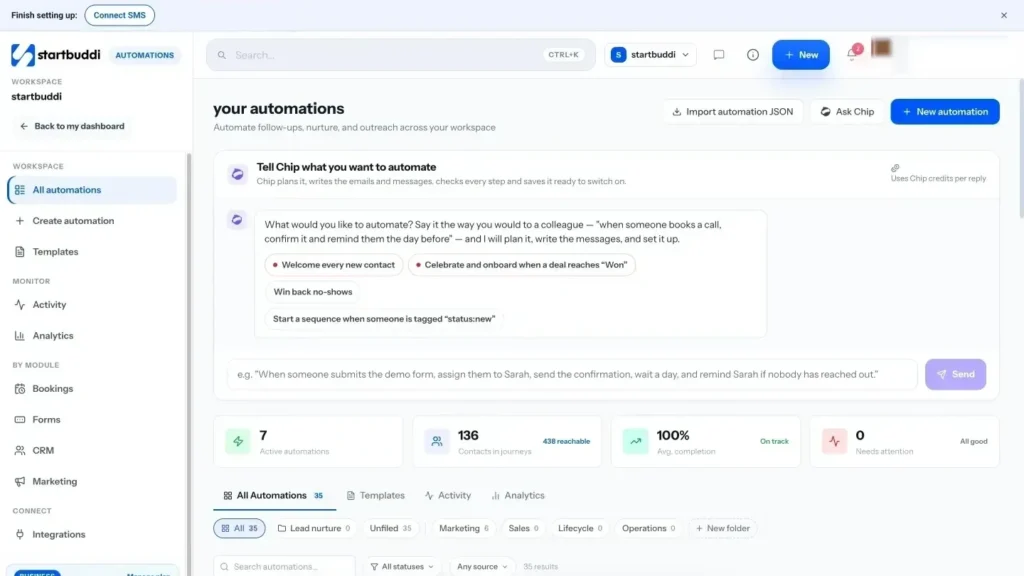
Go to Customers and click Automations. This opens CRM automations, a filtered view of the Automations hub that shows only customer, lead and pipeline work. Click New automation.
- Choose how to start
You get three choices:
- Tell Chip what you want: describe it in plain words, such as "When a deal moves to Proposal Sent, create a task to call them in two days". Chip plans the steps and writes the messages, and saves it as an inactive draft for you to check.
- Use a template: ready-made flows such as Lead capture welcome flow or New client onboarding.
- Start from scratch: pick what starts it, then add each step yourself.
- Pick a CRM trigger
Under What starts it?, the Contacts and CRM group includes New contact added, Tag added to contact, Joins a segment or list, Contact stage changed and Deal created. Under Something happens in startbuddi you will also find Deal won, Deal lost, Deal moved stage and Deal has gone quiet. Then give it a name in Name your automation.
- Add what happens next
Drag steps onto the canvas. Useful CRM steps include Create task, Assign to teammate, Send email, Wait / delay, Add tag and Notify the team. WhatsApp and SMS steps are there too if you have those channels connected.
- Test it, then switch it on
Click Validate to catch missing settings, then Test and choose Test with a contact to watch one run. When you are happy, click Activate. The Review before activating screen shows how many contacts can be reached before you confirm with Activate automation.
- Nurture one contact with Chip
For a single warm lead, open the contact, click the More actions menu and choose Nurture with Chip. Describe what you want from the sequence, pick a tone and click Draft sequence. Edit the emails, then click Save & enrol, or Save without enrolling to reuse it later. Drafting is in Beta.
- Turn on follow-ups on autopilot (Growth)
In Customers, open Settings, then the Automation & AI tab, and switch on Follow-ups on autopilot. When a contact's follow-up comes due, Chip writes and sends it: on WhatsApp while the 24-hour window is open, otherwise by email. After two unanswered touches it hands back to the contact owner.
Troubleshooting
My automation is active but nobody has gone through it.
Automations enrol people when the trigger fires, so existing contacts are not added unless you choose to. When you save a live automation you are asked whether to enrol contacts who already match. Also check the Activity view to see if runs failed.
Why can't I switch on Follow-ups on autopilot?
It needs the Growth plan or above. On Free and Starter the switch is locked, and you get a reminder to follow up yourself when a follow-up comes due.
The Nurture with Chip button won't enrol my contact.
The contact needs an email address and must not have unsubscribed. You can still save the sequence and use it for other contacts.
Tiwalade Joanna Okedara-Kalu is the founder, CEO and CTO of startbuddi, the business system that brings clients, bookings, invoices, projects, marketing and the Chip AI assistant into one place. Tiwalade builds software around how service businesses really work day to day, and writes about client management, getting paid on time and why small businesses outgrow the tools they start with.
Founded startbuddi and leads its product and engineering