How to change your startbuddi plan

To change your plan, open Settings, then Billing, go to Compare plans and click the button on the plan you want. Only the workspace owner or an admin can change the plan. Other teammates can see Billing but not change it.
The plans at a glance
| Plan | Seats included | Contacts | Emails a month | Chip credits a month |
|---|---|---|---|---|
| Free | 1 | 250 | 300 | 50 |
| Starter | 2 | 2,500 | 3,000 | 500 |
| Growth | 5 | 15,000 | 10,000 | 2,500 |
| Scale | 15 | 75,000 | 25,000 | 8,000 |
Starter unlocks Marketing, more automations, WhatsApp and SMS, and sending from your own email domain. Growth adds Chip auto-reply and advanced analytics. Scale adds advanced roles. Enterprise is priced for your team: email us to talk about it. Annual billing costs 10 times the monthly price, so you get two months free. Every paid plan starts with a 30-day trial, one per workspace. Prices and full details are on the pricing page.
Which plan fits you
- Free is for trying startbuddi on your own: contacts, tasks, invoices, one form and one booking page.
- Starter is for when you’re ready to market: campaigns, automations, WhatsApp and SMS.
- Growth includes five seats and suits a small team that wants Chip to answer customers while everyone’s busy.
- Scale includes 15 seats and suits a team that needs to control access module by module.
What happens during a trial
You get the plan’s features for 30 days. During a trial, sending is capped at 500 emails and 50 SMS a month, and 100 emails a day. If you don’t choose a plan before it ends, paid features lock and teammates lose access until you do. Nothing is deleted.
Steps
- Open Billing
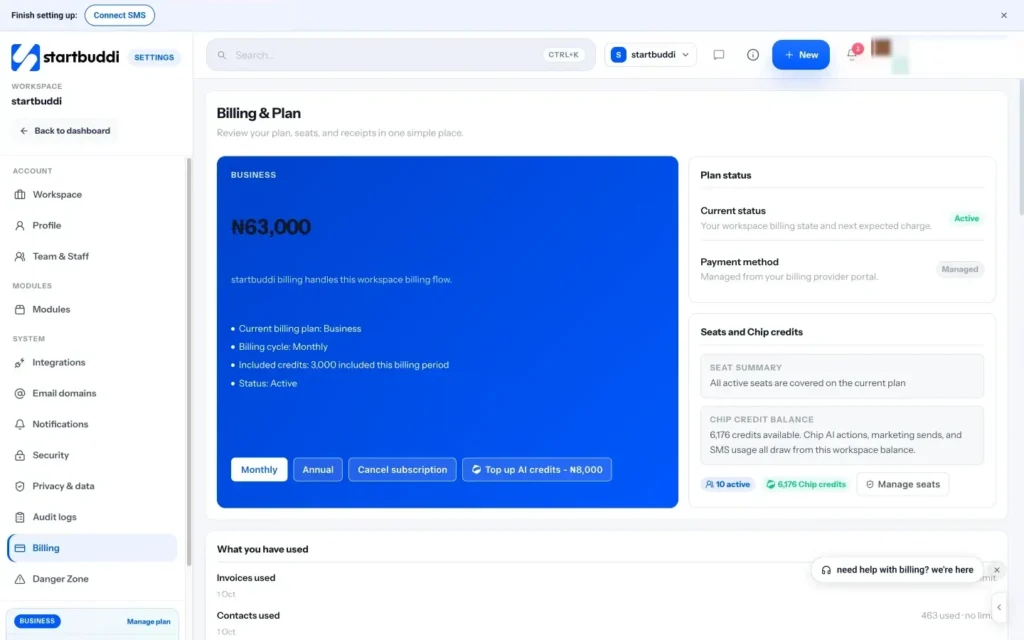
Open Settings and choose Billing. The top card shows your current plan, billing cycle, seats and when it renews.
- Choose monthly or annual
Scroll to Compare plans and pick Monthly or Annual. Prices on every card update so you can compare like for like.
- Start a trial or unlock a plan
On the plan you want, click Start trial to try it free for 30 days, or Unlock to pay now. If you're already on a trial, Try this plan moves your trial to that plan instead.
- Pay at checkout
You're taken to a secure checkout. Checkout runs through Paystack in Nigeria and Stripe elsewhere. When you come back, a message confirms your plan is now active. If it says billing is still syncing, give it a minute and refresh the page before trying again.
- Move down a plan if you need to
To move to a smaller plan, click Downgrade on it, or Go back to free on the Free card. Features that aren't on the new plan lock, but your data isn't deleted.
- Switch billing cycle on your current plan
Choose the other cycle at the top of Compare plans, then click Switch to annual or Switch to monthly on your current plan's card.
Troubleshooting
The plan buttons are greyed out.
You're not the workspace owner or an admin. Ask one of them to change the plan, or to change your role if you'll be managing billing.
My trial ended and features are locked.
Nothing has been deleted. Choose a plan in Compare plans to switch everything back on. You can still view and export your data meanwhile.
Checkout was cancelled or failed.
You weren't charged if checkout didn't finish. Try again, and check your card or bank app for a confirmation request.
I need more Chip credits, not a bigger plan.
Buy a credit pack under Buy more credits on the same page. Bought credits never expire and are used after your plan's monthly credits.
Chinedu Kalu is the co-founder and chief operating officer of startbuddi, responsible for how the company runs day to day. Chinedu writes about the operational side of a small business: registering and running the company, money, hiring and the routines that keep a team on track.
Co-founded startbuddi and runs its operations