How to use the startbuddi inbox to answer every customer message in one place

The startbuddi inbox is a shared inbox for every message customers send your business: WhatsApp, email, SMS, website chat, Instagram and Facebook. You find it under Customers, then Inbox (the page heading says CRM Inbox). Replies are saved on the contact’s timeline, so anyone on your team can pick up where someone else left off.
What you need for the shared inbox
- Connecting channels needs the Starter plan or above. Every paid plan starts with a 30-day trial.
- Chip auto-reply, where Chip answers conversations for you, needs Growth or above and uses Chip credits.
- Chip reply drafts that you edit and send yourself also use Chip credits.
This is the customer inbox. Team messaging between colleagues lives in Chat, which is a separate module.
Steps
- Open the inbox
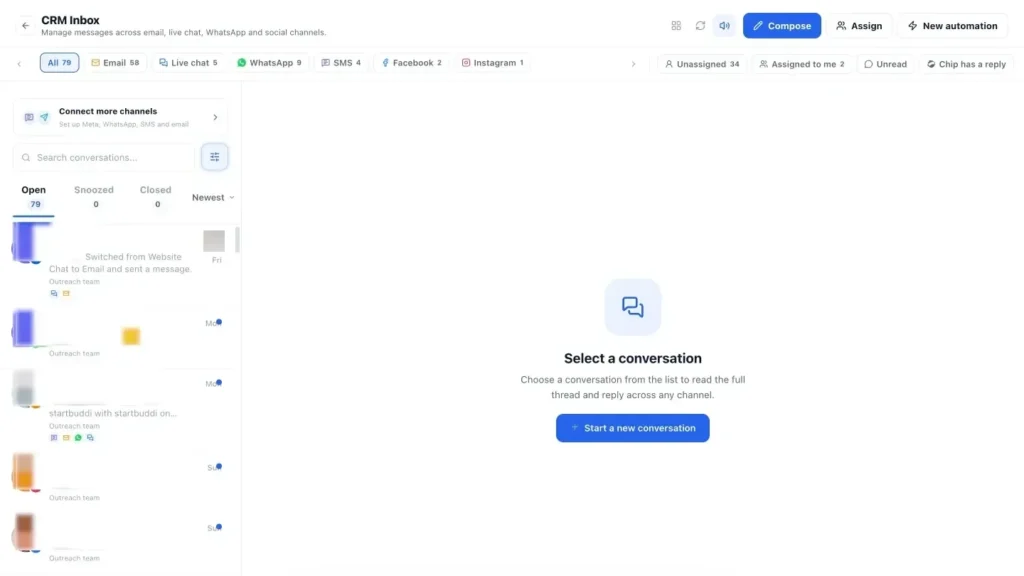
Go to Customers and click Inbox. Conversations are listed on the left with the channel they came from. Use the Open, Snoozed and Closed tabs, and the filter to show Unread only or conversations Assigned to me.
- Connect your channels
Click Connect more channels ("Set up Meta, WhatsApp, SMS and email"). Connect email, then WhatsApp, SMS, Instagram or Facebook as you need them. Website chat is set up in Live chat; see our live chat guide. Once a channel is connected, every new message lands here.
- Reply to a conversation
Open a conversation and type in the Reply box. You can add emoji, attachments, a quick reply or a form. To get a head start, click Generate a reply with Chip, or Use this on a suggestion, then edit it before sending.
Choose how to send: Send now, Schedule send (it goes out even when you are offline), Send & close or Send & snooze.
- Assign it to the right person
Click Assign and pick Assign to person or Assign to team. Team inboxes and the rules for who gets new conversations (one person, round robin or fewest open) are set up in Customers, then Settings, then Channels.
- Leave an internal note
Switch the compose box to Internal note, write your note and click Add note. Notes show in the thread for your team only. The customer never sees them, and they also appear in the contact's notes.
- Close the loop
When the customer is sorted, click Resolve to move the conversation to Closed. If it is a sales conversation, use the contact panel on the right to Create deal or Add task. You can also Add tag or Mark as unread to come back to it later.
- Let Chip answer when you're busy (Growth)
In Customers, open Settings, then Automation & AI, and find Chip answers your messages. Switch Chip on per channel and choose when it replies: straight away, when no one on the team replies, or outside business hours. If you reply yourself, Chip steps back for a while, and when a customer asks for a person, Chip hands the thread to your team.
Troubleshooting
I can't send a normal reply on WhatsApp.
WhatsApp only allows free-text replies within 24 hours of the customer's last message. After that, send an approved template. If the message is an update about something they already have with you, such as a booking, order or invoice, tick the update option that appears instead. Don't use it for offers.
Messages from Instagram or Facebook aren't arriving.
An account connected for posting isn't always connected for messages. Open the channel in the inbox and turn on messages so DMs arrive here, then send yourself a test message.
A conversation says Waiting for credits.
Chip ran out of Chip credits before it could answer. It replies automatically once credits are topped up, or you can reply yourself straight away.
The channels show as locked.
Inbox channels need the Starter plan or above. Unlock Starter, or start the 30-day trial, from Settings, then Billing.
Tiwalade Joanna Okedara-Kalu is the founder, CEO and CTO of startbuddi, the business system that brings clients, bookings, invoices, projects, marketing and the Chip AI assistant into one place. Tiwalade builds software around how service businesses really work day to day, and writes about client management, getting paid on time and why small businesses outgrow the tools they start with.
Founded startbuddi and leads its product and engineering