How to find new prospects with Chip

Prospecting lets you find prospects without buying a list. You tell Chip who you are looking for, for example “heads of marketing at software companies in Lagos with 20 to 100 staff”, and Chip searches the web and business listings for real matches. Everything it finds stays in Prospecting, with the reasons and sources, until you decide who belongs in your contacts.
What you need to find prospects
- Prospecting is under Customers, then Records, then Prospecting. You need full access to Customers to run searches.
- Searches and contact reveals use Chip credits. A search that finds nothing usable isn’t charged.
- The most prospects per search depends on your plan: 50 on Free, 250 on Starter, and 500 on Growth and Scale.
Chip only uses professional information: company, role and work contact details. Personal emails and personal phone numbers are never looked up. See the prospecting product page for more on how it works.
Steps
- Open Prospecting
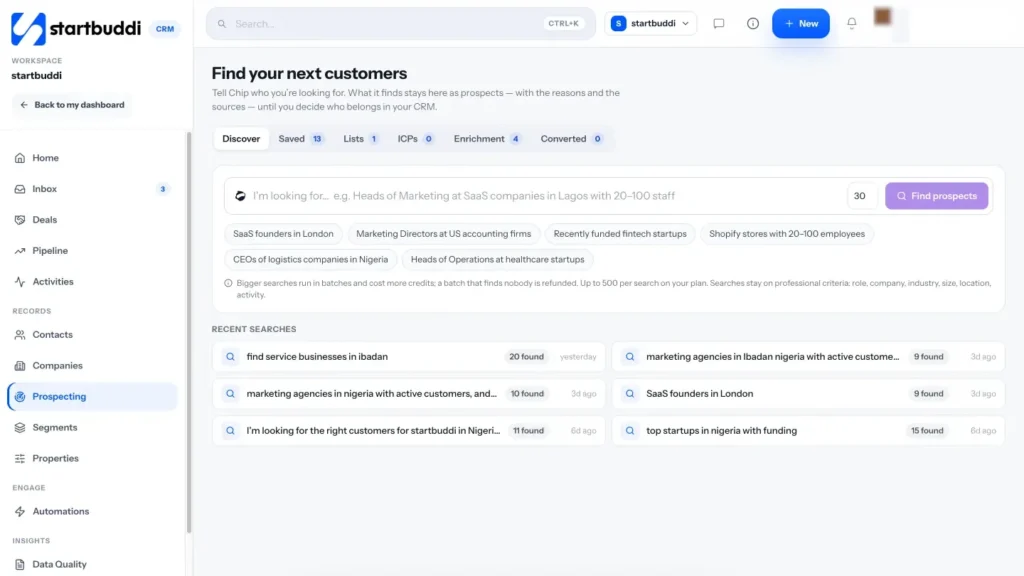
Go to Customers and click Prospecting. The page is called Find your next customers, with tabs for Discover, Saved, Lists, ICPs, Enrichment and Converted.
- Describe who you're looking for
On Discover, type into the box that starts "I'm looking for…". Be specific about role, industry, company size and location. Choose How many prospects you want, then click Find prospects.
The first results usually arrive within a minute or two. Each one shows how well it matches: Strong, Moderate or Partial.
- Check why Chip picked each prospect
Click a prospect to open its details. Read Why Chip picked this prospect, the signals it found and the sources it used, so you can judge the match yourself. If someone should never be approached, mark them Do not contact.
- Reveal work contact details if you need them
Work email and business phone show as Not revealed until you ask, because looking them up uses credits. Select the prospects you want and click Enrich, then choose what to look up, such as Work email or Business phone. The source is recorded on each prospect.
- Convert the best ones to contacts
Tick the prospects you want to work with and click Convert to CRM. startbuddi checks your contacts for duplicates first, so you can link a prospect to someone you already have instead of creating a copy. New contacts get the lead source Chip Prospecting.
Straight after converting, click Draft an intro with Chip to get a first message you can edit and send.
- Save your ideal customer for next time
Open the ICPs tab to save an ideal customer profile (roles, industries, countries, company size and more), or click Ask Chip to suggest one based on customers you have already converted. You can also click Save search on a search you like. On the Saved tab you can then have Chip re-run it weekly and tell you about new matches. Each re-run uses credits.
Troubleshooting
I see a message that web search is not connected.
Prospecting relies on a web search service that isn't switched on for your workspace yet. Contact startbuddi support and we will check it for you.
I can't reveal phone numbers.
Phone reveal can be switched off for a workspace. If it is off, the prospect shows that phone reveal is off, and you can still reveal the work email.
The results don't match what I asked for.
Make the request narrower: name the job title, the industry, the city and a staff range. Dismiss poor matches, then use Ask Chip for more like these on a list of good ones.
Tiwalade Joanna Okedara-Kalu is the founder, CEO and CTO of startbuddi, the business system that brings clients, bookings, invoices, projects, marketing and the Chip AI assistant into one place. Tiwalade builds software around how service businesses really work day to day, and writes about client management, getting paid on time and why small businesses outgrow the tools they start with.
Founded startbuddi and leads its product and engineering