How refunds work for your startbuddi plan

Short answer: startbuddi plan payments are not refunded, except where the law says they must be. When you cancel, you keep everything you paid for until the end of the current billing period, and you’re not charged again. This article explains what that means for cancelling, seats and Chip credits, so you can make changes without losing money.
Only the workspace owner or an admin can cancel a plan or change seats. Everyone else sees the plan but can’t change it.
The refund rules in plain words
- Cancelling: your plan runs to the end of the period you paid for, then stops. There’s no part refund for unused days.
- Removing extra seats: your bill goes down from your next renewal. Nothing already paid is refunded.
- Chip credits you buy: they never expire, so there’s nothing to lose by keeping them. Some Chip actions give their credits back automatically when they produce nothing, such as a prospect search that finds nobody.
- Your own customers: refunds you give to your clients are made from your Paystack or Stripe account. They don’t come from your startbuddi plan.
Every paid plan starts with a 30-day trial, one per workspace, so you can test a plan properly before you pay for it.
How to avoid paying for what you don’t use
- Use the trial properly. Try the features you’re paying for in the first 30 days, and note the renewal date shown in Billing.
- Stay monthly while you’re testing. Move to annual billing, which costs 10 times the monthly price, once you know the plan fits.
- Remove spare seats before renewal. Seat changes take effect from your next bill, so tidy them up a few days early.
- Top up Chip in small steps. If you only run short of Chip credits, a Small credit pack may cost less than a bigger plan (see pricing). You can turn automatic top-up off if you’d rather decide each time.
Steps
- Open Billing
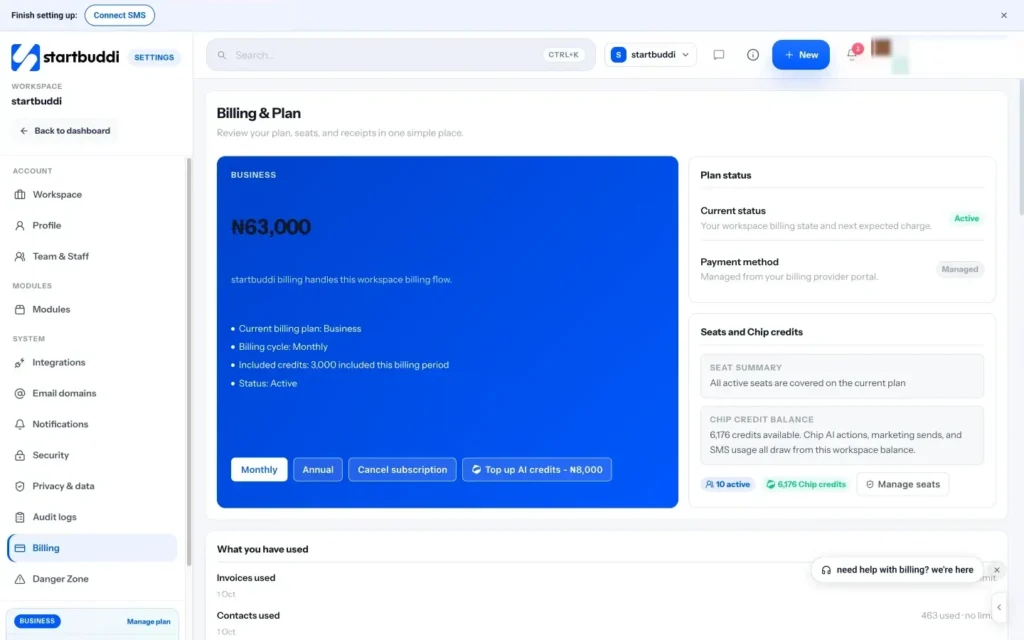
Open Settings, then Billing. The top card shows your plan, your billing cycle and the date it renews. Plan status shows whether it's Active, Trialing, Past due or Cancels soon.
- Cancel before the renewal date
Click Cancel subscription and confirm Cancel this plan at the end of the current billing period? You'll see Plan cancellation has been queued. Your workspace stays active until the period ends, and the status changes to Cancels soon.
- Remove seats you don't need
In the Seats card, lower the Extra seats number and click remove. The saving starts at your next renewal. You can't remove seats people are still using, so remove a teammate or cancel a pending invite first. Our guide on managing seats and roles walks through it.
- Check credits Chip put back
Scroll to Your Chip credits and open Where credits went. When a Chip action gives its credits back, you see both the charge and the refund line against the same action.
- Ask us about a charge
If you see a charge you don't recognise or think you were charged twice, email hello@startbuddi.com with your workspace name, the date and the amount. We'll look into it and tell you what we find.
Troubleshooting
I don't see a Cancel subscription button.
Only the workspace owner or an admin can cancel. You also won't see it on the Free plan, because there's nothing to cancel. Ask your owner to open Settings, then Billing.
What happens to my data after my plan ends?
Nothing is deleted. Paid features lock and team access may pause, but your contacts, invoices and documents stay, and you can still view and export them. Pick a plan again to switch everything back on.
I was charged after the trial ended. Can I get that back?
Plan fees are non-refundable except where the law requires it. If you think the charge is a mistake, email hello@startbuddi.com with the details and we'll check it.
A payment failed. Will I lose access straight away?
No. A failed renewal gets a 7-day grace period. Update your card from the Payment method row in Billing so the next attempt goes through.
Chinedu Kalu is the co-founder and chief operating officer of startbuddi, responsible for how the company runs day to day. Chinedu writes about the operational side of a small business: registering and running the company, money, hiring and the routines that keep a team on track.
Co-founded startbuddi and runs its operations