How to track cash flow and forecast your balance

The Cash Flow page helps you track cash flow before it becomes a problem. It forecasts your balance from open invoices, subscription renewals, recurring costs and bills, and lists every input so the number is never a mystery. It is on every plan.
The forecast is only as good as your records: it uses your connected Stripe balance plus what you have recorded in startbuddi, not your bank account. See cash flow, budgets and profitability for what else sits alongside it.
Make the forecast more accurate
- Give every invoice a due date.
- Add rent, salaries and software as recurring costs on the Expenses page.
- Record supplier bills with their due dates on the Bills tab.
- Mark payments that arrive outside startbuddi with Record payment on the invoice.
A good habit: look at Cash Flow once a week, and again before any big purchase.
Steps
- Open Cash Flow
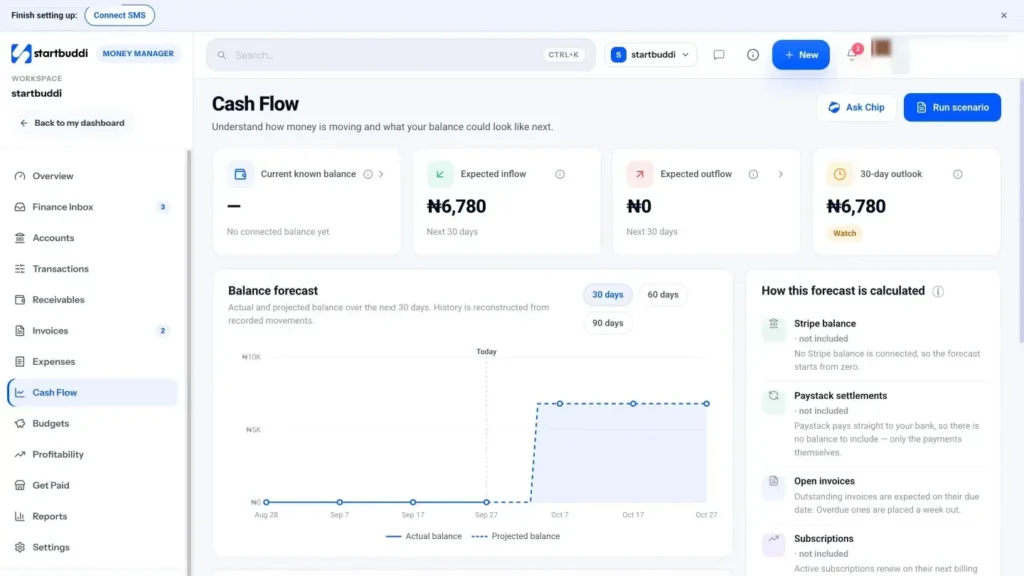
Go to Money Manager, then Cash Flow. If your account is new, you may see "Not enough history for a forecast yet". Send an invoice or record some expenses and come back.
- Read the summary cards
Current known balance is what startbuddi can see today. Expected inflow counts open invoices by due date, overdue invoices a week out, and subscription renewals. Expected outflow counts recurring expenses on their next dates and bills by due date. The outlook card shows where you are likely to end up.
- Pick how far ahead to look
On Balance forecast, choose 30 days, 60 days or 90 days. The chart shows your actual balance and the projected balance for that period.
- Check what is included
Open How this forecast is calculated to see every invoice, renewal and cost in the forecast, each marked as included or not included. If something looks wrong, fix it at the source, for example a missing due date on an invoice.
- Run a what-if scenario
Click Run scenario. Turn on any of the three changes: revenue up or down by a percentage, Overdue invoices paid this week, or marketing spend up. Click Apply scenario to see the scenario balance next to your base case. Scenarios change the forecast's inputs, not your records. Use Reset to start again.
- Ask Chip what to do
The Chip insight card offers Summarize, What can I do? and Draft a plan. Chip explains any dips and suggests what to collect, delay or watch. Chip replies use your Chip credits.
Cash Flow sits next to Budgets and Profitability in the Money Manager menu. Budgets warn you when spending on a project or campaign reaches 80%, and Profitability shows which clients and projects make you the most.
Next step: if the forecast dips, go to Receivables and chase the biggest overdue invoice first.
Troubleshooting
It says not enough history for a forecast yet.
The forecast needs some payments and expenses to work from. Send an invoice, record a few expenses or connect a payment provider, then check again.
My current balance doesn't match my bank.
startbuddi doesn't connect to bank accounts. The balance comes from a connected Stripe account and your records; Paystack money settles to your bank, so it isn't in that number.
Did running a scenario change my invoices?
No. Scenarios only change the forecast's inputs. Your invoices, expenses and records stay exactly as they were.
Chinedu Kalu is the co-founder and chief operating officer of startbuddi, responsible for how the company runs day to day. Chinedu writes about the operational side of a small business: registering and running the company, money, hiring and the routines that keep a team on track.
Co-founded startbuddi and runs its operations