See next month's balance this month.
Rent is due on the 1st, two clients pay "end of month", and the new laptop is very tempting. Before you say yes to anything, see roughly where your balance lands in 30, 60 or 90 days, try a what-if, and find out which clients actually make you money.
Start with the one thing you need. The rest is there when you're ready. Free plan, no card needed. Or book a demo.

A forecast that shows its working.
The balance forecast adds up open invoices on their due dates, subscription renewals, recurring costs and bills. Overdue invoices are placed a week out, not counted as cash in hand. Every input is listed, with whether it's included, so you can argue with it.
- Balance forecast for the next 30, 60 or 90 days
- Expected inflow and Expected outflow side by side
- How this forecast is calculated: each input, in or out
Cash Flow: known balance, expected inflow and outflow, the 30-day outlook, and the list of what the forecast includes.
Ask "what if?" before you spend.
Run a scenario to see what happens if revenue drops, if the overdue invoices get paid this week, or if you double the ad budget. Scenarios move the forecast, not your records, so try anything.
- Revenue up or down by up to 50%
- Overdue invoices paid this week
- Marketing spend up by up to 200%
A tap on the shoulder at 80%.
Set a budget for the company, a project, a department, a team or a campaign. startbuddi tracks spending against it, shows what's left and where the period will probably land, and puts a warning in the Finance Inbox at 80%. A campaign budget is the same number in Money and Marketing.
- On track, Warning and Over budget at a glance
- Budget amount, Spent, Remaining and Forecast for each
- Warnings in the Finance Inbox at 80% and when you go over
Budgets: on track, warning and over budget counts, the budget list by scope, and one campaign budget with its 80% warning line.
Your busiest client might be your worst.
Profitability takes the money you collected and subtracts the expenses you linked to each project, customer, product or campaign, then ranks them. Sometimes the client who calls every day earns you least. Now you'll see it.
- Projects, Customers, Products or Services and Campaigns
- Gross operating profit, Average margin, Best performing and Lowest margin
- Last 3, 6 or 12 months, Compare periods and Export
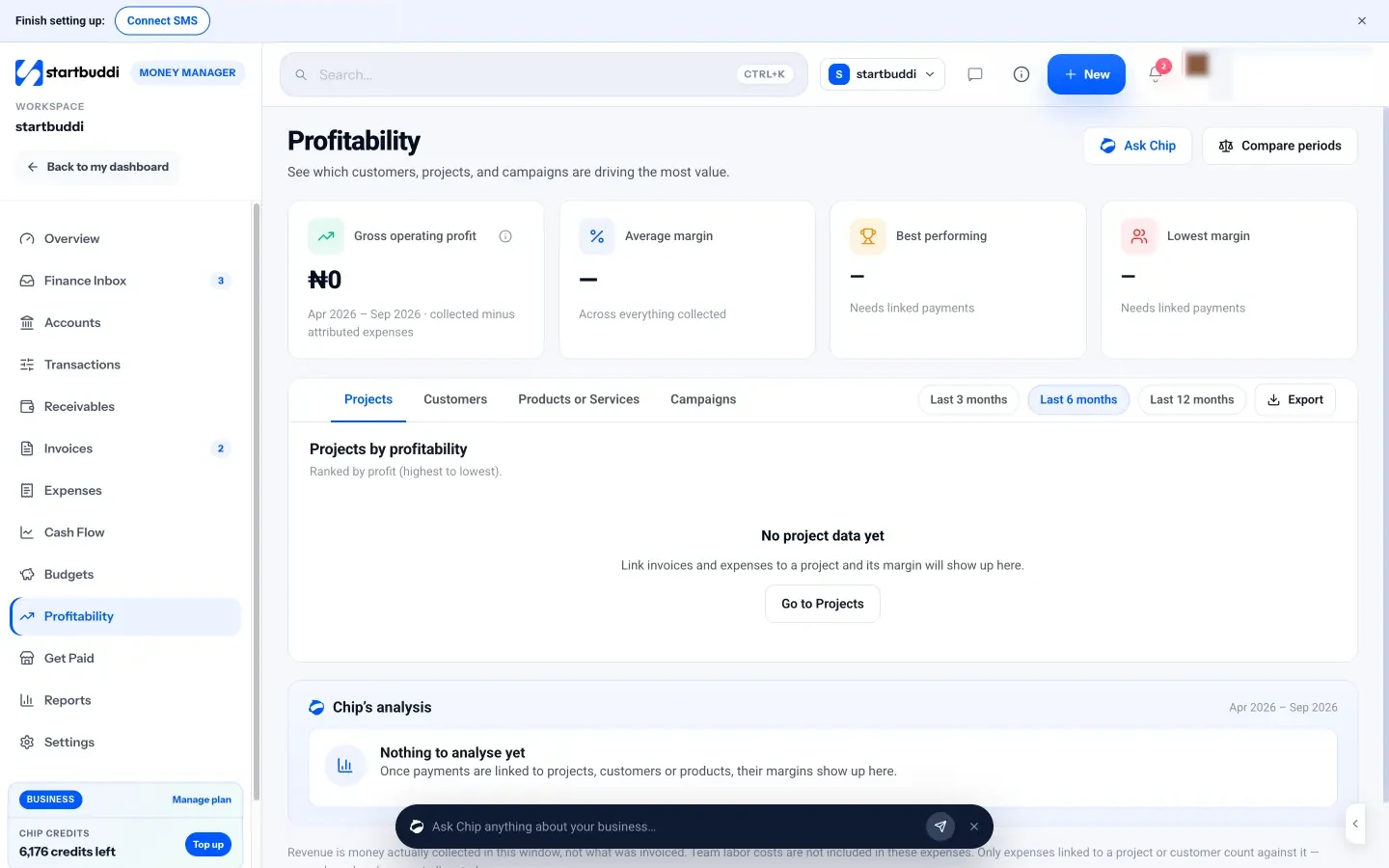
Profitability: operating profit and margins at the top, with tabs for Projects, Customers, Products or Services and Campaigns.
Where the forecast gets its numbers.
Nothing to type twice: the forecast reads what you already do in startbuddi.
-
Open invoices
Counted on their due dates.
Receivables -
Renewals and recurring costs
Subscriptions in, rent and software out.
SubscriptionsRecurring -
Balance forecast
30, 60 or 90 days ahead.
Forecast -
Early warning
Cash to watch, in the Finance Inbox.
Finance Inbox
Forecasting, compared.
Accounting tools are better at telling you what happened. This is about what's about to.
| startbuddi | Wave | QuickBooks Online | FreshBooks | |
|---|---|---|---|---|
| Balance forecast ahead | 30, 60 or 90 days | Not found | Not confirmed | Not found |
| What-if scenarios | Yes | Not found | Not confirmed | Not found |
| Budgets with warnings | Company, project, team, campaign | Not found | Not confirmed | Project budgets |
| Profit per client or project | Yes | Not found | Projects on higher tiers | Project profitability, Premium and up |
| Uses your real bank balance | No, Stripe balance and your records | Bank feeds on Pro | Yes | Yes |
Where they're better
- WaveWith bank feeds on Pro, the starting point is your actual bank balance, not an estimate.
- QuickBooks OnlineReal accounts and bank feeds behind every number, and an accountant can check them.
- FreshBooksProject profitability includes tracked time, which ours leaves out.
startbuddi is our product. Facts about other tools come from their own pages, checked on 6 October 2026, and plans change, so check before you buy: Wave pricing · QuickBooks pricing · FreshBooks pricing.
Money talks to the rest of your business.
Everything below shows up on the client's record by itself, so you never piece the story together by hand.
Ask Chip. It already knows your money.
Chip works from your own records, so the answer comes with names, amounts and dates, and a next step you can take in one click.
Which plans include cash flow, budgets and profitability?
Cash flow, budgets and profitability are on every plan, including Free.
- FreeIncluded, free forever
- StarterIncluded, 30-day trial
- GrowthIncluded, 30-day trial
- ScaleIncluded, 30-day trial







Questions about cash flow, budgets and profitability
How does the forecast work?
Does it know my bank balance?
Can I change the 80% budget warning?
Which clients make me the most money?
Can I track a project budget against spend?
No more end-of-month surprises.
See your balance ahead of time, try a what-if and keep spending in check. Free to start.
No need to set everything up on day one.
Or click around a sample account first, or book a demo and we'll set it up with you.