How to set up subscriptions for your customers

Subscriptions let your customers pay you every month or year without you sending a bill each time. Use them for memberships, retainers, classes or any paid service that repeats. Renewals are charged automatically by your connected provider.
Subscriptions are on every plan. You need Paystack or Stripe connected and verified first, because plans are created at the provider. If both are connected, the plan is created on Stripe. Prefer to review each bill before it goes out? Use recurring invoices instead. More on subscriptions in startbuddi.
Subscriptions or recurring invoices?
- Subscriptions charge the customer automatically on each renewal. Good for memberships and fixed monthly plans.
- Recurring invoices create a draft you check and send each time. Good when the amount or details might change.
Subscription plans use your workspace currency. Set it in Money Manager settings under Invoice defaults before you create your first plan.
Steps
- Connect a payment provider
In Money Manager, open Settings and connect Paystack or Stripe on How you get paid. Wait until it is ready to take payments (for Paystack, the Settlements ready badge).
- Open Subscriptions
Go to Get Paid and open the Subscriptions tab. You'll see your active subscribers, monthly recurring revenue and total subscribers at the top.
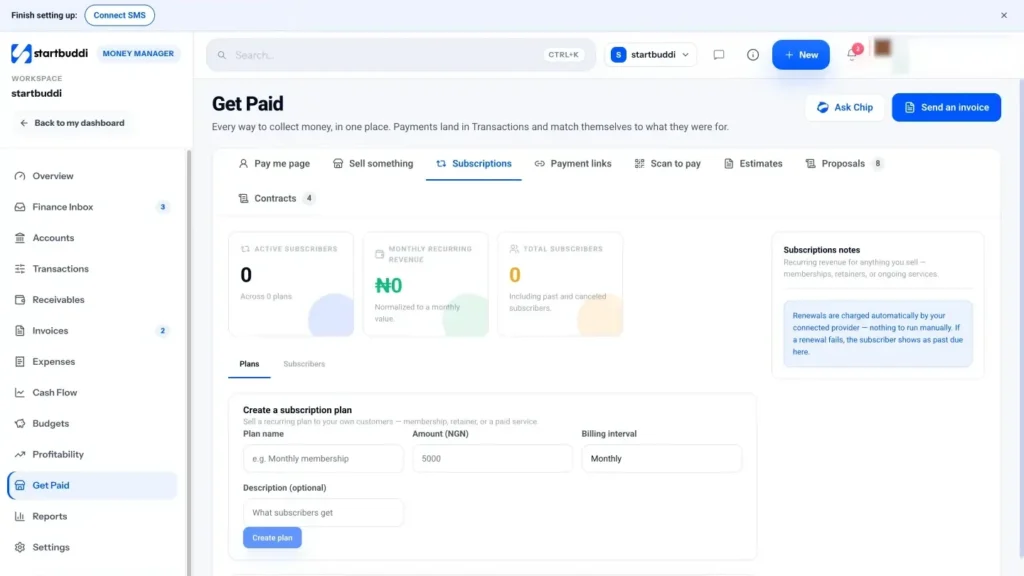
- Create a plan
Under Create a subscription plan, enter a Plan name (for example "Monthly membership") and the Amount, which is in your workspace currency. Set Billing interval to Monthly or Annually, add a Description (optional), and click Create plan.
- Create a subscribe link for a customer
In Your plans, click Add subscriber on the plan. Enter the Customer email and name, then click Create subscribe link.
- Send the link
Click Copy link and send it by WhatsApp, email or however you talk to that customer. They pay the first charge on the provider's checkout, and later renewals are charged automatically.
- Manage subscribers and plans
Open the Subscribers tab to see each subscriber's status and renewal date. Click Cancel when a customer stops. On a plan, use Pause and Resume to switch a plan off and on. A plan can only be deleted when it has no active subscribers.
Each subscription payment lands in Transactions, so you can filter by Subscriptions to see what renewed this month. Your monthly recurring revenue at the top of the tab turns yearly plans into a monthly figure, which makes it easy to compare plans.
Keep plan names short and clear, such as "Gold membership" or "Monthly retainer", so customers know exactly what they are signing up for when they open the link.
Next step: create a low-priced test plan, subscribe yourself with the link, then cancel it from the Subscribers tab. You will see exactly what your customers go through.
Troubleshooting
It says connect and verify a payment provider before creating plans.
Your Paystack or Stripe connection isn't ready to take payments yet. Finish setup in Money Manager settings; for Paystack, wait for Settlements ready.
A renewal failed. What happens?
The subscriber shows as past due on the Subscribers tab, and the Finance Inbox flags the failed payment. Contact the customer to update their card or pay another way.
How do I change a plan's price?
Create a new plan at the new price, send new subscribe links, and pause the old plan.
Chinedu Kalu is the co-founder and chief operating officer of startbuddi, responsible for how the company runs day to day. Chinedu writes about the operational side of a small business: registering and running the company, money, hiring and the routines that keep a team on track.
Co-founded startbuddi and runs its operations