How to collect payment via Paystack in startbuddi

You can collect payment via Paystack on invoices, payment links, your pay me page and subscriptions. When you connect, startbuddi sets up a Paystack subaccount in your business name, and each payment settles straight to your own bank account. startbuddi never holds your money and takes no cut. Paystack’s own transaction fees still apply; see Paystack pricing.
Paystack works on every startbuddi plan, including Free. The settlement bank list shows Nigerian banks, so you need a Nigerian bank account and its 10-digit account number. New to it? Read what Paystack is.
What you need
- Your business name as you want it on the Paystack subaccount.
- The bank and 10-digit account number you want payments settled into.
- Access to Money Manager settings in your startbuddi workspace.
You don’t need to sign up for your own Paystack dashboard to take payments this way: startbuddi creates the subaccount for you. Anything about Paystack’s side, such as fees, payout timing or account checks, is covered in Paystack’s own help pages linked below.
Steps
- Open payment settings
Go to Money Manager, then Settings in the Money Manager menu. The first tab, How you get paid, lists Stripe, Paystack, bank transfer and PayPal.
- Enter your settlement bank
On the Paystack card, click Connect Paystack. Fill in Business name, choose your Settlement bank, and type your 10-digit Account number. Click Connect Paystack to finish.
startbuddi checks the account number with your bank before it creates the subaccount, so use the account you want paid into.
- Check the connection status
When it works, the card shows Paystack connected with a Verified or Unverified badge, and Settlements ready once payouts can flow. Paystack may review a new subaccount before its first payout. Their subaccount documentation explains how that works on their side.
- Turn Paystack on for invoices
When you create an invoice, choose Accept payment via Paystack under Accept online payments. To make Paystack your usual choice, open the Invoice defaults tab in Money Manager settings and set Default payment provider to startbuddi payments, which is Paystack. Click Save changes.
- Share and get paid
Send the invoice or share a payment link. Your customer taps the pay button and finishes on Paystack's checkout, where the options (card, bank transfer, USSD and others) depend on what Paystack offers them. The payment appears in Transactions and the invoice is marked paid automatically.
- See Paystack activity in Accounts
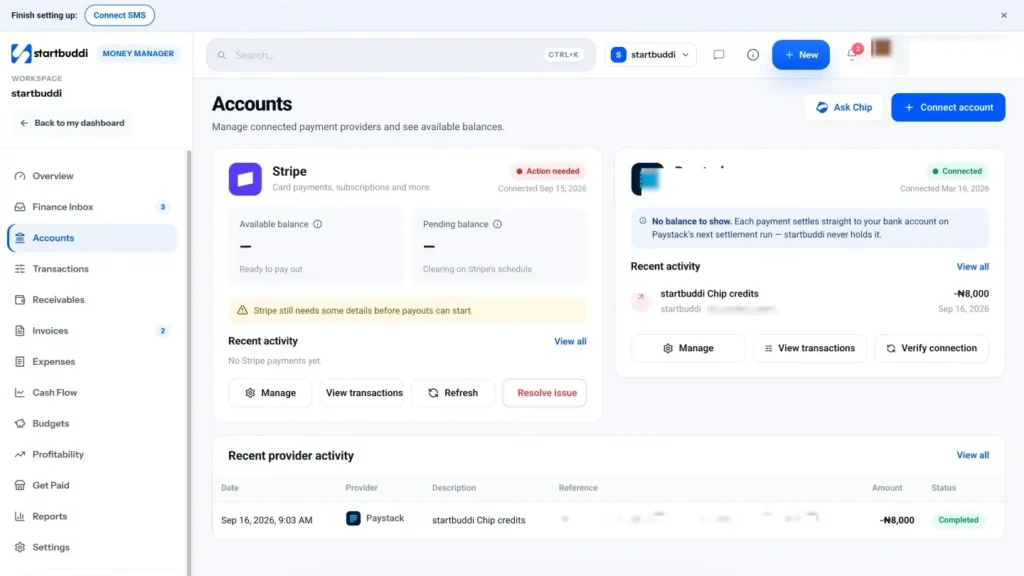
Open Accounts in the Money Manager menu to see recent Paystack activity. There is no Paystack balance to show, because each payment settles straight to your bank on Paystack's next settlement run. Paystack explains its payout timing in Getting your money.
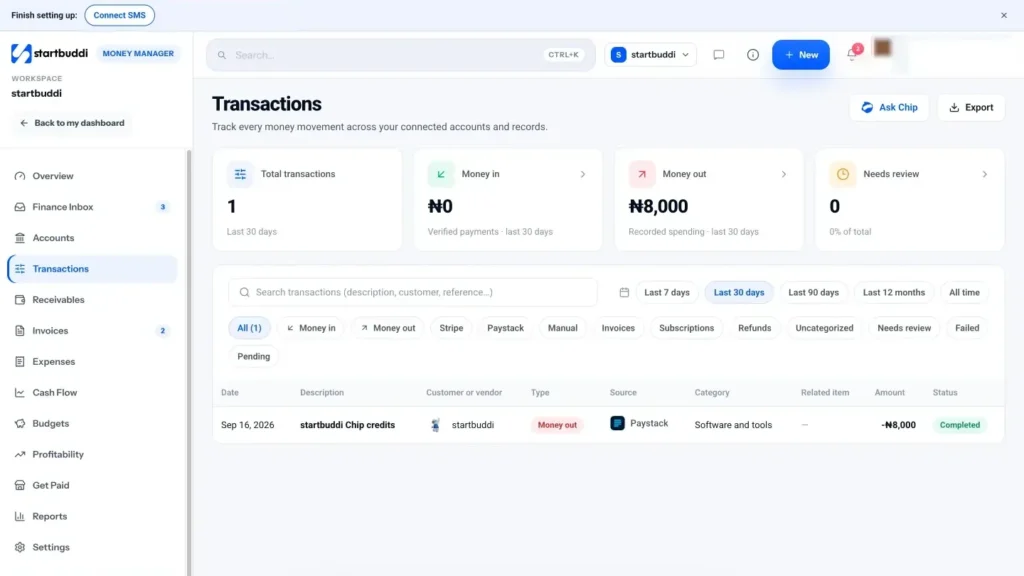
You can also see every Paystack payment in Transactions by choosing the Paystack filter, which is handy when you check payouts against your bank statement.
Next step: send an invoice with Paystack switched on, and pay a small amount yourself to see exactly what your customers will see.
Troubleshooting
It says it could not verify the account number.
The bank and account number did not match. Check you picked the right bank from Settlement bank and typed all 10 digits, then try again.
My Paystack badge still says Unverified.
Paystack verifies subaccounts on its side, and the badge updates when it does. If it stays unverified for days, contact Paystack support, as startbuddi cannot verify it for you.
A customer paid but the invoice still shows unpaid.
Give it a few minutes. If it is still open, check Transactions and the Finance Inbox for "Payment needs matching", open the payment and click Match to invoice.
How do I change the bank I get paid into?
On the Paystack card in Money Manager settings, click Disconnect, then connect again with the new settlement bank and account number.
Chinedu Kalu is the co-founder and chief operating officer of startbuddi, responsible for how the company runs day to day. Chinedu writes about the operational side of a small business: registering and running the company, money, hiring and the routines that keep a team on track.
Co-founded startbuddi and runs its operations