How to connect your social accounts

To connect social media accounts to startbuddi, open Social Media in Marketing, go to the Accounts tab and click Connect on each platform. You sign in on that platform, approve access, and come back to a card showing Connected. After that you can schedule posts and see results for every account in one place.
You can connect Facebook Pages, Instagram business or creator accounts linked to a Facebook Page, your LinkedIn profile and company pages, X, YouTube channels and Pinterest. TikTok shows a Soon badge and can’t be connected yet. Connections belong to the whole account, so everyone with Marketing access sees the same ones.
Who can do this: Social Media needs the Starter plan or above (Marketing is locked on Free). Starter allows 5 connected accounts, Growth 15 and Scale has no limit. Only people with full Marketing access can connect accounts. See social media for what you can do once they’re connected, or read what social media management is.
Once an account is connected, it appears under Post to when you create a post, and its followers, reach and engagement show on the Analytics tab. The whole job takes a few minutes per platform.
Steps
- Open the Accounts tab
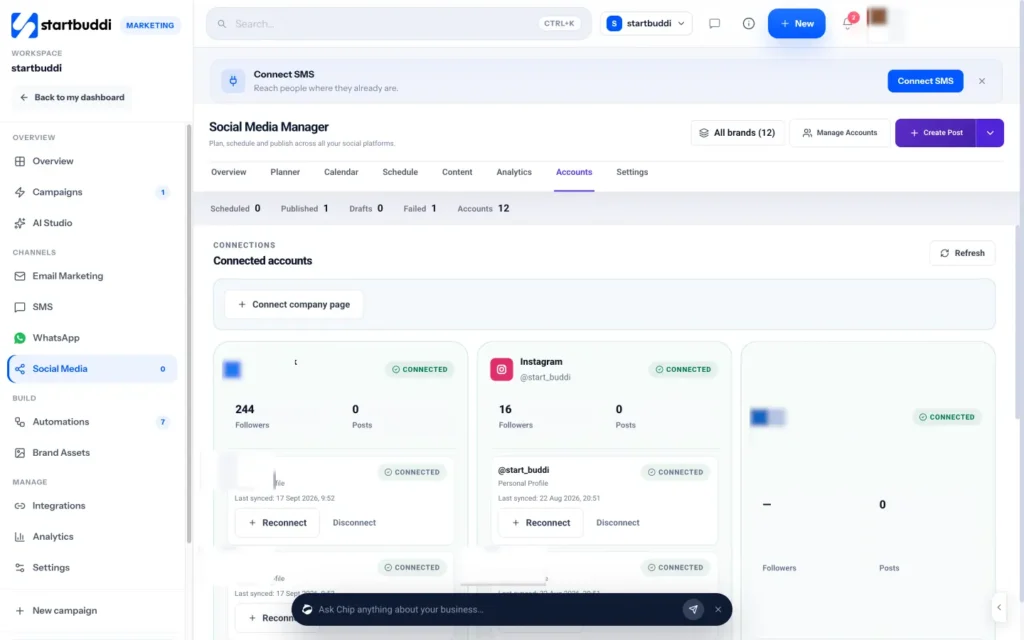
In Marketing › Social Media, open the Accounts tab, or click Manage Accounts at the top. If nothing is connected yet, the main button reads Connect account. You'll see one card per platform.
- Click Connect on a platform
Click Connect on the card for the platform you want. You're taken to that platform to sign in and approve access. Use the login that manages the business page or channel, not just a personal account.
- Pick your Facebook Pages and Instagram accounts
For Facebook and Instagram, Meta's login opens, then a picker lists the Pages and Instagram business accounts you manage. Tick the ones to add. Instagram connects through the Facebook Page it's linked to, so link them in Instagram's settings first if yours isn't showing.
- Choose your LinkedIn company pages
LinkedIn connects your personal profile and lists the company pages you manage. Tick the pages you want to post to, then click Save selected pages. X, YouTube and Pinterest simply bring you back once you've approved access.
- Check the account card
Back in startbuddi you'll see a message that the platform connected successfully. The card shows Connected, followers, posts and when it last synced. If a card later shows Expired, click Reconnect.
- Group accounts by brand (optional)
Running several brands or clients? Go to Social Media › Settings › Brands & folders and click New brand. Add the accounts, the people in charge and an approval route: no approval, one approver, approve in order, or approve in any order. Picking a brand at the top then filters every view to it.
Troubleshooting
It says I've reached my account limit.
Each plan allows a set number of connected accounts: 5 on Starter, 15 on Growth and no limit on Scale. Disconnect one you no longer use, or unlock a bigger plan.
My Instagram account doesn't appear in the list.
Instagram must be a business or creator account linked to a Facebook Page you manage. Link it in Instagram's settings, then connect again. Note that disconnecting a Facebook Page also disconnects the Instagram account that publishes through it.
Pinterest says it is not set up yet.
Pinterest has to be switched on for the platform before it can connect. Contact startbuddi support from inside the app and mention the message you saw.
Can I connect TikTok?
Not yet. TikTok shows a Soon badge on the Accounts tab and can't be connected or posted to.
Olabimpe Salami is the email and outreach specialist at startbuddi. Olabimpe writes about the messages that bring customers in and back: email, WhatsApp and SMS campaigns, follow-ups, and turning enquiries into paying clients.
Runs email and outreach at startbuddi