How to create a link in bio page

A link in bio page is one mobile page that holds everything you want people to find from your social profiles: links, products, a tip jar, a form, bookings and your WhatsApp. In startbuddi it is wired into your business, so people can pay you, subscribe or book without leaving the page. Anyone who subscribes or fills in a form on it is added to your contacts, and the analytics page shows visits, taps and money earned.
Before you create your link in bio
Link in bio is part of Publish and works on every plan. Each workspace has one link in bio page. On the Free plan, a small “made with startbuddi” line sits at the bottom of the page, and any paid plan can take it off. To take payments on the page, connect Paystack or Stripe in Money Manager first.
See the link in bio overview for ideas on what to add.
Steps
- Open Link in bio
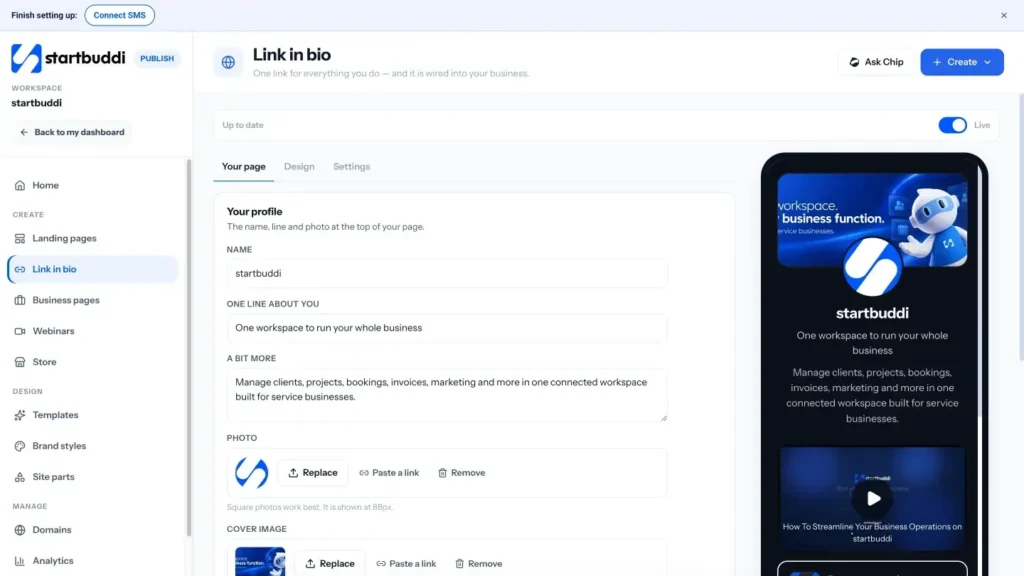
Open Publish and click Link in bio. The editor has three tabs: Your page, Design and Settings, with a phone preview beside them.
- Fill in your profile
On Your page, add your Name, One line about you, a longer A bit more if you want one, a Photo and a Cover image.
- Add your blocks
Click Add a block and pick what you want on the page. Popular choices are Link, Social icons, WhatsApp, Product (from your store), Tip jar, Payment, Subscribe to collect emails, Form, Booking and File for a download. Drag blocks to change their order.
Each block has style and scheduling options, so you can make one stand out or show it only between set dates, such as during a sale.
- Pick a design
Open Design and choose one of the themes, or Use my brand to use your own colours and fonts. You can also change the button shape and fill, the background and the photo shape.
- Choose your handle
Open Settings and choose your Handle, the name at the end of your link. It must be 3 to 40 characters, and the page tells you straight away if it is free. Set How it looks when shared so the link looks good in messages.
- Go live and share it
Switch on Live on the web. Click Copy link and paste it into your Instagram, TikTok or X bio, or use QR for print for flyers, packaging and your shop counter. Your changes save as you go, so you can keep editing after the page is live.
To see which profile sends the most visits, add ?src=instagram (or tiktok, and so on) to the end of the link you put in each profile.
Troubleshooting
Can I use my own domain for my link in bio?
Not yet. Your link in bio uses your startbuddi link with your handle. Other pages, such as landing pages, can use your own domain.
My page link does not open
Check Live on the web is switched on, and that you copied the link after saving your handle. Changing the handle changes the link.
The Product or Payment block does not take money
Connect Paystack or Stripe in Money Manager first. Product blocks also need at least one published product in your store.
My list has outgrown this page
Use Open in page builder under Settings. It copies your link in bio into a full page you can design freely, and your link in bio stays live.
Tiwalade Joanna Okedara-Kalu is the founder, CEO and CTO of startbuddi, the business system that brings clients, bookings, invoices, projects, marketing and the Chip AI assistant into one place. Tiwalade builds software around how service businesses really work day to day, and writes about client management, getting paid on time and why small businesses outgrow the tools they start with.
Founded startbuddi and leads its product and engineering