Email sequence CRM: how to automate follow-ups from your pipeline and close more deals
How an email sequence CRM works and how to set one up: map your pipeline, then automate enquiry replies, proposal follow-ups, stalled-deal nudges and onboarding.


Chinonye wrote this while on the startbuddi team. The product has changed since, so the team updated it on .

- An email sequence CRM sends a planned series of emails when something happens in your pipeline and stops when the person replies. Map your stages and exit rules first, then build one sequence at a time: an instant reply for new enquiries, a proposal follow-up and a stalled-deal nudge.
An email sequence CRM is a CRM that can send a planned series of emails to a lead or client when something happens in your pipeline, and stop the moment they reply. The sequences sit on top of “when this happens, do that” rules attached to your client list. For an agency, the useful ones fire when a deal changes stage: a new enquiry gets an instant reply and an owner, a proposal that goes quiet gets a follow-up, a won deal kicks off onboarding, and a lost deal goes into a gentle nurture. You set each one up once, test it, and it runs every time.
This guide is about the sales side of an agency, from first enquiry to signed client. It shows you how to map your pipeline, which workflows to build at each stage, how to write the rules so they don’t misfire, and how to check they’re working. If you’re looking for the everyday follow-ups a service business should automate in its first week, our post on 12 business workflow automation examples covers those.
What is an email sequence CRM?
A standalone email tool sends sequences to a list. An email sequence CRM starts, pauses and stops them based on what the CRM knows: a form was filled in, a deal moved to “Proposal sent”, an invoice was paid, the person replied. That is the difference between a follow-up that lands at the right moment and one that says “just checking in” after the client already signed.
When you compare tools, look for five things:
- Triggers from the pipeline, not just from a list sign-up.
- Stop on reply, so nobody gets chased after they answer.
- One timeline per contact, showing every email the sequence sent next to calls, notes and deals.
- Sending from your own domain, with merge fields such as first name and service.
- Consent and unsubscribe handling built in, so opt-outs are respected everywhere.
Why agencies lose deals between stages
Most agencies don’t lose work because the pitch was weak. They lose it in the gaps: the enquiry that sat in a shared inbox over the weekend, the proposal nobody chased, the “let’s talk in January” that nobody remembered in January.
Speed is a big part of it. In a study of 2,241 US companies published in Harvard Business Review, firms that tried to contact a web lead within an hour were nearly seven times as likely to qualify it as firms that waited even an hour longer. Only 37% responded within the hour, and the average response time was 42 hours. An agency with three people and a full client load can’t promise a human reply in an hour, but a workflow can acknowledge the enquiry in seconds and put a named person on it.
The other part is memory. A pipeline with 25 open conversations is too much to hold in your head. CRM automation doesn’t replace judgement; it makes sure the next step is always written down and never forgotten. If you’re still running the pipeline from a spreadsheet, move it into a CRM first; automation needs one reliable list to work from.
Step 1: map your pipeline before you automate it
Automating a messy process just makes the mess faster. Spend 30 minutes writing down the stages a typical agency deal goes through and what should happen at each. A common set looks like this:
- New enquiry: a form, email, WhatsApp message or referral arrives.
- Qualified: you’ve checked budget, timing and fit.
- Discovery call booked or held.
- Proposal sent.
- Negotiation: scope or price being adjusted.
- Won or lost.
For each stage, write the exit rule: what has to be true for a deal to move on. “Proposal sent” means a proposal has actually gone to the client, not that you’ve started writing one. Clear exit rules are what make stage-based automation reliable. Our post on managing client pipelines goes deeper on designing stages if you’re starting from zero.
Step 2: the email sequences and workflows to build first
Here is a starting set of workflows mapped to those stages. Build them in this order; the first three pay back fastest.
| Stage | Trigger | What the workflow does |
|---|---|---|
| New enquiry | Form submitted or new contact added | Send an acknowledgement, create a deal, assign an owner, create a “call within 24 hours” task |
| Proposal sent | Deal moved to Proposal | Wait 3 working days; if no reply, send a short check-in and create a task for the owner |
| Any open stage | Deal has gone quiet | Notify the owner with the deal name and last activity |
| Won | Deal won | Tag as client, create the onboarding project, send a welcome email, notify the team |
| Lost | Deal lost | Tag with the loss reason, add to a nurture list, stop other sales workflows |
| Paid | Invoice paid | Mark the deal won if it isn’t already, send a thank-you |
Workflow 1: new enquiry, instant reply and an owner
The acknowledgement should set expectations, not sell. Something like:
Hi {first name}, thanks for getting in touch about your {service} project. I’m Tunde, and I’ll call you by tomorrow afternoon. If it’s easier, pick a time here: {booking link}.
At the same time, create the deal in the first stage, assign it to whoever handles that service, and create a task due within one working day. If two people share new business, alternate between them or split by service line. Our guide to following up with leads has wording for the calls and messages that come next.
Workflow 2: proposal follow-up
Proposals are where agency deals go to die. A simple sequence helps:
- Day 0: proposal sent (by you, personally).
- Day 3: automated check-in: “Did the proposal come through okay? Happy to walk you through it on a 15-minute call.”
- Day 7: task for the owner to call or send a personal note.
- Day 14: a final, graceful message: “Shall I close this for now and check back next quarter?”
Add one exit rule: if the client replies at any point, stop the sequence. Nothing damages trust faster than an automated “just checking in” after they’ve already said yes.
Workflow 3: the stalled-deal nudge
Some deals don’t fail; they just stop. Set a rule that notifies the owner when a deal has had no activity for a set period, say 10 days in Qualified or 7 in Negotiation. Keep this one internal. It’s a reminder for you, not a message to the client.
Workflow 4: won deal to onboarding
The moment a deal is won, a lot has to happen: a welcome email, an onboarding form, a kickoff meeting, a project with tasks, the first invoice or deposit. Automate the admin so your first week with a new client feels organised. Our client portal post shows what that first week can look like for the client.
Workflow 5: lost deal to nurture
A lost deal is often a “not now”. Record the reason (budget, timing, chose someone else) and move the contact into a low-frequency nurture: a useful email every month or two, not a sales push. If you want to understand nurturing properly, read what lead nurturing is.
Workflow 6: invoice paid closes the loop
Agencies often forget to update the CRM once the money arrives, so the pipeline shows deals “in negotiation” that were paid weeks ago. Connect the two: when the deposit or first invoice is paid, mark the deal won (if it isn’t already), send a short thank-you and notify whoever runs delivery. Your pipeline and your cash then tell the same story, and win-rate reports stay honest.
Who owns the workflows?
Give one person responsibility for the automation list, even in a three-person agency. Their job is small but important: approve new workflows, keep names tidy, check the activity log once a week for failed steps, and switch off anything nobody can explain. Without an owner, agencies end up with duplicate welcome emails from three different flows built by three different people. A one-line note in each workflow’s description saying who built it and why saves a lot of guesswork later.
Step 3: write rules that don’t misfire
Bad automation is worse than none. These rules keep workflows safe.
Every workflow needs an exit
Decide in advance what stops it: the contact replies, the deal moves stage, the deal is won or lost, the person unsubscribes. Write the exit before you write the messages.
Use conditions sparingly
“If budget is over £10,000, assign to the founder” is a helpful condition. Five nested conditions is a workflow nobody will understand in three months. If a workflow needs lots of branches, it’s probably two workflows.
Name things so others can follow
Use a pattern like “Sales, Proposal follow-up, 3/7/14 days”. When someone asks why a client got a message, you want to find the workflow in seconds.
Respect consent
Replying to someone who asked you a question is fine almost everywhere. Adding them to marketing emails is different. In the UK, the ICO’s electronic mail marketing guidance explains when you need consent and the limited “soft opt-in” for existing customers. In the US, the FTC’s CAN-SPAM compliance guide requires an opt-out in commercial email and says opt-outs must be honoured within 10 business days. Nigeria, Kenya and South Africa have their own data protection laws. This is general information, not legal advice: check the rules where you and your clients are.
Keep a human in the sensitive moments
Automate reminders, acknowledgements and internal tasks. Write the proposal, the price change and the “we can’t take this on” message yourself.
Step 4: test, launch and measure
Before you switch a workflow on:
- Run it on yourself. Submit your own form, move a test deal through the stages, check every message and task.
- Check who it will reach. If you’re turning on a workflow for existing contacts, look at how many people match and whether they’ve agreed to hear from you.
- Start small. Launch one workflow, watch it for two weeks, then add the next.
After a month, look at three numbers: time from enquiry to first human contact, share of proposals that get a reply, and win rate. If any of them doesn’t improve, adjust the timing or wording before adding more automation. Those three numbers tell you more than any count of messages sent.
How startbuddi works as an email sequence CRM
In startbuddi, your contacts, deals and pipeline live in Customers, and every “when this happens, do that” rule runs on one engine in Automations. Here’s what that means in practice.
A pipeline that moves itself in two places
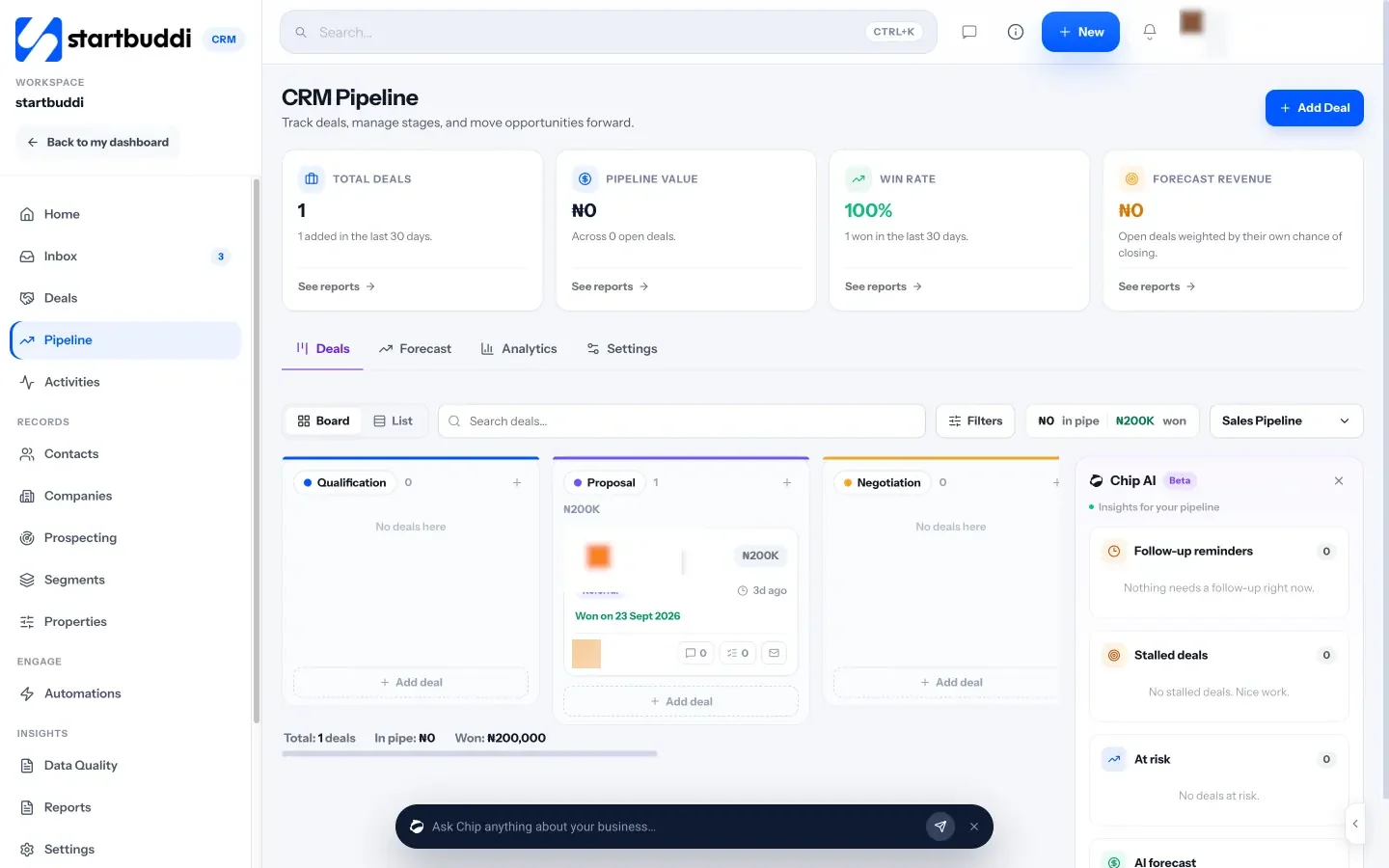
The pipeline board lets you drag deals between stages you name yourself. Two moves happen automatically: when a contact replies, their deal moves out of the first stage, and when an invoice linked to a deal is paid, the deal is marked won. Every move is written to the deal’s history with the reason. The insights panel flags follow-up reminders, stalled deals and deals at risk.
Workflows built on the triggers above
Automations can start when a form is submitted, a new contact is added, a tag is added or removed, a contact’s stage changes, a deal is created, or a deal is won, lost, moved stage or has gone quiet. Invoice paid, invoice overdue and booking events are triggers too. Steps include sending an email, SMS or WhatsApp message, waiting, conditions, “wait for their reply”, adding tags, creating a task or a project, assigning a teammate, notifying the team, and exit rules that take someone out of the flow early.
You can build from scratch, start from a template, or describe what you want to Chip (“when a deal is won, create the onboarding project and send a welcome email”) and it drafts the flow for you to check. Chip always saves these as drafts; nothing goes live until you switch it on.
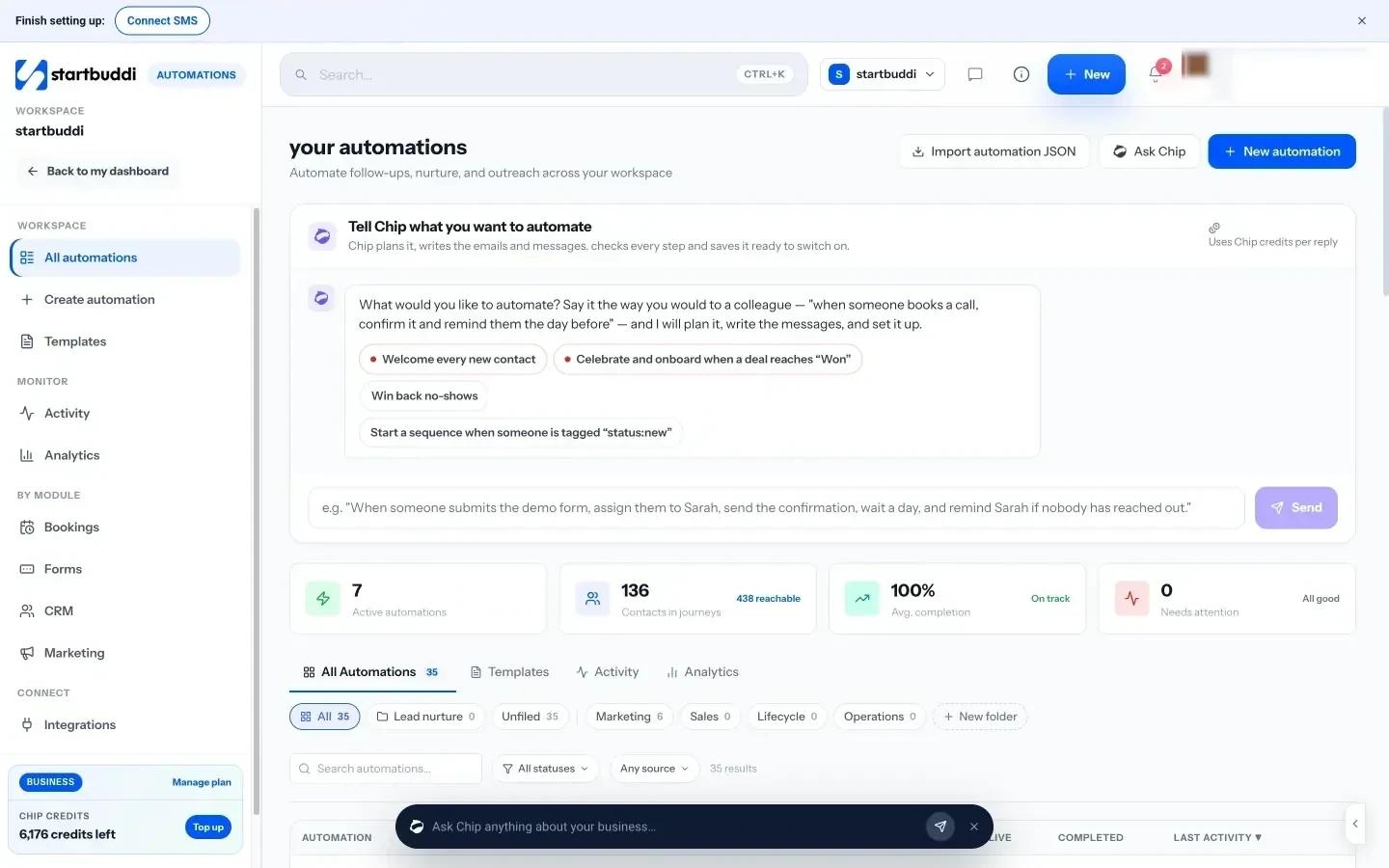
Before activating, you can test with a real contact or simulate the trigger, and a review screen shows how many contacts the workflow can reach and who is excluded for consent reasons. CRM Settings also has quick rules such as creating a follow-up task when a lead is added and a re-engagement task after seven days without activity.
Everything logged in one timeline
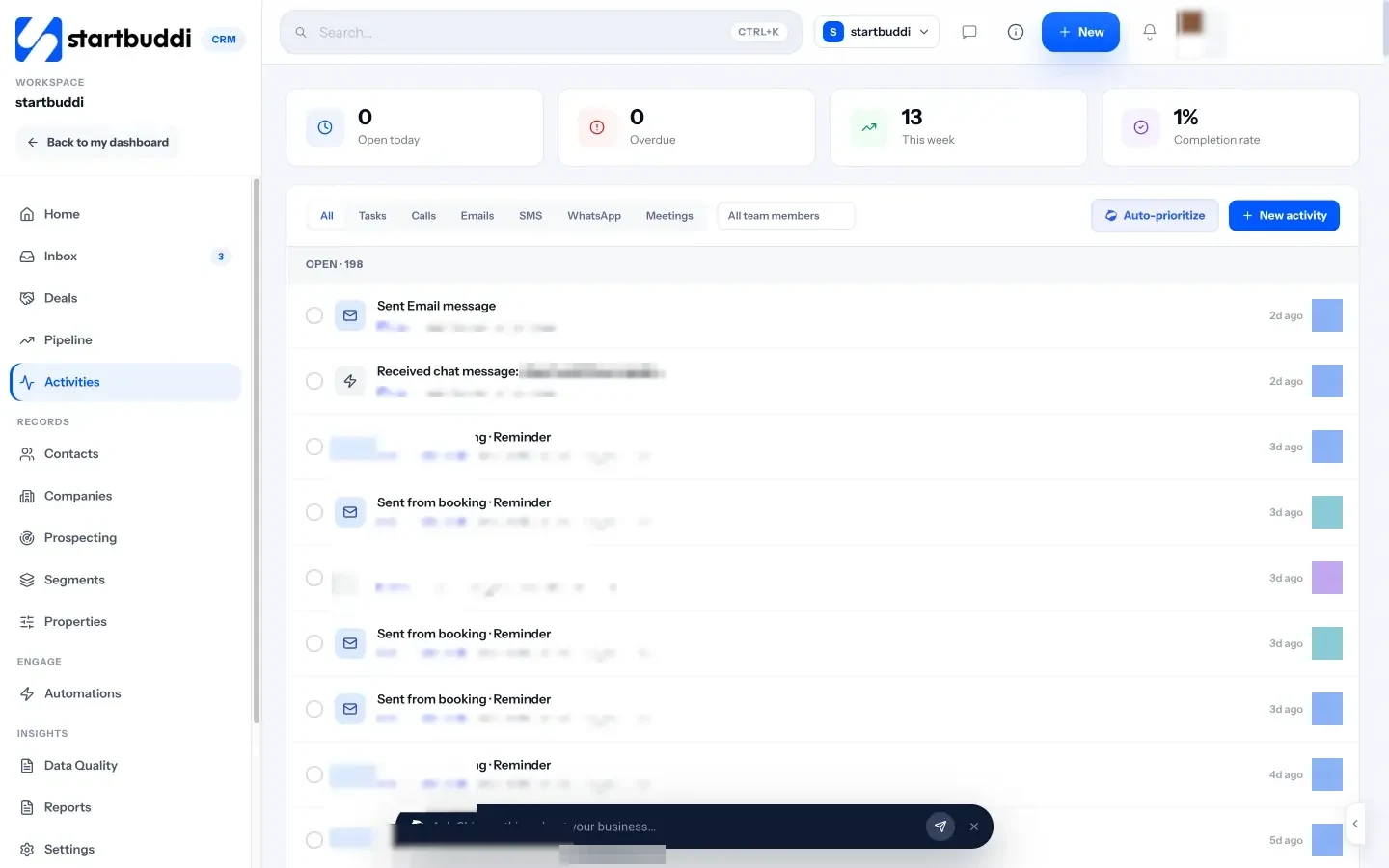
Emails, messages, reminders and tasks created by workflows show up in Activities and on each contact’s record, so anyone on the team can see what a client has already received.
Limits worth knowing
Free includes 2 active automations, Starter 10, and Growth and Scale have no limit, and each plan has a monthly allowance of automation runs (250 on Starter, 2,000 on Growth, 5,000 on Scale). SMS and WhatsApp steps need Starter or above too. Date-based triggers, such as “contract renewal date reached”, aren’t live yet, so for retainer renewals create a task with a due date instead. The help article on using CRM automation in startbuddi walks through the screens.
Your next step
Write your pipeline stages on one page with an exit rule for each. Then build just one workflow this week: the instant reply and owner assignment for new enquiries. Watch it for a fortnight before adding the proposal follow-up. If you want the pipeline and the workflows in one place, see CRM automation workflows in startbuddi or compare the plans; Starter comes with a 30-day trial.
Sources
- Harvard Business Review: The short life of online sales leads (March 2011)
- ICO: Electronic mail marketing (PECR)
- FTC: CAN-SPAM Act compliance guide for business
Frequently asked questions
What is an email sequence CRM?
A CRM that sends a planned series of emails when something happens in your pipeline, such as a form being submitted or a deal changing stage, and stops when the person replies. Every email is logged on the contact record.
Which CRM workflow should an agency automate first?
The reply to new enquiries: an instant acknowledgement, a deal in the first stage, a named owner and a task to call within a working day.
Will automated follow-ups annoy clients?
Not if they stop the moment the client replies, are spaced a few days apart and read like a person wrote them. Keep proposals and price talks personal.
How many workflows does a small agency need?
Five or six cover most of the sales pipeline. Add more only when you spot a gap that keeps costing you work.
SEO Copywriter| Email growth Specialist| I help businesses increase revenue with strategic SEO content & high-converting email funnels.