How to manage a client pipeline effectively (without losing your mind)
A calm system for client pipeline management: stages with clear exit rules, the four numbers that matter, a 30-minute weekly review and rules for stalled deals.


Chinonye wrote this while on the startbuddi team. The product has changed since, so the team updated it on .

- Define five or six stages based on what the client has done, give every deal a value, a next step and a date, and review the board for 30 minutes each week. Close stalled deals on a schedule and weight your forecast so it matches what your team can deliver.
To manage a client pipeline effectively, you need three habits. Define a few stages based on what the client has actually done, give every open deal a next step with a date, and review the whole board for 30 minutes once a week. Do that and you always know who to call today, which deals are really alive, and roughly how much work is coming next month. Skip it and the pipeline turns into a list of hopeful names nobody trusts.
This guide is for freelancers, agencies and service businesses who sell a handful of projects or retainers a month, not a sales floor of 50 reps. It covers how to design your stages, the numbers worth tracking, a weekly review agenda, what to do with deals that have gone quiet, and how to stop your pipeline from overbooking your team.
What a client pipeline is, and why it is hard to manage
A client pipeline is every potential piece of work you are chasing, grouped by how close it is to becoming paid work. If you want the textbook version, our glossary entry on what a sales pipeline is covers it. The practical version is simpler: it is the answer to “what could we be working on in 30, 60 and 90 days?”
Pipelines get messy for predictable reasons:
- Stages describe your hopes, not the client’s actions. “Very interested” means nothing. “Asked for a proposal” means something.
- Deals never close. Nobody likes marking work as lost, so dead deals sit in “Negotiation” for months and inflate the forecast.
- Information lives in five places. The brief is in email, the price is in WhatsApp, the proposal is in a folder, and the pipeline is a spreadsheet that is two weeks out of date. Our piece on CRM vs spreadsheet goes into why that last one breaks first.
- No routine. The pipeline only gets looked at when revenue dips, which is exactly when it is too late.
Design stages around what the client has done
The single biggest improvement you can make is to give each stage an exit rule: a thing the client has done, not a feeling you have. If you can’t say what moves a deal forward, the stage is doing no work.
Here is a stage set that fits most service businesses:
| Stage | A deal is here when | It moves on when |
|---|---|---|
| New enquiry | Someone asked about your services | You have booked a discovery call |
| Discovery | A call is booked or done | They have confirmed budget, timing and who decides |
| Proposal sent | You have sent a written price and scope | They have replied with questions or changes |
| Negotiating | You are agreeing scope, price or start date | They sign, pay a deposit, or say no |
| Won | Contract signed or deposit paid | Work starts |
| Lost | They said no, chose someone else, or went silent past your cut-off | Nothing: record the reason and move on |
How many stages is right?
Five or six, including Won and Lost. Fewer and you can’t see where deals stall. More and you spend your time deciding which column a card belongs in. If you sell two very different things, such as one-off projects and monthly retainers, use two pipelines rather than one long one.
Two examples
A web design agency in Manchester might use New enquiry, Discovery call, Proposal sent, Deposit requested, Won and Lost, because the deposit is the real moment of commitment. A tax consultant in Nairobi with mostly repeat clients might run a second, shorter pipeline for renewals: Renewal due, Engagement letter sent, Signed. Same principle in both cases: each stage is a client action you can point to, so anyone on the team can look at a card and know exactly what has happened and what should happen next.
Write your stage rules down
Put the exit rules in a shared note or in the pipeline settings. When two people run the pipeline, it stops “Proposal sent” meaning “I’m about to send one” for one person and “they’ve had it for a month” for the other.
Give every deal a value, a next step and a date
A deal card with only a name on it is a reminder, not a deal. Each open deal needs:
- A value. Your best estimate of what it is worth, even if it’s a range. A branding project might be $4,000, £3,200 or ₦2,500,000. Rough is fine. Blank is not.
- A next step. “Send revised proposal”, “Call Kemi about start date”, “Chase signed contract”.
- A date for that next step. The date is what turns the pipeline into your to-do list for the week.
- A contact and a decision-maker. They are often different people, and knowing both prevents the classic “I need to check with my boss” surprise.
A useful test on Monday morning: any open deal without a dated next step is either forgotten or dead. Decide which, today.
The client pipeline management numbers worth tracking
You don’t need a dashboard of 20 charts. Four numbers tell you almost everything.
- Win rate: deals won divided by deals closed (won plus lost). If you closed 20 deals last quarter and won 5, your win rate is 25%.
- Average deal size: total value of won deals divided by the number won.
- Sales cycle: the average number of days from enquiry to won.
- Open pipeline value: the total value of deals still in play.
How much pipeline do you actually need?
Divide your sales target by your win rate. If you want $20,000 of new work next quarter and you win 25% of what you close, you need about $80,000 of deals moving through the pipeline. In naira, a ₦6,000,000 target at the same win rate needs about ₦24,000,000 in play. This one calculation explains why “we have three good leads” rarely fills a quarter.
Sales velocity
Sales velocity combines those numbers into one: (number of open deals × average deal size × win rate) ÷ sales cycle in days. The answer is roughly how much revenue your pipeline produces per day. Ten open deals worth $3,000 each, a 30% win rate and a 45-day cycle gives $200 a day. You can raise it four ways: more deals, bigger deals, a better win rate, or a shorter cycle. Most small businesses find the fastest lever is the cycle, by replying faster and sending proposals sooner.
Run a 30-minute weekly pipeline review
A formal, repeatable sales process pays off even for small teams. A study of B2B companies reported in Harvard Business Review found an 18% difference in revenue growth between companies that had defined a formal sales process and those that had not. For a small business, the weekly review is most of that process.
Same time every week, 30 minutes, board open on screen:
- New since last week (5 minutes). Is every new enquiry in the pipeline with a value and a next step?
- Closing this month (10 minutes). For each deal in Proposal sent or Negotiating: what is blocking a yes, and who is doing what by when?
- Stalled deals (10 minutes). Anything with no activity for 14 days gets a decision: nudge, change the approach, or close as lost.
- Numbers (5 minutes). Open pipeline value against what you need. If it’s short, the week’s priority is finding new enquiries, not polishing proposals.
Solo? Do the review anyway, with a coffee on Friday afternoon. It takes less time than worrying about money over the weekend.
What to do with stalled and dead deals
Stalled deals are the main reason pipelines stop being trusted. Set simple rules and follow them.
- Reply speed first. A new enquiry should hear from you the same day. Research reported in Harvard Business Review found that firms contacting online leads within an hour were far more likely to qualify them than firms that waited.
- 14 days quiet: send a short, useful nudge. Not “just checking in”, but a question or something new: “We could start on 3 March if that helps your launch. Would that work?”
- 30 days quiet: send a polite closing message and mark the deal lost if there is no reply.
- Always record the lost reason: price, timing, chose a competitor, no budget, no reply. After a quarter, the reasons tell you what to fix.
A closing message that often gets a reply
Hi Sam, I haven’t heard back about the website proposal, so I’ll assume the timing isn’t right and close this on my side. If things change, just reply to this email and we’ll pick it up. Wishing you a good quarter.
It is honest, it takes pressure off, and it often brings back the deals that were only waiting for a nudge.
Match your pipeline to your team’s capacity
Agencies and service businesses have a problem product companies don’t: winning everything at once can be as painful as winning nothing. A healthy pipeline is one you can actually deliver.
- Add an expected start date to each deal, not just a close date. It shows you when the work lands.
- Weight the forecast. Multiply each deal’s value by a rough probability for its stage, for example 10% for Discovery, 40% for Proposal sent and 70% for Negotiating. The weighted total is a more honest view of next month than the raw one.
- Check capacity before you promise dates. If three big projects could all start in April, stagger the start dates in your proposals now.
- Keep an expansion pipeline for existing clients: renewals, add-ons and referrals. Keeping the right customers is usually cheaper than finding new ones, as Harvard Business Review notes.
Common client pipeline mistakes
- Counting every enquiry as a deal, including people who never replied.
- Leaving the value field blank “until we know more”.
- Never marking anything lost, so the forecast is fiction.
- Sending the proposal before the discovery call confirmed budget and timing.
- Keeping client notes in personal email or WhatsApp, where the rest of the team can’t see them.
If several of these sound familiar, our checklist of signs your agency needs a CRM will help you decide what to change first.
How startbuddi helps you manage client pipelines
The sales pipeline in startbuddi lives inside Customers, next to your contacts, inbox and invoices, so deals and conversations sit in one place.
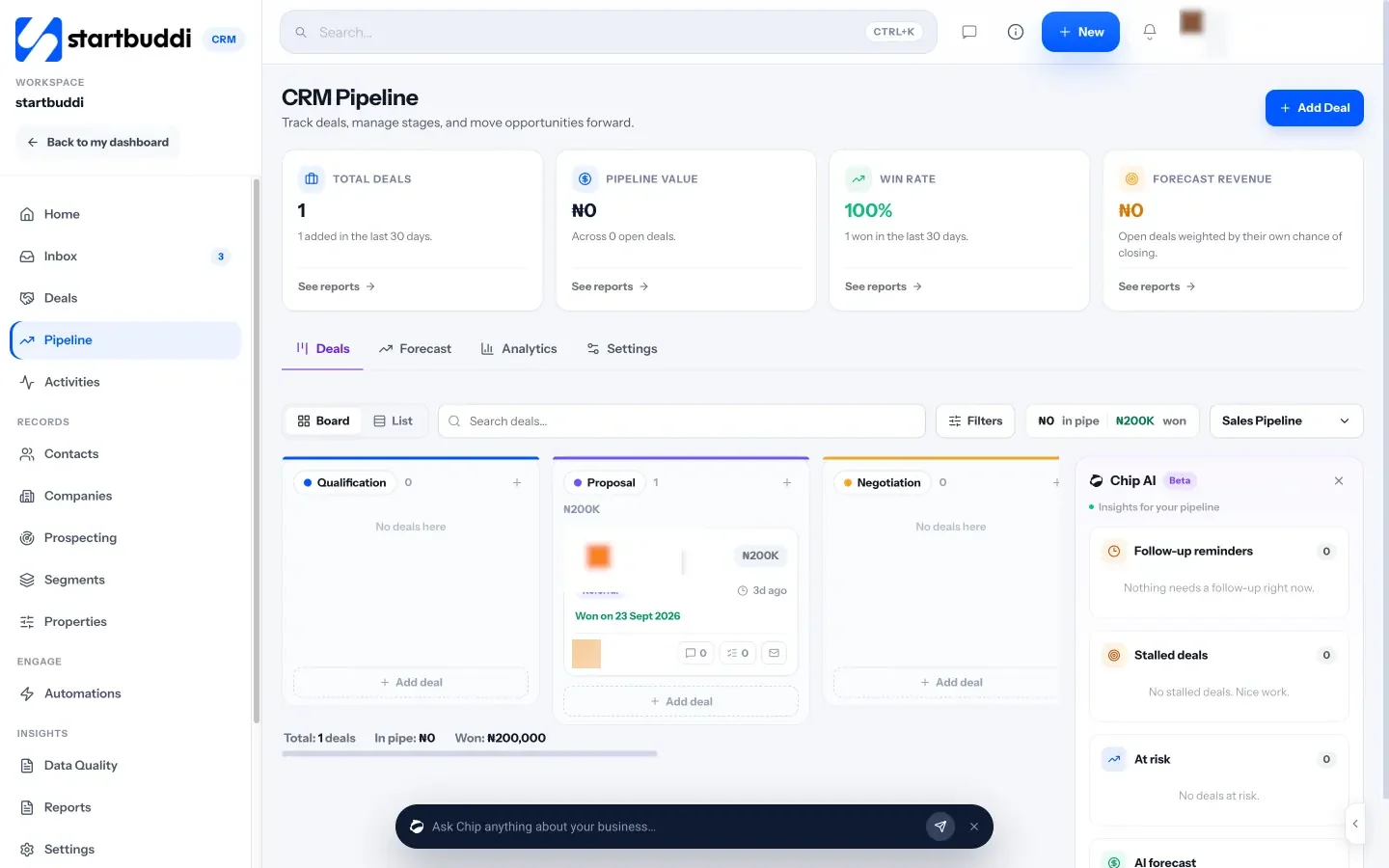
- A board you drag deals across. The default stages are New Leads, Qualified, Proposal Sent, Negotiation, Won and Lost. Rename them to match your exit rules, and double-click a stage title to edit it.
- Deal details that match this guide: value, contact, company, expected close date, owner, probability, tags and notes.
- Won and lost with a reason. Pipeline settings can require a reason whenever a deal is marked lost.
- Multiple pipelines, for example one for new business and one for renewals, each with its own stages and currency.
- Deals that move themselves. When a contact replies, their deal moves out of the first stage. When an invoice on a deal is paid, the deal is marked won. Each move is written to the deal’s history.
- Forecast and analytics tabs show win rate, a weighted pipeline by stage, and deals likely to close soon.
- Chip, the AI assistant, flags stalled and at-risk deals and suggests the next stage. These panels are labelled Beta, so treat them as prompts, not decisions.
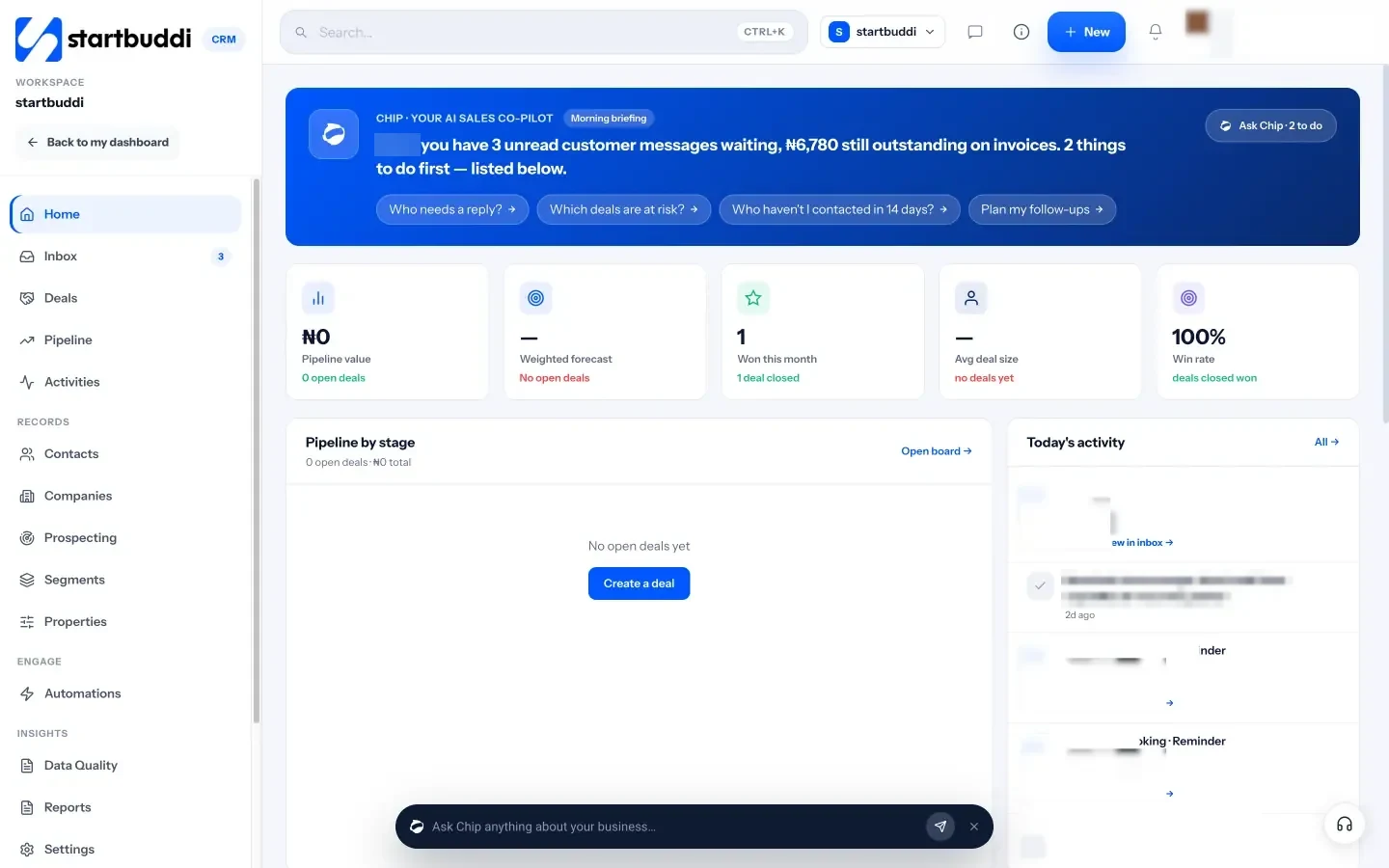
When you win a deal, Chip can offer to set up a client portal for the new client. Proposals and estimates live in Money Manager, and an accepted estimate becomes an invoice with the same line items, so you don’t retype anything.
What it won’t do: it isn’t built for large sales teams with territories, quotas and complex approval rules. The Free plan includes up to 250 contacts. Starter raises that to 2,500, and Growth to 15,000 with 5 seats (see pricing). Our help article on setting up your sales pipeline walks through the first setup.
Your next step
Pick a 30-minute slot this week, write an exit rule for each stage, and give every open deal a value, a next step and a date. Then try it on the pipeline board: startbuddi is free to start, and you can compare plans on the pricing page.
Sources
- Harvard Business Review: Companies with a Formal Sales Process Generate More Revenue
- Harvard Business Review: The Short Life of Online Sales Leads
- Harvard Business Review: The Value of Keeping the Right Customers
Frequently asked questions
How many stages should a client pipeline have?
Five or six, including Won and Lost. That is enough to see where deals stall without arguing about which column a card belongs in.
How often should I review my pipeline?
Weekly, for about 30 minutes. Look at new deals, deals closing this month, stalled deals and whether open value covers your target.
When should I mark a deal as lost?
When the client says no, or after a set quiet period such as 30 days with a polite closing message and no reply. Always record why.
What is a weighted pipeline?
Each deal's value multiplied by a probability for its stage, added up. It gives a more realistic forecast than the raw total.
Can I run a client pipeline in a spreadsheet?
You can at first. It tends to break when more than one person updates it or when conversations and invoices live elsewhere.
SEO Copywriter| Email growth Specialist| I help businesses increase revenue with strategic SEO content & high-converting email funnels.