9 Jobber Alternatives for Home Service Businesses
Jobber alternatives for home service businesses compared: Housecall Pro, ServiceM8, Tradify, GorillaDesk and more, with prices, free plans and real limits.



The best Jobber alternatives depend on why you’re leaving. Housecall Pro suits US crews that want dispatch and routes; ServiceM8 suits trades that would rather pay by job than by user; startbuddi suits service businesses that run on WhatsApp and want bookings, invoices and client messages together. Tradify, GorillaDesk and Zoho FSM are also worth comparing.
startbuddi is our product. We’ve listed its limits alongside everyone else’s, and every price below comes from the vendor’s own pricing page, checked on 1 October 2026.
Key takeaways
- Jobber is a capable field service tool. People leave because of price as the team grows, because key automations sit on higher plans, or because they need something simpler or more local.
- If you want to pay by job rather than by user, look at ServiceM8. If you want unlimited users, look at Service Fusion.
- If routes and GPS tracking matter, Housecall Pro, GorillaDesk and Zoho FSM cover them; startbuddi doesn’t.
- If you mostly need quotes and invoices, Joist is far cheaper than any full field service tool.
- Jobber lets you export clients to CSV on some plans, so check your plan before you plan the move.
Jobber alternatives compared
Prices are the lowest paid plan per month in US dollars, as each vendor shows them. “Annual” means the monthly price when billed yearly.
| Tool | Best for | Lowest paid plan | Free plan | Standout feature |
|---|---|---|---|---|
| startbuddi | Service businesses that sell on WhatsApp and want bookings, CRM and invoices together | See pricing | Yes | Client messages, bookings and invoices on one client record |
| Housecall Pro | US home service teams that dispatch crews | $59 annual, $79 monthly (Basic, 1 user) | No | Scheduling and dispatching, with routes from Essentials |
| ServiceM8 | Trades that want to pay by job volume | $29 (Starter, 50 jobs) | Yes, solo, 30 jobs a month | Unlimited users on paid plans |
| Tradify | Trades teams that use Xero or QuickBooks | $47 per user (Lite) | No | Accounting sync on the entry plan |
| GorillaDesk | Route-based services: pest control, pool, lawn | $49 (Basic, 1 route) | No | Routing and material tracking |
| Kickserv | Small crews that want several users cheaply | $60 (Start, 5 users) | No | 5 users on the entry plan |
| Service Fusion | Larger teams that want unlimited users | $208 annual (Starter) | No | Unlimited users on every plan |
| Zoho FSM | Teams already using Zoho | Priced by appointments a month | Yes, 30 appointments a month | Dispatch console and mobile app on the free plan |
| Joist | Solo contractors who mainly quote and invoice | $12 monthly, $8.34 annual (Basics) | No | Estimates that turn into invoices |
Why look for a Jobber alternative?
Jobber is popular with home service businesses for good reasons: quoting, scheduling, invoicing and a client hub in one product. The reasons people look elsewhere are mostly about cost and fit.
- The price climbs with the team. On Jobber’s pricing page, Core is $29 a month billed annually ($49 month to month) for one user. Connect is $99 annually ($139 monthly), Grow $149 ($199) and Plus $399 ($499). Extra users are $29 a month each.
- Key automations sit on higher plans. Automated client reminders, automated follow-ups, job checklists and QuickBooks Online sync start at Connect. Two-way SMS, job costing and custom workflow automations start at Grow.
- It’s built for North American crews. If your clients message on WhatsApp and pay by bank transfer or mobile money, check that Jobber’s channels and payment options work for you before you commit.
- Some businesses need less. A solo handyman who sends five quotes a week may not need scheduling, dispatch and a client hub at all.
None of this makes Jobber a poor choice. It means it’s worth pricing your actual team on two or three tools before you renew.
How we chose these alternatives
Each tool had to:
- publish its prices on its own website, so we could check them (we left out tools that only quote on request);
- cover quotes or estimates, scheduling or bookings, and invoicing for home service work;
- let you bring in your client list, which is how a Jobber move starts;
- be sold directly to small businesses.
All prices and plan details come from the vendors’ own pricing and help pages, checked on 1 October 2026. We haven’t run hands-on tests, so we describe what each plan includes rather than how it feels day to day. Prices change often; check before you buy.
1. startbuddi
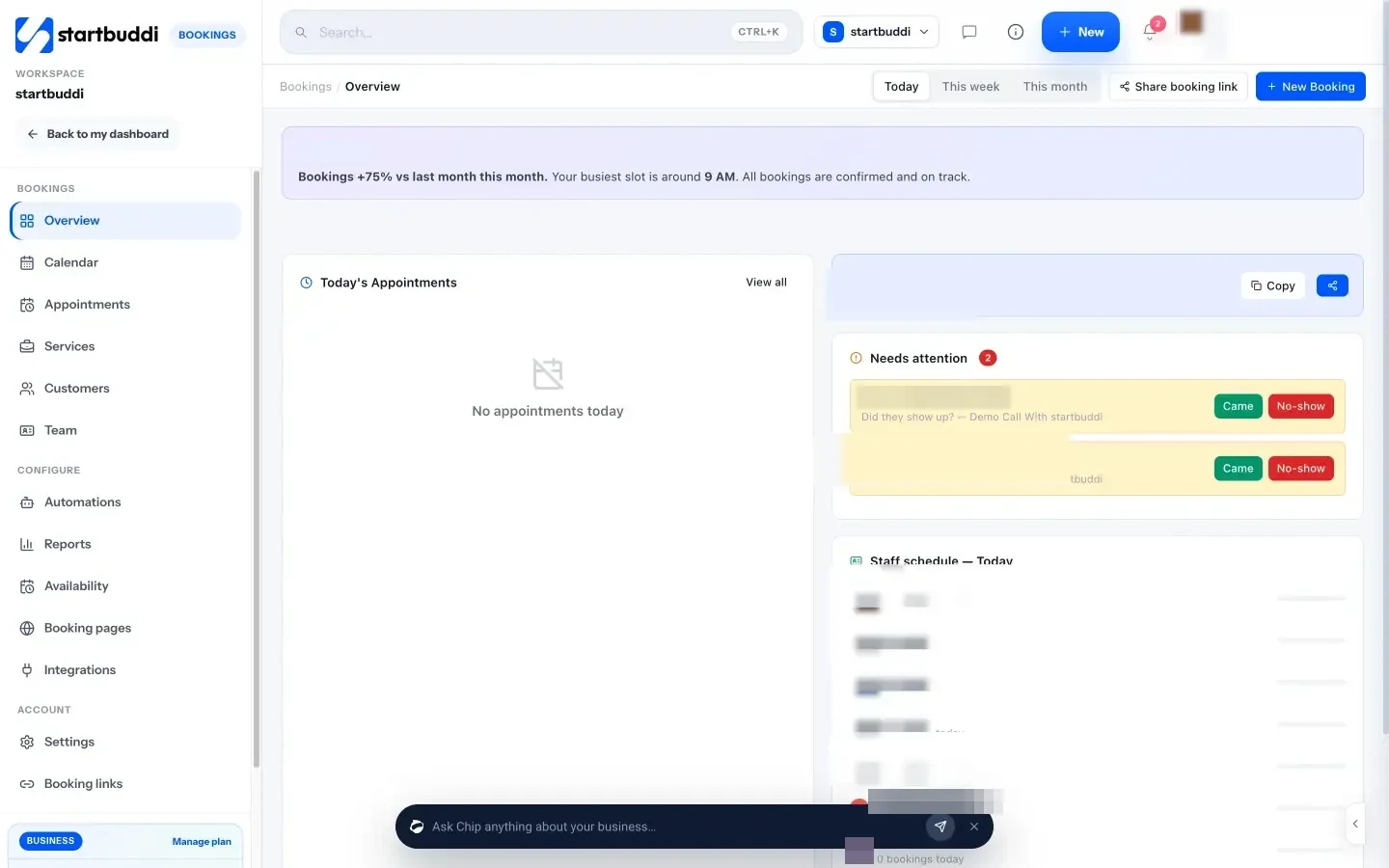
startbuddi is our product: a workspace for service businesses with contacts and deals, a customer inbox, bookings, estimates and invoices, payments, projects and documents in one place, with Chip, the AI assistant, on every screen.
Best for: cleaning companies, home repair and maintenance businesses, installers and other service businesses whose clients message on WhatsApp, Instagram or email and who want bookings, quotes and invoices tied to the client record.
Key features:
- An inbox for WhatsApp, email, SMS, website chat, Instagram and Facebook, with each conversation next to the client’s history.
- Booking pages with services, staff availability, reminders and optional deposits.
- Estimates that turn into invoices, payment links and recurring invoice drafts. Clients pay by card through Stripe, or by card, bank transfer, USSD or mobile money through Paystack.
- Projects and tasks for multi-day jobs, and a client portal for approvals and invoices.
- Automations, such as a follow-up email after a booking is completed or a reminder when an invoice is overdue.
Pricing: a free plan is available. See startbuddi pricing for paid plans. WhatsApp, SMS and Automations are on paid plans.
Pros: one record per client across messages, bookings and money; built for WhatsApp-first clients in Nigeria and across Africa as well as email-first ones elsewhere.
Cons: it is not field service software. There is no route optimisation, GPS tracking, dispatch map or job costing, and no native mobile app (it’s a web app that works in a phone browser). There’s no QuickBooks or Xero sync, it isn’t accounting software, and calendar sync only pushes bookings out to Google or Outlook. Moving from Jobber is a CSV import of contacts, not a one-click connection.
Skip it if: you run several crews in vans every day and need routing, GPS and a technician app. See how startbuddi works for cleaning businesses and plumbing businesses.
2. Housecall Pro
Housecall Pro is a field service platform for US home service businesses: plumbers, HVAC, electricians, cleaners and more.
Best for: crews of 2 to 10 that dispatch jobs and want online booking and review requests built in.
Key features: online booking, scheduling and dispatching, quotes and invoices, review management; routes, GPS tracking, checklist automations and QuickBooks Online sync from Essentials.
Pricing: on Housecall Pro’s pricing page, Basic is $59 a month billed annually or $79 monthly for 1 user. Essentials is $149 annually ($189 monthly) for 5 users, and Max is $299 annually ($329 monthly) for 8 users, with extra users at $35 a month on Max. There’s a 14-day trial with no card needed.
Pros: Essentials includes 5 users, which can work out cheaper than paying per head; strong dispatch features.
Cons: route optimisation, recurring service plans and API access are only on Max. The Basic plan is for one user.
Skip it if: you’re a one-person business that mostly needs quotes and invoices.
3. ServiceM8
ServiceM8 is a job management app for trades, priced by how many jobs you create rather than by user.
Best for: trades with several staff but a steady, predictable job volume.
Key features: job cards, quotes, invoicing, scheduling and dispatch, built around an iPhone and iPad app.
Pricing: on ServiceM8’s pricing page, the Free plan is for solo operators with 30 jobs a month. Starter is $29 a month for 50 jobs, Growing $79 for 150, Premium $149 for 500 and Premium Plus $349 for 1,500 or more, with users unlimited on paid plans and a 14-day trial.
Pros: adding a technician doesn’t add a seat fee; a genuinely usable free plan for sole traders.
Cons: it’s designed for Apple devices. ServiceM8’s help centre says it offers a lighter Android app for staff who don’t need the full iOS app. Busy months can push you into a higher job tier.
Skip it if: your team uses Android phones and needs the full app.
4. Tradify
Tradify is job management software for trades, popular with electricians, plumbers and builders.
Best for: small trades teams that keep their books in Xero or QuickBooks Online.
Key features: job management, scheduling with Google Calendar sync, quoting and invoicing, pricing and markups, email tracking, and Xero and QuickBooks Online sync on the entry plan.
Pricing: on Tradify’s pricing page, Lite is $47 per user a month, Pro $51 and Plus $61, with a free trial. An instant website add-on is $12 a month.
Pros: accounting sync on every plan; strong on quotes with markups.
Cons: per-user pricing gets expensive for bigger crews, and there’s no free plan.
Skip it if: you have many part-time staff who all need logins.
5. GorillaDesk
GorillaDesk is field service software for route-based businesses such as pest control, pool and lawn care.
Best for: businesses that visit many properties on regular routes.
Key features: scheduling, invoices, estimates and work orders, job mapping, basic routing up to 25 stops, Square and Stripe payments, material tracking, broadcast messages and automated email and SMS reminders.
Pricing: on GorillaDesk’s pricing page, Basic is $49 a month for one route ($539 a year), Pro $99 ($1,089 a year) and Growth $149 ($1,639 a year). Admin users and mobile devices are unlimited. SMS is sold in credit packs.
Pros: priced by route rather than by user; built for recurring visits.
Cons: the customer portal, online booking and QuickBooks Online sync start at Pro.
Skip it if: your work is one-off projects rather than repeat visits.
6. Kickserv
Kickserv is field service software for small service companies.
Best for: small crews that want several users on a modest budget.
Key features: an embeddable contact form, automated email and text reminders, more than 20 reports, time and expense tracking and QuickBooks Online on Start; dispatch mapping and GPS check-ins on Run.
Pricing: on Kickserv’s pricing page, Start is $60 a month for 5 users, Run $119 for 10 users and Scale $199 for 20 users, with 20% off on annual billing and a 30-day trial.
Pros: five users on the entry plan; long trial.
Cons: dispatch mapping, GPS check-ins and custom reports need Run.
Skip it if: you work alone and would pay for seats you don’t use.
7. Service Fusion
Service Fusion is a field service platform aimed at established companies.
Best for: teams of 10 or more who want every staff member on the system without seat fees.
Key features: customer management, estimates and jobs, scheduling and dispatching, invoicing and payments, QuickBooks integration and text alerts on Starter; job costing and inventory on Plus.
Pricing: on Service Fusion’s pricing page, Starter is $208 a month billed annually ($245 monthly), Plus $325 ($382) and Pro $533 ($627), all with unlimited users. Sign-up is through a demo.
Pros: unlimited users on every plan.
Cons: a high starting price for small businesses, and the customer portal, e-signatures and GPS tracking are add-ons on Starter.
Skip it if: you have fewer than five people.
8. Zoho FSM
Zoho FSM is Zoho’s field service app, priced by the number of appointments a month.
Best for: businesses that already use Zoho CRM or Zoho Books.
Key features: requests, estimates, work orders, a dispatch console, service reports, invoicing, a mobile app and workflow automation on the free plan; maps, location tracking and custom fields on Standard.
Pricing: on Zoho FSM’s pricing page, the Free plan covers 30 appointments a month and up to 20 users. Paid editions (Standard, Professional and Premium) are priced by how many appointments you need each month, with a free trial and no card required.
Pros: a genuinely useful free plan for small teams; works with the rest of Zoho.
Cons: appointments don’t roll over, so a busy month means paying for a higher tier; WhatsApp is on Professional.
Skip it if: you don’t use other Zoho apps and want something simpler.
9. Joist
Joist is an estimating and invoicing app for contractors.
Best for: solo contractors and small renovation businesses whose main admin is quotes and invoices.
Key features: estimates that convert to invoices, online payments, work orders, client activity tracking and homeowner financing.
Pricing: on Joist’s pricing page, Basics is $12 a month (or $8.34 a month billed annually) for up to 5 documents a month. Pro is $17 a month ($14.17 annually) with unlimited documents and clients, and Elite $32 ($26.67). There’s a 14-day trial.
Pros: very cheap; quick to learn.
Cons: no scheduling or dispatch, and Basics is capped at 5 documents a month.
Skip it if: you need to schedule a team.
How to choose a Jobber alternative
Start with the job you need done, not the feature list.
| If your main reason for leaving Jobber is… | Look at |
|---|---|
| Per-user cost as the team grows | ServiceM8, Service Fusion, Kickserv, GorillaDesk |
| You only need quotes and invoices | Joist |
| Clients message on WhatsApp and you want bookings and invoices together | startbuddi |
| Routes and recurring visits | GorillaDesk, Zoho FSM, Housecall Pro |
| Your books are in Xero or QuickBooks | Tradify, Housecall Pro (Essentials) |
| You already use Zoho | Zoho FSM |
Then run three checks:
- Price your real team. Count everyone who needs a login, or your jobs a month for ServiceM8 and appointments for Zoho FSM.
- Test on the phones your team uses. Ask a technician to run a full day on the trial: open the job, add notes and photos, take payment.
- Check payments in your country. In Nigeria, Ghana or Kenya, make sure clients can pay the way they prefer, such as bank transfer or mobile money.
Our guide to running a home service business covers the processes these tools support, and our home service checklist gives you a visit-by-visit routine to load into whichever tool you pick. For the client side, from enquiry to repeat work, see our guide to CRM tools for small business.
Migrating from Jobber: step by step
- Export your clients. Jobber’s help centre explains how to export client information: from Clients, choose More Actions, then Export Clients, and pick CSV. Jobber emails the file, splits exports above about 1,500 rows into several files, and says client export is available on select plans.
- Download your records. Export or save invoices, quotes and job history you need for tax and warranties before your subscription ends.
- Clean the file. Remove duplicates and old leads, and put phone numbers in one format with the country code.
- Import clients first, then set up services, prices and booking or job types in the new tool.
- Re-create open work by hand. Add upcoming jobs and unpaid invoices manually; it’s usually quicker than a bulk import for a few dozen items.
- Run both for two weeks, then cancel Jobber once every open job has moved.
Moving from Jobber to startbuddi
In startbuddi, go to Customers → Contacts → Import, drop in the CSV from Jobber, map the columns and choose whether to update or leave existing contacts. You can import up to 10,000 contacts at a time and tag the batch. The import covers contacts only, so add your services in Bookings and recreate open quotes and invoices in Money Manager. There’s no one-click Jobber connection.
Try a Jobber alternative with your own clients
Export your client list from Jobber and test your top two choices with real bookings for two weeks. Start startbuddi free, no card needed, import your clients and see whether bookings, quotes and WhatsApp in one place suit the way you work. More comparisons are on our alternatives page.
Frequently asked questions
What is the best alternative to Jobber?
It depends on why you're leaving. Housecall Pro is the closest like-for-like choice for US crews that dispatch jobs. ServiceM8 suits trades that want to pay by job rather than by user. startbuddi suits service businesses whose clients message on WhatsApp and who want bookings, quotes and invoices with the client record.
Is there a cheaper alternative to Jobber?
Yes. Joist starts at $12 a month for quotes and invoices, ServiceM8 has a free plan for solo operators and a $29 Starter plan, and Zoho FSM has a free plan with 30 appointments a month. Compare the plan you'd actually need for your team, not only the cheapest one.
Does Jobber have a free plan?
Jobber's pricing page lists a 14-day free trial rather than a free plan, as of 1 October 2026. Paid plans start with Core at $29 a month billed annually for one user.
Can I export my clients from Jobber?
Yes, on plans that include client export. In Jobber, go to Clients, then More Actions, then Export Clients, and choose CSV. Jobber emails you the file, which you can import into most other tools.
Which Jobber alternative works best for cleaning businesses?
For cleaning businesses that mostly take bookings and repeat visits, a tool with booking pages, reminders and recurring invoices fits well, such as startbuddi, Housecall Pro or GorillaDesk. If you run many teams across a city each day, prioritise routing and a strong mobile app.
Does startbuddi do route planning?
No. startbuddi has bookings, staff availability, reminders, quotes, invoices and a client inbox, but no route optimisation, GPS tracking or dispatch map. If routing is central to your work, a field service tool such as Housecall Pro or GorillaDesk is a better fit.
Tiwalade Joanna Okedara-Kalu is the founder, CEO and CTO of startbuddi, the business system that brings clients, bookings, invoices, projects, marketing and the Chip AI assistant into one place. Tiwalade builds software around how service businesses really work day to day, and writes about client management, getting paid on time and why small businesses outgrow the tools they start with.
Founded startbuddi and leads its product and engineering