What is a payment link?
Also called: Pay link, checkout link, payment page, pay me link

A payment link is a shareable web address that opens a secure checkout page, so a customer can pay you by card, bank transfer or another method straight from a chat, email or social post, without you needing a website.
A payment link is a web address you send to a customer that opens a secure checkout page where they can pay you. You create it in seconds, share it by WhatsApp, Instagram DM, email or SMS, and the customer pays by card, bank transfer or another method your payment provider supports. No website, shopping cart or card machine is needed.
Stripe’s documentation sums it up well: a payment link is a shareable URL that opens a hosted payment page. Paystack offers the same idea through Payment Pages, which you can share on WhatsApp, email or social media.
Why a payment link matters for a small business
Many small businesses sell through conversations. A customer asks about a product on Instagram, agrees a price on WhatsApp, and then comes the awkward part: “send your account number”. The customer has to copy it, open their banking app, type the amount, and you have to watch for the alert and match it to the right person.
A payment link makes that last step simple:
- Faster payment. The customer taps once and pays on the spot, while they still want to buy.
- Fewer mistakes. The amount and description are already filled in.
- Automatic confirmation. You know it’s paid without checking bank alerts.
- A professional look. A branded checkout page builds more trust than a bare account number.
- No website needed. You can collect payments online from day one.
How a payment link works
- You connect a payment provider, such as Paystack or Stripe, to the tool you use.
- You create a link with a title (for example “Logo design deposit”), an amount and a currency. Some links also let the customer enter their own amount.
- You share the link wherever the conversation is happening.
- The customer opens it, chooses how to pay and completes checkout.
- The provider confirms the payment, the link shows as paid, and the money is settled to your bank account on the provider’s schedule, minus its fee.
Here is an example. A caterer in Port Harcourt agrees a ₦250,000 small-chops order for a wedding. She asks for 50% up front. Instead of sending her account details, she creates a payment link for ₦125,000 titled “Deposit: Adaeze’s wedding, 14 December”, sends it on WhatsApp, and the client pays by card in the chat. The order is confirmed within minutes, and the balance goes on an invoice later.
Types of payment link
- One-off links: a fixed amount for a single sale or deposit.
- Reusable links: one link many people can pay, useful for a fixed-price product, class or donation.
- Open-amount links: the customer types how much to pay, handy for tips or top-ups.
- Subscription links: the customer signs up once and is charged on a schedule.
- Payment pages or “pay me” pages: one page listing several things you sell, often linked from a social bio.
- QR codes: a payment link printed as a code customers scan at a counter or stall.
Payment link vs invoice
Use a payment link for quick, simple collections: deposits, one-off products, small jobs and follow-ups in chat. Use an invoice when you need line items, tax, a due date, payment terms and a formal record, such as for business clients or larger projects. Many invoices include a pay button, which is a payment link attached to the invoice.
Best practices and common mistakes
- Name the link clearly. The customer and your records should both know what it was for.
- Send it from a trusted place. Customers are right to be wary of unknown links. Share from your usual business number or email, and tell them who the checkout will show.
- Deactivate old links once an order is paid or cancelled, so nobody pays twice.
- Know the fees. Providers charge per transaction; for example, see Paystack’s transaction pricing.
- Record the payment against the customer. A link collects money; your books still need to show what it was for.
Related terms
Paystack is one of the most common providers behind payment links in Africa. Recurring invoicing suits regular clients better than sending a new link each month. An online booking system can take a deposit at the moment a client books, which removes the need to send a link at all.
Payment links in startbuddi
In startbuddi, payment links live in Get Paid inside Money Manager. Open the Payment links tab, enter the customer’s email, a title, the amount and the currency, then click Create payment link. You can open, copy or deactivate each link, send it by email, or send it as a text message if SMS is set up. The customer pays on a secure checkout page, and the payment lands in Transactions, matched to the link.
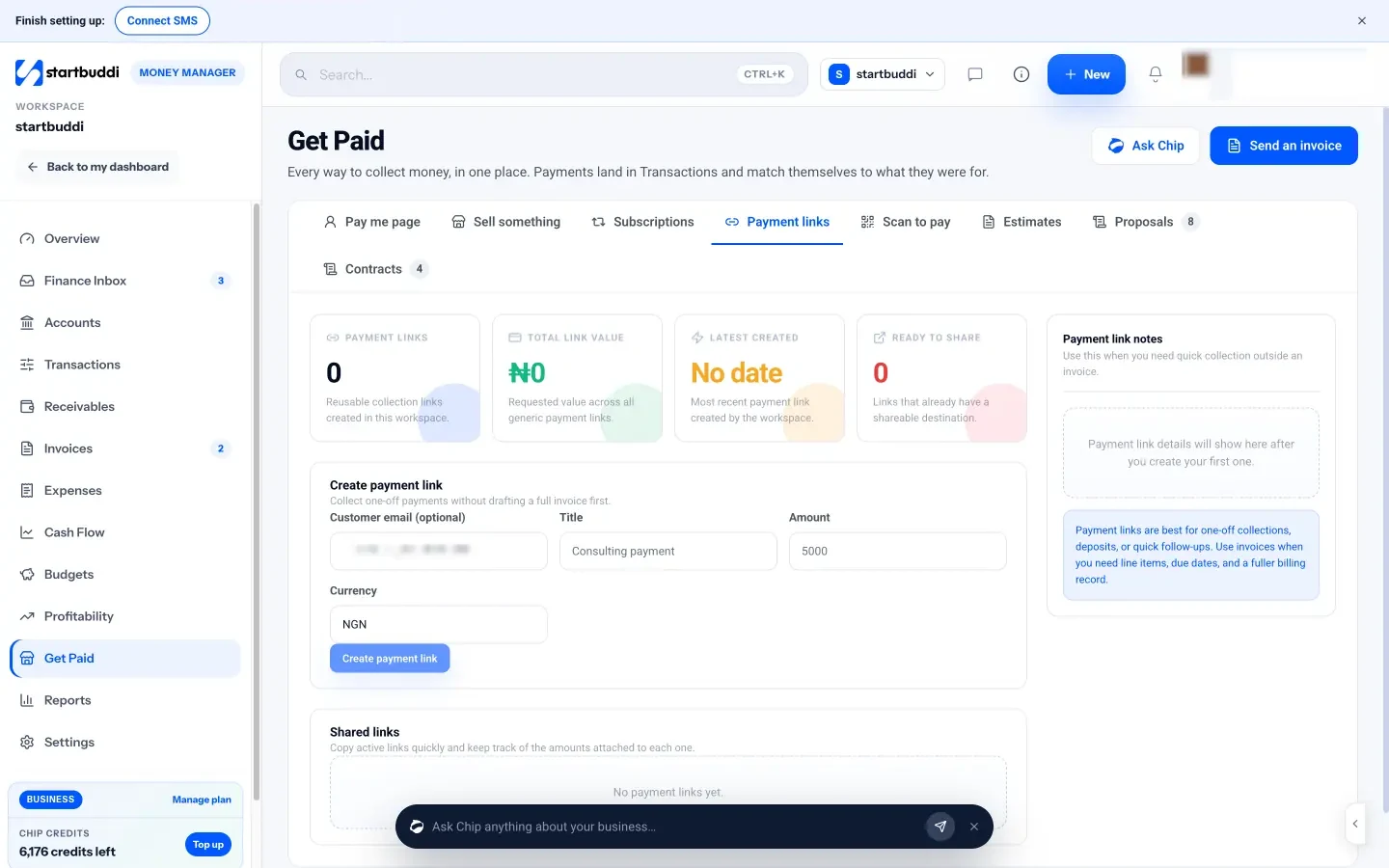
The same hub also has a pay me page with everything you sell in one link, Sell something for quick point-of-sale payments, Subscriptions for recurring plans, and Scan to pay, which turns links into printable QR codes. Payments run through your own Paystack or Stripe account, and money settles to your bank. For formal billing, use invoices with a pay button instead.
Next step: connect Paystack or Stripe in Money Manager, then send your next deposit request as a payment link instead of an account number.
Related terms
FAQ
Are payment links safe for customers?
Yes, when they come from a known payment provider such as Paystack or Stripe. The customer's card details go to the provider's secure checkout, not to you. Customers should only pay links from businesses they know.
Do I need a website to use payment links?
No. That is their main benefit. You can share them in any chat, email or social profile.
Can I use a payment link for a deposit?
Yes. Create a link for the deposit amount, then invoice the balance later or send a second link.
How long does a payment link last?
It depends on the tool. Many stay active until you deactivate them, so switch off links you no longer need.
Omolola Akiyode is the operations and project manager at startbuddi, leading cross-functional projects and the content that helps founders get set up. Omolola writes about projects, websites and getting found online, and turns complex ideas into clear, practical steps.
Runs operations and projects at startbuddi