What is booking software?
Also called: Appointment scheduling software, scheduling software, booking app, appointment booking software
Booking software is an app that manages a service business's appointments end to end: online bookings, calendars and staff schedules, reminders, deposits and payments, client records and reports.
Booking software is an app that manages appointments for a service business from start to finish: it takes bookings online, keeps your calendar and your team’s schedules in order, sends confirmations and reminders, collects payments and shows you how the business is doing. The customer sees a simple booking page; you see the whole diary, your clients and your numbers.
It is also called appointment scheduling software, scheduling software or a booking app. Salons, clinics, coaches, consultants, tutors, trades and cleaning companies all use it.
Why booking software matters for a small business
If your income depends on appointments, your diary is your till. Every slot left empty, every double booking and every no-show costs you money. Many small businesses still run the diary from a paper book, a notes app or a long WhatsApp thread, which works until you get busy or hire someone.
Booking software gives you one reliable place for the diary. It:
- Saves admin time, because clients book, pay and get reminders without you.
- Protects your income, with deposits, reminders and no-show follow-ups.
- Keeps the team in sync, since everyone sees the same schedule.
- Builds a client list from every booking, so you can invite people back.
- Shows you what sells, such as your busiest hours and most booked services.
How booking software works
You set it up once: add your services with durations and prices, set working hours for yourself and any staff, and choose your rules on buffers, notice periods and deposits. The software then publishes a booking page.
From there, the day-to-day looks like this. Clients book online and the booking lands in your calendar. You add walk-ins or phone bookings yourself. Before each appointment, reminders go out. After it, you mark it completed or a no-show, send a follow-up, and raise an invoice if payment is still due. At the end of the month, a report shows bookings, cancellations and repeat customers.
Here is an example. A physiotherapy practice with two therapists uses booking software for new-patient assessments and follow-up sessions. Patients book online, pay a deposit and answer a short health question. The front desk adds phone bookings in the same calendar. Each evening the software sends reminders for the next day. When someone misses a session, a polite rebooking email goes out, and the practice sees its no-show rate fall month by month.
Key features to look for in booking software
| Feature | Why it matters |
|---|---|
| Online booking page | Clients book any time without messaging you |
| Calendar views by day, week and staff | You see the whole diary at a glance |
| Availability rules and blocked time | No bookings during breaks, holidays or travel |
| Payments and deposits | Fewer no-shows and less chasing |
| Reminders and follow-ups | People turn up, and those who don’t are invited back |
| Team scheduling | Bookings shared fairly across staff |
| Customer records | Booking history for every client |
| Reports | Busiest hours, top services and cancellation rate |
| Calendar sync | Bookings appear in the calendar you already use |
Best practices and common mistakes
- Start with your top services only. Five clear services beat 25 confusing ones.
- Price and time services honestly, including set-up and clean-up, or use buffers.
- Decide your policies first. Deposits, cancellations and lateness rules should be written down before clients book. Our booking policy writer can draft one.
- Don’t run two diaries. If phone bookings stay in a paper book, double bookings will follow. Put everything in the software.
- Check how calendar sync works. Some tools only send bookings to your calendar and don’t read your personal events, so block personal time in the booking tool too.
- Look at the numbers. Our no-show cost calculator shows what missed appointments really cost you.
Related terms
An online booking system is the customer-facing part of booking software: the page where people pick a time. Round robin scheduling is how booking software shares bookings across a team. Tools like Paystack handle the payment when a booking needs a deposit.
Booking software in startbuddi
Bookings in startbuddi covers the whole cycle. The Overview shows today’s bookings, revenue, no-shows and a Needs attention queue where you can confirm, decline, mark attended or no-show, or follow up. The Calendar has Day, Week, Month and Staff views, with New Booking for walk-ins and Block time for breaks and holidays.
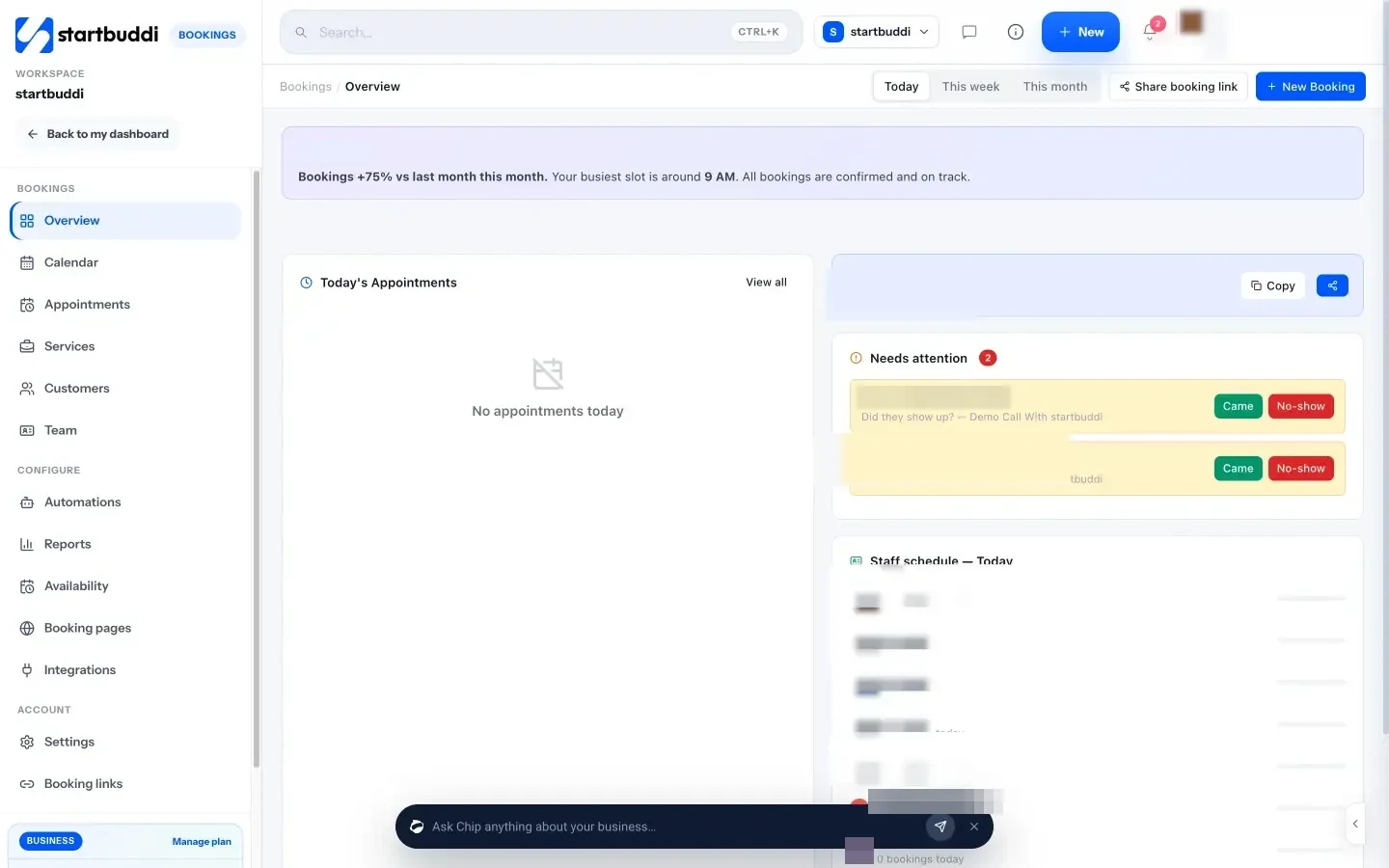
Services can require full payment or a deposit through Paystack or Stripe. Reminder emails go out at the lead time you choose, and no-show and after-booking follow-up emails use templates you can edit. From any booking you can use Generate Invoice to hand it to Money Manager. Reports show total bookings, cancellation rate, repeat customers, peak hours and staff performance, and every booking adds or updates the client in Customers. Bookings are pushed to Google Calendar. You can also ask Chip to set up a service in plain words, and it shows you a preview before saving.
The Free plan includes one live service with unlimited bookings. See pricing for more services and booking pages.
Next step: write down your services, durations, prices and deposit rule, then set up your first service and share the link with your next client.
Related terms
FAQ
Is booking software the same as an online booking system?
They overlap. The online booking system is the page clients use to book. Booking software also includes the tools you use behind it, such as the calendar, staff schedules, reminders and reports.
Is there free booking software?
Many tools have a free tier with limits on services, staff or features. Check what is included, especially payments and reminders, before you commit.
Can booking software take payments?
Most modern booking software can take full payment or a deposit at the time of booking through a payment provider such as Paystack or Stripe.
What if I also take bookings by phone?
Add them to the same software as manual bookings so there is only one diary. That is the best protection against double bookings.
Tiwalade Joanna Okedara-Kalu is the founder, CEO and CTO of startbuddi, the business system that brings clients, bookings, invoices, projects, marketing and the Chip AI assistant into one place. Tiwalade builds software around how service businesses really work day to day, and writes about client management, getting paid on time and why small businesses outgrow the tools they start with.
Founded startbuddi and leads its product and engineering