What is a unified business management system?
Also called: All-in-one business workspace, all-in-one business software, business operating system, business management platform

A unified business management system is a single app that covers the main jobs of running a business, such as customers, marketing, invoices, projects and team, with one login and one shared set of data instead of several separate tools.
A unified business management system (often called an all-in-one business workspace) is one app that handles the main jobs of running a business: keeping track of customers, marketing, sending invoices, running projects and working with a team. Instead of a contact list in one tool, invoices in another and tasks in a third, everything sits in one place and shares the same data.
The key idea is connection, not just convenience. When a customer books a call, pays an invoice or fills in a form, that all shows up on the same customer record, and the rest of the workspace can react to it.
Why a unified business management system matters
Most small businesses don’t choose a messy setup. It grows one tool at a time. A form tool for enquiries, a spreadsheet for clients, an email tool for newsletters, an invoicing app, a project board and a chat app. Each one is reasonable on its own. Together they create problems:
- Copying and pasting: the same customer’s details get typed into four places.
- Nothing talks to anything: a paid invoice doesn’t tell your project board the work can start.
- Many logins and bills: each tool has its own subscription, password and learning curve.
- No single view: to answer “how is the business doing?” you open five tabs.
For founders, freelancers and small teams, the biggest cost is time. An all-in-one workspace aims to give that time back by removing the joins between tools. We compared the numbers in all-in-one workspace vs five separate tools.
How it works: an example
Imagine a small design studio. A potential client fills in an enquiry form on the studio’s landing page. In an all-in-one workspace, this is what can happen next:
- The form answers create a contact in the customer list, with the source saved.
- An automation sends a thank-you email and adds a follow-up task for the owner.
- The client books a call through the booking page, which shows on the same record.
- The studio sends an estimate, then an invoice, from the same place.
- Once the deal is won, a project is created and the team starts work.
With separate tools, each of those steps is a manual handoff, and each one is a chance for something to slip. In one workspace, they are part of the same flow, and the owner can open the client’s record to see the whole story: the enquiry, the call, the estimate, the payment and the project.
What an all-in-one workspace usually includes
| Area | What it covers | Replaces |
|---|---|---|
| Customers | Contacts, companies, deals, inbox | A CRM or spreadsheet |
| Marketing | Email, SMS, WhatsApp, social posts | Separate marketing apps |
| Web presence | Landing pages, forms, bookings, store | Page, form and booking tools |
| Money | Invoices, payments, expenses | An invoicing app |
| Work | Projects, tasks, time, goals | A project board |
| Team | Chat, documents, people | Chat and document apps |
Not every product covers every area, and depth varies. Read the feature list for what is actually live, not just the headline.
When it makes sense, and what to check
An all-in-one workspace is a strong fit if you are starting out, if you are running your business from spreadsheets and chat apps, or if you pay for several tools that don’t connect. It is less of a fit if you already rely on one specialist tool your whole team is trained on, or if you need advanced features in one area only.
Before you choose, check:
- Does one customer record connect everything? This is the difference between a real workspace and a bundle of apps.
- Can you start free and grow? A free plan lets you try it with real work.
- Is it simple enough for your team? A tool nobody opens saves nobody time.
- Does it support the way you get paid? For example local payment providers and your currency.
- Can you get your data out? Look for exports of contacts and records, so you never feel locked in.
A common mistake is moving everything at once. Start with customers and invoices, then add marketing and projects when the basics work. Give one person the job of setting it up, agree simple rules (every client conversation is logged, every job has an owner), and switch off the old tools only once the new habit has stuck for a few weeks.
Related terms
A CRM is the customer part of the workspace. Workflow automation is what lets the parts react to each other. Project management software covers the delivery side.
The all-in-one workspace in startbuddi
This is the idea behind startbuddi, “your first business system”: Customers, Marketing, Publish, Forms, Bookings, Money Manager, Work, Documents, Chat and People in one app, with Chip, the AI assistant, available on every screen.
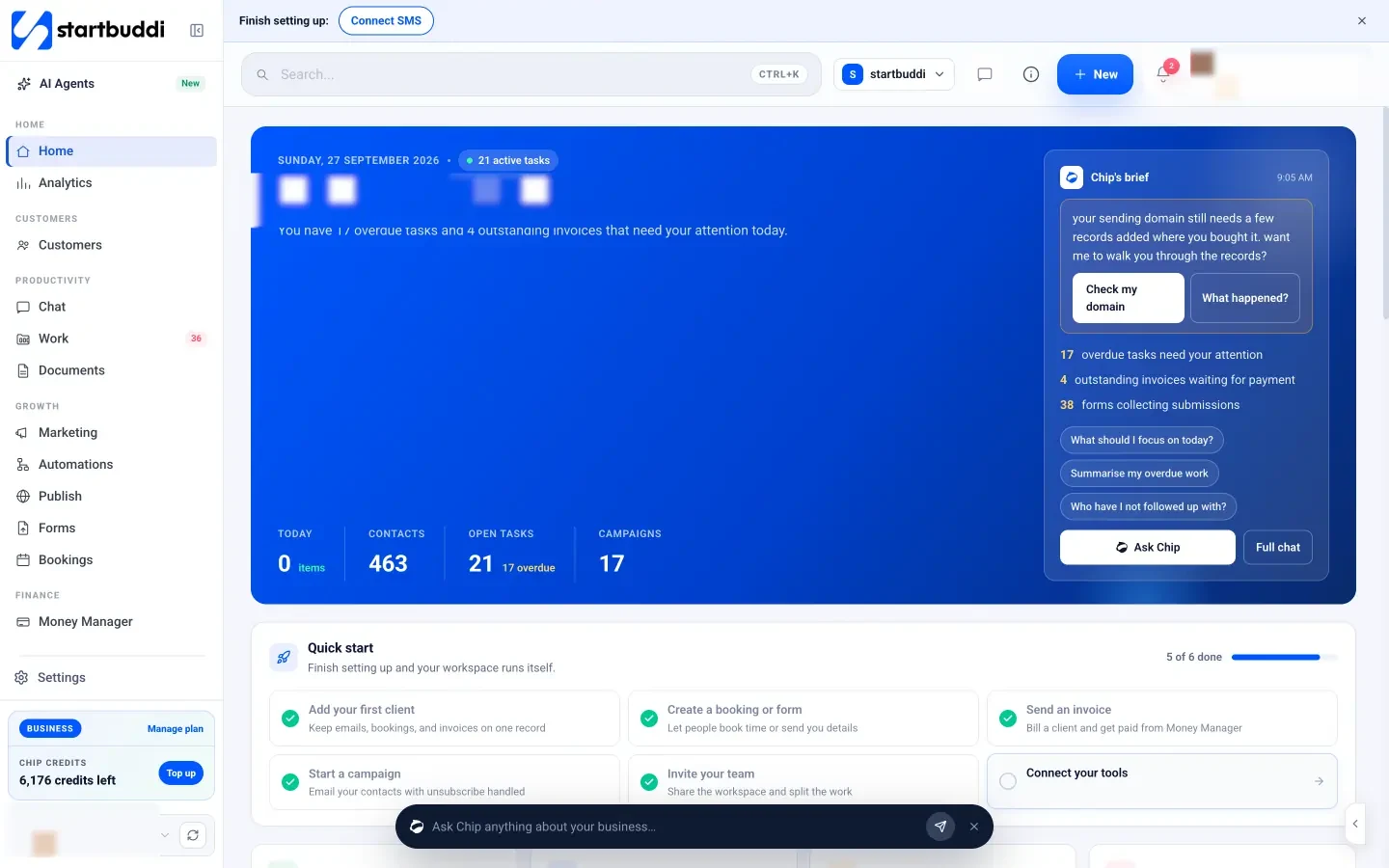
Three things hold it together. First, one contact record: bookings, forms, invoices, inbox conversations and automations all read and write the same customer. Second, one automation engine, so a form, a booking or a payment can start the next step anywhere. Third, the Home dashboard, where Chip’s brief tells you what needs you today: overdue tasks, unpaid invoices and new leads.
You can start on the Free plan, and every paid plan comes with a 30-day trial. See how it replaces separate tools in how startbuddi replaces your CRM, PM, email, invoicing and booking tools, or compare options in our guide to the best all-in-one business software.
Your next step: list the tools you pay for today, then check the startbuddi plans to see which ones one workspace could replace.
Related terms
FAQ
Is a unified business management system the same as a CRM?
No. A CRM manages customers and deals. A unified business management system includes a CRM but also covers marketing, invoicing, projects and team tools, all sharing the same data.
Will I lose features by moving to one app?
Possibly in niche areas. Specialist tools can go deeper in one job. For most small businesses, the time saved by having everything connected matters more than rarely used features.
Can a solo founder use an all-in-one workspace?
Yes. It is often most useful for one-person businesses, because one person is doing every job and has no time to move data between tools.
How long does it take to switch?
Start with your contacts and invoices, which you can often set up in an afternoon. Add marketing, bookings and projects over the following weeks.
Omolola Akiyode is the operations and project manager at startbuddi, leading cross-functional projects and the content that helps founders get set up. Omolola writes about projects, websites and getting found online, and turns complex ideas into clear, practical steps.
Runs operations and projects at startbuddi