What is a money manager app for businesses?
Also called: Business finance app, small business money management software, business finance manager, invoicing and expense app
A money manager app for business is software that brings your invoices, incoming payments, expenses and cash flow into one place, so you can see what came in, what went out and who still owes you without juggling spreadsheets.
A money manager app for business is software that keeps the day-to-day money side of your business in one place: the invoices you send, the payments that come in, the expenses that go out, and a view of what your cash will look like next month. Instead of piecing things together from bank alerts, WhatsApp chats and a spreadsheet, you open one screen and see where you stand.
It isn’t the same as full accounting software. Think of it as the tool you use every day to get paid and control spending, while an accountant (and their software) handles the formal year-end books.
Why it matters for a small business
Most small businesses don’t fail for lack of sales. They get into trouble because money arrives later than expected, costs creep up unnoticed, or nobody chases the invoices that are overdue. A money manager app is built to catch exactly those problems.
- You know who owes you. Unpaid and overdue invoices are listed in one place, not buried in your sent folder.
- You know where money went. Expenses are recorded with categories and receipts, so you can see what’s growing.
- You can look ahead. A simple cash forecast shows whether next month is comfortable or tight.
- You save time. Creating an invoice, taking a payment and recording a cost each take minutes instead of an evening.
How it works: an example
Funmi runs a two-person interior design studio. Here’s a normal week with a money manager app:
- On Monday she sends a client an invoice for ₦450,000 with a pay-online link.
- On Tuesday she buys fabric samples for ₦38,000, records the expense and snaps the receipt.
- On Thursday the client pays by card. The invoice is marked paid and the payment shows up in her list of transactions.
- On Friday she opens the overview. It shows money in and money out this month, one invoice now overdue from another client, and her expected balance in 30 days.
None of this needs accounting knowledge. The app does the adding up, and Funmi makes the decisions.
Key features to look for
| Feature | What it does for you |
|---|---|
| Invoicing | Create, send and track bills, with online payment built in |
| Payment collection | Payment links, card and bank transfer options, and in some apps subscriptions |
| Expense tracking | Record costs with categories and receipts |
| Receivables | See who owes what, what’s due soon and what’s overdue |
| Cash flow view | Compare money in and out over time and project your balance |
| Reports | Profit and loss and spending by category for a period |
| Local payment support | Works with the providers your customers actually use |
Money manager app vs accounting software
Accounting software is built around formal bookkeeping: a general ledger, bank reconciliation, tax filing and year-end accounts. A money manager app focuses on the daily tasks of getting paid and watching spending. Many small businesses start with a money manager app and bring in an accountant, or accounting software, as they grow. Some use both side by side. If you’re comparing options, our list of the best money manager apps for small business is a useful starting point.
Best practices and common mistakes
- Put everything in. The app is only as useful as the data in it. Record cash sales and transfer payments too, not just online ones.
- Keep business and personal money apart. Mixing them makes every report harder to trust.
- Check it weekly. Fifteen minutes on a Friday to review overdue invoices and uncategorised costs keeps things under control.
- Don’t treat it as your tax adviser. It organises your numbers; tax questions still belong with an accountant or your tax authority.
- Choose one tool, not five. Separate apps for invoicing, payments and expenses mean the numbers never quite match.
For more on running finances without a finance team, read our post on managing your finances without an accountant.
Related terms
- Expense tracking: recording each business cost with a category and receipt. See what expense tracking is.
- Invoice: the bill you send to ask for payment. See what an invoice is.
- Cash flow: the timing of money moving in and out of your business.
- Accounts receivable: money customers owe you for invoices not yet paid.
Money Manager in startbuddi
Inside startbuddi there is a module called Money Manager. Its overview shows four numbers (available balance in connected payment accounts, money in, money out and outstanding), a six-month chart of money in against money out, a 30-day cash outlook, and a short list of what needs attention.
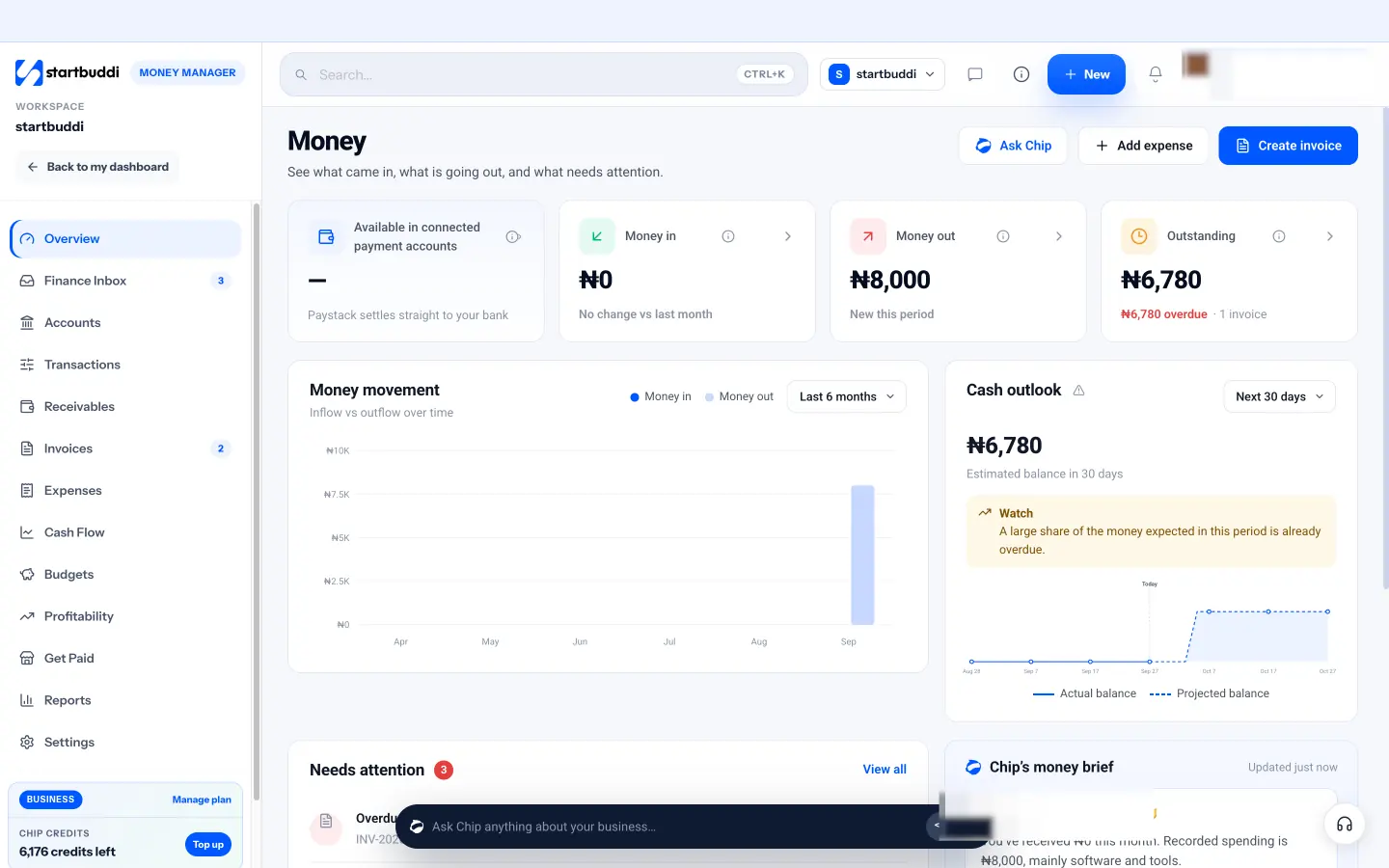
From there you can send invoices that customers pay through Paystack or Stripe, share payment links and a pay me page from Get Paid, record expenses and bills, see who owes you in Receivables, and run profit and loss reports. Payments land in Transactions and link back to what they paid for. Chip, the AI assistant, can summarise your month or help draft a payment reminder. Bank feeds, payroll and tax filing aren’t part of it.
Money Manager is available on every plan. Free includes five invoices a month; Starter and above remove the limit. Take a look at the Money Manager page.
Next step: write down where your invoices, payments and expenses live today. If it’s more than one place, that’s the case for a single money manager app.
Related terms
FAQ
Is a money manager app the same as accounting software?
No. A money manager app handles daily invoicing, payments and expenses. Accounting software adds formal bookkeeping such as a general ledger, reconciliation and tax filing.
Do I need an accountant if I use a money manager app?
Many small businesses still use an accountant for tax returns and year-end accounts. The app makes their job easier because your records are organised.
Can a money manager app connect to my bank?
Some do and some don't. Check before you choose. In startbuddi, you work with connected payment providers like Paystack and Stripe rather than bank feeds.
What's the most important feature for a new business?
Usually invoicing with online payment, because getting paid on time matters most early on. Expense tracking comes a close second.
Tiwalade Joanna Okedara-Kalu is the founder, CEO and CTO of startbuddi, the business system that brings clients, bookings, invoices, projects, marketing and the Chip AI assistant into one place. Tiwalade builds software around how service businesses really work day to day, and writes about client management, getting paid on time and why small businesses outgrow the tools they start with.
Founded startbuddi and leads its product and engineering