What is project management software?
Also called: Project management tool, project tracker, work management software, PM software
Project management software is an app for planning a project, breaking it into tasks, assigning people and dates, and tracking progress, time and budget until the work is delivered, all in one shared place.
Project management software is an app that helps you plan a piece of work, split it into tasks, give those tasks to people, set dates and track progress until it is done. It replaces the spreadsheet, the whiteboard and the “any update on this?” messages with one shared place everyone can see.
The Project Management Institute defines a project as a temporary effort to create a unique product, service or result. A website build, a product launch, a wedding or a kitchen refit are all projects. Project management software is the tool that keeps one on track.
Why project management software matters for a small business
When you have one client, you can keep the plan in your head. With five clients, two freelancers and a supplier, you cannot. Deadlines slip not because people do not care, but because nobody can see the whole picture.
- One source of truth. Everyone sees the same tasks, dates and files, instead of different versions in different chats.
- Fewer surprises. Overdue tasks and at-risk projects show up early, while there is still time to fix them.
- Clear responsibility. Each task has an owner, so nothing is left for “someone” to do.
- Better client relationships. You can answer “where are we?” in seconds, or let the client see progress themselves.
- Healthier margins. Tracking hours and costs against a budget tells you which projects actually make money.
How project management software works: an example
Kemi runs an events company and has just signed a corporate end-of-year party. In her project management software she:
- Creates the project “Harbour Ltd end-of-year party”, links it to the client and sets the event date as the deadline.
- Adds milestones: venue booked, menu approved, invitations sent, event day.
- Breaks milestones into tasks, such as “Shortlist three venues” and “Get catering quotes”, and assigns them to her two coordinators.
- Sets dependencies so “Print invitations” cannot start before “Client approves guest list”.
- Checks the timeline each week to see if anything is slipping, and logs hours and costs against the budget.
- Shares progress with the client through a portal instead of long update emails.
Key features to look for
| Feature | Why it helps |
|---|---|
| Tasks with owners and due dates | The basic building block: who does what, by when. |
| Board, list and calendar views | Different people like to see work differently. |
| Timeline (Gantt chart) | Shows how tasks depend on each other and what happens if one slips. |
| Milestones | Big checkpoints that tell you and the client how far along you are. |
| Templates | Reuse the plan from your last similar project instead of starting from zero. |
| Time and budget tracking | Shows whether the project is on budget and profitable. |
| Files and comments | Keeps decisions and documents next to the tasks they belong to. |
| Reports and workload | Shows progress across projects and who has too much on. |
| Client access | Lets clients follow along and approve work without email chains. |
Types of project management software
- Simple task boards focus on kanban-style lists. They are quick to learn but can struggle with dates, budgets and dependencies.
- Full project management tools add timelines, resource planning and reporting. They suit teams running several projects at once.
- All-in-one business tools include projects alongside customers, invoices and messaging, so a won deal can become a project and a project can become an invoice without copying data around. See what an all-in-one business workspace is.
Common mistakes when choosing and using it
- Buying for features you will never use. A small team needs clarity more than a hundred settings.
- Not getting everyone in. If half the team still works from WhatsApp, the software only shows half the truth.
- Tasks without dates or owners. They quietly pile up and make the whole board look unreliable.
- Keeping clients in the dark. A weekly progress share saves more time than it costs.
- Ignoring the budget. Many small businesses finish projects on time and still lose money on them.
Related terms
A task management system handles individual to-dos; project management software organises them into projects. Agile project management is a way of working in short cycles that many tools support with sprints and boards. A client portal gives clients their own view of the project. For a longer read, see project management for agencies.
Project management software in startbuddi
Projects in startbuddi live in Work, under Projects. The list shows every project with its owner, due date, progress and health, plus a Portfolios view that puts projects side by side with budget and hours used.
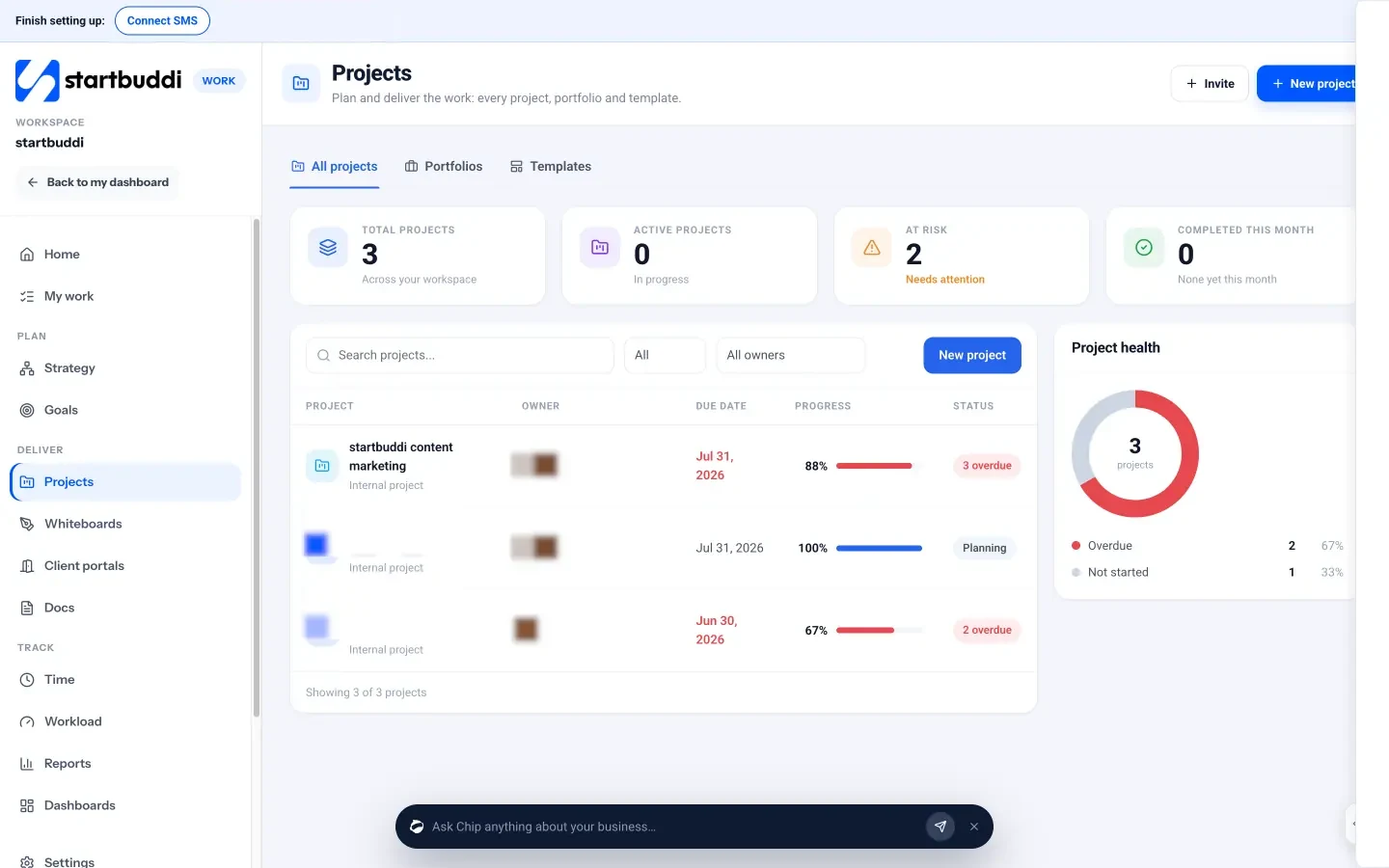
You can start from one of 14 templates (such as Client delivery, Website project or Event planning) or a blank project. Inside a project there are tabs for tasks, a Gantt-style timeline with dependencies and a critical path view, sprints, milestones, a budget that combines logged hours with expenses from Money, activity, linked documents and a client portal. Every project also gets its own discussion room in Chat.
Your next step: move one live client project into startbuddi, add its milestones and owners, and review the timeline at the end of the week. You can start free from the pricing page.
Related terms
FAQ
Do small businesses need project management software?
Once you run more than a couple of projects at a time or work with other people, it usually pays for itself in fewer missed deadlines and less time spent chasing updates.
What is a Gantt chart?
A Gantt chart shows tasks as bars along a timeline, so you can see how long each one takes, which tasks depend on others and what moves if one slips.
What is the difference between project management and task management software?
Task management focuses on individual to-dos. Project management groups tasks into projects with milestones, timelines, budgets and reports.
Can clients see my project?
Many tools let you share progress with clients. In startbuddi you do this through a client portal, where clients see only what you choose to share.
Tiwalade Joanna Okedara-Kalu is the founder, CEO and CTO of startbuddi, the business system that brings clients, bookings, invoices, projects, marketing and the Chip AI assistant into one place. Tiwalade builds software around how service businesses really work day to day, and writes about client management, getting paid on time and why small businesses outgrow the tools they start with.
Founded startbuddi and leads its product and engineering