What is timesheet software?
Also called: Time tracking software, online timesheet app, time sheet system, employee time tracker
Timesheet software is a tool for recording the hours people work, usually by day, task and project, with timers or manual entries. It replaces paper and spreadsheet timesheets and shows total, billable and team hours at a glance.
Timesheet software is a tool for recording how many hours people work and what they work on. Instead of filling in a paper form or a spreadsheet at the end of the week, you start a timer on a task or log hours as you go, and the software adds everything up by day, project, client and person.
It’s used by freelancers who bill by the hour, agencies that need to know which clients are profitable, and small teams that want a fair, simple record of working time.
Why timesheet software matters for a small business
A timesheet answers a simple question: where did the hours go? For a small business, the answer affects money directly.
- Accurate billing. If you charge by the hour, every untracked hour is lost income. A proper record of billable hours also makes your invoices easy to defend.
- Honest project costs. Knowing a website took 80 hours rather than the 50 you quoted tells you what to charge next time.
- Fair workloads. Team hours show who is stretched and who has room before someone burns out.
- Records you may need. Employers often need to show working time. In the UK, for example, Acas explains that employers must keep records showing they follow working time limits, and keep them for two years. Rules differ by country, so check locally. This is general information, not legal advice.
How timesheet software works
Most tools offer two ways to record time:
- A timer. Pick the task, press start, press stop when you’re done. The software records the exact duration.
- Manual entry. Type in the time (say 1 hour 30 minutes), the date, the task and a short note. Useful when you forgot to start the timer or worked away from your desk.
Each entry is tied to a task or project and marked billable or not. The software then builds a weekly timesheet: a grid of tasks down the side, days across the top, with totals for each day and the week.
An example
Amara runs a three-person content agency. Each writer starts a timer when they begin a client article and marks it billable. At the end of the week Amara sees 96 hours logged across the team, 71 of them billable, with one client’s blog project taking twice the hours of any other. That tells her to either raise that client’s price or tighten the brief.
Key features of timesheet software
| Feature | Why it matters |
|---|---|
| One-click timer | Makes tracking quick enough that people actually do it |
| Manual time entry | Covers work done away from the computer |
| Link to tasks and projects | Shows what the time was spent on, not just how much |
| Billable flag | Separates chargeable time from admin |
| Weekly view | Hours by task and day, with totals |
| Team view | Lets managers see everyone’s hours in one place |
| Project budgets | Compares time used with time planned |
Timesheets vs attendance tracking
The two are easy to confuse. Attendance tracking records when someone clocked in and out, or whether they were in the office, remote or on leave. Timesheets record what they worked on. Being present for eight hours is not the same as eight hours on client work, which is why many businesses use both.
Best practices and common mistakes
- Track as you go. Filling in a week from memory on Friday is the most common reason timesheets are wrong.
- Keep it light. If logging time takes more than a few seconds, people stop doing it.
- Explain why. Tell your team the goal is better pricing and fairer workloads, not watching them. Timesheets used to blame people rarely stay accurate.
- Add short notes. “Client call about homepage changes” is far more useful than a bare number.
- Review weekly. A quick look at the team total catches missing entries while people still remember.
- Use the data. Compare hours with quotes after each project and adjust your prices.
Not ready for software yet? Our free timesheet template is a simple way to start. If you’re comparing tools, read our post on what to look for in timesheet software.
Related terms
- Billable hours: the hours you can charge a client for. See what billable hours are.
- Utilisation rate: billable hours as a share of total hours worked.
- Project management software: where tasks and projects live, which timesheets attach to. See what project management software is.
- Attendance tracking: recording presence, clock-in and leave, rather than work done.
Timesheets in startbuddi
In startbuddi, time tracking sits inside Work, right next to your tasks and projects. On the Time page you pick a task and press Start timer, or use Log time to enter hours, a date, a note and a Billable tick. The week view shows total hours, billable hours and billable value, with a grid of hours by task and day, and you can step back or forward a week.
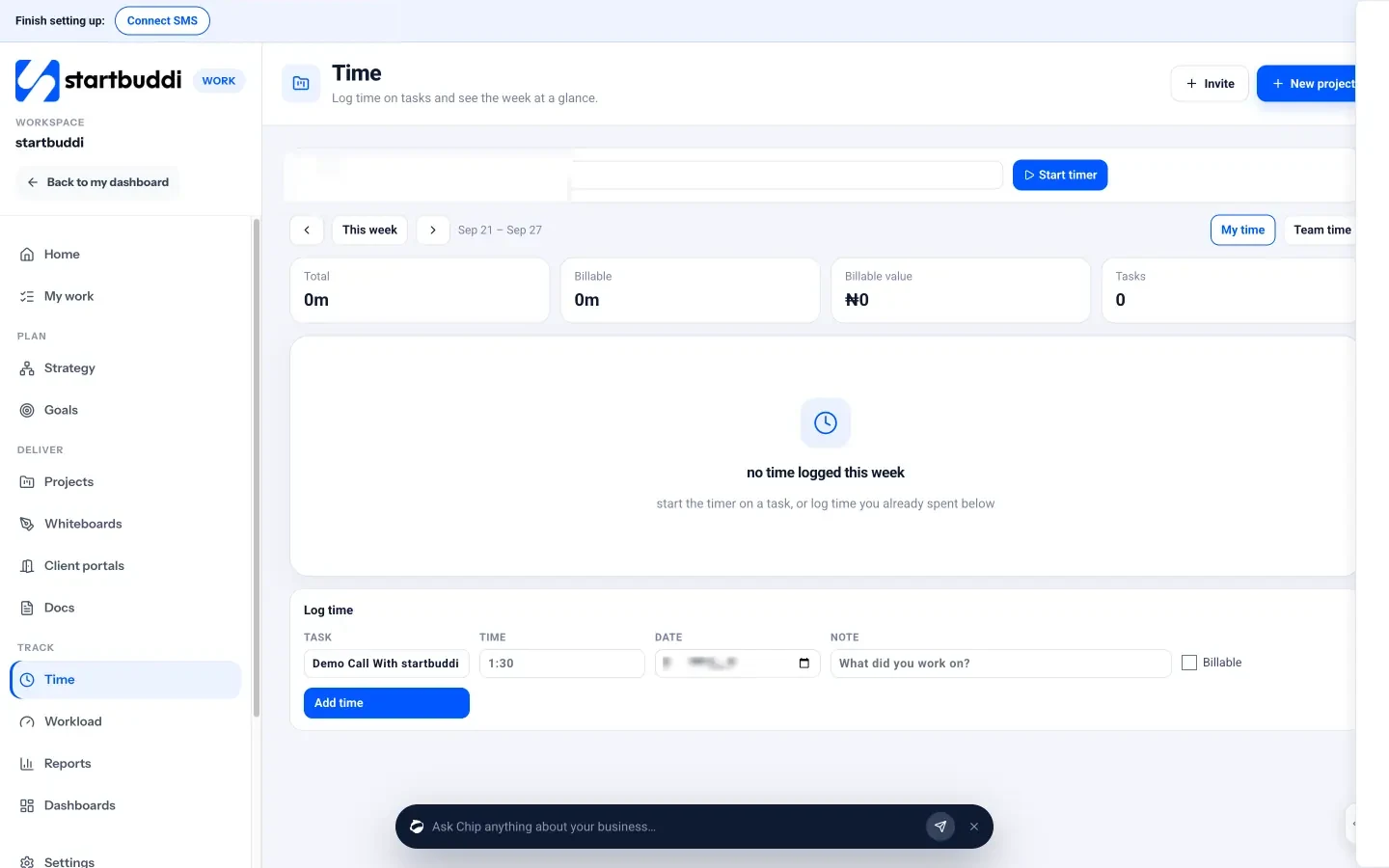
Managers, admins and owners can switch to Team time to see everyone’s hours. Each project’s Budget tab turns logged time into time spent so far. If you also need clock-in and attendance, the People module has leave and attendance tools that link to Work timesheets.
Find out more on the time tracking page.
Next step: ask everyone on your team to track one normal week with a timer, then sit down together and compare the hours with what each project was quoted.
Related terms
FAQ
What's the difference between a timesheet and time tracking?
Time tracking is the act of recording hours, often with a timer. A timesheet is the summary that results, usually hours by task and day for a week.
Do freelancers need timesheet software?
If you bill by the hour, yes, it protects your income. Even on fixed prices, it shows whether a job was worth what you charged.
Is timesheet software a way to monitor staff?
It shouldn't be. The best use is pricing work properly and balancing workloads. Screen or keystroke monitoring is a different kind of tool.
Can timesheets replace attendance records?
Not always. Timesheets show work done, while attendance shows presence and leave. Many businesses keep both.
Tiwalade Joanna Okedara-Kalu is the founder, CEO and CTO of startbuddi, the business system that brings clients, bookings, invoices, projects, marketing and the Chip AI assistant into one place. Tiwalade builds software around how service businesses really work day to day, and writes about client management, getting paid on time and why small businesses outgrow the tools they start with.
Founded startbuddi and leads its product and engineering