Timesheets for agencies: what to track, and what to look for in timesheet software
How agencies can use timesheets to find unprofitable clients, protect retainers and balance workload: what to track, the software features that matter and what tools cost.


Chinonye wrote this while on the startbuddi team. The product has changed since, so the team updated it on .
- Agencies sell time, even on retainers. Choose timesheet software that links every hour to a client, project and task, makes logging fast, and shows billable value, budgets and workload. Log daily, review weekly, and compare dedicated tools with an all-in-one workspace.
Timesheets for agencies record how long each person spends on each client, project and task, mark what can be billed, and, with the right software, turn those hours into reports on profit, budgets and workload. The right tool is one your team will actually fill in every day, that ties time to the client work it belongs to, and that tells you quickly whether a retainer or fixed-fee project is making money.
This guide covers why agencies need timesheets even when they don’t bill by the hour, the features that matter in 2026, how popular tools price their plans, and how to roll one out without a team revolt.
Why agencies need timesheet software
Agencies sell time, even when the invoice says “monthly retainer” or “website project”. Every hour spent on a client either earns money or eats margin. Without timesheets, you only find out which clients are unprofitable when the team is exhausted and the bank balance is thin.
Memory is also a poor timesheet. In a 2021 study published in the Journal of Medical Internet Research, 18 physicians used an app that recorded their work hours automatically. When asked to recall their hours, they reported about 9 hours less than the app recorded for the previous week, and the share of hours they failed to recall was higher for the week before that. Doctors aren’t agency staff, but the lesson carries over: the longer you wait to fill in a timesheet, the more hours go missing.
Good timesheet data helps an agency to:
- Bill accurately on hourly and time-and-materials work.
- Protect retainers by showing when a client uses more hours than the fee covers.
- Price the next project on what similar work really took.
- Balance workload before someone burns out.
- Meet record-keeping rules for employees where they apply.
Key numbers: billable hours, utilisation and effective rate
Three numbers turn timesheets into decisions. You don’t need a finance degree to use them.
| Number | How to work it out | What it tells you |
|---|---|---|
| Billable hours | Hours logged on client work you can charge for | How much of the week turns into revenue |
| Utilisation | Billable hours divided by available hours | Whether people are overloaded, or spending too long on admin |
| Effective hourly rate | Fee received divided by hours logged on that client | Which clients and projects actually pay well |
Here’s an example. A designer works 40 hours and logs 28 on client work. Utilisation is 70%. One client pays a $2,000 monthly retainer and took 50 hours this month, so the effective rate is $40 an hour. Another pays $1,200 and took 15 hours, an effective rate of $80. Without timesheets, the bigger retainer looks like the better client. With them, you know which one to renegotiate.
The same maths works in any currency: a ₦1,500,000 retainer that takes 60 hours earns ₦25,000 an hour, and a £1,500 retainer that takes 30 hours earns £50. For a deeper look at the definitions, see what are billable hours and what is timesheet software.
What to look for in timesheet software
Time linked to clients, projects and tasks
The most important feature isn’t the timer. It’s where the time goes. Look for a tool where every entry belongs to a task, inside a project, for a client. Then reports by client and project come for free, and nobody has to tag entries later.
Fast entry: timer and manual logging
Some people like a running timer. Others prefer to log “1:30 on the homepage copy” at the end of a block of work. Your tool should support both, on desktop and mobile, with as few clicks as possible. If logging time takes longer than a minute, people will stop.
Billable flag and rates
Each entry should be marked billable or not, and the tool should turn billable hours into a money value using your rates. That’s what lets you see the value of a week’s work at a glance.
Team view and approvals
Managers need to see the whole team’s week: who logged what, and who hasn’t logged at all. Some tools add formal timesheet approval, where a manager signs off each week before it’s billed. Decide whether you need that, because it often sits on higher-priced plans.
Budgets and burn-down
For fixed-fee projects and retainers, look for project budgets that compare hours logged against hours planned, so you can warn a client before the budget runs out, not after.
Workload and capacity
Timesheets look backwards. A workload view looks forwards, showing who has too much assigned next week. Together they stop the “everyone’s busy but we’re not making money” problem.
Invoicing
If you bill by the hour, check how time becomes an invoice. Some tools create invoices straight from logged hours. Others make you copy totals across. Neither is wrong, but know which you’re getting.
Reports you can share with clients
Retainer clients often ask, “What did we get for our money this month?” A report of hours by project and task, with short notes, answers that question in minutes. Check that you can filter by client and date range, and export the result.
Remote and mixed teams
Many small agencies mix employees, freelancers and staff in different countries. Check that the tool works on phones, handles different time zones sensibly, and lets you add a freelancer to one project without giving them access to everything. Also check how seats are priced for part-time people, because per-seat pricing can make occasional contributors expensive.
Timesheet tools and what they cost
Most dedicated timesheet tools charge per person per month. These are the published starting prices from each vendor’s pricing page in September 2026; check the page before you buy, as prices change.
| Tool | Published starting price | Free plan |
|---|---|---|
| Harvest | Teams $9 per seat a month billed monthly, or $108 per seat a year | Yes: 1 seat, 2 projects |
| Toggl Track | Starter $9 per user a month | Yes, for a limited number of users |
| Clockify | Basic $3.99 per seat a month billed annually, or $4.99 billed monthly | Yes |
| startbuddi | Time tracking is part of Work; Starter includes 2 seats, Growth 5 and Scale 15 (see pricing) | Yes, 1 seat |
A dedicated timesheet tool is often the right choice if you already have a CRM, project tool and invoicing you’re happy with. If you’re juggling separate tools for all of those, compare the combined cost with one workspace. Our researched list of timesheet software for agencies goes into more tools.
Timesheets and employment records
If you employ staff, timesheets can also be part of your legal records. The rules depend on where you are, so treat this as general information, not legal advice, and check with the official body in your country.
- United States: under the Fair Labor Standards Act, employers must record hours worked each day and each workweek for non-exempt employees, according to the US Department of Labor.
- United Kingdom: most workers can’t be made to work more than 48 hours a week on average unless they opt out, and the employer must keep a record of the opt-out, according to GOV.UK.
- Elsewhere: check your labour ministry or employment regulator. Rules on overtime and records differ between countries, and sometimes between states.
Contractors and freelancers you hire usually submit their own timesheets or invoices. Agree in writing how they’ll log time before the first project starts.
Non-billable time is worth tracking too
It’s tempting to track only billable hours. Resist it. Non-billable time is where agency margins quietly disappear, and it’s the part you can change most easily.
- Pitches and proposals. If winning a new client takes 20 hours of unpaid work, you need to know that before you pitch for a small job.
- Client communication. Calls, emails and voice notes that fall outside the agreed scope. Tracking them gives you evidence when you raise a retainer fee.
- Revisions beyond the agreed rounds. Log them against the project so they show up in the budget, then decide whether to bill them as extras.
- Internal admin. Invoicing, hiring, meetings and tool wrangling. If admin grows every month, that’s a sign to automate or simplify.
- Your own marketing. Posts, case studies and your website. These are investments, and it helps to know what they cost.
A simple rule: every hour goes somewhere. If it isn’t a client, it’s one of four or five internal categories. That keeps the data complete without making logging a chore.
Common timesheet mistakes agencies make
- Buying a tool nobody opens. A tool with every feature fails if logging takes too long. Test speed of entry first.
- Tracking time with no one looking at it. If nobody reviews the numbers, the team notices and stops logging carefully.
- Using timesheets to punish. Calling people out for low hours in front of the team kills honest logging. Talk privately and look for causes, such as unclear briefs or too many meetings.
- Keeping time apart from the project. If time lives in one app and tasks in another, someone has to match them up, and it rarely happens.
- Ignoring scope creep. Hours creeping above budget are the earliest warning you’ll get. Our guide on project management for agencies covers how to keep scope in check.
How to roll out timesheets without a team revolt
Timesheets fail when people see them as surveillance. They succeed when people see them as protection from overwork and bad pricing. Here’s a rollout that works for small agencies:
- Explain why. Tell the team you want to find unprofitable clients and overloaded people, not to count minutes. Share what you’ll do with the data.
- Keep categories few. Clients, projects, and a handful of internal categories such as sales, admin and training. Too many options slow logging down.
- Log daily. Make “log today’s time” the last task of the day. The recall study above shows why weekly catch-up doesn’t work.
- Agree rounding. Fifteen-minute blocks are common. Pick one rule for everyone.
- Review weekly, together. Spend ten minutes in your weekly meeting looking at utilisation and budgets. Act on what you see, so the team knows the data matters.
- Lead by example. If the founder doesn’t log time, nobody will.
If your agency is also working out how to track billable time without spreadsheets, our older post on tracking billable hours without a spreadsheet covers the basics.
How startbuddi helps with timesheets
startbuddi includes time tracking inside Work, the same place your projects, tasks and client portals live. Because every entry belongs to a task, time is already attached to the right project and client. See timesheet software for agencies for the overview.
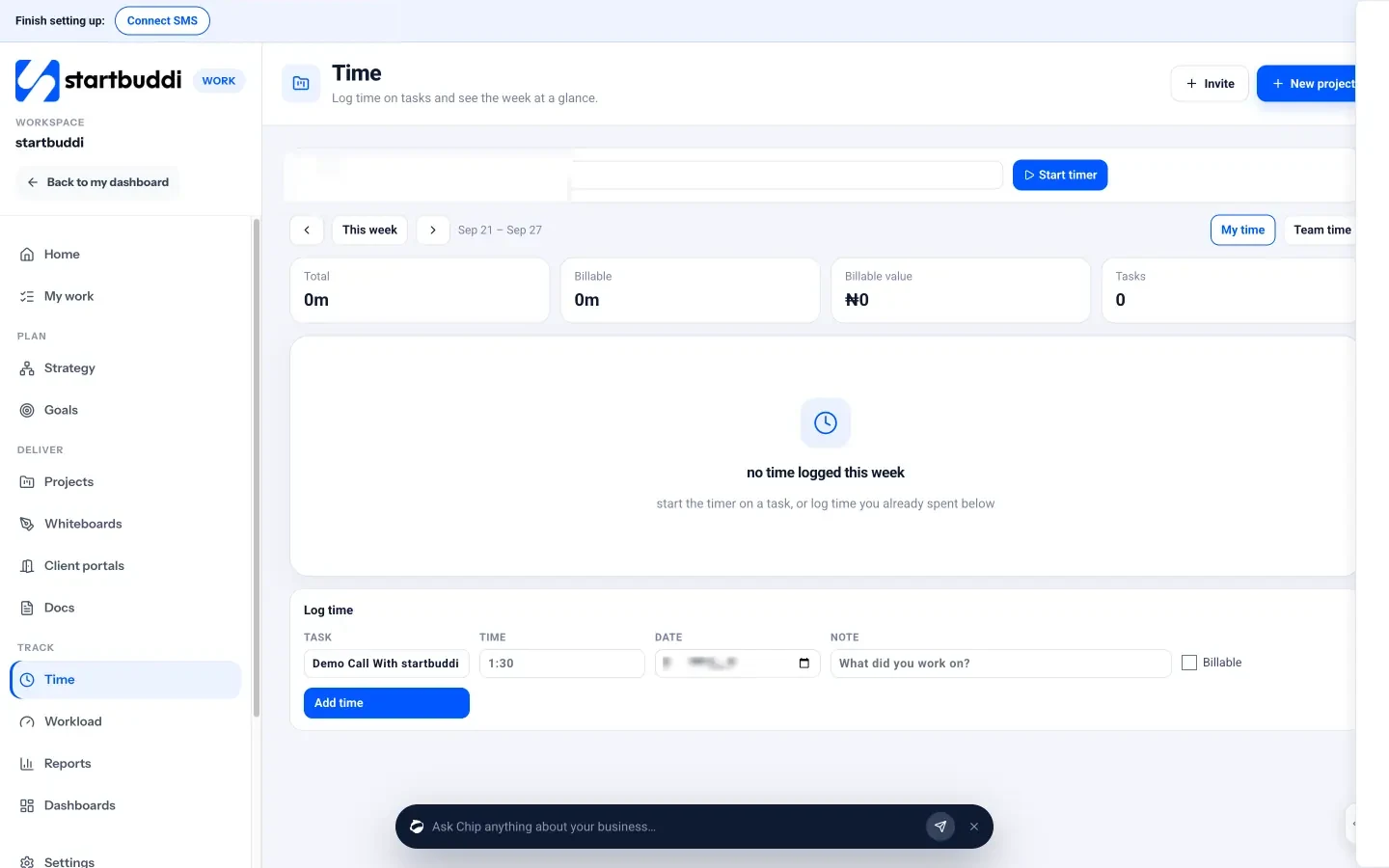
- Timer or manual entry. Pick a task and click Start timer, or use Log time to add hours you already spent, with a date, a note and a Billable tick box.
- Week at a glance. Totals for the week show total hours, billable hours, billable value and tasks, with a grid by task and day.
- My time and Team time. Everyone sees their own week. Managers, admins and owners can switch to Team time.
- Project budgets. A project’s Budget tab turns logged time into time logged, spent so far and cost to complete, with an hours burn-down.
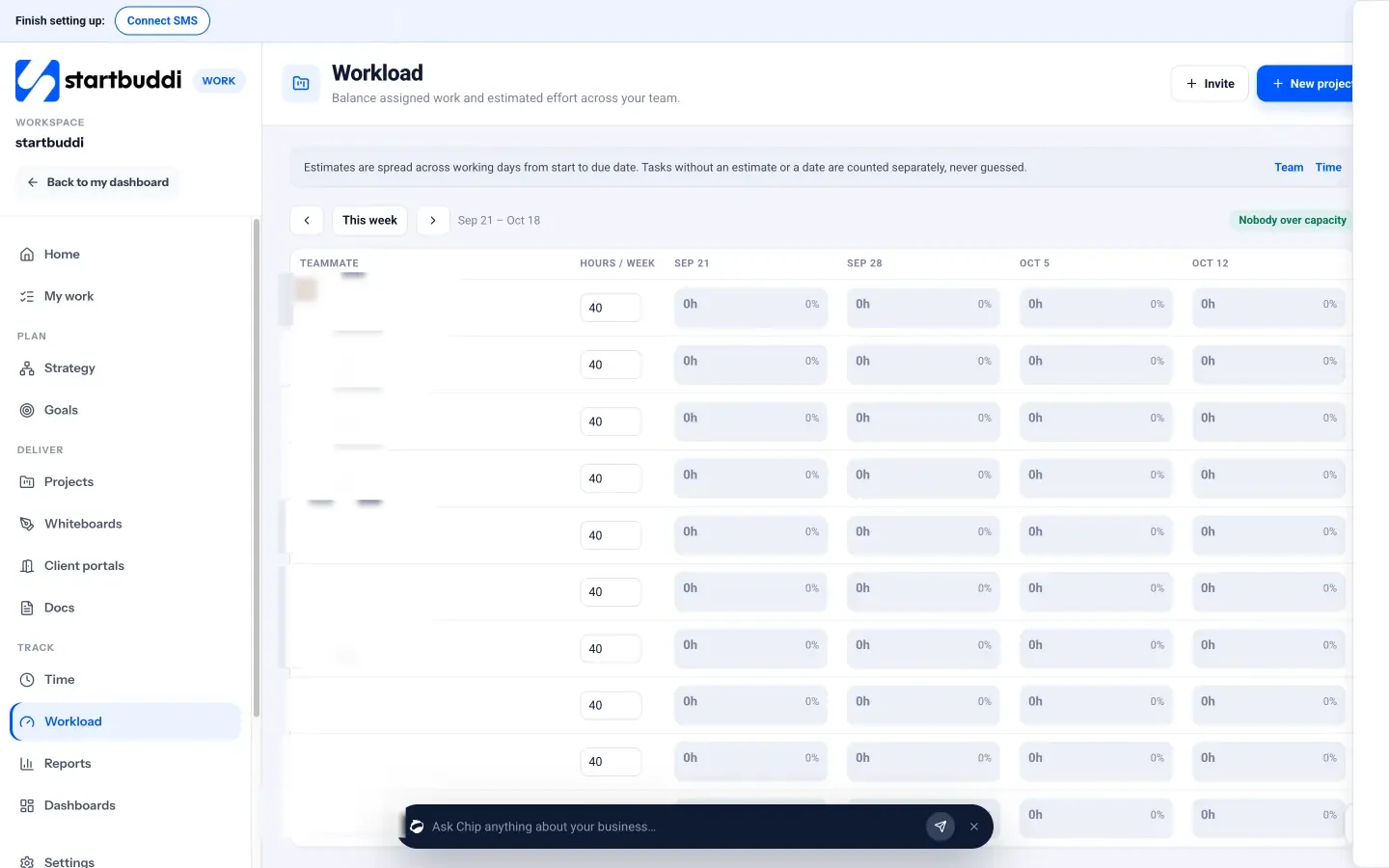
- Workload and reports. Workload shows each teammate’s hours per week against capacity, and Reports shows project progress, task status and overdue work.
Because startbuddi also runs your clients and invoicing, the client, the project, the hours and the invoice live in one account instead of four.
Honest limits
Know what’s missing before you switch. There’s no button that turns logged time into an invoice yet, so you create the invoice and add the hours yourself. There’s no formal weekly timesheet approval step. Seats also matter: Free includes one seat, Starter two, Growth five and Scale 15, so a larger team needs Scale or an Enterprise plan. If you need approvals or automatic time-based invoicing today, a dedicated tool such as those above may suit you better, alongside your other systems.
For agency-specific setups, see timesheet software for agencies, which covers billable hours tracking for teams.
Your next step
Pick your two worst-feeling clients and log every hour on them for the next two weeks, in any tool. Then work out the effective hourly rate. If you want the timer, projects and invoices in one place, you can start on the Free plan or try a paid plan free for 30 days from the pricing page.
Sources
- Journal of Medical Internet Research (2021): Assessing physicians’ recall bias of work hours with a mobile app
- US Department of Labor: Recordkeeping requirements under the FLSA
- GOV.UK: Maximum weekly working hours
- Harvest pricing
- Toggl Track pricing
- Clockify pricing
Frequently asked questions
Do agencies on retainers need timesheets?
Yes. Timesheets show how many hours each retainer really uses, so you can spot clients who cost more than they pay and renegotiate early.
What is a good utilisation rate for an agency?
It depends on the role. Delivery staff can carry more billable hours than managers or salespeople. Track your own numbers for a few months and set targets from them.
How often should staff fill in timesheets?
Daily. Hours recalled at the end of the week are less accurate and usually come out lower than the time really spent.
Can startbuddi turn logged time into an invoice?
Not automatically yet. You can see billable hours and their value in Time, then create the invoice in Money Manager.
SEO Copywriter| Email growth Specialist| I help businesses increase revenue with strategic SEO content & high-converting email funnels.