How to track billable hours without a spreadsheet
A practical system for small teams to track billable hours as they work, watch utilisation and realisation, and turn tracked time into invoices clients accept.


- Spreadsheet timesheets leak money because time is entered from memory, formulas break and hours aren't tied to the work. Agree your rules first, capture time the same day against client, project and task, review weekly, and invoice from the weekly totals.
To track billable hours without a spreadsheet, record time at the moment you do the work, against a client, project and task, with a billable flag and a rate attached. Let a time tracker add it up, check it once a week, and build your invoices from those weekly totals. The difference from a spreadsheet isn’t the software. It’s that time is captured as it happens, tied to the work, and visible to everyone who needs it.
This guide is for small agencies, consultancies and service teams who bill some or all of their work by the hour. It covers where spreadsheet timesheets leak money, the three numbers worth watching, how to set up your rules before you track a single minute, a weekly routine for a small team, and how to turn hours into invoices clients don’t argue with.
Why spreadsheet timesheets leak money
Spreadsheets are where most teams start, and for a solo freelancer with three clients they can be enough. As soon as a few people are logging time, the cracks show:
- Time is entered from memory. Most spreadsheet timesheets are filled in on Friday afternoon, or the day before invoicing. Short calls, quick fixes and email replies are the first things forgotten.
- Formulas break quietly. Raymond Panko, who has studied spreadsheet mistakes for years, summed up the research in his review “Spreadsheet Errors: What We Know. What We Think We Can Do”: fifteen years of studies agree that spreadsheet errors are common and not trivial. A timesheet with a wrong total means a wrong invoice.
- There are too many copies. “Timesheet_final_v3_Tunde.xlsx” lives on one laptop. The manager’s master copy is already out of date.
- Time isn’t linked to the work. A row that says “Client A, 3 hours, design” can’t tell you which task, whether it was in scope, or how much of the project budget is left.
- Rates live somewhere else. Someone has to look up who charges what, multiply, and hope the rate card is current.
Each of these is small. Together they mean hours worked never turn into money received.
The three numbers that tell you where hours go missing
Law firms have measured billable time for decades, and their industry reports are a useful benchmark for any business that sells hours. Clio’s Legal Trends benchmarks track three rates, and they work for agencies and consultants too:
| Number | What it measures | Clio’s 2025 law firm figure |
|---|---|---|
| Utilisation | Billable hours recorded as a share of hours available | 38%, about 3.0 hours of an 8-hour day |
| Realisation | Billable hours actually invoiced, as a share of hours recorded | 88%, about 2.6 hours a day |
| Collection | Invoiced hours actually paid, as a share of hours invoiced | 93%, about 2.4 hours a day |
Your numbers will differ, and a design agency isn’t a law firm. The point is the shape: time leaks at three separate stages. Some work is never recorded, some recorded time is never billed (written off, discounted or forgotten), and some billed time is never paid.
A quick example. A three-person studio in Manchester has 360 available hours a month and charges £60 an hour. If it records 180 billable hours (50% utilisation), bills 160 of them (89% realisation) and collects 150 (94% collection), it earns £9,000. Recording just 20 more hours a month, which is about 20 minutes per person per working day, is worth £1,200 before anything else changes. The same logic applies at $85 an hour in Toronto or ₦25,000 an hour in Abuja.
A spreadsheet makes the first leak worst, because it depends on memory. A tracker that runs while you work closes most of it.
Set your rules before you track anything
Most time-tracking projects fail because the team starts logging hours before agreeing what to log. Spend an hour deciding these five things and write them down.
1. Your structure
Time should always sit under client, then project, then task. Tasks should be meaningful units of work (“homepage wireframes”, “March payroll run”), not vague buckets like “admin”. If a task takes more than a couple of days, break it up.
2. What counts as billable
Agree the grey areas: client calls, travel, internal reviews, fixing your own mistakes, revisions beyond the agreed rounds. Put the answers in your contracts too, so clients aren’t surprised. Our glossary entry on billable hours has a longer list of common cases.
3. Rates
Decide whether rates are per person, per role, per client or per project, and where the current rate card lives. If you’re unsure what to charge, the hourly rate calculator works backwards from your costs and target income.
4. Rounding
Pick an increment (6, 10 or 15 minutes are common) and say in your contract whether you round each entry or each day’s total. Round consistently, and never round every entry up by default: clients who see a list of 15-minute entries for two-minute emails will stop trusting the whole invoice.
5. Notes
Every entry gets a short note in plain words: “revised pricing table after client call”, not “stuff”. Notes are what make an invoice defensible when a client asks what they’re paying for.
| Rule | Example decision |
|---|---|
| Structure | Client, then project, then task. No time without a task. |
| Billable calls | Client calls about the project are billable. Sales calls are not. |
| Revisions | Two rounds included. Further rounds billable at the standard rate. |
| Rounding | Round each day’s total per task to the nearest 15 minutes. |
| Notes | One sentence, written so the client would understand it. |
| Deadline | Time logged by 5pm each Friday. |
Pick a capture method that fits how you work
There are three ways to get time into a system, and most teams use a mix:
- A running timer. Start it when you begin a task, stop it when you switch. Best for focused project work. The risk is forgetting to stop it, so check the day’s entries before you log off.
- Manual entries the same day. Log “1:30 on homepage wireframes” as soon as you finish. Best for people who switch tasks constantly or work away from a computer.
- Calendar-based entries. Turn meetings and calls into time entries at the end of the day. Good for consultants whose day is mostly meetings.
The rule that matters is “same day”. Time logged within a few hours is accurate. Time logged at the end of the week is a guess.
If you only need a timer, dedicated trackers such as Toggl Track, Clockify and Harvest exist for exactly this. The trade-off is another tool to connect to your projects and invoicing. Our list of timesheet software and the post on what agencies should look for in timesheet software go through the options.
A weekly routine for a small team
Tracking only pays off if someone looks at the numbers. A 20-minute routine each Friday is enough for most teams of two to fifteen people:
- Everyone, 5 minutes: check your week. Fill any gaps, fix any timers left running, make sure every entry has a task, a billable flag and a note.
- Team lead, 10 minutes: look at the team’s week. Who’s logged far fewer hours than usual (missing entries, or overloaded with unbillable work)? Which projects are burning through their hours budget faster than planned?
- Whoever invoices, 5 minutes: note billable totals per client, flag anything that needs a conversation before it goes on an invoice, such as work outside the agreed scope.
Once a month, calculate your utilisation and realisation. You don’t need exact figures. A trend over three months tells you more than any single number.
Track non-billable time too
It’s tempting to log only the hours you can charge for. Don’t. Proposals, sales calls, internal meetings, admin and learning all take time, and if you can’t see them you can’t plan around them. A team member who logs 22 billable hours in a 40-hour week isn’t slacking if the other 18 went on pitching for new work; they may be your best salesperson. Tracking both kinds also tells you whether your fixed-price quotes are realistic, because you can compare the hours a job actually took with the hours you priced it at. If the gap keeps growing on one type of project, raise the price or change the scope before the next quote goes out.
From tracked hours to an invoice clients accept
A good hourly invoice answers the client’s three questions before they ask: what did you do, how long did it take, and does that match what we agreed?
Summary or detailed lines?
Most small businesses do well with one line per task or phase, showing hours, rate and amount, plus a short description. Keep the detailed entry-by-entry log ready to share if the client asks. Some clients, especially larger companies and anyone billed on a retainer with an hours cap, will want the detail every time. Ask at the start.
| Description | Hours | Rate | Amount |
|---|---|---|---|
| Homepage and pricing page wireframes, two revision rounds | 11.5 | $85 | $977.50 |
| Client workshop and follow-up notes (6 March) | 3.0 | $85 | $255.00 |
| Additional revision round (requested 12 March) | 2.5 | $85 | $212.50 |
Retainers with an hours cap
If you sell a monthly block of hours, report hours used against the cap on every invoice, and agree in advance what happens to unused hours and to overage. Clients are far happier to pay for extra hours when they’ve seen the balance going down all month. Our agency retainer agreement template includes clauses for both.
Invoice on a rhythm
Weekly or fortnightly invoicing for hourly work keeps amounts smaller and disputes fresher. Waiting until the end of a three-month project turns one easy conversation into a difficult one. For practical tips on layout and payment terms, see how to create a professional invoice that gets paid faster.
How to move off the spreadsheet in a week
- Day 1: write your rules (the table above) and set up clients, projects and main tasks in your new tool.
- Day 2: add rates. Import nothing from the old spreadsheet except the list of active projects and any hours budgets.
- Days 2 to 5: everyone tracks in the new tool only. Keep the old spreadsheet read-only for reference.
- Day 5: run the Friday routine. Fix what confused people.
- Next invoice run: invoice from the new totals. Archive the spreadsheet.
Don’t try to migrate old time entries. Close last month in the spreadsheet, start this month clean.
How startbuddi helps you track billable hours
In startbuddi, time tracking lives inside Work, next to your projects and tasks, and your invoices live in Money Manager in the same account. Here’s what that looks like, including what it doesn’t do.
Time logged against tasks
Open Work, then Time. Pick a task and click Start timer, then Stop when you switch. Or use Log time to add an entry by hand: task, time (for example “1:30”), date, a note (“What did you work on?”) and a Billable tick box. The week view shows your total hours, billable hours, billable value where rates exist, and a grid of hours per task per day. Managers, admins and owners can switch to Team time to see the whole team’s week.
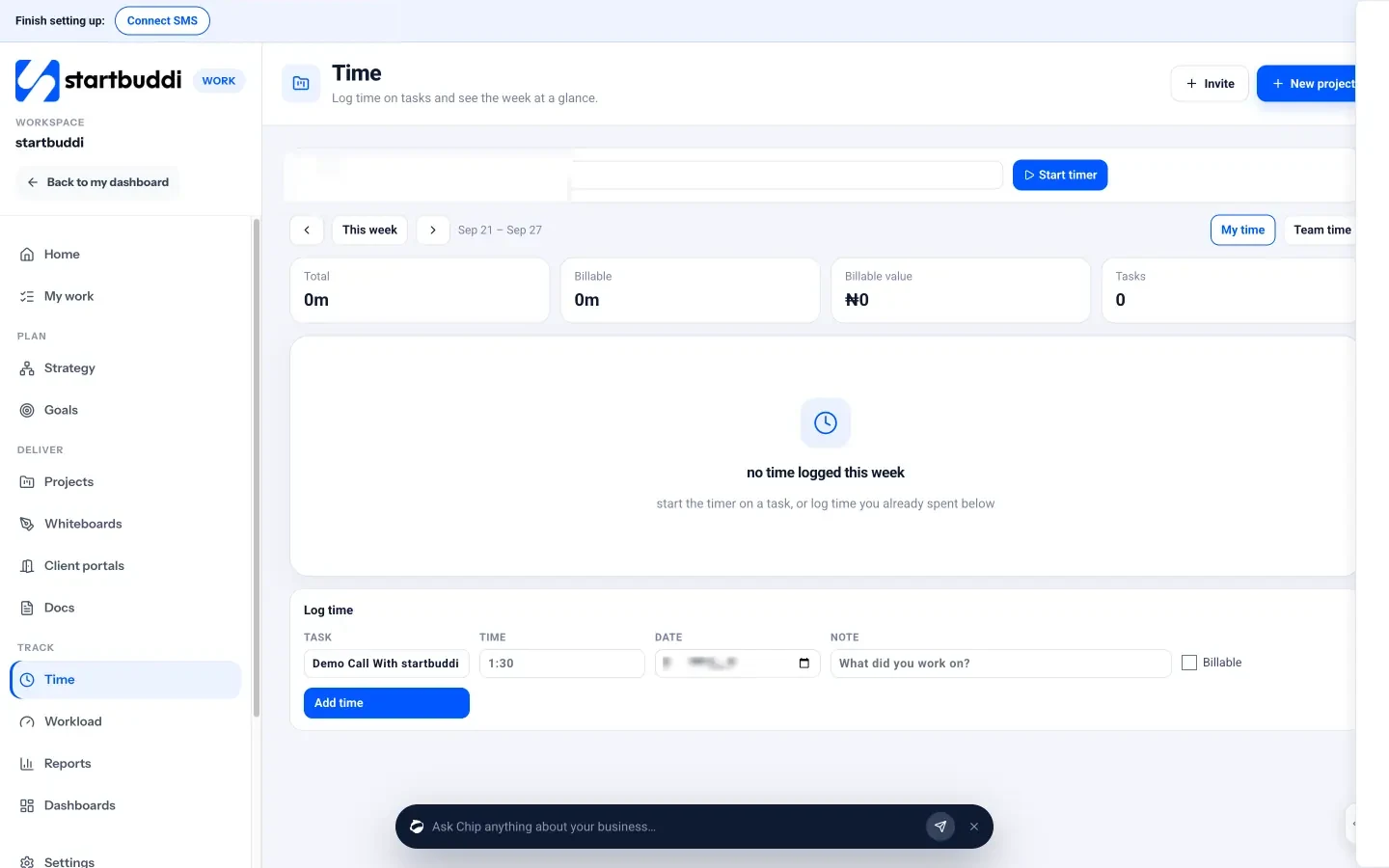
You can also log time from inside any task, and add an estimate in hours. A project’s Budget tab then shows time logged, spend so far and cost to complete against an hours budget, with a burn-down chart, so you can spot a project running over before the invoice goes out. The Workload view balances estimated hours across the team each week.
Invoices from the same account
When it’s time to bill, create an invoice in Money Manager for the client, add a line per task or phase with the hours as the quantity and your rate as the price, and send it. Clients can pay online through Paystack or Stripe, or by bank transfer, and Receivables shows who still owes you, with a Remind button on each open invoice.
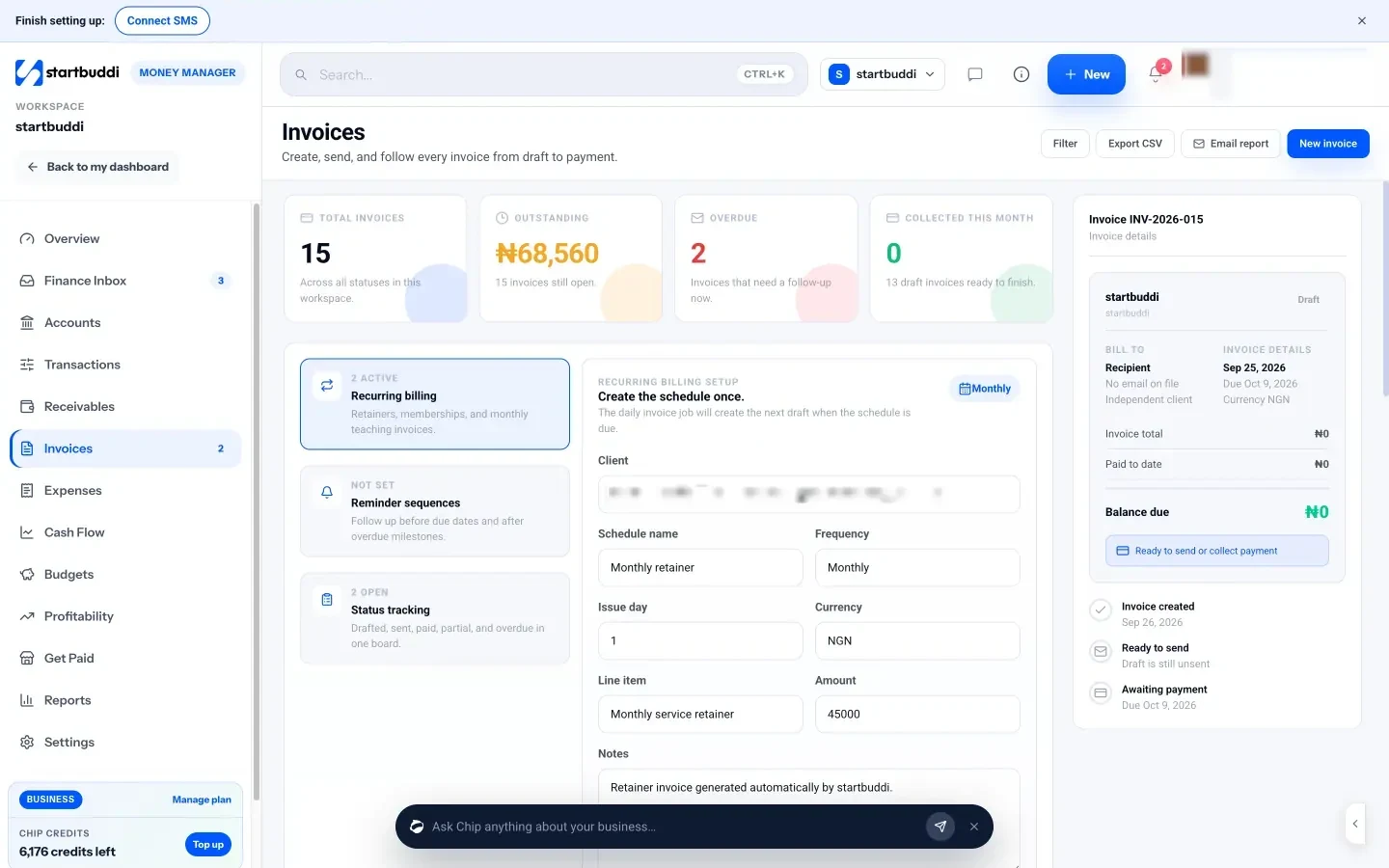
To be clear about the limits: there’s no one-click “turn these hours into an invoice” button yet, so you copy the week’s billable totals into invoice lines yourself. And the Profitability report in Money Manager counts collected revenue minus expenses linked to a project; it doesn’t include the cost of your team’s time. For many small teams those two steps are still far quicker than reconciling a spreadsheet, and the time and the invoice sit in one place. The help guide on logging time in startbuddi walks through setup.
Your next step
Write your five rules this week, even if you keep your current tool for now. Then track every hour, billable or not, for two weeks, and compare the billable total with what you actually invoiced last month. If you’d like the timer, projects and invoices together, start with startbuddi for free and log your first hour today.
Sources
- Raymond Panko, Spreadsheet Errors: What We Know. What We Think We Can Do (arXiv)
- Clio Legal Trends: law firm benchmarks for utilisation, realisation and collection
- Toggl Track, Clockify and Harvest (official sites)
Frequently asked questions
What is a good utilisation rate for a small agency?
It depends on the role. Owners and account managers spend lots of time on sales and admin, so their rate is lower. Track your own trend over three months rather than chasing a benchmark.
Should I round time up to 15 minutes?
Choose one increment, state it in your contract and apply it consistently, ideally to each day's total per task rather than every tiny entry.
Can I track billable hours on a fixed-price project?
Yes, and you should. It shows whether the price covered the work, so you can quote the next similar job more accurately.
How often should I invoice hourly work?
Weekly or fortnightly works well for most small teams. Smaller, more frequent invoices are easier for clients to check and pay.
Tiwalade Joanna Okedara-Kalu is the founder, CEO and CTO of startbuddi, the business system that brings clients, bookings, invoices, projects, marketing and the Chip AI assistant into one place. Tiwalade builds software around how service businesses really work day to day, and writes about client management, getting paid on time and why small businesses outgrow the tools they start with.
Founded startbuddi and leads its product and engineering