How to get invoices paid faster without chasing clients
How to get invoices paid faster without chasing: what to put on the invoice, the rules in a few countries, terms, timing, online payment and a follow-up plan.



- To get invoices paid faster, send a professional invoice (unique number, both parties' details, clear line items, tax shown separately, a specific due date and a pay online option) the day you deliver. Agree short terms upfront, state your late policy in writing and plan your reminders before you need them.
The quickest way to get invoices paid faster is to fix the invoice itself, then the terms and the timing around it. A professional invoice that gets paid does three things: it contains everything the client’s finance team needs to approve it, it is sent the moment the work is done, and it makes paying take one tap. That means a unique invoice number, both parties’ details, a clear description of each item, the total with any tax shown separately, a specific due date, and a pay button alongside your bank details.
Late payment is the norm, not the exception. Xero’s small business data showed US small businesses waited an average of 29.3 days to be paid in the June quarter of 2026, and were paid 8.5 days late on average (Xero). You can’t control your clients, but you can remove every excuse your invoice gives them. This guide covers what to include, the rules in a few countries, how to design and word it, and when to send it.
What a professional invoice must include
An invoice is a formal request for payment and a record for both sides’ accounts. Whatever country you are in, a clear invoice has these parts:
| Part | What to write | Why it speeds payment |
|---|---|---|
| The word “Invoice” | At the top, clearly | Finance teams sort documents fast; a “quote” or “statement” gets set aside |
| Invoice number | Unique and in sequence, e.g. INV-2026-041 | Easy to reference in payments and reminders |
| Invoice date and supply date | When you issued it and when the work was done | Needed for the client’s records and tax |
| Your details | Business name, address, email, phone, tax or registration number if you have one | Proves you are a real supplier |
| Client details | Company name, address, the contact’s name, PO number if given | Gets it to the right person and approved |
| Line items | Description, quantity, rate, amount for each | No questions about what they are paying for |
| Subtotal, tax, discount, total | Tax shown separately, currency stated | Matches what their accounts system expects |
| Due date | A date, e.g. “Due 14 October 2026” | “Net 30” is easy to misread; a date is not |
| How to pay | Pay online link plus bank details and reference | Paying should take seconds |
| Notes | Thank you, late payment terms, contact for questions | Sets expectations politely |
If you want a starting point, our free invoice template and invoice generator include every one of these fields.
Invoice rules in different countries
Most countries set out what an invoice must show, especially if you charge sales tax or VAT. The details differ, so check the rules where you and your client are. A few examples:
- United Kingdom. GOV.UK lists what every invoice must include: a unique identification number, your business name, address and contact details, the customer’s name and address, a clear description, the supply date, the invoice date, the amounts charged, VAT if applicable and the total owed (GOV.UK). VAT-registered businesses have extra requirements set out in HMRC’s VAT Notice 700/21.
- United States. There is no federal invoice format, but the IRS expects you to keep records such as invoices, receipts and deposit slips that support your income (IRS). States set their own sales tax rules.
- Canada. If you are registered for GST/HST, the CRA sets out what information your invoices must show, with more detail required for larger sales (CRA guide RC4022).
- Nigeria. VAT-registered businesses show VAT separately. The Nigeria Revenue Service is also rolling out mandatory e-invoicing in phases: large taxpayers first, then medium taxpayers (₦1 billion to ₦5 billion turnover) from July 2026, with smaller businesses below ₦1 billion expected from 2027 (Nairametrics). Watch the NRS for dates that apply to you.
This is general information, not tax or legal advice. If you charge VAT or sales tax, check with your tax authority or an accountant.
How to design an invoice that looks professional
Professional doesn’t mean fancy. It means clear, consistent and easy to scan in five seconds.
- Put the three key facts at the top right: invoice number, due date, amount due. That is what a busy finance officer looks for.
- Use your business name and, if you have one, your logo, in the same style as your quotes and emails.
- One font, plenty of white space, and line items in a simple table.
- State the currency with the code or symbol on every amount, especially when billing abroad: “USD 1,200” or “₦450,000”.
- Send a PDF or an online invoice, never an editable Word file that anyone can change.
Write line items the client recognises
“Services rendered: ₦300,000” invites questions. Use the words from your quote or proposal so the approver can match them:
- Logo design, 3 concepts and 2 rounds of revisions: 1 × ₦180,000
- Brand guidelines document (12 pages): 1 × ₦90,000
- Social media templates (10 designs): 1 × ₦30,000
If you bill by time, show the hours and the rate, and keep your timesheet ready in case they ask.
A professional invoice example
Here is how the parts come together for a small design studio billing a client in Lagos. Swap in your own details and currency.
- Top: “Invoice” · INV-2026-041 · Issued 30 September 2026 · Due 14 October 2026 · Amount due ₦300,000
- From: Ada Studio, 12 Admiralty Way, Lekki, Lagos · hello@adastudio.com.ng · +234 800 000 0000 · RC 1234567
- To: Brightpath Foods Ltd, attention Tunde Bello, Accounts · PO 7781
- Project: Brand identity refresh, delivered 29 September 2026
- Line items: as in the logo design example above, with subtotal, VAT if you are registered, and total
- How to pay: “Pay online” button · or transfer to Ada Studio, [bank], [account number], reference INV-2026-041
- Notes: “Thank you for your business. Payment is due within 14 days. Questions? Reply to this email or call Ada on the number above.”
Notice that the approver can see in one glance what it is for, how much, by when and how to pay. There is nothing to look up and nothing to ask.
Invoicing clients in other countries
Billing abroad adds a few details that stop delays:
- Agree the currency first and invoice in it. A US client expects dollars; a UK client pounds.
- Say who pays transfer fees. “Please cover any sending fees so the full amount arrives” avoids a short payment.
- Give full bank details for international transfers: account name, account number, bank name and address, and SWIFT/BIC or IBAN where relevant.
- Offer card payment for smaller amounts, where it is often quicker than an international transfer.
- Check tax rules both ways. Services sold across borders can have different VAT or sales tax treatment. Ask an accountant if you are unsure.
- Use a date format both sides understand. Write “14 October 2026”, not “10/14/26”, which reads differently in the US and the UK.
Set payment terms that get you paid sooner
The terms on the invoice should match what you agreed before the work started. A few choices make a real difference:
- Shorter terms. Many small businesses use 7 or 14 days instead of 30. Agree it upfront, then put the date on the invoice.
- Deposits and milestones. For bigger jobs, take part of the fee before you start and bill the rest in stages. You are never owed the whole amount at once.
- Clear late terms. State what happens if payment is late, such as paused work or a late fee where your contract allows it. Put the same line in three places: your contract, your welcome email and the invoice itself, so it never comes as a surprise. In the UK, businesses can claim statutory interest on late business payments at 8% plus the Bank of England base rate (GOV.UK).
- Several ways to pay. Card for speed, bank transfer for large amounts. Every extra step you remove shortens the wait.
When to send your invoice
Timing is the easiest win. The longer the gap between finishing the work and sending the invoice, the less urgent it feels to the client.
- Send it the day you deliver, ideally in the same email thread where the client approved the work.
- For retainers, bill in advance, on the same day each month.
- Know the client’s payment run. If they pay suppliers on the 25th, an invoice that arrives on the 26th waits a month.
- Send it to the right person. Copy the accounts payable address as well as your contact.
An email to send with the invoice
Hi Tunde, thanks again for signing off the final designs today. Your invoice INV-2026-041 for ₦300,000 is attached and due on 14 October. You can pay online with the button on the invoice or by transfer to the account shown, using the invoice number as the reference. Any questions, just reply here.
Make your invoice easy to pay online
A pay button on the invoice is the single biggest step you can take. The client clicks, pays by card or transfer, and you get notified. No copying account numbers, no typos, no “which account was it again?”.
Card payments cost a fee per payment. Stripe in the US charges 2.9% + 30¢ on domestic cards (Stripe pricing); Paystack in Nigeria charges 1.5% + ₦100 on local payments, capped at ₦2,000 (Paystack pricing). Many businesses decide being paid a week earlier is worth it. Keep bank details on the invoice too, for clients who prefer transfer. Our guide to sending invoices and getting paid via Paystack walks through the setup.
Follow up so invoices get paid faster, without chasing
Even a perfect invoice sometimes gets forgotten. Plan your follow-ups before you need them:
- 3 days before the due date: a friendly heads-up with the link.
- On the due date: a short “just a reminder, due today”.
- 7 days late: a direct but polite message asking when to expect payment.
- 14 days late: a firmer note, and pause new work if your terms allow.
Our payment reminder generator and late payment email writer draft these for you. When the money arrives, send a receipt. Our post on invoice vs receipt explains the difference.
Invoice mistakes that delay payment
- Missing or duplicate invoice numbers. Accounts systems reject them.
- No due date, or “payable on receipt” with no date. It gets paid “when we get round to it”.
- Wrong client name or address. Larger companies send these back.
- No purchase order number when the client uses them.
- Totals that don’t add up, or tax calculated wrongly. It triggers a query and a new invoice.
- Sending from a personal email with a vague subject. Use “Invoice INV-2026-041 from Ada Studio, due 14 October”.
How startbuddi helps you send a professional invoice
In startbuddi, invoices live in Money Manager, next to your customers and payments.
- Build it in a minute. Pick an existing client or type in a one-off recipient, add line items, and tax, discount, subtotal and total are calculated as you type. Set the currency per invoice. Add payment instructions and footer text.
- Set your defaults once. In Money Manager settings, choose your invoice prefix, default due days (7, 14, 21 or 30), default tax rate and label, and footer.
- A pay button on every invoice. Turn on Paystack and/or Stripe and the client pays online from the invoice page. Paid invoices are marked paid automatically and the payment appears in Transactions. Your bank transfer details and a PayPal link can show on the invoice too; record those payments yourself when they arrive, including part payments.
- Send, download and track. Email the invoice, download a PDF, and see when it was created, sent and viewed.
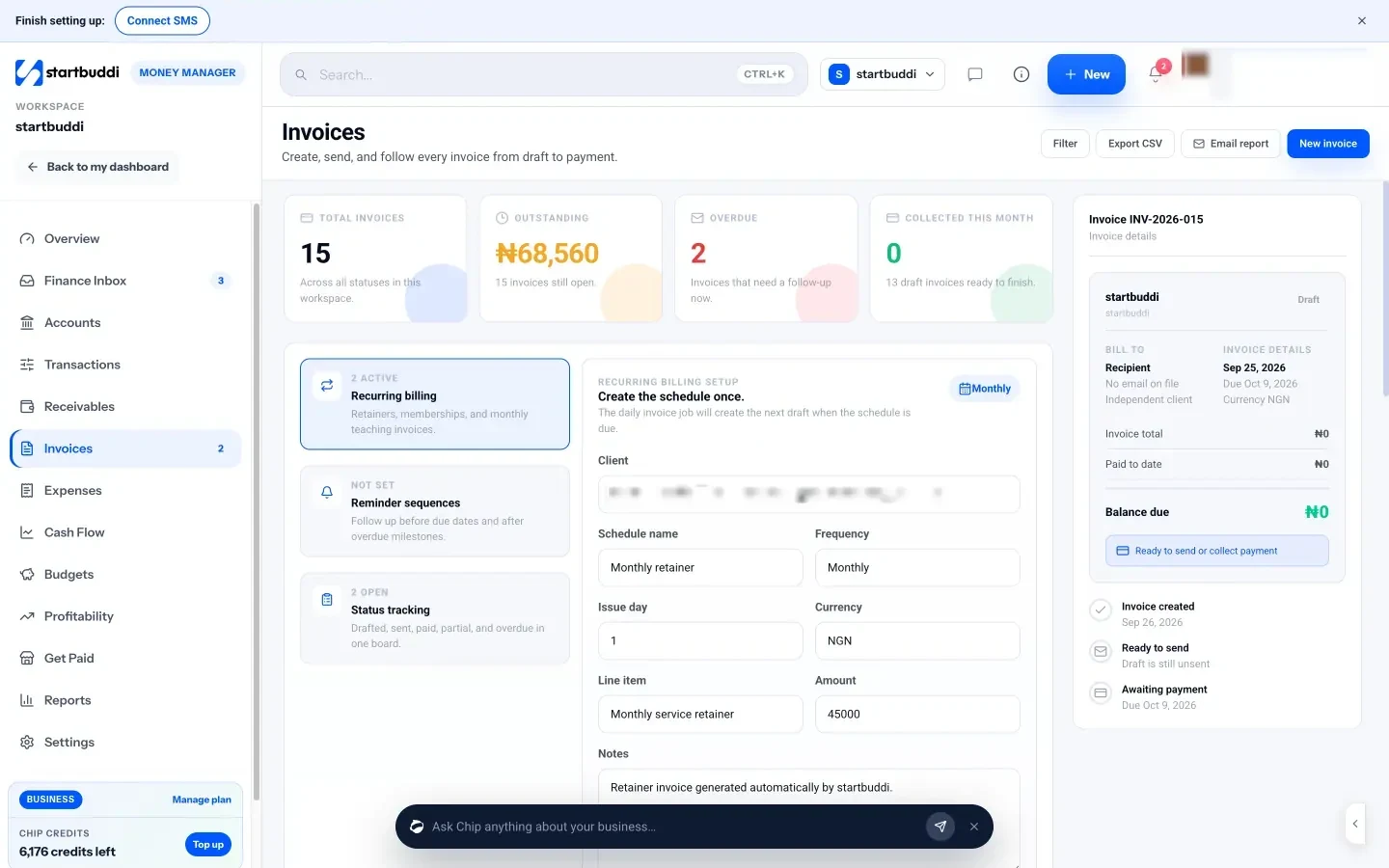
- Follow up. Set a reminder sequence (days before the due date, on the due date, and days after), use the Remind button on any open invoice in Receivables, or ask Chip to draft a personal reminder.
- Quote first, then invoice. Accepted estimates convert into invoices with the same line items.
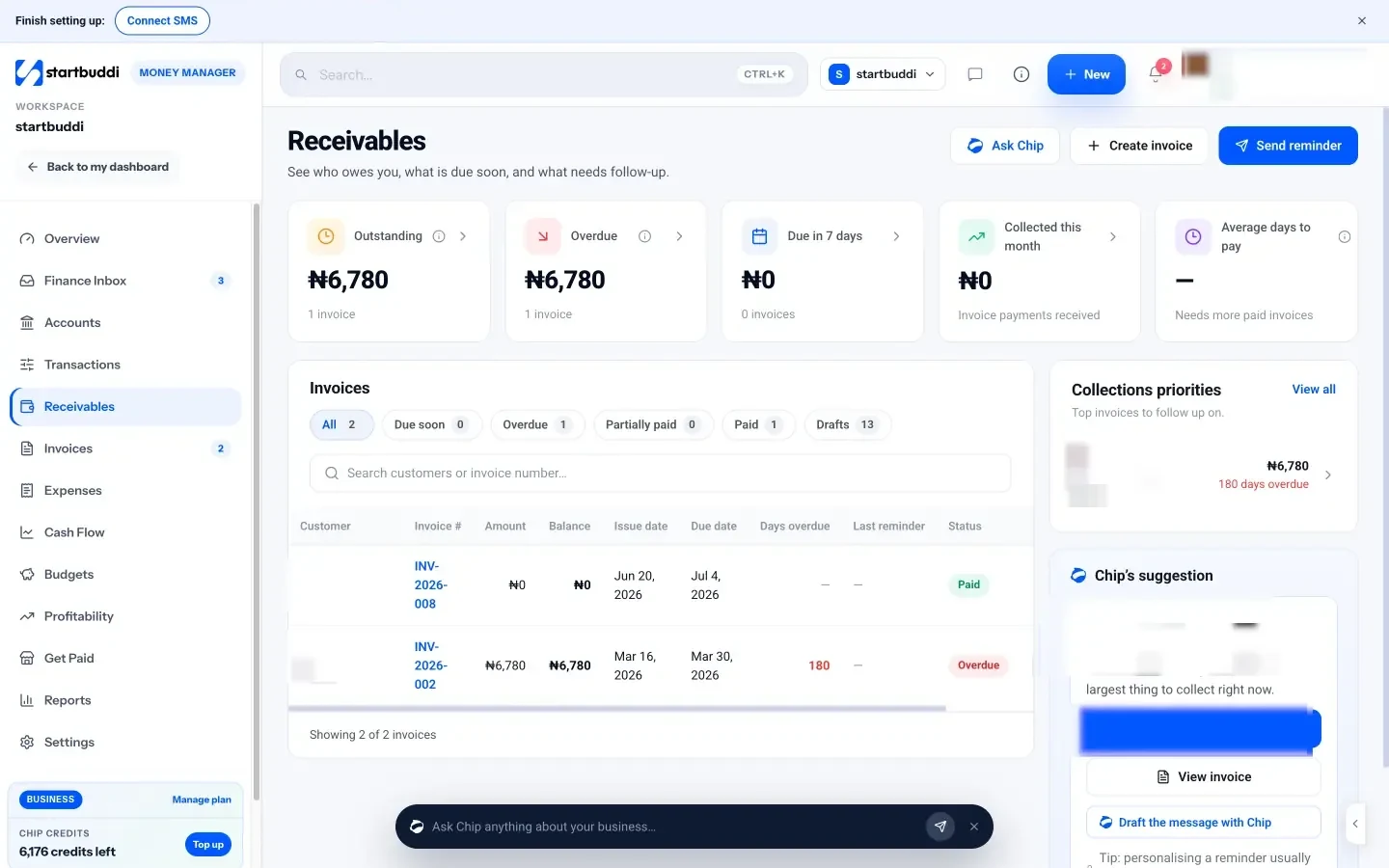
Money Manager is on every plan. Free includes 5 invoices a month; Starter and above include unlimited invoices. startbuddi is not accounting software and doesn’t file taxes or e-invoices with a tax authority. For a walkthrough, read how to create and send your first invoice, or see pricing.
Your next step
Open your last invoice and check it against the table at the top of this post. Add a specific due date, a pay online option and a clear reference, then use the new version for the next job you finish. Send it the same day.
Sources
- Xero: Late payments are climbing again
- GOV.UK: Invoices, what they must include
- HMRC: Record keeping (VAT Notice 700/21)
- GOV.UK: Charging interest on commercial debt
- IRS: What kind of records should I keep
- Canada Revenue Agency: General information for GST/HST registrants (RC4022)
- Nairametrics: NRS launches phased e-invoicing and fiscal monitoring system
- Nigeria Revenue Service
- Stripe: Pricing
- Paystack: Transactions pricing
Frequently asked questions
What makes an invoice look professional?
A unique number, your business details, clear line items, a specific due date, the currency on every amount and a clean, consistent layout sent as a PDF or online link.
What payment terms should a small business use?
Many use 7 or 14 days, agreed before the work starts. For large jobs, add a deposit and milestone payments.
Can I send an invoice by WhatsApp?
Yes, a PDF or online invoice link works well on WhatsApp. For business clients, also email it to their accounts team so it enters their system.
Do I need to be VAT registered to send an invoice?
No. Anyone in business can invoice. If you are registered for VAT or sales tax, extra details and the tax amount must be shown.
Tiwalade Joanna Okedara-Kalu is the founder, CEO and CTO of startbuddi, the business system that brings clients, bookings, invoices, projects, marketing and the Chip AI assistant into one place. Tiwalade builds software around how service businesses really work day to day, and writes about client management, getting paid on time and why small businesses outgrow the tools they start with.
Founded startbuddi and leads its product and engineering