How to send invoices and get paid via Paystack
A practical guide to the Paystack invoice routine: fees by country, what to put on the invoice, handling transfers and part-payments, settlement times and polite follow-ups.



Photo: Oluwatobi Fasipe / Unsplash
- Connect Paystack, send an invoice with a Pay button on an online invoice page, and let clients pay by card, transfer, USSD or mobile money. In Nigeria fees are 1.5% + ₦100 capped at ₦2,000, and payouts usually arrive the next working day.
To send invoices and get paid via Paystack, you connect a Paystack account (or a tool that creates one for you), send each client an invoice that carries a “Pay now” button, and let Paystack take the payment by card, bank transfer, USSD or mobile money. The money settles into your bank account, usually the next working day in Nigeria, and the invoice is marked paid without you checking your banking app.
This guide covers the whole Paystack invoice routine: what Paystack is and where it works, the fees you will pay, how to write an invoice that gets paid first time, how to handle clients who still prefer a transfer, and how to follow up without awkward messages.
What Paystack does, and where it works
Paystack is a payment gateway: a company that lets a business accept online payments and passes the money to its bank account. It started in Lagos and is now owned by Stripe. Businesses use it in Nigeria, Ghana, Kenya, South Africa and Côte d’Ivoire, and each country has its own pricing and payment methods. If you want a one-page explainer first, read our glossary entry on what Paystack is.
For invoicing, Paystack does three useful jobs:
- It gives the client more ways to pay. Depending on the country, that means local and international cards, bank transfer, USSD, mobile money such as M-PESA, or EFT in South Africa.
- It confirms the payment for you. A card payment or transfer through Paystack is recorded with a reference, so you don’t have to match a vague bank alert to an invoice.
- It settles to your bank. Paystack pays out to the bank account you registered, on a set schedule.
If your clients are mostly in the US, UK, Europe, Canada or Australia, Paystack is usually not the right tool. A gateway like Stripe or PayPal covers those markets better. Plenty of businesses use both: Paystack for African clients and Stripe for everyone else.
Paystack fees: what an invoice payment actually costs
Paystack charges a percentage per successful transaction, and in Nigeria a small flat fee on top. There are no monthly fees for the standard account. These were the published rates when we checked in September 2026; always confirm on Paystack’s pricing page before you set your own prices.
| Country | Local payments | Notes |
|---|---|---|
| Nigeria | 1.5% + ₦100 | ₦100 waived under ₦2,500; fee capped at ₦2,000. International cards 3.9% + ₦100, no cap. |
| Ghana | 1.95% | Cards, mobile money and bank transfer |
| Kenya | 2.9% cards, 1.5% M-PESA | Local payments |
| South Africa | 2.9% + R1 cards, 2% EFT | VAT exclusive |
Source: Paystack support, transactions pricing.
Three worked examples in naira
- A ₦2,000 deposit: 1.5% is ₦30, and the ₦100 is waived because the amount is under ₦2,500. You receive ₦1,970.
- A ₦50,000 design job: 1.5% is ₦750, plus ₦100, so ₦850 in fees. You receive ₦49,150.
- A ₦400,000 monthly retainer: 1.5% is ₦6,000, plus ₦100, but the cap stops it at ₦2,000. You receive ₦398,000.
The cap is the part many freelancers miss. On large invoices, the local card fee in Nigeria is a fraction of a percent, which is cheap compared with the time you spend confirming transfers by hand.
Should you pass the fee on to the client?
You can, but think about it before you do. Adding a separate “card fee” line can feel petty on a small invoice and invites haggling. Many service businesses simply build payment costs into their prices, the same way they build in data, software and transport. If you do pass fees on, say so in your quote and your terms, not for the first time on the invoice. Check the rules where you are too, since some countries and card schemes restrict surcharges.
What you need before you send your first Paystack invoice
Paystack is a regulated financial service, so there is some setup before you can take live payments:
- A registered business or verified identity. Paystack asks for business details and documents to activate a live account. Requirements differ by country and business type, so check their current list when you sign up.
- A bank account for payouts. This is where your settlements land. Use a business account if you have one; it keeps your records clean at tax time, because mixing personal and business money makes every later job harder.
- Your invoice basics. Business name, address, a numbering system (INV-001, INV-002), payment terms and your tax details if you charge VAT.
If you invoice from a tool that connects to Paystack for you, you may not need to go through Paystack’s dashboard at all. Some tools create a Paystack subaccount in your name: the client pays through Paystack, and the money settles straight to your bank rather than passing through the tool’s own account. Paystack’s own split payments documentation explains how subaccounts work.
How to write a Paystack invoice that gets paid first time
A payment button helps, but it doesn’t rescue a confusing invoice. Clients delay payment when they are unsure what they are paying for, who to pay, or whether the amount is final. Get these parts right:
The details that stop questions
- Clear line items. “Logo design, 3 concepts and 2 rounds of changes” beats “Design work”. If the client has to forward the invoice to a manager, the manager should understand it without calling you.
- The right currency. Invoice Nigerian clients in naira, Ghanaian clients in cedis, and international clients in the currency you agreed. Don’t make a client guess an exchange rate.
- A due date, not just terms. “Due 14 October” is clearer than “Net 14”.
- A reference they can quote. The invoice number, repeated in the payment instructions.
- Tax shown separately. If you charge VAT or sales tax, show the rate and amount. This is general information, not tax advice; check the rules with your tax authority, such as the Nigeria Revenue Service (formerly FIRS), Ghana Revenue Authority or Kenya Revenue Authority.
Put the pay button where they look
The client should be able to pay from the email in two taps. That means a link to an online invoice page with a Pay button, not a PDF attachment and a bank account number buried in the footer. Keep the PDF for their records, but make the link the main route.
Our guide to creating a professional invoice goes deeper on layout and wording.
A short email to send with it
Hi Amaka, here is invoice INV-014 for the brand identity work, ₦150,000, due on 14 October. You can pay by card, transfer or USSD using the button on the invoice page. Thanks again, it was a great project.
Put this into practiceEverything in this article works inside startbuddi, free to start.Start free
Friendly, specific, and it tells them exactly how to pay. If you need more wording for tricky situations, how to ask a client for payment politely has templates for every stage.
When clients still want to pay by bank transfer
In Nigeria especially, many clients prefer a direct transfer from their banking app. That is fine, and you shouldn’t force them through a gateway. The problem is reconciliation: a transfer arrives with a name that doesn’t match the company, no reference, and a slightly different amount.
Three habits keep transfers under control:
- Show your bank details on the invoice page next to the Pay button, with a line asking them to use the invoice number as the reference.
- Record the payment against the invoice the day it lands. Note the date, amount and transfer reference, so the invoice shows as paid or partly paid.
- Send a receipt. It closes the loop and saves the “did you get my payment?” message. An invoice asks for money; a receipt confirms you got it.
Paystack itself also offers transfer as a payment method at checkout in Nigeria. The client gets temporary account details, pays from their bank, and Paystack confirms it automatically. For clients who like transfers but you want automatic confirmation, this is the best of both.
Deposits, part-payments and retainers on Paystack
Not every job is one invoice at the end. Three common patterns work well with Paystack:
- Deposit then balance. Send a deposit invoice (often 30 to 50%) before you start and the balance on delivery. Our post on how much deposit to charge covers how to decide the split.
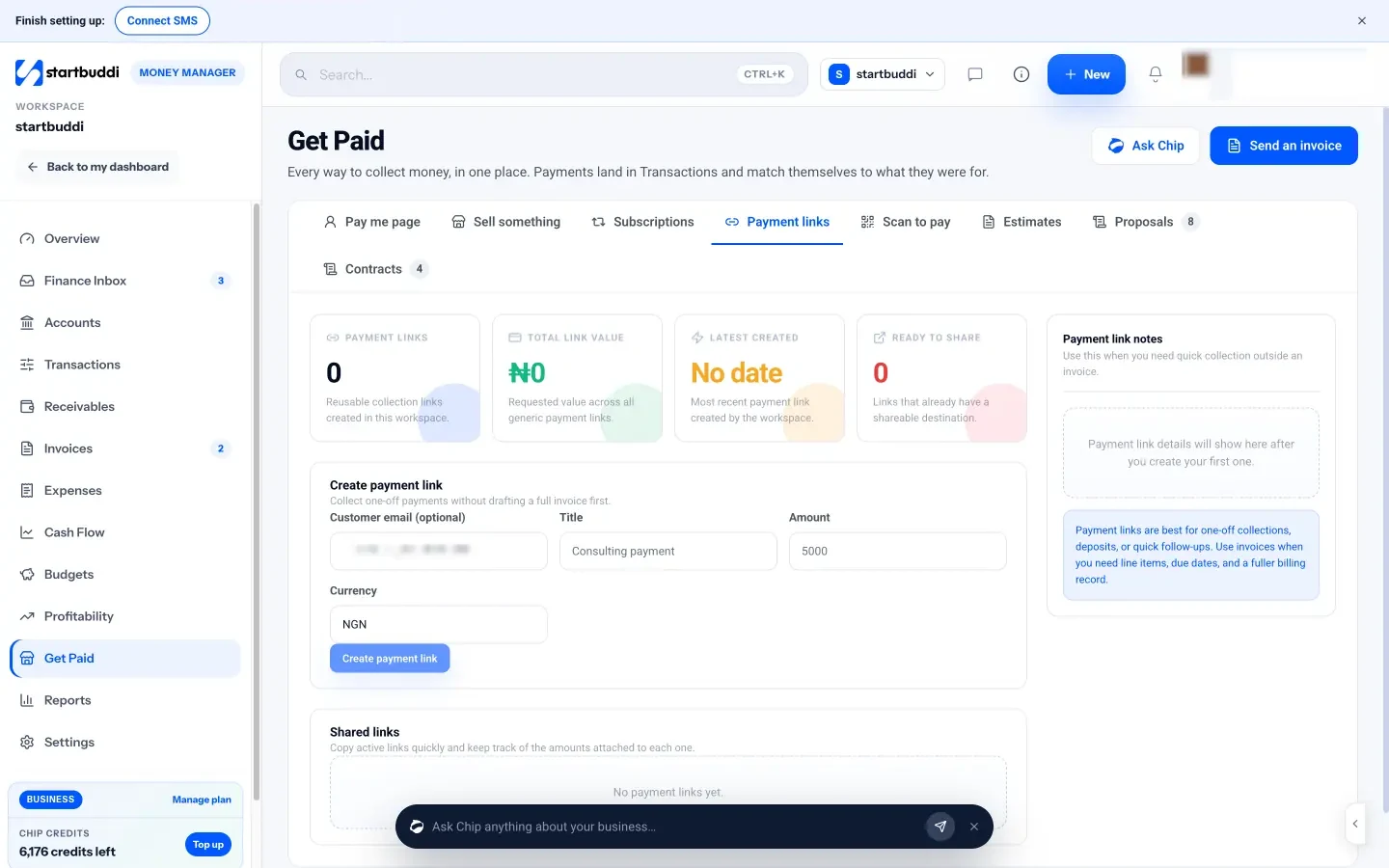
- Payment links for quick amounts. For a small deposit or a one-off extra, a payment link is faster than a full invoice. You create a link for a set amount and paste it into WhatsApp. Read more on what a payment link is.
- Monthly retainers. Send the same invoice each month on the same day. A recurring invoice schedule saves you from rebuilding it every time; our guide to selling and billing retainers covers the agreement side.
If part of an invoice arrives by Paystack and part by cash or transfer, record each payment separately against the same invoice. Your balance stays accurate, and the client sees exactly what is still owed.
Settlement: when the money reaches your bank
Paystack doesn’t send each payment to your bank instantly. It batches payments and settles them on a schedule. In Nigeria, standard settlement is the next working day, so a payment made on Monday arrives on Tuesday, and weekend payments move to the next working day, according to Paystack’s support guide to getting your money. Nigerian businesses with a steady payout history can also request payout on demand for same-day collections, subject to Paystack’s conditions.
Plan your cash around this. If you have rent or salaries due on the 28th, don’t count on a client payment made on the evening of the 27th. Keep a small buffer in the account so one slow payout never decides whether a bill gets paid on time.
Following up without chasing
Even with a pay button, some invoices go quiet. Late payment is a problem everywhere: the UK government estimated in July 2025 that it costs the UK economy £11bn a year and closes 38 businesses a day. You can’t control every client, but a simple rhythm helps:
| When | What to send |
|---|---|
| 3 days before due | A friendly heads-up with the pay link |
| On the due date | A short reminder: “due today, here’s the link” |
| 3 days overdue | A polite check that they received it |
| 7 and 14 days overdue | Firmer notes, then a phone call |
Always include the pay link in every reminder. The fewer steps between “oh, I forgot” and “paid”, the better.
How startbuddi helps you get paid via Paystack
startbuddi’s Money Manager connects to Paystack so you can send an invoice and take payment in one place. Here is what it does, and what it doesn’t.
Connecting Paystack
In Money Manager, open Settings, then “How you get paid”. To connect Paystack you enter your business name, choose your bank and add your 10-digit account number. startbuddi sets up a Paystack subaccount for you, so payments settle straight to your bank. startbuddi never holds your money and takes no cut of your payments; Paystack’s own fees still apply. Paystack covers cards, bank transfer, USSD and mobile money in Nigeria, Ghana, Kenya and South Africa. You can also connect Stripe for clients elsewhere, and add bank transfer details and a PayPal.me link that show on your invoices.
Sending the invoice
Create an invoice for an existing client or a one-off recipient, add line items, tax and discount, and leave “Accept payment via Paystack” switched on. When you click Create and send, the client gets an email with a link to an online invoice page with a Pay button, your bank details and PayPal if you added them. When they pay through Paystack or Stripe, the invoice is marked paid and the payment appears in your transactions and on the client’s record.
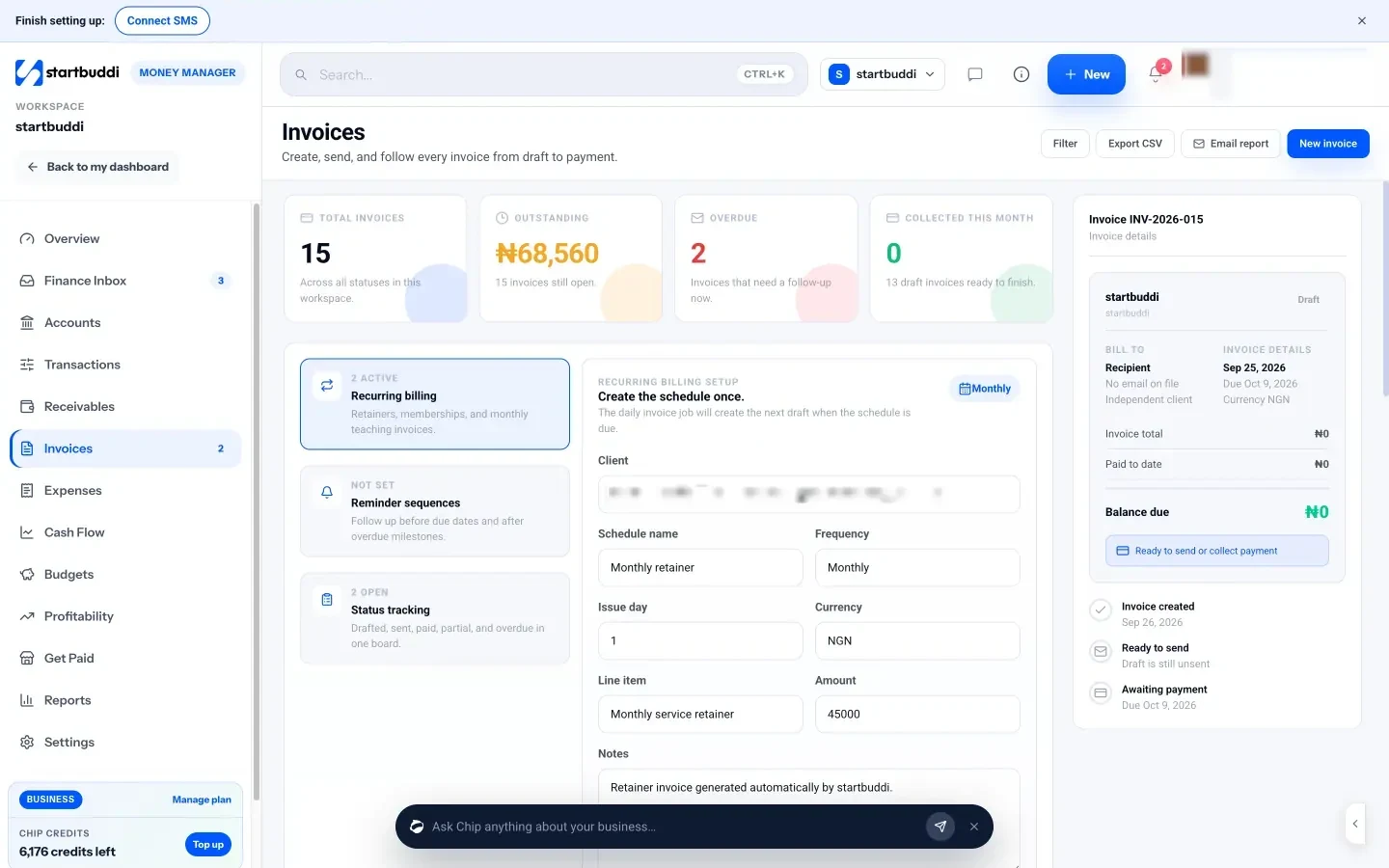
For transfers that arrive outside startbuddi, use Record payment on the invoice: enter the amount (part-payments are fine), the method, the date and a note such as the transfer reference. The balance updates and the client’s history stays accurate.
Following up
The Receivables screen shows who owes you, what is due soon and what is overdue, with average days to pay. Each open invoice has a one-click Remind button, and Chip can draft a personal reminder for you to check and send. You can also set up a reminder sequence (days before the due date, on the due date, and after it) and a recurring billing schedule for retainers.
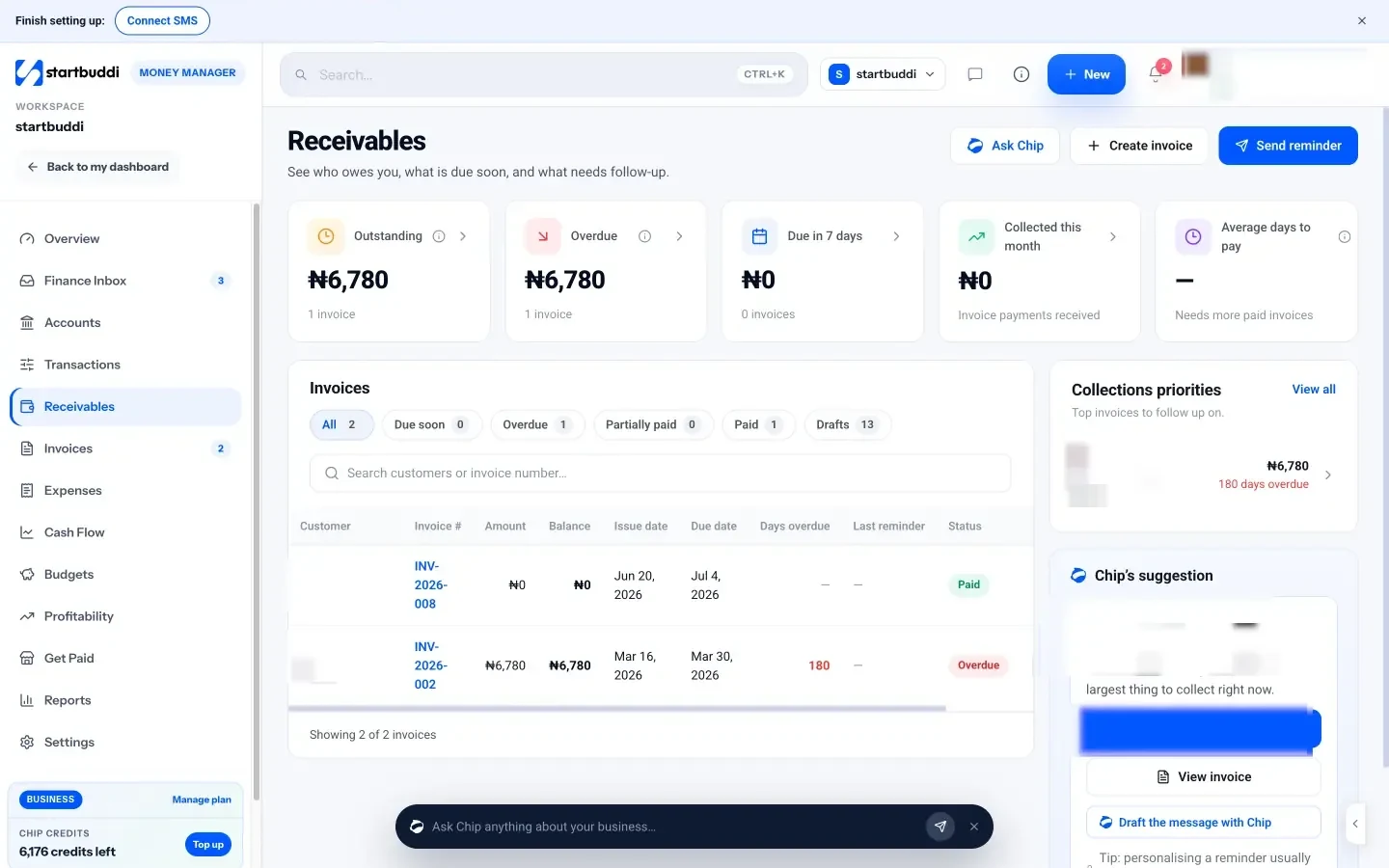
For quick amounts like deposits, the Get Paid hub creates payment links you can paste into WhatsApp, email or a QR code.
What it isn’t
startbuddi is not accounting software. It doesn’t file tax, reconcile your bank feed or replace your accountant, and it doesn’t support Flutterwave. Bank transfers and PayPal payments are shown on the invoice but you confirm them yourself with Record payment. On the Free plan you can send five invoices a month; Starter and above are unlimited. The help article on collecting payment via Paystack walks through the screens step by step.
Your next step
Take the last three invoices you sent and check them against this list: clear line items, a due date, a reference, and a pay button the client can use in two taps. Fix the template once, then connect Paystack so the next invoice pays itself. You can see how invoicing works in startbuddi or compare the plans; every paid plan starts with a 30-day trial.
Sources
- Paystack: Pricing
- Paystack Support: Transactions pricing by country
- Paystack Support: Getting your money
- Paystack Support: Payout on demand
- Paystack Developer Documentation: Split payments and subaccounts
- GOV.UK: Time to pay up, late payments announcement (30 July 2025)
Frequently asked questions
Can I send an invoice directly from Paystack?
Paystack's dashboard has payment requests and payment pages, but many businesses invoice from a separate tool that connects to Paystack, so line items, clients and reminders live in one place.
How much does Paystack charge per invoice payment in Nigeria?
Local payments are 1.5% + ₦100, with the ₦100 waived under ₦2,500 and the fee capped at ₦2,000. International cards cost 3.9% + ₦100. Check Paystack's pricing page for current rates.
How long does Paystack take to pay out?
In Nigeria the standard schedule is the next working day. Weekend and public holiday payouts move to the next working day.
Can international clients pay a Paystack invoice?
Yes, by international card, at a higher fee. If most of your clients are outside Africa, a gateway such as Stripe usually suits them better.
What if a client pays part of the invoice?
Record each payment against the same invoice. The balance updates, and your reminders can show exactly what is still owed.
Tiwalade Joanna Okedara-Kalu is the founder, CEO and CTO of startbuddi, the business system that brings clients, bookings, invoices, projects, marketing and the Chip AI assistant into one place. Tiwalade builds software around how service businesses really work day to day, and writes about client management, getting paid on time and why small businesses outgrow the tools they start with.
Founded startbuddi and leads its product and engineering