
Online Booking for Barbers: How to Set Up a Barber Salon Booking App for Walk-ins and Appointments
Set up a barber salon booking app that still welcomes walk-ins: honest cut times, a walk-in window, deposits for busy days, reminders and a checklist.

A barber salon booking app works best when it fits around walk-ins instead of replacing them: book each cut for its real length, keep set hours or a chair free for people who just turn up, take a small deposit on your busiest days, send a reminder the day before, and put every walk-in into the same calendar.
Key takeaways
- Decide your model first: appointments only, walk-ins only, or a mix. Most busy shops end up with a mix.
- Time each service honestly. A skin fade and a beard line-up are not the same 30 minutes.
- Protect walk-ins on purpose, with a walk-in chair or walk-in hours, so regulars who don’t book still get seen.
- Deposits make sense for Saturdays, long services like locs, and home-service visits. A weekday trim rarely needs one.
- Every walk-in goes into the calendar as soon as they sit down, or an online client can book over them.
Why a barber salon booking app needs a different setup
Nail technicians and hairstylists are mostly appointment businesses. Barbering grew up on the walk-in. Plenty of customers still prefer to turn up, sit on the bench and wait their turn, and plenty of good barbers like it that way because the chair never sits empty.
Online booking changes that balance, and it causes two familiar problems:
- Walk-ins get pushed out. If every slot is open for online booking, a regular who turns up at 2pm finds a full book and goes to the shop down the road.
- Bookings run late. If a walk-in is squeezed in without being added to the calendar, the 2:30 online booking waits 20 minutes and leaves a bad review.
A barber salon booking app should solve both: give people who like to plan a guaranteed time, and keep enough space for people who don’t. If you’re still choosing software, our roundup of Booksy alternatives and our comparison of salon appointment software cover the main options. This guide is about setting it up so it works in a barbershop.
Step 1: Choose walk-ins, appointments or both
Before you touch any settings, pick how your shop takes customers. Here are the three models and who each one suits.
| Model | How it works | Suits | Watch out for |
|---|---|---|---|
| Appointments only | Every cut is booked online, by phone or on WhatsApp | Solo barbers, studios in offices or homes, home-service barbers | Losing passing trade and regulars who never book |
| Walk-ins only | First come, first served, no booking link | Busy shops on high streets and market roads with steady foot traffic | Long waits on Saturdays, customers who give up and leave |
| Hybrid | Some chairs or hours are bookable, the rest are for walk-ins | Shops with two or more barbers, and anyone with a Saturday rush | Walk-ins and bookings clashing if they’re not in one calendar |
The hybrid model needs one more decision: do you split by chair or by time?
- Split by chair: one barber takes bookings, another takes walk-ins. Simple to explain, and it works well with three or more chairs.
- Split by time: everyone takes bookings in the morning and walk-ins after 3pm, or the other way round. This suits a two-chair shop where both barbers want a full book.
Write the rule down and put it on your booking page, your WhatsApp profile and the door: “Walk-ins welcome from 3pm. Book online for a set time.”
Step 2: Build a short service menu with honest times
Time each service on a normal working day for your slowest barber, then round up to the nearest 15 minutes. Here is an example menu for a small shop. The times and prices are illustrative, so use your own.
| Service | Time to book | Example price (Lagos) | Example price (London) |
|---|---|---|---|
| Haircut | 30 min | ₦5,000 | £25 |
| Skin fade | 45 min | ₦6,000 | £28 |
| Haircut and beard | 45 min | ₦7,000 | £32 |
| Beard trim and line-up | 15 min | ₦2,500 | £12 |
| Kids’ cut (under 12) | 30 min | ₦3,500 | £18 |
| Hot towel shave | 30 min | ₦5,000 | £25 |
| Locs retwist | 90 min | ₦15,000 | £55 |
| Home-service haircut | 60 min | ₦15,000 | Not offered |
Three rules keep the menu working online:
- Keep it short. Eight to ten services is plenty. A customer on a phone shouldn’t have to scroll.
- Make the long version its own service. If a fade with a design takes 15 minutes more, list it separately with its own time and price.
- Price home service as a visit, not a cut. Travel across Lagos or Accra can take longer than the haircut. Book enough time for the journey both ways.
Step 3: Add buffer time and set a daily cap
Buffer time is the gap the calendar leaves after each booking. In a barbershop it covers sweeping up, cleaning and disinfecting clippers and combs, taking payment and a short breather. Five to ten minutes is usually enough for cuts; home-service bookings need much more because of travel.
A daily cap per service helps too. If locs retwists take 90 minutes, you might allow only two a day so they don’t eat the Saturday you want for quick cuts.
Step 4: Protect your walk-ins
This is the step most shops skip, and it’s the one that keeps the regulars happy. A few ways to do it:
- Leave walk-in hours out of your bookable hours. If walk-ins are from 3pm, set the booking hours to end at 3pm. The calendar can’t fill what it can’t offer.
- Keep a walk-in chair off the booking page. Only add the barbers who take bookings to your bookable services.
- Block the walk-in window. On days when you want a mix, block an hour or two in the calendar for walk-ins only.
- Add every walk-in the moment they sit down. Put them in the calendar as a booking, with their name and the service, so nobody online books that chair for the same time. This is how you avoid double booking.
What about a proper queue, where walk-ins join a list and get a message when it’s their turn? Some apps do this; check before you buy, because many booking tools don’t. A waitlist is a related idea, a list of people who want a slot if one opens. If your tool doesn’t run a queue, a numbered list at the door and a realistic wait time (“about 40 minutes”) still works.
Step 5: Decide how customers pick a barber
Customers are loyal to a barber, not just a shop. Offer both options:
- Any available barber. The booking spreads across whoever is free, known as round robin scheduling. New customers usually pick this.
- A personal link per barber. Regulars want their own barber. Give each one a booking page with their photo, and let them share it in their own Instagram bio and WhatsApp status.
Each barber should set their own working hours. If Femi is off on Mondays, his page shouldn’t offer Monday slots.
Step 6: Take deposits where no-shows hurt
A no-show on a Tuesday morning costs a 30-minute gap you might fill with a walk-in. A no-show at 11am on a Saturday costs a slot you could have sold three times over. Target deposits where the loss is real.
A sensible deposit policy for a barbershop:
- No deposit for regulars on weekday cuts.
- A deposit on Saturday and public holiday bookings, on first visits, on long services and on every home-service booking.
- The deposit comes off the final price.
- Cancel or move at least 12 hours ahead and the deposit carries over. Later than that, or a no-show, and the shop keeps it.
Worked example (illustrative): a barber has 16 half-hour slots on a Saturday at ₦5,000 each. Two no-shows lose ₦10,000 that day. Over four Saturdays, that’s ₦40,000 a month, close to the price of eight cuts. With a ₦2,000 deposit on Saturday bookings, the same two no-shows still leave ₦4,000 in the till each week, and fewer people skip a booking they’ve paid towards. Run your own numbers in the free no-show cost calculator.
The booking deposit glossary entry explains how deposits differ from full prepayment. Put your rules in writing with the no-show policy template.
Step 7: Send a reminder the day before
Many no-shows are people who forgot. A reminder about 24 hours before gives them time to confirm or cancel, and gives you time to offer the slot to someone else. For an early Saturday slot, a reminder on Friday afternoon is about right.
Keep it short: the day and time, the service, the barber’s name, the address with a landmark, and how to cancel or move. For the wider setup, read how to automate appointment reminders.
Step 8: Put the link where your customers already are
Barbershop customers find you on Instagram, through friends and by walking past. Make booking the easiest next step from each:
- Instagram bio: the shop’s booking page, plus each barber’s own link in their bio.
- WhatsApp: pin the link in your business profile and keep it in your quick replies, so “how much for a fade?” gets a price and a link in one reply.
- Google: if you have a Business Profile, add your booking page as the link for “Book an appointment”. Google’s help on managing your business links (checked on 1 October 2026) shows where to add it, and the blue booking button on Google only appears through Reserve with Google booking providers (checked on 1 October 2026).
- At the mirror: a QR code at each station so customers book their next cut before they leave. The free booking link QR code tool makes one.
Mistakes to avoid
- Opening every hour for booking. Your walk-in regulars find a full book and stop coming.
- One slot length for everything. Fades, beards and locs don’t take the same time, and the day drifts later with every one.
- Walk-ins that never go into the calendar. This is how two people end up waiting for the same chair at the same time.
- Deposits on everything. A ₦1,000 deposit on a weekday trim for a ten-year regular feels like an insult. Keep deposits for busy days, long services and new faces.
- A hidden link. If customers have to dig through your Instagram highlights to find it, they’ll message you instead.
Copy this: a barber booking setup checklist
- Model chosen: appointments, walk-ins or hybrid, and split by chair or by time
- Walk-in rule written on the booking page, WhatsApp profile and door
- Every service timed on a real day and rounded up
- Separate services for anything that takes 15 minutes or more extra
- Home-service bookings timed with travel both ways
- 5 to 10 minutes of buffer after each cut
- A daily cap on long services
- Walk-in hours left out of bookable hours, or blocked in the calendar
- Working hours set for each barber
- A personal booking page for each barber who takes bookings
- Deposits on Saturdays, first visits, long services and home service
- Deposit and cancellation rules written on the booking page
- A reminder about 24 hours before each booking
- Link in the Instagram bio, WhatsApp profile, Google Business Profile and on a QR code at each station
How to do this in startbuddi
startbuddi’s Bookings module handles the appointment side of a hybrid shop. Here’s the setup in order.
- Create your services. Go to Bookings → Services → Create Service. Set the name, duration (15, 30, 45, 60 or 90 minutes, or 2 hours) and the barbers who do it. Open the service to set the price and currency, and use Max bookings per day to cap long services. You can also describe a service to Chip in a chat; it shows a preview and waits for your yes before creating anything.
- Set hours and buffer. In Availability, set the working hours for each day (end them where your walk-in hours start), the Buffer after event and how far ahead people can book.
- Take deposits. In a service, turn on Require payment to book and choose a deposit or the full amount. Customers pay through your Paystack account (card, bank transfer, USSD or mobile money) or Stripe (card), and the slot is held for 30 minutes while they pay.
- Turn on reminders. Each confirmed booking gets one automatic reminder at the time you choose, from 1 to 48 hours before (24 by default). In Bookings → Settings → Notifications you can switch on reminders by email, WhatsApp (once a WhatsApp number is connected) and SMS (once SMS is connected, on a plan that includes it).
- Add your barbers. In Team, add each barber and have them Set my hours. Pick them under staff on each service so bookings are shared round robin, and create a personal page for each one in Booking pages.
- Run the day from the calendar. Add walk-ins with New Booking as soon as they sit down, and keep the walk-in window or a day off clear with Block time.
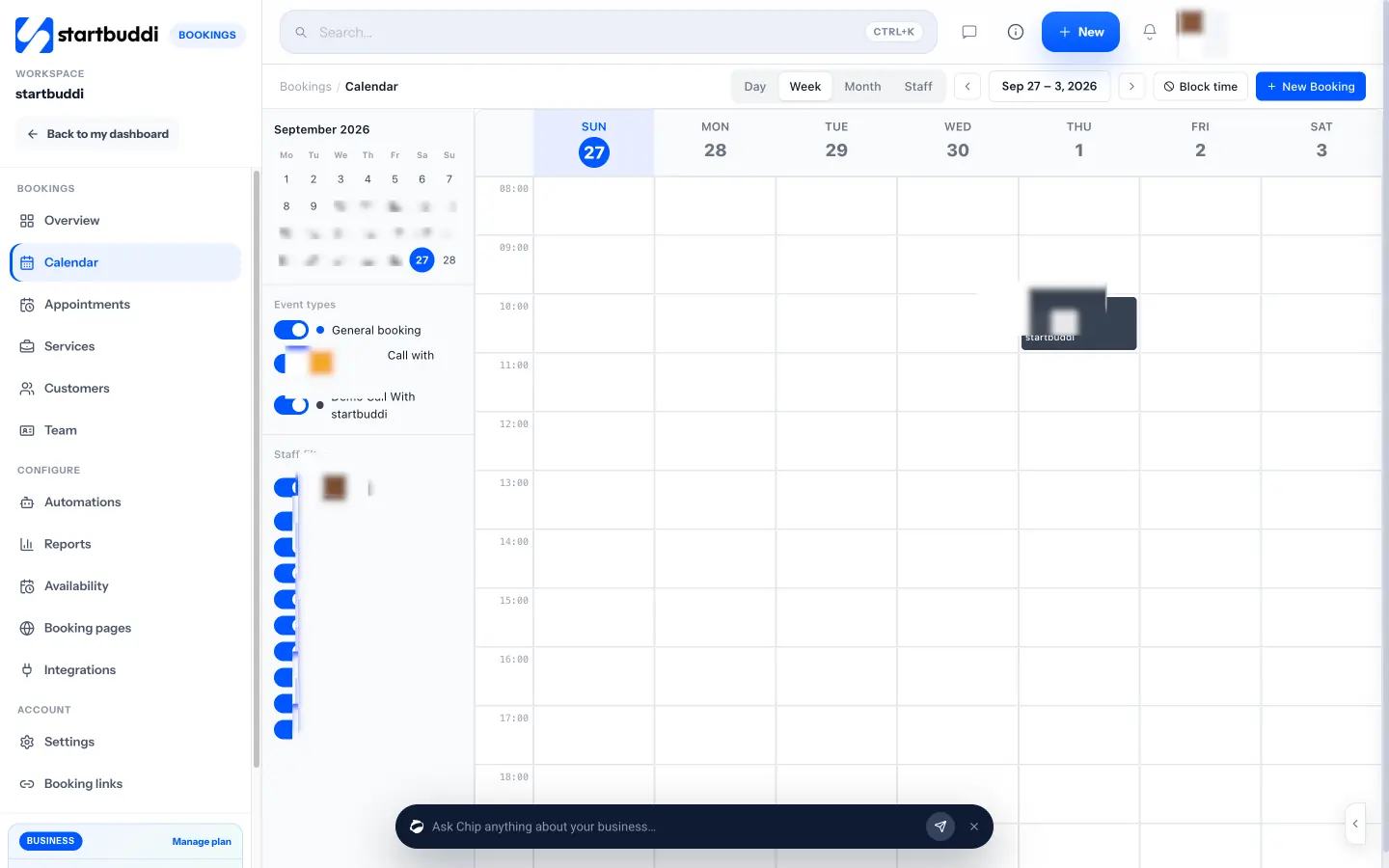
When a customer doesn’t turn up, mark the booking as a no-show and startbuddi sends your “after a no-show” follow-up email inviting them to rebook. Every booking also creates or updates the customer in your contacts, so you can see how often each regular comes in.
What it doesn’t do, so you can plan around it: there’s no live walk-in queue or waitlist that messages people when it’s their turn, no recurring bookings (book a regular’s next cut before they leave instead), and one booking is one service. Google Calendar sync is one way: your bookings show in Google Calendar, but personal Google events don’t block booking slots. Set up services and hours on a computer; on a phone, the Bookings overview shows the day and lets you add a booking. It isn’t a till or card machine either; it takes online deposits and payments, not in-shop card payments. See the details on the Bookings page.
Related guides
- Nails as well as cuts: our guide to online booking for nail salons covers removal questions, long appointments and technician pages.
- Running the whole shop: how to run a salon business covers pricing, client records and marketing.
FAQs
What is the best way for a barbershop to handle walk-ins and appointments?
Use a hybrid model with a clear rule: either some chairs take bookings while others take walk-ins, or bookings run at set hours and walk-ins at others. Put every walk-in into the same calendar as soon as they sit down. That way online customers can’t book a chair that’s already in use.
Should a barber take deposits?
Take deposits where no-shows cost you most: Saturdays, public holidays, first visits, long services such as locs, and home-service bookings. Weekday cuts for regulars usually don’t need one. Take the deposit off the final price and write the cancellation rule next to it.
How long should a barber book for a haircut?
Time your cuts on a normal day and round up to the nearest 15 minutes. Many shops book 30 minutes for a standard cut and 45 minutes for a skin fade or a cut and beard, plus 5 to 10 minutes of buffer for cleaning. Your own times are what count.
Can customers book a specific barber online?
Yes, if your booking app gives each barber a personal booking page. Regulars use their barber’s link, while new customers book “any available” so bookings are shared across the team.
Is a barber salon booking app worth it for a one-chair shop?
Usually, yes. A solo barber loses the most from a no-show and spends the most time answering “are you free by 4?” on WhatsApp. A booking link with a deposit on busy days and a reminder gives that time back, and you can still keep walk-in hours.
Do I still need a walk-in queue if I use online booking?
Only if walk-ins are a big part of your trade. A booking app protects booked slots, while a queue manages people who turn up. Many shops manage walk-ins with set hours, a numbered list and an honest wait time, and use the booking app for everyone else.
Set up your barbershop bookings free
Copy the checklist, choose your walk-in rule, then build your services, deposits and reminders in startbuddi Bookings. Start free, no card needed.
Tiwalade Joanna Okedara-Kalu is the founder, CEO and CTO of startbuddi, the business system that brings clients, bookings, invoices, projects, marketing and the Chip AI assistant into one place. Tiwalade builds software around how service businesses really work day to day, and writes about client management, getting paid on time and why small businesses outgrow the tools they start with.
Founded startbuddi and leads its product and engineering