
How to run a salon business: bookings, clients and payments
A practical guide to running a salon: bookings and scheduling, client records and rebooking, deposits and no-shows, POS choices and marketing that fills the chair.


Running a salon comes down to four jobs: keeping the appointment book full, looking after clients so they come back, getting paid for every hour in the chair, and bringing in new people for the quiet times. This guide covers all four, with worked examples and templates, and shows how to choose salon appointment scheduling software that fits the way you work.
It’s written for salon owners, barbers, nail techs, braiders and independent stylists anywhere, whether you have one chair or ten, and whether you take payment in dollars, pounds, naira, shillings, rand or rupees. Each chapter starts with the business thinking, then shows how to set it up in startbuddi, and is honest about where you’ll need another tool, such as a POS system at the front desk.
By the end, you’ll have a clear service menu and booking link, a simple client record and rebooking habit, a deposit and cancellation policy, and a 30-day plan to fill your empty slots.
Bookings and scheduling: choosing salon appointment scheduling software
- Why the appointment book decides your income
- Build your service menu before you touch any software
- Worked example: turning a price list into bookable services
- Opening hours, buffers and the gaps that cost you money
- Long services and processing time
- Staff, chairs and who does what
- Walk-ins, phone calls and WhatsApp bookings
- What to look for in a salon booking app
- Hair salon appointment software vs a paper diary: when to switch
- How to set up bookings in startbuddi
- Scheduling mistakes to avoid
Your appointment book is the heart of a salon. Every other part of the business, from the money you take to the clients you keep, flows through it. A diary that is full, accurate and easy for clients to use means steady income. A diary full of gaps, double bookings and "can I come at 4?" messages you forgot to answer means lost money and tired staff.
This chapter covers the thinking first: how to turn your price list into bookable services, how to set hours and gaps, how to share work across stylists, and what to look for when you choose salon appointment scheduling software. Then it shows how to set it all up in startbuddi.
Why the appointment book decides your income
A salon sells time in a chair. A stylist who works eight hours a day has 480 minutes to sell, and every minute that goes unbooked is gone for good. You can't store it and sell it next week like a bottle of shampoo.
That makes three numbers matter more than anything else:
- How full the book is. Booked hours divided by available hours. Many owners never work this out, but it is the clearest sign of whether you need more clients or more staff.
- What an hour in the chair earns. A 45-minute cut at $50 earns about $67 an hour. A two-hour colour at $160 earns $80 an hour. Knowing this tells you which services to promote.
- How many booked hours actually happen. A booked slot that ends in a no-show earns nothing, and it also blocked someone else from booking.
Good scheduling improves all three. It fills gaps, puts your best-earning services front and centre, and cuts the slots that go to waste.
Build your service menu before you touch any software
The most common mistake is jumping straight into a booking app and typing in services as you remember them. Sit down with a pen first. For every service, write down five things:
- The name clients use. "Knotless braids, mid-back" beats "Protective style B". "Gel manicure" beats "Nails 2".
- Time in the chair. How long the stylist is actually busy with the client.
- Processing or setting time. Time when colour, relaxer or gel is working and the client is waiting.
- Clean-up and reset time. Sweeping, sterilising tools, changing towels.
- Price, and whether it's fixed or "from". Length, thickness and extras change the price of many hair services, so decide how you will show that.
Here's what a small menu looks like when it's written this way:
| Service | Chair time | Processing | Reset | Price |
|---|---|---|---|---|
| Men's cut and beard trim | 40 min | None | 10 min | $45 |
| Women's cut and blow-dry | 60 min | None | 15 min | $70 |
| Root colour | 45 min | 35 min | 15 min | from $95 |
| Gel manicure | 50 min | None | 10 min | $40 |
| Knotless braids, mid-back | 5 hours | None | 20 min | from $220 |
Keep your menu short. Ten clear services are easier to book than forty confusing ones. Clients who can't work out which option they need will message you instead of booking, and that puts you back where you started.
Worked example: turning a price list into bookable services
Imagine Ngozi (an example, not a real client), who runs a two-chair braiding and natural hair studio in Lagos. Her old price list was a photo on Instagram with 28 styles, each in three lengths. Clients sent a WhatsApp message for every booking, and she spent an hour a night replying.
She grouped the styles into six services clients actually choose between: braids, twists, cornrows, locs maintenance, silk press and wash and treatment. Each service got one clear starting price in naira, and she moved length and extras into a single booking question: "What length do you want?" with answers for shoulder, mid-back and waist. Her price list page explained the extra cost for longer lengths.
The result was a menu a client could understand in ten seconds, and a booking form that collected the one detail Ngozi needed to plan her day. Whatever the country and whatever the currency, the pattern is the same: fewer services, clear names, and questions for the details.
Opening hours, buffers and the gaps that cost you money
Once your services are clear, set the rules that decide when people can book.
Working hours per person. Your salon may open 9am to 7pm, but each stylist may not. Set hours for each person, not just for the shop.
Buffers. A buffer is extra time added after an appointment. It covers reset time and small overruns so one late finish doesn't push the whole day back. Ten to fifteen minutes is a common place to start. Too much buffer leaves money on the table; too little leaves your team rushing and clients waiting.
Notice and booking window. Decide how far ahead people can book, and how close to the time. Some salons open bookings eight weeks ahead so regulars can lock in their slots. Others keep it to four weeks so the book doesn't fill with appointments people forget.
Blocked time. Lunch, training, a supplier visit, the school run. Block these in the diary so the software doesn't sell them.
Awkward gaps. Look at your diary for gaps that are too short for any service. A 25-minute hole between a colour and a cut can't be sold. Either set service lengths so they fit together, or create one short service, such as a fringe trim or brow tidy, that fits those gaps.
Long services and processing time
Hair salons have a problem most booking tools weren't built for: services where the client is in the chair for hours, and colour services where the stylist is free while the colour develops.
For long services such as braids, extensions or locs, the simplest approach is to make each one a single long appointment and to ask for a deposit (chapter 3 covers deposits). Don't split a five-hour service into five one-hour bookings. Clients will book the first hour and forget the rest.
For colour, some salon systems can book a second client into the processing gap. That's useful in a busy salon, but it adds risk: if the first client's colour runs long, both clients wait. If you're small, keep it simple at first. Book the full time, and fill processing gaps with tasks like consultations, stock checks or replying to messages.
Staff, chairs and who does what
Once you have more than one stylist, you need to decide how bookings reach each person. There are two common models, and many salons use both:
- Clients pick their stylist. Loyal clients want the person who knows their hair. Give each stylist their own booking link so clients can go straight to them.
- The next free stylist takes it. For services anyone can do, such as a wash and blow-dry or a gel manicure, share bookings across the team. This is called round robin scheduling, and it keeps new clients from all landing on the same person.
Be clear about which services each person offers. A junior who doesn't yet do colour shouldn't appear as an option for it. And if you rent chairs to self-employed stylists, agree up front who owns the client relationship and whose booking link the client uses. That decision matters later when a stylist leaves.
Walk-ins, phone calls and WhatsApp bookings
Online booking won't replace every other channel, and it doesn't need to. A barber in Atlanta may still take half his trade from walk-ins. A salon in Nairobi may take most bookings by WhatsApp. What matters is that every booking ends up in the same diary.
A simple rule for the team: if it isn't in the diary, it isn't booked. When a regular calls or a walk-in arrives, add them to the same system straight away, in the same way an online booking would appear. When someone messages on WhatsApp asking for a slot, reply with your booking link rather than going back and forth about times. Here's a message you can save as a quick reply:
Hi! Thanks for getting in touch. You can see every free slot and book here: [your booking link]. It takes about a minute. If you can't find a time that works, reply here and I'll help.
Most clients are happy to book themselves once they see it's quicker than waiting for a reply.
What to look for in a salon booking app
There are many salon booking apps and plenty of general scheduling tools. Whatever you look at, check these points against how your salon actually works:
- Services with real durations and prices, in your currency, including long services.
- Staff scheduling: hours per person, a choice of stylist, and a way to share bookings across the team.
- Buffers and blocked time for holidays and training days.
- Booking questions so you can ask about hair length, allergies or reference photos before the day.
- Deposits or full payment at booking, through a payment provider that works where you are.
- Reminders by email, and by WhatsApp or text if your clients live on their phones.
- A client list that fills itself from bookings, with notes and history.
- A booking link and QR code you can share on Instagram, WhatsApp, Google and a printed card at the till.
- Calendar sync with Google or Outlook, and an honest answer about which direction it syncs.
- Reports on bookings, cancellations and repeat clients.
- Fair pricing for your size. Check how price changes as you add staff, services or locations.
If you want to see how two options differ in practice, our startbuddi vs Square Appointments comparison is a good place to start.
Hair salon appointment software vs a paper diary: when to switch
A paper diary works when you're one person with regular clients who call. It stops working when any of these happen:
- You miss bookings because messages arrive while you're working.
- Two people write in the book, and double bookings creep in.
- You can't tell who hasn't been in for months.
- No-shows are costing you real money and you have no way to take deposits.
- You want new clients to find you online and book without waiting for a reply.
If two or more of those sound familiar, it's time for hair salon appointment software. Moving over is easier than it looks: enter your services, set your hours, add the next four weeks of bookings from the paper diary, and start sharing the link.
How to set up bookings in startbuddi
startbuddi has a Bookings module that handles services, availability, team scheduling and a public booking page. Here's how to set it up for a salon.
1. Create your services. Open Bookings, then Services, and click Create Service. Give it the name clients use, a duration and a colour, and assign the staff who offer it. Open the service to set a price and currency (USD, GBP, EUR, NGN, KES, ZAR and GHS are available). The service editor offers lengths from 15 minutes to 2 hours. For longer services like braids or extensions, you can ask Chip, the AI assistant, to create the service with the exact length you need; it shows you a preview and waits for your yes before saving.
2. Add booking questions. In the service editor, add the questions you need answered before the day: hair length, current colour, any allergies, or a link to an inspiration photo. Answers can be short or long text, single or multiple choice, or a rating. You can save an answer to the client's contact record, so you don't have to ask again next time. Chip can suggest questions if you tell it what you need to know, and it labels them as drafts for you to keep or delete.
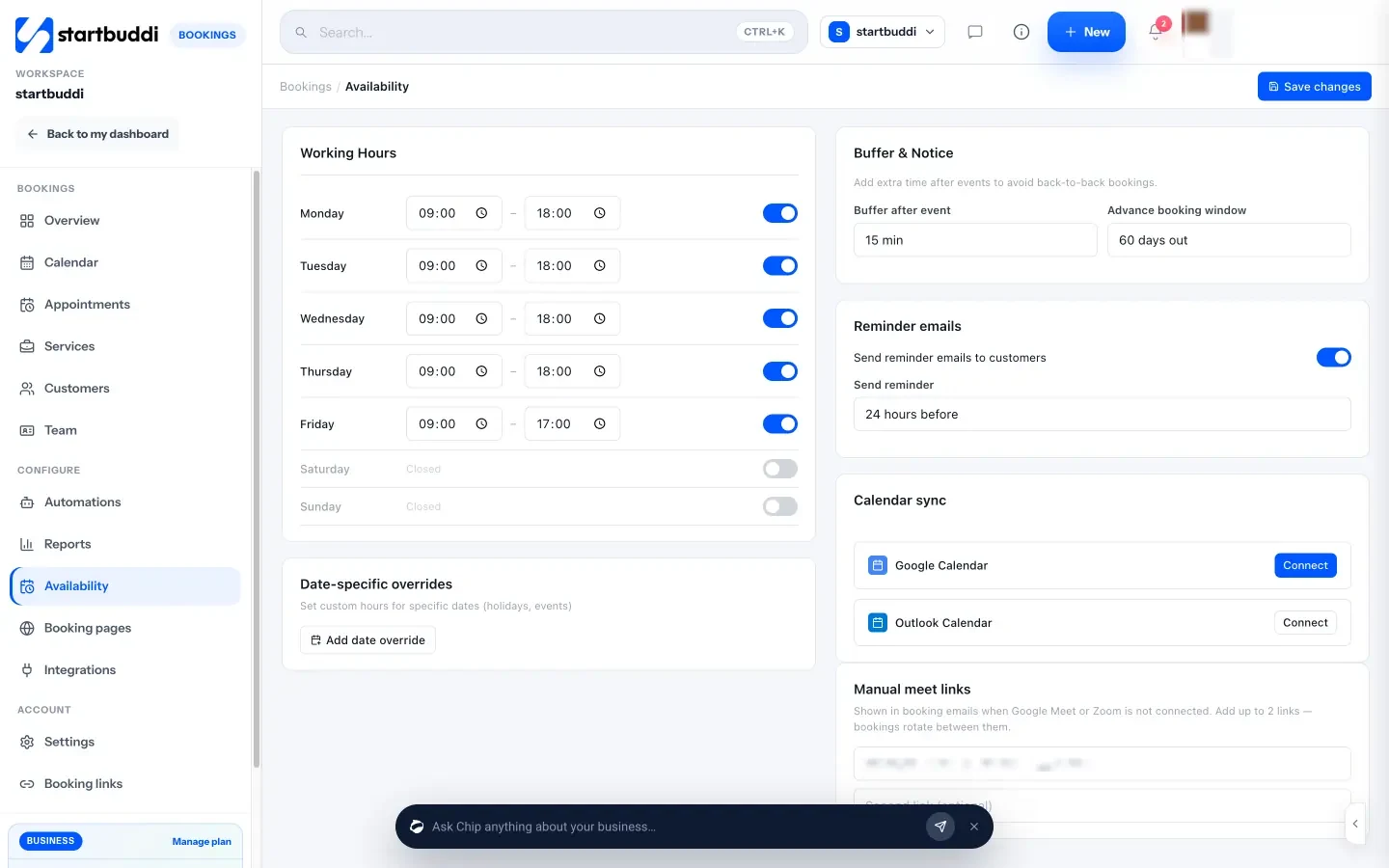
3. Set availability. Open Availability and set working hours for each weekday, a buffer after each appointment (up to 60 minutes), and how far ahead clients can book (from 7 to 90 days). For holidays and training days, use Block time on the Calendar.
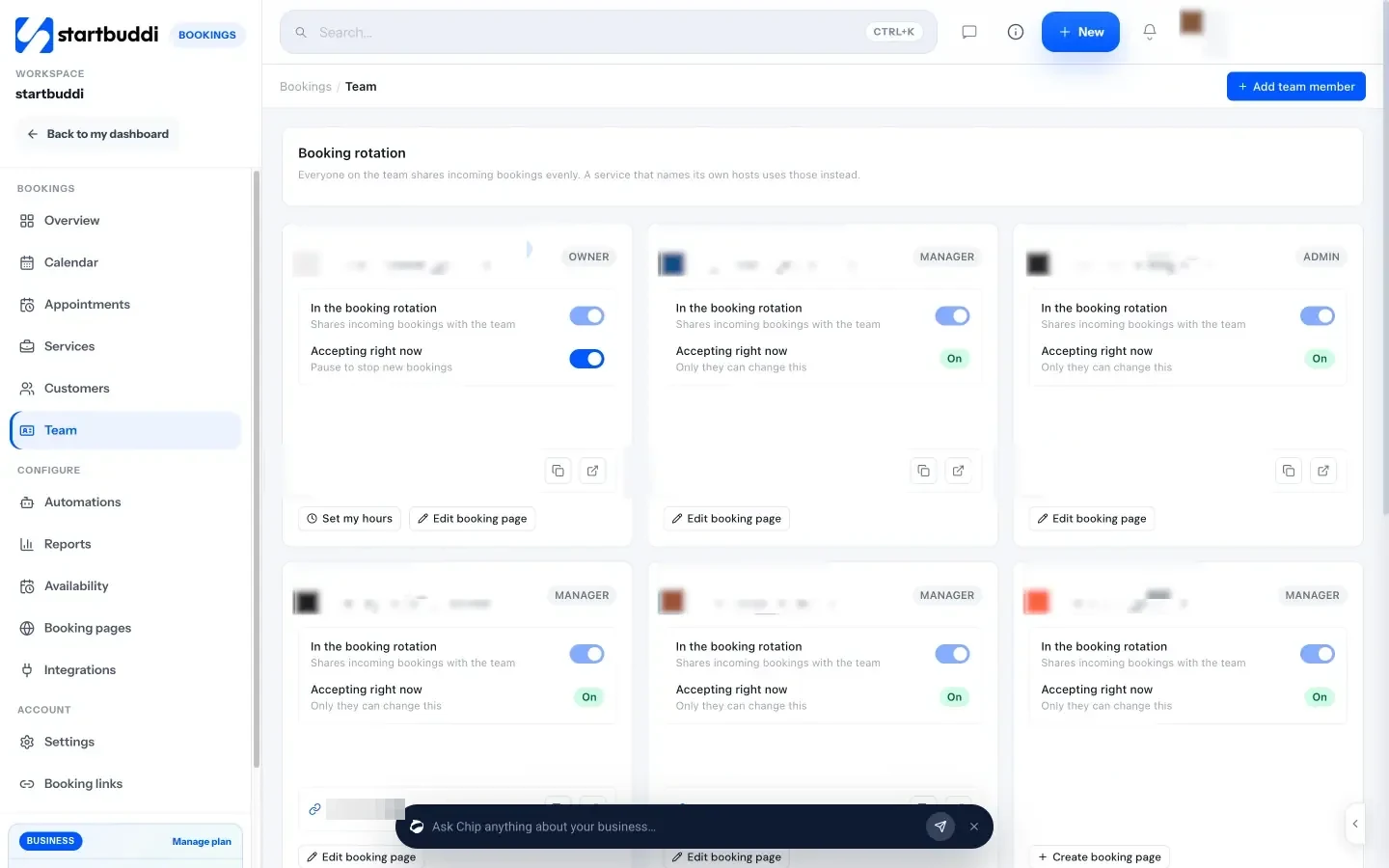
4. Add your team. In Team, invite each stylist. Each person sets their own hours, and anyone in the booking rotation shares incoming bookings. On a service, pick which stylists can do it, and clients see the next available person. For clients who always want the same stylist, create a personal booking page for each team member with their own photo and welcome message.
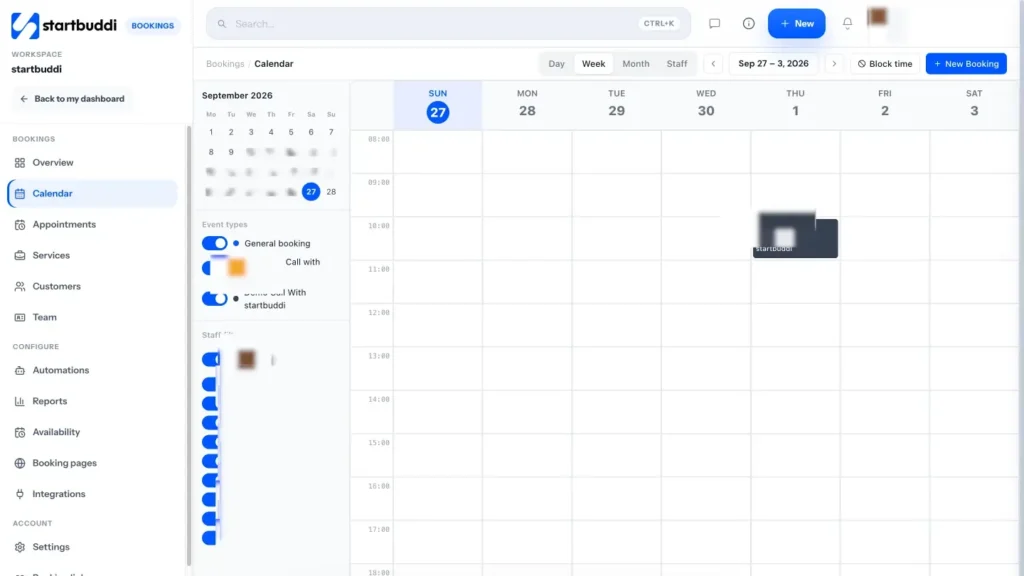
5. Run the day from the calendar. The Calendar shows day, week, month and staff views. Use Block time for lunch, training or holidays, and New Booking to add walk-ins and phone bookings so everything sits in one diary.
6. Share your link. From the Overview, use Share booking link to copy it, send it by WhatsApp or email, embed it on a website, or download a QR code for the front desk. The help article on setting up your booking page walks through the settings screen by screen.
Two honest notes. First, calendar sync pushes your bookings into Google Calendar (and Outlook where it's set up), but it doesn't read the busy times in your personal calendar, so use Block time in startbuddi for anything that should stop bookings. Second, check the plan limits against your team: the Free plan has one live service and one seat, while paid plans add more services, booking pages and team seats. The pricing page lists them all, and every paid plan starts with a 30-day trial.
Scheduling mistakes to avoid
- Durations that are too short. If a service regularly overruns by 15 minutes, change the duration. Running late every day is worse for clients than a slightly longer booking.
- No rules for last-minute bookings. Decide whether someone can book 20 minutes before a slot. If you're not always at the salon, set a minimum notice.
- Two diaries. A paper book at the desk plus an app means double bookings. Pick one.
- Hiding prices. "Price on request" for every service puts people off. Show a starting price, even if the final price depends on length or thickness.
- Never looking at the numbers. Check once a month which services and times are busiest, and which days are quiet. That's where chapter 4's marketing should focus.
With a clear menu, sensible hours and one diary everyone uses, you've built the base the rest of the salon runs on. Next, we'll look at the people in that diary: your clients, and how to keep them coming back.
Salon client management: records, rebooking and retention
- Why keeping clients beats chasing new ones
- What to record on a client card
- Allergy checks and patch tests
- The consultation: a simple intake template
- How to manage client expectations in a salon
- Rebook before they leave the chair
- Spot clients who are drifting away
- Client data, privacy and consent
- Salon client management software: what to look for
- How to manage salon clients in startbuddi
- Client management mistakes to avoid
A new client costs you time, marketing and a slightly nervous first appointment. A regular books without being asked, trusts your judgement, tells their friends and is far less likely to cancel. That's why salon client management matters more than almost any marketing trick: the salons that do well over years are the ones whose clients keep coming back.
This chapter covers what to record about each client, how to handle consultations and expectations, how to rebook people before they leave the chair, and how to notice when someone is drifting away. Then it shows how to run it in startbuddi.
Why keeping clients beats chasing new ones
The numbers behind retention are well known. As Harvard Business Review reports, acquiring a new customer can cost five to 25 times more than keeping an existing one, and research by Frederick Reichheld of Bain & Company found that raising retention by 5% can lift profits by 25% to 95%. Those figures come from business in general, not salons specifically, but anyone who has run a salon knows the pattern.
The US Bureau of Labor Statistics describes the job in the same terms: stylists need to be friendly and able to "build and retain clientele". It also notes that most barbers, and about half of hairstylists and cosmetologists, work for themselves. When you're self-employed, your client list is your business.
Here's a simple way to see the value of a regular. Say a client in London books a £65 cut and colour every eight weeks. That's about six or seven visits a year, or roughly £400 a year. If they stay for five years and refer one friend who does the same, that one relationship is worth around £4,000. Losing them because nobody noticed they hadn't rebooked is an expensive mistake.
What to record on a client card
A good client record means any stylist in your salon can give a returning client a great appointment, even on their first time with them. Keep it short and useful:
| What to record | Why it matters | Example |
|---|---|---|
| Name, phone, email | Reminders, rebooking and receipts | Amara Okeke, WhatsApp number, email |
| Preferred stylist | Loyal clients want the same person | "Always with Jo" |
| Service history | Know what was done and when | Root colour, 12 March; cut, 30 April |
| Formulas and products | Repeat the result exactly | Colour formula, developer, timing |
| Allergies and patch tests | Safety, and your own protection | Patch test done 10 March, no reaction |
| Hair or skin notes | Plan the right service | Fine, colour-treated, sensitive scalp |
| Preferences | The details that make people feel known | Prefers quiet appointments, takes tea with no sugar |
| How they found you | See which marketing works | Instagram, referral from a friend |
| Marketing consent | Stay on the right side of the rules | Happy to get WhatsApp offers: yes |
Only record what you need, and never write anything you'd be embarrassed for the client to read. In many countries, clients have a right to see the data you hold about them.
Allergy checks and patch tests
For colour services, allergy checks are not optional paperwork. The NHS advises testing hair dye at least 48 hours before use, and allergic reactions can develop over time, even to a product someone has used before. Follow the instructions of the products you use and any rules where you work.
For your booking system, this means two things. First, ask about allergies and past reactions when a new client books a colour service. Second, record the date and result of each patch test on the client's record, so the team can see at a glance whether a test is due. A short booking for the patch test itself, 48 hours or more before the colour appointment, makes it much harder to forget.
The consultation: a simple intake template
A consultation, whether it's five minutes at the chair or a form filled in when booking, is where good results start. Use these questions as a base and adjust them for your services:
- What would you like to have done today?
- Do you have a photo of the look you want? (A photo prevents a lot of misunderstandings.)
- What have you had done to your hair or nails in the last six months? Any home colour, relaxer or treatments?
- Do you have any allergies, sensitivities or skin conditions we should know about?
- How much time do you usually spend styling at home?
- Is there an event or date this is for?
- What didn't you like about your last appointment, here or anywhere else?
Put the questions that affect time and price into your booking form, so you know before the client arrives. Keep the rest for the chair.
How to manage client expectations in a salon
Often, unhappy clients aren't unhappy with the stylist's skill. They're unhappy because the result, the time or the price wasn't what they expected. Managing expectations is simple in theory and easy to skip on a busy day.
- Say what's realistic. If someone with dark box-dyed hair wants platinum blonde in one visit, tell them it may take two or three appointments, and explain why. Clients respect honesty more than a disappointing surprise.
- Confirm the price before you start. "From $95" on your menu is fine, but say the actual price in the chair before you begin. "With your length, this will be $120. Is that okay?"
- Confirm the time. Tell long-service clients how long it will take so they can plan their day.
- Show, don't just tell. Use photos to agree on length, shape and colour. "About this long?" with a finger at the jaw prevents a lot of tears.
- Check in during and after. Ask how the water temperature is, whether they're comfortable, and, at the end, whether they're happy. Fix small things before they leave.
- Put your policies in writing. Deposits, lateness, cancellations and redo policies belong on your booking page and in confirmation messages, not only on a sign by the till.
When something does go wrong, respond quickly and calmly. Offer to fix it, listen more than you explain, and write a note on the client's record so everyone knows what happened.
Rebook before they leave the chair
The easiest moment to secure the next visit is at the end of this one, while the client is looking in the mirror and feeling good. Many clients don't rebook simply because nobody asked. A short, natural script works well:
"To keep this shape, you'll want to come back in about six weeks. I've got a Thursday at 5pm or a Saturday at 10am that week. Would either of those work?"
Offering two specific times tends to work better than "Do you want to book again?", because it turns a yes-or-no question into a choice. If they're not sure of their schedule, send your booking link that evening with a friendly note.
Set your own rebooking intervals by service, based on how your clients' hair and nails grow and what they tell you. Example intervals you might start with and then adjust:
| Service | Example rebooking interval |
|---|---|
| Short men's cut or fade | 2 to 4 weeks |
| Women's cut | 6 to 10 weeks |
| Root colour | 4 to 8 weeks |
| Gel manicure | 2 to 3 weeks |
| Braids or protective style | Agree with the client based on the style |
Record the interval on the client's record, so a follow-up can go out if they pass it without booking.
Spot clients who are drifting away
Clients rarely announce that they're leaving. They just don't come back. The trick is noticing early, while a friendly message can still win them back.
Once a month, look for three groups:
- Overdue regulars. Anyone past their usual interval plus two weeks. A client who comes every six weeks and hasn't booked in eight is worth a message.
- One-visit clients. People who came once and never returned. Some were passing through, but some had a so-so first visit you can still fix.
- Recent cancellations. Anyone who cancelled and didn't rebook.
A short personal message does more than any discount. Here's one you can adapt:
Hi Priya, it's Jo from the salon. It's been a little while since your last colour and I wanted to check in. If you'd like to come in, here are my free times this month: [booking link]. And if anything about your last visit wasn't right, I'd really like to hear.
If you send messages like this in bulk, rather than one by one, check the consent rules in the next section and in chapter 4 first.
Client data, privacy and consent
Client records include personal details and sometimes health information, such as allergies. Most countries have rules about how you collect, store and use this. The principles are similar almost everywhere: collect only what you need, keep it secure, tell clients what you use it for, and get permission before sending marketing messages.
The details differ by country, so check the rules where you are. Examples of official sources are the ICO in the UK, the Nigeria Data Protection Commission, South Africa's Information Regulator, Kenya's Office of the Data Protection Commissioner and India's data protection framework. This is general information, not legal advice.
Salon client management software: what to look for
Paper cards and a phone full of WhatsApp chats work for a while. Once you have a few hundred clients or more than one stylist, you need salon client management software that does these things:
- Creates a client record automatically when someone books, so nobody retypes details.
- Shows every visit, note and payment on one page.
- Lets you tag and group clients, such as "colour clients" or "not seen in 90 days".
- Sends follow-ups after appointments and after missed appointments.
- Records marketing consent, and lets people unsubscribe.
- Exports your data if you ever move.
How to manage salon clients in startbuddi
In startbuddi, bookings and clients are connected. When someone books, they're created or updated as a contact in Customers, so your client list builds itself as your diary fills.
See everyone who's booked. In Bookings, the Customers tab lists everyone who has booked, with their total bookings, last booking and a tag worked out from their history: VIP, Active, Lead, At risk or New. Sort by last booking to find the regulars who are overdue, or export the list as a CSV.
Keep notes and details on the contact. Open Customers, then Contacts, for the full record. Each contact has notes, tasks, activity, files and a money tile showing what they've been invoiced, paid and still owe. Add tags such as "colour client" or "patch test due", and use custom properties for things like hair type or preferred stylist. Answers to booking questions can be saved straight to these properties.

Group clients with segments. A segment is a saved filter that keeps itself up to date, such as "tagged colour client, last contacted more than 90 days ago". Use segments for your monthly check of drifting clients, and later for marketing.
Follow up after every appointment. In Bookings, Settings has two follow-up emails you can edit: one after a completed booking and one after a no-show. Use the first to thank clients and include your booking link for their next visit. On paid plans, Automations can send follow-ups by email, WhatsApp or text when a booking is completed, cancelled or missed, with a wait step in between. The templates include a booking reminder stack and a cancellation win-back you can adapt.
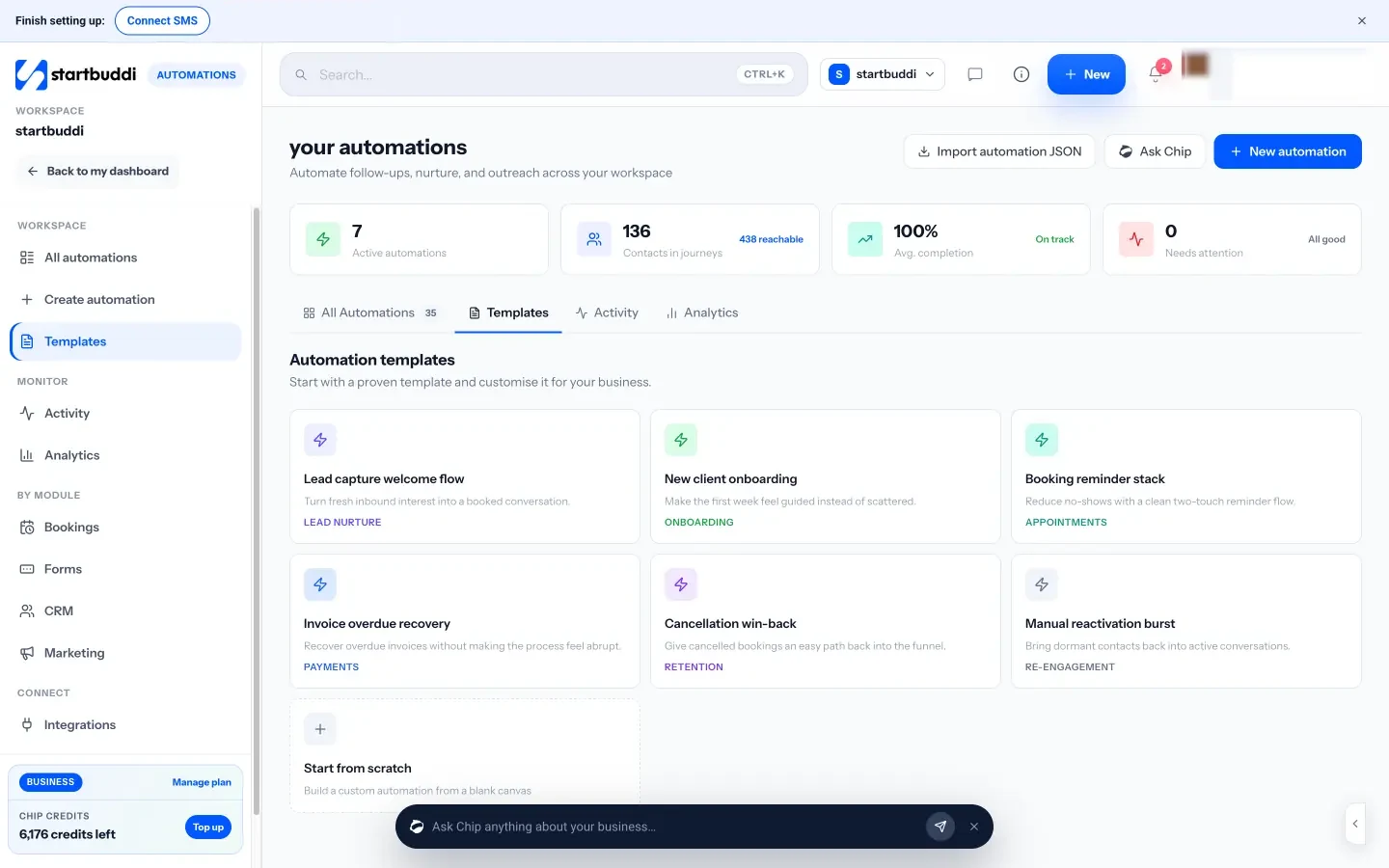
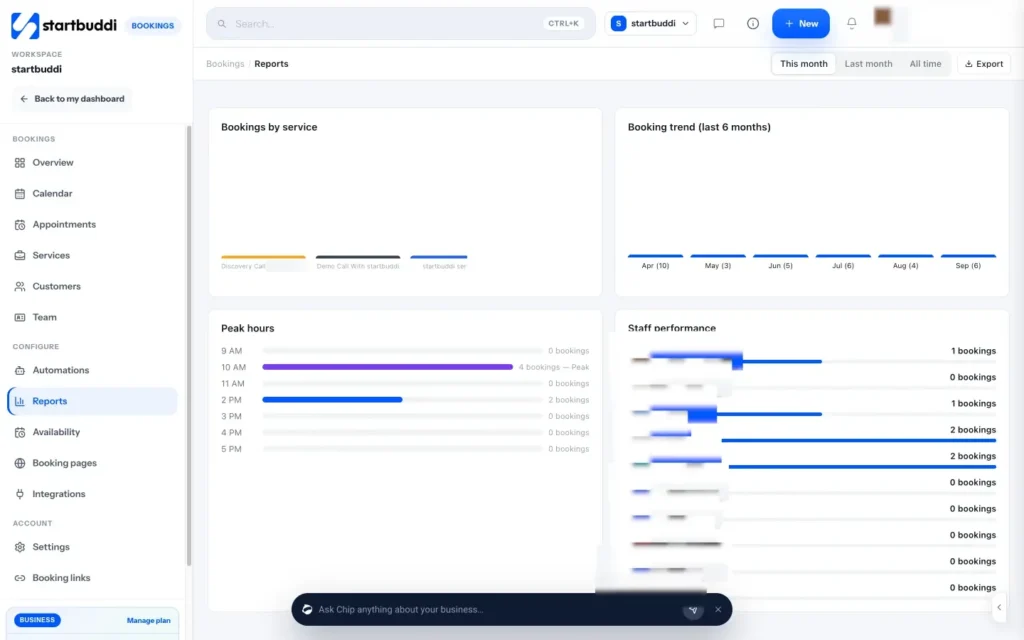
Check your repeat clients. Bookings Reports show total bookings, cancellation rate, repeat customers, bookings by service, busiest hours and bookings per staff member. Look at repeat customers each month: it's the clearest measure of whether your client care is working.
One honest note: automations can't yet start on a calendar date, such as a client's birthday. A "booking completed" automation with a wait step can send a rebooking nudge a few weeks after each visit, but for clients who have drifted further, use your monthly segment check and send the check-in message yourself, or ask Chip to draft it for you.
Client management mistakes to avoid
- Records only in one stylist's head. If Jo leaves or is off sick, her clients' formulas shouldn't leave with her.
- Collecting everything. A 30-question form puts people off. Ask what you need to do the job well.
- Discounting instead of caring. A client who didn't return because of a poor experience won't be won back by 10% off. Ask what happened.
- Messaging without permission. It annoys clients and can break the rules. Ask for consent when they book.
With clients recorded, rebooked and looked after, the next job is making sure every appointment turns into money, including the ones people don't turn up to.
Payments, deposits, no-shows and the best POS system for your salon
- How money flows through a salon
- Deposits: when to take them and how much
- Worked example: deposits for a braiding service
- A cancellation and no-show policy template
- The no-show playbook
- Tips, commission and chair rental
- Do you need the best POS system for your salon?
- Where startbuddi fits, and where it doesn't
- How to take salon payments in startbuddi
- Payment mistakes to avoid
A full diary only matters if the appointments turn into money. That means taking payment smoothly at the end of each visit, protecting your time with deposits and a clear cancellation policy, and cutting down the no-shows that quietly drain a salon's income. It also means deciding whether you need a point of sale (POS) system at the front desk, and if so, which kind.
This chapter works through each of those, with a worked example, a policy template and a POS buyer's checklist. Then it shows what startbuddi does for salon payments, and, just as important, what it doesn't do.
How money flows through a salon
Before choosing tools, map how money actually reaches you. For most salons there are four moments:
- At booking: a deposit or full payment for long, expensive or first-time appointments.
- At the end of the visit: the balance for the service, plus any products and tips.
- Between visits: gift vouchers, memberships or packages paid in advance.
- After a missed appointment: a cancellation or no-show fee, if your policy includes one.
How clients like to pay depends a lot on where you are. A salon in Toronto or Manchester will mostly see card and phone payments. In Lagos, bank transfers are common alongside cards. In Nairobi, many clients will want to pay by mobile money, and in Bengaluru, by scanning a code and paying with UPI. Whatever tools you choose must handle the ways your clients already pay, otherwise you'll end up checking your bank app for transfers at the till, which slows everyone down.
Deposits: when to take them and how much
A deposit is a part-payment taken when someone books. It does two jobs: it covers some of your loss if they don't turn up, and it makes people more likely to show up or cancel properly, because they've already committed money.
You don't need a deposit on everything. Take them where the risk is highest:
- Long services such as braids, extensions, locs or bridal hair, where a no-show wipes out half a day.
- Expensive services such as colour corrections.
- Services where you buy materials in advance, like hair extensions bought for a specific client.
- New clients for anything longer than an hour, until they've shown up once or twice.
- Peak slots such as Saturday mornings or the week before a holiday.
How much? Enough to make the booking feel real, but not so much it looks like you're profiting from cancellations. Many salons ask for a fixed amount or a modest share of the price, and ask for full payment only where they buy materials for the client. Our post on how much deposit to charge clients goes into more detail.
Fairness matters legally as well as for your reputation. In the UK, for example, the Competition and Markets Authority's guidance on unfair terms explains that deposits and cancellation charges should reflect the loss a business actually suffers, rather than being set to cover everything. Rules differ by country and sometimes by state or city, so check the consumer protection rules where you are. This is general information, not legal advice.
Worked example: deposits for a braiding service
Imagine a studio in Johannesburg that charges R1,200 for knotless braids, a five-hour appointment. Before deposits, the owner found that clients sometimes didn't turn up for these long bookings, and each no-show left five hours of an empty chair and a stylist paid for nothing.
She sets a R300 deposit, paid online when booking, taken off the final bill. Her policy says the deposit moves to a new date if the client gives 48 hours' notice, and is kept if they cancel later or don't show. The client pays the remaining R900 at the end of the appointment.
Now a no-show still hurts, but the R300 covers part of the lost time, and clients who might have drifted away without a word now send a message to move their booking. The same approach works with $50 on a $200 service in Chicago, £40 on a £160 colour correction in Leeds, or ₦10,000 on a ₦40,000 style in Abuja. Pick an amount that fits your prices and your clients.
A cancellation and no-show policy template
A policy only works if clients see it before they book, it's short enough to read, and you actually apply it. Here's a template to adapt:
Booking and cancellation policy
A deposit of [amount] is needed to secure appointments over [length] and for all new clients. It comes off your final bill.
Need to change your appointment? Please give us at least [48] hours' notice and we'll move your deposit to your new date.
If you cancel with less than [48] hours' notice, or don't arrive for your appointment, your deposit is kept to cover the time we reserved for you.
If you're more than [15] minutes late, we may need to shorten your service or rebook you, so the next client isn't kept waiting.
If something unexpected happens, message us. We'll always try to be fair.
Put the policy on your booking page, in your confirmation message and on your price list. Our free cancellation policy template can help you word yours.
The no-show playbook
No-shows are a familiar headache for salon owners, and you rarely get to zero. But a few habits help a great deal. First, know what they cost you. If three $60 appointments go missing a week, that's $180 a week, or over $9,000 over a year. Our free no-show cost calculator works it out for your prices.
Then put these in place:
- Confirm every booking in writing, with the date, time, address, price and your policy.
- Send a reminder the day before. For early morning appointments, send it the afternoon before.
- Make cancelling easy. It sounds odd, but a client who can cancel with one tap gives you a slot you can refill. A client who has to call during a busy hour often just doesn't show.
- Take deposits on the services where the risk is highest.
- Record every no-show on the client's record, and ask repeat no-shows to pay in full to book.
- Follow up kindly. A message the same day ("We missed you today, is everything okay?") keeps the relationship and often gets a rebooking.
- Keep a waiting list of clients who want an earlier slot, and message them when there's a cancellation.
For more detail, read our post on how to reduce no-shows.
Tips, commission and chair rental
Salon payments often involve more than the service price. Three things to sort out early:
- Tips. If clients tip by card, decide how tips reach each stylist and keep records. In the UK, the law on tips at work says all tips must go to workers without deductions, with a written tipping policy. In the US, the IRS has guidance on tip recordkeeping and reporting. Check the rules where you are.
- Commission. If stylists earn a share of their services or product sales, you need a record of which stylist did which service. That's one reason to keep every booking in one system.
- Chair rental. If stylists rent a chair and run their own clients, agree who takes the payment. Often each renter takes their own payments, and the salon charges rent separately.
These are general points, not tax or employment advice. Speak to an accountant if you're unsure.
Do you need the best POS system for your salon?
A point of sale, or POS, system is what you use to take payment at the counter. For salons, a full POS usually means a card reader plus software that handles services, retail products, tips, receipts, staff commission and a cash drawer, often joined to a booking system.
Whether you need one depends on how you work:
- You probably need a POS if you have a front desk, several stylists, a lot of card payments in person, retail products on shelves, card tips, or staff commission to track.
- You may not need a full POS if you're a solo stylist or mobile nail tech, most clients pay by transfer, mobile money or a link, and you sell few products. A payment link or QR code may be all you need.
When you look at salon POS options, check:
- Payment methods your clients actually use: contactless cards, phone wallets, bank transfer, mobile money or UPI.
- Hardware: card reader, receipt printer, cash drawer, and whether it works on a phone you already own.
- Fees: the percentage and fixed fee per transaction, monthly fees, hardware costs, and how fast money reaches your bank. Always read the provider's own pricing page.
- Tips and commission handled properly.
- Retail stock if you sell products.
- Booking connection: does it link to your appointment book, so you're not typing the service in twice?
- Reports by stylist, service and day.
- Support in your time zone and your country.
Some examples of tools salons use, described in their own words: Square Appointments is booking and scheduling software that connects to Square's point of sale and lists hair, nail and beauty salons among its business types. Fresha calls itself a booking platform for salons and spas, with payments built in. Phorest describes itself as all-in-one software for premium salons and aesthetic clinics. In South Africa, Yoco offers card machines and point of sale for small businesses, and Stripe Terminal lets businesses that already use Stripe take in-person payments. This isn't a ranking. The best POS system for a salon is the one that handles your clients' payment methods, at fees you can live with, and that your team finds quick to use.
Where startbuddi fits, and where it doesn't
To be clear: startbuddi is not a POS system. It doesn't connect to card readers, receipt printers or cash drawers, and it isn't built for tip handling or staff commission. If your salon needs those, use a dedicated POS alongside it.
What startbuddi does well is the money around the appointment: deposits at booking, payment links you can send on WhatsApp, a QR code clients can scan to pay on their own phones, invoices, memberships, and one record of what every client has paid. For solo stylists and small salons where most payments are online, by transfer or by link, that may be all you need. For bigger salons, it can handle bookings, deposits and client follow-up while a POS handles the counter.
How to take salon payments in startbuddi
First, connect a payment provider. startbuddi works with Paystack, which supports cards, bank transfer, USSD and mobile money in the countries it covers, and Stripe, which pays into your own Stripe account. Money goes to your account with the provider, not to startbuddi.
1. Take deposits at booking. In Bookings, open a service and turn on Require payment to book. Choose whether to take the full amount or a deposit. When a client books, they go to Paystack or Stripe checkout, and their slot is held for 30 minutes as Awaiting payment. Payment confirms the booking and sends the confirmation email.
2. Send reminders. In Bookings settings, switch on the reminder channels you want: email, WhatsApp and SMS. Then, in Availability, choose when the reminder goes out, from 1 to 48 hours before. WhatsApp needs a connected WhatsApp number, and SMS needs an SMS connection and a plan that includes SMS. For a second reminder or a custom message, add a booking automation.
3. Handle no-shows. The Bookings Overview has a Needs attention list where you mark each appointment as Came or No-show. Marking a no-show sends your "After a no-show" follow-up email, which you can edit in Settings to include your policy and a link to rebook.
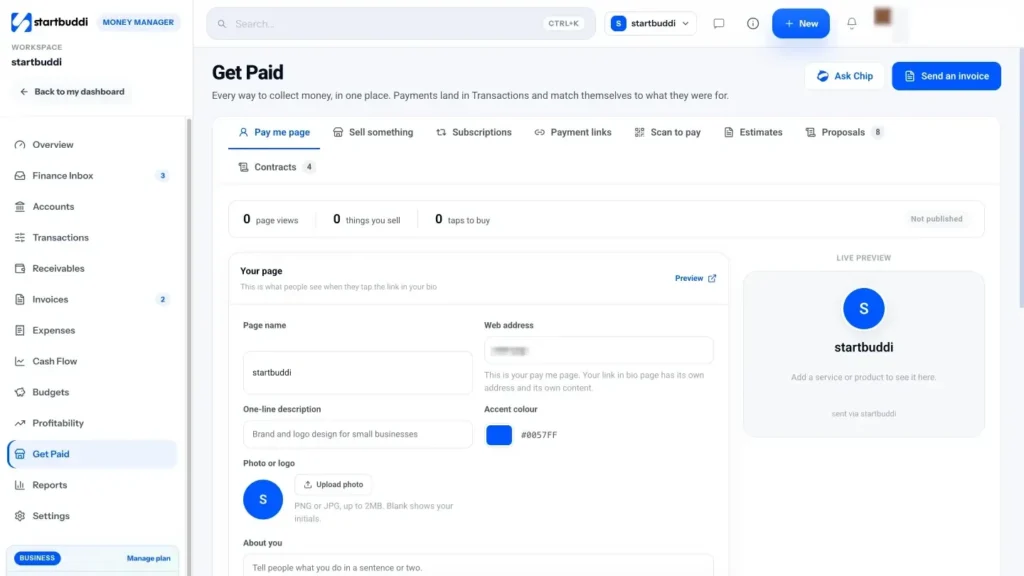
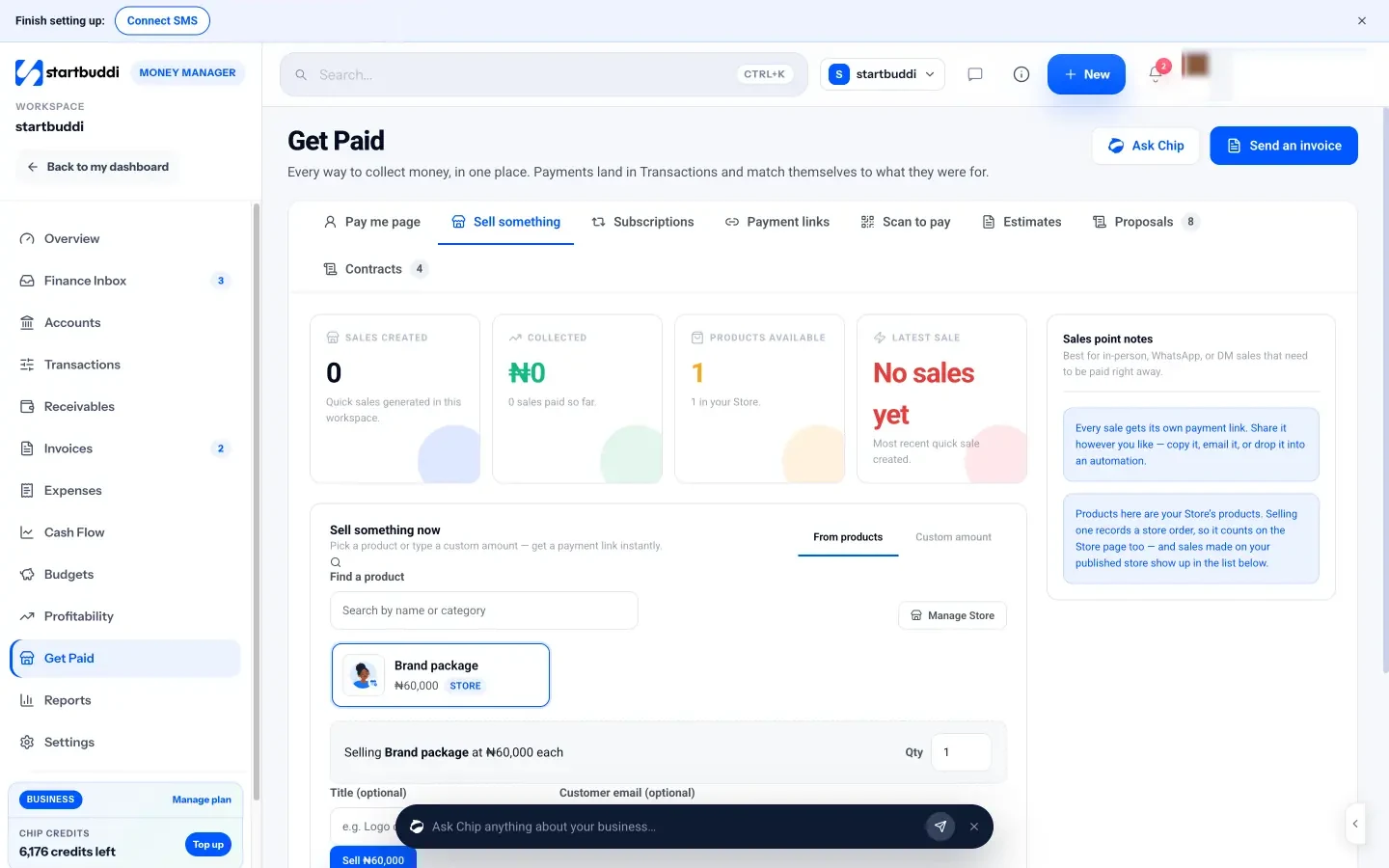
4. Take the balance at the end. In Money Manager, open Get Paid, then Sell something. Pick a product from your store or type a custom amount, and startbuddi creates a payment link straight away. The client can pay on their phone from the link you send, or you can print QR codes from Scan to pay and keep one at the desk.
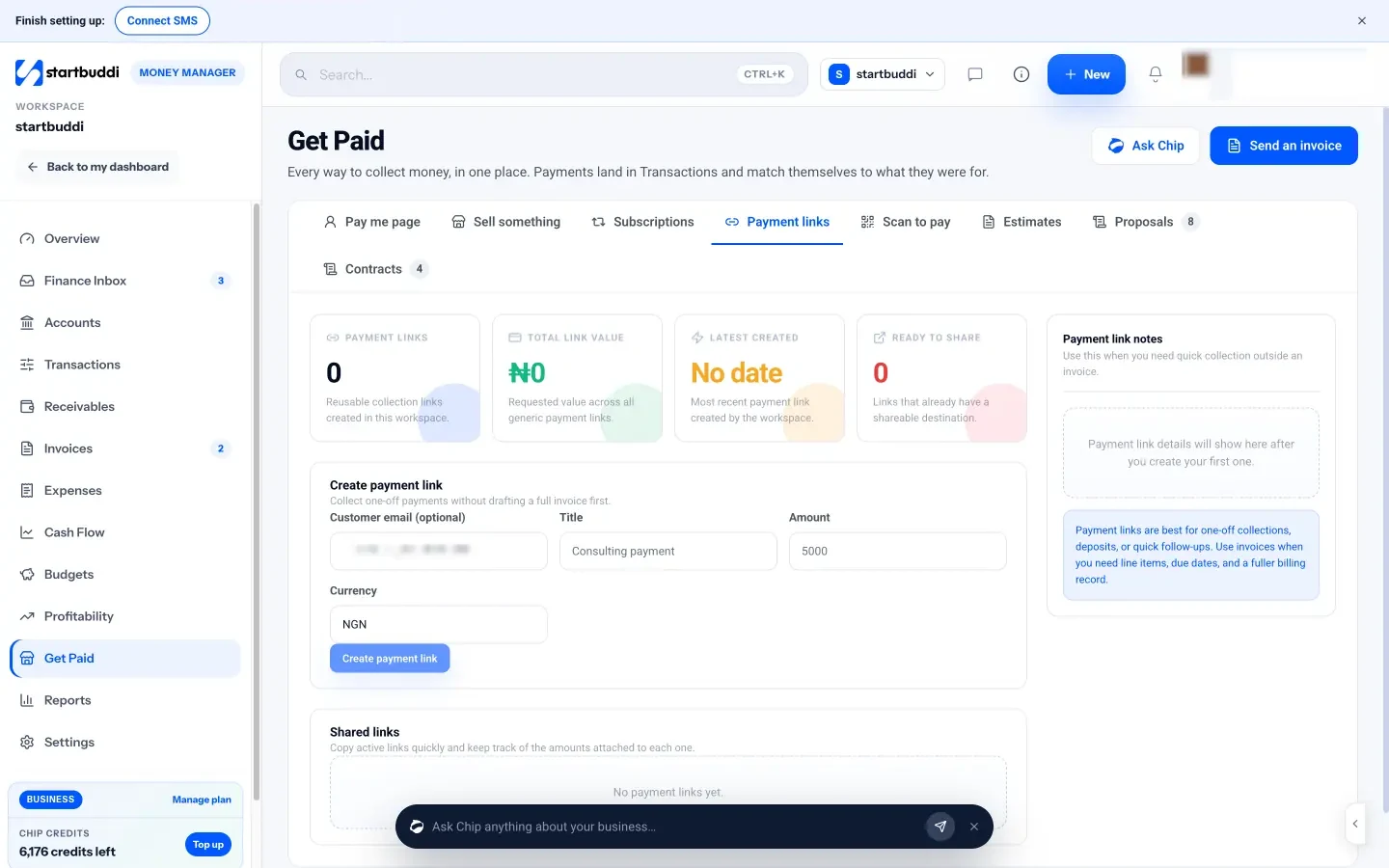
5. Send payment links for deposits taken by chat. If a client books by WhatsApp, go to Payment links, enter the amount and a title such as "Deposit: bridal trial", and create the link. Copy it into the chat, or send it by email or text.
6. Give clients one page to pay from. The Pay me page in Get Paid is a simple page with your photo, a short description and the services you sell, each with a price. Publish it, put the link in your bio, and print its QR code from Scan to pay for the desk.
7. Sell memberships and packages. In Subscriptions, create a monthly plan, such as a blow-dry club or unlimited fringe trims, and send clients a link to subscribe. Renewals are charged automatically by Paystack or Stripe.
8. Invoice when you need to. For bridal parties, corporate events or anything with several line items, use invoices. You can also generate an invoice from a booking's detail page. The Free plan includes five invoices a month; paid plans include unlimited invoices.
Every payment lands in Transactions and links back to the booking, sale or invoice it was for, so at the end of the month you can see what came in without checking three apps. Learn more on the Get Paid product page.
Payment mistakes to avoid
- A policy nobody sees. If it's only on a sign by the till, clients will say, fairly, that they didn't know.
- Deposits that feel like a trap. Keep amounts reasonable and always offer a way to move the booking with notice.
- Only one way to pay. A salon that only takes cash, or only takes cards, turns some clients away.
- Mixing personal and business money. Use a separate account so you can see what the salon really earns.
With money coming in and no-shows under control, the last piece is making sure your chairs stay full. That's where marketing comes in.
Salon marketing: how to fill the chair
- Start with your empty slots, not with a campaign
- Get found on Google and maps
- Ask for reviews the right way
- Build a salon page with prices and a booking button
- Put your salon booking app link everywhere
- What to post on social media
- Message the clients you already have
- Referrals and local partners
- A 30-day plan to fill the chair
- How to run salon marketing in startbuddi
- Marketing mistakes to avoid
Every salon has quiet hours. Tuesday mornings, the week after a holiday, the gap between two long bookings. Marketing for a salon isn't about going viral. It's about filling those specific empty chairs, with a steady flow of new clients who find you, and existing clients who come back more often.
This chapter covers where to focus first, how to get found on Google, how to build a simple page and booking link people can use, what to post on social media, and how to message the clients you already have without annoying them. It ends with a 30-day plan and how to run it in startbuddi.
Start with your empty slots, not with a campaign
Before you post anything, look at your diary for the last month. Which days and times were quiet? Which services had the fewest bookings? Which stylists had the most free time? That tells you what your marketing needs to sell.
Here's a worked example. A four-chair salon in Manchester is open 45 hours a week per chair, which is 180 chair-hours. Last month it averaged 120 booked hours a week, so it was about 67% full. Nearly all the empty hours were Tuesday to Thursday before 1pm. Saturday was full every week.
That changes the whole plan. More Instagram posts about Saturday appointments won't help. Instead, the salon needs a reason for people to come on weekday mornings: a weekday express blow-dry for people working from home, an offer for students or retired clients, or a message to regulars who could shift their visit. Filling just 10 of those empty hours a week at £50 an hour adds £500 a week, around £26,000 over a year.
Work out your own version: available hours, booked hours and the quiet times. Then aim every marketing effort in this chapter at those gaps.
Get found on Google and maps
When someone searches "hair salon near me", "barber in Kilimani" or "nail salon open Sunday", the results that appear on the map come from Google Business Profiles. For a local salon, this is often the single most useful free listing you can have.
Google explains that local results are based mainly on relevance, distance and prominence. In practice that means:
- Fill in everything. Your category (hair salon, barber shop, nail salon), address, service area, phone, hours and holiday hours.
- List your services and prices in plain words people search for, such as "knotless braids", "balayage" or "gel manicure".
- Add real photos of your salon, your team and your work, and add new ones regularly.
- Add your booking link so people can book straight from the listing.
- Get reviews and reply to them. Google says more reviews and positive ratings can help your local ranking, and replying shows you value feedback.
Our guide to local SEO for small businesses goes into more detail, including other directories worth listing on.
Ask for reviews the right way
Reviews are the salon version of word of mouth. The best time to ask is at the end of a great appointment, when the client is happy with the result. Make it easy: a QR code at the desk, or a short message that evening with the link.
Hi Amara, thank you for coming in today, your colour looked amazing. If you have a minute, a short Google review really helps a small salon like ours: [review link]. Thank you!
Two rules to follow. First, don't offer discounts or freebies in exchange for reviews. Google's own review guidance says incentives for posting or changing reviews are prohibited. Second, never write fake reviews or buy them. In the US, the Federal Trade Commission has a rule banning fake reviews and testimonials, and many other countries have similar consumer protection laws.
Reply to every review, good or bad. For a bad one, stay calm, thank them, apologise for their experience and offer to talk privately. Other potential clients read your replies as much as the reviews.
Build a salon page with prices and a booking button
Many salons send people to an Instagram profile and expect them to work out prices and booking from the posts. That loses clients. You need one simple page that answers the questions every new client has:
- What services do you offer, and what do they cost?
- Where are you, and when are you open?
- What does your work look like?
- What do other clients say?
- How do I book?
That page doesn't need to be a full website. A clear price list with photos, your location and hours, a few real reviews and a big "Book now" button does the job.
Put your salon booking app link everywhere
Once you have a booking link, the goal is simple: anyone who thinks about booking should be one tap away from doing it. Put the link:
- In your Instagram, TikTok and Facebook bios.
- In your WhatsApp Business profile and your quick replies.
- On your Google Business Profile.
- On a QR code at the front desk, on the mirror at each station, and on business cards.
- In your email signature and at the bottom of every confirmation and follow-up.
If you post on several platforms, a link in bio page lets you show your booking link, price list, WhatsApp and reviews from one link.
What to post on social media
For salons, social media is a portfolio people can scroll through. You don't need to post every day. A steady, honest rhythm beats bursts of activity followed by weeks of silence. Here's a simple weekly plan:
| Day | Post | Example |
|---|---|---|
| Monday | Before and after | A colour transformation, with the service name and price |
| Wednesday | Quick tip or short video | How to make a silk press last longer |
| Friday | Free slots or offer | "Two openings Tuesday morning, book here" |
| Weekend | Story from the salon | Behind the scenes, a new team member, a happy client (with permission) |
Always ask clients before posting photos of them, and keep a note of who said yes. Tag the service and a starting price in the caption, because people want to know "how much for that?" And finish each post with one clear step: "Book at the link in our bio."
Seasonal moments are your easiest content. Weddings, school holidays, Christmas, Eid, Diwali, Easter, graduation season and December parties all bring people looking for a fresh look. Plan posts and offers two to four weeks before each one, not the day before.
Message the clients you already have
Your existing clients are your best marketing channel. They already trust you, and a message to them costs almost nothing. Good reasons to send a message include:
- Last-minute openings: "We have a cancellation at 11am tomorrow. First to book gets it."
- Quiet-day offers aimed at the empty slots you found earlier.
- New services or a new stylist.
- Seasonal booking reminders: "December is filling up. Book your party hair now."
- Referral thank-yous: a small credit for every friend who books.
Here's a template for a quiet-day message:
Hi [first name], it's the team at Glow Salon. We've opened some weekday morning slots this month, with 15% off cuts and blow-dries before 1pm, Tuesday to Thursday. Book here: [link]. Reply STOP if you'd rather not get offers from us.
Consent matters. In the UK, the ICO's guidance on electronic marketing says you generally need consent to send marketing emails or texts, with a limited exception for existing customers who were given a simple way to opt out. On WhatsApp, Meta requires businesses to get opt-in before messaging people. The simplest habit is to ask when clients book or visit: "Can we send you occasional offers and openings by WhatsApp or email?" Record the answer, and always include a way to stop. Check the rules where you are; this is general information, not legal advice.
Referrals and local partners
Happy clients bring friends who look like them: similar hair, similar budgets, similar area. Make referrals easy with a simple offer, such as a credit off the next visit for both the client and the friend. Give each client a short message they can forward, with your booking link in it.
I get my hair done at [salon name] and I love it. If you book your first visit with this link, we both get [credit] off our next appointment: [booking link].
Keep track of who referred whom on each client's record, and thank the referrer personally when their friend books. A quick message from their stylist often means more to people than the credit itself.
Local partners can send you steady work too. A bridal salon can team up with wedding planners and photographers. A barber near a university can work with student groups. A nail studio can partner with a nearby gym or a boutique. Keep it simple: agree who refers to whom, and thank partners every time.
A 30-day plan to fill the chair
| Week | Focus | Tasks |
|---|---|---|
| Week 1 | Foundations | Find your quiet slots. Update your Google Business Profile. Build or refresh your price list page with a booking button. |
| Week 2 | Reviews and link | Put your booking link and QR code everywhere. Ask every happy client for a review. Reply to all existing reviews. |
| Week 3 | Existing clients | Ask for marketing consent at every visit. Send one message to consenting clients about your quiet-slot offer. Start a referral offer. |
| Week 4 | Social and review | Schedule two weeks of posts. Check how many of your quiet slots filled. Keep what worked and drop what didn't. |
Repeat the review in week four every month. Marketing works best as a steady habit, not a big launch.
How to run salon marketing in startbuddi
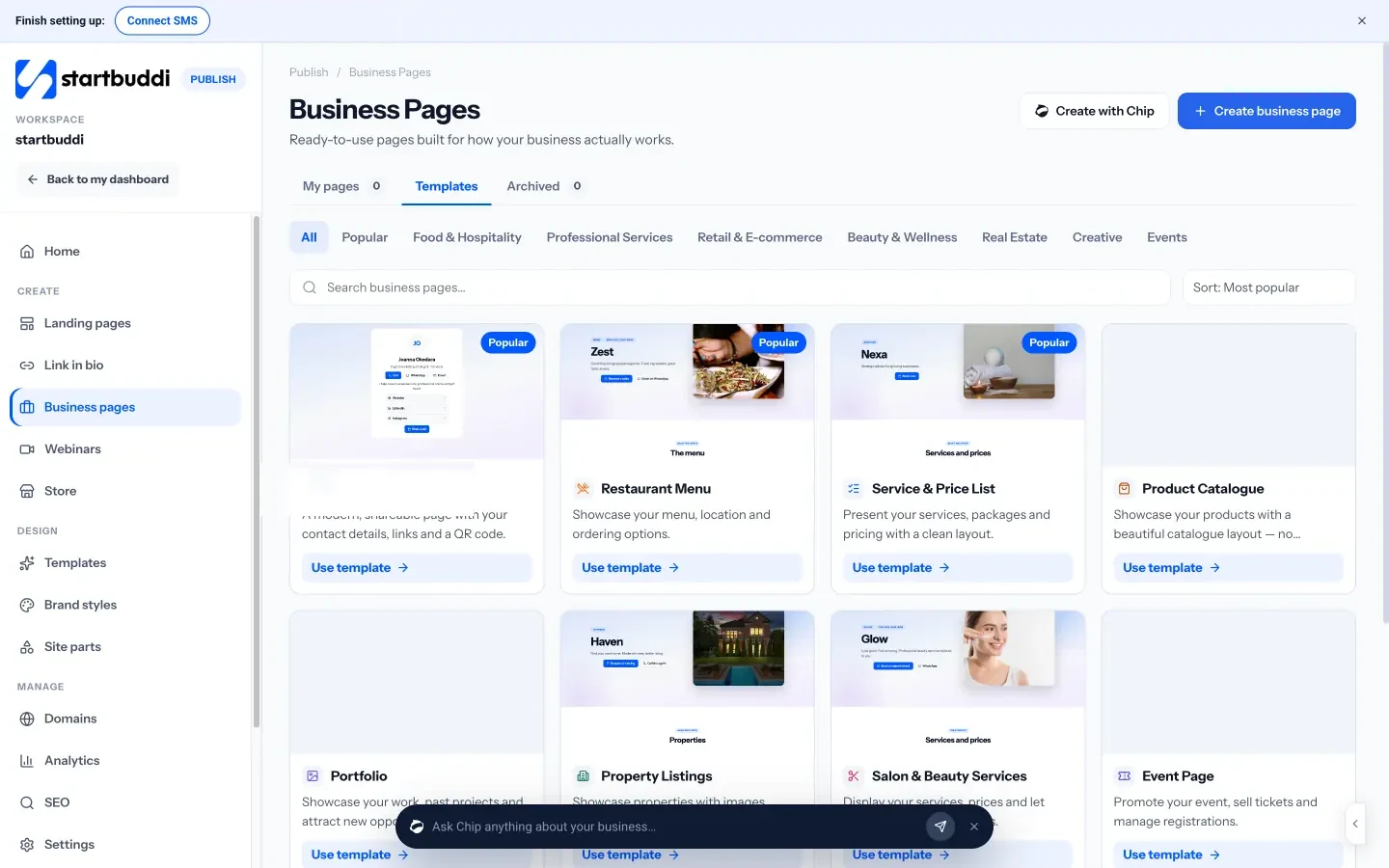
Build your salon page. In Publish, open Business pages. There's a Salon and Beauty Services template made for this, with services, prices and a Book an appointment button. Each item can show a price (including "from" prices), a duration, photos, labels and add-ons, and you can add up to eight buttons, such as Booking, WhatsApp, Phone and Directions. You can also add real client reviews. If you'd rather not start from a blank page, Create with Chip builds a first draft from a sentence about your salon, and nothing is published until you say so. Business pages come with a QR code to print and tap analytics that show how many people tapped Book, WhatsApp or Directions.
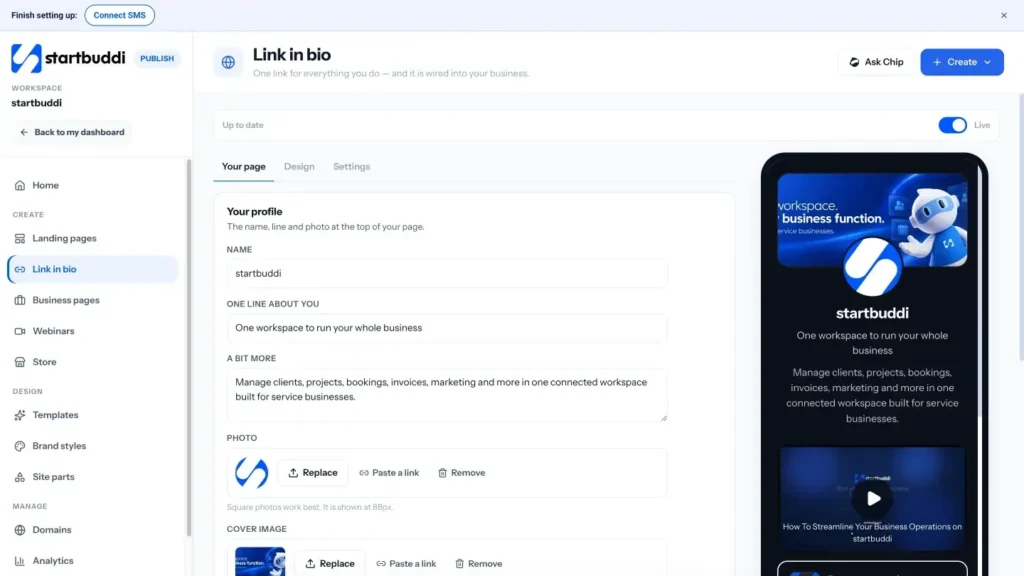
Create a link in bio. In Publish, link in bio gives you one mobile page for your Instagram or TikTok bio, with your booking link, price list and contact buttons.
Find your quiet times. Bookings Reports show your peak hours, bookings by service and bookings by staff member. Use them each month to decide which slots your marketing should fill.
Message consenting clients. The Marketing module, available on paid plans from Starter, lets you send email campaigns, SMS and WhatsApp campaigns to a segment of your contacts, such as "colour clients who agreed to offers". WhatsApp campaigns use message templates approved by Meta, so plan them a little ahead.
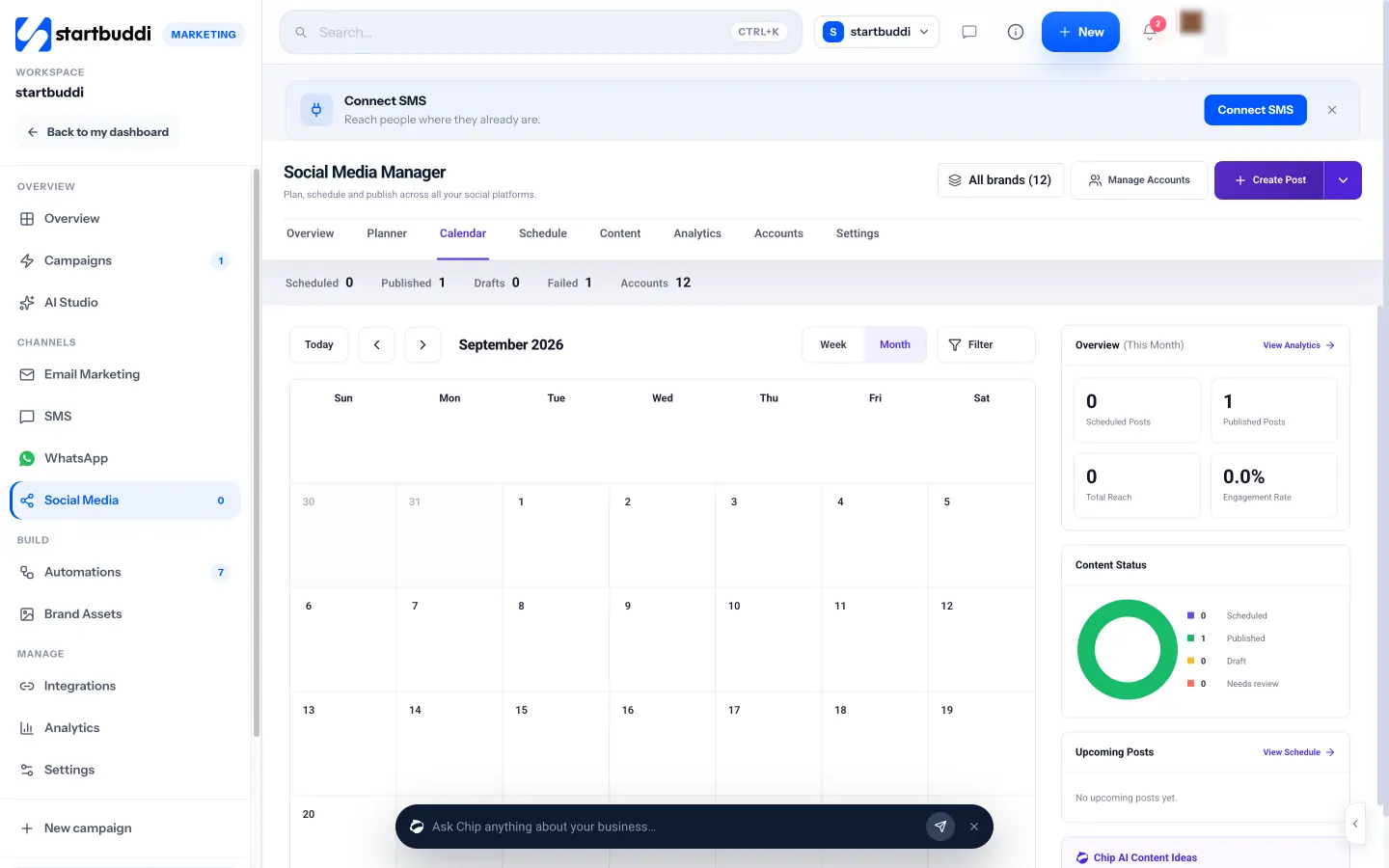
Plan and schedule social posts. The Social Media Manager lets you connect Instagram, Facebook, LinkedIn, X, YouTube and Pinterest (TikTok isn't available yet), then plan and schedule posts on a calendar. Chip can plan a week of posts from a description of what's happening in your salon, and draft captions and hashtags for you to edit.
Automate the basics. Automations can send a thank-you and review request after a completed booking, or a rebooking message a few weeks later. Start from a template and edit the words so they sound like you.
Plans and limits are on the pricing page. The Free plan covers a business page, a booking link and a small client list; email, WhatsApp and SMS campaigns start on Starter, and every paid plan comes with a 30-day trial.
Marketing mistakes to avoid
- Discounting your busiest times. Only offer deals on the slots that are actually empty.
- Posting without a booking link. Every post and message should end with one clear way to book.
- Messaging everyone about everything. Send fewer, more relevant messages to the right group.
- Buying lists or fake reviews. It breaks the rules and damages trust.
- Not measuring. Check each month whether your quiet slots filled. That's the only number that tells you if your marketing worked.
Your next step: pick one thing from this guide and do it this week. For most salons, that's setting up online booking with deposits on your longest services. Start with startbuddi Bookings, share the link, and come back to the other chapters as your diary fills.
Tiwalade Joanna Okedara-Kalu is the founder, CEO and CTO of startbuddi, the business system that brings clients, bookings, invoices, projects, marketing and the Chip AI assistant into one place. Tiwalade builds software around how service businesses really work day to day, and writes about client management, getting paid on time and why small businesses outgrow the tools they start with.
Founded startbuddi and leads its product and engineering