
SEO for small business: a plain-English guide to getting found on Google
A four-part guide to SEO for small business owners: how search works, free keyword research, pages that rank and convert, local SEO, links and the tools to track it.

This guide explains SEO for small business owners in plain words: how search engines decide what to show, how to find the searches your customers make, how to write pages that answer them, and how to get found in your local area. It is for owners doing their own SEO with a few hours a month, not for technical specialists, and it assumes you have, or are about to build, a simple website or a few pages. No coding is needed, and every step works whether your pages are built in startbuddi or elsewhere, so you can use the business advice even if you never sign up.
The short answer: SEO (search engine optimisation) is making it easy for search engines to understand your pages and for people to choose them. For a small business, that mostly means one clear page for each thing you sell, written in your customers’ words, a complete Google Business Profile, genuine reviews and links from local sites, and a monthly check of what is working. The four chapters follow that order, each ending with how to do it in startbuddi. You will also find a short list of free keyword research tools for small business owners and the essential SEO tools for small businesses that are worth using.
How search works and what SEO for small business really means
- Should you hire an SEO agency?
- See which pages need attention
- Add Search Console and a sitemap
SEO has a reputation for being technical, mysterious and expensive. For a small business, most of it is none of those things. It is about being clear: clear about what you do, where you do it and who it is for, in a way both people and search engines can understand. This chapter explains how search works, what SEO can and cannot do for a small business, how long it takes, and the myths that waste owners' money. Then it shows where to see your pages' search health in startbuddi.
What SEO for small business actually means
When someone types "wedding photographer in Brighton" or "accountant for freelancers" into a search engine, the results they see are not random. The search engine is trying to show the pages that best answer that search. SEO is the work of making your pages the best, clearest answer for the searches your customers make.
For a large company, SEO might mean thousands of pages and a team of specialists. For a small business, it usually comes down to five things:
- The right pages: one clear page for each main service, product or area you serve.
- The right words: the terms customers actually search, used naturally on those pages.
- A good experience: pages that load quickly, read well on a phone and answer the question.
- Local signals: a complete Google Business Profile, consistent details and genuine reviews.
- Trust from other sites: links and mentions from relevant local and industry websites.
Get those right and you will be ahead of most small competitors, many of whom have one vague homepage and nothing else.
How search engines work, in three steps
Google describes search in three stages (How Google Search works):
- Crawling: automated programs called crawlers find pages by following links and reading sitemaps, and download their text, images and videos.
- Indexing: Google analyses each page to work out what it is about and stores that information.
- Serving results: when someone searches, Google picks the pages it thinks are most relevant and useful, taking into account things like the words used, the searcher's location and the quality of the page.
Each step suggests a job for you. Make sure your pages can be found (linked from your other pages and listed in a sitemap). Make it obvious what each page is about (clear titles and headings). And make each page genuinely useful to the person searching.
Why ranking on the first page matters
Most people never scroll far. In an analysis of four million Google results, Backlinko found that the first organic result had an average click-through rate of 27.6 per cent, and only 0.63 per cent of searchers clicked on anything on the second page (Backlinko). Search results now also include maps, ads, videos and AI summaries, so the exact figures change from search to search, but the pattern holds: being near the top for a few specific searches is worth far more than being on page three for many.
That is good news for small businesses. You do not need to rank for "accountant", which national firms fight over. You need to rank for "accountant for hair salons in Leeds" and a handful of similar searches that your ideal customers make. Those searches have fewer people behind them, but the people are much closer to buying, and far fewer competitors are trying to answer them well.
The parts of a search result you can influence
Every ordinary result in Google has three parts, and you have a say in all of them:
- The title link: the blue headline. Google usually builds it from your page's title and main heading (Google's title link guidance). A clear title that says what the page offers and where gets more clicks than "Home".
- The web address: short, readable addresses such as yourbusiness.com/end-of-tenancy-cleaning are easier to trust than long strings of numbers.
- The snippet: the two lines of description. Google often uses the page's meta description if it describes the page well, and sometimes picks text from the page instead.
You cannot control exactly how Google shows your page, but pages with a clear title, a clean address and an honest description are more likely to be shown the way you intended, and more likely to be clicked. Chapter 3 covers how to write each one.
Show real experience: why helpful content wins
Google's guidance on creating helpful, reliable content asks site owners to judge their pages with questions such as whether the content provides "original information, reporting, research, or analysis" and whether it is "the sort of page you'd want to bookmark, share with a friend, or recommend". It also describes E-E-A-T: experience, expertise, authoritativeness and trustworthiness, with trust the most important.
This is where small businesses have a real advantage over big content sites. You have done the work. A plumber who writes "why your boiler pressure keeps dropping, and what we check first" from hundreds of real call-outs, with photos, is showing experience no generic article can copy. Put your name, your qualifications, real photos, real prices and real customer stories on your pages. They help customers trust you, and they are exactly the signals helpful content is built on.
Technical basics you should not ignore
You do not need to be technical, but check these once and then occasionally:
- Secure address: your site should load over https (a padlock in the browser). Most modern website builders do this automatically.
- Mobile friendly: many local searches happen on phones. Open every page on your own phone and check that text is readable and buttons are easy to tap.
- Speed: slow pages lose visitors. Google's free PageSpeed Insights tests any page and suggests fixes, often simply using smaller images.
- Findable pages: every important page should be linked from at least one other page on your site, and listed in your sitemap.
Local SEO and national SEO
There are two broad kinds of search that matter to small businesses:
| Local search | National or online search | |
|---|---|---|
| Example | "emergency plumber Ikeja", "nail salon near me" | "how to price a logo design", "bookkeeping for Etsy sellers" |
| Who it suits | Businesses that serve people in a place | Online services, products shipped anywhere, experts selling knowledge |
| What shows | A map with three businesses, then web results | Web results, videos, questions people also ask |
| What matters most | Google Business Profile, reviews, distance, local pages | Helpful content, clear pages, links from relevant sites |
Many businesses need a bit of both. A local accountant wants to appear on the map for "accountant near me" and also to be found for "what expenses can a hairdresser claim". Chapter 4 covers local search in depth, and our post on local SEO for small businesses goes further still.
How long SEO takes
SEO is slow compared with ads or a social post. Google's own starter guide says that "some changes might take effect in a few hours, others could take several months" (SEO Starter Guide). For a new website in a competitive area, it is normal to wait three to six months before seeing steady visits from search.
The trade-off is that SEO keeps working. An ad stops the moment you stop paying. A clear, helpful page that ranks for "wedding cake prices in Nairobi" can bring in enquiries every week for years with only occasional updates. That is why SEO works best alongside faster channels, not instead of them. Our guide on how to market a small business shows how the channels fit together.
Common SEO myths that cost small businesses money
- "You can pay Google to rank higher." You cannot. You can pay for ads, which are labelled, but the unpaid results cannot be bought.
- "You need to add keywords to a meta keywords tag." Google says plainly that it "doesn't use the keywords meta tag".
- "Longer pages always rank better." Google says there is "no magical word count target". A page should be as long as it needs to be to answer the question well.
- "Repeat your keyword as often as possible." Repeating words unnaturally is called keyword stuffing and is against Google's spam policies.
- "SEO is a one-off job." Businesses change, competitors improve and search engines update. A small amount of regular attention beats a big project every few years.
- "We guarantee first place on Google." Nobody can guarantee this. Treat anyone who promises it with great suspicion.
What good SEO looks like for a small business
Here is an illustrative example. Imagine a family-run cleaning company in Leicester has a single homepage that says "Welcome to Sparkle Clean, your trusted cleaning partner". It does not rank for anything useful.
They rebuild their site into five clear pages: regular home cleaning, end-of-tenancy cleaning, office cleaning, carpet cleaning, and a page for the three neighbourhoods they cover. Each page has a clear title ("End of tenancy cleaning in Leicester | Sparkle Clean"), prices, photos of real jobs, a short FAQ and a booking button. They complete their Google Business Profile, ask every customer for a review and get listed on two local directories.
Within a few months they start appearing for searches like "end of tenancy cleaning Leicester" and on the map for "cleaners near me" in their areas. They did not need a big budget or technical skills, only clear pages, local signals and patience.
What you need before you start
- A website or pages you control, ideally on your own domain.
- A clear list of what you sell and where, which becomes your list of pages.
- A Google account for Google Business Profile and Google Search Console.
- Two to four hours a month for writing, updating and checking.
If you do not have a website yet, one well-structured page per service is enough to begin. Our guide to getting your business online in a weekend covers the set-up. If you are still at the idea stage, start with our guide on how to start a small business.
Should you hire an SEO agency?
Not at the start. Everything in this guide can be done by an owner with a few hours a month, and doing it yourself teaches you how your customers search, which is valuable in itself. Help makes sense later, for example when you have many locations, a large online shop or a competitive national market. If you do hire someone, ask for a monthly report showing enquiries from search, not just rankings, avoid anyone who guarantees positions or sells links in bulk, and make sure the website, domain and Google accounts stay in your name.
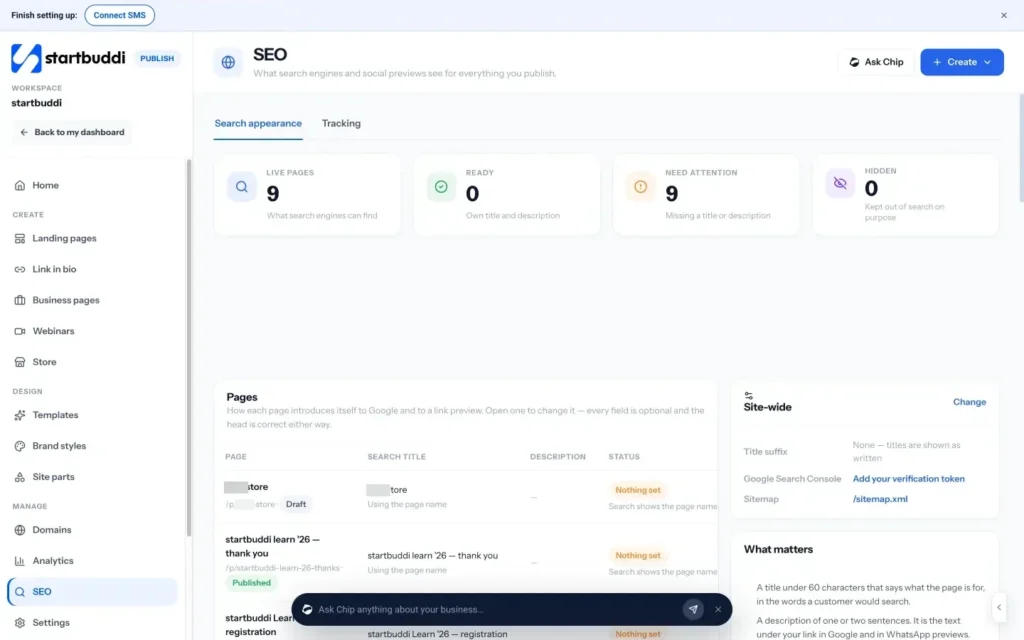
How to check your pages' search health in startbuddi
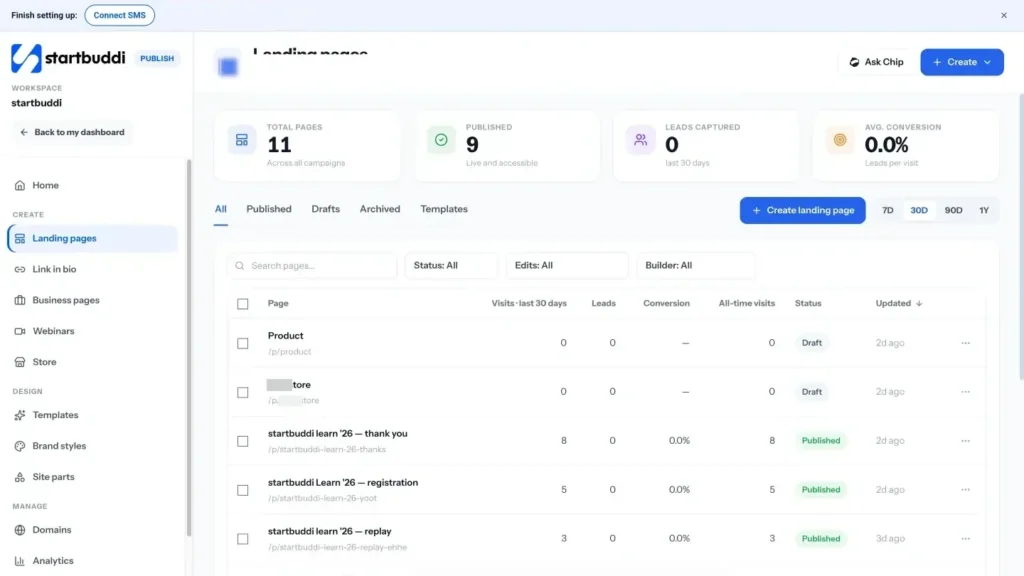
Publish is where you build everything customers see online in startbuddi: landing pages, business pages, link in bio, a store and webinar pages. It includes an SEO screen that shows what search engines and social previews see for everything you publish.
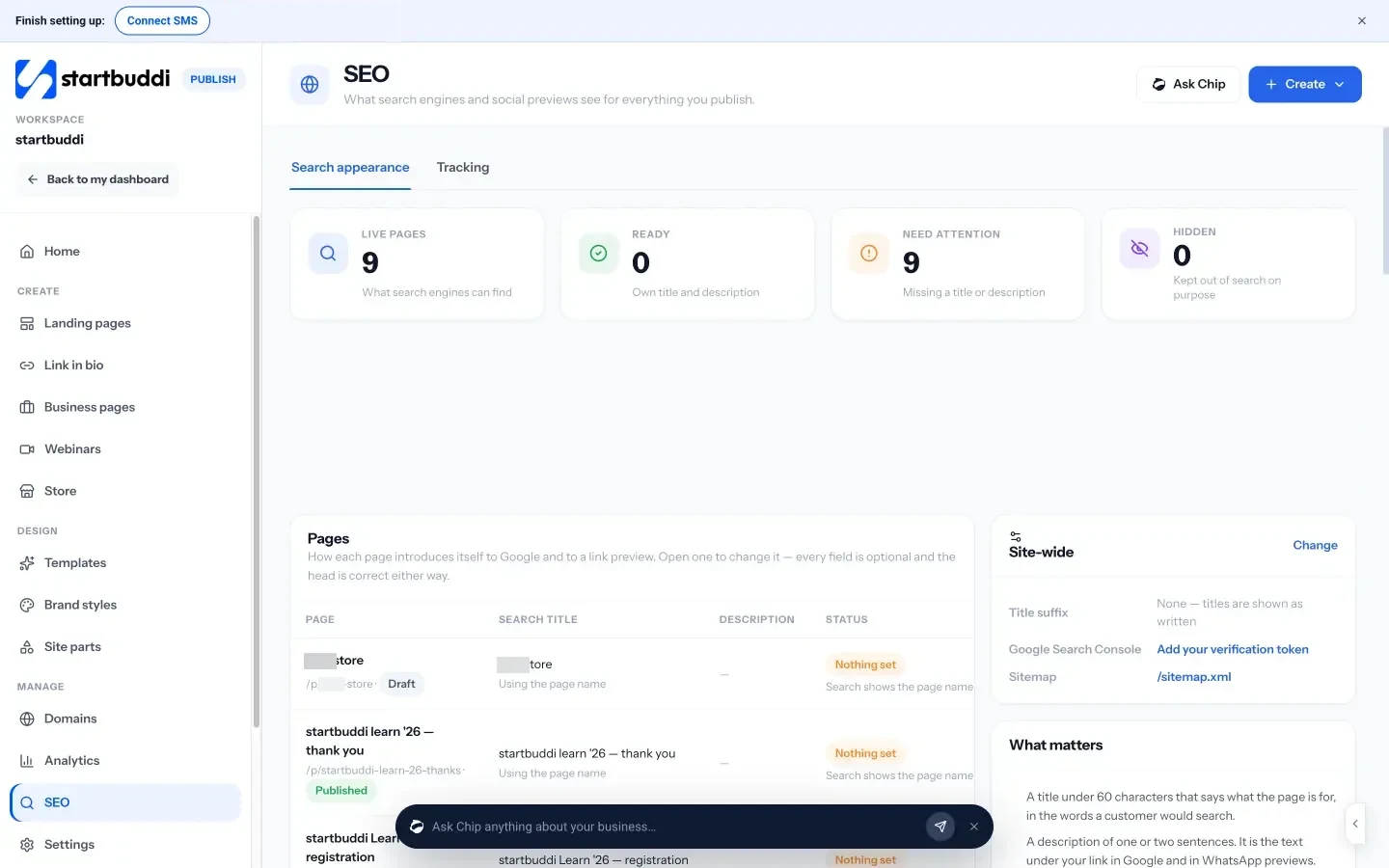
See which pages need attention
The SEO screen lists your live pages and sorts them into Ready (they have their own title and description), Need attention (missing a title or description) and Hidden (kept out of search on purpose). For each page you can see the search title, description and status, and fix what is missing. A short "What matters" guide reminds you of the basics: a title under 60 characters, a description of one or two sentences, a share image of 1200 × 630 pixels, and your own domain.
Add Search Console and a sitemap
From the same screen you can add your Google Search Console verification token and see your sitemap, so Google can find and report on your pages. The Tracking tab takes your Google Analytics measurement ID, Google Tag Manager and Meta Pixel. Chapter 4 explains what to do with these once they are connected. See the Publish overview for everything else it does.
Chapter 2 shows how to find the exact searches your customers make, using free keyword research tools, and how to turn them into a simple plan of pages.
Find what customers search: free keyword research tools
- Watch for seasons
- Patterns for local keywords
- A worked example
- Turn questions into FAQs
- Ask Chip what people in your niche are searching and asking
- Keep your keyword map next to your pages
Keyword research sounds like a job for specialists with expensive software. For a small business, it is simpler: find out the exact words your customers type when they need what you sell, then make sure you have a clear page that answers each of those searches. This chapter shows you how to do that with free keyword research tools for small business owners, how to judge which searches are worth your time, and how to turn the results into a plan of pages. Then it shows how Chip can help you find the words and questions in your niche.
What a keyword really is
A keyword is simply a search: the words someone types or says to a search engine. "Plumber", "plumber near me", "how to fix a dripping tap" and "emergency plumber Lekki Phase 1" are all keywords. They look similar, but the people behind them want very different things.
The most useful idea in keyword research is search intent: what the person is trying to do. There are four broad kinds:
| Intent | What they want | Example | Best page |
|---|---|---|---|
| Local | A business nearby, now | "emergency plumber Lekki" | A service page for that area, plus your Google Business Profile |
| Transactional | To buy or book | "book end of tenancy clean Leicester" | A service page with prices and a booking button |
| Commercial | To compare options before buying | "how much does a wedding cake cost" | A pricing guide or comparison page |
| Informational | To learn or fix something | "how to stop a dripping tap" | A helpful article or FAQ |
For a small business, local and transactional searches bring in customers fastest, because the person is ready to act. Commercial and informational searches build trust and bring in people earlier in their decision. A healthy site has pages for both.
Start with your customers, not a tool
The best keywords often come from conversations, not software. Before opening any tool, write down:
- The words customers use when they call or message you. "My boiler is making a banging noise" is a search someone makes.
- The questions you answer again and again.
- Every service or product you sell, in plain words, and the areas you cover.
- What customers compare you with ("salon or home visit?", "freelancer or agency?").
- Words from your reviews and your competitors' reviews.
This list becomes your seed list: the starting points you will check and expand with tools.
Free keyword research tools for small business owners
You can do solid keyword research for $0. These tools are free from their providers:
- Google search itself. Type a seed word slowly and note the autocomplete suggestions. Then look at the "People also ask" questions and the related searches at the bottom of the page. These come from what people actually search.
- Google Search Console. Once your site is live and verified, its Performance report shows the searches that already bring people to your pages, how often you appear and your average position. It is the most valuable free SEO tool there is, because it shows your own data. Start at Google Search Console.
- Google Keyword Planner. Part of Google Ads, and free to use with a Google Ads account. It suggests related keywords and gives an idea of how often they are searched. Without an active ad campaign the numbers may be broad ranges rather than exact counts, which is still enough to compare options. See Keyword Planner.
- Google Trends. Shows whether interest in a search is rising, falling or seasonal, and compares regions. Useful for seasonal businesses such as caterers or tax preparers. See Google Trends.
- Your own website search and enquiry forms. If people search your site or type questions into forms, those words are gold.
Paid SEO tools add more data, competitor analysis and rank tracking. They can be worth it later, but most small businesses should get the free tools working first.
How to judge which keywords are worth it
Not every keyword deserves a page. Score each one on four questions:
- Relevance: would someone searching this want what you sell? "Free logo maker" is related to logo design, but the searcher does not want to pay a designer.
- Intent: are they ready to act, or just learning?
- Competition: who ranks now? If the whole first page is national brands and huge directories, pick a more specific version.
- Volume: are enough people searching it? For local businesses, even a few searches a month can be worth it if each one is a potential customer.
Small businesses usually do best with long-tail keywords: longer, more specific searches like "vegan birthday cakes in Clapham" rather than "cakes". Each has fewer searches, but together they add up, they are easier to rank for, and the people behind them know exactly what they want.
Watch for seasons
Some searches rise and fall through the year: "tax return help" before filing deadlines, "wedding catering" before wedding season, "air conditioner repair" before the hot months. Check your main keywords in Google Trends for your country and publish or update the matching page six to eight weeks before the peak, so it has time to be found. A page published in the middle of the rush is usually too late.
Patterns for local keywords
If you serve an area, most of your valuable searches follow a handful of patterns. Write out each one for your services and places:
- Service + town or city: "electrician Durban", "wedding photographer Brighton".
- Service + neighbourhood: "nail salon Yaba", "dog groomer Fitzroy". Smaller areas have far less competition.
- Service + "near me": you cannot put "near me" on every page sensibly, but a complete Google Business Profile and a clear address or service area help you appear for these.
- Problem + place: "burst pipe repair Kilimani", "same day phone screen repair Leeds".
- Service + price words: "cheap", "cost", "price list", "per hour". These show commercial intent and deserve a page that answers the price question honestly.
Do not create dozens of near-identical pages that only swap the town name. Google's spam policies warn against pages made mainly to rank for many places without real content. One genuine page per area you truly serve, with local details, photos and reviews, is the safe and effective approach.
A worked example
Take an illustrative example: Wanjiru runs a catering business in Nairobi. Her seed list includes "catering Nairobi", "wedding catering", "office lunch catering" and "catering prices". Using Google autocomplete, People also ask and Keyword Planner, she finds:
| Search | Intent | Competition | Decision |
|---|---|---|---|
| "catering services in Nairobi" | Transactional, local | High (directories, big caterers) | Homepage target, but not the only focus |
| "wedding catering Nairobi price per person" | Commercial | Medium | Write a clear wedding catering page with a price guide |
| "office lunch delivery Westlands" | Transactional, local | Low | Create a dedicated page: quick win |
| "how much food per person for a party" | Informational | Medium | Write a helpful guide linking to her packages |
| "free catering" | Not relevant | n/a | Ignore |
Instead of one homepage trying to rank for everything, she now has a plan for four pages, each with a clear job.
Turn keywords into a page plan (keyword mapping)
Keyword mapping means giving each important keyword one page, and each page one main keyword plus a few related ones. It stops you writing five weak pages that compete with each other, and makes it obvious which pages are missing.
Use a simple table:
| Page | Main keyword | Related searches to cover | Status |
|---|---|---|---|
| / | catering services Nairobi | caterers in Nairobi, event catering Nairobi | Live, needs update |
| /wedding-catering | wedding catering Nairobi | price per person, menu ideas, tasting | To write |
| /office-lunch-delivery | office lunch delivery Westlands | corporate lunch Nairobi, weekly office meals | To write |
| /guides/food-per-person | how much food per person for a party | party food calculator, portions per guest | To write |
Start with the pages closest to a sale (service and local pages), then add helpful articles. Aim for one new or improved page a month; after a year you will have a site that answers most of what your customers search.
Use Search Console to find keywords you nearly rank for
Once your site has been live for a few weeks and verified in Google Search Console, it becomes your best keyword tool. Here is a simple monthly routine:
- Open the Performance report and set the date range to the last three months.
- Turn on impressions, clicks and average position, and look at the list of queries.
- Sort by impressions. Look for searches that are relevant to your business, have plenty of impressions, and sit at an average position between about 8 and 20. These are your "nearly there" keywords.
- Click each one to see which page appears for it. Improve that page: add a section that answers the search more directly, use the words in a heading, and add an FAQ.
- Note any relevant searches where no page is a good match. Those are new pages to add to your map.
This is often the fastest SEO win for a small business, because Google already sees your page as relevant and a small improvement can move it onto the first page.
Turn questions into FAQs
Every "People also ask" question, every question in Search Console that starts with how, what, why or how much, and every question a customer asks on the phone can become a short FAQ on the right page. Answer it in two to four plain sentences. FAQs help people decide, cut down repetitive calls and give search engines clear answers to match with questions.
Common keyword research mistakes
- Chasing big numbers. A keyword with huge volume and national competition is rarely the right target for a small local business.
- Ignoring intent. A beautiful service page will not rank for a "how to" search, and a blog post will struggle for "book a plumber".
- One page for everything. A single page cannot rank well for twenty different services.
- Two pages for the same thing. If two of your pages target the same search, they compete with each other. Merge them.
- Using your words instead of theirs. You might say "bespoke joinery"; your customers search "custom wardrobes".
- Doing it once. Check Search Console every month for new searches you appear for, and add them to your map.
How to find keywords and questions with startbuddi
To be clear, startbuddi is not a dedicated keyword research tool, and you should still use Google's free tools above. It can help in two ways.
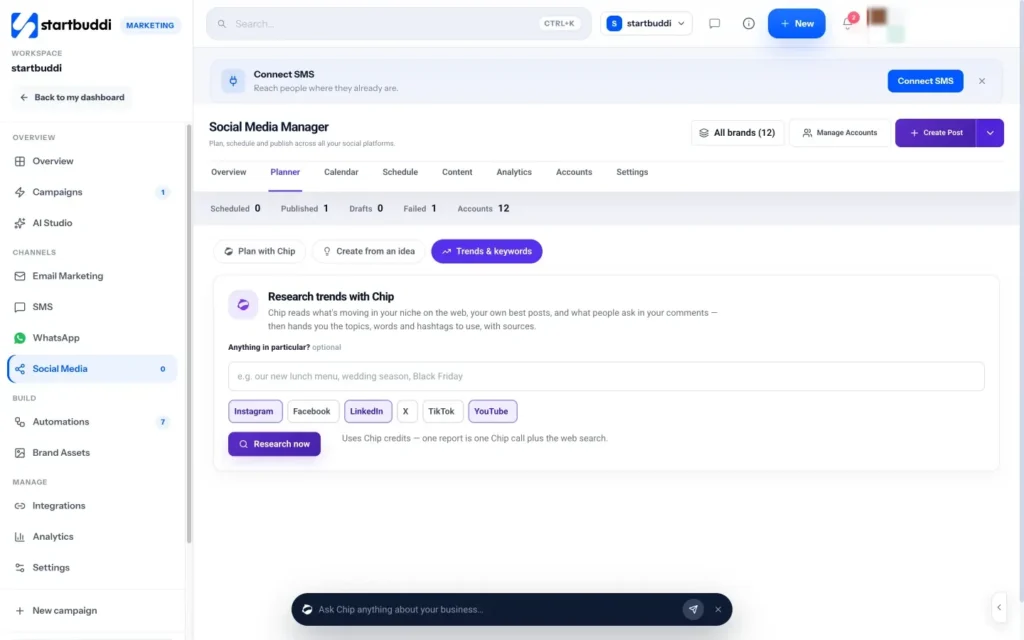
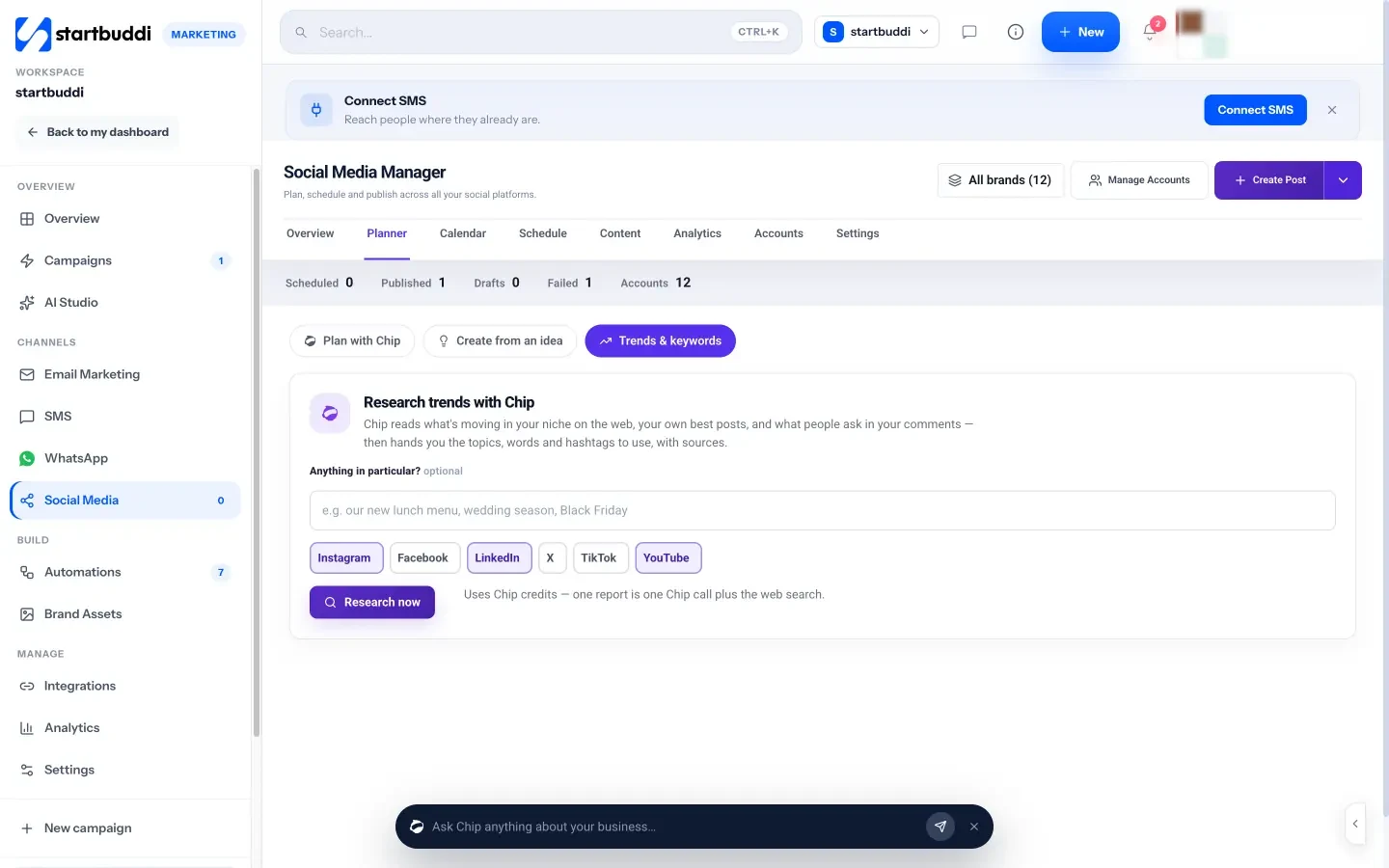
Ask Chip what people in your niche are searching and asking
In the Social Media Manager, Trends and keywords lets Chip research your niche. You can add a focus, such as "wedding season" or "our new lunch menu", and Chip reads what is moving on the web, your own best posts and the questions people ask in your comments. The report includes words and hashtags to use, what people are asking, and post ideas, each with the sources Chip read. It was built for social content, but the questions and words it finds are also a useful list of topics for pages and FAQs. Each report uses Chip credits and is part of the Marketing module, from the Starter plan.
Keep your keyword map next to your pages
Once you know which page targets which search, set each page's search title and description to match. The SEO screen in Publish lists every page you have published with its search title, description and status, so you can check your keyword map against what is actually live. Connect Google Search Console from the same screen (chapter 1), and you can then see in Search Console which searches each page appears for, which is the most reliable way to track keywords over time.
Chapter 3 shows how to write and structure each page so search engines understand it and people choose it: titles, descriptions, headings, content, images and links.
Write pages that rank and convert (on-page SEO)
- A before and after
- Build service pages from a template or with Chip
- Set the search title, description and share image
- Run the publish check before you go live
You have a list of searches and a plan of pages. Now each page needs to do two jobs: help search engines understand exactly what it is about, and persuade the person who lands on it to get in touch. The good news is that these jobs rarely conflict. A page that is clear, specific and useful to a customer is usually a page that search engines like too. This chapter covers on-page SEO for small business pages: titles, descriptions, headings, content, images, links and the details that build trust. It ends with a service page template and how to set all of this in startbuddi.
Write a title that earns the click
The page title is the single most important on-page element. It usually becomes the blue headline in search results and the text on the browser tab. A good small business title:
- Starts with what the page offers, using the main keyword naturally.
- Includes the place, if the service is local.
- Ends with your business name, if there is room.
- Stays under about 60 characters so it is not cut off.
- Is different on every page.
| Weak title | Better title |
|---|---|
| Home | Office cleaning in Leicester | Sparkle Clean |
| Services | Wedding catering in Nairobi, from KSh 2,500 a guest |
| Welcome to Ade Designs | Logo and brand design for Lagos restaurants | Ade Designs |
| Blog post 4 | How much food per person for a party (with a calculator) |
Google may rewrite a title if it thinks another headline on the page describes it better (Google's title link guidance), so make sure your main heading and your title agree.
Write a description that sells the click
The meta description is the short summary that often appears under the title in results. It does not directly change rankings, but a clear one makes people more likely to choose your result. Aim for one or two sentences that say what the page offers, who it is for and what to do next.
Weekly office lunches delivered across Westlands by noon. Fresh, local menus from KSh 650 a head, no minimum order. See this week's menu and book a trial.
Google sometimes uses text from the page instead of your description when it matches the search better (Google's snippet guidance). That is fine; a clear first paragraph on the page gives it good material either way.
Structure the page with clear headings
Headings are the signposts of a page. People skim them to decide whether to read on, and search engines use them to understand the page's structure. Use one main heading (H1) that says what the page is about, then subheadings (H2 and H3) for each section. Write headings that would make sense on their own, and use the words customers use.
A service page might have these headings:
- H1: End of tenancy cleaning in Leicester
- H2: What is included
- H2: Prices
- H2: How it works
- H2: Areas we cover
- H2: What our customers say
- H2: Questions people ask
Each heading answers a question a customer has before they book. That is exactly why the page works for both people and search engines.
Write content that answers the search completely
There is no ideal word count. Google says the length of content alone does not matter for ranking (SEO Starter Guide). What matters is whether the page fully answers the question behind the search. For a service page, that means answering, clearly and early:
- What exactly you do, and what is included and not included.
- Who it is for, and who it is not for.
- What it costs, or at least a starting price and what affects it.
- How long it takes and what happens next.
- Where you work.
- Why someone should trust you: experience, qualifications, reviews, guarantees, photos of real work.
- How to book or get in touch, with one clear button.
Use your keyword naturally in the main heading, the first paragraph and a subheading or two, and use related words where they fit. Then stop thinking about keywords and write for the customer. Read it aloud; if it sounds like it was written for a robot, rewrite it.
Make images work harder
Real photos of your work, team and premises build trust far better than stock images, and they can bring visitors from image search too. For each image:
- Describe it with alt text: a short, accurate description of what the image shows, such as "Three-tier white wedding cake with fresh flowers". Alt text helps people using screen readers and helps search engines understand the image (Google image best practices).
- Keep file sizes small: large photos straight from a phone slow pages down. Resize them before uploading.
- Use a sensible file name: "wedding-cake-nairobi.jpg" says more than "IMG_4432.jpg".
Link your pages together
Internal links, from one of your pages to another, help people move around your site and help search engines discover and understand your pages. A few habits:
- Link every service page from your homepage or main menu.
- Link helpful articles to the related service page ("Need it done for you? See our office cleaning service").
- Use descriptive link text such as "end of tenancy cleaning prices", not "click here".
- Check that no important page is an orphan with no links pointing to it.
Small details that build trust
- Contact details: your business name, phone number and area, the same as on your Google Business Profile.
- Real people: a photo and short bio of you or your team.
- Reviews: two or three short quotes from real customers, with their permission.
- Clear policies: cancellation, refunds and privacy, linked in the footer.
- A share image: an image that looks good when the page is shared on WhatsApp or social media, commonly 1200 by 630 pixels.
Advanced option: structured data is code that describes your business (name, address, hours) to search engines in a standard format. Google documents the local business structured data it supports. It is useful but optional; clear content and a complete Google Business Profile matter more for most small businesses.
Write helpful articles that support your service pages
Service pages catch people ready to buy. Helpful articles catch people earlier, while they are still working out what they need, and point them to your services when they are ready. For a small business, the best article ideas come straight from customer questions and the informational searches in your keyword map.
A simple outline works for most articles:
- A direct answer in the first two or three sentences. If someone searches "how much food per person for a party", tell them the rule of thumb straight away, then explain.
- The detail: what changes the answer, examples, a table or checklist.
- Your experience: what you see in real jobs, mistakes customers make, photos.
- A bridge to your service: "If you would rather we handled it, here is our party catering service", with a link.
One good article a month, on a question you are asked all the time, builds up a library that keeps bringing in visitors. Keep it accurate and update it when prices or rules change.
Area pages done properly
If you serve several towns or neighbourhoods, it can make sense to have a page for each main area. The test is whether each page has something genuinely local to say: jobs you have done there, reviews from customers there, specific travel times, local landmarks or rules. A page for "boiler repair in Salford" with photos of Salford jobs, two Salford reviews and your typical response time there is useful. Twenty pages with the same text and a different town name are not, and Google's spam policies treat pages like that as doorway pages. Start with your two or three most important areas and do them well.
A before and after
Before: a bakery's single "Cakes" page says "We bake delicious cakes for all occasions. Contact us for more information." It has no prices, no photos with descriptions and the title "Cakes | Home".
After: the bakery creates a "Custom birthday cakes in Clapham" page with the title "Custom birthday cakes in Clapham, from £45 | Rise Bakery", a first paragraph that states sizes, lead time and starting prices, a gallery of real cakes with alt text, three reviews, an FAQ on allergies and delivery, and one "Order your cake" button. The page now answers the search, persuades the visitor and gives search engines everything they need.
A service page template you can copy
| Section | What to write |
|---|---|
| Title | [Service] in [place] | [Business name], under 60 characters |
| Description | One or two sentences: what, for whom, from what price, next step |
| H1 and first paragraph | The service and place; the main result the customer gets; a starting price |
| What is included | A short list, plus what is not included |
| Prices | A small table or "from" prices, and what changes the price |
| How it works | Three steps from enquiry to done |
| Proof | Photos, two or three reviews, years of experience or qualifications |
| Areas covered | Towns or neighbourhoods, in plain text |
| FAQ | Four to six real customer questions, answered in two to four sentences each |
| Call to action | One button: book, get a quote, or message on WhatsApp |
Keep pages fresh
Pages age. Prices change, services evolve, photos date and questions shift. Once a year, review every important page: update prices and details, swap in recent photos and reviews, add any new questions customers ask, and check that every link still works. Refreshing a page that already ranks is often quicker and more effective than writing a new one, and it keeps customers from calling about a price you stopped charging two years ago.
On-page mistakes to avoid
- The same title on every page. Each page needs its own.
- Text inside images. Search engines and screen readers cannot always read words that are part of a picture. Put important text in the page itself.
- Hiding prices and details behind "contact us". Pages that answer the question rank and convert better.
- Copying text from other sites or manufacturers. Write your own, from your experience.
- Changing web addresses without redirects. If you rename a page, make sure the old address still leads to the new one.
How to build search-friendly pages in startbuddi
Publish's page builder handles most of the technical side for you, so you can focus on the words.
Build service pages from a template or with Chip
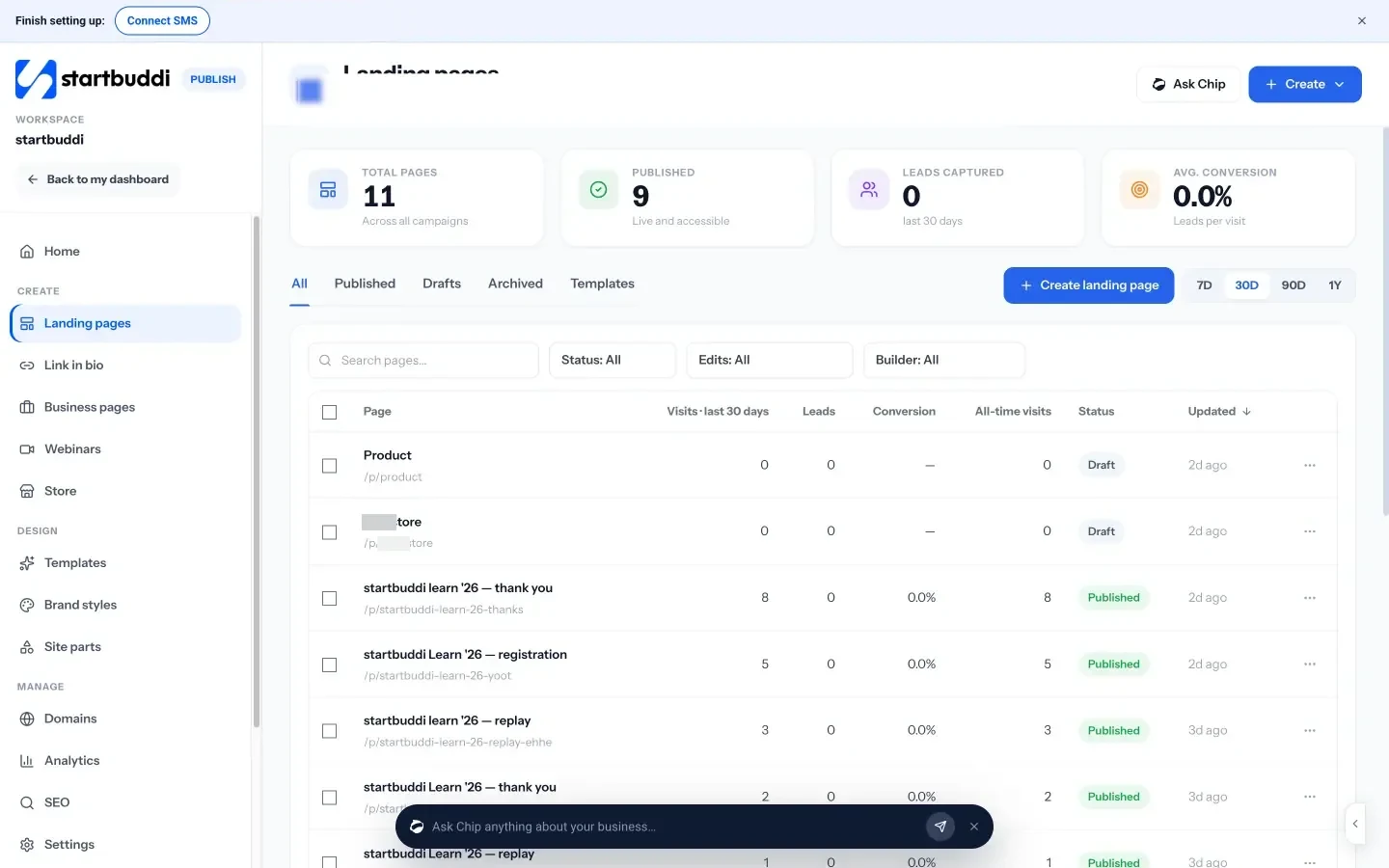
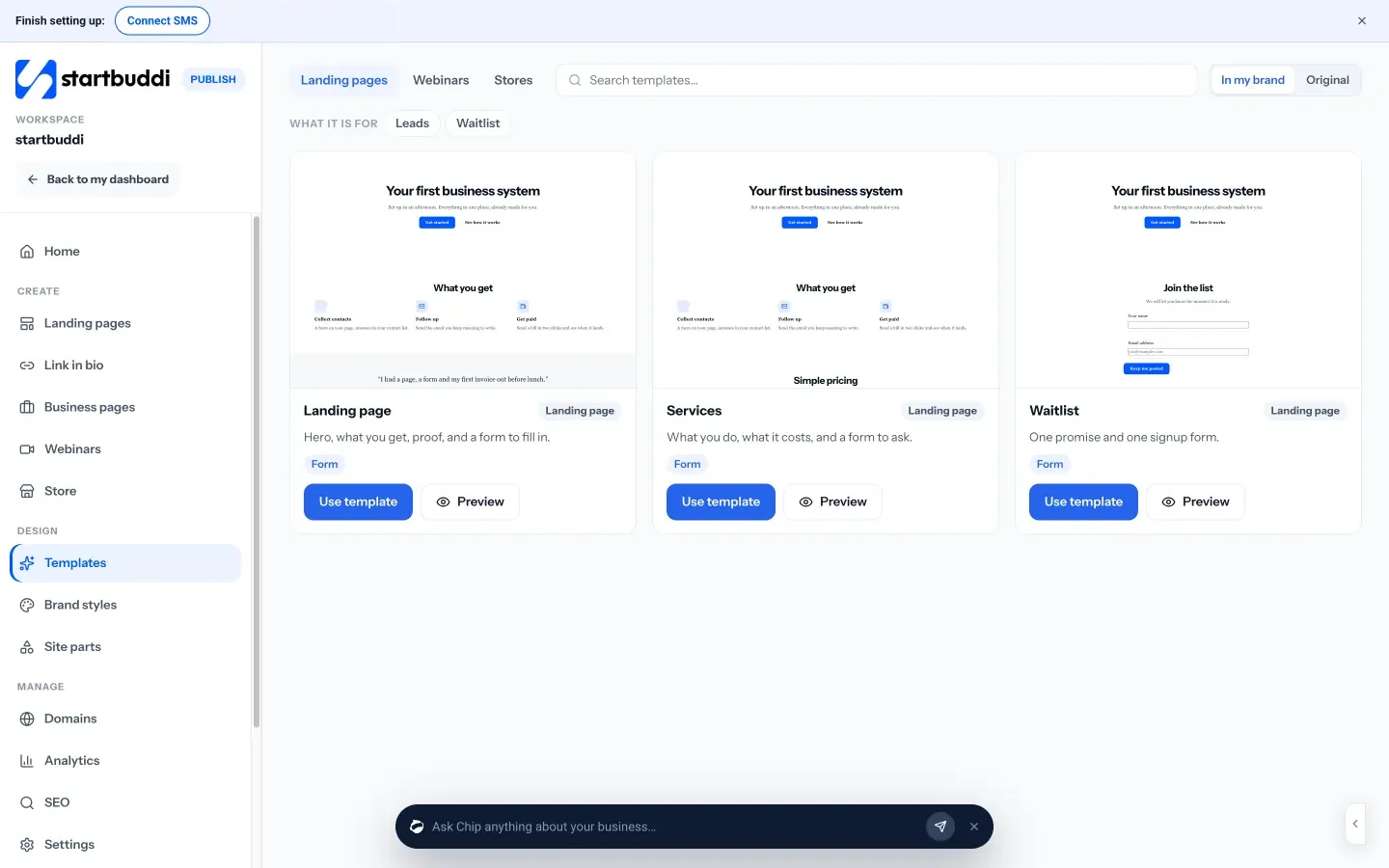
Create a landing page for each main service from a template, start blank, or choose Build with Chip and describe the page. Chip writes each section in your brand, but it never makes up prices, reviews or numbers; those stay as placeholders for you to fill with real details, which is exactly what a trustworthy page needs. Business pages are another option for price lists, menus, portfolios and service lists. Every lead from a page lands in your contacts with the page it came from.
Set the search title, description and share image
Each page has a settings panel for how it looks in search results and when shared. You set the title and description, choose whether the page shows in search or is hidden from search, and add a share image. You can also add tracking codes for that page only. After a rename, the old web address keeps working, so links you have already shared do not break.
Run the publish check before you go live
When you publish, a checklist reviews the page: an SEO title, a meta description, no broken links, a connected form, a social image, alt text on every picture, legal pages where the page collects details, and a domain. The checks are suggestions, not blockers, so you stay in control. More on the landing pages page, and see our post on building a landing page that converts for the writing side.
Chapter 4 covers what happens beyond your pages: your Google Business Profile, reviews, links from other sites, the essential SEO tools for small businesses, and a monthly routine to track progress.
Local SEO, links and the essential SEO tools for small businesses
- Beyond Google: other maps and listings
- How to reply to reviews
- Honest ways for a small business to earn links
- Reading Search Console in plain words
- Put your pages on your own domain
- Connect Google Analytics and Search Console
- See what your pages bring in
- Which plan you need
Your pages are only half of SEO. The other half happens elsewhere: on your Google Business Profile, in your reviews, and on other websites that mention and link to you. This chapter covers local SEO, how to earn links the honest way, the essential SEO tools for small businesses (most of them free), and a monthly routine that takes an hour or two. Then it shows how to put your pages on your own domain and connect tracking in startbuddi.
Local SEO: win the map
For businesses that serve a place, the map results are often the most valuable real estate in search. Google says local results are "mainly based on relevance, distance, and popularity" (Google Business Profile Help). You cannot change where a searcher is standing, but you can do a lot about relevance and prominence.
- Complete your Google Business Profile. Choose the most accurate primary category, add every service, write a clear description, list your hours and service area, and add real photos. Treat it as a second homepage.
- Keep your details consistent. Your business name, address and phone number should match exactly on your profile, your website and every directory. Inconsistent details confuse both customers and search engines.
- Get listed in the right places. Your national business directories, chamber of commerce, industry associations and trusted local directories. Quality and accuracy matter more than quantity.
- Earn reviews steadily. Google notes that "more reviews and positive ratings can help your business's local ranking". Ask every customer, make it easy with a direct link, and reply to every review.
- Post updates. Share news, offers and photos on your profile now and then. It shows the business is active.
- Add local detail to your website. Areas you serve, local jobs and reviews, and a clear address or service area on your contact page.
Our post on local SEO for small businesses goes step by step through the profile, reviews and local listings.
Beyond Google: other maps and listings
Google is the biggest, but not the only place people look. Apple Maps draws on Apple Business Connect, and Microsoft's search engine uses Bing Places, both free to claim. Beyond maps, choose a few listings your customers actually use: national business directories, trade association member lists, wedding or events directories for event businesses, booking marketplaces for salons and health services, and delivery apps for food. Use the same name, address, phone number and description everywhere, and keep a simple list of every listing with its login so you can update them all when something changes.
How to reply to reviews
Replies are read by future customers as much as by the reviewer. Keep them short, personal and specific.
To a positive review
Thank you, Aisha. It was a pleasure doing the deep clean before your move, and we are glad the new tenants were happy. Good luck in the new home!
To a mixed or negative review
Thank you for the feedback, Mark, and I am sorry we arrived later than agreed. That is not the service we aim for. I have changed how we schedule the first job of the day so it does not happen again. I would like to put it right; please call me on [number].
Never share private details in a public reply, never argue, and never offer a discount in exchange for changing a review.
Links: how other websites vouch for you
Links from other websites to yours act a little like recommendations. A link from a respected local newspaper, a trade association or a well-known supplier tells search engines that real organisations know and trust you. A thousand links from random, low-quality sites tell them nothing good.
Honest ways for a small business to earn links
- Suppliers and partners: ask the brands you stock, the venues you work with or the businesses you partner with to list you as a stockist, supplier or recommended partner.
- Associations and memberships: trade bodies, professional associations and business networks often have member directories.
- Local press and blogs: a new opening, a milestone, a community project or a useful local guide can earn a mention. Offer a quote or a story, not a sales pitch.
- Sponsorships and community: a local sports team, school event or charity run often lists sponsors on its site.
- Useful resources: a genuinely helpful guide, checklist or price guide can earn links from people who want to share it.
- Customers and clients: business clients may be happy to mention you in a case study or partner page.
Essential SEO tools for small businesses
You do not need a large budget for SEO tools. These cover the essentials, and most are free:
| Tool | What it does for you | Cost |
|---|---|---|
| Google Search Console | Shows the searches you appear for, clicks, positions, indexing problems and your sitemap status | Free |
| Google Analytics | Shows visitors, where they came from and what they did on your site | Free |
| Google Business Profile | Your listing on Google Maps and local results, with its own performance stats | Free |
| PageSpeed Insights | Tests how fast a page loads on mobile and desktop and suggests fixes | Free |
| Google Keyword Planner and Google Trends | Keyword ideas, rough search volumes and seasonal patterns (see chapter 2) | Free |
| Paid SEO suites | Competitor research, backlink data, rank tracking and site audits | Paid, optional |
Start with the free ones. Consider a paid SEO tool only when you have a clear question the free tools cannot answer, such as tracking dozens of keywords across several locations, and check the provider's current pricing before you commit.
What to measure
Rankings are interesting, but they are not the goal. Customers are. Track these once a month:
- Impressions and clicks from search (Search Console): are more people seeing and choosing your pages?
- Average position for your target keywords (Search Console): are your "nearly there" pages moving up?
- Visits from organic search (Google Analytics): how many people arrive from unpaid search?
- Enquiries and bookings from search: ask "how did you hear about us?" and note answers like "Google".
- Google Business Profile actions: calls, direction requests and website clicks from your listing.
- Reviews: how many new ones this month, and your average rating.
Compare each month with the same month last year once you have a year of data, because many businesses are seasonal.
Reading Search Console in plain words
- Impressions: how many times your pages appeared in results. Rising impressions mean Google is showing you for more searches, even before clicks follow.
- Clicks: how many people chose your result.
- Click-through rate: clicks divided by impressions. A low rate on a page that appears often usually means the title or description needs work (chapter 3).
- Average position: roughly where you appear. Treat it as a trend rather than an exact place, because results vary by location and device.
- Pages report: which pages are indexed, and why any are not. Fix anything important that is excluded by mistake.
A monthly SEO routine in about two hours
| Step | Task | Time |
|---|---|---|
| 1 | Check Search Console for errors, new searches and "nearly there" keywords | 20 minutes |
| 2 | Improve one existing page based on what you found | 30 minutes |
| 3 | Write or plan one new page or article from your keyword map | 45 minutes |
| 4 | Post an update and photos on your Google Business Profile; reply to reviews | 15 minutes |
| 5 | Ask for one new link or listing (a supplier, association or partner) | 10 minutes |
Two hours a month, every month, beats a frantic weekend once a year. After twelve months you will have a dozen better pages, a stronger profile and a steady trickle of links.
Can you use AI to write SEO content?
AI writing tools, including Chip, can save a lot of time on first drafts, outlines, titles and descriptions. Google's guidance on AI-generated content focuses on whether content is helpful and original, not on how it was produced, while making clear that using automation mainly to manipulate rankings breaks its spam policies. In practice, use AI to get started faster, then add what only you know: real prices, real jobs, photos, customer questions and your own opinion. Check every fact before you publish. A page full of generic AI text with nothing from your business in it is unlikely to help customers or rank well.
Mistakes to avoid
- Setting up tracking and never looking. Put your monthly routine in the calendar.
- Chasing rankings for words that do not bring customers. Focus on searches from people who might buy.
- Ignoring your Google Business Profile after setting it up. Old photos and unanswered reviews look like a closed business.
- Moving website without planning. If you change platform or domain, make sure old addresses redirect to the new ones and update your profile and listings.
- Expecting results in a week. Give SEO months, and keep your faster channels going meanwhile.
How to connect your domain and tracking in startbuddi
Publish makes the technical parts of this chapter quick, so you can spend your SEO time on pages and reviews.
Put your pages on your own domain
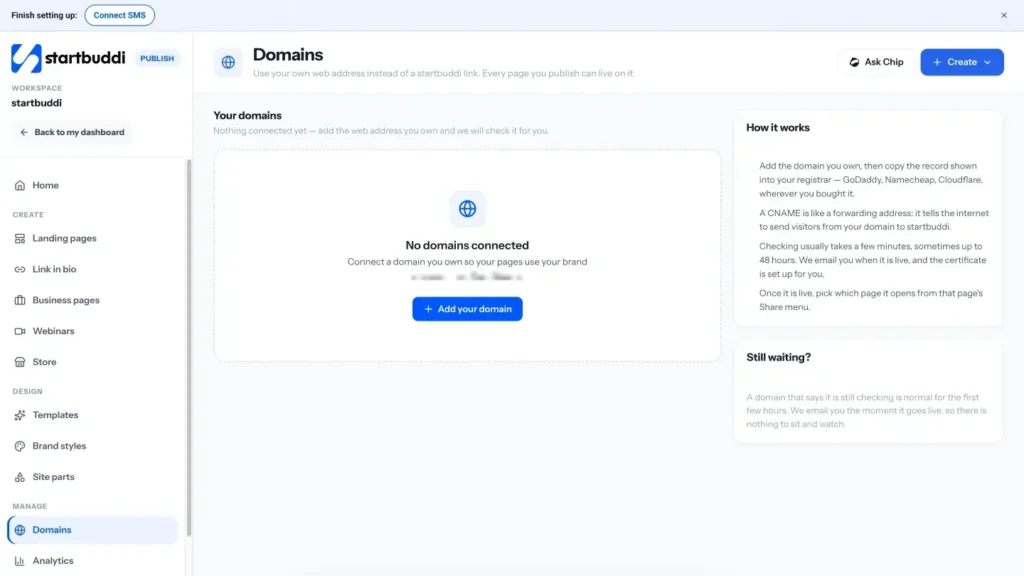
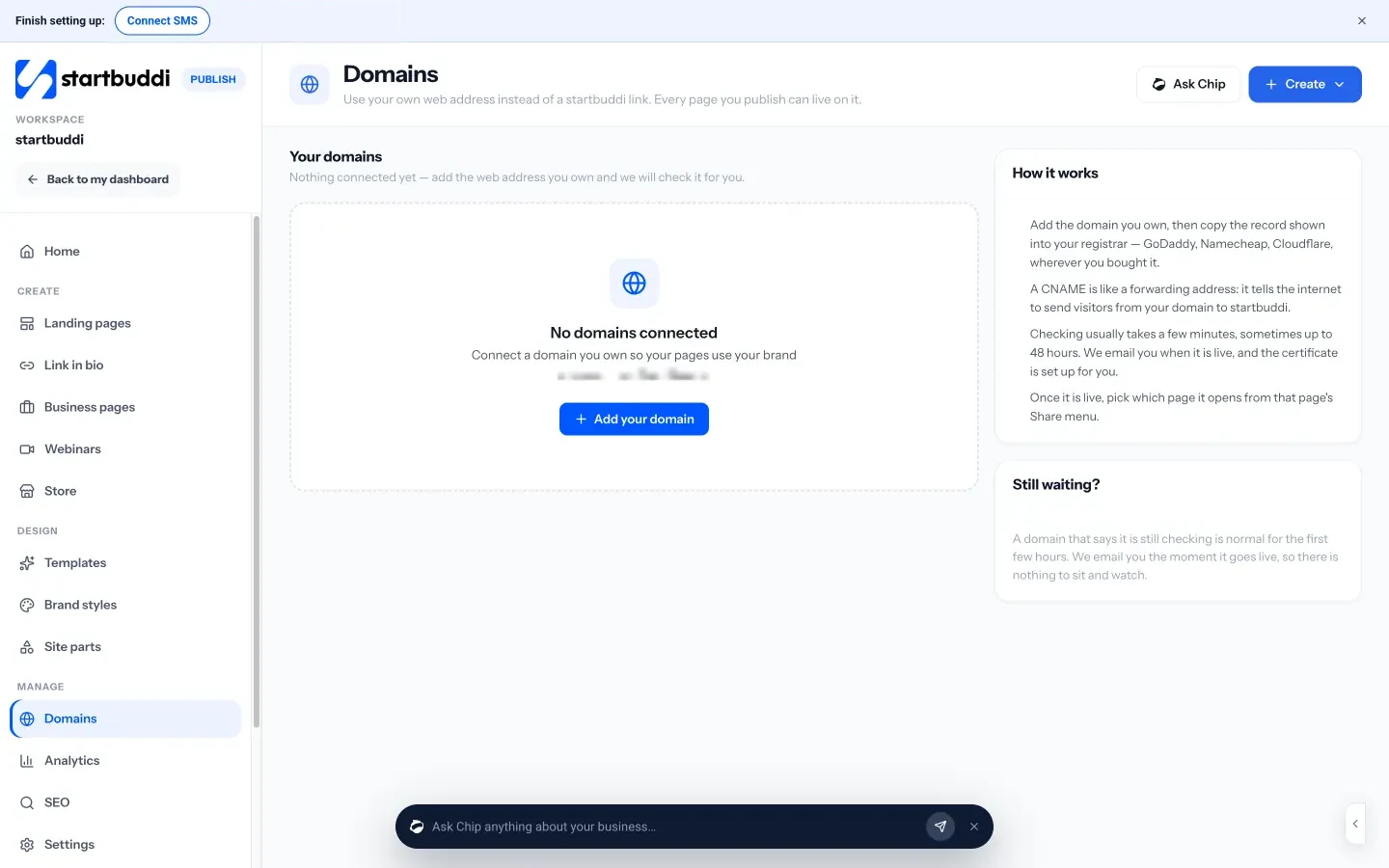
In Publish, Domains lets you use a web address you already own instead of a startbuddi link. You add the domain, copy one CNAME record into your registrar (wherever you bought it, such as GoDaddy, Namecheap or Cloudflare), and startbuddi checks it and sets up the security certificate for you. Checking usually takes a few minutes, sometimes up to 48 hours, and you get an email when it is live. You then choose which page it opens. You cannot buy a domain inside startbuddi; you bring one you own. See the custom domains page.
Connect Google Analytics and Search Console
The Tracking tab on the SEO screen takes your Google Analytics measurement ID, Google Tag Manager, your Search Console verification token and a Meta Pixel, and applies them across everything you publish. Any page can override them in the builder. Once Search Console is verified, the routine above works for your startbuddi pages like any other website.
See what your pages bring in
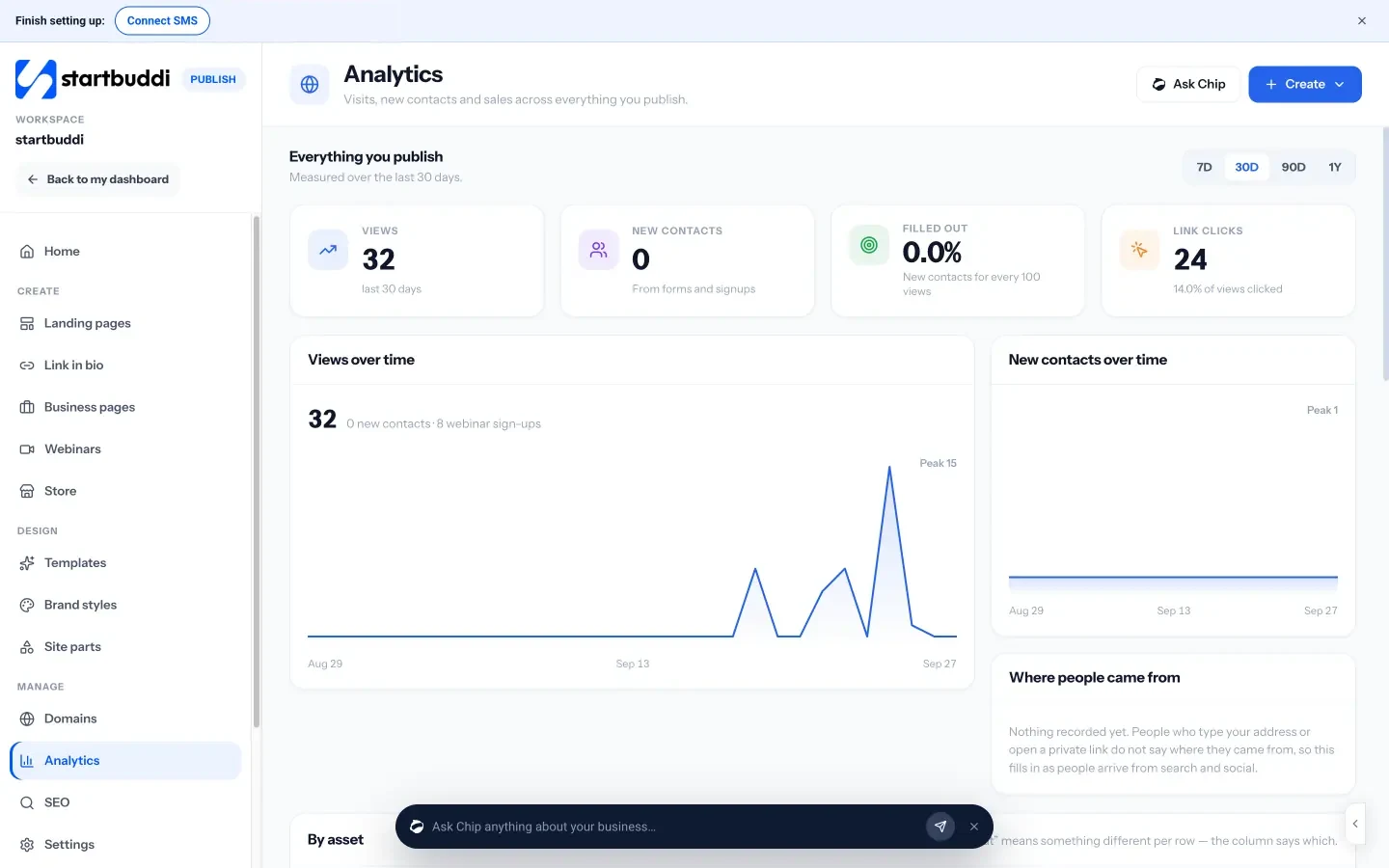
Publish Analytics shows views, new contacts, forms filled out and link clicks across everything you publish, where people came from, and a breakdown by page. It is honest about what it does not measure, such as time on page and bounce rate, and points you to Google Analytics for those. Because every form on a page creates or updates a contact, you can see which pages turn visitors into real enquiries, not just visits.
Which plan you need
Pages, forms and your contact list are available on the Free plan, where published pages carry a small "Powered by startbuddi" line. Any paid plan lets you remove it, starting with Starter, with a 30-day trial. See pricing for details.
Your next step: open Google Search Console (or set it up today), note three searches you nearly rank for, and improve the page for the first one this week. If you need somewhere to build clear, search-friendly service pages on your own domain, see what Publish does.
Tiwalade Joanna Okedara-Kalu is the founder, CEO and CTO of startbuddi, the business system that brings clients, bookings, invoices, projects, marketing and the Chip AI assistant into one place. Tiwalade builds software around how service businesses really work day to day, and writes about client management, getting paid on time and why small businesses outgrow the tools they start with.
Founded startbuddi and leads its product and engineering