How to market a small business: a practical guide for owners with no time
A four-part guide to marketing a small business: choose your customer and message, get found, reach people every week and measure what brings in paying customers.

This guide explains how to market a small business when you have little time, a small budget and no marketing team. It is for owners who know they should be posting, emailing and asking for reviews but never quite get round to it, and for anyone who has tried “a bit of everything” and cannot tell what worked.
The short answer: get clear on who you serve and what you promise, make sure people can find and trust you, choose two or three channels and show up on them every week, and measure which ones bring in paying customers. The four chapters follow that order. Each starts with the thinking, with examples, templates and mistakes, and ends with how to do it in startbuddi. By the end you will have a one-page marketing plan, a presence people can find, a weekly routine and a short list of the marketing tools for small business that are worth your time.
Know who you serve and what you promise
- Borrow your customers' words
- Stand out from competitors
- Test your promise
- Marketing and sales are one job in a small business
- Put your brand in one place
- Plan your first campaign
Most small business marketing fails before a single post goes out. The owner starts with the question "what should I post?" when the real questions are "who is this for?" and "why should they pick me?". Get those two answers right and everything else, from your page to your captions to your emails, becomes easier to write and far more likely to work.
This chapter helps you choose your customer, write a clear promise, pick a small number of channels and put a marketing plan on one page. Then it shows how to set up your brand in startbuddi so every page, email and Chip draft sounds like you.
How to market a small business: the four questions
Every piece of marketing, whether it is a flyer, an Instagram post or a cold email, answers four questions for the reader:
- Is this for me? The customer recognises themselves.
- What do I get? The result, not the process.
- Why you? A reason to trust you over the alternatives, including doing nothing.
- What do I do next? One clear, easy step.
If a post or page does not answer all four, it is decoration. Keep these questions next to you as you work through the rest of this guide.
Choose who you are marketing to
Small businesses win by being the obvious choice for a specific group, not a vague choice for everyone. A narrow audience is cheaper to reach, easier to write for and quicker to recommend you to their friends, because they know exactly who you help.
Describe your best customer in a short paragraph. Use real customers if you have them. Include:
- Who they are (a role, a life stage, a type of business).
- Where they are (a city, a region, online communities).
- What they are trying to achieve, and what gets in the way.
- What they have tried before, and why it did not work.
- Where they spend time and whose advice they trust.
- What makes them decide to buy, and what makes them hesitate.
Here is an example for a small accounting practice in Leeds: "Owners of hair and beauty salons with one to five staff, usually aged 30 to 50. They are brilliant at their craft and hate paperwork. They have tried doing their own books in a spreadsheet and missed deadlines. They trust recommendations from other salon owners and follow a couple of industry Facebook groups. They buy when a tax deadline is close or after a scare with HMRC."
Notice how much easier it is to write marketing for that person than for "small businesses". You already know where to find them (industry groups, salon suppliers), what to say (no more missed deadlines), and when to say it (before tax deadlines).
Borrow your customers' words
The best marketing copy is rarely written; it is collected. Your customers already describe their problem and your service in words that other customers understand. Collect those words in a simple document:
- Reviews of you and of your competitors. Read the three-star reviews of competitors carefully: they tell you what customers wish was different.
- Messages and emails from enquiries. Note the first sentence people use to describe what they need.
- Short calls with five recent customers. Ask what nearly stopped them buying, what made them choose you, and how they would describe you to a friend.
- Questions people ask again and again. Each one is a post, an FAQ or a line on your page waiting to be written.
When a customer says "I just want someone who turns up when they say they will", that sentence is worth more than any slogan. Put it on your page, almost word for word.
Write a promise people remember
Your promise, sometimes called a value proposition, is the one or two sentences that explain what you do, for whom, and why it is better. It goes at the top of your page, in your social bios, in your email signature and in how you introduce yourself.
A simple formula:
We help [who] [get what result] without [the thing they hate], so they can [the bigger benefit].
Examples:
- "We help salon owners stay on top of their books without spending Sundays on receipts, so they can focus on clients."
- "Fresh home-cooked lunches for small offices in Westlands, delivered by noon, no minimum order."
- "Affordable websites for plumbers and electricians in Cape Town, live in a week, with online booking built in."
Then add proof: a number, a review, a guarantee, years of experience, a well-known client, a before-and-after photo. A promise without proof sounds like every competitor; proof makes it believable.
Stand out from competitors
List three competitors your customers might choose instead of you, including "doing it themselves". For each, write what they are good at and what customers complain about (their reviews are the best source). Then pick one or two things you will do noticeably better and build your promise around them. Common ways small businesses stand out: faster replies, a narrower speciality, clearer prices, a guarantee, a more personal service, or convenience such as evening appointments or delivery. You rarely win by being slightly better at everything; you win by being clearly better at one thing a specific customer cares about.
Test your promise
Read your promise to three people who match your customer and ask them to repeat back what you do. If they cannot, it is too clever or too vague. Replace industry words with the words customers use. A customer does not want "integrated brand solutions"; they want "a logo and a menu that make people come in".
Pick your channels (two or three, not ten)
A channel is any way of reaching people: word of mouth, a Google listing, Instagram, LinkedIn, email, WhatsApp, flyers, local events, partnerships, paid ads. Trying all of them at once is the most common marketing mistake small businesses make. You end up doing each one badly and learning nothing.
Choose two or three channels using three filters:
- Where your customers already are. Business clients are often on LinkedIn and email. Local consumers search Google and ask neighbours. Younger customers may discover you on Instagram or TikTok. Many customers in Africa and Latin America prefer WhatsApp.
- What you can keep up. A channel you can manage every week for six months beats a better channel you will abandon after three weeks.
- How fast you need results. Referrals, direct outreach and paid ads work quickly. Search and content build slowly but keep working for years.
A useful mix for most small businesses is one "found" channel (Google and your page), one "social" channel where your customers spend time, and one "owned" channel (an email or WhatsApp list you control). Chapters 2 and 3 cover each in detail.
| Type of business | Found | Social | Owned |
|---|---|---|---|
| Local service (cleaning, plumbing, salon) | Google Business Profile, local page | Facebook or Instagram, neighbourhood groups | WhatsApp or SMS reminders and offers |
| Professional service (consultant, accountant, agency) | Page with case studies, search | Monthly email newsletter | |
| Product seller (food, fashion, crafts) | Shop page, marketplace listings | Instagram, TikTok | Email and WhatsApp for launches |
| Coach or trainer | Booking page, search | Instagram or LinkedIn | Email course, WhatsApp community |
Marketing and sales are one job in a small business
In a large company, marketing brings people in and a sales team closes them. In a small business, you do both, often in the same conversation. That is good news: you can see directly which messages bring in people who buy. Keep a note of where every paying customer first heard of you. After a month, that list tells you more about your marketing than any dashboard.
Set a realistic budget of time and money
Marketing costs either time or money, usually both. There is no single right percentage of revenue to spend; it depends on your margins, your competition and how fast you want to grow. A practical way to start:
- Time: block two to three hours a week, in your calendar, for marketing. Treat it like a client appointment.
- Money: decide a small monthly amount you can afford to lose while you learn, say $100 to $300, £100, or ₦50,000. Spend it on one test at a time (a boosted post, a local flyer run, a directory listing) and record what came back.
Work out what a customer is worth before you spend. If an average customer spends $80 a visit and returns four times a year, they are worth about $320 in a year. Spending $40 to win one is a good deal; spending $400 is not. That simple sum stops you overspending on ads that look busy but do not pay.
Your one-page marketing plan
Put everything on one page and review it monthly:
- Who we serve: your customer paragraph.
- Our promise: one or two sentences, plus your best proof.
- Channels: your found, social and owned channels.
- Weekly actions: what you will do on each channel every week (for example, three posts, one email a fortnight, reply to every review).
- Monthly budget: time and money.
- Goal for the next 90 days: a number, such as "30 new enquiries a month" or "12 new regular customers".
- How we will measure it: where each enquiry came from, tracked every week.
If you want a fuller version with a month-by-month calendar across WhatsApp, email and SMS, our marketing playbook for WhatsApp, email and SMS builds on this page.
Mistakes to avoid at the planning stage
- Talking about yourself. "We are passionate about quality" says nothing. Talk about the customer's problem and result.
- Copying big brands. A national brand can afford to be vague because everyone already knows them. You cannot.
- Changing your message every week. Customers need to hear the same promise many times before they act.
- Measuring likes instead of customers. Followers and likes feel good but do not pay bills. Track enquiries and sales by source from the first week.
- Giving up too soon. Most channels take two to three months of steady effort before they show a clear result. Decide how long you will test each one before you start, and stick to it.
- Skipping the plan because you are busy. The busy months are when you should be planning the next ones, so you do not hit a quiet patch.
How to set up your brand and plan in startbuddi
In startbuddi, the Marketing module brings email, SMS, WhatsApp, social media, campaigns and brand assets into one place, connected to your contacts. The Marketing module is included from the Starter plan (with a 30-day trial, see pricing); it is not part of the Free plan.
Put your brand in one place
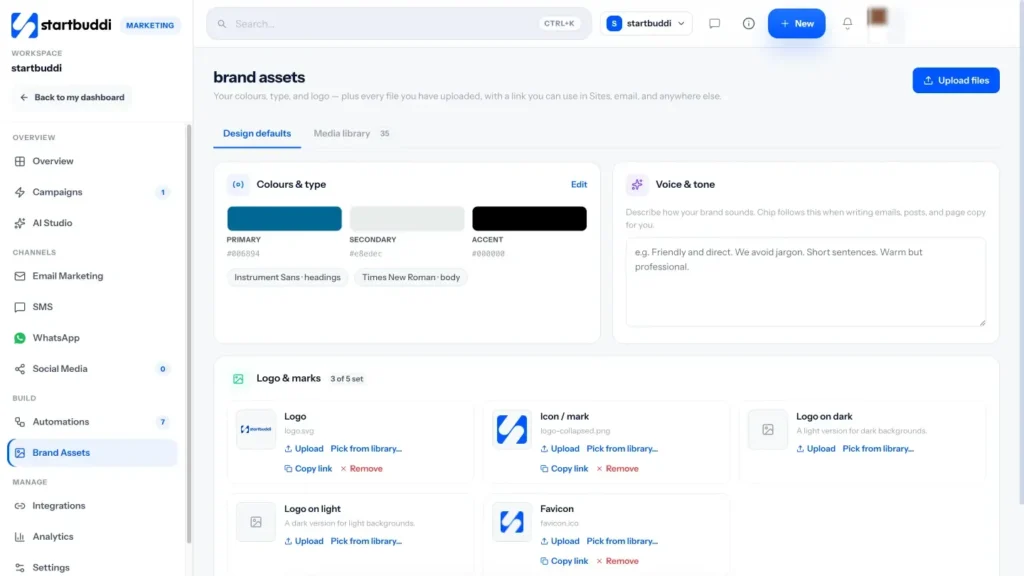
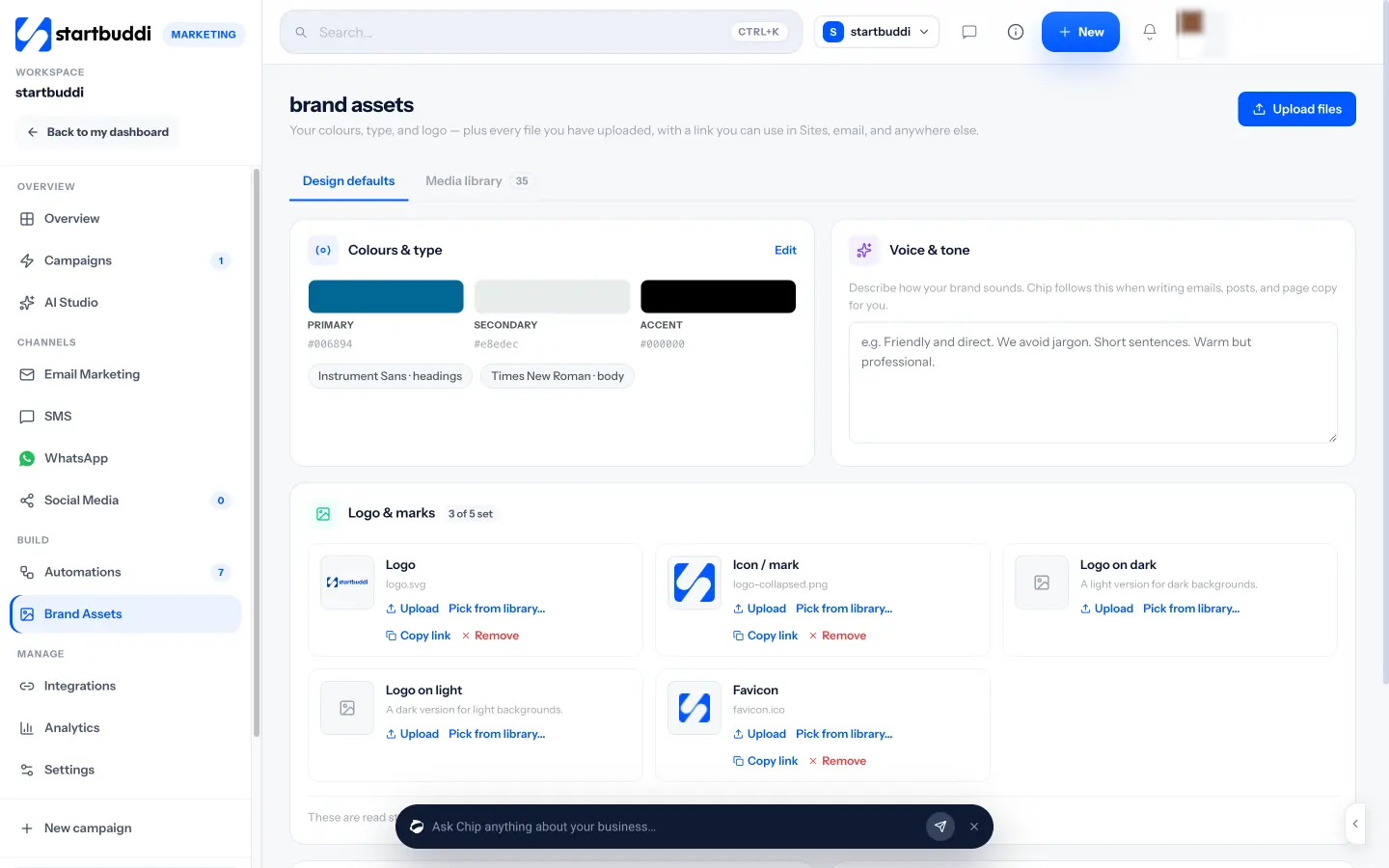
Open Marketing, then Brand Assets. Under Design defaults you can upload your logo (with versions for light and dark backgrounds and a favicon), set your primary, secondary and accent colours, choose heading and body fonts, and write a Voice and tone guide, for example "Friendly and direct. We avoid jargon. Short sentences." Chip uses your voice and brand whenever it writes for you, including email drafts, and the email builder can start with your brand kit applied. The Media library keeps every image, video and file with a link you can reuse in pages and emails.
Plan your first campaign
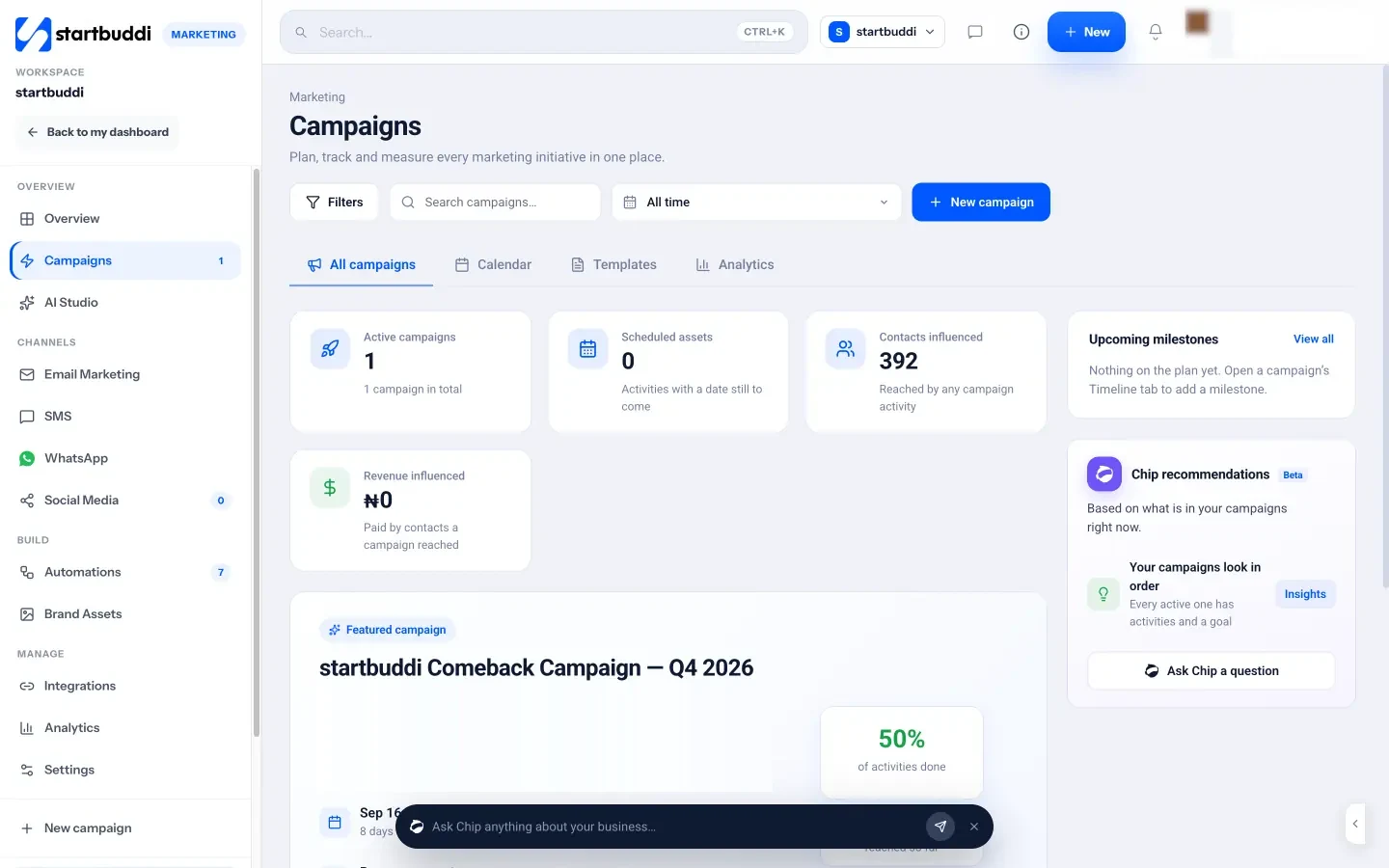
Campaigns groups everything that belongs to one push, such as a launch, a seasonal offer or an event: the emails, social posts, landing page, form and follow-ups. You can start from a template (Product launch, Webinar or event, Lead nurture, Seasonal promotion, Win back quiet contacts), fill in the fields yourself, or describe the idea and let Chip draft the goals and milestones for you to review. Each campaign has an objective, dates, a budget and goals on live numbers such as contacts, bookings or revenue, so progress fills in by itself. You can read more on the Campaigns page.
Chapter 2 turns to the first job of any marketing plan: making sure people can find you and trust what they see when they do.
Get found: your Google listing, page, profiles and reviews
- How to set it up well
- Write the page in the order people read it
- Use your own domain when you can
- Do not forget your WhatsApp profile
- When and how to ask
- How to handle a bad review
- A worked example: fixing a leaky shop window
- A business page built for how you work
- One link for every social profile
- Check how your pages look on Google
Before you spend a minute on posts or emails, make sure that when someone hears about you, they can find you and like what they see. A friend recommends you, the customer searches your name, and finds nothing, or an old Facebook page with no prices. That lost customer never shows up in any report, which is why this step is so often skipped. This chapter covers the places people check before they buy: search results, a Google listing, your own page, your social profiles and reviews.
Why being findable comes first
Nearly every customer checks you out before they get in touch, even when a friend recommended you. They look for four things: that you are real, that you do what they need, roughly what it costs, and that other people were happy. If your online presence answers those four questions in under a minute, more of the people your other marketing reaches will turn into enquiries. If it does not, you are pouring water into a leaky bucket.
Think of it as your shop window. It does not need to be fancy, but it must be clean, clear and open.
Your Google Business Profile (if you serve a local area)
If customers come to you, or you go to them within an area, a Google Business Profile is the most valuable free marketing asset you can set up. It is the listing that appears on Google Maps and in the local results when someone searches "plumber near me" or "cake shop in Ikeja". It shows your hours, phone number, photos and reviews, and lets people call or ask for directions in one tap.
How to set it up well
- Claim or create the profile at Google Business Profile with the email you use for the business.
- Choose the most accurate main category. "Emergency plumber" or "Wedding cake shop" is better than a vague one. Add a few secondary categories if they genuinely apply.
- Write a clear description using the words customers search, such as the service and the area. Do not stuff keywords; write for a person.
- Add real photos of your work, your team and your premises or van. Update them every month or two.
- Keep hours, phone and address exactly the same as on your website and other listings.
- List your services and prices where the profile allows it.
- Reply to every review, good or bad, politely and within a few days.
Our post on local SEO for small businesses covers the profile in more detail, and the SEO for small business guide explains how search works beyond the map results.
Your own page: the one place you control
Social platforms change their rules and can suspend accounts overnight. Your own page is the one place online you fully control. It does not need to be a big website. For most small businesses, one well-made page does the job:
- Headline: your promise from chapter 1.
- What you offer: your main services or products, with prices or "from" prices.
- Proof: two or three short reviews, photos of real work, a well-known client or a number ("200 homes cleaned in Surulere this year").
- How it works: three simple steps, from getting in touch to getting the result.
- One clear action: a form, a booking button, a WhatsApp button or a phone number. One main action is better than five.
- Where and when: the area you serve, your hours and how quickly you reply.
- FAQ: the four or five questions people always ask.
Write the page in the order people read it
Most visitors arrive on a phone, scroll quickly and decide in seconds. Put the answer to "is this for me?" in the first screen, with the main button visible without scrolling. Keep paragraphs to two or three lines. Use real photos over stock images wherever you can, because people can tell the difference. Read the page aloud: if any sentence would sound odd said to a customer across a counter, rewrite it.
Then test it. Send the page to two people who match your customer and ask them three questions: what do we do, what does it cost, and how would you get in touch? If either of them hesitates, the page needs work.
Use your own domain when you can
A web address with your business name (yourbusiness.com or yourbusiness.co.uk) looks more established than a free sub-address and is easier to say out loud. It also lets you use a matching email address. A domain usually costs a small yearly fee from a registrar. If money is tight, start on a free address and move to your own domain once you have your first few customers.
Social profiles: make the basics work
You do not need to be on every platform, but the ones you are on should look alive and point people to your page. For each profile:
- Use the same name, logo and photo everywhere, so people know they have found the right business.
- Write your promise in the bio, with your area if you are local.
- Put one link in the bio that leads to everything else: your page, your booking link, your WhatsApp and your latest offer.
- Pin your best post: a customer result, a price list or a "how to work with us" post.
- If you stop using a platform, say so in the bio and point people elsewhere rather than leaving it to go stale.
Do not forget your WhatsApp profile
In many countries, WhatsApp is where customers actually talk to businesses. The free WhatsApp Business app lets you add a business profile with your address, hours, website and a catalogue of products or services, plus quick replies and a greeting message. Fill in the profile as carefully as your Google listing: it is often the first thing a customer sees after tapping your number. Use the same business name and description, and link back to your page.
Reviews: the proof that sells for you
Reviews do two jobs at once. They persuade the person reading them, and on Google they help you appear in local results. Yet most happy customers never leave one, simply because nobody asked at the right moment.
When and how to ask
Ask when the customer is happiest: just after the job is finished, the order has arrived or they have told you they are pleased. Make it easy with a direct link, and keep it short:
Hi Grace, thank you again for choosing us for the kitchen refit. If you are happy with the work, would you leave a quick review? It takes a minute and really helps a small business like ours: [link]. Thank you!
Send it by the channel the customer uses most, often WhatsApp or text. One polite reminder a few days later is fine; more than that is pushy.
How to handle a bad review
- Wait until you are calm, then reply publicly within a few days.
- Thank them, acknowledge the problem without arguing, and explain briefly what you are doing about it.
- Offer to continue the conversation privately with a phone number or email.
- Fix the underlying problem if the complaint is fair.
A calm, helpful reply to a bad review often impresses future customers more than a page of five-star ratings.
A worked example: fixing a leaky shop window
Here is an illustration. Chidi runs a small AC repair business in Abuja. Most of his work comes from referrals, but he notices that some people who were recommended to him never call. He searches his own business name and finds an old Facebook page with a wrong phone number and no reviews.
Over one weekend he claims his Google Business Profile, adds photos of real jobs, lists his three main services with starting prices, and publishes one page with a WhatsApp button and a short form. He then messages his last 20 customers asking for a review, and 9 leave one. He adds the same link to his WhatsApp Business profile and Facebook page.
Nothing about his referrals changed, but more of the people who heard about him could now find him, check him out and get in touch in one tap. That is what "findable" means in practice: removing the reasons a warm lead drifts away.
Directories and marketplaces
Depending on your business, listings on industry directories, local chamber of commerce sites, wedding or event directories, booking marketplaces or delivery apps can bring steady enquiries. Choose a few that your customers actually use, fill them in completely with the same name, address and phone number as everywhere else, and check each one's fees and terms before you sign up. A handful of accurate listings beats fifty half-finished ones.
Keep your details the same everywhere
Search engines and customers both get confused when your business name, address, phone number or hours differ from one listing to the next. Make a single "source of truth" note with your exact business name, address format, phone number, web address, hours and a short and long description. Copy from it every time you create a profile or listing, and update every listing the same day if something changes. It is a dull job that takes an hour, and it removes a common reason for lost calls and wasted visits to an old address.
A findability checklist
| Check | Done |
|---|---|
| Searching your business name shows your page or listing on the first page | [ ] |
| Google Business Profile claimed, complete and with recent photos (local businesses) | [ ] |
| One clear page with promise, offers, prices, proof and one main action | [ ] |
| Same name, phone and hours on every listing | [ ] |
| Social bios state your promise and link to one page | [ ] |
| At least five genuine reviews, all replied to | [ ] |
| A routine for asking every customer for a review | [ ] |
| Page loads quickly and reads well on a phone | [ ] |
How to get found in startbuddi
Publish is where you create everything customers see online: landing pages, business pages, link in bio, an online store and webinars, all connected to your contacts and payments.
A business page built for how you work
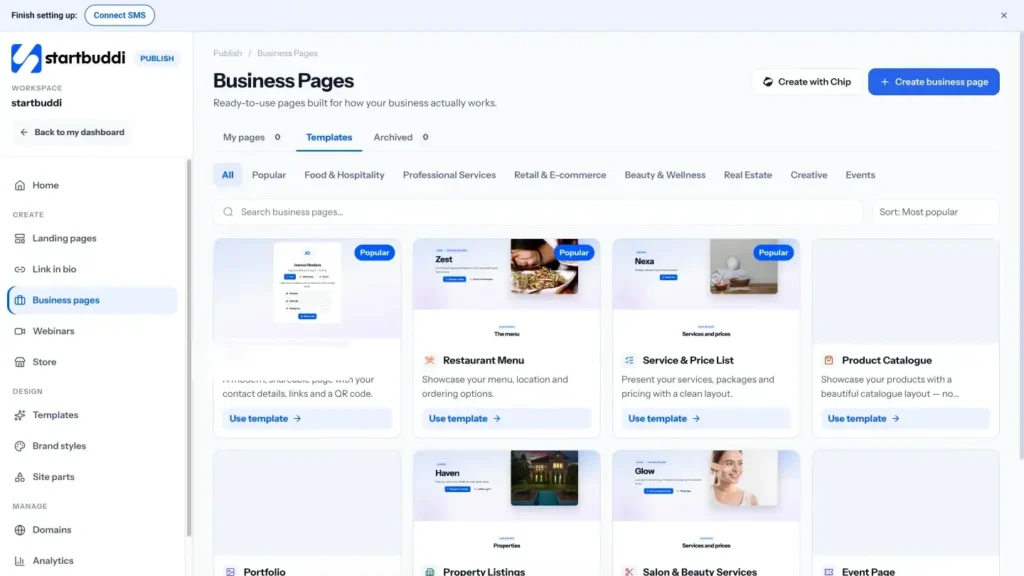
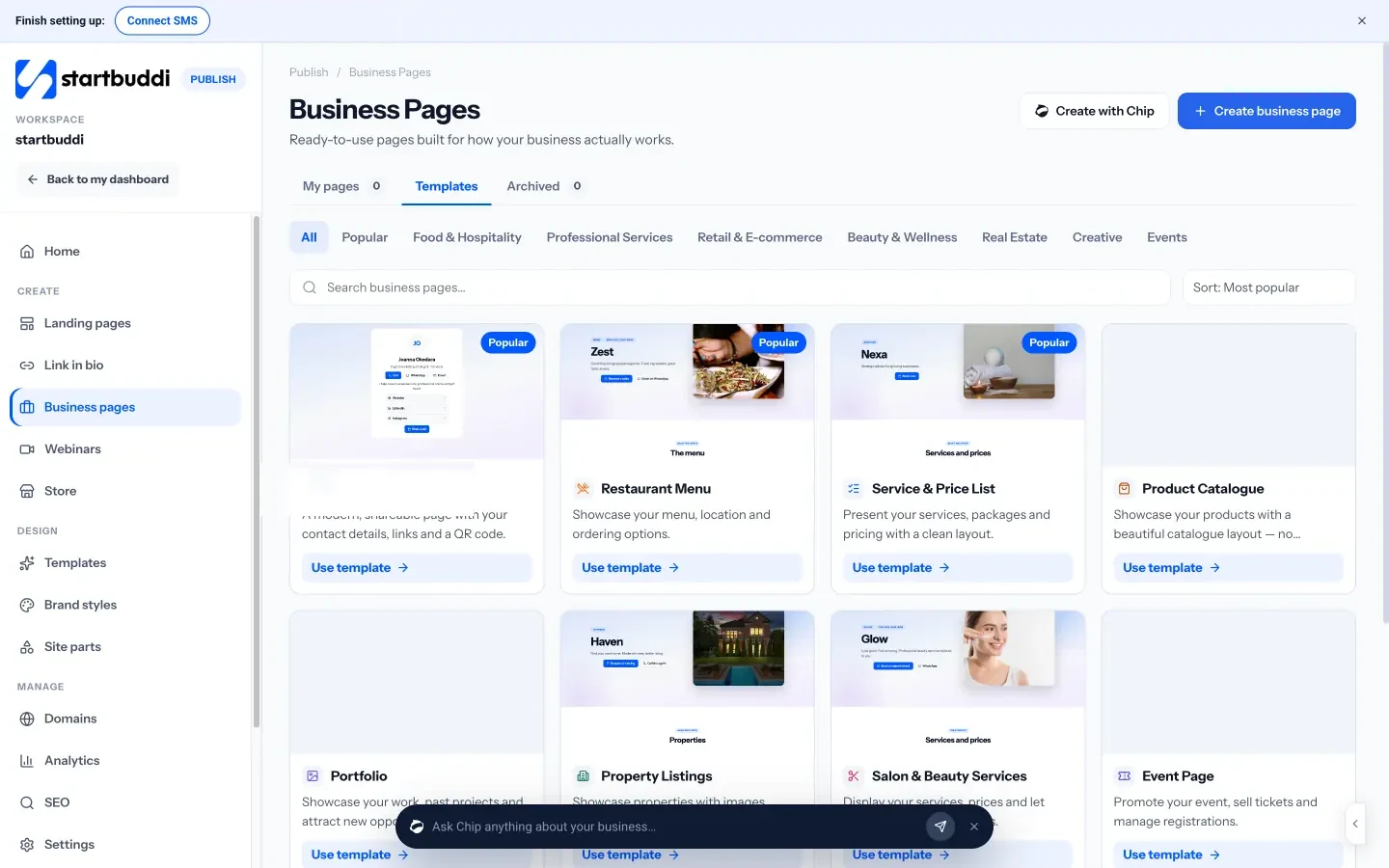
Business pages are ready-made page types for common needs, including a Service and Price List, a Restaurant Menu, a Portfolio, a Digital Business Card, Salon and Beauty Services, a Product Catalogue and an Event Page. Each has buttons for booking, a form, WhatsApp, phone, email or directions, and enquiries go straight to your contacts. The Overview shows views and which buttons people tap. You can build one from a template or ask Chip to create it from a description; Chip does not publish anything until you say so.
One link for every social profile
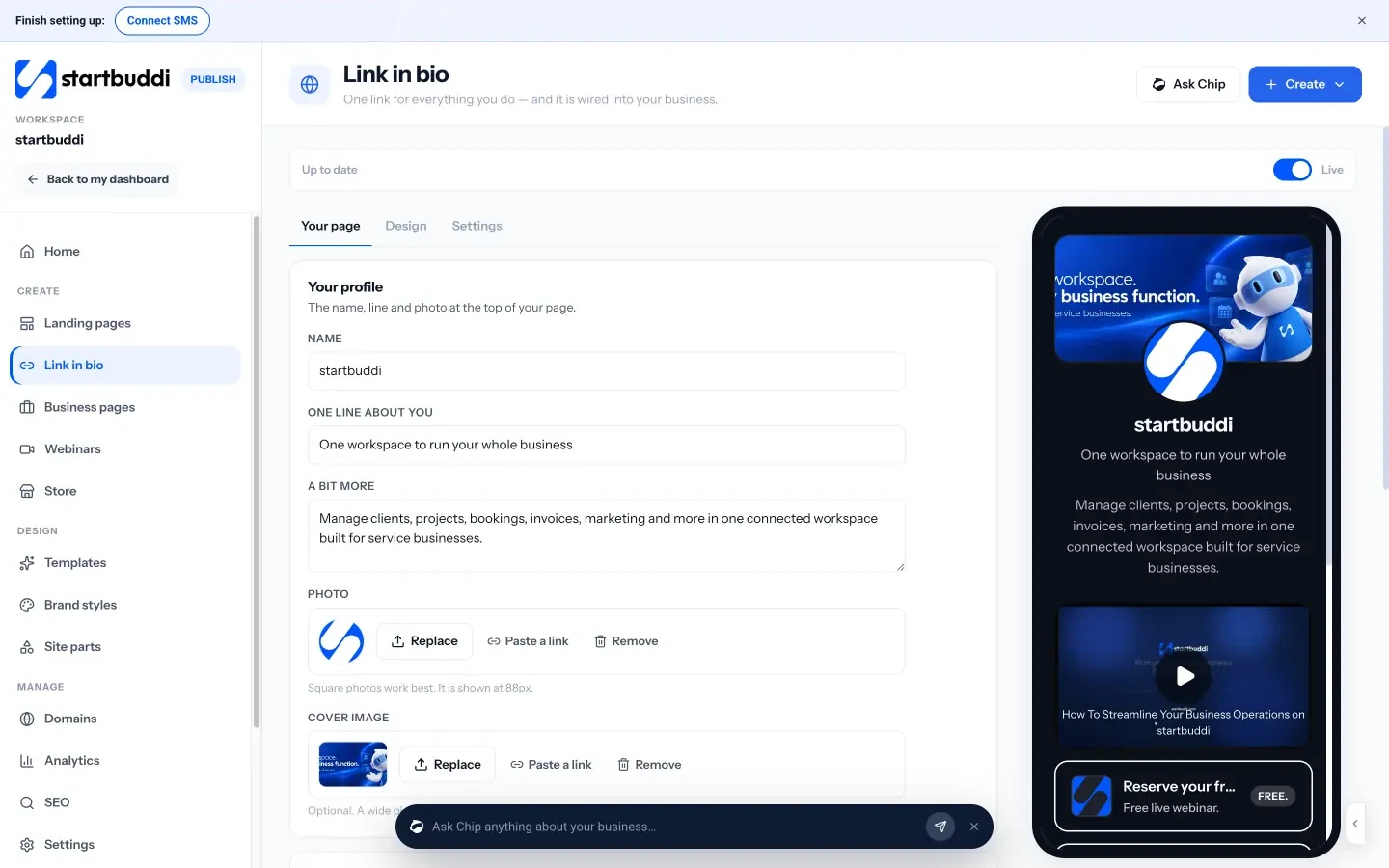
Link in bio gives you one mobile page for all your links, with blocks for social icons, a booking link, a form, a WhatsApp button, a subscribe box that adds people to your contacts, and ways to get paid on the page. Its analytics show visits, taps and where people came from, so you can see which platform sends the most traffic. Pages on the Free plan show a small "made with startbuddi" line, which any paid plan can remove. More on the link in bio page.
Check how your pages look on Google
The SEO screen in Publish shows how every page appears in search and when shared, flags pages missing a title or description, and lets you add your Google Search Console verification and tracking codes such as Google Analytics or a Meta Pixel. You can also connect your own domain from Publish, so your pages live at your own web address.
With a presence people can find and trust, you are ready to reach out. Chapter 3 covers social media, email, WhatsApp, referrals and content, and how to keep them going every week.
Reach people every week: referrals, social, email and WhatsApp
- Pick one main platform
- Use content pillars
- Batch your posts
- Build the list
- What to send
- A newsletter template you can reuse
- Plan a week of social posts with Chip
- Send email campaigns to the right people
- WhatsApp and SMS from the same place
Being findable brings in people who are already looking. To grow, you also need to reach people who are not looking yet, and to stay in touch with those who showed interest but were not ready to buy. This chapter covers the channels that work best for small businesses: referrals, social media, email, WhatsApp and SMS, content and partnerships. For each one you get the thinking, a simple routine and the mistakes to avoid. Then it shows how to plan social posts and send email campaigns in startbuddi.
Start with the channel you already have: referrals
Word of mouth is the oldest marketing channel and still the most trusted. It is also the one most small businesses leave to chance. You can make it deliberate:
- Ask at the right moment. When a customer thanks you, reply with thanks and a simple ask: "If you know anyone else who needs this, I would love an introduction."
- Make it easy to share. Give people a link, a short message they can forward or a card they can pass on.
- Say thank you properly. A handwritten note, a small gift or a discount on their next order for every referral that becomes a customer.
- Stay in touch. People can only refer you if they remember you. A monthly email or occasional WhatsApp update keeps you in mind.
Social media marketing without burning out
Social media is where many small businesses spend the most time for the least return, usually because they post whatever comes to mind, whenever they remember. A little structure fixes most of that.
Pick one main platform
Choose the platform where your customers already spend time (see chapter 1) and make it your main one. Post there consistently. You can share the same content to a second platform, but do not try to master four at once.
Use content pillars
Content pillars are three to five themes you rotate through, so you never stare at a blank screen. For a bakery, they might be:
- Behind the scenes: early mornings, new recipes, the team.
- Proof: customer photos, reviews, a wedding cake you delivered.
- Helpful: how to store bread, how far ahead to order a birthday cake.
- Offers: this week's special, pre-orders for a holiday.
A simple rule: for every post that sells, post three that help, show or entertain. People follow businesses that are useful or interesting, not ones that only advertise.
Batch your posts
Set aside one hour a week to plan, write and schedule the week's posts in one go. Batching is faster than writing each post on the day, and scheduling means posts still go out on your busiest days. A simple content calendar helps you plan a month at a glance.
Here is what that hour might produce for the bakery: Monday, a short video of the ovens at 5am; Wednesday, a customer's birthday cake photo with their permission; Thursday, a tip on freezing bread; Saturday, the weekend special with a pre-order link. Four posts, four pillars, one hour, and a clear call to action once in the week.
Email: the channel you own
Followers belong to the platform; an email list belongs to you. Email is still one of the best-value channels for small businesses. Litmus, an email testing company, reports an average return of $36 for every $1 spent on email, based on its surveys of marketers (Litmus). Your numbers will differ, but the point stands: a list of people who asked to hear from you is a valuable asset.
Build the list
Give people a reason to join: a useful checklist, a discount on the first order, early access to new products, or simply a helpful monthly tip. Add a signup form to your page and your link in bio, and ask customers at checkout if they would like updates. Our post on growing an email list from zero has a 30-day plan.
What to send
- A welcome email the moment someone joins, saying what they can expect.
- A regular newsletter, monthly or fortnightly: one useful idea, one piece of news, one offer.
- Campaign emails for launches, seasonal offers and events.
- Follow-ups after an enquiry or purchase, which you can automate.
Keep emails short, write like a person, use one main button, and send from a name people recognise. If you want the basics explained, see what email marketing is.
A newsletter template you can reuse
If you are not sure what to put in a regular email, use the same simple shape every time:
Subject: [One useful idea in a few words]
Hi [first name],
[One short tip, story or lesson your customers will find useful, three to five sentences.]
What is new: [one line about a new service, product, date or team member].
This month only: [one clear offer, with a date it ends and a button].
Thanks for reading. Reply to this email if you have a question; I read every one.
[Your name]
It takes about 30 minutes to write once you have the habit, and the reply line turns a broadcast into conversations.
WhatsApp and SMS: close and personal
In many markets, WhatsApp is how customers prefer to talk to businesses, and SMS reaches people without data. Both feel personal, which is their strength and their risk: people welcome useful messages and quickly block anything that feels like spam.
- Use them for things people want: order updates, booking reminders, back-in-stock alerts, a short monthly offer to people who opted in.
- Keep messages short and personal, with the customer's name and one clear action.
- Send less often than email, and always make it easy to stop receiving messages.
- For bulk WhatsApp messages to customers, the WhatsApp Business Platform requires approved message templates. Our collection of WhatsApp message templates has 20 examples to adapt.
Offline and local marketing still works
Digital channels get the attention, but many small businesses win customers face to face. Offline marketing is often cheaper than it looks and less crowded:
- Local events and markets: a stall, a talk or a free workshop puts you in front of people who can meet you in person.
- Flyers and cards: useful for local services when they go to the right streets and carry one clear offer and a QR code that leads to your page.
- Community groups and associations: trade bodies, business networks, religious and school communities, sports clubs.
- Your vehicle and premises: a clean, clearly branded van or shopfront with your phone number and web address works every day for free.
Give every offline activity its own trackable link or code, such as a QR code that points to a specific page or a short offer code, so you can tell whether it brought anyone in.
Paid ads: when to try them
Paid ads on search engines and social platforms can bring results quickly, but they also spend money quickly. Wait until your page converts visitors into enquiries and you know what a customer is worth (chapter 1). Then:
- Start with a small, fixed test budget you can afford to lose.
- Target narrowly: one service, one area, one type of customer.
- Send people to a page built for that ad, not your homepage.
- Run the test for two to four weeks and compare the cost per enquiry and per customer with what a customer is worth.
- Stop, change or scale based on the numbers, not on how many clicks you got.
Many small businesses find that a small ad budget works best when it amplifies something already working, such as a post that did well organically or an offer your email list responded to.
Get permission first: the rules in brief
Marketing messages are regulated almost everywhere. The details vary, but the principles are similar: have a lawful reason to contact people (usually their permission), say who you are, and let them stop easily.
- United States: the FTC's CAN-SPAM guide requires honest subject lines, your physical address and a working opt-out in commercial email.
- United Kingdom: the ICO's guidance on electronic mail marketing explains that you generally need consent to email or text individuals, with a limited "soft opt-in" for existing customers.
- Nigeria: the Nigeria Data Protection Act, overseen by the NDPC, sets rules on consent and personal data.
This is general information, not legal advice. Never buy email or phone lists: it breaks the rules in many countries and damages your sender reputation.
Content and partnerships: slower, but they compound
Content means useful articles, videos or guides that answer your customers' questions. It takes longer to pay off than a post or an email, but a good answer to a common question can bring in visitors for years through search. Start by writing short answers to the ten questions customers ask most. Chapter 2 of our SEO guide shows how to choose the topics.
Partnerships put you in front of another business's customers. A wedding photographer partners with a florist; a bookkeeper with a business bank's local branch; a personal trainer with a physiotherapist. Offer something useful to their customers, such as a joint guide, a workshop or a discount, and do the same for them.
Mistakes that waste marketing time
- Posting without a call to action. Every few posts, tell people exactly what to do next.
- Sending only offers. Lists and followers tune out if every message is a sale.
- Going quiet for months. Consistency matters more than volume. One email a month, every month, beats five in January and none after.
- Ignoring messages. Slow replies lose customers who were ready to buy.
- Contacting people without permission. It is often illegal and always bad for your reputation.
How to reach people from startbuddi
The Marketing module keeps social media, email, WhatsApp and SMS in one place, connected to the same contacts as your forms, bookings and invoices. It is included from the Starter plan; the Free plan does not include marketing sends.
Plan a week of social posts with Chip
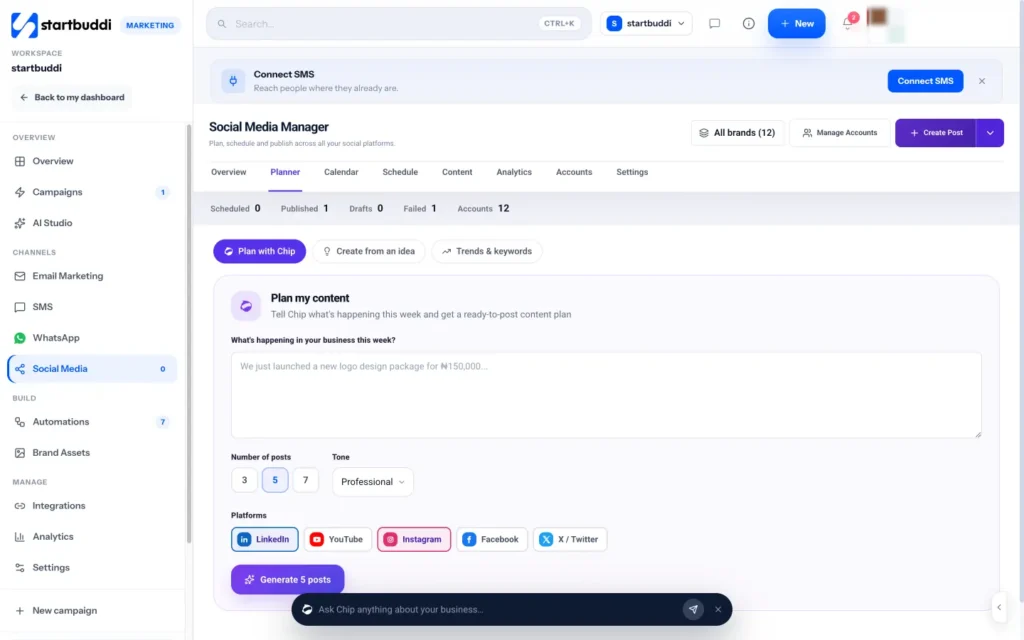
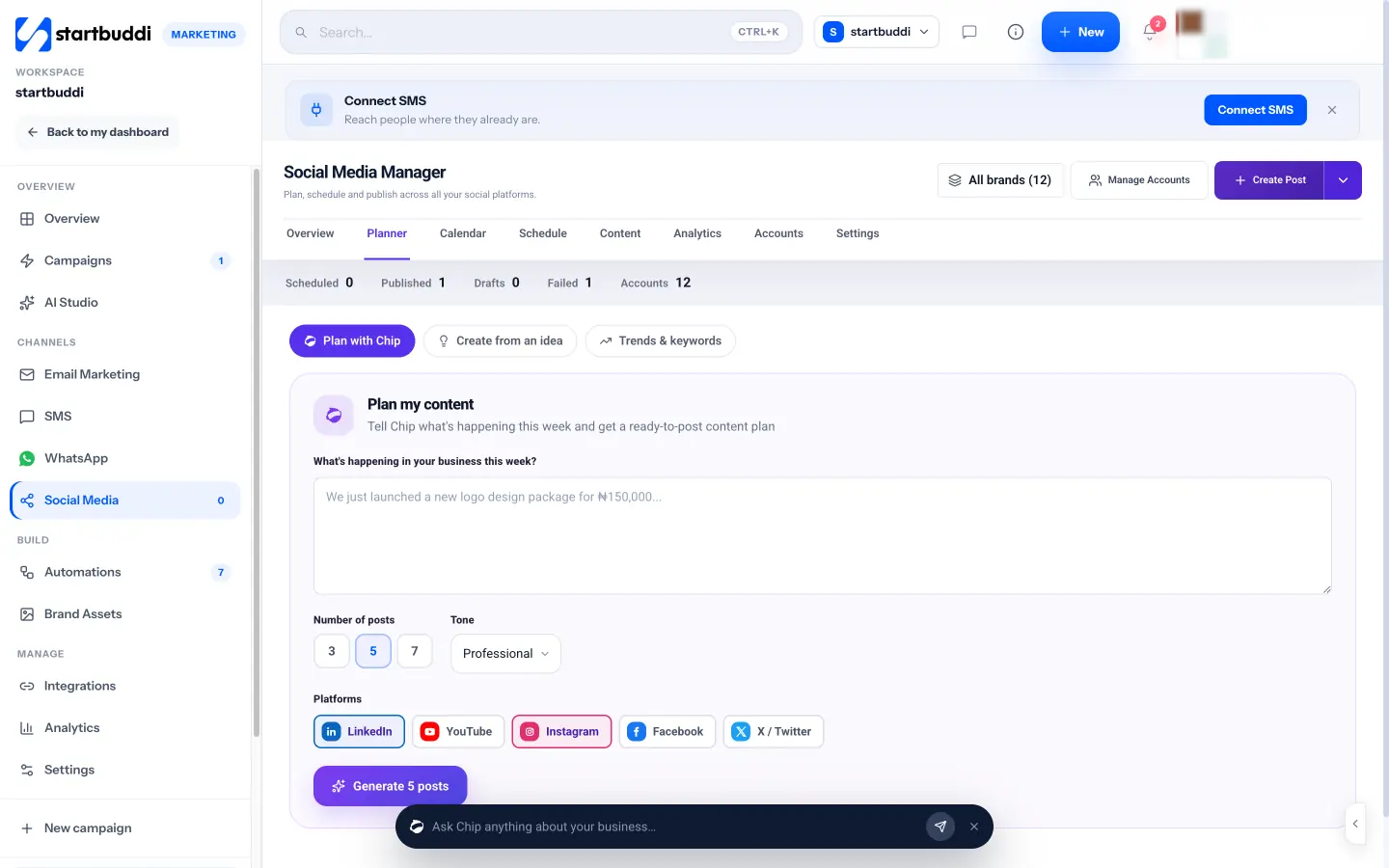
The Social Media Manager connects to Facebook, Instagram, LinkedIn, X, YouTube and Pinterest. In Planner, choose Plan with Chip, describe what is happening in your business this week, pick how many posts (3, 5 or 7), the tone and the platforms, and Chip drafts the posts. You approve the ones you like and schedule them onto the calendar in one step. Chip can also write captions, suggest hashtags and research trends in your niche, with sources. These AI features use Chip credits. Scheduled posts publish on their own, and a failed post is retried once before it is flagged. Starter includes 5 connected social accounts and 100 posts a month. See the social media page for more.
Send email campaigns to the right people
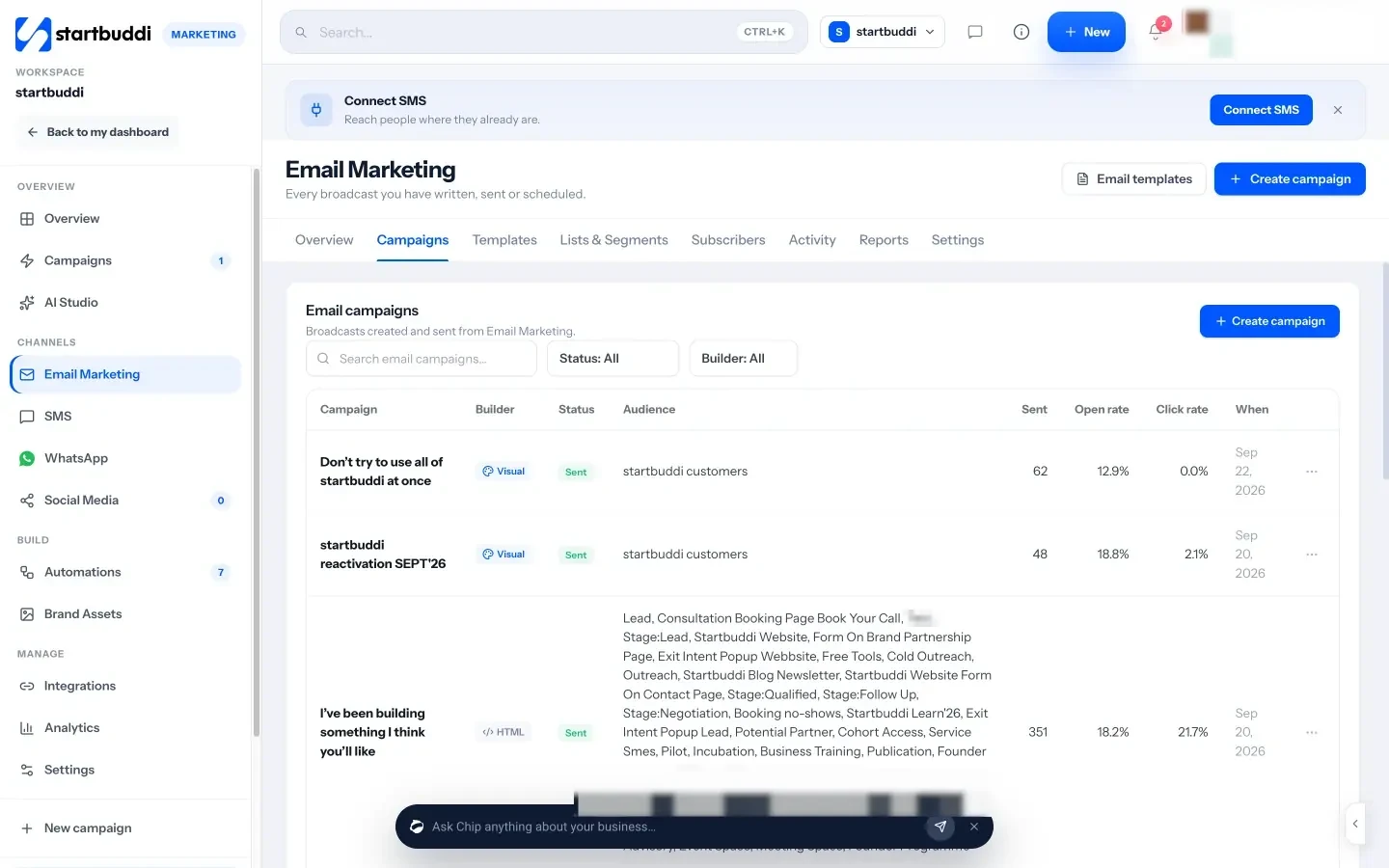
Email Marketing lets you build campaigns from templates or from scratch, with your brand kit applied, and write with Chip if you want a first draft. You choose who receives each campaign from your lists and segments, review it, then send or schedule it. Reports show opens and clicks campaign by campaign. You can also set up your own sending domain so emails come from your business address. Starter includes 3,000 email sends a month. More on the email marketing page.
WhatsApp and SMS from the same place
WhatsApp Marketing sends campaigns with approved templates to people who opted in, and SMS sends text campaigns through startbuddi's built-in SMS or your own provider. Both need the Starter plan or above, and replies land in the same customer inbox as your email conversations.
Chapter 4 brings it together: how to measure what works, which marketing tools are worth paying for, and a weekly routine that fits into two or three hours.
Measure what works and choose your marketing tools
- A worked example
- Tag your links so you know where clicks came from
- Free marketing tools for small business
- Questions for your monthly review
- When to get help
- Marketing analytics tied to real revenue
- Know where every enquiry came from
- See every activity on one calendar
- Switch on follow-ups once
- Which plan you need
Marketing only gets easier when you know what is working. Without measurement, every month feels like starting again: you post, you email, you try an ad, and you cannot say which of them brought in the customers who paid. This chapter shows you how to track results without a data team, how to choose marketing tools for small business that earn their place, which free marketing tools cover the basics, and how to fit it all into a weekly routine. Then it shows how to measure and automate your marketing in startbuddi.
Measure the few numbers that matter
Most marketing dashboards show dozens of numbers. For a small business, five are enough:
| Number | What it tells you | How to get it |
|---|---|---|
| Enquiries by source | Which channels bring people in | Ask "how did you hear about us?" on every form and in every first call |
| Enquiry to customer rate | Whether your offer and follow-up work | Customers ÷ enquiries, each month |
| Cost per customer | Whether paid activity is worth it | Money spent on a channel ÷ customers it brought |
| Customer value | How much you can afford to spend to win one | Average spend × purchases a year (see chapter 1) |
| Repeat customers | Whether people come back and refer others | Customers who bought more than once ÷ all customers |
Likes, followers and opens are useful signals for improving a single post or email, but they are not the goal. The goal is customers who pay and come back.
A worked example
Imagine a small physiotherapy clinic in Nairobi that tracks one month of new patients:
- Google listing: 14 enquiries, 9 new patients, no direct cost.
- Instagram: 11 enquiries, 3 new patients, about 6 hours of staff time.
- A boosted Facebook post: 8 enquiries, 2 new patients, KSh 6,000 spent (KSh 3,000 per patient).
- Referrals from existing patients: 6 enquiries, 5 new patients.
An average new patient books six sessions at KSh 3,500, worth about KSh 21,000. The ad paid for itself, but the Google listing and referrals did far better for less effort. The clinic decides to ask every patient for a review, start a simple referral thank-you, cut Instagram to two posts a week and keep a small ad test running.
Tag your links so you know where clicks came from
When you share a link in an email, a post, a flyer QR code or an ad, add tracking tags so your analytics can tell the sources apart. These are called UTM parameters. Google's guide to campaign URLs explains them; the three that matter most are utm_source (where, such as instagram or newsletter), utm_medium (the type, such as social or email) and utm_campaign (the name, such as spring-offer). Keep your naming consistent, all lower case, and write it down so everyone on the team uses the same words.
How to choose marketing tools for small business
There are thousands of digital marketing tools for small businesses. The right set depends on your channels, not on what is popular. Before you sign up for anything, ask:
- Which job does it do? Match every tool to one of your channels or one of your five numbers. If it does neither, skip it.
- Does it connect to your customer list? A tool that collects leads in its own silo creates copy-and-paste work every week.
- Can you use it in under an hour? Complex tools with steep learning curves often get abandoned.
- What does it cost at your size next year? Check how the price changes as your list or team grows.
- Can you get your data out? Make sure you can export contacts and content if you leave.
Our practical toolkit of marketing tools for small business goes through each category, with what to look for and where one connected system can replace several separate apps.
Free marketing tools for small business
You can cover a surprising amount for $0. These are genuinely free from their providers:
- Google Business Profile: your listing on Google Search and Maps.
- Google Search Console: shows which searches bring people to your website and flags problems.
- Google Analytics: website visits, sources and actions.
- Meta Business Suite: manage and schedule Facebook and Instagram posts and messages.
- WhatsApp Business app: a business profile, catalogue, quick replies and labels.
Free tools have limits, usually on volume, features or branding, and each has its own login and customer data. They are a good place to start. Once you are spending hours moving details between them, it is worth paying for something that connects the pieces.
Automate the repetitive parts
Some marketing tasks happen the same way every time. They are perfect for automation, which saves time and makes sure nothing is forgotten on busy weeks:
- A welcome email or WhatsApp message when someone joins your list or fills in a form.
- A reminder before a booking, and a thank-you with a review request after it.
- A "we miss you" message to customers who have not bought in three or six months.
- A follow-up to people who clicked an offer but did not buy.
Start with one automation, check that it reads well and reaches the right people, then add the next. Automations should sound like you on a good day, not like a machine.
A weekly marketing routine in two to three hours
Consistency is the secret most successful small businesses share. Here is a routine that fits into a busy week:
| When | What | Time |
|---|---|---|
| Monday | Check last week's numbers: enquiries by source, customers won, money spent | 20 minutes |
| Monday | Plan and schedule the week's social posts | 45 to 60 minutes |
| Wednesday | Reply to reviews and comments; ask two happy customers for a review or referral | 20 minutes |
| Thursday (fortnightly) | Write and schedule your email or WhatsApp update | 30 to 45 minutes |
| Friday | Follow up every open enquiry; update your customer list | 20 minutes |
Once a month, spend an extra hour reviewing your one-page plan from chapter 1: keep what works, change what does not, and choose one new thing to test.
Improve one thing at a time
Once you can see your numbers, you can improve them with small, careful tests. The rule is to change one thing at a time, so you know what caused the difference. Good things to test in a small business:
- Your page headline: try the customer's own words against your current promise for a month each.
- Your offer: a free consultation versus a small paid first session; a percentage discount versus a free extra.
- Email subject lines: a question against a plain statement, sent to two halves of your list.
- Your reply speed: answering enquiries within an hour versus within a day, and comparing how many become customers.
- Your form: removing one question, then checking whether more people finish it.
Small lists and small numbers make results noisy, so look for big differences and give each test enough time. If a change makes no clear difference, keep whichever version is simpler.
Questions for your monthly review
- Where did this month's paying customers come from?
- Which channel took the most time for the fewest customers?
- What did customers say, in their own words, about why they chose us?
- Which enquiries did we lose, and why?
- What is the one change we will test next month?
Write the answers at the bottom of your one-page plan. After three months you will have a record of what works for your business that no general guide can give you.
When to get help
At some point, doing all the marketing yourself stops making sense. Common signs: you have a routine that works but no time to run it, or one channel is clearly profitable and you want to do more of it. Start by handing over one well-defined task, such as scheduling social posts or writing the monthly newsletter, to a freelancer or part-time assistant, with your one-page plan and brand guide as their brief. Keep the numbers and the customer relationships with you.
Mistakes to avoid when measuring
- Judging a channel after a week. Give each channel a fair test, usually two to three months, with a clear number to beat.
- Counting only the last click. A customer might see three posts, read an email and then search your name. Ask them what made them get in touch.
- Tracking without acting. A number you look at but never act on is just decoration. Write down one decision after each monthly review.
- Comparing yourself with averages. Industry benchmarks for open rates or conversion rates vary widely and rarely match a small, local business. Your own numbers from last month are the benchmark that matters.
- Forgetting costs. Your time counts. Six hours a week on a channel that brings one small customer a month may not be worth it.
How to measure and automate your marketing in startbuddi
Because startbuddi keeps your marketing, contacts and invoices in one system, it can connect a campaign to the money it brought in, which separate tools struggle to do.
Marketing analytics tied to real revenue
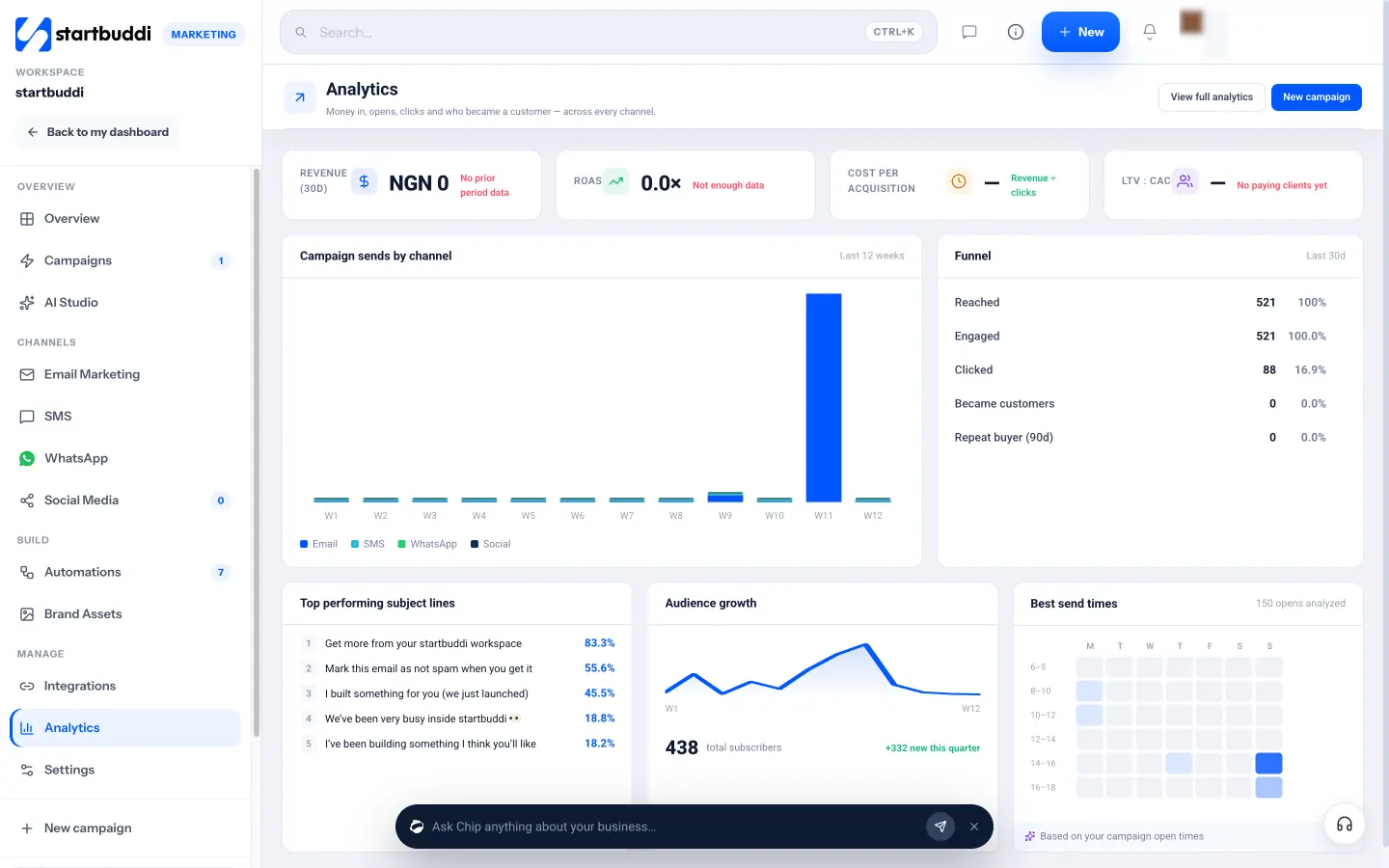
Marketing Analytics shows revenue from the last 30 days, return on ad spend, cost per acquisition and customer value against acquisition cost, worked out from paid invoices and the expenses you tag as Marketing or Advertising in Money Manager. It also shows a funnel from reached to engaged, clicked and became a customer, your best send times based on when your emails are opened, and top subject lines. These numbers only fill in when your invoices and marketing expenses are recorded in startbuddi, which is a good reason to keep them there.
Know where every enquiry came from
Every form response in startbuddi records where it came from, the device used and the location, and you can add your own "How did you hear about us?" question in a couple of clicks. Landing pages show where visits came from, link in bio can split traffic by platform, and a contact created from a page keeps the page and campaign it came from. Put together, that answers the first question in your monthly review without a spreadsheet: which channels bring in the people who end up paying.
See every activity on one calendar
The Campaigns calendar shows every email, WhatsApp campaign, social post, landing page, form and event on one month view, colour-coded by channel, with what is coming up in the next seven days. It makes gaps and clashes easy to spot before they happen.
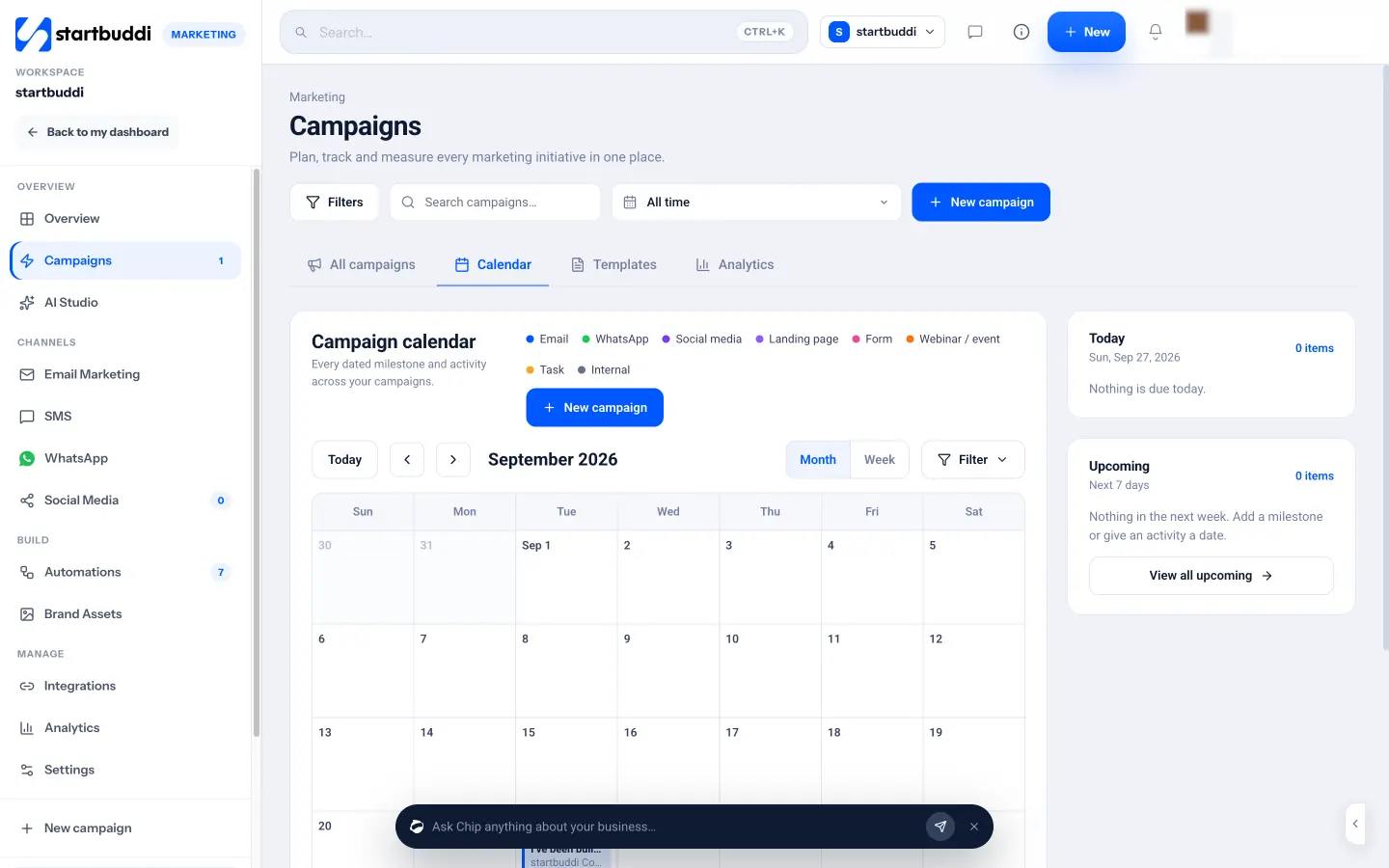
Switch on follow-ups once
Automations runs the repetitive messages for you on one engine across forms, bookings, invoices and marketing. Templates include a lead capture welcome flow, a booking reminder stack, a cancellation win-back and a manual reactivation burst for quiet contacts. You can also describe what you want to Chip, which plans the steps, writes the messages and saves the automation as a draft for you to review. Before an automation goes live, a check shows how many contacts can be reached and how many are excluded, for example because they unsubscribed. Free includes 2 active automations and Starter 10, and each plan includes a monthly number of automation runs.
Which plan you need
The Marketing module, including email, SMS, WhatsApp, social media, campaigns and analytics, starts on the Starter plan, with a 30-day trial (see pricing). Growth adds more contacts, sends and seats, plus Chip auto-replies in your inbox, WhatsApp and live chat. The Marketing overview and the pricing page have the full details.
Your next step: write your one-page marketing plan from chapter 1 today, then block your first weekly marketing session in your calendar. If you are still setting up the business itself, our guide on how to start a small business covers the steps before marketing.
Olabimpe Salami is the email and outreach specialist at startbuddi. Olabimpe writes about the messages that bring customers in and back: email, WhatsApp and SMS campaigns, follow-ups, and turning enquiries into paying clients.
Runs email and outreach at startbuddi