How to grow an email list from zero (a 30-day plan)
A step-by-step way to grow an email list from nothing: the signup offer, the form, where to put it, the welcome email, consent rules and a 30-day plan.


Photo: Caden Norcott / Unsplash
- Give people a specific reason to sign up, use a two-field form, and put it everywhere they already find you. Send a welcome email straight away, follow consent rules from day one, and aim for your first 100 subscribers in 30 days.
To grow an email list from zero, give people one clear reason to sign up, put a simple signup form everywhere they already find you, and ask for consent properly. Then send a welcome email straight away and keep sending something useful on a steady rhythm. You don’t need a big audience, a website with thousands of visitors or a paid tool on day one. You need a place to collect addresses and a habit of asking.
This guide walks through the whole thing in order: why an email list is worth your time, the offer that makes people sign up, where to put your form, what to write in the first emails, the consent rules, and a 30-day plan to get your first 100 subscribers.
Why an email list is worth building, even for a tiny business
Social media followers belong to the platform. If an algorithm changes or an account gets restricted, your reach can drop overnight. An email list is a list of people who asked to hear from you, and you can reach them whenever you have something worth saying. If you’re new to the channel, our glossary entry on what email marketing is covers the basics.
For a small business, a list does three practical jobs:
- It turns interest into sales later. Most people who visit your page or chat with you aren’t ready to buy today. Email lets you stay in touch until they are.
- It fills quiet weeks. A short email about a new slot, product or offer to people who already like you is usually the fastest way to bring in work.
- It tells you what people want. Replies and clicks show which topics and offers people actually care about.
The size of the list matters less than who is on it. Fifty people who chose to join and open your emails are worth more than 5,000 addresses that never asked.
Step 1: give people a reason to sign up
“Subscribe to our newsletter” rarely works on its own, because it promises more email and nothing else. People sign up when they get something specific and useful in return. Marketers call this a lead magnet, but think of it as a small, honest trade: their email address for something they’d genuinely want.
Signup offers that work for small businesses
| Type of business | Offer idea |
|---|---|
| Salon, spa, clinic | First access to new appointment slots, or a seasonal care guide |
| Restaurant or café | This week’s specials and a birthday treat |
| Online shop | Early access to new stock and restocks before they sell out |
| Coach or consultant | A one-page checklist or worksheet that solves one small problem |
| Agency or freelancer | A short case study, a pricing guide or a template your clients ask for |
| Trades and home services | A maintenance calendar, or priority booking in busy season |
The best offers share three traits. They are quick to consume, they’re closely linked to what you sell, and they’re specific. “The 10-minute guide to choosing a solar inverter for a three-bedroom flat” beats “Energy tips” every time.
Avoid discounts as your only offer if you can. They work, but they attract people who wait for the next discount. A useful guide or early access attracts people interested in what you do.
Step 2: build one simple signup form
Your form has one job: collect the address with as little effort as possible. Every extra field costs signups.
- Ask for first name and email only. First name lets you write “Hi Amaka”. Everything else can wait.
- Say what they’ll get and how often. “One email a week with new slots and offers. Unsubscribe any time.”
- Use a button that describes the result. “Send me the guide” works better than “Submit”.
- Add a clear consent line. A checkbox or sentence that says they agree to marketing emails, not buried in terms and conditions.
- Show a thank-you message that confirms what happens next. “Check your inbox, the guide is on its way.”
Our post on building a lead capture form that converts goes deeper on wording and layout.
Should you use double opt-in?
Double opt-in means people confirm their address by clicking a link before they’re added. It lowers the number of signups a little but removes typos, fake addresses and people who were signed up by someone else. For a brand new list, a clean start is worth more than a slightly bigger number, especially because mailbox providers watch how people react to your emails.
Step 3: put your form where people already are
You don’t need new traffic to grow a list. You need to ask the people who already visit, message and buy from you. Go through these places one by one.
Online
- Your link in bio. Add a signup block at the top of the page your Instagram, TikTok or X profile points to.
- Your website or landing page. One signup section on the home page and a short form at the end of every blog post or service page.
- Your email signature. A one-line link: “Get our monthly tips”.
- Social posts. Once a week, post about your signup offer itself, not just your products.
- WhatsApp status and chats. When a customer asks a question you’ve answered in your guide, send the signup link.
Offline
- At the counter or after a job. A QR code on a small card, receipt or invoice: “Scan to get priority booking.”
- At events and markets. A tablet or a printed QR code with a clear offer. Collect consent on the form, not on a paper sheet you type up later.
- Existing customers. Past clients who gave you their email for an invoice have not automatically agreed to marketing everywhere. Ask them to join with a friendly one-off message.
A simple test: if someone likes your business today, can they find a way to join your list in under ten seconds? If not, that’s where to start.
Step 4: send a welcome email straight away
The moment someone signs up is when they’re most interested. A welcome email sent automatically, within minutes, is the most important email you will write. It should:
- Deliver what you promised (the guide, the code, the early-access link).
- Say who you are in two sentences.
- Set expectations: what you’ll send and how often.
- Ask one small question they can reply to, such as “What’s the one thing you’re stuck on?”
Replies are valuable. They tell you what people want, and a genuine reply is a good sign for your future emails reaching the inbox.
A simple welcome sequence
Once the first email works, add two more and let them run automatically. This is often called a drip sequence.
- Day 0: welcome and the thing you promised.
- Day 2: your most useful tip or story, with a link to your best page.
- Day 5: a gentle offer: book a call, try a service or browse the shop.
Step 5: follow the consent rules from day one
Getting consent right from the start saves you from rebuilding your list later. This is general information, not legal advice, and the rules depend on where you and your subscribers are.
- Nigeria: the Nigeria Data Protection Act 2023, overseen by the Nigeria Data Protection Commission, gives people the right to object to their data being used for direct marketing. Once someone objects, you must stop. The Future of Privacy Forum’s explainer is a readable summary.
- UK: the ICO’s guidance on electronic mail marketing says you normally need consent. There’s a limited “soft opt-in” for your own recent customers, but only if you gave them a clear chance to opt out when you collected their details and in every email, and it never covers bought lists.
- US: the FTC’s CAN-SPAM compliance guide requires accurate sender details, honest subject lines, a physical postal address and a working opt-out, honoured within 10 business days.
Mailbox providers have their own rules too. Google’s email sender guidelines require marketing emails to support one-click unsubscribe with a visible unsubscribe link, and tell senders never to reach a spam complaint rate of 0.3% or higher. Senders of larger volumes also need SPF, DKIM and DMARC set up for their domain.
The practical version for a small business: only add people who asked, record where and when they signed up, include your address and an unsubscribe link in every email, and never buy or borrow a list.
A 30-day plan to grow your email list to 100 subscribers
Here’s a realistic month for a business starting from nothing. It assumes you spend about 30 minutes a day.
| Week | Focus | Tasks |
|---|---|---|
| 1 | Set up | Choose your signup offer, create it, build the form, write the welcome email and test the whole flow yourself. |
| 2 | Ask the warm circle | Add the form to your link in bio, website and email signature. Message past customers and contacts personally with the link. |
| 3 | Promote the offer | Post about the offer on each social channel, share it on your WhatsApp status, and add a QR code to receipts or your counter. |
| 4 | Send and learn | Send your first regular email. Look at who opened, clicked and replied, and ask subscribers what they want next. |
Track one number each week: new subscribers. If it’s flat, change one thing, usually the offer or where the form sits, rather than everything at once. The first 100 are the slowest. After that, word of mouth and forwarded emails start to help.
What to send once the welcome emails are done
Keeping subscribers is part of growing a list, because people who enjoy your emails forward them. If you’re stuck for ideas, rotate through these:
- A quick tip your customers keep asking about, answered in five lines.
- Behind the scenes: a new product being made, a job before and after, a day in the shop.
- A customer question and your honest answer, with their permission.
- News they can act on: new slots, restocks, price changes or holiday opening hours.
- A clear offer once in a while, with a deadline and one link.
End each email with a line like “Know someone who’d find this useful? Forward it.” That small ask brings in subscribers you’d never reach otherwise.
Common mistakes to avoid
- Waiting until the list is “big enough” to email it. Send from subscriber one. People forget why they signed up if you stay silent for months.
- Importing every phone contact or business card. People who didn’t ask are the ones who mark you as spam.
- Asking for too much on the form. Company, phone, job title and birthday can all be collected later.
- Only ever selling. A rough rule many small businesses use: for every sales email, send a couple that are simply useful.
- Hiding the unsubscribe link. People who can’t leave easily report you instead, which hurts your delivery to everyone else.
How startbuddi helps
In startbuddi, every signup lands in the same contact list you use for sales, bookings and invoices, so a subscriber is a real customer record, not a line in a separate tool.
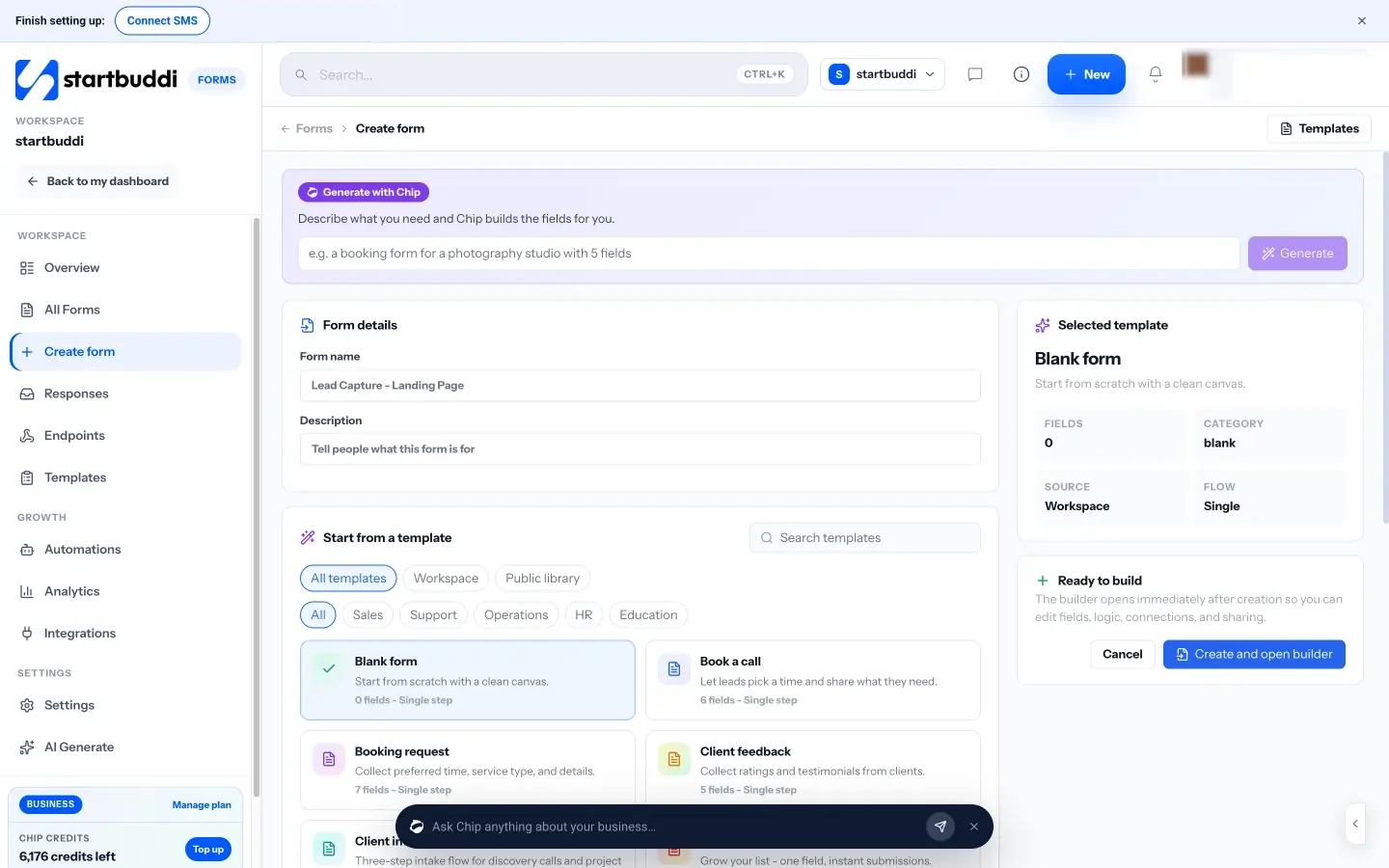
- Signup forms. Build a form with Forms, or describe what you need and let Chip draft the fields. Any field can be marked as marketing consent, and every response is saved to your contacts. Share it as a link or QR code, or embed it on your site.
- Link in bio and landing pages. The link in bio page has a Subscribe block that collects emails and phone numbers, and a File block that can put a download behind an email. Landing pages can hold a signup form too.
- Consent you can see. In audiences, each contact has a marketing status (subscribed, not subscribed, transactional only or suppressed), with the consent source and date recorded.
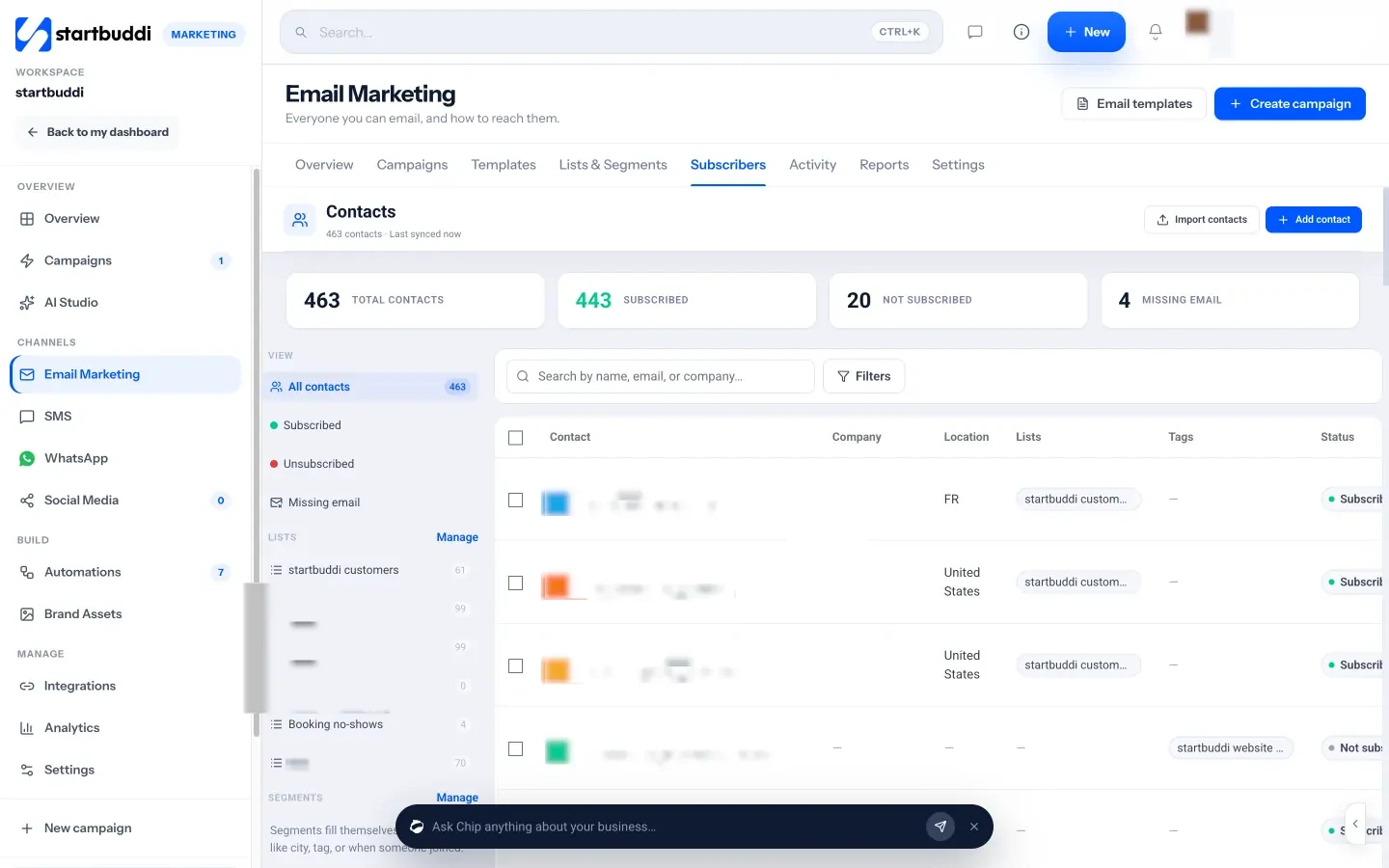
- Welcome emails and sequences. Email marketing sends campaigns with an unsubscribe link, your business address and a preferences link added automatically. Welcome sequences run in Automations, and the help article on setting up your first email sequence shows how.
Forms and contacts are available on the Free plan (one form and up to 250 contacts). Sending email campaigns is part of the Marketing module, which needs the Starter plan or above; Free includes 2 active automations and Starter 10.
Your next step
Today, write down your signup offer in one sentence and build a two-field form for it. Put the link in your bio and send it to five past customers. That’s your list started. When you’re ready to send your first welcome email, compare the plans on the pricing page; every paid plan comes with a 30-day trial.
Sources
- Google Workspace: Email sender guidelines
- FTC: CAN-SPAM Act compliance guide for business
- ICO: Electronic mail marketing
- Nigeria Data Protection Commission: Nigeria Data Protection Act 2023
- Future of Privacy Forum: Nigeria’s new Data Protection Act, explained
Frequently asked questions
How many subscribers do I need before I start emailing?
One. Email from the start so people remember why they joined. A small list that hears from you regularly is better than a big one that doesn't.
Can I add my customers' emails to my list?
Only if they agreed to marketing, or where a rule like the UK soft opt-in applies. The safest route is to invite them to join with one friendly message.
Is it OK to buy an email list?
No. Bought lists break consent rules in most countries, lead to spam complaints and can stop your emails reaching the inbox for everyone.
How often should I email my list?
Pick a rhythm you can keep, such as weekly or twice a month, and tell subscribers upfront. Consistency matters more than frequency.
Olabimpe Salami is the email and outreach specialist at startbuddi. Olabimpe writes about the messages that bring customers in and back: email, WhatsApp and SMS campaigns, follow-ups, and turning enquiries into paying clients.
Runs email and outreach at startbuddi