The best email marketing tools for Nigerian businesses in 2026: how to choose
How to choose email marketing tools for Nigerian businesses: paying in naira or dollars, contacts vs sends pricing, deliverability rules, consent, and published plans.


Photo: Donovan Sikaona / Unsplash
- Choose an email tool you can pay for reliably, that lets you send from your own domain, and whose pricing model suits how often you email. Set up SPF, DKIM and DMARC, collect clear consent, and test one real campaign on a free plan before committing.
The best email marketing tools for Nigerian businesses are the ones you can pay for without a fight with your bank card, that land in the inbox rather than spam, and that fit how your customers already buy. For most small businesses that means a free or low-cost plan to start, the ability to send from your own domain, simple templates that look good on a phone, and a clear way to collect consent. Tools priced per contact suit small lists that you email often. Tools priced per email sent suit large lists that you email occasionally.
This guide explains what to look for, compares the published plans of popular tools, and covers the deliverability rules and data protection points you need to know. Most of it applies wherever you are, with notes on what is specific to Nigeria.
Does email marketing still work in Nigeria?
Yes, but it plays a different role from WhatsApp. WhatsApp is where quick conversations and orders happen. Email is where you send things people want to keep or come back to: receipts and invoices, event details, course content, monthly newsletters, and anything aimed at other businesses. Corporate buyers, HR teams and procurement officers in Nigeria still work from email, so if you sell to businesses, email is often the channel that gets read at a desk.
The audience is large and mobile. DataReportal counted 109 million internet users in Nigeria in late 2025, which is 45.5% of the population (DataReportal). Most of them read email on a phone, so every template you choose should be tested on a small screen first.
The strongest approach uses both channels: email for depth and records, WhatsApp or SMS for short nudges. Our comparison of WhatsApp and SMS marketing covers the messaging side.
What to look for in email marketing tools for Nigerian businesses
How you pay
Most international email tools bill in US dollars or euros by card. Check that your card works for recurring foreign payments, and remember that a dollar price moves with the exchange rate. A tool billed in naira gives you a steady monthly cost.
How the price grows
Email tools price in one of two ways: by the number of contacts you store, or by the number of emails you send. We work through an example below, because the difference can be large.
Sending from your own domain
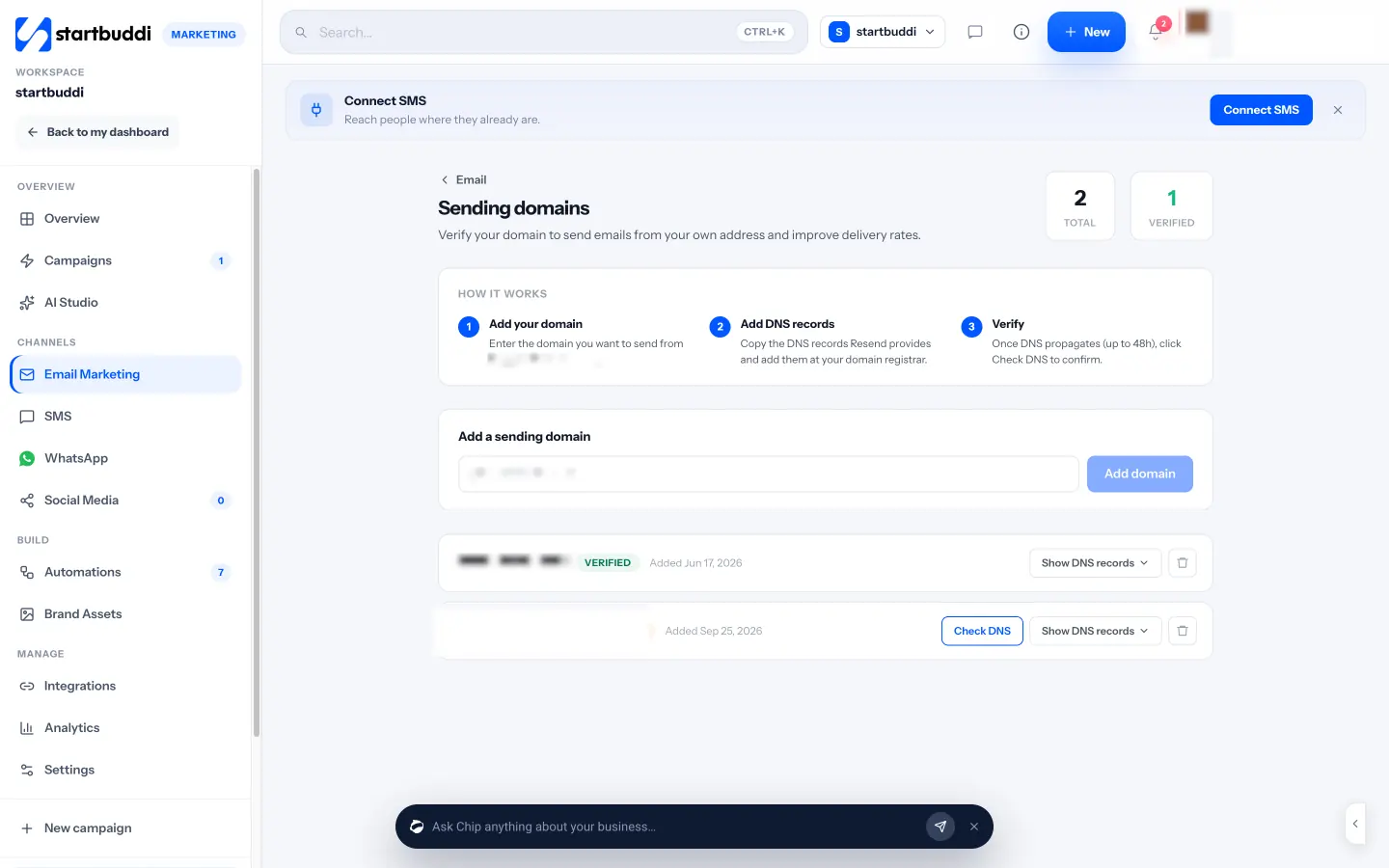
Emails from hello@yourbusiness.com.ng look more trustworthy than a free Gmail address, and they are more likely to reach the inbox once your domain is verified. Check that the tool guides you through the DNS records.
Templates that work on phones
Look for a drag-and-drop editor with a mobile preview, plus templates for the emails you will actually send: welcome, newsletter, promotion, event, invoice reminder.
Consent and unsubscribe handling
Every marketing email needs a working unsubscribe link, and the tool should stop emailing people the moment they opt out. Signup forms that record when and how someone joined are useful evidence of consent.
Connection to the rest of your business
The most useful emails are triggered by something real: a form filled in, a booking made, an invoice paid. If your email tool can’t see those events, you will be exporting and importing spreadsheets every week.
Deliverability: the rules big inbox providers now enforce
Getting into the inbox is not automatic. Google’s guidelines for anyone sending more than 5,000 messages a day to Gmail addresses require SPF, DKIM and DMARC authentication for your domain, one-click unsubscribe with a clearly visible unsubscribe link in marketing messages, and a reported spam rate kept below 0.30% (Google Workspace Admin Help). Even if you send far fewer, following the same rules protects your reputation as you grow.
In plain terms:
- SPF lists the services allowed to send email for your domain.
- DKIM adds a signature that proves the email wasn’t changed in transit.
- DMARC tells inboxes what to do with emails that fail those checks.
Your email tool gives you the records; you add them wherever you bought your domain. It usually takes under an hour, plus some waiting while DNS updates.
Three habits matter as much as the settings: only email people who asked to hear from you, remove addresses that bounce, and stop emailing people who haven’t opened anything in six months or more.
Popular email marketing tools and their published plans
These are widely used email tools, with free plans and starting prices as published on their own pricing pages when we checked in September 2026. Prices change and some pages show introductory offers, so confirm on the linked page. We haven’t ranked them.
| Tool | Free plan | Paid plans start at | Priced by |
|---|---|---|---|
| Mailchimp | Yes: up to 250 contacts | See current pricing; varies by list size | Contacts |
| Brevo | Yes: up to 300 emails a day | See current pricing; varies by send volume | Emails sent |
| MailerLite | Yes: up to 250 subscribers, 2,500 emails a month | Comfort, from $12 a month billed monthly | Subscribers |
| Kit | Yes: up to 10,000 subscribers | Creator, $33 a month billed monthly (or $390 a year) for 1,000 subscribers | Subscribers |
| Zoho Campaigns | Yes: up to 2,000 contacts, 6,000 emails a month | Standard, priced by contact tier | Contacts or emails |
For deeper comparisons, see startbuddi vs Mailchimp, startbuddi vs Brevo and startbuddi vs Kit, or our wider list of email marketing software.
Contacts or sends: which pricing model suits you?
Take two businesses, each with 3,000 contacts.
- A Lagos fashion brand emails everyone once a week: about 12,000 emails a month. On a per-contact plan, it pays for 3,000 contacts and can send as often as the plan allows. On a per-send plan, it pays for 12,000 emails.
- An Abuja consulting firm sends one newsletter a month to 3,000 contacts: 3,000 emails. On a per-send plan, that is a small volume. On a per-contact plan, it pays for all 3,000 contacts whether it sends once or ten times.
The rule of thumb: if you email often, per-contact pricing tends to be kinder. If you have a big list you email rarely, per-send pricing often wins. Also check what happens to unsubscribed contacts, because some tools still count them.
Consent and the Nigeria Data Protection Act
The Nigeria Data Protection Act 2023, overseen by the Nigeria Data Protection Commission, sets out how you may collect and use personal data, and gives people the right to object to their data being used for direct marketing. Once someone objects, you must stop. In practice:
- Say on your signup form what people are signing up for and how often you will email.
- Don’t add people to your list just because they gave you a business card or messaged you once.
- Honour unsubscribes straight away.
- Keep a record of when and how each person joined.
If you email people in other countries, their rules may also apply, such as the UK’s guidance on electronic mail marketing or the US CAN-SPAM Act. This is general information, not legal advice.
Five emails worth setting up first
Whichever tool you choose, these five emails do most of the work for a small business. Set them up once and most of them run on their own.
- Welcome email. Sent the moment someone joins your list. Say thank you, tell them what to expect and how often, and give them one useful thing, such as a price list, a guide or a discount code. Welcome emails are usually the most opened emails you will ever send, because the person has just asked to hear from you.
- Monthly newsletter. One short update: what is new, one tip, one offer. Consistency beats length. A four-paragraph email every month builds more trust than a long one every quarter.
- Promotion or launch. A clear subject line, one offer, one button, and a deadline that is real. For a sale around Independence Day, Black Friday or Christmas, send a reminder to people who didn’t open the first email.
- After-purchase or after-session email. Thank the customer, share how to get the best from what they bought, and ask for a review two or three days later.
- Win-back email. For customers who haven’t bought in a while: a friendly check-in and a reason to return. If they still don’t open after a few attempts, remove them from your marketing list to protect your deliverability.
Common mistakes to avoid
- Buying or scraping lists. It breaks data protection rules, damages your sender reputation and rarely produces customers.
- Sending from a free Gmail or Yahoo address. Many inboxes treat bulk mail from free addresses with suspicion. Use your own domain.
- Designing for desktop. Wide images and tiny text are hard to read on a phone. Preview on mobile every time.
- Judging by open rate alone. Some email apps open messages automatically, which inflates opens. Clicks, replies and sales tell you more.
- Emailing only when you need money. If every email is a sales pitch, people stop opening. Mix useful content with offers.
How to choose in five questions
- Can I pay for it reliably? Try your card on the free trial before you build your list in the tool.
- What will it cost at double my list size? Your list should grow. Price the plan for next year, not just this month.
- Can I send from my own domain? And does the tool walk you through setting it up?
- What triggers can it react to? Form signups at least. Bookings, purchases and invoices if you want useful automations.
- Will my team use it? A simpler tool you use weekly beats a clever one you open twice a year.
Then run one real campaign on the free plan: a short welcome email to new subscribers. It will tell you more than any feature list.
How startbuddi helps with email marketing
In startbuddi, Email Marketing sits inside the Marketing module, next to WhatsApp, SMS and social media, and uses the same contacts as your forms, bookings and invoices.
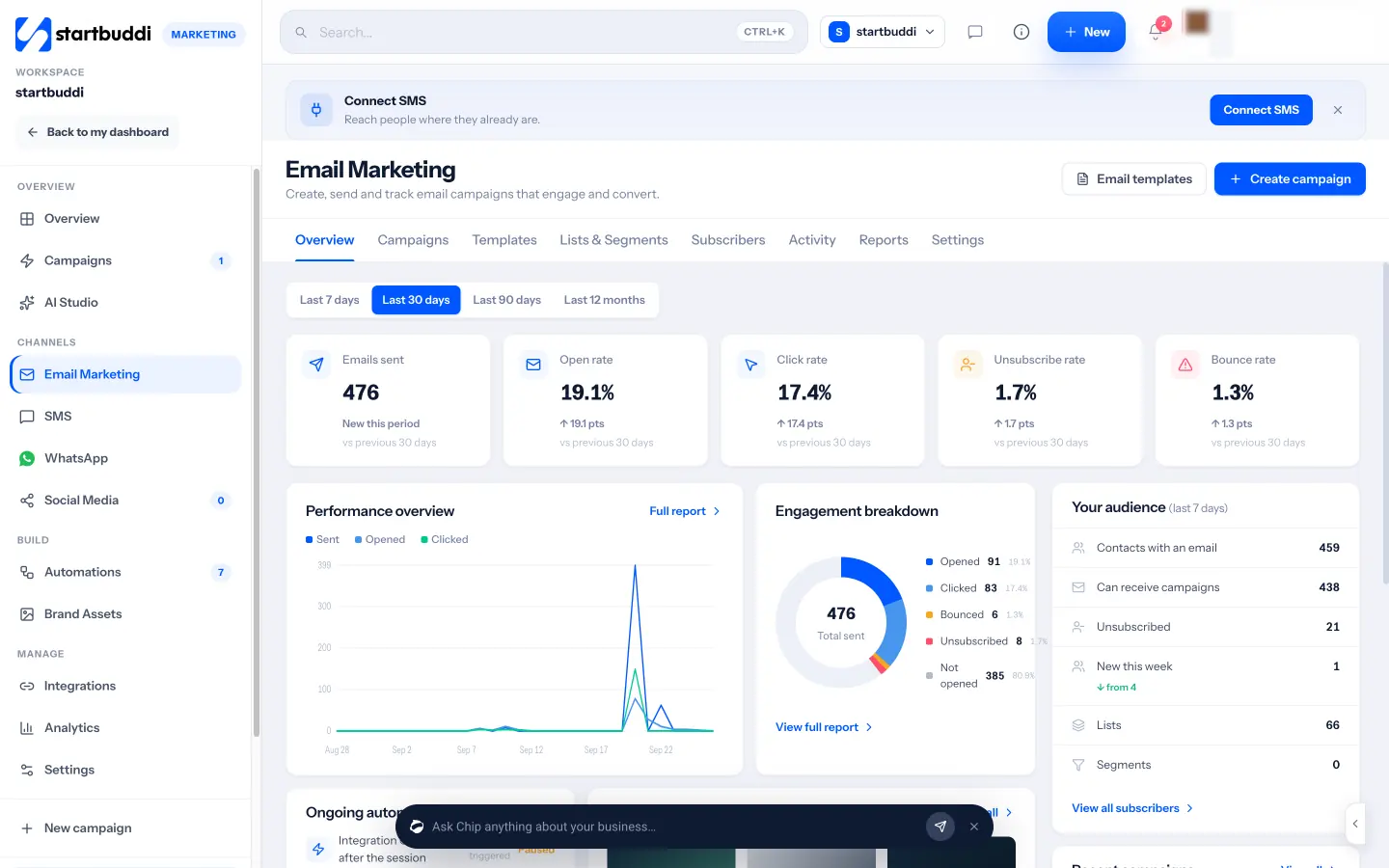
Create and send. Each campaign follows four steps: who, what, a check, and when. Build the email with a drag-and-drop editor, start from a template, write HTML, or ask Chip to draft the subject, preview text and copy. The review step checks for a missing subject, broken links and images without alt text before anything goes out. You can send now, schedule it, or A/B test a subject line, the content or the sender name.
The right people. Build lists and segments from contact details and behaviour, such as people who filled in a form, missed a booking or have an unpaid invoice. You can also describe the audience in plain words and Chip turns it into segment rules.
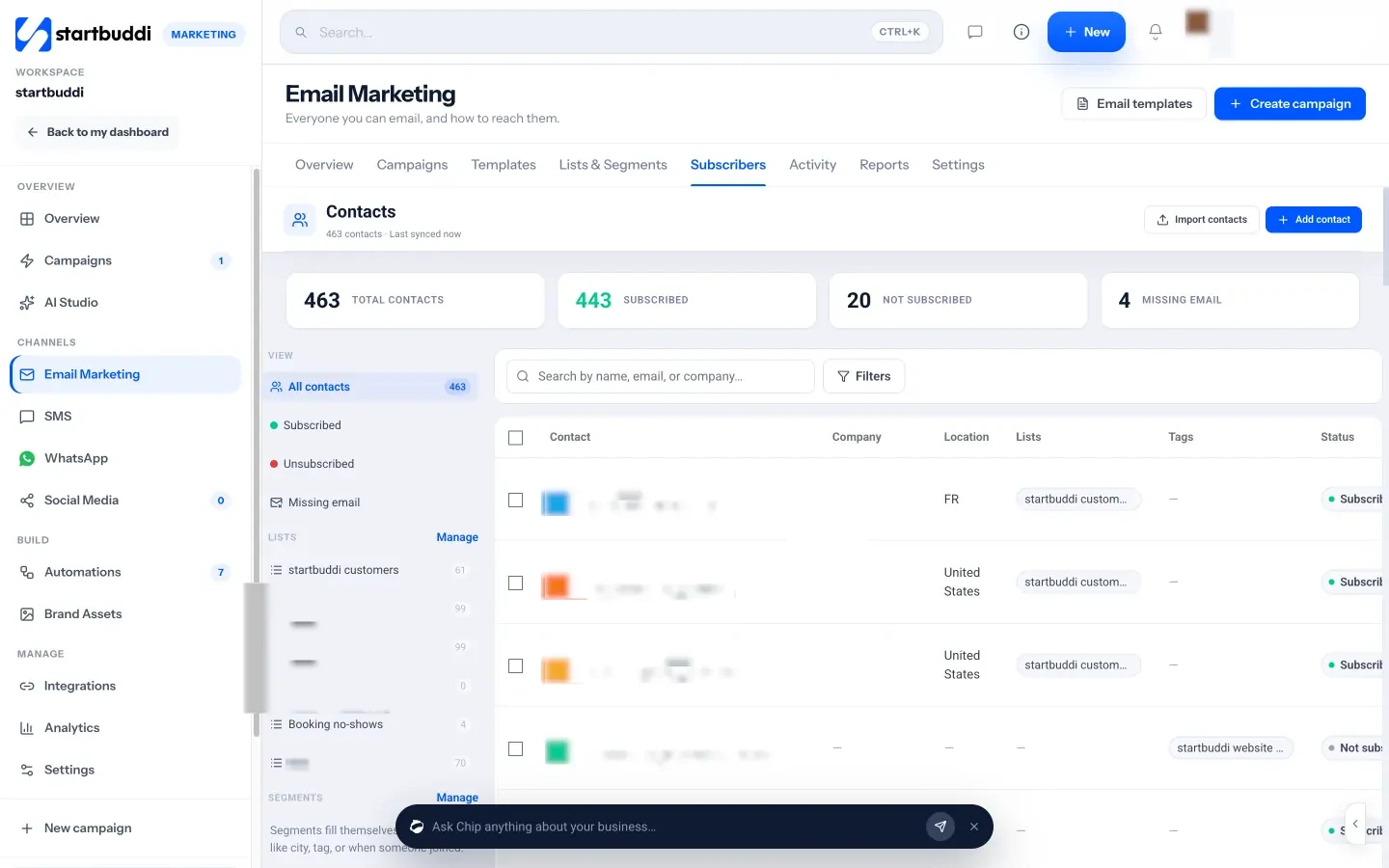
Deliverability. Verify your own sending domain by adding the DNS records shown in the app. Every send includes an unsubscribe link, your business address and a preferences link automatically, and opt-outs stop receiving campaigns straight away.
Reports and follow-ups. Each campaign has a report with opens and clicks over time, the links people clicked, devices, and a “when people read it” heatmap by hour and day. You can resend once to people who didn’t open, with a new subject line, or turn the campaign into a follow-up automation. Replies land in your customer inbox, labelled with the campaign they answer. Our help article on building an email campaign walks through each step.
Plans and limits. The Marketing module, including email campaigns, is locked on Free and opens on Starter (see pricing), with a 30-day trial on every paid plan. Starter includes 3,000 marketing emails a month, Growth 10,000 and Scale 25,000. Until you verify your own domain, sends from the shared startbuddi address are capped at 1,000 a month and 200 a day. Scheduling uses your time zone; sending in each recipient’s own time zone isn’t available yet.
Your next step
Pick one email you could send every month, such as a short update with one offer, and write it this week. Then choose a tool by trying that email on its free plan or trial. If you want email, WhatsApp and SMS working from one contact list, see email marketing for Nigerian businesses or compare plans on the pricing page.
Sources
- DataReportal: Digital 2026 Nigeria
- Google Workspace Admin Help: email sender guidelines
- Nigeria Data Protection Commission: Nigeria Data Protection Act 2023
- ICO: electronic mail marketing
- FTC: CAN-SPAM Act compliance guide
- Mailchimp pricing, Brevo pricing, MailerLite pricing, Kit pricing, Zoho Campaigns pricing
Frequently asked questions
What is the best free email marketing tool in Nigeria?
It depends on your list. MailerLite and Mailchimp have free plans for small lists, Brevo's free plan limits daily sends, and Kit's free plan allows a larger list. Try your most common email on each before deciding.
Can I pay for email marketing software in naira?
Most international tools bill in dollars or euros by card. Some tools, including startbuddi, charge in your local currency where available, which keeps the monthly cost steady when the exchange rate moves.
Why do my marketing emails go to spam?
Common causes are an unverified domain, sending to people who didn't sign up, old addresses that bounce, and missing unsubscribe links. Set up SPF, DKIM and DMARC and clean your list.
Do I need consent to send marketing emails in Nigeria?
You need a lawful basis under the Nigeria Data Protection Act, and people can object to direct marketing at any time. Clear opt-in consent and easy unsubscribes are the safe approach.
Olabimpe Salami is the email and outreach specialist at startbuddi. Olabimpe writes about the messages that bring customers in and back: email, WhatsApp and SMS campaigns, follow-ups, and turning enquiries into paying clients.
Runs email and outreach at startbuddi