WhatsApp vs SMS marketing: which should your business use?
WhatsApp vs SMS marketing compared on reach, cost, permission rules and results, with a five-question test to pick your main channel and a plan for using both.


Photo: Michael Umoh / Unsplash
- Use WhatsApp for conversations, pictures and offers to customers who opted in on WhatsApp. Use SMS for short, urgent messages that must reach any phone, and for markets such as the US where WhatsApp marketing templates are paused. Many businesses run both from one contact list.
The short answer to WhatsApp vs SMS marketing: use WhatsApp when your customers already chat with you there, you want replies, pictures and buttons, and you have their permission. Use SMS when you need to reach every phone, including ones without data or WhatsApp, with a short message that must land now. Many small businesses end up using both, with WhatsApp for conversations and offers and SMS for reminders and people WhatsApp can’t reach.
The right mix depends on three things: where your customers are, what you are sending, and the rules in the countries you message. This guide compares the two channels on reach, cost, permission and results, then gives you a simple way to decide and a playbook for running both from one contact list.
WhatsApp vs SMS marketing at a glance
| WhatsApp (Business Platform) | SMS | |
|---|---|---|
| Works on | Smartphones with WhatsApp and a data or Wi-Fi connection | Any mobile phone, including basic phones, over the mobile network |
| What you can send | Text, images, video, documents, buttons, in-chat forms | Plain text, about 160 characters per segment; links only |
| Replies | Natural, like any chat; replies are free to answer for 24 hours | Possible, but many people treat texts as one-way alerts |
| Sender | Your business name and profile, with a verified badge if Meta grants one | A number, short code or alphanumeric sender ID, depending on country |
| Approval before sending | First messages must use a template approved by Meta | No content approval in most countries, though many countries require sender IDs to be registered, and US numbers need 10DLC registration |
| How you pay | Meta charges per delivered template message; rates vary by category and country | Your provider charges per segment; rates vary by country and network |
| Best for | Offers with images, questions, bookings, order updates, customer service | Short reminders, urgent alerts, codes, reaching everyone on a list |
How the costs work
Neither channel has one global price, so compare how they charge rather than chasing a single number.
WhatsApp: per template, by category
Since 1 July 2025, Meta charges per delivered template message on the WhatsApp Business Platform (Meta for Developers). Templates fall into categories: marketing, utility (confirmations, updates) and authentication (one-time codes), and each has its own rate per country. Three details matter for a small business:
- Replying is free. When a customer messages you, a 24-hour customer service window opens and your free-form replies in that window are not charged.
- Utility templates inside that window are free too, so an order update sent while the chat is open costs nothing.
- Ads can open a longer free window. If someone starts a chat from a Click-to-WhatsApp ad and you reply within 24 hours, Meta opens a 72-hour window in which all messages are free.
So WhatsApp is cheapest when customers start the conversation, and most expensive when you broadcast marketing templates to people who never write back.
SMS: per segment, per country
SMS is priced per segment, not per message. A standard segment holds 160 characters, but as soon as you add an emoji or certain accented characters, the whole message switches encoding and each segment holds only 70 (Twilio). A friendly 180-character text with one smiley can cost three segments instead of two. Keep texts short, plain and without emoji when cost matters.
Prices differ a lot between countries and between local and international providers, so get quotes from a provider that covers your market, for example Africa’s Talking or Termii in parts of Africa, or Twilio or Brevo for many other countries.
Reach: where your customers actually are
WhatsApp is huge. Meta said in 2025 that it had passed 3 billion monthly users (TechCrunch). In much of Africa, Latin America, India and Europe it is the default way people message each other, including businesses. If your customers already send you voice notes and screenshots on WhatsApp, that is a strong signal.
But reach isn’t only about user numbers. Three things can shrink it:
- Permission. You can only send WhatsApp marketing to people who opted in to hear from you on WhatsApp. A list of phone numbers is not the same as a list of WhatsApp opt-ins.
- Country rules. Meta paused marketing template messages to US (+1) phone numbers from 1 April 2025, while utility templates and replies to customers kept working (Twilio changelog). If you sell to the US, SMS or email is the practical channel for promotions. Check Meta’s current rules before planning a campaign.
- Devices and data. Some customers use basic phones, share a phone, or ration mobile data. SMS reaches them; WhatsApp may not until they next connect.
A quick test: look at your last 50 customers. How many have messaged you on WhatsApp? How many only ever called or texted? That split is a better guide than any global statistic.
Permission and the rules for each channel
Both channels are permission-based, and breaking the rules can get your number blocked or your business fined. What follows is general information, not legal advice; check the rules in each country you message.
WhatsApp’s Business Messaging Policy says you may only contact people who have given you their number and opted in to receive messages from you, and that you must respect every request to stop, whether it arrives on WhatsApp or elsewhere (WhatsApp Business Messaging Policy). Meta also limits how many people a new business can message outside the service window: new business portfolios start at 250 unique people in a rolling 24 hours, rising to 2,000 once you verify your business or send enough good-quality messages, and further as quality stays high (Meta messaging limits). Blocks and reports from customers lower your quality rating, which can hold you at a low limit.
SMS
- UK: under PECR, marketing texts count as “electronic mail”, so you need consent, with a narrow “soft opt-in” for existing customers who bought something similar and were offered an easy way to opt out (ICO).
- US: automated marketing texts generally need the person’s prior written consent under the Telephone Consumer Protection Act (FCC). Businesses texting US numbers from ordinary 10-digit numbers also have to register through the A2P 10DLC system, which Twilio says takes about seven business days for standard use cases (Twilio).
- Nigeria: subscribers can text STOP to 2442 to block unsolicited promotional messages under the NCC’s Do-Not-Disturb service (NCC), which is one reason bulk SMS to cold lists often fails to arrive.
The common thread: get permission for each channel, say what people will receive, and make stopping easy. “Reply STOP to opt out” on SMS and a clear opt-out line in WhatsApp marketing templates protect you on both.
Which channel suits which message
Most businesses don’t need to pick one channel for everything. Match the channel to the job.
| Message | Better channel | Why |
|---|---|---|
| New product or collection with photos | Images and a “Shop now” button do the selling | |
| Flash sale ending tonight | Both | WhatsApp to opted-in fans, SMS to everyone else who agreed to texts |
| Appointment reminder | SMS or WhatsApp utility template | Short, time-sensitive, needs to land even without data |
| Order or delivery update | WhatsApp utility template | Customers can reply with questions in the same thread |
| One-time login code | SMS or WhatsApp authentication template | Either works; SMS reaches phones without WhatsApp |
| “We miss you” win-back offer | WhatsApp first, SMS as backup | A personal chat invites a reply |
| Answering questions before a sale | It’s a conversation, not a broadcast |
For wording that gets replies, our library of WhatsApp message templates has examples by situation.
How to decide: five questions
- Where do customers already talk to you? If most enquiries arrive on WhatsApp, start there. If they call and text, start with SMS.
- Which countries are on your list? A US-heavy list points to SMS for promotions. A Nigerian, Kenyan, Indian or Brazilian list usually points to WhatsApp, with SMS as backup.
- What do you have permission for? Count opt-ins per channel. You can only market on the channel people agreed to.
- Do you need replies? If a message should start a conversation, such as a quote, a booking or a question, WhatsApp is the stronger choice.
- Does it need pictures? Products, menus, before-and-after shots and event flyers belong on WhatsApp. A text with a link is a weaker substitute.
If you answered “WhatsApp” to three or more, make WhatsApp your main marketing channel and use SMS for reminders and the people WhatsApp can’t reach. If you answered “SMS” to three or more, lead with SMS and email, and add WhatsApp as customers start chatting.
Running WhatsApp and SMS marketing together
Using both works best when they share one contact list, so you know who has opted in to what and nobody gets the same offer twice.
- Collect permission per channel. On forms and at checkout, ask separately: “Send me offers on WhatsApp” and “Send me texts”. Record where and when each person agreed.
- Send WhatsApp first to opted-in contacts. Use an approved marketing template with an image and a button.
- Send SMS to the rest. Target people who opted in to texts but not WhatsApp, or whose WhatsApp message failed.
- Answer every reply in one place. Replies from both channels should land where your whole team can see them.
- Honour opt-outs everywhere. Someone who replies STOP to a text is probably not happy to get the same offer on WhatsApp an hour later.
- Measure by channel. Compare delivered, read or clicked, replies and sales, not just messages sent.
For a full multi-channel plan, see how to run a sale across email, WhatsApp and SMS, and for automated follow-ups on each channel, how to set up WhatsApp automation sequences and automated SMS campaigns.
Mistakes that hurt both channels
- Buying or scraping numbers. Cold lists break WhatsApp’s policy and most SMS rules, and they drag down delivery for everyone else on your list.
- Sending too often. Customers block businesses that message every day. For most small businesses, one or two marketing messages a month per channel is plenty, plus service messages as needed.
- Forgetting who you are. A text from an unknown number that says “20% off today!” looks like spam. Start with your business name and give a reason to care.
- No next step. Every message needs one clear action: reply, book, tap the link or visit the shop.
- Counting sends, not results. A campaign that reached 2,000 people and produced no replies or sales did not work, however cheap it was. Track replies and sales per channel for a month before deciding where to spend more.
How startbuddi helps with WhatsApp and SMS
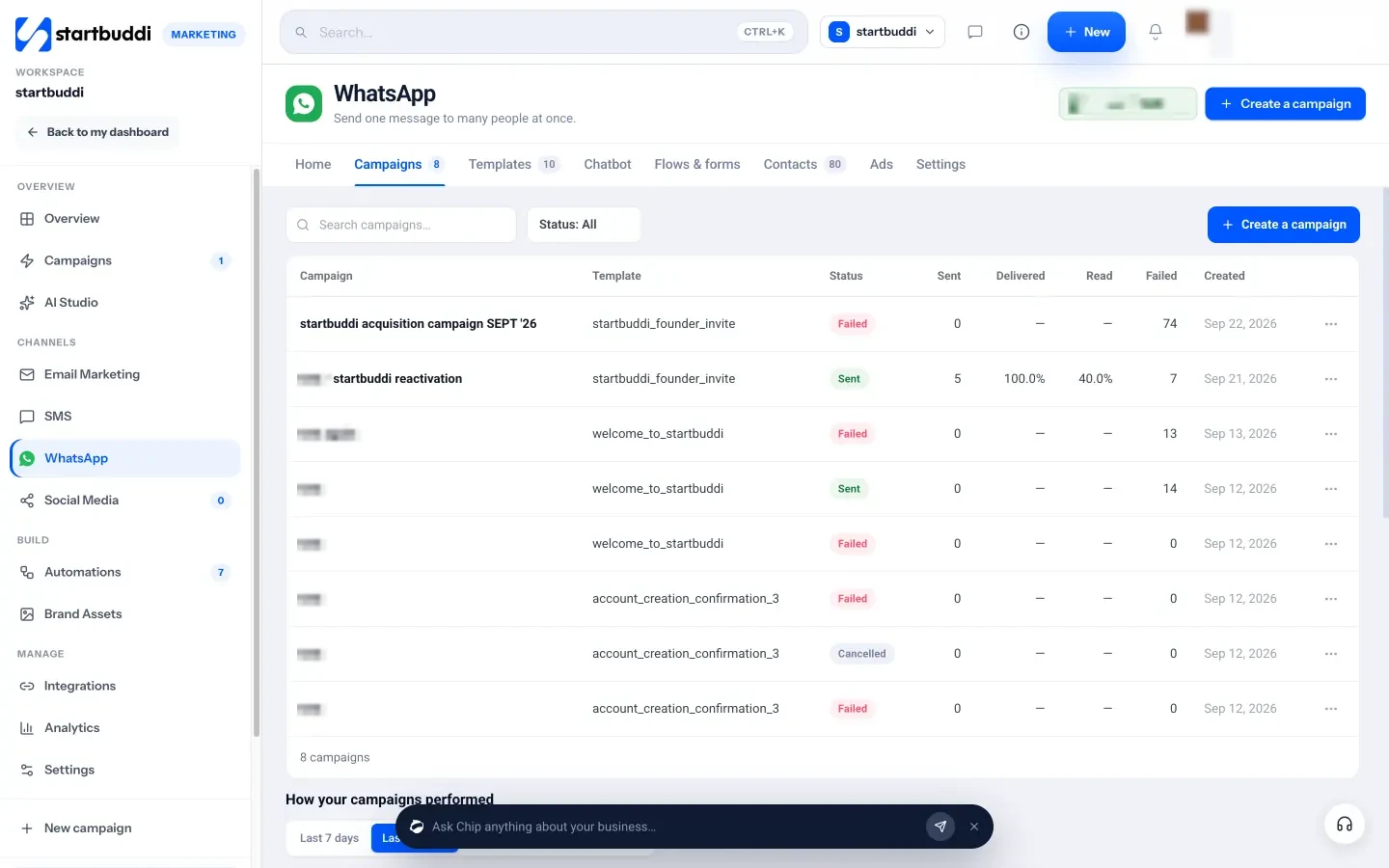
startbuddi puts both channels in the Marketing module, next to email, using the same contacts. In WhatsApp, you connect your own business number through Meta’s signup window, and you can keep using the WhatsApp Business app on the same number. You write templates and send them to Meta for review, then create a campaign in five steps: audience, template, personalise, schedule and review. Marketing templates only go to contacts marked as opted in, and the Contacts tab shows who is opted in and who has opted out.
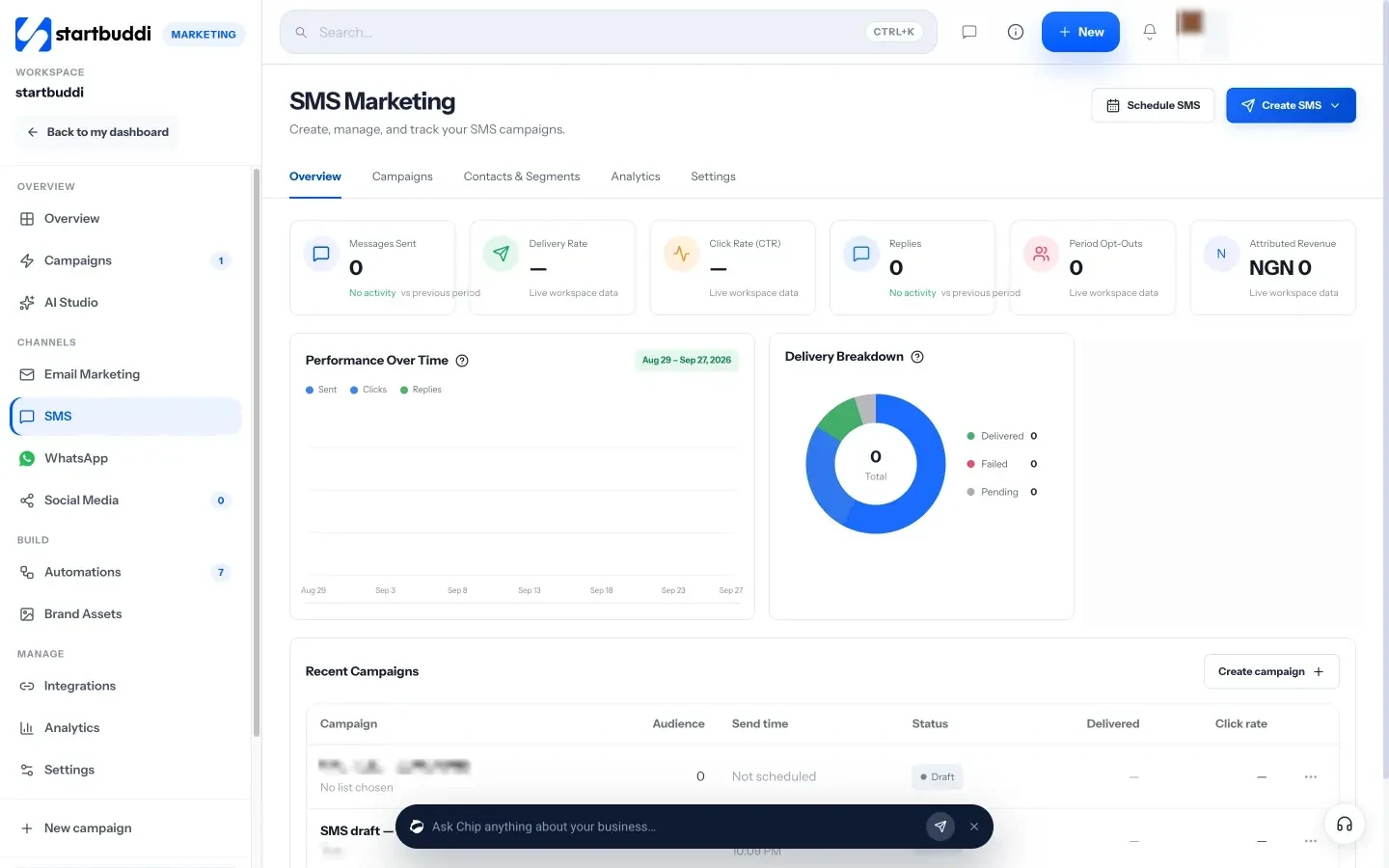
In SMS, you create a campaign, pick a list and sender ID, personalise with merge tags such as first name, and send now or schedule. A live preview counts characters and segments. Messages go out through startbuddi’s built-in SMS with nothing to set up, or through your own Termii, Africa’s Talking, Twilio or Brevo account. Replies of STOP, UNSUBSCRIBE, CANCEL, END or QUIT remove the contact from every SMS campaign automatically; startbuddi reads those replies for built-in SMS, Twilio and Africa’s Talking, but not yet for Termii or Brevo.
Replies from both channels land in the shared customer Inbox, next to email and live chat, where you can filter by WhatsApp or SMS and assign conversations to teammates.

What to know before you choose a plan: the whole Marketing module, including WhatsApp and SMS, needs the Starter plan or above. Starter includes 50 SMS a month, Growth 200 and Scale 500, and texts sent through your own provider are paid to that provider. Meta bills its WhatsApp template charges to your own WhatsApp Business account. Letting Chip answer WhatsApp automatically needs Growth or above.
Your next step
Pull your last 50 customers and count who has messaged you on WhatsApp and who has agreed to texts. Pick your main channel from that, write one offer and one reminder, and send them to people who opted in. When you want both channels, one contact list and one inbox, compare startbuddi’s plans; every paid plan starts with a 30-day trial.
Sources
- Meta for Developers, WhatsApp Business Platform pricing
- Meta for Developers, WhatsApp messaging limits
- WhatsApp Business Messaging Policy
- Twilio changelog, WhatsApp marketing messages to US numbers no longer supported
- TechCrunch (2025), WhatsApp now has more than 3 billion users a month
- Twilio, SMS character limits and segments
- ICO, Electronic mail marketing (PECR)
- FCC, Stop unwanted robocalls and texts
- Twilio Help Center, What is A2P 10DLC?
- Nigerian Communications Commission, Do-Not-Disturb (DND) service
Frequently asked questions
Is WhatsApp marketing cheaper than SMS?
It depends on the country and the message. WhatsApp replies inside the 24-hour window are free, while broadcast marketing templates are charged per delivery. SMS is charged per segment by your provider. Compare quotes for your own list.
Can I send WhatsApp marketing to anyone with my number saved?
No. WhatsApp requires that people have opted in to receive messages from your business, and you must honour any request to stop.
Do people still read SMS?
Yes, especially for reminders, codes and urgent alerts. SMS also reaches basic phones and people without mobile data, which WhatsApp cannot.
Can I send WhatsApp marketing messages to US customers?
Meta paused marketing templates to US (+1) numbers from April 2025. Utility templates and replies still work, so use SMS or email for US promotions and check Meta's current rules.
Should a small business use both WhatsApp and SMS?
Often, yes. Lead with the channel your customers use most, and use the other for reminders or for people who have not opted in to the first. Keep both on one contact list so opt-outs are respected everywhere.
Olabimpe Salami is the email and outreach specialist at startbuddi. Olabimpe writes about the messages that bring customers in and back: email, WhatsApp and SMS campaigns, follow-ups, and turning enquiries into paying clients.
Runs email and outreach at startbuddi