Automated SMS campaigns: how to set up triggers and flows
How triggers and flows work, the six automated SMS campaigns to build first with example texts, and the consent, timing and testing rules to follow.


Photo: Ahmed Nasiru / Unsplash
- An automated SMS campaign sends a text when something happens to one customer: an enquiry, a booking, a no-show, an overdue invoice. Build each flow from a trigger, waits, conditions, a short message and a clear exit rule, get consent first, respect quiet hours and test on your own phone before going live.
Automated SMS campaigns are text messages sent by a rule instead of by hand. A trigger (someone books, fills in a form, misses an appointment or has an unpaid invoice) starts a flow, and the flow decides what to send, when to wait, and when to stop. Set up well, a handful of flows sends the right text at the right moment every time, while you get on with the work.
This guide explains how triggers and flows fit together, the six SMS flows most small businesses should build first (with example messages under 160 characters), the consent and timing rules to respect in different countries, and how to test a flow before it reaches a real customer.
What automated SMS campaigns are (and how they differ from a blast)
A bulk SMS blast goes to a whole list at a time you choose: “Our summer sale starts today.” An automated SMS campaign goes to one person at a time, at the moment something happens to them: “Hi Amaka, your appointment is tomorrow at 10am.” The blast is about your calendar; the automated flow is about theirs.
That’s why automated texts tend to feel useful rather than noisy. They answer a question the customer already has (when is my booking, did you get my enquiry, how do I pay) instead of interrupting them. Our glossary explains SMS marketing and bulk SMS if you want the wider picture.
Get permission first: the rules differ by country
Before building anything, make sure every person who gets a text has agreed to hear from you in a way that fits local law. The details vary, so here are three examples of how different places handle it:
- United Kingdom: the rules on electronic marketing cover texts as well as emails. The Information Commissioner’s Office says you need specific consent unless a limited “soft opt-in” applies to existing customers, and every message must offer a simple way to opt out.
- United States: the wireless industry’s CTIA Messaging Principles and Best Practices expect clear opt-in, standard “STOP” opt-out wording, and that normal phrases such as “unsubscribe” or “cancel” are also honoured. Federal rules restrict telephone solicitations to residential subscribers before 8am or after 9pm local time.
- Nigeria: the Nigerian Communications Commission runs a Do Not Disturb service on short code 2442. Subscribers can block all unsolicited texts or choose categories, and promotional messages to DND numbers may not be delivered.
This is general information, not legal advice. Check the rules where you and your customers are, and keep a record of when and how each person opted in.
A useful distinction: service messages (a booking confirmation, a payment receipt, a reminder about an appointment they made) are usually treated differently from marketing messages (offers, promotions, win-backs). Keep the two in separate flows so a customer who opts out of marketing still gets their appointment reminder.
The anatomy of an SMS flow
Every automated flow, whatever tool you use, is made of the same parts.
| Part | What it does | Example |
|---|---|---|
| Trigger | The event that starts the flow for one person | A booking is made |
| Wait | A pause before the next step | Wait 1 day |
| Condition | A check that sends people down different paths | Has the invoice been paid? |
| Message | The text itself, personalised with merge tags | “Hi {first_name}, …” |
| Action | Something that happens inside your system | Add a tag, create a task for a teammate |
| Exit rule | When someone leaves the flow early | They reply, cancel or pay |
Exit rules are the part people forget. A reminder sent after someone cancelled, or a payment nudge sent after they paid, does more harm than no message at all. Write the exit rule before you write the message.
Six SMS automation triggers worth setting up first
Start with the texts you already send by hand, or wish you did. These six cover most service businesses.
1. New enquiry: reply in seconds
Trigger: a form is submitted with a phone number and SMS consent. Send: immediately. Also: create a task for someone to follow up personally.
Hi {first_name}, thanks for contacting Bright Studio. We’ve got your message and will call you by 12pm tomorrow. Reply STOP to opt out.
2. Booking made: confirm, then remind
Trigger: a new booking. Send: a confirmation straight away, then a reminder the day before. Exit: if the booking is cancelled or rescheduled.
Reminders are one of the best-evidenced uses of SMS. A Cochrane review of healthcare appointments found attendance of 78.6% with text reminders against 67.8% with no reminder, with results similar to phone call reminders at lower cost. Your business isn’t a clinic, but the principle carries: people forget, and a short text helps. Our no-show cost calculator shows what missed appointments cost you.
Reminder: your consultation with Dayo is tomorrow, Tue 14 Oct, at 10:00. Need to change it? Use the link in your confirmation email.
3. Missed appointment: make rebooking easy
Trigger: a booking is marked as a no-show. Send: within a couple of hours. Tone: no blame. Exit: they rebook.
Hi {first_name}, sorry we missed you today. Want to pick a new time? Reply YES and we’ll send some options.
4. Overdue invoice: a polite nudge
Trigger: an invoice passes its due date. Send: the day after, then again a week later if still unpaid. Exit: payment received. Keep amounts and account details out of the text itself if you can, and point to the invoice or payment link you’ve already emailed.
Hi {first_name}, a quick reminder that invoice 1042 from Bright Studio is now due. The payment link is in your email. Thanks!
5. Job done: ask for a review
Trigger: a booking is marked complete. Send: the next day, once. Exit: they click or reply. One ask is enough; don’t chase reviews by text.
6. Win-back: bring quiet customers back
Trigger: a contact joins a segment such as “no booking in 90 days”, or you start it by hand for a chosen list. Send: one message with a reason to return. This is marketing, so it needs marketing consent.
Hi {first_name}, it’s been a while! We’ve added Saturday slots at Bright Studio. Book here: {link} Reply STOP to opt out.
Writing texts that work in 160 characters
SMS has hard limits that shape how you write. According to Twilio’s documentation, a single message in the standard GSM-7 character set holds 160 characters. Longer messages are split into segments of 153 characters each. If your text contains characters outside that set, including emoji and some accented letters, it switches to UCS-2 encoding and the limit drops to 70 characters per message (67 per segment). Each segment is usually billed as a message.
- Say who you are first. Many people don’t have your number saved. Start with your business name, or use a recognisable sender ID.
- One message, one job. Confirm, remind or ask. Not all three.
- Personalise with care. A first name helps; make sure the flow falls back gracefully if the name is missing (“Hi there”).
- Put the action at the end. A link, a reply keyword or a time to expect a call.
- Include opt-out wording on marketing texts. “Reply STOP to opt out” is the widely understood standard.
- Skip the emoji unless you’ve checked the length after encoding.
Choose your sender carefully
What appears as the sender affects whether people open, trust and reply to your texts. An alphanumeric sender ID (your business name, up to 11 characters) is easy to recognise but is one-way: people can’t reply to it, so they need another way to opt out. Some networks also require it to be registered in advance. A phone number can receive replies, which suits flows that ask a question, such as “Reply YES to rebook”. Rules and registration steps vary by country and network, so check with your SMS provider before you build a flow that depends on replies.
Timing and frequency rules
- Respect quiet hours. Even where the law doesn’t set them, sending between roughly 8am and 9pm in the recipient’s time zone is good practice. Service messages like same-day reminders are the only exception worth considering.
- Cap marketing frequency. A few marketing texts a month is plenty for most businesses. Automated service texts don’t need to count against that cap, but watch the total a single customer receives in a week.
- Mind time zones. If you serve customers in several countries, store their time zone or schedule by their local time.
- Don’t stack channels. If the same flow also sends an email or WhatsApp message, space them out or pick one. Our comparison of WhatsApp vs SMS marketing helps you choose which channel fits which message.
Test before you switch a flow on
- Run it on yourself. Use your own number as the contact and trigger the flow for real. Read every message on your phone.
- Test the exit rules. Cancel the test booking or pay the test invoice and check the next message doesn’t send.
- Check the fallbacks. What happens if the first name, the phone number or the booking time is missing?
- Check who will be reached. Before going live, confirm how many contacts match the trigger, how many have consent and how many have opted out.
- Watch the first week. Track delivery rate, replies, opt-outs and, where there’s a link, clicks. A spike in opt-outs means the message, timing or audience needs work.
Common mistakes with SMS automation
- Automating before asking permission. Importing an old phone list and starting a marketing flow is the fastest way to complaints and blocked sender IDs.
- No exit rules. Reminders for cancelled bookings and nudges for paid invoices make you look careless.
- Too many flows at once. Build two, watch them for a fortnight, then add more.
- Treating SMS like email. Long messages split into several paid segments and read badly on a lock screen.
- Nobody reading the replies. People reply to automated texts. Make sure replies land somewhere a person will see them.
If you’re in Nigeria and starting from scratch, our guide to setting up SMS marketing in Nigeria covers sender IDs and providers.
How startbuddi helps
In startbuddi, automated SMS runs on Automations, the one engine that handles follow-ups across the whole workspace, and texts go out through SMS marketing. Because bookings, forms, invoices and contacts live in the same place, the triggers above are built in rather than bolted on.
Triggers include form submitted, new contact added, tag added, joins a segment or list, new booking made, booking cancelled, booking completed, booking no-show, invoice overdue and payment succeeded. Steps include Send SMS, Wait, Condition, Wait for their reply, Create task, Add tag and “Exit when”, which removes someone from the flow early if a rule matches. You can start from a template such as Booking reminder stack, Invoice overdue recovery or Cancellation win-back, then add SMS steps.
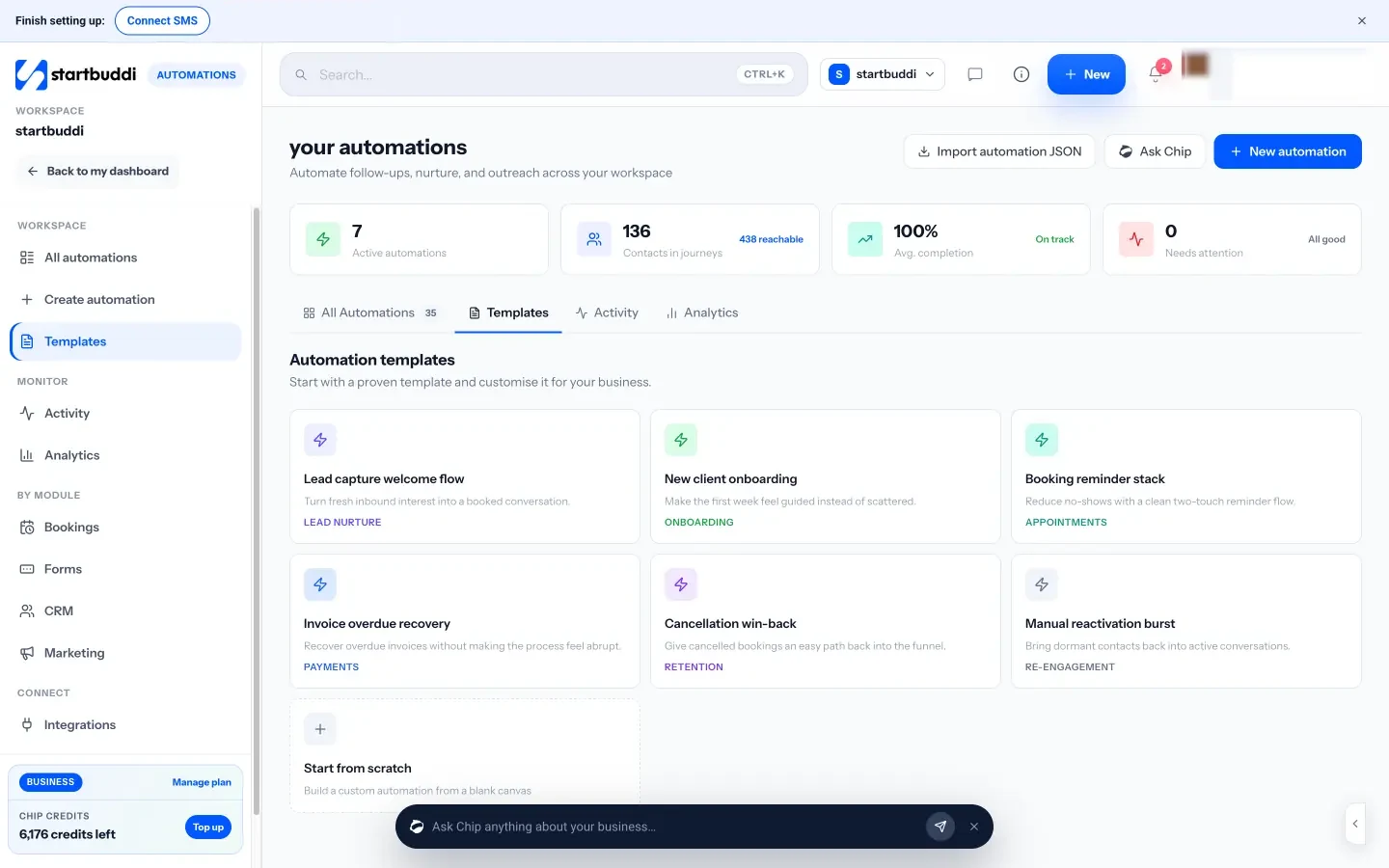
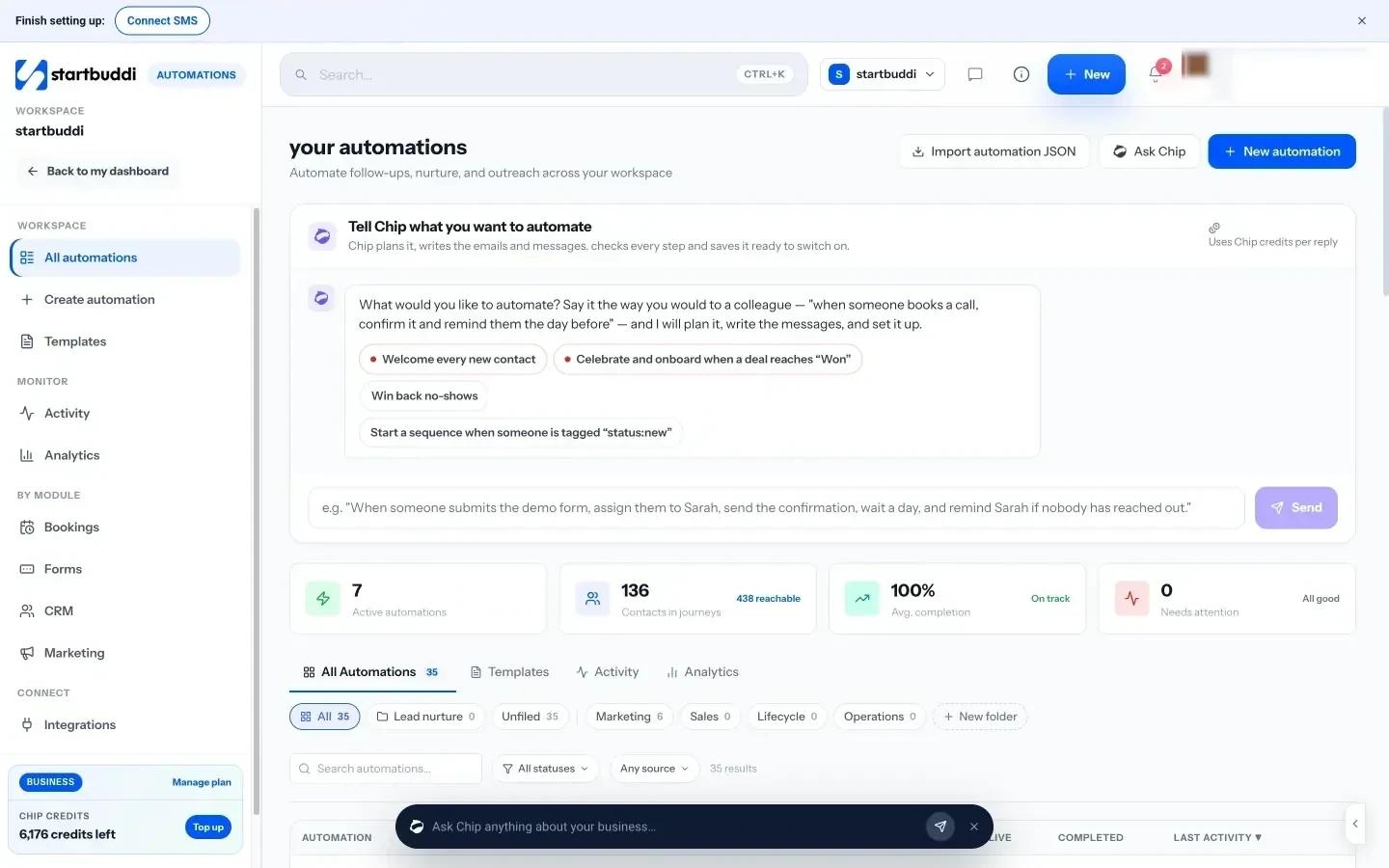
You can also describe a flow in plain words and let Chip, the built-in AI assistant, plan it and write the messages. Chip saves what it builds as an inactive draft, so nothing sends until you review it and switch it on. Before a flow goes live, an activation review shows how many contacts are reachable and how many are suppressed, and a test mode lets you run the flow on one contact first.
On the sending side, startbuddi’s built-in SMS works without any setup, or you can connect your own Termii, Africa’s Talking, Twilio or Brevo account and sender ID. Merge tags personalise each text, a counter shows how many segments a message will use, and replies of STOP, UNSUBSCRIBE, CANCEL, END or QUIT remove someone from SMS campaigns automatically. That automatic opt-out handling covers built-in SMS, Twilio and Africa’s Talking; replies sent through Termii or Brevo aren’t read yet, so manage opt-outs for those in the provider too.
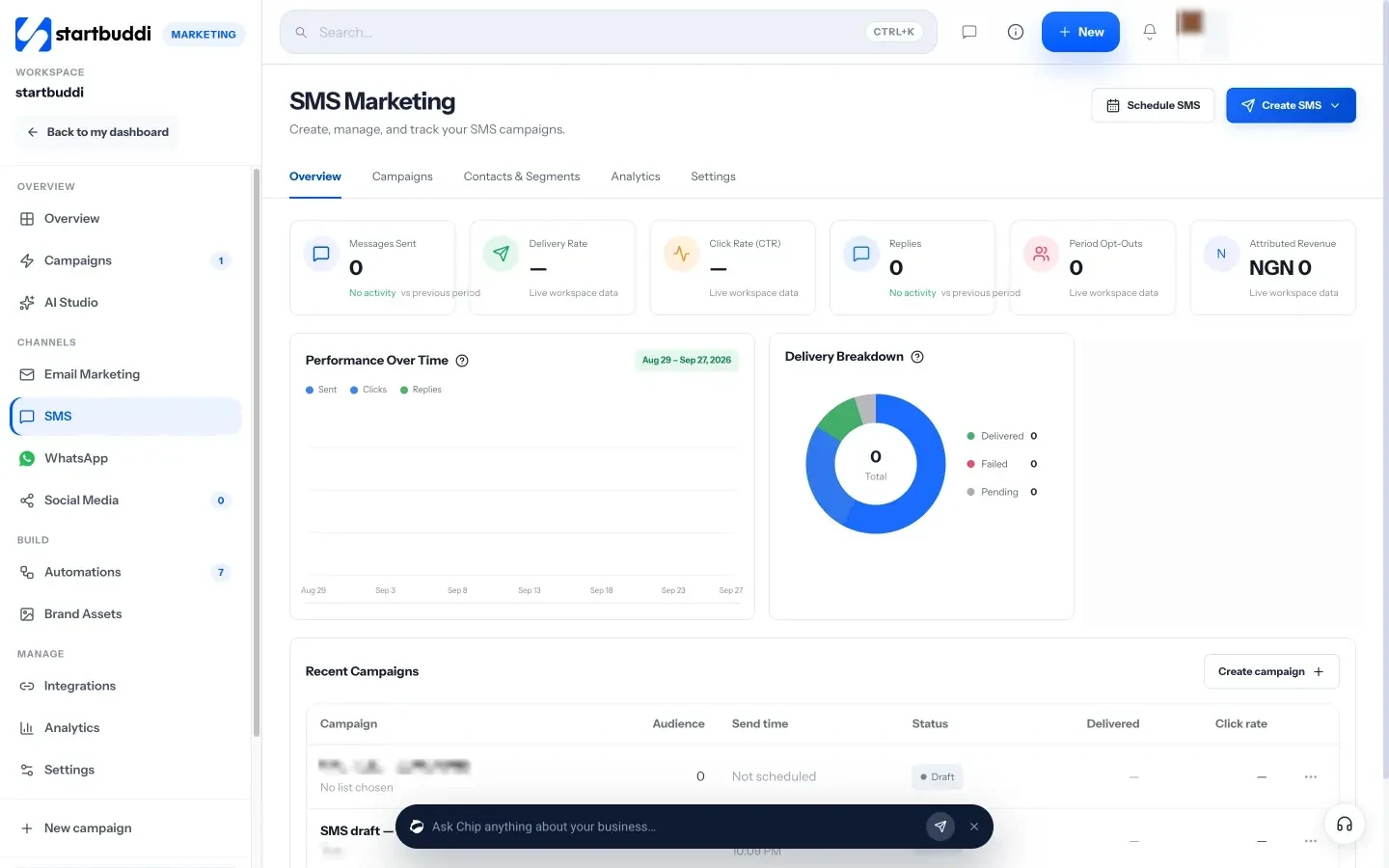
Plan limits matter here. SMS needs the Starter plan or above (the Free plan has no SMS), and Starter also raises active automations from 2 to 10. Starter includes 50 texts a month, Growth 200 and Scale 500, and texts sent through your own provider are paid to that provider. Automation runs are also metered per plan. Date-based triggers, such as birthdays or anniversaries, aren’t live yet, so build win-backs from segments or start them by hand. See automated SMS for businesses for more.
Your next step
Pick the one text you send by hand most often, usually a booking reminder or an enquiry reply, and build it as a flow this week with a clear exit rule. Test it on your own phone, switch it on, and watch replies and opt-outs for a fortnight before adding a second flow. Compare what each plan includes on our pricing page.
Sources
- Information Commissioner’s Office: electronic mail marketing (includes texts)
- CTIA: Messaging Principles and Best Practices (2023)
- 47 CFR 64.1200: delivery restrictions (US)
- Nigerian Communications Commission: Do Not Disturb service
- Cochrane: mobile phone messaging reminders for attendance at healthcare appointments
- Twilio: what is an alphanumeric sender ID?
- Twilio: what is the SMS character limit?
Frequently asked questions
What is an SMS automation trigger?
It's the event that starts a flow for one person, such as a form submission, a new booking, a missed appointment or an overdue invoice. The flow then sends the right text at the right time.
Do I need consent to send automated texts?
For marketing texts, almost always, and every message should offer an opt-out. Service texts like booking confirmations are often treated differently, but check the rules where your customers are.
How long should an automated SMS be?
Aim for one segment: 160 characters in the standard character set, or 70 if the message includes emoji or certain special characters. Longer texts split into several billed segments.
Should I send reminders by SMS, email or WhatsApp?
Use the channel your customers read fastest and have agreed to. Many businesses send confirmations by email and a short SMS or WhatsApp reminder the day before.
Olabimpe Salami is the email and outreach specialist at startbuddi. Olabimpe writes about the messages that bring customers in and back: email, WhatsApp and SMS campaigns, follow-ups, and turning enquiries into paying clients.
Runs email and outreach at startbuddi