How to write email sequences that convert trial users to paid
Plan a trial email sequence around the moment your product proves itself, with a day-by-day skeleton, example emails, honest reminders and the metrics that matter.


- A trial email sequence is five to eight emails from sign-up to just after the trial ends. Build it around your "it works" moment, branch on what people do, send a clear reminder before any charge, and measure trial-to-paid rate and clicks rather than opens.
A trial email sequence that converts is a short series of emails, usually five to eight, sent from the day someone starts a trial to a few days after it ends. Each email has one job: help the person reach the moment where your product proves its worth, remind them honestly when the trial is ending, and make paying easy. The sequences that convert best react to what people actually do, rather than firing the same email on day 3 whether the user is thriving or has never logged in.
This guide is for anyone who offers a trial: a software founder, a membership or course business with a free first month, a gym or studio with a trial pass, or an agency offering a paid pilot. You’ll get a way to plan the sequence around your product, a day-by-day skeleton, example emails, the rules on reminders and consent in a few countries, and how to measure what works.
Why trial conversion needs more attention than it used to
Trials are harder to convert than they were a few years ago. Subscription billing company Recurly reports that free trial conversion across its customers fell from 46% in 2021 to 33% in 2024. People sign up for more trials, have less time to try each one, and cancel faster when a product doesn’t prove itself early.
That doesn’t mean trials don’t work. It means a trial with no guidance, where the user signs up, gets one welcome email and then a “your trial has ended” message, leaves most of the value on the table. The emails in between are where you win or lose. A trial sequence is a special kind of email drip sequence: it has a hard deadline, a clear goal and a payment at the end, which changes how you write it. If you sell services rather than software, our guide to email marketing automation for service businesses covers the wider picture.
Plan the trial before you write a single email
Most weak trial sequences are weak because they describe features instead of guiding people to a result. Before writing, answer three questions on one page.
1. What is the “it works” moment?
This is the first time a user gets real value, not the first time they log in. For an invoicing tool, it’s sending a real invoice. For a booking app, it’s the first client booking themselves in. For a fitness studio, it’s the second class, not the first. Be specific. If you can’t name it, your emails will wander.
2. What are the two or three steps to get there?
List the setup actions that lead to that moment: connect an account, import contacts, publish a page. These become the jobs of your early emails.
3. What usually stops people?
Ask your support inbox and your last ten cancellations. Common blockers are “I didn’t have time to set it up”, “I couldn’t work out how to import my data”, “I wasn’t sure it would work for my type of business” and “I forgot the trial was running”. Each blocker deserves an email that removes it.
A day-by-day trial email sequence you can adapt
Here’s a skeleton for a 14-day trial. Stretch or squeeze the timing to fit your trial length; the order matters more than the exact day.
| When | One job | |
|---|---|---|
| Day 0 (straight away) | Welcome and first step | Get them to do step one today |
| Day 1 | The quickest win | Show the shortest path to the “it works” moment |
| Day 3, only if not activated | Stuck? Here’s the fix | Remove the most common blocker |
| Day 3, only if activated | Next level | Introduce the feature that makes them stay |
| Day 6 | A real example | Show how a business like theirs uses it (only real examples, with permission) |
| Day 9 | Offer help | A reply-to-me email or a short setup call |
| 3 days before the end | Trial ending reminder | Clear date, price, what happens next, how to cancel |
| Last day | Last day | Summarise what they’ve set up and make paying one click |
| 2 to 5 days after | Win-back | Ask why, offer an extension or a smaller plan |
Two things stand out. First, day 3 splits into two emails depending on behaviour. Second, the reminder before the trial ends isn’t just polite; in some places it’s the law, as covered below.
How to write each trial email
Good trial emails read like a note from a helpful person, not a brochure. A few rules:
- One email, one action. One button or link, pointing at the next step. If you have three things to say, that’s three emails.
- Lead with their goal, not your feature. “Send your first invoice in 3 minutes” beats “Discover our invoicing module”.
- Keep it short. Most trial emails work at 60 to 150 words. The welcome email can be a little longer.
- Send from a real name, and make sure replies reach a real inbox. Replies are gold: they tell you exactly what’s blocking people.
- Write subject lines that say what’s inside. “Your trial ends Friday” is clearer, and more trusted, than “Don’t miss out!!”
- Use their data where you have it. “You’ve added 12 clients, now send them your booking link” is far stronger than a generic tip.
Example: day 0 welcome
Subject: Your first step (takes 3 minutes)
Hi Ama, welcome. Most people get the most from their trial when they do one thing today: add your services, so clients can book you. It takes about three minutes.
[Add my services]
Reply to this email if you get stuck. It comes straight to me.
Daniel, founder
Example: day 3, not activated
Subject: Stuck on setup?
Hi Ama, I noticed you haven’t added your services yet. The most common reason is not knowing what to put in. Here’s a filled-in example for a hair studio you can copy and edit.
Put this into practiceEverything in this article works inside startbuddi, free to start.Start free[See the example]
Or reply with your price list and I’ll set it up for you.
Example: trial ending reminder
Subject: Your trial ends on Friday 14 March
Hi Ama, a quick heads-up: your free trial ends on Friday 14 March. After that, your plan is $25 a month, charged to the card ending 4242, unless you cancel. So far you’ve taken 9 bookings.
[Keep my account] or [Cancel in one click]
Being this clear about price and cancelling may feel like it would cost you customers. In practice, a surprise charge costs more, in refunds, chargebacks and angry reviews, than an honest reminder ever does.
Branch on behaviour, and know when to stop
The biggest improvement on a basic drip is branching. Instead of one timeline for everyone, split people by what they’ve done:
- Activated users get emails about going deeper: the feature that makes the product hard to leave, tips from power users, and the value of paying.
- Not-yet-activated users get help: the blocker email, a template, an offer to set it up for them.
- Silent users (never came back after signing up) get one plain, personal check-in, then fewer emails, not more.
Equally important are stop rules. Anyone who pays should leave the trial sequence at once and move to an onboarding sequence for customers. Anyone who unsubscribes or cancels should stop getting sales emails. Nothing undermines trust faster than a “your trial is ending, buy now” email the day after someone paid.
If you’re new to the idea of groups built from behaviour, our glossary entries on email segmentation and lead nurturing explain the basics.
Reminders, consent and the law
This is general information, not legal advice. Check the rules for the countries you sell into.
Trial emails sit across two kinds of message. Emails that help someone use a product they signed up for, or tell them about their account and billing, are generally treated as transactional or service messages. Emails that promote something new are marketing. The US Federal Trade Commission’s CAN-SPAM compliance guide explains that transactional or relationship messages are exempt from most of the Act’s rules, while commercial messages need things like a physical address and a working opt-out, and opt-outs must be honoured within 10 business days. Rules in the UK and EU on marketing consent are stricter, so keep sales-heavy emails for people who agreed to hear from you.
Trial reminders are increasingly required, not optional:
- California: under changes made by AB 2863, when a free trial or discounted period of more than 31 days is part of an automatic renewal offer, the business must send notice at least 3 days and at most 21 days before the trial ends.
- US federal: the FTC’s “click to cancel” rule was vacated by the Eighth Circuit in July 2025, but other federal and state laws on automatic renewals still apply.
- UK: the new subscription rules under the Digital Markets, Competition and Consumers Act will, according to the UK government’s August 2026 announcement, come into force in January 2027, including reminders before free or discounted trials end and a 14-day cooling-off period after a trial renews.
The simplest way to stay on the right side of all of these is the reminder email in the skeleton above: clear date, clear price, clear cancel link, sent a few days before any charge.
How to measure a trial email sequence
Judge the sequence by what users do, not by how the emails look in a report.
- Trial-to-paid rate by the week people signed up. That’s the number that pays the bills.
- Activation rate: the share of trial users who reached your “it works” moment, and how many days it took.
- Clicks on each email’s one link. Treat open rates with caution. Apple’s Mail Privacy Protection downloads remote content in the background, so many emails register as “opened” whether or not a person read them.
- Replies and what they say.
- Unsubscribes per email. A spike tells you one message is off.
Change one email at a time and give each change a few weeks of sign-ups before judging it. With a small number of trials, patience beats clever testing. For a wider look at when automation beats personal outreach, read marketing automation vs manual outreach.
How startbuddi helps you run a trial email sequence
startbuddi has one Automations engine for follow-up sequences across email, SMS and WhatsApp, next to your contacts, forms and payments. Here’s how a trial sequence maps onto it, and where it won’t fit.
Build the flow from a template, from scratch, or with Chip
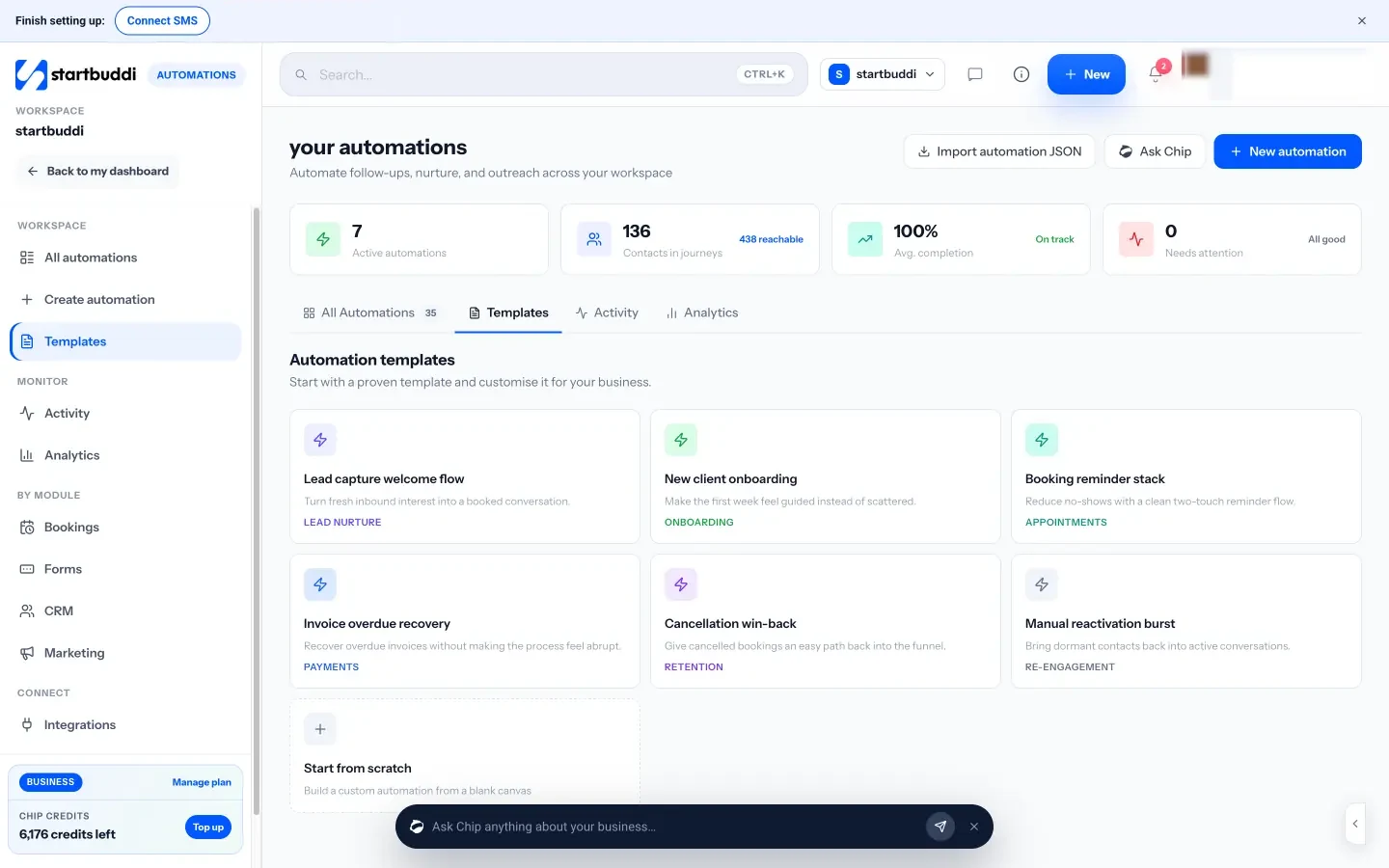
You can start from a template, build from scratch by picking what starts it and adding steps, or tell Chip, the built-in AI assistant, what you want in plain words. Chip plans the flow, writes the emails and saves it as an inactive draft for you to review; nothing goes live until you switch it on.
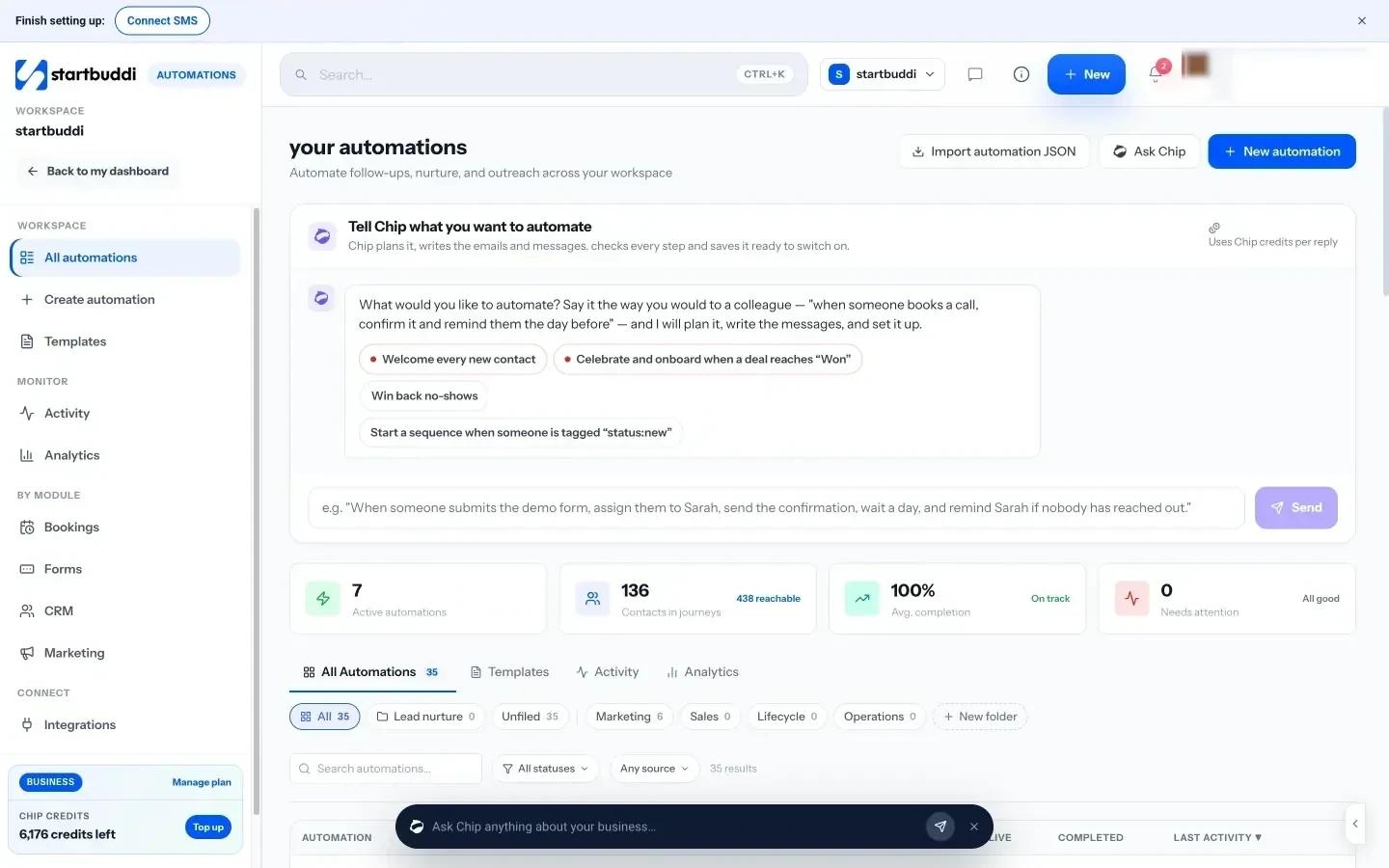
The pieces a trial sequence needs are all there: triggers such as form submitted, new contact added, tag added or joins a segment; steps for send email, wait, wait until, condition and branch; add or remove tag; send a payment link; and an “exit when” rule so anyone who pays leaves the flow. A payment succeeded trigger can start a separate customer onboarding flow. Before switching a flow on you can test it with a contact or simulate an event, and an activation review shows how many people are reachable and who’s suppressed.
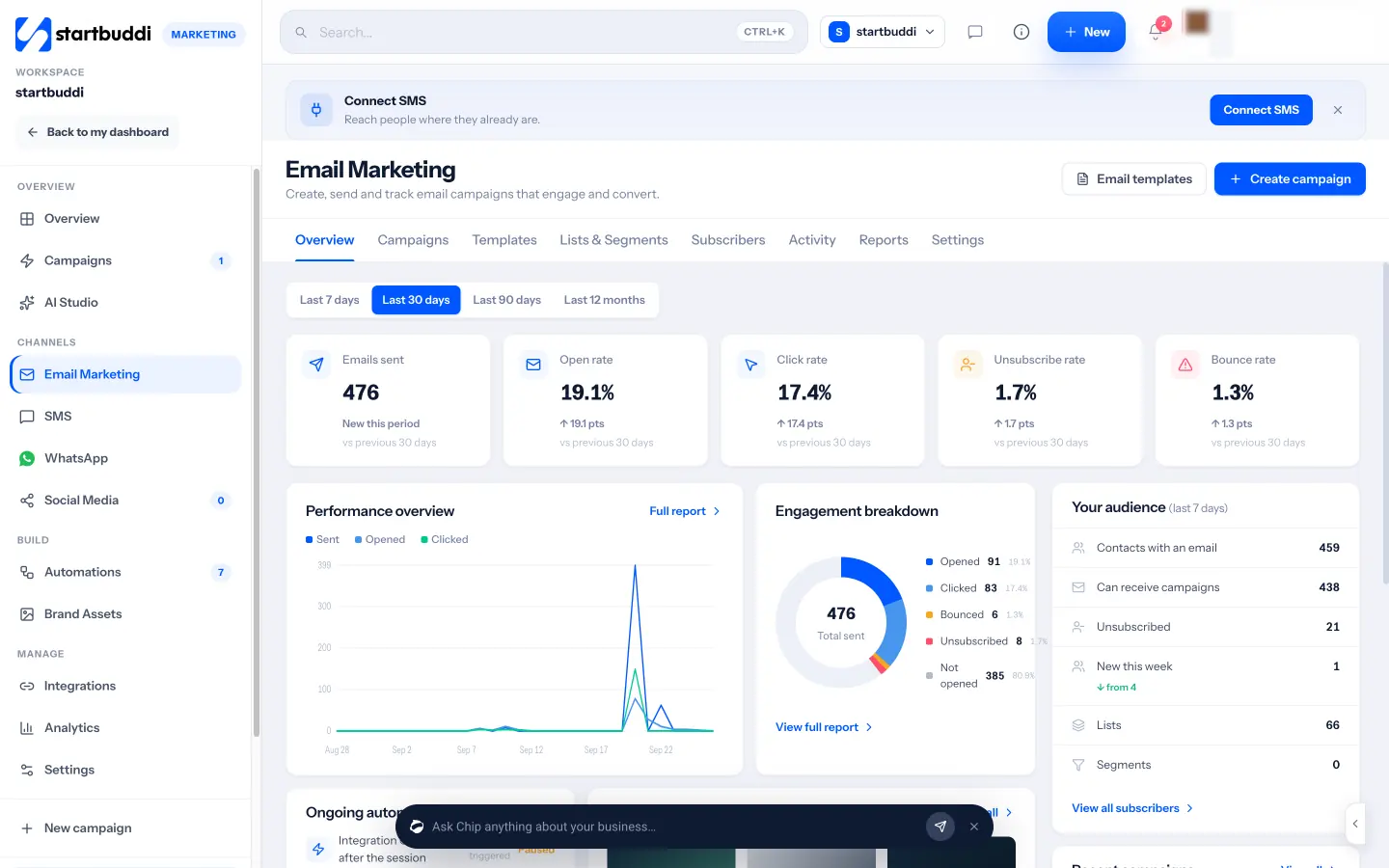
Email performance, including sent, opened, clicked and unsubscribed, shows on each automation and in Email Marketing, which also handles your own sending domain.
Where it fits and where it doesn’t
startbuddi works best when the trial happens around things it can see: people signing up through a startbuddi form or page, paying through Money Manager, or being tagged by your team. If you run a software product of your own, startbuddi can’t see what users do inside your app, so “activated” and “not activated” branches need a tag or segment you update, rather than live product events. Dedicated product-led growth tools are built for in-app tracking; startbuddi is built for service businesses and simple trials.
On plans: Marketing needs the Starter plan or above, and Free includes 2 active automations against 10 on Starter. Starter includes 250 automation runs and 3,000 email sends a month, and sending from your own verified domain is included on paid plans. Compare the limits on the pricing page, and see the help guide on setting up your first email sequence.
Your next step
Write down your “it works” moment and the two steps that lead to it. Then write just three emails this week: the day 0 welcome, the day 3 “stuck?” email and the trial ending reminder. Those three cover most of the gain. When you’re ready to automate them, start a free startbuddi account and try the 30-day trial of a paid plan.
Sources
- Recurly: How to fix the free trial problem
- FTC: CAN-SPAM Act compliance guide for business
- California Legislative Information: AB 2863, automatic renewal and continuous service offers
- Crowell & Moring: Eighth Circuit cancels click-to-cancel
- GOV.UK: new subscription rules to come into force in January 2027
- Apple Support: Use Mail Privacy Protection on iPhone
Frequently asked questions
How many emails should a free trial sequence have?
Five to eight for a 14-day trial is typical. Fewer, well-timed emails that each have one job beat a daily stream of feature tips.
Should I send a reminder before the trial ends?
Yes. It builds trust, cuts refunds and chargebacks, and in some places, such as California for longer trials, it is a legal requirement.
What should the trial expired email say?
Ask what stopped them, in one line, and offer a simple next step: a short extension, a smaller plan or a setup call.
Should I track open rates for trial emails?
Treat them with caution, because some email apps load emails automatically. Clicks, replies and the trial-to-paid rate are more reliable.
Olabimpe Salami is the email and outreach specialist at startbuddi. Olabimpe writes about the messages that bring customers in and back: email, WhatsApp and SMS campaigns, follow-ups, and turning enquiries into paying clients.
Runs email and outreach at startbuddi