Buffer Time: Definition, Examples and How It Works

Buffer time is a fixed gap kept free before or after an appointment so the next one can't be booked straight on top of it. So what is buffer time for in practice?
Buffer time is a fixed gap kept free before or after an appointment so the next one can’t be booked straight on top of it. So what is buffer time for in practice? It covers the travel, set-up, notes and overruns that every real appointment needs, so you start the next one on time instead of apologising.
Key takeaways
- A buffer is part of how much calendar a booking uses, even though the client never sees it.
- Buffers can sit before an appointment (to prepare) or after it (to wrap up, clean or travel).
- The right length depends on the work: 5 to 15 minutes for remote calls, often 30 minutes or more for site visits.
- Buffers cut the number of slots you can sell, so price your services with them included.
- Booking software applies the buffer automatically, which is far more reliable than remembering to leave gaps by hand.
Why buffer time matters for a small business
Back-to-back bookings look efficient on paper. In real life, a 60-minute visit runs to 70, the next client’s office is across town, and you still need to write up what you did. Without a buffer, every small overrun pushes the rest of the day later, and the last client of the day gets the worst of it.
For an IT support business, an engineer who arrives 25 minutes late to a server room visit has lost goodwill before opening a laptop. The same is true for a salon or a tutor.
Buffers also protect admin: ticket notes and invoices are easier in a 15-minute gap than at 9pm. If you’ve ever tried manual scheduling in a paper diary or a group chat, you’ll know how quickly gaps disappear when nobody guards them.
What is buffer time and how does it work in booking tools?
Before and after buffers
A buffer before an appointment is preparation time: reading the client’s notes, setting up a room, joining a call early. A buffer after is wrap-up time: cleaning equipment, writing notes, travelling to the next job. Some tools let you set both; others offer only one.
Buffers change which slots are offered
Booking software treats the buffer as part of the appointment when it works out free times. Microsoft’s guide to configuring service availability in Microsoft Bookings (checked on 1 October 2026) gives a clear example: a one-hour appointment with a 15-minute buffer before it needs a free block of 1 hour and 15 minutes, and customers only see times where both fit. Google Calendar’s appointment schedules (checked on 1 October 2026) have a similar setting to add time between appointments, alongside a daily booking limit.
Buffer time, blocked time and minimum notice
These three are often confused:
| Setting | What it does | Example |
|---|---|---|
| Buffer time | Keeps a gap next to every booking | 15 minutes after each remote session |
| Blocked time | Removes a one-off or regular window from your availability | Lunch from 13:00 to 14:00, or a public holiday |
| Minimum notice | Stops people booking too close to now | No bookings less than 4 hours ahead |
Example: buffer time with real numbers
Take an IT support company in Nairobi that does 60-minute on-site visits, with working hours of 09:00 to 18:00 (540 minutes). These figures are illustrative.
| Setup | Minutes each booking uses | Visits that fit in a day | Value at KSh 6,000 per visit |
|---|---|---|---|
| No buffer | 60 | 9 | KSh 54,000 on paper |
| 15-minute buffer | 75 | 7 (525 minutes) | KSh 42,000 |
| 30-minute buffer | 90 | 6 (540 minutes) | KSh 36,000 |
With no buffer the calendar promises nine visits, but Nairobi traffic means the engineer is late from the second one onwards and some visits get cut short or moved. Six visits with a 30-minute travel buffer is a day the engineer can actually deliver.
The lesson isn’t “use the biggest buffer”. It’s that your prices should assume the real number of visits. If six a day is realistic, price each visit so six a day pays the bills. For remote support sessions the same company might use a 10-minute buffer, because there’s no travel, only notes.
How to choose the right buffer length
- Time your last ten appointments. Note how long they really took and how long you needed afterwards. The difference is your buffer.
- Separate remote from on-site. Travel is the biggest variable, so on-site services usually need a longer gap.
- Add a buffer where overruns cluster. First visits and complex jobs run long more often than routine ones.
A buffer also helps you avoid one of the causes of a no-show appointment: clients who give up because you’re late tend not to rebook. In a team, buffers work alongside round robin scheduling, which shares bookings across people, so each person’s gaps are respected. Any decent booking software applies both without anyone checking by hand.
How startbuddi handles buffer time
In startbuddi, open Bookings, then Availability. Under Buffer & Notice, choose a Buffer after event from No buffer up to 60 minutes, and an Advance booking window for how far ahead people can book, then click Save changes. The app describes it as extra time “to avoid back-to-back bookings”.
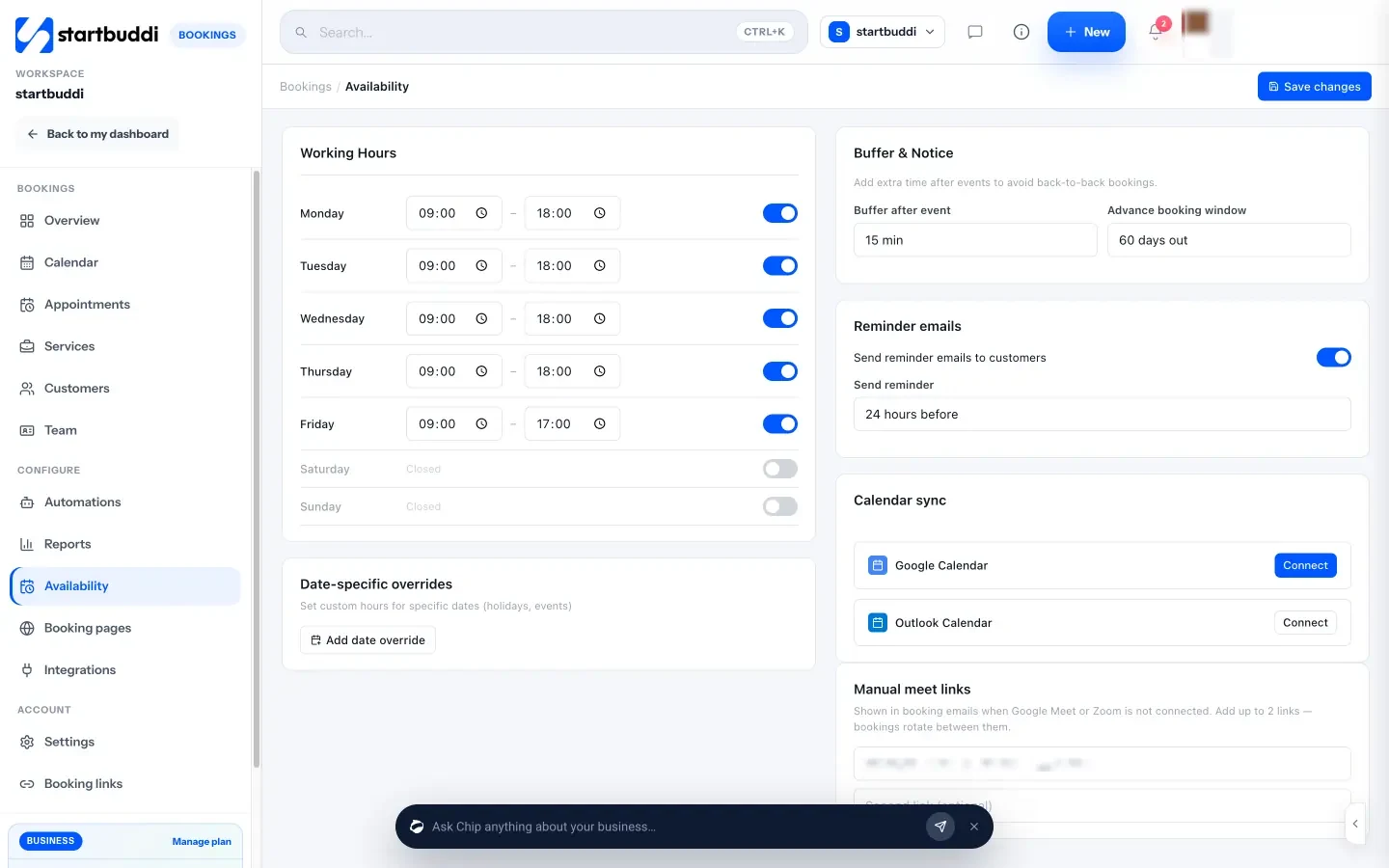
When someone books, startbuddi checks the slot against your other bookings and blocked time, including the buffer, and only offers times where the gap fits. If you add a booking yourself and it overlaps, it tells you that time is already booked. You can also ask Chip to set up a service, buffer included, in plain words and approve its draft.
A free plan is available. See what each plan includes, how startbuddi Bookings works, or how IT support companies use it in startbuddi for IT teams.
Related terms
FAQ
What is buffer time in scheduling?
Buffer time is a gap kept free next to each appointment so nothing else can be booked there. It gives you time to prepare, wrap up or travel. Booking tools add it automatically when they work out which slots to offer.
How long should buffer time be between appointments?
Most remote appointments need 5 to 15 minutes for notes and a short break. On-site work usually needs 30 minutes or more, depending on travel. Time your last ten appointments and set the buffer to the average extra time you needed.
Do clients see buffer time?
No. Clients see the appointment length they booked, such as 60 minutes. The buffer only affects which start times are offered, so slots that would leave no gap simply don't appear.
Is buffer time the same as blocked time?
No. A buffer is attached to every booking automatically. Blocked time is a window you remove from your calendar on purpose, such as lunch, training or a public holiday.
Does buffer time reduce how much I can earn?
It reduces the number of slots on paper, but usually not the number you can actually deliver well. Back-to-back days tend to end with late starts, rushed work and rescheduled clients. Price your services on the realistic number of appointments per day.
Tiwalade Joanna Okedara-Kalu is the founder, CEO and CTO of startbuddi, the business system that brings clients, bookings, invoices, projects, marketing and the Chip AI assistant into one place. Tiwalade builds software around how service businesses really work day to day, and writes about client management, getting paid on time and why small businesses outgrow the tools they start with.
Founded startbuddi and leads its product and engineering