Invoicing software for contractors: what to look for
What the best invoicing software for contractors does: quotes to invoices, deposits, stage payments, card payments on site and reminders, plus free options.



- Judge contractor invoicing software on the whole money trail of a job: quote to invoice, deposits, stage payments, online payment and reminders. Free plans suit one-person trades; bigger commercial jobs with retainage need construction-specific tools.
The best invoicing software for contractors is the one that matches how you actually get paid: a quote that turns into an invoice without retyping, a deposit before you buy materials, stage payments on bigger jobs, a way for customers to pay by card or bank transfer from their phone, and reminders that go out when you are on a roof and cannot chase. Pretty templates matter far less than those five things.
This guide explains what contractors need that a freelancer’s invoice tool may not do, the features worth paying for, what free plans really include, the rules your invoices must follow in different countries, and how to compare tools without getting lost in feature lists. It works for general builders, electricians, plumbers, roofers, painters and anyone else who quotes a job, does it and bills for it.
Why contractors need different invoicing software
A designer or consultant usually sends one invoice for one piece of work. Contractor billing is messier. A kitchen fit might involve a deposit, a materials payment, a stage payment when first fix is done, a change order when the client picks a different worktop, and a final invoice with a snag list attached. Some commercial jobs add retentions, where the client holds back part of each payment until the work is signed off.
Contractors also bill in places and at times other businesses do not. You finish a boiler repair at 6pm in someone’s hallway, and the best moment to get paid is right then. You buy materials on your own card and need to pass the cost on. You may also have tax rules that only apply to construction, such as the UK’s Construction Industry Scheme.
So when you look at invoice software for contractors, judge it on the whole money trail of a job, not just on how the PDF looks.
Features to look for in invoice software for contractors
Use this table as a checklist when you try a tool. If a feature matters to your trade and the tool cannot do it, move on.
| Feature | Why it matters on a job | What to test in the trial |
|---|---|---|
| Quote or estimate that converts to an invoice | No retyping line items, fewer mistakes | Create an estimate, accept it, convert it, check every line came across |
| Deposits and part payments | Covers materials before you start | Take a 30% deposit, then see the balance on the final invoice |
| Separate lines for labour and materials | Customers trust a clear breakdown, and your margins are easier to see | Add quantity, unit price and a discount on one invoice |
| Online payment on the invoice | Customers pay by card or bank from their phone | Pay a test invoice yourself and check it marks itself as paid |
| Reminders and a list of who owes you | You stop chasing from memory | Find your overdue invoices in two clicks |
| Works on a phone | You invoice on site, not at 11pm | Create and send an invoice from your phone |
| Export for your accountant | Year-end without retyping | Export a CSV of last month’s invoices |
Quotes that turn into invoices
Most contractor work starts with a quote. In the UK, Citizens Advice explains that a quote is a promise to do the work for an agreed price, while an estimate is your best guess. Whichever you send, the tool should let the accepted version become the invoice with the same lines. Our guide to writing a proposal that wins the job covers what to put in the quote itself.
Deposits and stage payments
Asking for money upfront is normal in the trades, especially when you buy materials for a specific job. Look for software that can record partial payments against one invoice, or send a separate payment link for the deposit. Our post on how much deposit to charge helps you set the amount.
Change orders
Clients change their minds. When they do, write the change down with a price before you do the extra work, then add it to the next invoice as its own line. Software that keeps notes and documents against the customer makes this easier to prove later. See how to scope a job so it does not creep for wording you can reuse.
Online payment and fees
Card payments get you paid faster but they cost money, so know the fees before you switch them on. Check your provider’s current rates, for example on Stripe’s pricing page or Paystack’s pricing page. Bank debits and transfers usually cost less than cards, so on a large job, offering a bank transfer option as well keeps your costs down.
Reminders and receivables
Late payment is not a small annoyance. The UK government’s 2026 response to its late payment consultation puts the cost at about £11 billion a year to the economy, says around 38 businesses close every day because of it, and estimates that affected small firms spend 86 hours a year chasing money (GOV.UK). Software that shows who owes what, and sends polite reminders, gives you those hours back. For the wording, read how to handle late payments professionally.
Invoicing software for electrical contractors, plumbers and roofers
The basics are the same across trades, but each has its quirks.
- Electrical contractors often bill a mix of small call-outs and larger installs, and may need to attach certificates or test results to the job. Look for a tool that lets you attach documents to the customer record, not just the invoice.
- Plumbing and heating contractors do a lot of same-day repairs, so taking payment on the spot matters most. Fast mobile invoicing and a payment link you can text beat a long list of features.
- Roofing and building contractors run longer jobs with more money at stake. Deposits, stage payments and a clear record of changes matter more than speed.
Progress billing and retentions on bigger jobs
If you work on commercial or public projects, you may be asked to bill in a set format. In the US, the American Institute of Architects publishes the G702 and G703 forms: the contractor lists progress against a schedule of values, the architect certifies the amount, and any retainage is shown on the form. On US federal fixed-price construction contracts, FAR 52.232-5 lets the contracting officer hold back up to 10% of a progress payment when progress is not satisfactory.
In the UK, retentions have been a long-running cash flow problem for smaller firms, and the government has said it plans to ban retention deductions in construction contracts (GOV.UK). Watch for when that takes effect.
If most of your work is billed on AIA forms or with retainage, you need construction accounting software built for it. Most small contractors doing domestic work do not. They need clean quotes, deposits and stage invoices, and a general invoicing tool handles that well.
What a contractor’s invoice must include
This is general information, not tax or legal advice. Check the rules where you work, or ask an accountant.
The rules vary by country, but most ask for the same core details: a unique invoice number, your business name and contact details, the customer’s name and address, a description of the work, the dates, the amounts and any sales tax. A few examples:
- UK: GOV.UK lists what an invoice must include, and VAT-registered businesses have extra requirements in VAT Notice 700/21. Construction has two special rules: under the Construction Industry Scheme, contractors deduct 20% from registered subcontractors’ payments (30% if unregistered), and the VAT domestic reverse charge means some invoices must show that the customer accounts for the VAT.
- Canada: the CRA sets out which details a GST/HST invoice needs, and the list grows with the invoice value.
- US: the IRS (Publication 583) lists invoices among the records that support your income, and says to keep records generally for three years, longer in some cases.
Whatever tool you pick, check it lets you add your tax number, a tax rate per invoice and custom notes, so you can meet your local rules.
Free invoice software for contractors: what you actually get
You can start for nothing, and many one-person trades should. The catch is usually a limit on clients or invoices, and card payments are charged per transaction on every plan. As published on each tool’s pricing page when we checked in September 2026:
- Wave has a free Starter plan for invoicing and bookkeeping. Card payments are charged per transaction, at the rates on its pricing page.
- Zoho Invoice is free, and points growing businesses to Zoho Billing.
- Invoice Ninja is free for up to 5 clients. Its Pro plan is $14 a month.
For a tradesperson with a handful of regular customers, a free plan is fine. Once you have steady weekly jobs, the time saved by quotes, reminders and a proper customer list is usually worth a paid plan.
Contractor invoicing tools compared
Prices change, so treat this as a starting point and check each official page. All prices are the cheapest paid plan as published in US dollars in September 2026. Our list of the best invoicing software for service businesses covers more options.
| Tool | What it is | Cheapest paid plan | Free plan |
|---|---|---|---|
| Joist | Estimates, invoices and payments for contractors | Basics, $12 a month billed monthly | No (14-day trial) |
| Jobber | Field service software: quotes, scheduling, invoicing | Core, $49 a month billed monthly | No (14-day trial) |
| Invoice Ninja | Invoicing, open-source based | Pro, $14 a month | Yes, up to 5 clients |
| Wave | Invoicing and bookkeeping | Pro, $19 a month | Yes |
| startbuddi | Clients, bookings, projects, estimates and invoices in one place | Starter (see pricing) | Yes, 5 invoices a month |
Tools built for field service, like Jobber, add scheduling and dispatch features. If you have several vans on the road and need a map of where everyone is, that category is the right one. If you are a small team that mostly needs to quote, invoice and get paid, a simpler tool costs less and takes less time to learn.
How to choose the best invoicing software for contractors
- List your last ten jobs. How many needed a deposit? A change order? Stage payments? That tells you which features matter.
- Decide where you invoice. If it is on site, test the phone experience first.
- Check how customers can pay. Card, bank transfer, mobile money: pick a tool that supports what your customers use locally.
- Add up the real cost. Monthly fee plus per-user fees plus card fees at your average invoice size.
- Run one real job through the trial. Quote, deposit, invoice, reminder, payment. If anything feels slow, it will feel slower in March when you are busy.
How startbuddi helps contractors get paid
startbuddi is not construction accounting software. It does not produce AIA forms, track retainage, handle CIS deductions or do payroll, and it has no GPS dispatch or native mobile app (it runs in your phone’s browser). What it does is keep the customer, the quote, the job and the invoice together, so a small contracting business can run the money side from one place.
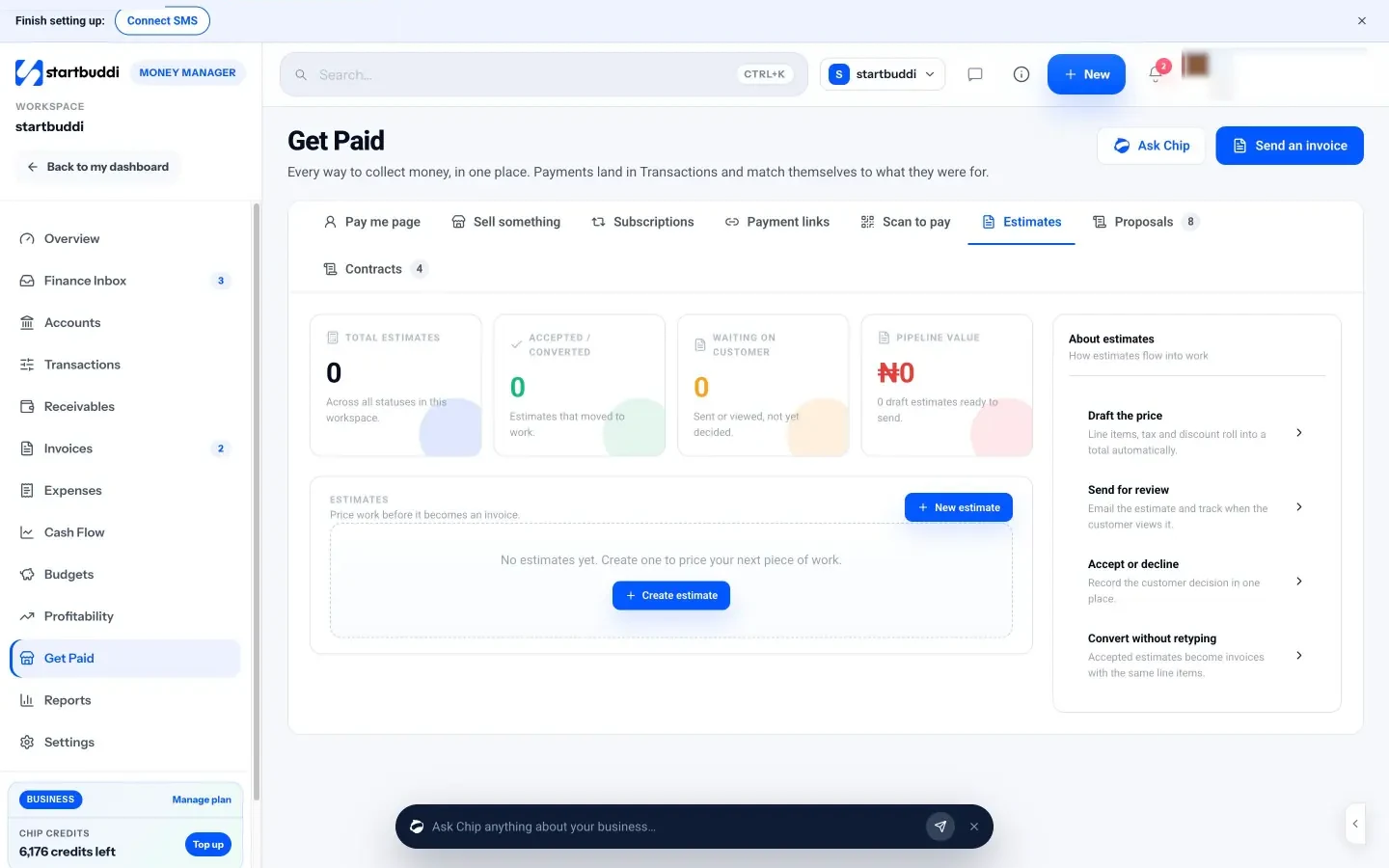
In Estimates you price the job with line items, tax and a discount, and add terms such as “Valid for 30 days. 50% deposit to begin.” You email it, record the customer’s decision, and when they accept, click Convert to invoice: the invoice gets the same line items.
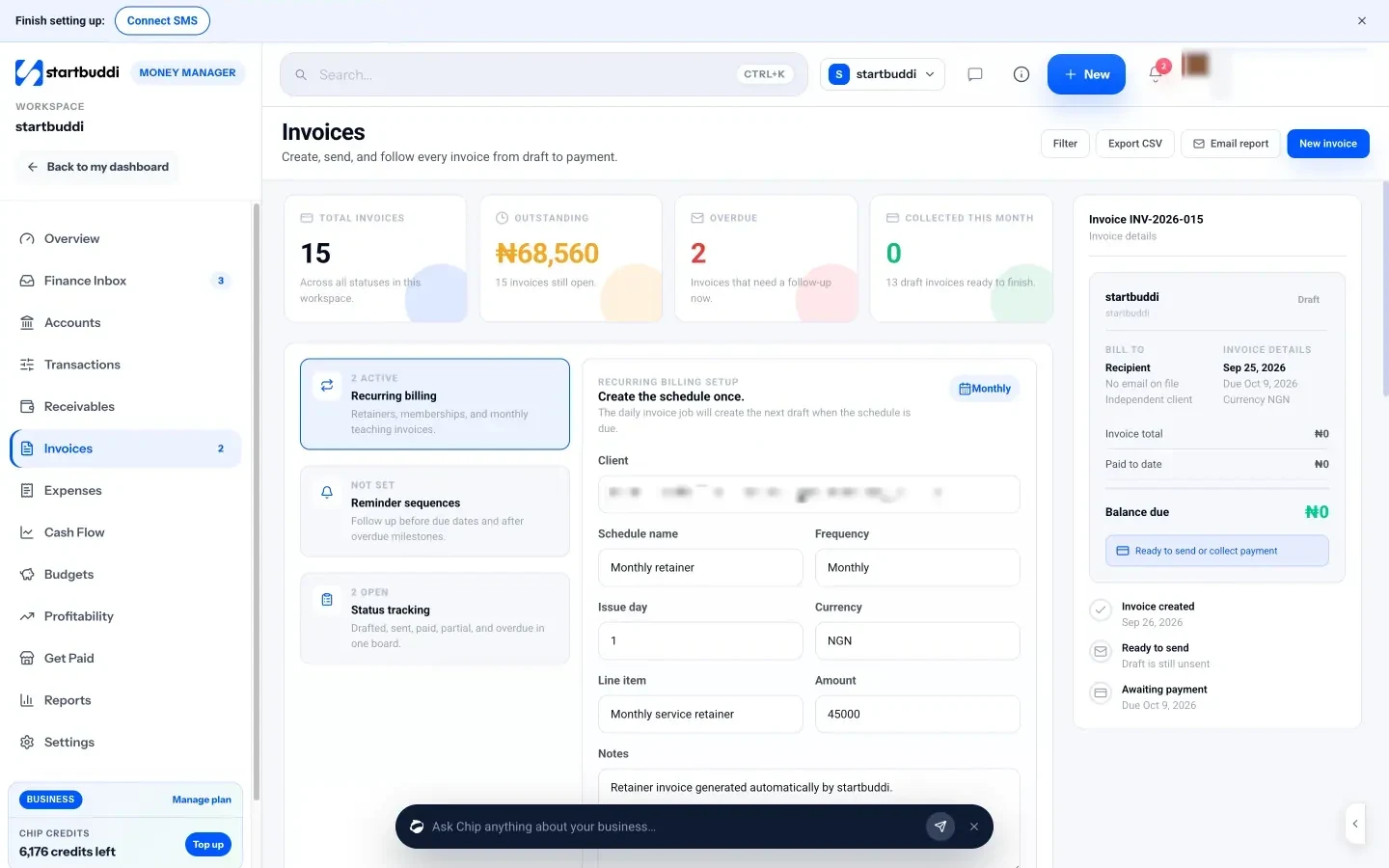
On invoices, customers can pay online through Stripe or Paystack, or by bank transfer using the details on the invoice page. When a payment arrives some other way, such as cash on site, use Record payment and choose the method. Partial payments are allowed, so a deposit and a balance can sit on one invoice. For a quick deposit before a job, a payment link takes seconds and can be pasted into WhatsApp or a text.
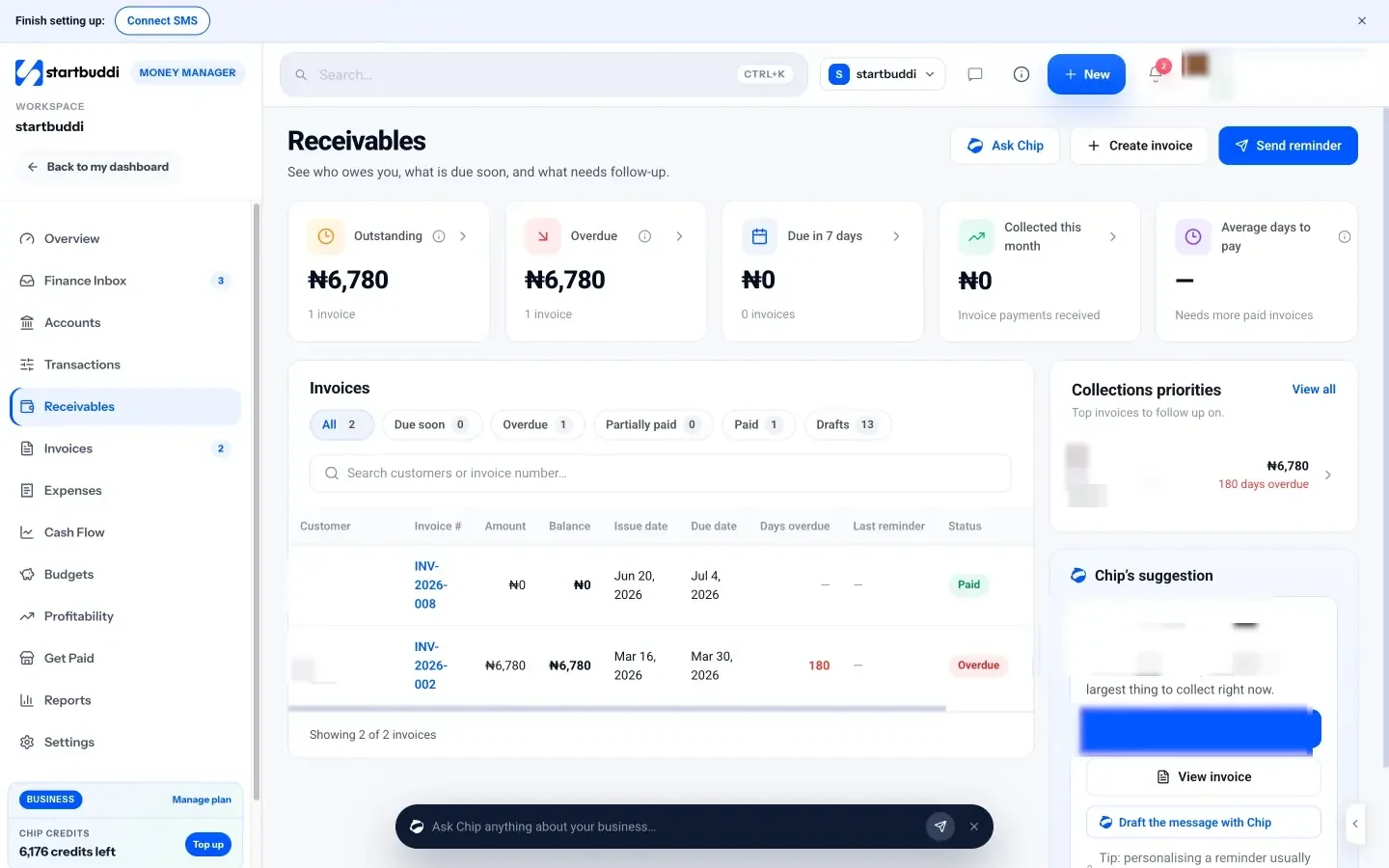
Receivables shows what is outstanding, what is overdue and your average days to pay, with a Remind button on each open invoice and Chip suggesting who to chase first. If you also take bookings, you can create an invoice straight from a booking, and project budgets in Work pull in expenses linked to that job, so you can see what a job really cost.
The Free plan includes 5 invoices a month, and Starter removes the limit (see pricing). If you run a trade business, the page for plumbing and trade services shows how the pieces fit.
Your next step
Pull up your last three invoices and check them against the feature table above. Note what you had to do by hand. Then trial one or two tools with a real job, from quote to payment. If you want your quotes, invoices and customers in one place, start on startbuddi’s Free plan and send your first estimate today.
Sources
- GOV.UK: Late payment consultation, government response (2026)
- Citizens Advice: Problems with home improvements (quotes and estimates)
- AIA Contract Documents: Instructions for G702
- FAR 52.232-5: Payments under fixed-price construction contracts
- GOV.UK: Invoices, what they must include
- HMRC: VAT Notice 700/21
- GOV.UK: Construction Industry Scheme
- HMRC: VAT domestic reverse charge for building and construction services
- CRA: General information for GST/HST registrants
- IRS Publication 583: Starting a business and keeping records
- Stripe pricing and Paystack fees
- Pricing pages: Joist, Jobber, Invoice Ninja, Wave, Zoho Invoice
Frequently asked questions
What is the best invoicing software for contractors?
There is no single best tool. Pick the one that handles your usual jobs: quotes that convert to invoices, deposits, stage payments, online payment and reminders, at a total cost that fits your volume.
Is there free invoice software for contractors?
Yes. Wave and Zoho Invoice have free plans, Invoice Ninja is free for up to 5 clients, and startbuddi's Free plan includes 5 invoices a month. Check how card payments are charged on each plan.
Do electrical contractors need special invoicing software?
Not usually. Most electrical contractors need the same basics as other trades, plus somewhere to keep certificates and test results with the customer's record.
Can I take a deposit before starting a job?
Yes, and it is common in the trades. Send a payment link or a deposit invoice, then record it as a part payment so the final invoice shows the balance.
Tiwalade Joanna Okedara-Kalu is the founder, CEO and CTO of startbuddi, the business system that brings clients, bookings, invoices, projects, marketing and the Chip AI assistant into one place. Tiwalade builds software around how service businesses really work day to day, and writes about client management, getting paid on time and why small businesses outgrow the tools they start with.
Founded startbuddi and leads its product and engineering