What are billable hours?
Also called: Chargeable hours, billable time, client hours
Billable hours are the hours of work you can charge a client for, such as design, consulting or project delivery. Non-billable hours are the rest of your working time, like admin, sales and learning, which you don't invoice directly.
How to calculate it
Hours worked includes admin, sales and anything else you cannot bill for.
Billable hours are the hours you spend on work you can charge a client for. If you’re a designer, the time spent designing a client’s logo is billable. The time spent answering your own emails, chasing new leads or doing your accounts is not. Billable hours turn directly into income; non-billable hours keep the business running but don’t appear on anyone’s invoice.
The idea matters most if you charge by the hour, but it’s just as useful for fixed-price work. Knowing how many hours a job really took tells you whether your price was right.
Why billable hours matter for a small business
For freelancers, consultants and agencies, time is the product. Every hour you work but don’t bill is an hour you’ve given away.
- They set your income ceiling. There are only so many hours in a week. If just half of them are billable, your earnings depend on that half.
- They show whether your prices work. A ₦300,000 project that took 60 hours earns you ₦5,000 an hour. If you expected 25 hours, you’ve learned something important.
- They support your invoices. Clients on hourly or retainer deals trust a bill more when it’s backed by a clear time log.
- They reveal hidden work. Tracking often shows how much time goes on revisions, calls and admin that you never priced in.
Billable vs non-billable hours
| Usually billable | Usually non-billable |
|---|---|
| Doing the client’s work: design, writing, coding, consulting | Invoicing, bookkeeping and admin |
| Client meetings and calls about the project | Pitching, proposals and sales calls |
| Research done specifically for the client | Training and learning new skills |
| Travel to the client, if your agreement says so | Marketing your own business |
| Agreed revisions within scope | Internal team meetings |
What’s billable depends on your agreement. Write it down before you start: are calls billable, is travel, are revisions beyond the second round? A short freelance agreement avoids arguments later.
How billable hours work: an example
Ibrahim is a freelance web developer. He charges ₦15,000 an hour and works about 40 hours a week. He tracks his time for one week:
- 24 hours building two client websites (billable)
- 4 hours of client calls about those projects (billable)
- 7 hours on proposals and sales calls (non-billable)
- 5 hours on invoicing, email and admin (non-billable)
His billable hours are 28 out of 40. At ₦15,000 an hour, that’s ₦420,000 of billable work for the week. It also tells him that 12 hours went on running the business, which his hourly rate needs to cover.
Utilisation rate
The share of your working time that’s billable is called your utilisation rate:
Utilisation rate = billable hours ÷ total hours worked × 100
For Ibrahim, 28 ÷ 40 × 100 = 70%. There’s no perfect number, because sales and admin time are necessary, but tracking the rate month by month shows whether non-billable work is quietly taking over. It also helps you set a realistic rate: if only 70% of your time is billable, your hourly price must cover the other 30%. Our hourly rate calculator helps you work that out.
Billing increments
Many professionals record time in fixed blocks rather than exact minutes. Lawyers and accountants commonly use six-minute blocks, a tenth of an hour, as legal billing guides explain. Smaller businesses often use 15 minutes. Whatever you choose, say so in your agreement and apply it consistently.
Best practices and common mistakes
- Track in real time. Starting a timer when you begin is far more accurate than reconstructing your week on Friday.
- Link time to the task and client. “3 hours” is useless later; “3 hours, homepage build, Client A” is an invoice line.
- Mark billable time as you log it. Deciding weeks later leads to guesswork, and usually under-billing.
- Add short notes. “Revised checkout page after client feedback” answers questions before the client asks them.
- Track fixed-price jobs too. It’s the only way to learn which projects are worth quoting for again.
A common mistake is rounding down out of politeness. If the work was done and it’s within the agreement, bill it. For more practical tips, see our post on tracking billable hours without a spreadsheet.
Related terms
- Timesheet: a record of the hours worked, by day and task. See what timesheet software is.
- Hourly rate: the price you charge for one billable hour.
- Retainer: a fixed monthly fee, often for an agreed number of hours.
- Invoice: the bill you send, where billable hours become line items. See what an invoice is.
Billable hours in startbuddi
In startbuddi, time is tracked inside Work, next to your projects and tasks. On the Time page you pick a task and start a timer, or log time by hand with a note and a Billable tick box. The week view shows your total hours, billable hours, and the billable value where rates are set, plus a grid of hours by task and day.
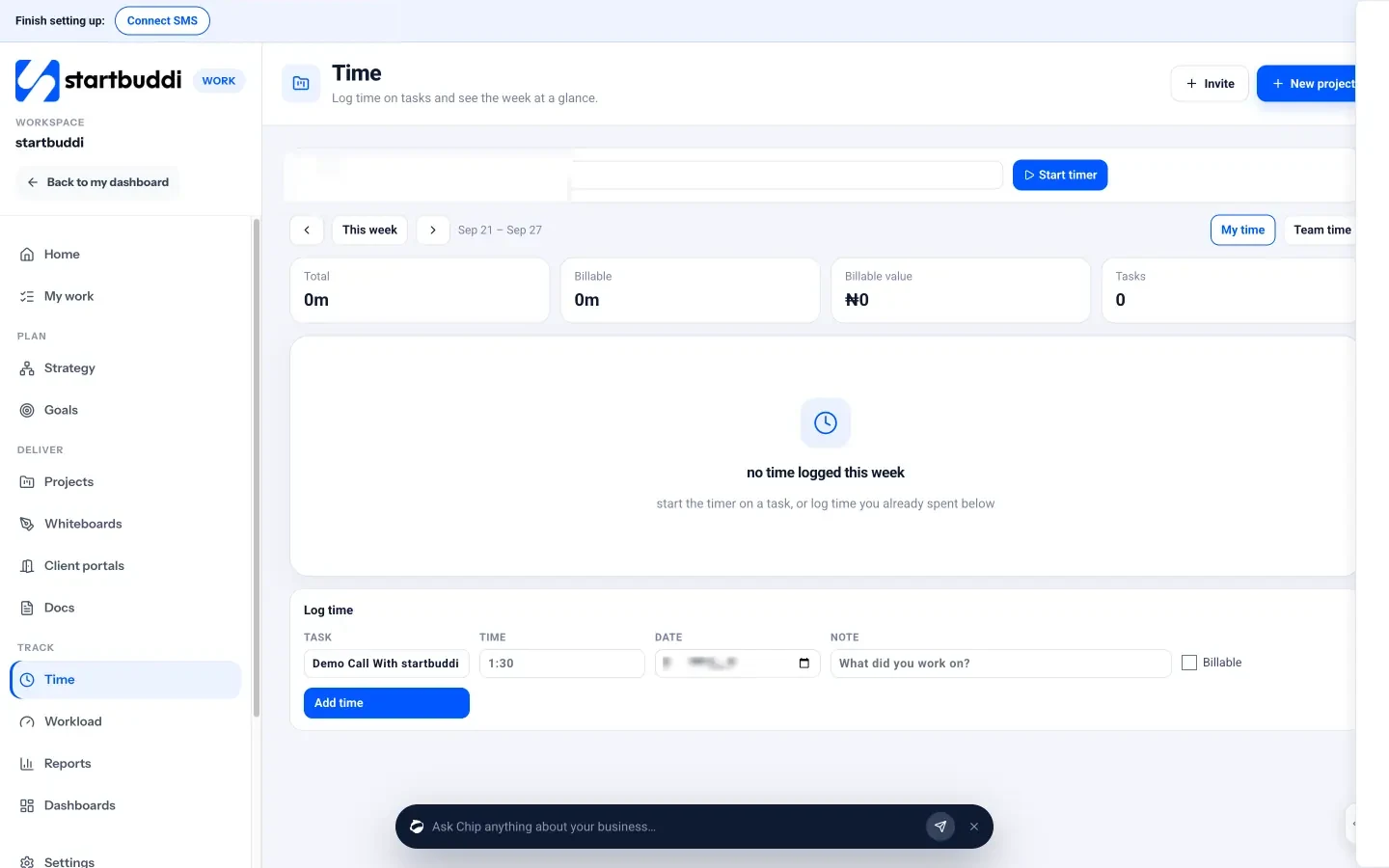
Managers can switch to Team time to see the whole team’s hours, and a project’s Budget tab turns logged time into time spent against the budget. There’s no one-click “turn time into an invoice” button, so you add hours as line items when you create the invoice in Money Manager. Read more on the time tracking page.
Next step: track every working hour for one week, mark each as billable or not, and work out your utilisation rate. The number will tell you whether your prices need to change.
Related terms
FAQ
Are meetings billable hours?
Client meetings about their project usually are, if your agreement says so. Internal meetings and sales calls usually aren't.
What is a good utilisation rate?
It depends on your role and business. Solo owners must spend time on sales and admin, so 100% is neither realistic nor healthy. Track your own trend and price accordingly.
Should I track time on fixed-price projects?
Yes. You won't bill the hours, but they show whether your fixed price paid off, which helps you quote the next job.
How do I show billable hours on an invoice?
List each piece of work as a line item with the hours as the quantity and your hourly rate as the price, so the client can see the breakdown.
Tiwalade Joanna Okedara-Kalu is the founder, CEO and CTO of startbuddi, the business system that brings clients, bookings, invoices, projects, marketing and the Chip AI assistant into one place. Tiwalade builds software around how service businesses really work day to day, and writes about client management, getting paid on time and why small businesses outgrow the tools they start with.
Founded startbuddi and leads its product and engineering