Project management for agencies: the complete guide
How to run agency projects from enquiry to final invoice: scoping, capacity planning, short delivery cycles, client approvals, time and profitability.


- Agency projects succeed or fail on process: written scope with a change rule, plans built around real team capacity, short delivery cycles, approvals in writing, and time tracked against every project. Close each job with a review and turn it into a template.
Project management for agencies is different from project management anywhere else, because you’re running several clients’ projects at once, with a small shared team, fixed budgets and clients who change their minds. Good agency project management comes down to five things: scope every job in writing, plan it around your team’s real capacity, run delivery in short cycles with clear approvals, keep clients informed without endless status emails, and track time and money so you know which work is profitable.
This guide walks through the whole lifecycle of an agency project, from the first enquiry to the final invoice and the review afterwards. It’s written for small creative, digital and marketing agencies, from a two-person studio to a team of twenty, wherever you’re based.
Why agency project management is harder than it looks
An in-house team runs one company’s projects for one boss. An agency runs many clients’ projects for many bosses, each of whom thinks they are your only client. That creates problems in-house teams rarely face:
- Shared people, competing deadlines. Your one designer is on four projects, and every client wants their work this week.
- Scope that drifts. “Just one more banner” happens on almost every job. The Project Management Institute’s Pulse of the Profession 2018 found that 52% of projects completed in the previous year experienced scope creep or uncontrolled changes.
- Coordination overhead. Asana’s Anatomy of Work research found knowledge workers spend around 60% of their time on “work about work”: chasing updates, searching for files and switching between apps. In an agency, much of that is client communication.
- Money tied to time. On a fixed-fee project, every extra hour comes straight out of your margin.
None of this is solved by a fancier tool on its own. It’s solved by a simple process that everyone follows, supported by a tool that makes the process easy.
Stage 1: intake and scoping
Most agency projects that go wrong went wrong before they started. The fix is a consistent intake.
Qualify before you quote
Use the same short brief or intake form for every enquiry: what they want, why now, budget range, deadline, who approves, and what success looks like. If they can’t answer “who approves?”, expect delays later.
Write the scope down
Every project needs a written scope, even a small one. At minimum:
- Deliverables, listed one by one
- What’s not included
- Number of revision rounds per deliverable
- Timeline with the client’s responsibilities (content, feedback, access) and their dates
- Fee, payment schedule and what happens when scope changes
Our free statement of work template covers this. For ongoing work, use a retainer agreement instead, with a monthly allowance and a rule for unused hours.
Agree the change process up front
Scope creep is easier to manage when the client already knows the rule: new requests get a short written change note with the extra cost and time, and nothing starts until it’s approved. You’re not saying no, you’re saying “yes, and here’s what it takes”.
Stage 2: planning around real capacity
Break the work down
Split the project into milestones (moments the client sees and approves, such as “homepage design approved”) and tasks (the work that gets you there). Give each task one owner, a due date and a time estimate.
Map the dependencies
Some tasks can’t start until others finish: development waits for design sign-off, and design waits for the client’s copy. Mark these links. The chain of dependent tasks that decides your end date is your critical path, and any delay on it delays the whole project.
Check capacity before you promise dates
This is where agencies most often go wrong. Before you confirm a timeline, add up the estimated hours for each person across every live project that week. If your designer is already at 38 of 40 hours, a new project can’t start on Monday, whatever the client wants. Leave a buffer, around 20% of each person’s time, for feedback rounds, small client requests and the unexpected.
Stage 3: kickoff
A kickoff meeting turns a signed contract into a working relationship. Cover the goals, the scope and what’s out of it, the timeline and the client’s own deadlines, who approves what, how you’ll communicate, and how feedback works. Send a short written summary the same day. Our guide to running a project kickoff meeting includes an agenda you can copy.
Stage 4: delivery in short cycles
Long, silent stretches followed by a big reveal are how agencies end up redoing weeks of work. Short cycles catch problems early.
Choose a working style that fits the project
| Project type | Works best with | Why |
|---|---|---|
| Brand identity, one-off campaign | Milestones and a timeline | Clear stages with approvals between them |
| Website build | Timeline with dependencies | Design, content and development depend on each other |
| Ongoing social media or SEO retainer | Short sprints or a monthly board | Continuous work, reprioritised each cycle |
| Product or app development | Sprints | Scope evolves as you learn |
Whatever the style, keep each cycle short enough that the client sees progress at least every two weeks.
Hold a short weekly internal review
Fifteen minutes, every project, same three questions: what’s done, what’s at risk, what’s blocked and who can unblock it. Anything overdue gets a new date or a decision, not a shrug.
Keep all project talk in one place
If feedback arrives by email, WhatsApp, voice note and a comment on a shared file, something will be missed. Pick one place for decisions and approvals and move everything there, even if clients still message you elsewhere first. When a request arrives in a chat app, turn it into a task straight away and reply with a link to it.
Stage 5: approvals and client communication
Clients want two things: to know where things stand without asking, and to feel their feedback was heard. Give them both with a routine.
- A weekly update, same day each week, in three lines: done, next, and what we need from you.
- Approvals in writing, against the exact version, never “looks good” in a voice note you can’t find later.
- Consolidated feedback. Ask for one set of comments per round from the person who approves, not separate notes from five people.
- A shared view of progress. A client portal lets clients see milestones, files and approvals without emailing you. We explain why in client portals: why they save service businesses hours each week.
Stage 6: time, budget and profitability
You can’t manage agency profit without knowing where the hours go. Track time against each project and task, even on fixed-fee work. It’s the only way to know whether a project that looked profitable actually was.
The numbers to watch
| Measure | What it tells you | How to work it out |
|---|---|---|
| Budget used | Is this project on track financially? | Hours logged × cost rate, plus expenses, against the fee |
| Utilisation | How much of your team’s time is billable | Billable hours ÷ available hours |
| Effective hourly rate | What you really earned per hour | Project fee ÷ total hours spent |
| On-time delivery | Are your estimates realistic? | Milestones hit on time ÷ total milestones |
| Days to pay | How fast clients pay | Average days from invoice to payment |
If the effective hourly rate on a type of project is consistently low, the answer is usually to price it differently or scope it tighter, not to work faster. Our guide to tracking billable hours without a spreadsheet covers the habits that make time data reliable.
Stage 7: handover, billing and review
Close every project properly. Hand over final files and access in one organised delivery, get written sign-off, and send the final invoice the same day. For retainers, invoice on the same date every month; our post on how to sell and bill retainers explains how.
Then hold a 30-minute internal review. Compare estimated with actual hours, list what caused delays, and write down one change to your process or your pricing. Turn the project’s structure into a template so the next similar job starts from something that already works.
Retainers vs one-off projects
Most agencies run both, and they need slightly different handling.
One-off projects have a start, an end and a fixed deliverable list. The main risks are scope creep and underestimating. Manage them with milestones, a timeline and a clear sign-off at each stage.
Retainers are ongoing: a monthly block of social media, SEO, design or development support. The main risk is the opposite of scope creep, a slow drift where the client uses far more or far less than they pay for, and nobody notices until someone is unhappy. Manage them with a monthly plan agreed at the start of each month, a cap on hours or deliverables, time tracked against the retainer, and a short report at month end showing what was delivered and how much of the allowance was used. Unused hours should follow whatever rule your contract sets, rather than quietly rolling over forever.
What to look for in agency project management software
If you’re choosing a tool, judge it on how well it supports the process above, not on its feature count. A practical checklist:
- Multiple projects per person, with a workload view that shows everyone’s hours across all clients.
- Templates for your common project types, so every job starts with the same structure.
- Dependencies and milestones, not just a to-do list.
- Time tracking built in and tied to tasks, so logging hours isn’t a separate chore.
- A client-facing view with approvals, so feedback doesn’t live in email.
- A link to invoicing, so finishing a milestone and billing for it happen close together.
- Pricing that works for a small team, especially how clients and freelancers are counted.
Our researched list of project management software compares options.
Common agency project management mistakes
- Starting before the scope is signed “to save time”. It rarely does.
- Estimating without checking capacity, then missing the date and blaming the team.
- Letting one client’s urgency reshuffle everyone’s week without a decision about what moves.
- Not tracking time on fixed-fee work, so you never learn which projects lose money.
- Using a different system for every client because each one prefers their own tool.
How startbuddi helps agencies run projects
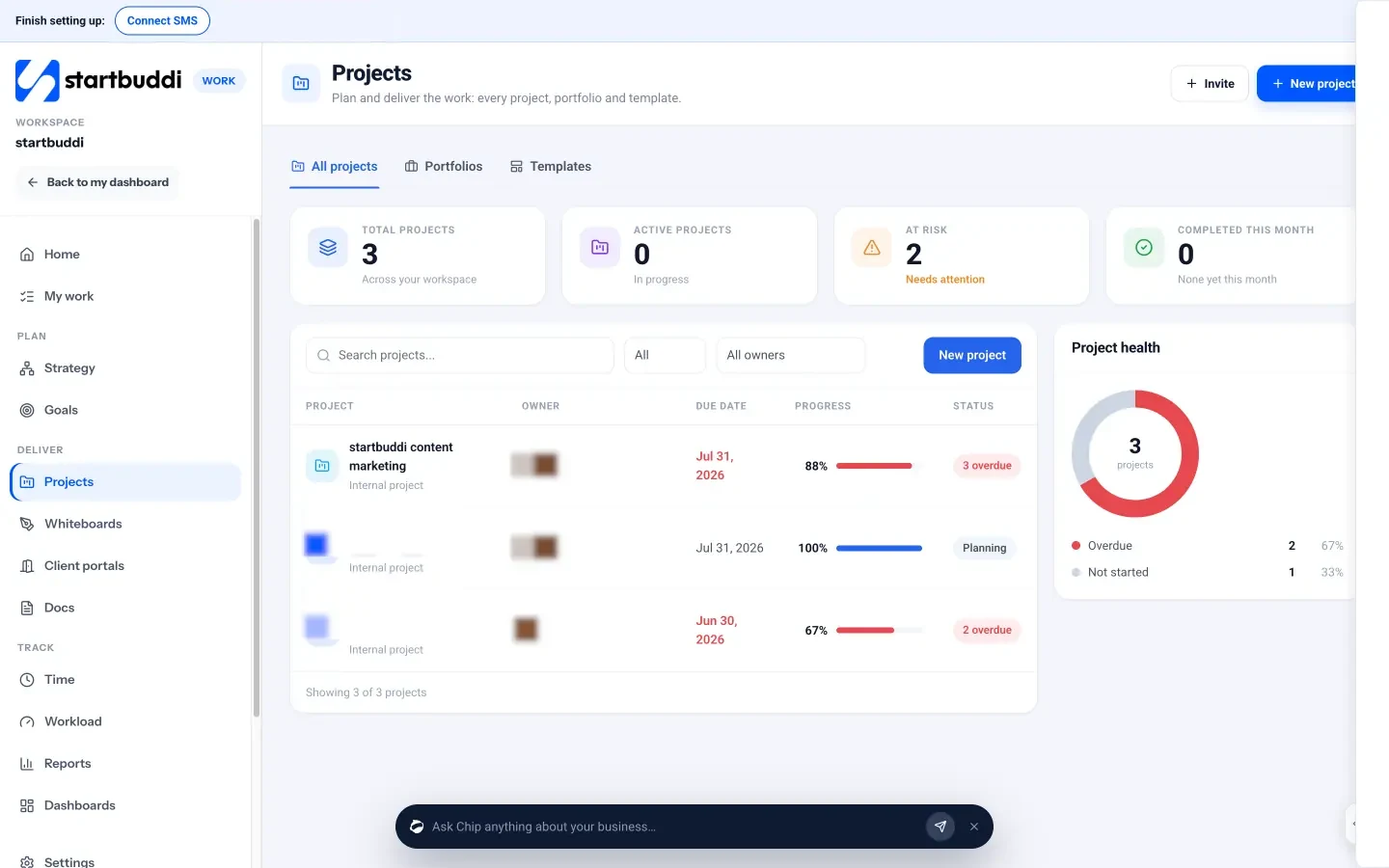
startbuddi puts projects, tasks, time, client portals and invoicing in one workspace, connected to the same client records. The project management side lives in Work, under Projects.
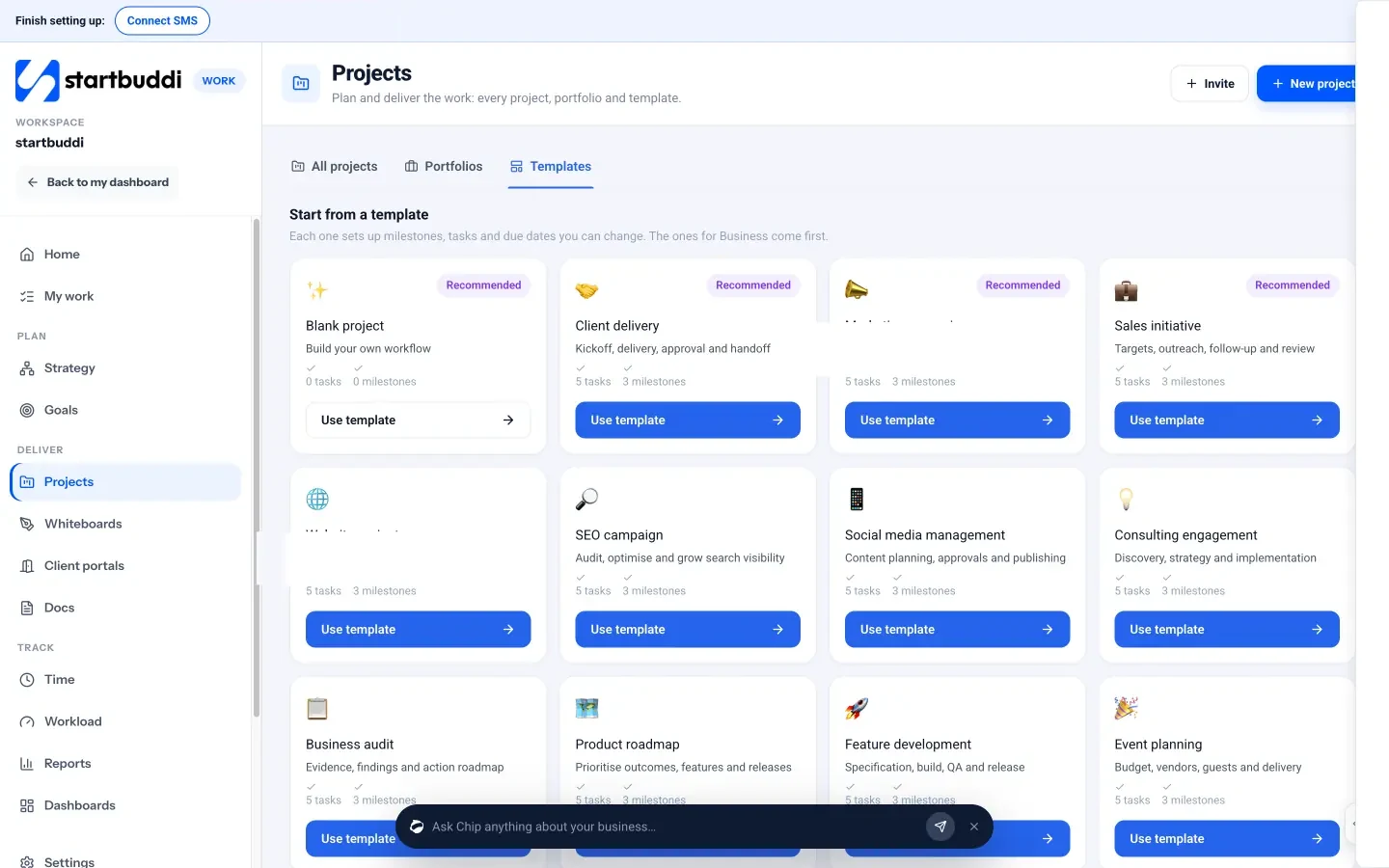
Templates, timelines and milestones
You can start from a template such as Client delivery, Marketing campaign, Website project, SEO campaign or Social media management, each with starter tasks and milestones you can change, or pick the Complete agency system bundle. Inside a project, tabs cover Overview, Tasks (list, board, timeline, calendar or table), a Timeline with dependencies and a critical path highlight, Sprints, Milestones, and a Budget tab that tracks money and hours, including expenses linked from Money Manager. Every project also gets a discussion room in Chat.
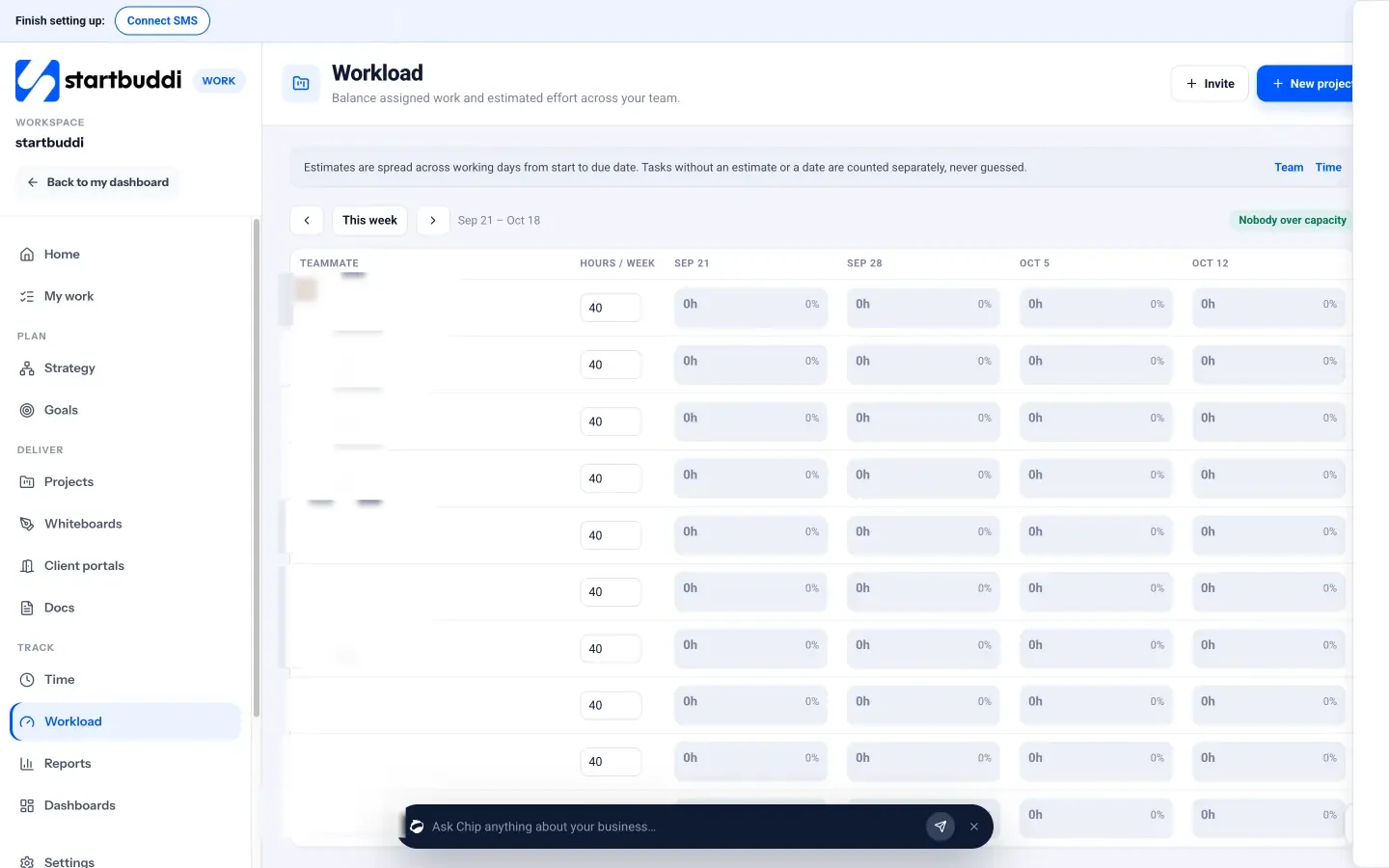
Capacity and time
Workload shows each teammate’s estimated hours per week across all projects, so you can spot overload and reassign a task before a date slips. It’s visible to managers, admins and owners. Time lets people start a timer on a task or log time manually, mark it billable, and see the week’s total, billable hours and billable value. There’s no one-click button yet to turn logged time into an invoice; you create the invoice in Money Manager.
Client portals and approvals
Client portals give each client a private page for their projects, shared files, approvals, messages and invoices. Clients sign in with an email link, see only what you share, and never take a paid seat. You can require client approval before a shared deliverable is marked done. On Free you can build and preview a portal; inviting clients needs a paid plan (Starter includes 1 live portal, Growth 10 and Scale 50).
A few things to know. Seats matter for agencies: Free includes 1 seat, Starter 2, Growth 5 and Scale 15. Project notification and custom field settings are marked as coming soon. For time tracking specifically, see time tracking.
Your next step
Take your most recent finished project and write down three numbers: estimated hours, actual hours, and how many rounds of revisions it took. That single comparison will show you where your process leaks. Then turn that project’s steps into your first template. When you’re ready to run your agency’s projects, time and client portals in one place, compare plans on the pricing page; every paid plan has a 30-day trial.
Sources
- Project Management Institute: Pulse of the Profession 2018
- Asana: Anatomy of Work research on “work about work”
Frequently asked questions
What is the best project management method for a small agency?
Most small agencies mix methods: milestones and timelines for fixed projects like websites and brand work, and short sprints or a monthly board for retainers. Pick per project type, not one method for everything.
How do agencies handle scope creep without upsetting clients?
Agree a change rule in the contract, then respond to each new request with a short written note of the extra cost and time. Clients usually respect a clear, friendly process.
Should clients have access to our project management tool?
Give them a view, not the whole tool. A client portal shows progress, files and approvals while keeping internal notes and drafts private.
What utilisation rate should an agency aim for?
It depends on roles and your pricing. Track your own billable hours against available hours for a few months, then set a target that leaves room for sales, admin and training.
Tiwalade Joanna Okedara-Kalu is the founder, CEO and CTO of startbuddi, the business system that brings clients, bookings, invoices, projects, marketing and the Chip AI assistant into one place. Tiwalade builds software around how service businesses really work day to day, and writes about client management, getting paid on time and why small businesses outgrow the tools they start with.
Founded startbuddi and leads its product and engineering