Weekly Report Template for Small Businesses (Copy and Fill In)
A weekly report template for small business owners: money, sales, marketing, delivery and next week's priorities on one page, with a filled-in example.



A weekly report template is a one-page form you fill in at the end of each week with the same numbers every time: cash in and owed, new enquiries and sales, marketing results, work delivered, problems and next week’s priorities. Kept for a few months, it shows trends you’d never spot day to day, and takes about 20 minutes to complete.
Key takeaways
- Track the same 10 to 15 numbers every week. Consistency matters more than detail.
- Put money first: cash in, invoices sent and what’s overdue.
- Compare each number with last week and with your target, not just the raw figure.
- End with three priorities and any decision you need from someone else.
- Fill it in at the same time each week, from your records, not from memory.
Why a weekly business report is worth 20 minutes
Monthly reports arrive too late to change the month. Daily numbers jump around too much to read. A week is long enough to show a pattern and short enough to act on it: if enquiries dropped this week, you can post, call or follow up before it becomes a bad month.
The report also makes handovers easier. A partner, an investor or a team lead can read one page and know how the business is doing without a meeting. If you do hold a weekly team meeting, make the report the first thing on the agenda.
The weekly report template
Copy this into a document, a spreadsheet or your notes app. Replace the brackets each week. Keep the numbers you don’t use yet as “n/a” rather than deleting them, so the layout stays the same.
WEEKLY REPORT
Business: [name]                Week: [Mon date] to [Sun date]
Prepared by: [name]             Date sent: [date]

1. HEADLINE (three lines)
- Best thing this week: [ ]
- Biggest problem this week: [ ]
- One number to watch: [ ]

2. MONEY                    This week   Last week   Target
Cash received               [ ]         [ ]         [ ]
Invoices sent (value)       [ ]         [ ]         [ ]
Owed to us, total           [ ]         [ ]         -
  of which overdue          [ ]         [ ]         [ ]
Money spent                 [ ]         [ ]         [ ]
Cash in bank (Friday)       [ ]         [ ]         [ ]

3. SALES
New enquiries               [ ]         [ ]         [ ]
Quotes or proposals sent    [ ]         [ ]         [ ]
Jobs won (number / value)   [ ]         [ ]         [ ]
Jobs lost and why           [ ]
Open quotes (value)         [ ]

4. MARKETING
Website visits              [ ]         [ ]         [ ]
Form or booking requests    [ ]         [ ]         [ ]
Social posts published      [ ]         [ ]         [ ]
Emails sent / opened        [ ]         [ ]         [ ]
Reviews received            [ ]         [ ]         [ ]

5. DELIVERY
Jobs or bookings completed  [ ]         [ ]         [ ]
No-shows or cancellations   [ ]         [ ]         [ ]
Tasks overdue               [ ]         [ ]         0
Complaints                  [ ]         [ ]         0

6. TEAM
Hours worked / billable     [ ]         [ ]         [ ]
Absences or leave           [ ]
Hiring or training          [ ]

7. NEXT WEEK
Priority 1: [ ]     Owner: [ ]
Priority 2: [ ]     Owner: [ ]
Priority 3: [ ]     Owner: [ ]
Decisions needed from: [name], about: [ ]
How to fill in the weekly report template
- Pick a fixed time. Friday afternoon or Monday morning, whichever you’ll keep. Put it in your calendar as a repeating task.
- Start with money. Take cash received, invoices sent and overdue amounts from your invoicing tool or bank, not from memory. Overdue is the number that predicts trouble, so always show it separately. Watch the timing of settlements: Paystack (checked on 1 October 2026) pays into your bank the next working day, so a payment taken on Friday lands on Monday. Count it in the week the customer paid, and keep “cash in bank” as a separate line. Our definition of cash flow explains why cash and profit can tell different stories.
- Count enquiries from every channel. WhatsApp, calls, email, forms and walk-ins. If you only count one channel, the number will mislead you.
- Work out one rate. Jobs won divided by quotes sent gives your quote conversion rate. Watch it over several weeks; a single week is too small to judge.
- Pull marketing numbers from their sources. Website visits from your analytics, and calls, direction requests and website clicks from your Google Business Profile’s performance report (checked on 1 October 2026).
- Write the headline last. Once the numbers are in, the best thing, the biggest problem and the number to watch are usually obvious.
- Set three priorities with owners. More than three and none get done.
Choosing your targets
Targets turn numbers into a report you can act on. Set one target per number that matters, based on your monthly goal divided by four or by the last eight weeks’ average. Each target is a KPI: a number you’ve decided to manage, not just watch. If you’re setting goals for the quarter first, our guide to goal setting for small business helps you choose them.
Filled-in example
These figures are illustrative.
Wanjiru runs a cleaning company in Nairobi with six cleaners. Here’s her report for the second week of November.
| Section | This week | Last week | Target |
|---|---|---|---|
| Cash received | KSh 412,000 | KSh 365,000 | KSh 400,000 |
| Invoices sent | KSh 455,000 | KSh 390,000 | KSh 420,000 |
| Owed to us, total | KSh 310,000 | KSh 267,000 | |
| of which overdue | KSh 96,000 | KSh 41,000 | under KSh 50,000 |
| Money spent | KSh 298,000 | KSh 305,000 | under KSh 320,000 |
| New enquiries | 23 | 17 | 20 |
| Quotes sent | 14 | 11 | 12 |
| Jobs won | 6 (KSh 168,000) | 4 (KSh 110,000) | 5 |
| Bookings completed | 41 | 38 | 40 |
| No-shows or cancellations | 3 | 1 | 2 or fewer |
| Tasks overdue | 2 | 4 | 0 |
Headline: best thing: six new jobs, including a weekly office contract. Biggest problem: overdue money more than doubled, mostly one property manager. Number to watch: overdue.
Quote conversion: 6 jobs ÷ 14 quotes = about 43%, up from 4 ÷ 11 = about 36% last week.
Next week: 1. Call the property manager about the KSh 70,000 invoice (Wanjiru). 2. Ask for 50% deposits on all new one-off deep cleans (Wanjiru). 3. Confirm all bookings by WhatsApp the day before to cut cancellations (Brian).
Cash received beat the target, but overdue money is climbing. Without the report, the good sales week would have hidden that.
Mistakes to avoid
- Changing the numbers every week. You can’t compare weeks if the layout keeps moving.
- Reporting without comparing. “23 enquiries” means little until you see it against 17 last week and a target of 20.
- Only reporting good news. The biggest problem line is the most useful line on the page.
- Too many numbers. If it takes more than 30 minutes, cut the ones nobody acts on.
- No owners. A priority without a name next to it is a wish.
How to do your weekly report in startbuddi
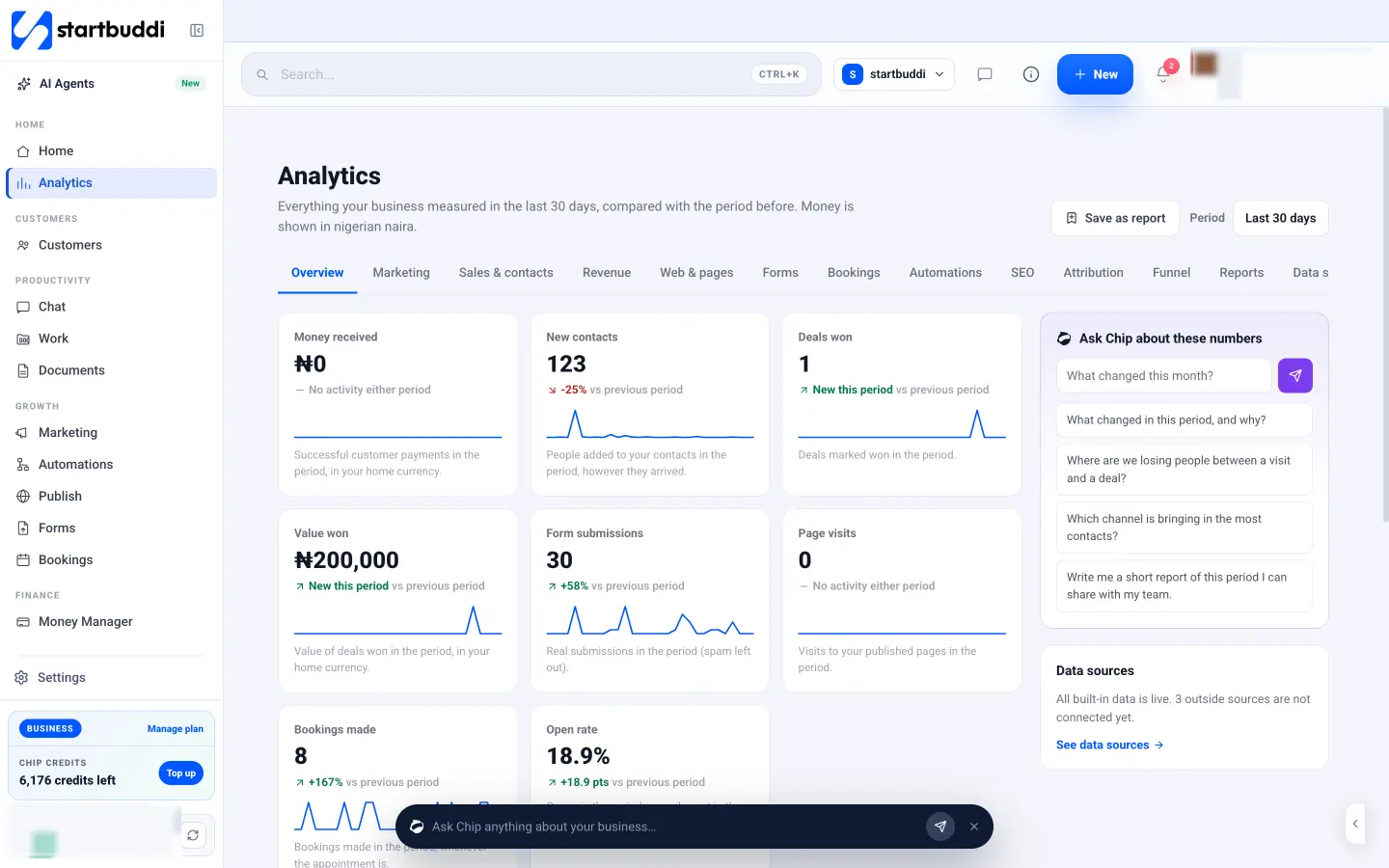
startbuddi can fill most of this template for you, because your invoices, contacts, bookings, forms and tasks are already in it.
- Open Analytics and choose “Last 7 days”. Every number is compared with the seven days before. The Overview shows money received, new contacts, deals won, form submissions, page visits and bookings.
- Save it as a report. Use Save as report, name it “Weekly report” and open it each week. You can print it or save it as a PDF to send.
- Ask Chip to write the summary. In “Ask Chip about these numbers”, ask for a short report of the period you can share with your team. Chip uses the numbers on screen and says which ones it used.
- Check money and delivery. Money Manager shows money in, money out and what’s outstanding. Work’s Reports page shows task completion, overdue work and what’s due in the next 14 days.
- Make it a habit. In Work, add a task called “Weekly report” and set it to repeat weekly.
See Analytics and Work reports, or how startbuddi helps solo founders run projects. If your weekly report feeds a team meeting, our meeting notes template keeps the decisions in one place.
Let your numbers fill themselves in
Your invoices, bookings, forms and tasks already hold most of this report. Start free with startbuddi and build your weekly report from real numbers, not memory.
Frequently asked questions
What should a weekly report include?
A weekly report should include money (cash received, invoices sent, what's overdue), sales (enquiries, quotes, jobs won), marketing results, work delivered, team notes and next week's priorities. Each number should sit next to last week's figure and a target. Keep it to one page.
How long should a weekly report be?
One page is enough for most small businesses. A three-line headline, 10 to 15 numbers and three priorities is plenty. If it runs longer, people stop reading it and you stop writing it.
What is the difference between a weekly report and a weekly status report?
A weekly business report covers the whole business: money, sales, marketing and delivery. A weekly status report usually covers one project: what was done, what's next and what's blocked. Many small teams use both, with project status feeding the delivery section.
Who should a small business send its weekly report to?
Send it to anyone who makes decisions or acts on the numbers: business partners, team leads and sometimes investors. A solo founder can keep it as a private record. Reading back over a few months of reports is how you spot trends.
When is the best time to write a weekly report?
Friday afternoon or Monday morning both work. Friday captures the week while it's fresh, and Monday lets you set priorities as the week starts. Pick one and keep it, because a regular time matters more than the day.
Omolola Akiyode is the operations and project manager at startbuddi, leading cross-functional projects and the content that helps founders get set up. Omolola writes about projects, websites and getting found online, and turns complex ideas into clear, practical steps.
Runs operations and projects at startbuddi