Meeting Notes Template That Captures Actions
A free meeting notes template built around decisions and actions: copy it, see a filled client example and the rules that turn notes into finished work.



A good meeting notes template has six parts: the meeting details, who attended, a short summary, the decisions made, an action list with an owner and due date for every item, and the open questions to carry forward. Notes built that way take ten minutes to write and tell everyone exactly what happens next.
Key takeaways
- The action list is the part that matters. Every action needs one named owner and a date, or it won’t get done.
- Write decisions as decisions (“We will…”), not as a record of who said what.
- Send the notes the same day, while people still remember the meeting.
- Informal meeting notes are not the same as formal board minutes, which some companies are legally required to keep.
- Copy the template below into whatever you use, or keep it as a document and turn the actions into tasks.
Why most meeting notes don’t lead to action
Most notes are either a transcript nobody reads or three vague lines (“discussed the website, will follow up”) nobody can act on. A week later the client asks where the revised quote is, and two people on your team each thought the other was sending it.
Meetings are expensive, too. Harvard Business Review reported in 2017 that senior executives spend nearly 23 hours a week in meetings (checked on 1 October 2026). A small business can’t spare that, so every meeting should end with something you can act on.
The meeting notes template
Copy this into a document, an email or your notes app. Delete any section that doesn’t apply, but never delete the action list.
MEETING NOTES

Meeting:        [Name of meeting or client and topic]
Date and time:  [Date, start time, time zone]
Where:          [Office address, phone or video link]
Note taker:     [Name]
Attendees:      [Names, and company for anyone external]
Apologies:      [Invited but absent]

PURPOSE
[One sentence: why this meeting happened and what it needed to decide]

SUMMARY
[Two to four sentences a person who missed the meeting could read in 30 seconds]

DECISIONS
1. [We will / We won't ...]
2.
3.

ACTION ITEMS
| # | Action (starts with a verb) | Owner | Due date | Status |
|---|------------------------------|-------|----------|--------|
| 1 |                              |       |          | Open   |
| 2 |                              |       |          | Open   |
| 3 |                              |       |          | Open   |

OPEN QUESTIONS AND RISKS
- [Question] (who will find out, by when)

PARKED FOR LATER
- [Topic raised but not discussed]

NEXT MEETING
[Date, time and the one thing it must decide]
If you already plan meetings with an agenda, keep the headings in the same order as the agenda. Our free meeting agenda template is built to pair with this one.
How to fill in each section of the meeting notes format
Header: date, attendees and apologies
Fill this in before the meeting. Record who was missing: if the person who owns the budget wasn’t there, any decision about money is provisional.
Purpose and summary
Write the purpose before the meeting and the summary straight after. If you can’t summarise it in four sentences, the meeting tried to cover too much.
Decisions
Start each decision with “We will” or “We won’t”. “Discussed pricing” is not a decision; “We will quote the retainer at the old rate until January” is. Anything left undecided goes under open questions.
Action items
This is where notes turn into work. Each action follows four rules:
- Start with a verb. “Send revised quote”, not “quote”.
- One owner. A single named person, never “team” or “us”. Others can help, but one person reports back.
- A real date. “Friday 14 November”, not “ASAP” or “next week”.
- Small enough to finish. If an action will take more than a week, split it into a first step the owner can complete before the next meeting.
Clear owners and dates are also the heart of delegating tasks well. An action list is a delegation list, written in public.
Open questions and parked topics
Open questions need an answer before you can decide. Parked topics were raised but didn’t belong in this meeting; writing them down stops them taking over the next one.
A filled-in example: a client review meeting
The example below is illustrative. Adaeze runs a four-person design studio in Lagos and meets a restaurant client every fortnight while she rebuilds their brand.
MEETING NOTES

Meeting:        Bistro Ikoyi brand refresh, fortnightly review
Date and time:  Tuesday 4 November, 10:00 to 10:40 WAT
Where:          Video call
Note taker:     Tolu (studio)
Attendees:      Adaeze, Tolu (studio); Kunle, Funmi (Bistro Ikoyi)
Apologies:      None

PURPOSE
Approve the final logo and agree the menu redesign scope.

SUMMARY
The client approved logo option B with a darker green. The menu redesign
goes ahead for the main menu only; the drinks menu waits until January.
Photography is the main risk to the 28 November launch date.

DECISIONS
1. We will use logo option B, with the green changed to the darker shade.
2. We will redesign the main menu now and the drinks menu in January.
3. We won't reprint the old menus; the client will use the current stock.

ACTION ITEMS
| # | Action                                   | Owner | Due        | Status |
|---|------------------------------------------|-------|------------|--------|
| 1 | Send final logo files in all formats     | Tolu  | Thu 6 Nov  | Open   |
| 2 | Send revised quote for main menu only    | Adaeze| Wed 5 Nov  | Open   |
| 3 | Confirm photographer date for dishes     | Funmi | Fri 7 Nov  | Open   |
| 4 | Send current menu text as a Word file    | Kunle | Fri 7 Nov  | Open   |

OPEN QUESTIONS AND RISKS
- If the photo shoot slips past 14 November, the 28 November launch moves.
  Funmi to confirm by 7 November.

PARKED FOR LATER
- New staff uniforms (Kunle raised; separate conversation in December).

NEXT MEETING
Tuesday 18 November, 10:00 WAT. Must approve the main menu layout.
The example leaves out who argued for which logo and the ten minutes on napkin colours. Nobody needs that next week. They need the four actions, two of which belong to the client.
Meeting notes vs formal meeting minutes
Meeting notes are informal: they exist so the work gets done. Meeting minutes are a formal record of a company’s governance meetings, and some are a legal requirement.
| Meeting notes | Formal minutes | |
|---|---|---|
| Used for | Team, client and project meetings | Board and shareholder meetings |
| Main purpose | Agree and track actions | Keep an official record of decisions |
| Format | Flexible, short | More formal, often approved at the next meeting |
| Legal requirement | Usually none | Often, depending on the country and company type |
In the UK, for example, section 248 of the Companies Act 2006 says every company must record minutes of all directors’ meetings (checked on 1 October 2026) and keep them for at least ten years. Nigeria, Kenya and other countries have their own company law rules. If you are a director of a limited company, check what your company registry or company secretary expects, and don’t rely on this template for board minutes.
Mistakes to avoid
- Writing a transcript. Long notes don’t get read. Capture outcomes, not the conversation.
- Actions without owners. “Follow up with the supplier” will sit there until someone asks who was meant to do it.
- Sending notes days later. By then people have their own memory of what was agreed, and it won’t match yours.
- Never closing actions. Start each meeting by reading through the last action list. It takes two minutes and is the quickest way to make actions get done.
How to do this in startbuddi
If your clients, projects and tasks are already in startbuddi, the notes and actions can live next to them.
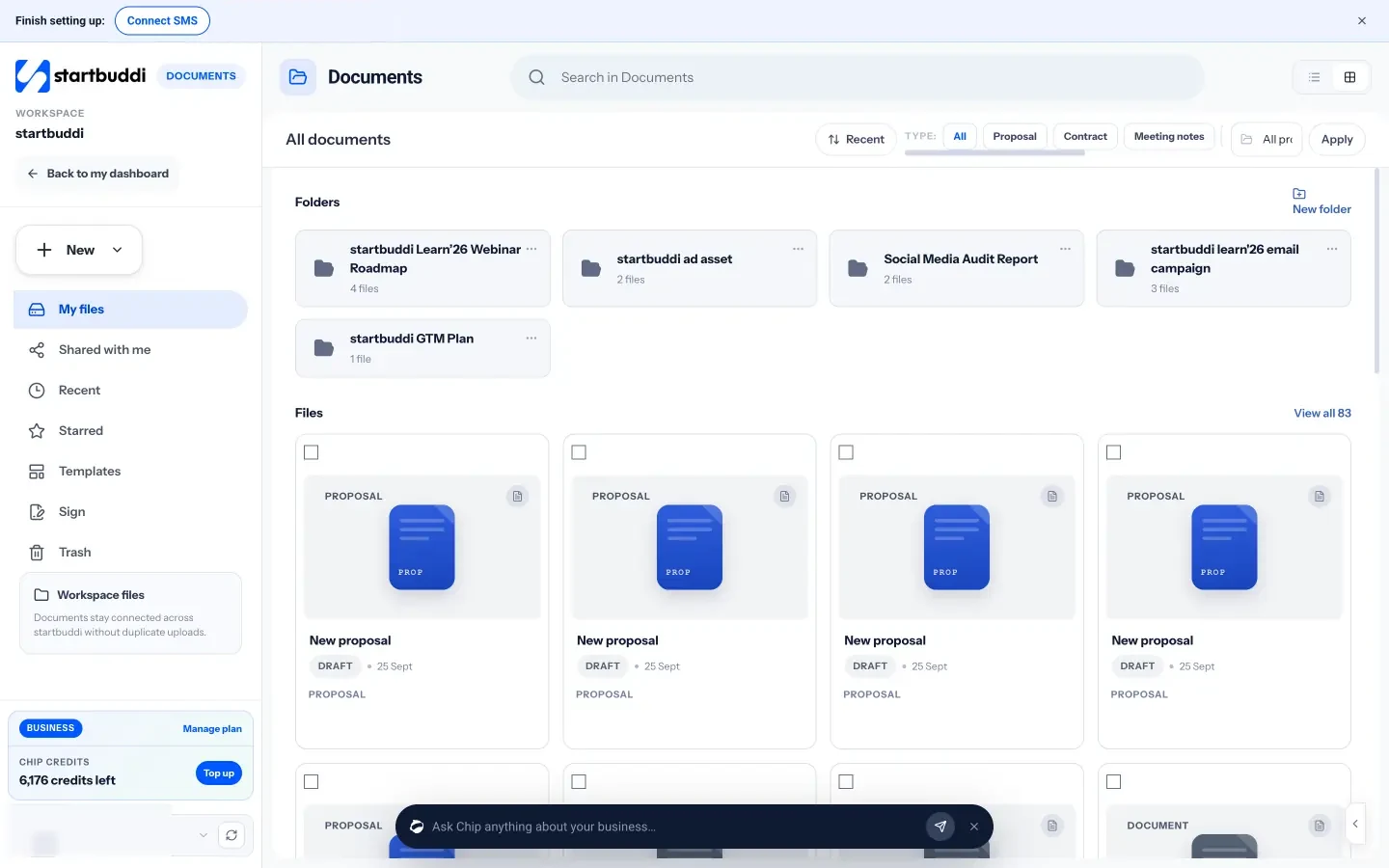
- Keep the template as a document. In Documents, click New and create a startbuddi Doc, paste the template and save it in a “Meeting notes” folder. Duplicate it for each meeting, so every set of notes has the same headings and sits in the same folder.
- Link the notes to the client or project. In the document’s Links tab, link it to the project, contact or booking it belongs to, so the notes appear where your team will look for them.
- Turn each action into a task. In Work, open My work, click Add task, and give it a title, an assignee, a due date and the project. Every task then appears in its owner’s list and calendar, and overdue tasks show under Overdue, so the action list doesn’t depend on someone rereading the notes. The My work view shows each person everything assigned to them.
- Let Chip draft the notes for video meetings. If you meet in startbuddi Live, Chip notes (on Starter and above) draft a summary, decisions and action items from the transcript after the call. You check the draft, then save it and create the tasks in one step. Everyone in the call sees when notes are on. See how meeting recording and Chip notes work.
Consultants and agencies that run several client projects at once can see how notes, tasks and projects connect in project management for consultants. If the meeting is the first one on a new job, our guide to running a project kickoff meeting covers what to agree on day one, and every deliverable you agree belongs on the action list.
Turn your next meeting into finished work
Copy the template, use it at your next client meeting, and put every action into a task with an owner and a date. If you want the notes, tasks and client records in one place, start free with startbuddi. A free plan is available.
Frequently asked questions
What should a meeting notes template include?
A meeting notes template should include the meeting name, date, attendees, purpose, a short summary, the decisions made, an action list with an owner and due date for each item, open questions and the next meeting date. The action list is the most important part, because it turns the conversation into work.
How do you take meeting notes quickly?
Prepare the header and purpose before the meeting, then listen for three things only: decisions, actions and open questions. Write actions as you hear them, with the owner's name. Tidy the notes and write the summary in the ten minutes straight after the meeting, while it's fresh.
What is the difference between meeting notes and meeting minutes?
Meeting notes are an informal record used to track actions from team and client meetings. Minutes are a formal record of governance meetings, such as board meetings, and are often approved at the next meeting. In the UK, companies must keep minutes of directors' meetings for at least ten years.
Who should take notes in a meeting?
Pick one person before the meeting starts, and make it someone other than the person running it. Rotating the job around the team works well and stops it always falling to the most junior person. The note taker should also be the one who sends the notes out.
How soon should meeting notes be sent?
Send them the same day, ideally within an hour of the meeting ending. Quick notes catch misunderstandings while they're easy to fix. If a decision was recorded wrongly, people will say so straight away rather than act on it.
Should action items go in the notes or in a task list?
Both. The notes record what was agreed, and the task list makes sure it gets done. A task management system reminds owners of due dates and shows what's overdue, which a document on its own can't do.
Tiwalade Joanna Okedara-Kalu is the founder, CEO and CTO of startbuddi, the business system that brings clients, bookings, invoices, projects, marketing and the Chip AI assistant into one place. Tiwalade builds software around how service businesses really work day to day, and writes about client management, getting paid on time and why small businesses outgrow the tools they start with.
Founded startbuddi and leads its product and engineering