How to delegate tasks: a practical guide for small business owners
Learn how to delegate tasks well: decide what to hand over, brief people clearly, follow up without micromanaging and choose collaboration tools that make it stick.

This guide explains how to delegate tasks in a small business: how to decide what to hand over, who to give it to, how to brief them so the work comes back right, and how to follow up without hovering. It is written for founders and owners who know they should delegate but keep ending up doing everything themselves, and for new managers handing work to a team for the first time.
The short answer: choose tasks that repeat, that others can learn and that cost more of your time than they are worth; give each one to a single person with a clear brief covering the outcome, the standard, the deadline and how much they can decide alone; agree when you will check in; then review the result, give feedback and gradually hand over more. The four chapters below turn that into a step-by-step method, with templates, worked numbers and the mistakes to avoid.
By the end you will have a list of tasks to hand over, a delegation brief you can reuse, a simple check-in routine, and a clear idea of which collaboration tools a small business needs to make delegation work. Each chapter ends with how to do it in startbuddi.
How to delegate tasks: what to hand over and who to give it to
- Good candidates for delegation
- What to keep, at least for now
- Worked example: what delegation is really worth
- A delegation list template
Almost every business owner reaches the same point. The business has grown enough that there is more work than one person can do well, but not so much that handing it over feels natural. So the owner keeps doing it all, working longer hours and becoming the bottleneck for every decision. The business stops growing, not because of the market, but because of the owner's calendar.
Delegation is the way out. This chapter explains why it matters, why it feels so hard, and how to decide which tasks to hand over first and who to hand them to.
Why learning how to delegate tasks matters
Delegation means giving someone else the responsibility for a piece of work, along with the information and authority to do it. It is different from simply asking for help. When you delegate, the other person owns the result.
The research on this is striking. Gallup studied the "Delegator" talent in entrepreneurs and found that among 143 CEOs on the Inc. 500 list, those with high Delegator talent posted an average three-year growth rate of 1,751 percent, 112 percentage points higher than CEOs with limited or low Delegator talent. They also generated 33 percent more revenue. Yet Gallup found that only about one in four employer entrepreneurs had high levels of the talent (Gallup, delegating: a huge management challenge for entrepreneurs).
In other words, delegation is strongly linked to growth, and most owners find it difficult. The good news is that, unlike a talent, the process of delegating can be learned.
Why delegation feels so hard
If delegation is so valuable, why do owners avoid it? The reasons are very human, and naming them helps.
- "It is faster to do it myself." True for the first time. Not true for the fiftieth. Explaining a task once might take an hour, but it saves that hour every week afterwards.
- "Nobody will do it as well as me." Maybe not at first. But 80 percent as good, done by someone else, often beats 100 percent done late by an exhausted owner.
- "I can't afford help." Sometimes true. But the maths in this chapter often shows you cannot afford not to delegate.
- "I don't want to burden people." Most team members want more responsibility, not less. Delegation is a sign of trust.
- "I like doing it." A good reason to keep a task, if it is also valuable. A bad reason if it is keeping you from more important work.
- "I don't know how to explain it." This is the real blocker for many owners, and Chapter 2 solves it.
Signs you are the bottleneck
- Work regularly waits for your approval or your answer.
- Your team asks you questions they could answer themselves, because the information only lives with you.
- You are working evenings and weekends while others finish on time.
- You cannot take a holiday without checking messages every day.
- Good ideas and opportunities sit untouched because you have no time to act on them.
- Customers ask for you by name for things anyone could handle.
If three or more apply, delegation is probably the single biggest lever for growing your business, and for getting your evenings back.
Delegating versus dumping
Handing someone a task you do not want, with no context, no deadline and no authority, is not delegation. It is dumping, and it usually ends with the work coming back wrong, the owner doing it again and both people deciding delegation does not work. The difference comes down to a few things:
| Dumping | Delegating |
|---|---|
| "Can you sort out the newsletter?" | "Can you own the monthly newsletter? Here is what good looks like, the template, the deadline and when we will review it." |
| Only unpleasant tasks | A mix, including work that helps the person grow |
| No authority to decide | Clear limits on what they can decide alone |
| Owner takes it back at the first problem | Owner coaches through problems |
What to delegate first
Start with a list. For one week, every time you do a task, ask: "Could someone else do this, with the right instructions?" Write down every yes. If you ran a time audit (see our guide to time management for business owners), your "running" and "reacting" work is the best place to look. Then sort the list using these questions.
Good candidates for delegation
- Repeatable tasks: anything that happens weekly or monthly, such as invoicing, scheduling, social posts, reporting and supplier orders.
- Teachable tasks: work you can explain in a page or show in an hour.
- Tasks below your hourly value: work that someone could do for much less than your time is worth (see the worked example below).
- Tasks someone else would do better: a bookkeeper will do the books better than most founders. A designer will make better graphics.
- Tasks that develop your team: work that stretches someone and builds skills they want.
What to keep, at least for now
- Setting the direction and priorities of the business.
- Key relationships, such as your biggest clients, investors and partners.
- Hiring decisions and sensitive people matters.
- Final decisions on money above a limit you set.
- Anything confidential that you cannot yet share.
Worked example: what delegation is really worth
Suppose your time is worth $60 an hour, based on the income you want and the hours you can spend on earning and growing work. You spend eight hours a week on tasks that fit the list above: four hours on bookings and customer messages, two on invoicing and chasing payments, and two on social posts.
| Task | Your hours a week | Cost of your time | Option | Cost to delegate |
|---|---|---|---|---|
| Bookings and messages | 4 | $240 | Part-time assistant at $18 an hour, 4 hours | $72 |
| Invoicing and chasing | 2 | $120 | Bookkeeper, fixed fee about $40 a week | $40 |
| Social posts | 2 | $120 | Freelancer, about $50 a week | $50 |
| Total | 8 | $480 | $162 |
On paper, delegating costs $162 a week and frees eight hours worth $480. The saving only becomes real if you spend those hours on earning or growing work, such as sales calls or improving your service. The same maths works in any currency. In Nigeria, for example, an owner valuing their time at ₦25,000 an hour might delegate admin to an assistant at a small fraction of that rate. Check local rates where you are; these figures are illustrations, not benchmarks.
Who to delegate to
You do not need a full-time employee to start delegating. Match the task to the right kind of help.
| Option | Best for | Watch out for |
|---|---|---|
| An existing team member | Work close to their role that helps them grow | Overloading your best people |
| A part-time or virtual assistant | Admin, scheduling, inbox, data entry | Access to sensitive data; clear instructions needed |
| A freelancer | Specialist tasks such as design, writing, bookkeeping, development | Availability and consistency; agree scope and deadlines in writing |
| An agency or service provider | Whole functions, such as payroll or marketing | Higher cost; less direct control |
| A business partner | Areas where they have more skill or interest | Blurred roles; agree who owns what |
| Software | Repetitive steps triggered by events | Automating a broken process |
Delegating when you do not have a team yet
Solo founders often think delegation starts with the first hire. It starts earlier. You can hand over a single, well-defined job to a freelancer for a few hours a month: bookkeeping, editing, design, data entry. You can use a virtual assistant for scheduling and inbox management a few hours a week. And you can hand repeat steps to software, such as booking confirmations and payment reminders. Each small handover teaches you how to brief, check and trust, which makes your first real hire far smoother.
Start with one task that is clearly defined, easy to check and low risk if it goes wrong. A good first job for many owners is scheduling, because the brief is simple (your availability, your rules) and mistakes are easy to spot and fix.
Delegate decisions, not just tasks
Handing over tasks frees your hands. Handing over decisions frees your head. If every refund, discount, supplier choice or schedule change still needs your approval, your team will wait for you, and you will still be interrupted all day. Set clear decision rights: "You can approve refunds up to $100", "You can move bookings within the same week without asking", "You can choose suppliers from this approved list". Written limits give people confidence to act and give you peace of mind that nothing big happens without you.
A delegation list template
Keep your list in a simple table and review it monthly.
| Task | Hours a week | Repeats? | Teachable? | Delegate to | Brief or SOP ready? | Start date |
|---|---|---|---|---|---|---|
| Booking confirmations | 2 | Daily | Yes | Software plus assistant | Yes | 1 Oct |
| Monthly newsletter | 3 | Monthly | Yes | Amara | Drafting | 1 Nov |
| Bookkeeping | 2 | Weekly | Yes | Bookkeeper | No | Find one by 15 Nov |
How much to hand over at once
Resist the urge to delegate everything in one go after reading a guide like this. Handing over too much at once overwhelms both you and the people receiving the work, and it makes it hard to tell which handovers are working. Three tasks at a time is a good pace for most small businesses. Get those running smoothly, turn their briefs into procedures, then choose the next three. Within six months, the list of things only you can do will look very different.
Prepare before you hand anything over
A little preparation makes the first handovers far smoother. Gather the templates, logins, examples and contacts each task needs. Tidy the folder the person will work from. Write down the decisions you usually make without thinking, such as which customers get priority or when you offer a discount. An hour of preparation now saves many hours of questions later, and it often reveals that the task was more complicated in your head than it needs to be.
Common mistakes when starting to delegate
- Delegating only the worst tasks. People notice. Mix in interesting work.
- Waiting until you are desperate. Delegating in a crisis leaves no time to explain. Start when you have a little breathing room.
- Delegating to the busiest person. Check their workload first.
- Handing over half a task. Give ownership of a whole, clear piece of work where possible.
Bringing people into startbuddi
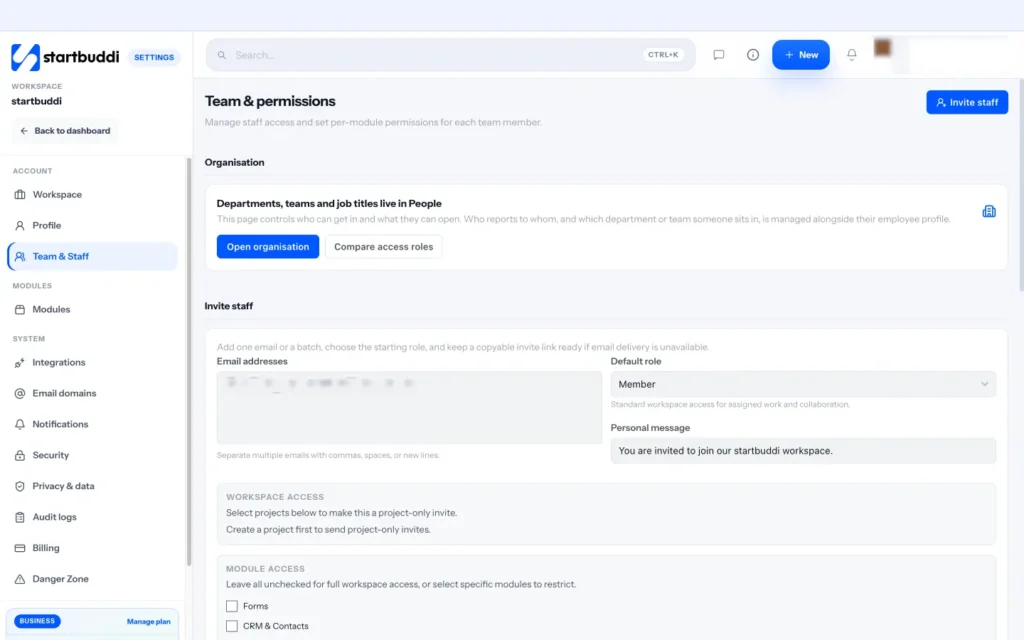
Before you can hand work over in a shared system, the people doing it need access. In startbuddi, open Settings, then Team & Staff, and use Invite staff. You can invite one email or a batch, choose a starting role, add a personal message, and restrict access to particular modules or to specific projects only, which is useful for a freelancer who should see one client's work and nothing else.
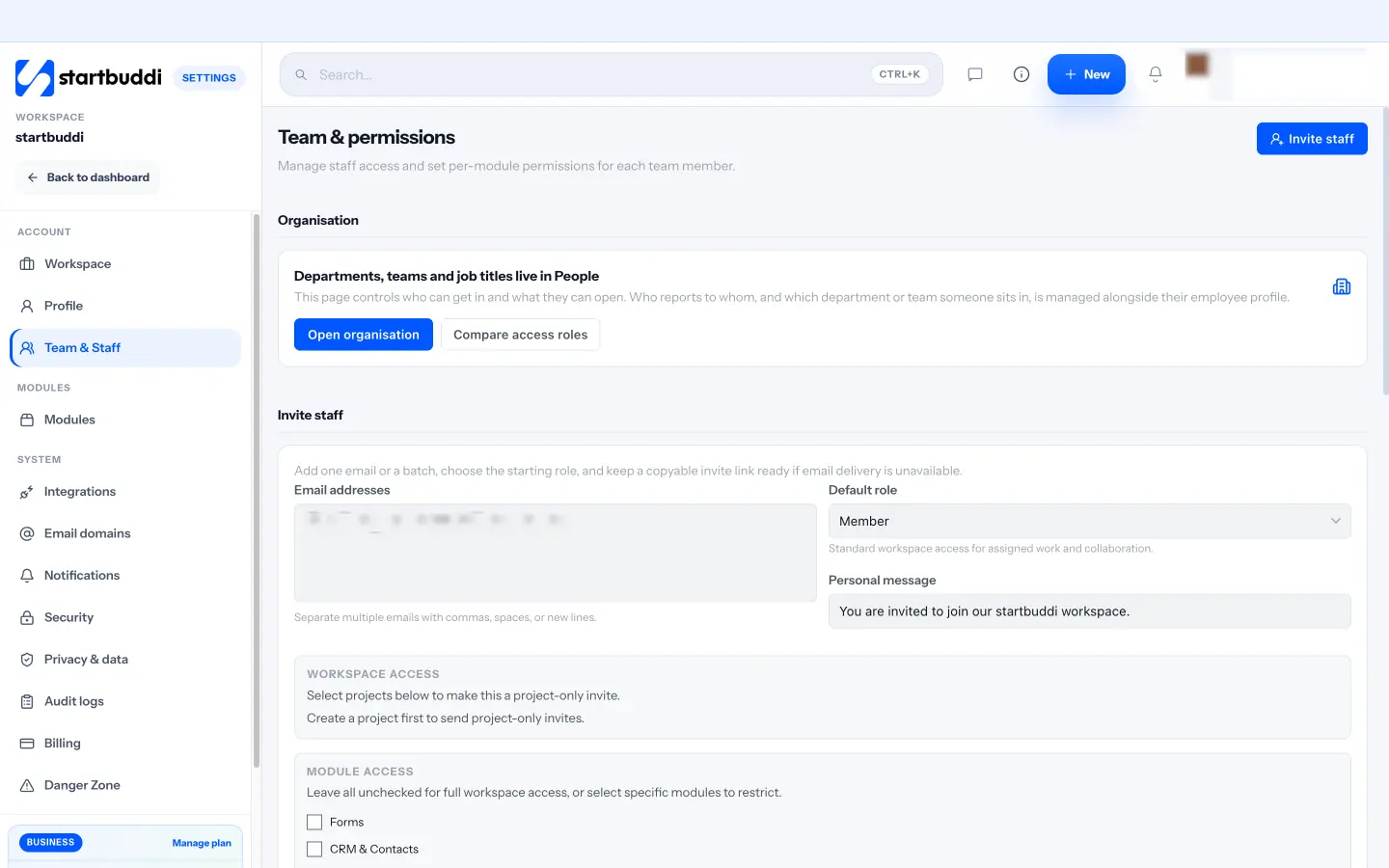
Roles run from Owner and Admin through Manager, Member and View only, plus a Client role that sees only the projects they are added to. A simple rule from the roles page: start with Member for most teammates, and use Manager when someone owns delivery or client work. Seats depend on your plan: Free includes one seat, Starter two, Growth five and Scale 15, and team invites need a paid plan. Your task for this chapter: list every task you did last week that someone else could do, and pick three to delegate first.
Hand it over well: the delegation brief and levels of delegation
- 1. Choose the right person
- 2. Explain the outcome and why it matters
- 3. Set the standard
- 4. Agree the deadline and milestones
- 5. Give them what they need
- 6. Be clear about authority
- 7. Agree how and when you will check in
Most delegation fails at the handover. The owner says "can you take care of this?", the other person nods, and a week later the result is not what the owner imagined. Neither person did anything wrong. The brief simply lived in one head and not the other. This chapter gives you a step-by-step method for handing over a task, a brief template you can copy, and a way to decide how much freedom to give.
How to delegate tasks: the seven-step handover
1. Choose the right person
Match the task to someone with the skills, or the potential to learn them, and the time. Ask about their current workload before you add to it. A great person with no capacity will do the new task badly or let something else slip.
2. Explain the outcome and why it matters
Start with what done looks like and why it matters to the business or the customer. "The goal is that every new client feels welcomed and has everything they need within a week, because the first week sets the tone for the whole relationship." People make better decisions when they know the purpose.
3. Set the standard
Describe what good looks like, ideally with an example. Show a past newsletter you liked, a report layout, a finished job. If a written procedure exists, share it. If not, this is a good moment to write one; our guide on how to write standard operating procedures shows how.
4. Agree the deadline and milestones
Give a clear date, and for bigger tasks, one or two checkpoints before it. "Draft by Wednesday, final by Friday."
5. Give them what they need
Access to tools, files, contacts and budget. Nothing slows delegated work more than waiting for a login.
6. Be clear about authority
Say exactly what they can decide alone and what needs your approval. "You can choose the images and write the copy. Check with me before offering any discount." See the levels of delegation below.
7. Agree how and when you will check in
Decide together how progress will be visible and when you will talk. "Update the task when the draft is ready, and let's have ten minutes on Thursday." Then confirm understanding by asking them to explain the task back in their own words. It feels awkward the first time, but it catches most misunderstandings in seconds.
A delegation brief template you can copy
Task: Produce and send the monthly customer newsletter.
Owner: Amara (from October).
Outcome: A newsletter sent to all subscribers by the first Tuesday of each month.
Why it matters: It brings back past customers; last year's best month came after a newsletter offer.
What good looks like: Three short sections (news, a tip, an offer), one clear button, our brand colours. See the March issue as an example.
Deadline and checkpoints: Draft in the shared folder by the Friday before; send on Tuesday by 10:00.
Resources: Newsletter template, brand kit, customer list, last year's issues.
You can decide: Topics, images, subject line, send time.
Check with me first: Any discount over 10 percent; anything about prices or new services.
Check-ins: I will review the first two drafts; after that, I will read it when it goes out.
Every brief should answer the same questions: what, why, to what standard, by when, with what, with how much freedom, and how you will stay in touch. If you use the same template every time, people learn what to expect and briefing gets faster.
Choose the right level of delegation
Delegation is not all or nothing. How much freedom you give depends on the person's experience and the risk of the task. A useful way to think about it is as a ladder of five levels:
| Level | What you say | Use it when |
|---|---|---|
| 1. Do exactly this | "Follow these steps exactly." | New person, high-risk task, first time |
| 2. Research and report | "Look into the options and tell me what you find. I will decide." | You want their input but need to own the decision |
| 3. Recommend | "Look into it and recommend what we should do." | They are building judgement; you still approve |
| 4. Decide and tell me | "Decide, then let me know what you did." | They are experienced; you want visibility |
| 5. Own it | "This is yours. Tell me only if there is a problem." | Proven track record on this kind of work |
Say the level out loud when you hand over the task. Many delegation problems are really level problems: the owner expected level 3 ("recommend") and got level 4 ("I've already done it"), or the team member thought they were at level 5 and felt undermined when the owner stepped in. As trust grows, move people up the ladder task by task.
How to hand over a task you have always done
The hardest tasks to delegate are the ones you have done for years, because so much of the knowledge is automatic. Use a three-stage handover, especially for anything that affects customers or money:
- They watch you. Do the task while they observe and take notes. Talk through the decisions you make, not just the clicks.
- You watch them. They do it, you sit alongside and only step in if something is about to go wrong.
- They do it, you check the result. Review the output, not the process, for the first few rounds.
After two or three good rounds, step back to the agreed level of delegation. Turn their notes into a written procedure so the next handover is easier.
Expect the first handover of any task to take longer than doing it yourself. That is normal and it is an investment. Count the payback over months, not over the first week.
What to say: example delegation messages
Here are three short examples for different situations. Adapt them to your tone.
- A new, simple task (level 1): "Could you take over sending booking confirmations from Monday? The steps are in this document. Please follow them exactly for the first two weeks, and message me if anything doesn't fit. Thanks, this frees up a couple of hours a week for me."
- A task that builds judgement (level 3): "We need a new supplier for packaging before the end of the month. Could you compare three options on price, delivery time and minimum order, and recommend one by the 20th? Budget is up to $400 a month."
- A task you are handing over fully (level 5): "From next month the monthly client report is yours. You've done the last three brilliantly. Use your judgement on format; just flag anything that might worry a client before it goes out."
One-off tasks versus recurring responsibilities
Delegating a one-off task, such as researching a new supplier, needs a clear brief and a deadline. Delegating a recurring responsibility, such as the monthly newsletter or weekly supplier orders, needs more: a written procedure, a recurring reminder, a standard for quality and an agreement about what happens when the person is away. Recurring responsibilities are where delegation pays off most, because the effort of the handover is repaid every week or month. When you hand one over, make the new owner's name visible to the whole team, so questions go to them rather than to you.
Put the brief where the work lives
A brief sent by email or explained on a call tends to get lost. Put it in the task itself, or link it from the task, so the person can find it the moment they start work, and so anyone covering for them can pick it up. If the task repeats, the brief becomes part of the procedure and never has to be explained again.
Agree what happens when they get stuck
Every delegated task hits a snag sooner or later: missing information, an unexpected customer request, a tool that does not work. Agree in advance what the person should do. A good rule is "try for 20 minutes, then ask", with a named person to ask if you are not available. Encourage people to bring a suggested answer with the question: "The client wants the report on Thursday instead of Friday. I think we can do it if I move the supplier review to next week. OK?" That habit builds judgement, keeps things moving and keeps your answers short.
Delegating to freelancers and outside help
The same principles apply to people outside the business, with a few additions. Put the scope, deadline, price and ownership of the work in writing before they start. A short agreement protects both sides; our free freelance agreement template is a starting point. Give them access only to what they need. Agree how you will communicate, how often and where files will live. And start with a small, paid test task before handing over anything large.
Delegate the outcome, not every step
Where you can, hand over a whole outcome rather than a list of tiny steps. "Make sure every booking is confirmed and reminded" is more motivating and more useful than "send these five emails". Owning an outcome lets the person improve how the work is done, spot problems early and take pride in the result. Step-by-step instructions are right for the first few rounds or for high-risk tasks, but the aim is always to move towards ownership of the result.
Handover mistakes to avoid
- Explaining the steps but not the purpose. People can follow steps, but they cannot handle surprises without knowing why.
- No deadline, or "whenever you can". Undated work is always last in the queue.
- Delegating the task but not the authority. If every decision still needs you, you have not freed any time.
- Giving the same task to two people. Each assumes the other has it.
- Handing over in a corridor. A rushed, verbal handover is the most common cause of work coming back wrong.
Handing over tasks in startbuddi
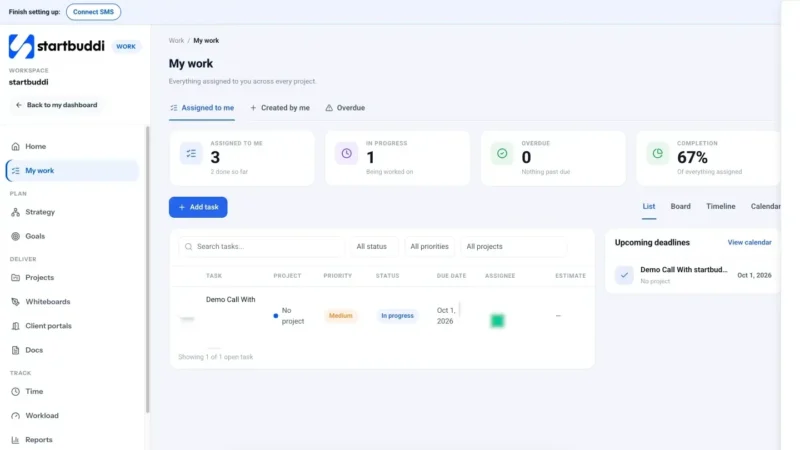
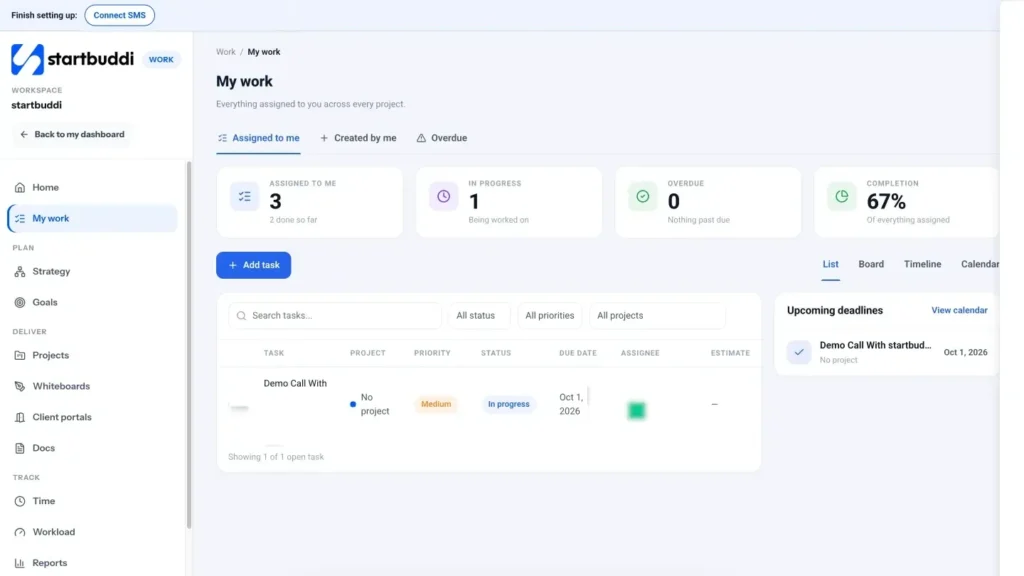
In startbuddi, delegated work lives in Work as tasks. When you create a task with Add task, the form has a title, a description for your brief, the project, the assignee, status, priority (Urgent, High, Medium or Low) and a due date, and it can repeat daily, weekly or monthly for recurring work. Inside a task you can add subtasks for the checkpoints, set an estimate in hours, link a document such as the SOP or the brief, attach files, and comment. Type @ to mention the person, so they are notified, or @chip to ask Chip, the built-in AI assistant, to help with the task.
Each person sees their work in My work, across every project. As the person delegating, use the Created by me tab to see every task you have handed to someone else and where it stands, without chasing people for updates.
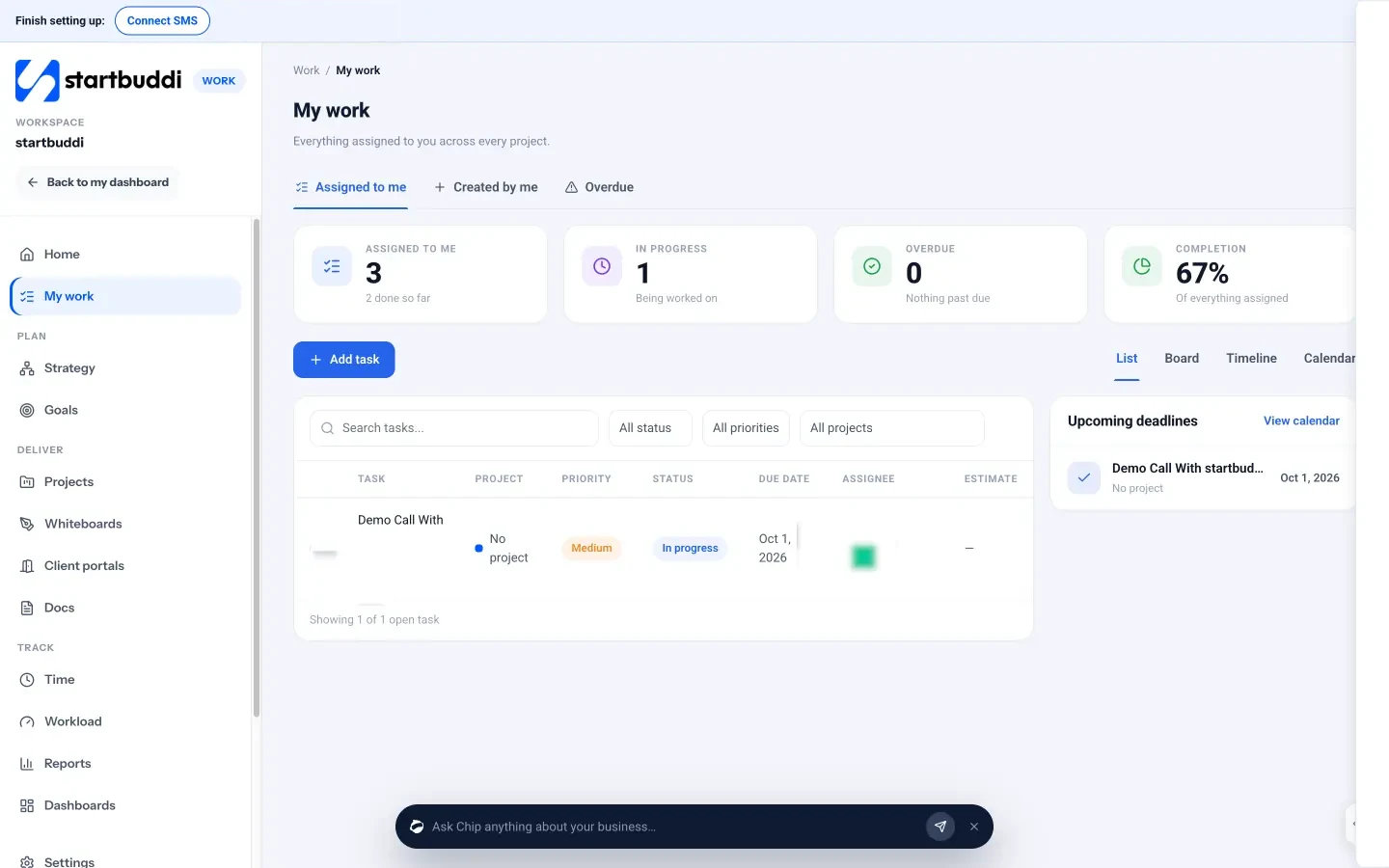
If the task is part of a bigger piece of work, put it in a project, so the person can see the context, the milestones and who else is involved. The help article on assigning tasks to team members walks through it step by step, and the My work page covers the task features. A good habit is to write the brief straight into the task description using the template headings, so the outcome, standard, deadline and decision limits travel with the work. Your task for this chapter: write a brief for the first task on your delegation list using the template, agree the level, and hand it over.
Follow up without micromanaging: check-ins, feedback and trust
Once a task is handed over, a new challenge begins. Check too little and problems surface too late. Check too much and you become a micromanager, the person you were delegating to stops thinking for themselves, and you have not saved any time at all. This chapter shows how to stay informed without hovering, how to give feedback that helps, what to do when delegated work goes wrong, and how to build trust so you can hand over more.
Follow up without micromanaging
The difference between supporting and micromanaging is mostly about what you check and when. Micromanagers check how the work is being done, often and unannounced. Good delegators check the progress and the result, at agreed times.
- Agree the check-ins in advance. "Let's look at the draft on Wednesday" is support. Dropping by every two hours to ask how it is going is micromanagement.
- Make progress visible without asking. If tasks are updated in a shared tool, you can see where things stand at a glance, and the person does not have to stop work to report.
- Match the check-ins to the level. More often for level 1 and new people; less often as you move up the ladder from Chapter 2.
- Ask questions rather than giving answers. "What options have you considered?" builds judgement. "Just do it this way" builds dependence.
- Resist the urge to redo. If the result is good enough, accept it, even if you would have done it differently.
A simple check-in routine
For most small teams, one short weekly check-in covers all delegated work. Keep it to 15 or 20 minutes per person, and use the same questions each time:
- What have you finished since we last spoke?
- What are you working on next?
- Is anything blocked, or waiting on me?
- Is there anything you are unsure about?
The third question matters most. In small businesses, delegated work is very often blocked by the owner: an approval not given, a login not shared, a question not answered. A weekly check-in exposes those quickly. Make it your job to clear them the same day.
Give feedback that helps
Feedback is how delegated work gets better over time. It works best when it is specific, timely and about the work rather than the person. A simple structure is to describe the situation, the behaviour you saw and the impact it had.
- Positive example: "In yesterday's client report (situation), you added a summary at the top with the three key numbers (behaviour). The client replied within an hour saying it was the clearest report she'd had (impact). Please keep doing that."
- Constructive example: "On Tuesday's quote (situation), the delivery date was left out (behaviour), so the customer called to ask and we nearly lost the job to a faster competitor (impact). Can we add the delivery date to the quote checklist?"
Notice that the constructive example ends with a fix to the process, not a telling-off. When delegated work goes wrong, the cause is usually a gap in the brief, the procedure or the training, not a lack of effort. Give positive feedback at least as often as constructive feedback; people repeat what is noticed.
When delegated work goes wrong
It will happen. A deadline is missed, a customer gets the wrong information, the result is not what you pictured. How you respond decides whether delegation survives in your business. Work through these steps:
- Fix the immediate problem. Look after the customer first, together with the person if possible.
- Find the cause without blame. Was the brief unclear? Was the level wrong? Were they overloaded? Was information missing?
- Fix the system. Update the brief, the SOP, the checklist or the training so it cannot happen the same way again.
- Keep the task with them. Taking it back at the first mistake teaches everyone that delegation is temporary. Adjust the level instead, perhaps moving back one step on the ladder for a while.
Finally, ask for feedback on your own delegation too. "Was my brief clear enough? What would have helped?" People will tell you, and your next handover will be better for it.
Build trust step by step
Trust in delegation is built through small wins. Start people on lower-risk tasks at lower levels, notice when they do well, and move them up. Over a few months, a team member can go from following a checklist to owning an entire area of the business. Keep a simple note of what each person owns and at what level. Review it every quarter and ask them what they would like to take on next. Many people are ready for more responsibility long before owners offer it.
Watch workload, not just results
Delegation can go wrong in the opposite direction: handing so much to your best people that they burn out. Before adding work to someone's list, check what they already have. Signs of overload include missed deadlines from someone who is usually reliable, work that is rushed, and people staying late regularly. When you delegate something new, ask what can come off their list to make room, and be willing to drop, delay or reassign something else.
Worked example: a delegation review after three months
Picture a small agency owner who delegated five areas in the first quarter. At the review, her notes might look like this:
| Area | Owner | Level now | How it is going | Next step |
|---|---|---|---|---|
| Booking and calendar | Assistant | 4 (decide and tell) | Smooth; owner has not touched it in six weeks | Move to level 5 |
| Monthly client reports | Account manager | 3 (recommend) | Good; one late report | Add report dates to recurring tasks |
| Social media posts | Freelancer | 2 (research and report) | Quality uneven | Write an SOP with examples; review weekly |
| Invoicing | Bookkeeper | 5 (own it) | Paid faster than before | No change |
| Supplier orders | Assistant | 1 (do exactly this) | Just started | Review after four orders |
A table like this takes 20 minutes a quarter and shows exactly where to invest attention. In this example, it also shows the owner has freed roughly a day a week.
Watch out for work flowing back to you
A common trap is reverse delegation. You hand a task over, the person hits a problem and brings it back to you, and before you know it you have agreed to "look into it". The task is back on your list. When someone brings you a problem with delegated work, help them think it through, but leave the next action with them: "What do you think the options are? Which would you choose? Great, go ahead and let me know how it goes." The task stays delegated, and their confidence grows.
Let people make small mistakes
If you only delegate work that cannot possibly go wrong, people never learn to handle problems. Where the stakes are low, let people take their own approach even if you suspect it will not work perfectly, and talk about it afterwards. A small mistake on an internal task is a cheap lesson. Save your early intervention for anything that affects customers, safety or money.
Replace some meetings with written updates
For routine delegated work, a short written update often works better than a meeting. Ask each person to post two or three lines at the end of the week in the relevant project room or task: what they finished, what is next and anything blocked. You read them in five minutes and only book a call when something needs discussion. It respects everyone's time, and it builds a written record of progress that is useful for reviews.
Hold regular one-to-ones
Weekly check-ins cover the work. A monthly one-to-one covers the person. Spend 30 minutes asking how they are finding their responsibilities, what they would like to learn, what is frustrating them and what they would like to take on next. Listen more than you talk. These conversations are where you find out that someone is quietly overloaded, bored, or ready for a bigger role, all of which affect how you delegate next.
When someone does not want more responsibility
Not everyone wants to take on more, and that is fine. Some people prefer a clear, stable role. Ask rather than assume, and explain what is in it for them: new skills, more interesting work, a stronger case for a pay rise or promotion. If someone is reluctant because they fear getting it wrong, start at a lower level with more support. If they simply do not want it, find someone who does. Forcing responsibility onto an unwilling person rarely ends well for either of you.
Recognise the people who take work off your plate
When someone takes over a task you used to do, and does it well, say so, specifically and in front of others where appropriate. Where the extra responsibility is significant and lasting, it should also be reflected in their role, their title or their pay at the next review. Delegation that only ever adds work, without recognition, slowly wears down your best people.
When managers delegate in turn
As the business grows, the people you delegate to will start delegating to others. Share the same method with them: the brief template, the levels of delegation and the check-in questions. A shared way of handing over work means that quality stays consistent as it passes through more hands, and it stops every problem flowing back up to you.
Measure how delegation is going
Every few months, check a few simple signs. How many hours a week have you freed, and what are you doing with them? How many questions a week come back to you about delegated work? Are delegated tasks finished on time and to the standard? Are the people you delegate to growing in confidence and asking for more? If the hours freed are being swallowed by new admin rather than growth work, delegation is working but your priorities need attention.
Follow-up mistakes to avoid
- Checking in randomly. Unplanned check-ins feel like distrust.
- Only speaking up when something goes wrong. Praise good work too.
- Being the blocker. Answer questions and approvals quickly, or delegate the approval as well.
- Moving the goalposts. If your expectations change, update the brief and tell the person.
Following up on delegated work in startbuddi
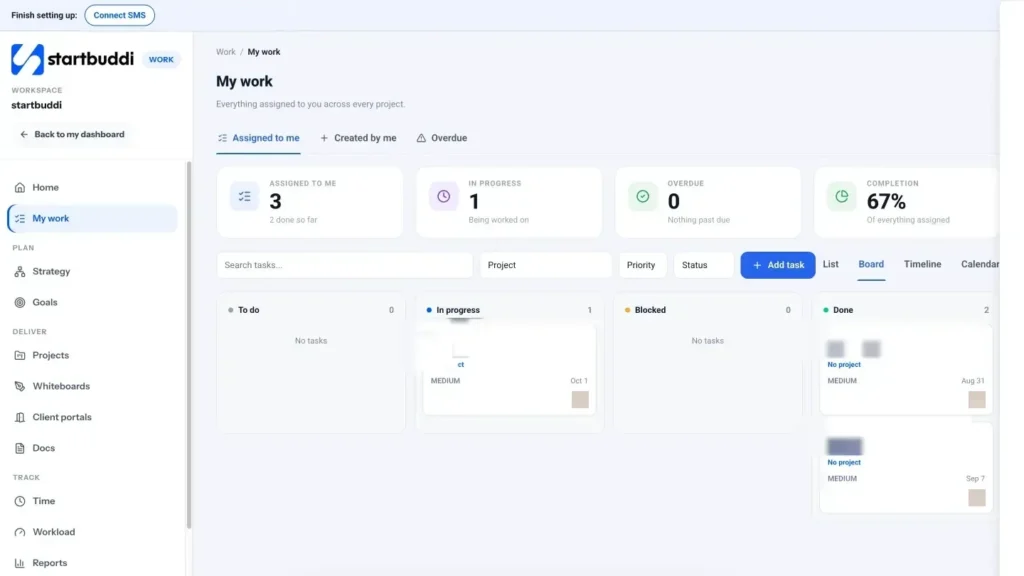
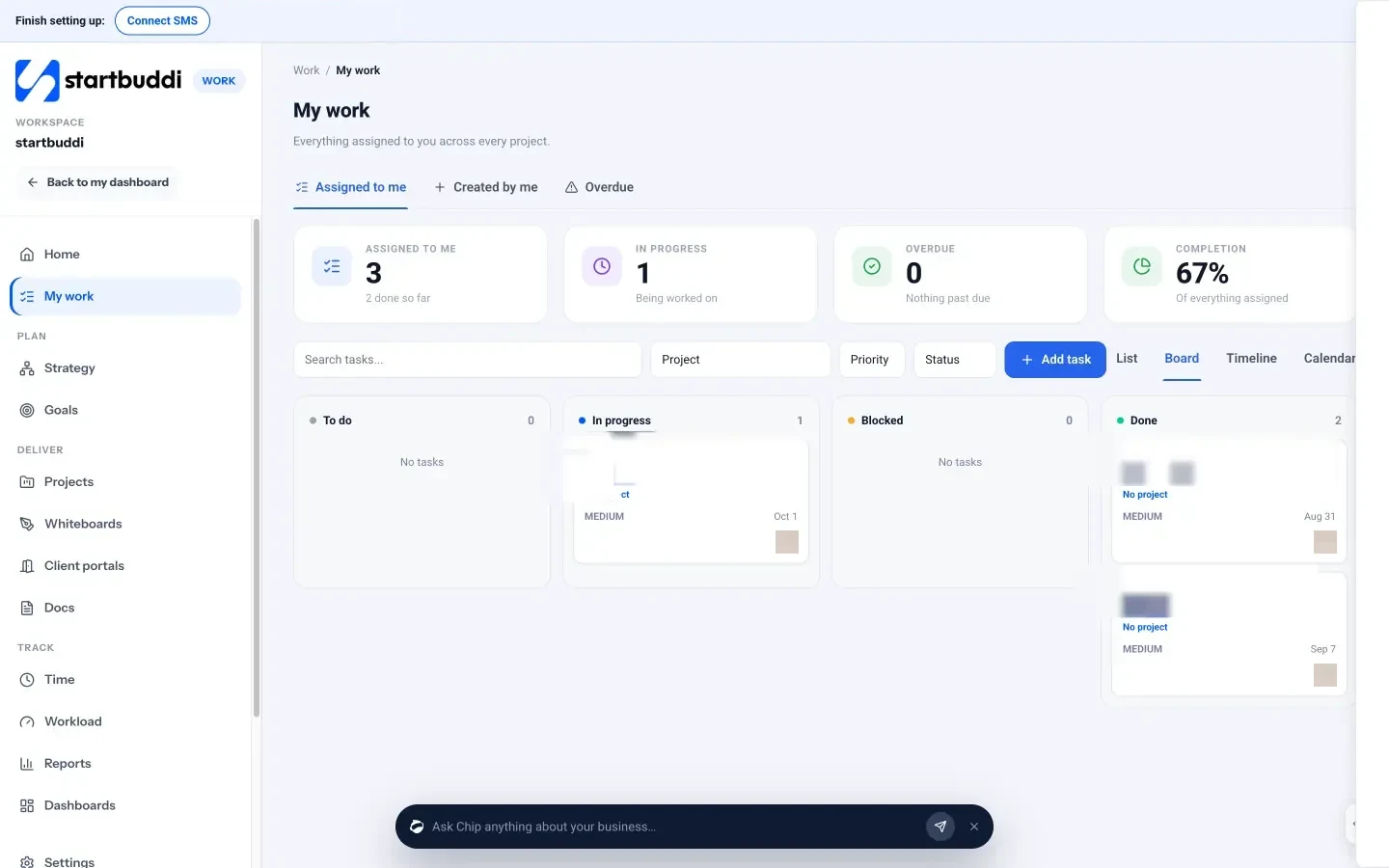
In startbuddi, the Board view in My work or inside a project shows tasks as cards in columns such as To do, In progress and Done. It is a quick way to see where delegated work stands before a check-in, without anyone having to write a status update. Comments on each task keep the conversation, decisions and files together, and @mentions notify the right person.
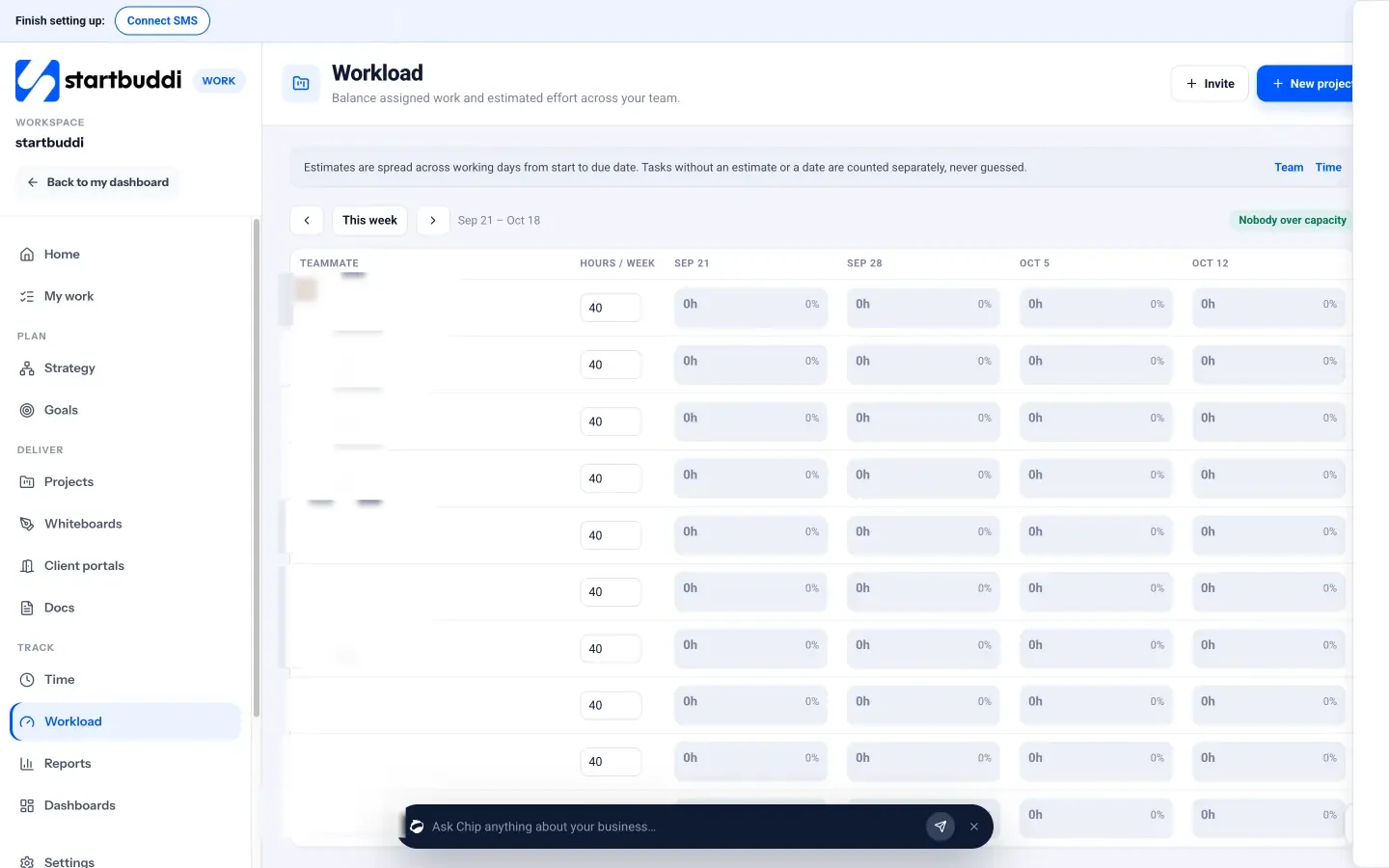
Before you hand over more work, managers, admins and owners can open Workload to see each teammate's hours per week, worked out from task estimates spread across the working days between start and due date. Tasks without an estimate or a date are counted separately rather than guessed. If someone is over capacity, you can reassign a task straight from the grid.
Inside a project, the Overview tab lists overdue items and a "Needs attention" section, which makes a ready-made agenda for your weekly check-in. You can also filter tasks by assignee or status before a check-in, so the conversation starts from what the list shows rather than from memory. Your task for this chapter: book a weekly 15-minute check-in with each person you delegate to, and use the four questions for the next month.
The best collaboration tools for small business delegation

Delegation depends on information moving easily between people. When tasks, files and conversations are scattered across email, three chat apps, personal drives and someone's notebook, handing work over means handing over a treasure hunt. The right collaboration tools make delegation almost effortless: everyone knows what they own, where the files are and where to ask questions. This chapter helps you choose the best collaboration tools for a small business, set them up so delegation works, and avoid the common tool traps.
What collaboration tools need to do for delegation
Forget brand names for a moment and think about the jobs. For delegation to work, your tools need to cover five things.
- Tasks with owners and dates. One shared place where every delegated piece of work has one owner, a due date and a status.
- Conversation next to the work. A way to discuss a task or project without losing the thread in a busy group chat.
- Shared documents and files. Briefs, procedures and deliverables in one place everyone can reach, with the latest version obvious.
- The right access for each person. Staff, freelancers and clients each see what they need and nothing more.
- A view of progress and workload. So you can see where things stand and who has capacity.
Many small businesses cover these with four or five separate tools. Others use one all-in-one app. Both can work; what matters is that everyone uses the same set and knows where each kind of information lives. If you want the background on task tools specifically, read our explanation of a task management system.
How to choose the best collaboration tools for a small business
Use these questions to compare options for your team.
- Will people actually use it? The simplest tool your team opens every day beats the most capable one they avoid. Try it with the least technical person on your team.
- Does it keep context together? Can you see a task, its files and its discussion in one place, or will people keep switching apps?
- Can you control access? Look for roles and the ability to give a freelancer or client access to one project only.
- What does it cost as you grow? Many tools charge per person. Count staff, freelancers and clients who need access, and check whether guests or clients count as paid seats.
- Does it work on a phone? Essential if your team works on site, in a shop or on the road.
- Can you get your data out? Check export options before you commit.
- Does it connect to the rest of your business? Delegated client work often touches your customer list, invoices and bookings. Copying information between tools wastes the time delegation was supposed to save.
Our pages comparing tools side by side, such as startbuddi vs Notion, and the researched list of the best project management software set out the facts if you are weighing up specific products.
Set simple rules for where things go
Tools only help if everyone uses them the same way. Agree a short set of rules and write them down, ideally as a one-page SOP. For example:
| If it is... | It goes... |
|---|---|
| A piece of work someone must do | A task, with one owner and a due date |
| A discussion about a project | That project's chat room or the task comments |
| A quick question to one person | A direct message |
| A company-wide announcement | The announcements channel |
| A brief, procedure or deliverable | The shared documents area, linked from the task |
| A customer conversation | The customer inbox, not the team chat |
The rule that matters most: if it is not a task, it is not happening. A request made in chat should be turned into a task before anyone agrees to it.
Communication habits that support delegation
- Write things down. Decisions made in a call should be written in the task or project the same day.
- Default to shared channels. Private messages hide information. Project discussions belong in the project room, so anyone picking up the work later can read the history.
- Set response expectations. Agree what needs an answer within an hour and what can wait until tomorrow, so people are not tied to their phones.
- Use @mentions carefully. Mention someone when you need them to act, not to keep them informed of everything.
- Summarise long threads. When a discussion runs long, someone writes a three-line summary with decisions and owners.
Delegating across a remote or mixed team
When people work in different places or at different hours, delegation relies even more on clear written briefs and visible progress. You cannot see that someone is stuck. Make the brief complete enough that it can be followed without a conversation, agree overlap hours for questions, and make sure task status is updated where everyone can see it. A weekly video check-in keeps the human side of working together, which written tools cannot replace.
Giving freelancers and clients the right access
Two groups need special care: freelancers and clients.
- Freelancers need enough access to do the delegated work, and no more. Give them access to the specific project or folder, not your whole workspace, and remove it when the work ends.
- Clients often need to see progress, approve work or send files, but should not see your internal discussions, other clients or your finances. A client portal gives them a private view of their own work without making them part of your team.
Worked example: the cost of a scattered stack
Consider a five-person team using separate tools for tasks, chat, documents, time tracking and client updates. If each person spends 20 minutes a day looking for files, checking different apps or copying information between them, that is 100 minutes a day across the team, or about eight hours a week. At an average internal cost of $30 an hour, that is $240 a week, roughly $11,000 a year, before counting the subscriptions themselves. Your numbers will differ, so measure your own: ask the team to note for one week how often they search for something or ask "where is...?". Whatever the answer, it is the hidden cost of collaboration that the right setup can reduce. We compare the direct costs in all-in-one workspace vs 5 separate tools.
Help people learn the tools
A new tool is only as good as the least confident person using it. When you introduce one, show everyone the handful of actions they will use every day: find their tasks, update a status, comment, find a file, message a colleague. Write those steps on one page. Nominate one person as the go-to for questions in the first month. And lead by example: if you keep asking for updates by text message instead of checking the task, the team will keep sending them.
Basic security when you share access
- Give every person their own login. Shared accounts make it impossible to see who did what or to remove one person's access.
- Turn on two-step sign-in wherever your tools support it.
- Keep passwords in a password manager, never in chat messages or documents.
- Review who has access every few months and remove anyone who no longer needs it.
A 30-day plan to get delegation working
- Week 1: List the tasks you could delegate and choose three. Agree where tasks, files and conversations will live.
- Week 2: Write a brief for each, hand them over and agree the level and check-ins.
- Week 3: Run your first weekly check-ins. Clear blockers the same day. Give specific feedback.
- Week 4: Review what worked, turn the briefs into procedures and choose the next three tasks.
For more on keeping shared tasks out of chat threads, read how to stop losing tasks in Slack and email threads.
Connect your tools, or reduce them
If you keep separate tools, connect them where you can, so information flows without copying. Many tools offer integrations with each other or with connector services. But every connection is another thing to set up, check and fix when it breaks. Before building a web of integrations, ask whether fewer tools would do the job. For many small teams, the simplest setup is one main workspace for tasks, documents and chat, with just a few specialist tools alongside it.
Where AI assistants fit in collaboration
AI assistants built into your tools can help delegation run smoothly: summarising a long discussion for someone who missed it, drafting a brief from your rough notes, listing the decisions and owners from a meeting thread. They save time on the writing around delegation, not on the judgement. Always read what an assistant produces before you share it, and make sure a person, not the assistant, owns every task that comes out of it.
Keep a single source of truth for who owns what
As delegation grows, keep one simple page that lists each area of the business, who owns it and at what level. Share it with the team. When a customer, supplier or new starter asks who handles something, the answer is one link away, and nobody has to guess or ask you.
Tool mistakes to avoid
- Rolling out a tool without rules. The tool gets used five different ways and nobody trusts it.
- Letting the old tools linger. Set a date to stop using the previous system.
- Giving everyone full access by default. Start with the least access people need and add more when required.
- Choosing for the owner, not the team. The people doing delegated work use the tool most. Involve them in the choice.
Collaborating in startbuddi
In startbuddi, the five jobs sit in one workspace. Tasks and projects live in Work. Briefs, procedures and deliverables live in Documents, where you can share a file with teammates as viewers or editors, comment on specific text and link each document to a project, task or contact.
Team conversations happen in startbuddi Chat, which has channels (including types for announcements, questions and feedback, and public or private channels), group chats, direct messages and a room for every project. In a message, type @ to link a teammate or a startbuddi record such as a project, customer or document, so the context is one click away. Chip can summarise a conversation, list the decisions made, or pick out the tasks and owners that were mentioned, and you can add its answer to your reply. Customer conversations stay separate, in the customer inbox.

Access is set in Settings, then Team & Staff, where each person gets a role and, if needed, access limited to certain modules or projects. For clients, Client portals give each client a private page where they sign in with an email link, with no password and no paid seat, to follow progress, approve deliverables, message you and see what you share. Client portals can be built and previewed on the Free plan; inviting clients needs a paid plan.
Because tasks, documents, chat and client access sit in one workspace, a delegated task can carry its brief, its files, its discussion and the client's approval in one place, which is exactly what makes handing work over less risky.
Your next step
Pick the three tasks from your delegation list, write a brief for each using the template in Chapter 2, agree the level and a check-in time, and hand them over this week. If you want tasks, documents, chat and client access in one place, you can start with startbuddi Work on the Free plan; inviting teammates needs a paid plan, and every paid plan has a 30-day trial. See plans and pricing for seats and features.
Tiwalade Joanna Okedara-Kalu is the founder, CEO and CTO of startbuddi, the business system that brings clients, bookings, invoices, projects, marketing and the Chip AI assistant into one place. Tiwalade builds software around how service businesses really work day to day, and writes about client management, getting paid on time and why small businesses outgrow the tools they start with.
Founded startbuddi and leads its product and engineering