
How to manage a remote team: communication, tools and trust for small businesses
A four-part guide to managing a remote team: a working agreement, async communication, one place for the work, and managing results, workload and wellbeing.


This guide shows you how to manage a remote team when you are a small business, not a tech giant with a people department. It is for founders and managers with two to twenty people spread across homes, cities or countries, including teams that mix employees and freelancers, and teams that are only partly remote.
The short answer: to manage a remote team well, agree how you work in writing, make written, asynchronous updates the default, keep every task and document in one shared place, and judge people on results rather than hours online. Then check in often enough that nobody feels forgotten.
There are four chapters. First, you will set the team up properly: the working agreement, overlap hours, contracts and equipment. Second, you will choose how the team communicates, including when a video call is worth it. Third, you will pick online collaboration tools so the work lives in one place. Fourth, you will manage performance, workload and wellbeing from a distance. Each chapter covers the thinking first, with templates and examples, then shows how to do it in startbuddi.
How to manage a remote team: set it up to work from day one
- First, name the kind of remote team you have
- Why remote work needs more structure, not less
- Write a remote working agreement
- Set overlap hours across time zones
- Employee or contractor? Get the contract right
- Equipment, security and the boring essentials
- A first-week plan for every new remote hire
- Common set-up mistakes
- Set up your remote team in startbuddi
Most remote teams do not fail because people are lazy or because the internet is slow. They fail because nobody ever agreed how the team works. In an office, you pick up the rules by watching: when people arrive, how they ask for help, which messages need a quick reply. Remotely, none of that is visible. If you want to know how to manage a remote team, start by writing down the rules that an office would have taught people for free.
This chapter covers the groundwork: the kind of remote team you are running, the working agreement every member signs up to, overlap hours across time zones, the contract question (employee or contractor), and the basic kit and security every remote worker needs.
First, name the kind of remote team you have
"Remote" covers very different set-ups, and each needs slightly different habits. Be honest about which one describes you today.
| Set-up | What it looks like | The main risk |
|---|---|---|
| Fully remote, one time zone | Everyone works from home or a co-working space, in roughly the same hours. A design studio in Manchester with four people at home, for example. | Too many calls, because it is easy to get everyone online at once. |
| Fully remote, spread out | People in different countries: a founder in Nairobi, a developer in Lagos, a marketer in Toronto. | Work waits overnight for an answer; people feel out of the loop. |
| Hybrid | Some days in an office or shop, some at home, or some people in and some out. | Two classes of worker: decisions get made in the room and remote people hear late. |
| Remote freelancers around a small core | You and one employee, plus a bookkeeper, a video editor and a virtual assistant who work for other clients too. | Unclear ownership; freelancers lack context and deadlines slip. |
Most small businesses are a mix. A cleaning company might have an office manager who works from home three days a week, crews in the field and a part-time marketer in another city. That is still a remote team for the purposes of this guide, because some of the people you rely on cannot tap you on the shoulder.
Why remote work needs more structure, not less
Remote work can be very good for engagement. Gallup's global research found that 31% of fully remote workers were engaged at work, compared with 23% of hybrid workers and 23% of on-site workers who could work remotely (Gallup, the remote work paradox). The same research found fully remote workers were more likely to report feelings such as sadness and loneliness. In other words, people like the autonomy but can feel cut off.
Buffer's survey of remote workers tells a similar story. Loneliness was chosen as a struggle by 23% of respondents, and difficulties with collaboration and communication by 15% (Buffer, State of Remote Work 2023). The problems are real but manageable, and most of them are solved by clear agreements and regular contact rather than by expensive software.
Write a remote working agreement
A working agreement is a one-page document that answers the questions people would otherwise guess at. Write it with the team, not for them, and keep it where everyone can find it. Review it every six months or whenever someone new joins. Here is a template you can copy and adapt.
How we work (remote working agreement)
Core hours: we are all available 10:00 to 13:00 Lagos time (09:00 to 12:00 London in winter) on weekdays. Outside core hours, work when suits you.
Response times: chat messages within 4 working hours; email within 1 working day; anything marked urgent within 30 minutes during core hours. Urgent means a customer or money is at risk.
Where things live: tasks in our project tool, documents in our shared documents space, quick questions in team chat, customer messages in the customer inbox. If it is not written down in one of these places, it has not been agreed.
Meetings: one team call on Monday (30 minutes), one 1:1 with your manager every two weeks (30 minutes). Every meeting has an agenda and written notes.
Status: set your status when you are away. Post a short written update on Friday: what you finished, what is next, what is blocking you.
Time off: request leave at least two weeks ahead, and put it in the team calendar.
Camera: cameras on for 1:1s and team calls if your connection allows it; optional for everything else.
Disconnecting: nobody is expected to reply outside their working hours. Schedule messages if you work late.
The most important line is "where things live". Most remote chaos comes from the same information sitting in five places: a WhatsApp group, a personal email, a spreadsheet, a notebook and somebody's memory. Chapter three is all about fixing that.
Set overlap hours across time zones
If your team spans time zones, the single most useful decision is a daily window when everyone is reachable. Two to three hours is enough. Outside that window, people work on their own and pass work along in writing.
Here is a worked example. A founder in Nairobi (East Africa Time, three hours ahead of UTC) works with a developer in Lagos (West Africa Time, one hour ahead of UTC) and a marketer in Toronto (Eastern Time, four hours behind UTC during summer time). Their working days overlap as follows:
- Nairobi 09:00 to 17:00 is 06:00 to 14:00 UTC.
- Lagos 09:00 to 17:00 is 08:00 to 16:00 UTC.
- Toronto 09:00 to 17:00 is 13:00 to 21:00 UTC.
The only time all three are in their normal working day is 13:00 to 14:00 UTC, which is 16:00 in Nairobi, 14:00 in Lagos and 09:00 in Toronto. One hour is tight. The team could agree that the Toronto marketer starts at 08:00 twice a week and the Nairobi founder stays until 18:00 on those days, which gives two hours for the Monday call and anything that needs a live conversation. Everything else moves in writing. Remember that clocks change in some countries and not others, so check the overlap again in March and November.
Employee or contractor? Get the contract right
Remote teams often include freelancers, and small businesses sometimes treat full-time remote workers as contractors to keep things simple. That can be a costly mistake. Whether someone is an employee or self-employed is usually decided by how the work actually happens, not by what the contract calls it.
In the United States, the IRS looks at three groups of facts: behavioural control (do you direct how and when the work is done?), financial control (who pays for tools, and can the worker make a profit or loss?) and the type of relationship (benefits, permanence, written contracts) (IRS, independent contractor or employee). In the UK, HMRC offers a free Check employment status for tax tool. Other countries have their own tests.
Hiring someone in another country adds a layer. Employment rules usually follow where the person works, not where your business is registered, so a full-time employee in Kenya is generally covered by Kenyan employment law even if your company is in the UK. Many small businesses start with a properly written freelance agreement, and move to local employment (directly or through a provider that employs people on your behalf) once the relationship becomes long term and full time.
Whatever the status, put the basics in writing: the work, the hours or deliverables, the rate, when you pay, who owns what is created, and how either side ends the arrangement. The free freelance agreement template is a starting point for contractors.
Equipment, security and the boring essentials
Remote workers need a reliable laptop, a stable connection, a headset and somewhere quiet to take calls. Decide up front what you pay for. Common options for small teams are a company laptop, a one-off home office allowance (for example $300 or ₦250,000), or a monthly internet contribution (for example $30 or £25). Whatever you choose, write it down so it is the same for everyone.
Security matters more when your data leaves the building. The minimum for a small remote team:
- Every account has its own login. No shared passwords in chat messages.
- Two-step verification is switched on for email and every business tool that offers it.
- People only have access to the tools and data they need for their role.
- There is a written checklist for when someone leaves: accounts closed, equipment returned, files handed over.
A first-week plan for every new remote hire
The first week decides whether a remote hire feels part of the team or like a stranger with a login. In an office, they would sit next to someone and absorb how things work. Remotely, you have to plan it. A simple first week:
- Before day one: laptop delivered, accounts created, working agreement and a short welcome note sent. Name a "buddy" who is not their manager.
- Day one: a video welcome with the manager, a tour of where things live, and a short call with each teammate. No real work yet beyond setting up.
- Days two to four: a small, real task they can finish, with the buddy on hand for questions. Reading time for the key documents and processes.
- Day five: a 30-minute check-in: what is clear, what is confusing, what they need. Agree goals for their first 30 days.
Our post on how to onboard a new employee covers the first 90 days in more depth, including remote hires.
Common set-up mistakes
- Copying the office day. Asking everyone to be online 09:00 to 17:00 and on camera all day recreates the worst of the office without the good parts.
- No written "where things live". People end up asking where the latest version is, every day.
- Treating hybrid people as second class. If some people are in a room, run the meeting as if everyone is remote: everyone joins from their own laptop, and notes are written in the shared document.
- Leaving contracts vague. A handshake deal with a remote freelancer feels friendly until there is a dispute about who owns the work.
Set up your remote team in startbuddi
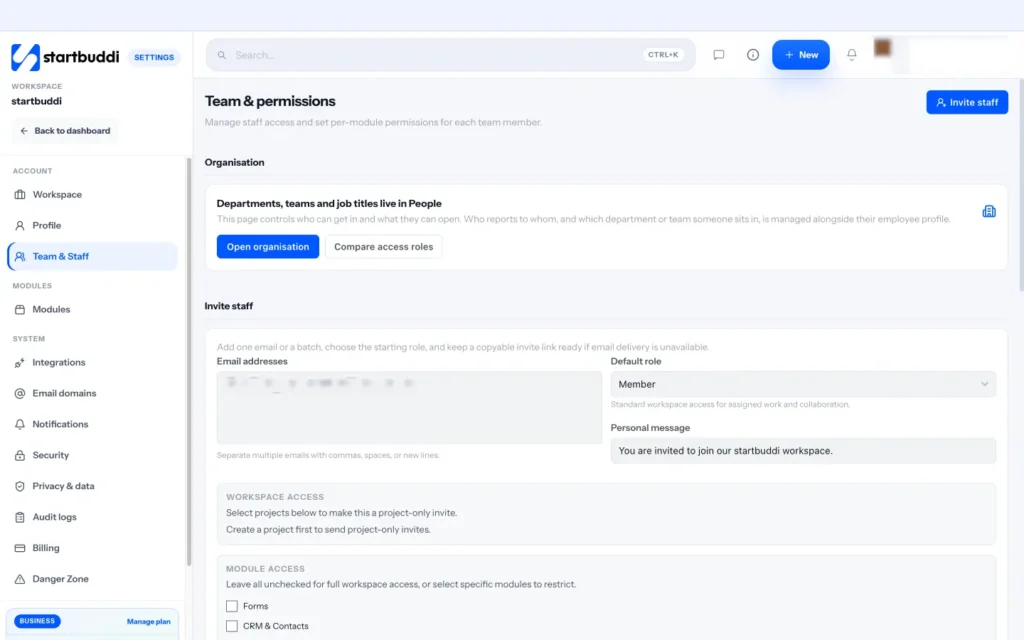
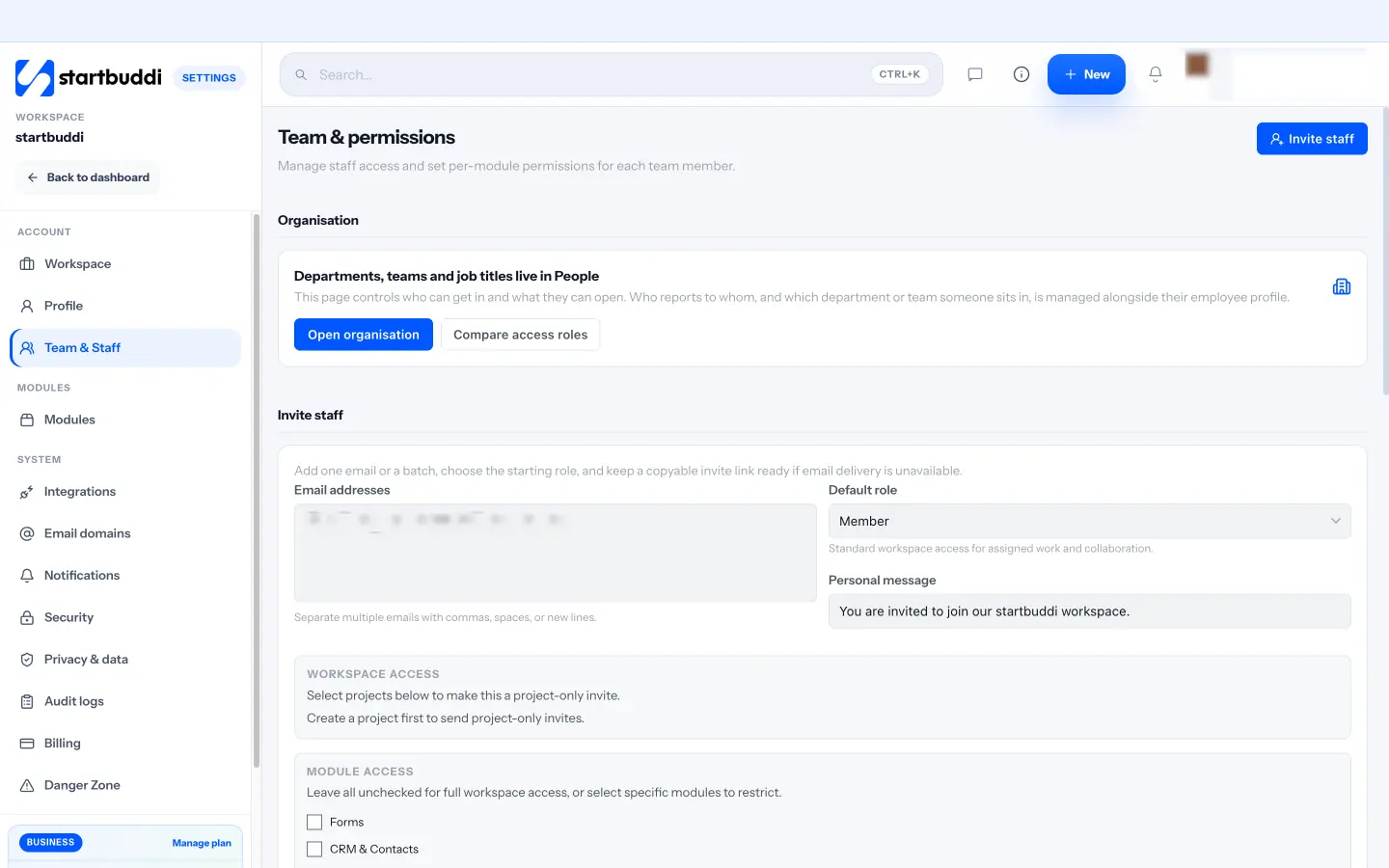
In startbuddi, a remote team gets one shared account for customers, projects, documents, chat and people, so the "where things live" line in your agreement points to one place. Start by inviting the team. Open Settings, then Team & Staff, and use Invite staff. You can add one email address or a batch, pick a default role, and tick which modules each person can open, so a freelance designer can see projects and documents but not your money.
Seats depend on your plan. The Free plan includes only the owner seat, Starter includes 2 seats, Growth 5 and Scale 15, and you can add extra seats on any paid plan. Every paid plan comes with a 30-day trial, so you can try it with the whole team first. See pricing for the full comparison.
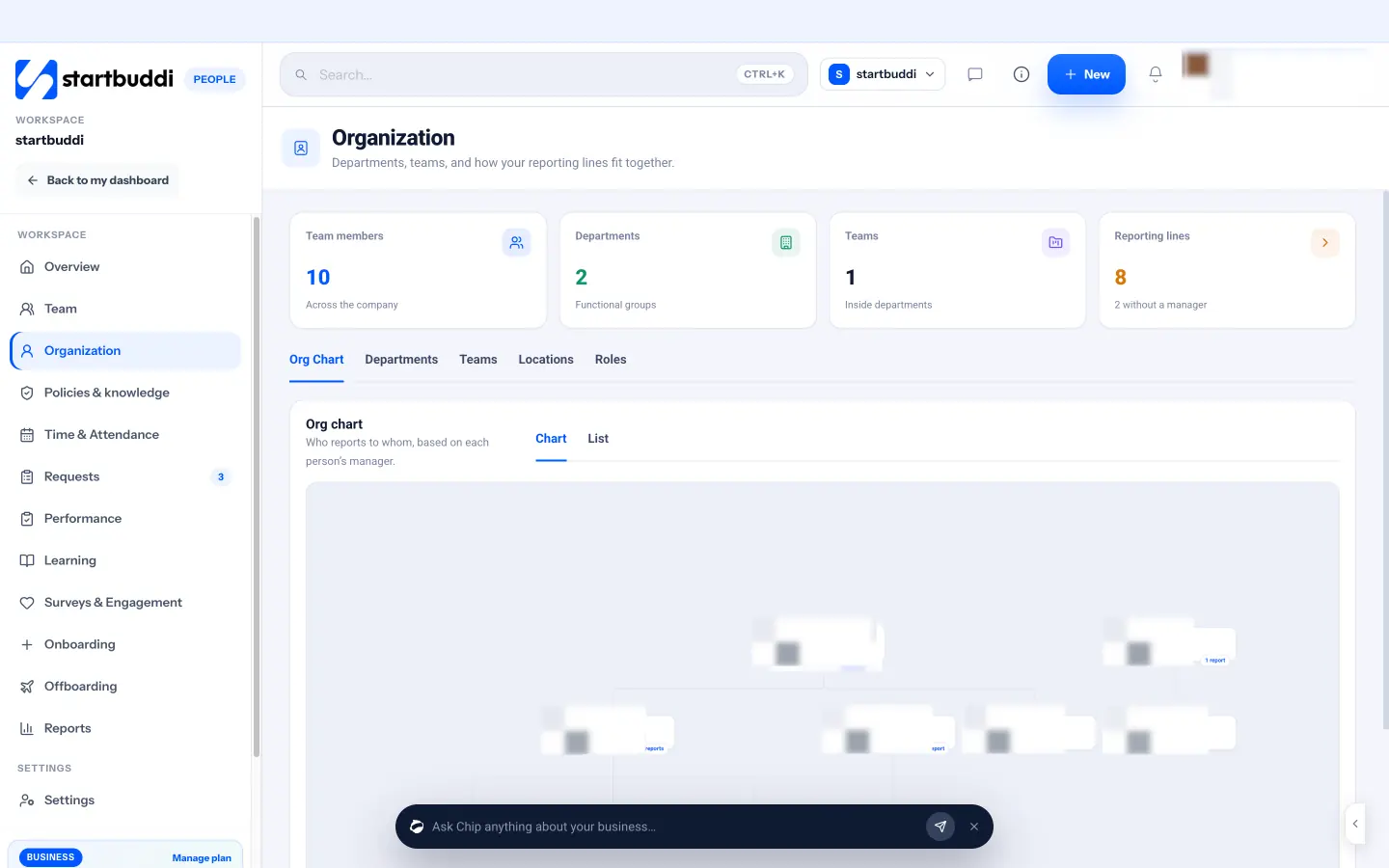
Next, record who is who in People. When you set someone up, People asks how you work together: part of your team, or an external collaborator such as a freelancer, contractor, consultant or agency. That keeps your headcount honest. On each profile you can add a job title, department, manager and location, and the Organization page draws your org chart from who reports to whom, which helps a spread-out team see how it fits together.
Finally, write your working agreement where people will find it. You can keep it as a document in Documents, or publish it as a page in the People knowledge base and ask everyone to acknowledge it. Time & Attendance also has a default schedule with working days, working hours and a time zone, which is a handy place to record your core hours. With the basics in place, the next step is deciding how the team talks to each other.
Sources for this chapter
- Gallup: The remote work paradox
- Buffer: State of Remote Work 2023
- IRS: Independent contractor (self-employed) or employee?
- GOV.UK: Check employment status for tax
Remote communication: channels, async updates and video calls
- Synchronous vs asynchronous: default to written
- Build a channel map
- The best app for small business communication
- Write updates that do not need a meeting
- A light meeting rhythm
- Video conferencing: when a call is worth it
- Notifications and quiet hours
- Language, culture and tone across countries
- Voice notes and short recorded videos
- Common communication mistakes
- Set up team communication in startbuddi
Communication is the whole job when you manage a remote team. In an office, a quick question costs ten seconds. Remotely, the same question can cost half a day if it arrives in the wrong place, at the wrong time, without the context the other person needs. The good news is that remote communication can be better than office communication, because it can be written, searchable and calm. This chapter shows you how.
You will learn the difference between synchronous and asynchronous communication, build a simple channel map so everyone knows where each kind of message goes, write updates that do not need a follow-up call, set a light meeting rhythm, and decide when video conferencing is worth it. Then you will see how to set this up in startbuddi.
Synchronous vs asynchronous: default to written
Synchronous communication happens live: calls, video meetings, a chat conversation where both people reply within seconds. Asynchronous communication does not need both people at the same time: a written update, a comment on a task, a recorded walkthrough, a document someone reads tomorrow morning.
Remote teams that work well make asynchronous the default and use live conversation on purpose. GitLab, one of the best-known fully remote companies, describes asynchronous communication as its starting point and writes decisions down before announcing them, so the documentation exists first (GitLab handbook, handbook-first). You do not need a thousand-page handbook, but the principle scales down well: if a decision matters, it is written somewhere people can find it.
Why default to written? Because constant live contact is exhausting. Microsoft's research on what it calls the "infinite workday" found that, based on its product data, workers were interrupted by a meeting, email or chat message roughly every two minutes during core hours (Microsoft Work Trend Index). A small team cannot afford that. Written, asynchronous habits give people long stretches to do the actual work.
Build a channel map
A channel map is a small table that says which tool is for which kind of message. It removes the daily "did you get my message?" question. Here is one that works for most small teams.
| Kind of message | Where it goes | Expected reply |
|---|---|---|
| Quick question, social chat, "I'm offline for an hour" | Team chat | Within a few hours |
| Anything with an owner and a due date | A task in the project tool | By the due date |
| Discussion about a specific task or file | Comments on that task or document | Within a working day |
| Decisions, plans, processes, briefs | A shared document | Read before the next meeting |
| Company news and announcements | An announcements channel | Read the same day |
| Customers and suppliers | The customer inbox or email | As your service standard says |
| A real emergency | A phone call | Immediately |
Two rules make the map stick. First, if a chat conversation produces a decision or a to-do, somebody turns it into a task or a note in the right place. Second, personal messaging apps are for emergencies and social chat only. WhatsApp is brilliant, but a business run from five WhatsApp groups has no memory: new starters cannot see the history, and nothing links to the work.
The best app for small business communication
People often ask which app is best. The honest answer is that the best app for small business communication is the one where the conversation sits next to the work it is about. If you chat in one tool, track tasks in another and keep documents in a third, every message needs a link and every link needs permission. Look for these features when you choose:
- Channels and direct messages, with public and private options.
- Linking to real work: mention a project, customer or document and jump straight to it.
- Search that finds messages, people and files.
- Notifications you can control, including quiet hours.
- Guest access, if you work closely with clients or freelancers.
- A fair price per person, because chat tools are often priced per seat.
If you want a side-by-side view of broader tools, our comparisons of startbuddi and Notion and our project management software list cover how several popular options handle chat and collaboration.
Write updates that do not need a meeting
The most useful remote habit is a short written update at a regular time. It replaces most status meetings. Keep it to three questions:
Done this week: Finished the new price list and sent it to Ada for review. Closed 14 customer tickets.
Next week: Launch the October email (Tuesday). Start the supplier comparison.
Blocked or need help: Waiting on the new logo files from the designer; I have asked twice. Can you nudge?
Good remote writing follows a few simple habits. Put the ask in the first line ("Can you approve the quote by Thursday?"). Give the context the reader needs without scrolling up. Use names and dates, not "soon" and "someone". Say what happens if nobody replies ("If I don't hear back by Thursday I'll send it as it is"). These habits feel slow for a week and then save hours.
A light meeting rhythm
Meetings still matter. They build trust and settle things writing cannot. The trick is to keep a small, predictable set and protect everything else.
- Weekly team call (30 to 45 minutes). Wins, priorities for the week, decisions that need everyone. Agenda shared the day before. Use the free meeting agenda template.
- 1:1 with each person (30 minutes, every one or two weeks). Their agenda first: how they are, what is blocking them, what they want to learn. Chapter four covers these in detail.
- Monthly or quarterly look back (60 minutes). What worked, what did not, what you will change. Tie it to your goals.
- Kick-offs for new projects. Our guide to running a project kickoff meeting has an agenda you can reuse.
Video conferencing: when a call is worth it
Video conferencing is the right choice when a conversation is sensitive, complex or creative: feedback, conflict, hiring, brainstorming, or anything where tone matters. It is the wrong choice for status updates and for questions a message could answer.
Most small teams use a mainstream tool such as Google Meet, Zoom or Microsoft Teams, often whichever comes with their email. Pick one and stick to it, so nobody wastes the first five minutes of every call finding the right link. A few habits make calls better:
- Share the agenda and any document before the call, and take notes in the shared document during it.
- Start on time and end five minutes early.
- Invite only the people who need to decide or contribute; share notes with everyone else.
- Record walkthroughs and training sessions (with permission) so people in other time zones can watch later.
- End every call by reading out the decisions and who does what by when, then turn them into tasks.
Notifications and quiet hours
A remote team can drown in notifications. Every mention, reaction and comment pings someone's phone, and people start to feel they must answer instantly, at any hour. Agree a few simple rules and write them into your working agreement:
- Everyone turns off notifications for channels they only need to skim, and keeps them on for direct messages and mentions.
- Use @ mentions only when you need that person to act. A mention is a request, not a way to say "for your information".
- Outside core hours, people are free to mute everything. If something is a genuine emergency, you phone.
- Managers do not expect replies outside working hours, and say so out loud at least once, because people assume the opposite.
It also helps to set two or three blocks of focus time a week when nobody books calls. Many small teams choose Wednesday mornings or Friday afternoons. Mark them in the shared calendar so the rule is visible.
Language, culture and tone across countries
A remote team often mixes cultures and first languages. A message that sounds efficient in Amsterdam can sound rude in Lagos, and a polite hint in London can be missed completely in Toronto. You cannot learn every culture, but you can remove most misunderstandings with a few habits.
- Be explicit. Say "Please send this by Thursday 17:00 Lagos time", not "Whenever you get a chance".
- Explain the why. A request with a reason ("so I can send the invoice before month end") rarely feels bossy.
- Avoid idioms and sarcasm in writing. They travel badly between languages.
- Name the time zone every time you give a time.
- Check understanding on calls by asking people to repeat back the next steps in their own words.
- Respect holidays. Public holidays differ from country to country. Keep a shared list so nobody is surprised when a teammate is off for Eid, Diwali, Thanksgiving or a national holiday.
Voice notes and short recorded videos
Some things are hard to explain in writing: a tricky bug, a design walkthrough, how to use a new supplier portal. A two-minute screen recording or voice note can replace a 30-minute call, and people in other time zones can watch it when they start their day. Keep recordings short, say the point in the first 20 seconds, and always add one line of text describing what it is, so it can be found in search later. If a recording contains a decision, write the decision down too. Nobody wants to scrub through a video to find out what was agreed.
Voice notes are popular in many countries, especially where teams already live on WhatsApp. They are fine for quick, friendly updates. They are poor for anything someone will need to look up again, such as prices, dates or instructions, so ask for those in writing.
Common communication mistakes
- Everything is urgent. If every message is flagged, nothing is. Define urgent in your working agreement.
- Decisions made in private messages. Two people agree something in a direct message and the rest of the team never finds out. Post decisions in the right channel.
- "Hi" as a whole message. Send the question with the greeting, so the other person can answer when they see it.
- Silence from the manager. Remote people read silence as disapproval. A two-line "thanks, looks good" matters more than you think.
Set up team communication in startbuddi
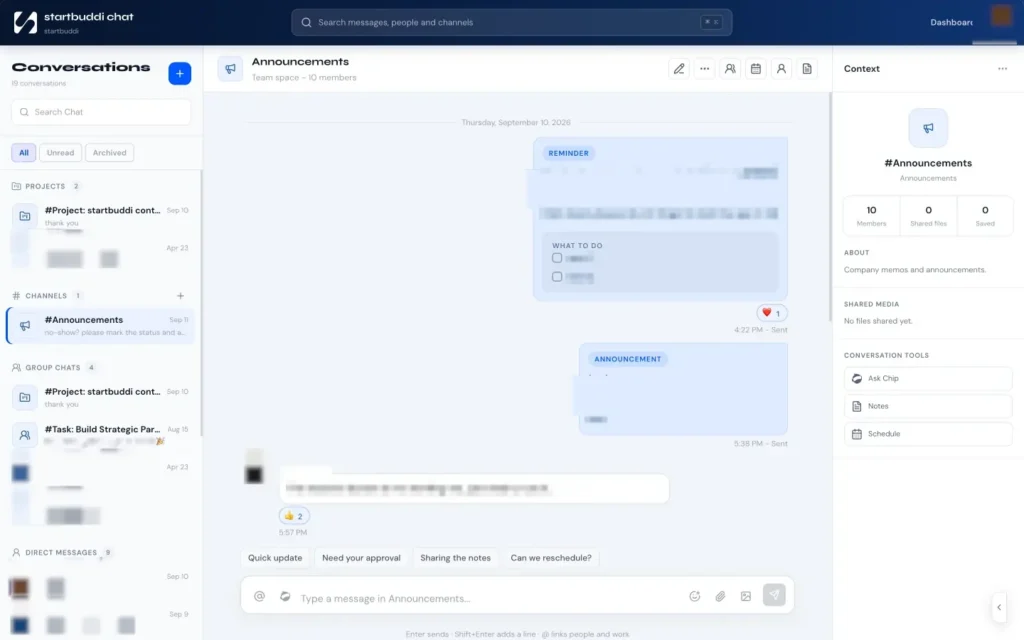
Team chat in startbuddi is called Chat, and it is built into the same account as your projects, documents and customers. Open Chat and use + to create a channel. You can choose a type (Chat, Announcement, Q&A, Feedback, Random or Client) and make it Public, so anyone in the workspace can join, or Private, so only invited members see it. A sensible starting set for a remote team is an announcements channel, a general chat channel, and one channel per team or big client.
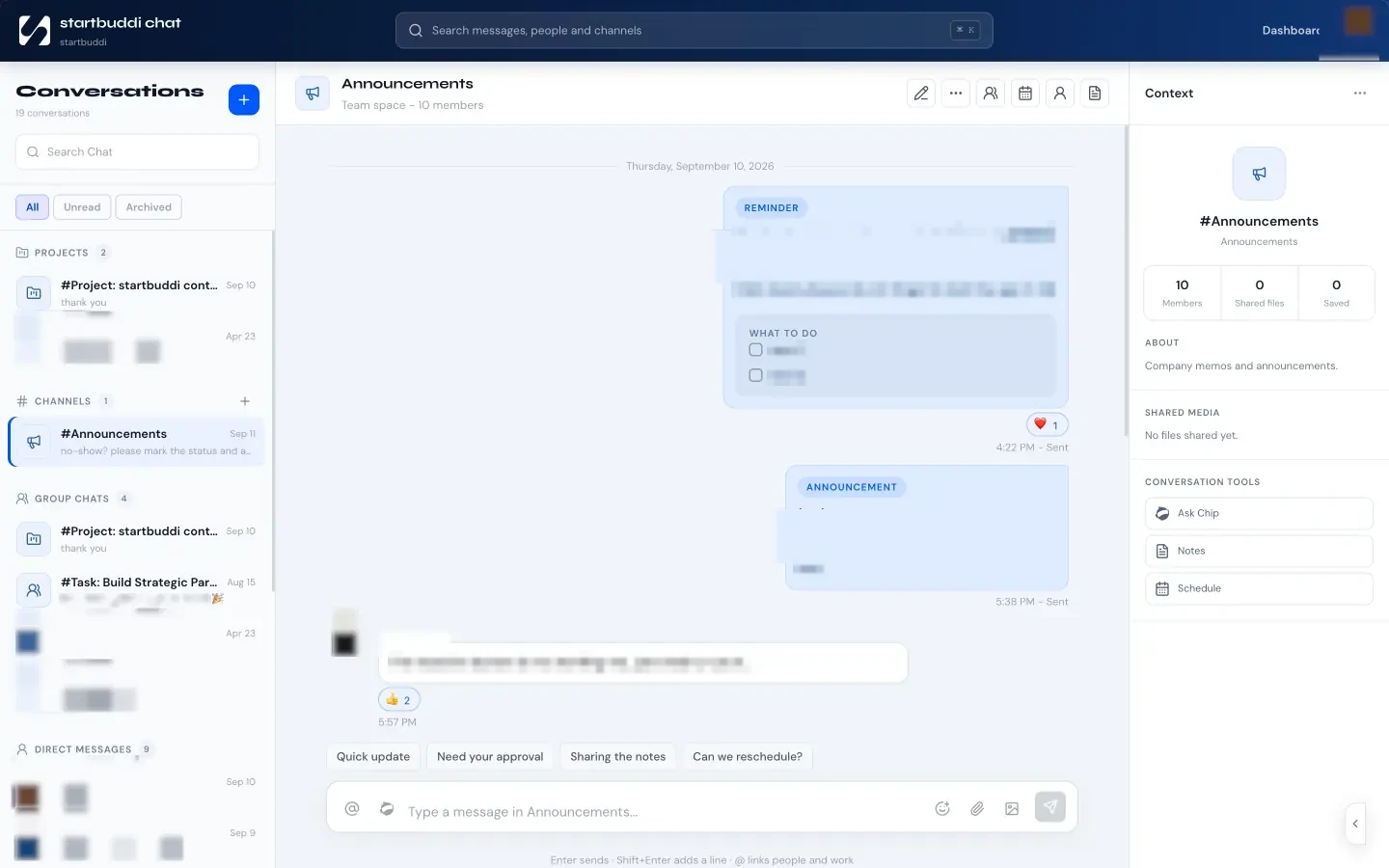
Direct messages and group chats cover one-to-one and small-group conversations, and every project automatically gets its own discussion room, so talk about a project stays with that project. In the message box, type @ to mention a teammate or to link a startbuddi record such as a project, customer, document, campaign or booking. The person reading can open it straight from the message, which removes the "which file do you mean?" back-and-forth.
For async catch-ups, Chip helps. Hover a message and choose Ask Chip about this, or open Ask Chip for the whole conversation and pick a prompt such as Summarize this conversation, What decisions were made? or What tasks and owners were mentioned? The answer is based only on that chat, and you can add it to the message box to share. It is a quick way for someone in a different time zone to catch up on a busy channel without reading 80 messages. Chip answers use Chip credits from your plan.
Two other features suit remote work. Follow-up reminders let you pick a date and time and draft what the follow-up should say, so you do not forget to chase a reply. And you can add a guest, such as a client contact or freelancer, to messages without giving them your whole workspace. There is no built-in video calling, so keep using the video tool your team already knows and paste the join link into the channel or the calendar invite.
Sources for this chapter
- GitLab handbook: The importance of a handbook-first approach to communication
- Microsoft Work Trend Index: Breaking down the infinite workday
Online collaboration tools for small business: one place for the work
- One source of truth, in plain words
- The five kinds of online collaboration tools for small business
- Separate apps or one connected system?
- How to choose: a short checklist
- Rules that make collaboration tools work
- A simple folder structure you can copy
- Moving the team off WhatsApp groups: a two-week plan
- Permissions for freelancers and clients
- Common mistakes with collaboration tools
- Run tasks, projects and documents in startbuddi
A remote team is only as organised as the place its work lives. When tasks sit in chat messages, files sit in personal email and plans sit in someone's head, every day starts with a hunt. This chapter is about building a single, shared picture of the work, using online collaboration tools that a small business can afford and a busy team will actually open.
You will learn what a "single source of truth" means in practice, the five kinds of online collaboration tools for small business, how to choose between separate apps and one connected system (with a worked cost example), and how to run tasks, documents and brainstorming in startbuddi.
One source of truth, in plain words
A single source of truth means that for every important question there is exactly one place to look. What am I working on today? That is in the task list. What did we agree with the client? That is in the project brief. Which version of the price list is current? That is the one in the shared documents space. If anybody has to ask a colleague "where is it?", the system has a gap.
This matters far more remotely than in an office, because asking a colleague is slower and may wait until tomorrow in another time zone. It also matters when people join and leave. A new remote hire who can read the history of every project gets up to speed in days, not weeks. When someone leaves, their work does not leave with them.
The five kinds of online collaboration tools for small business
Almost every remote team needs the same five jobs done. You can use one tool per job or one system that covers several.
| Job | What it does | Must-haves for a small team |
|---|---|---|
| Tasks and projects | Who is doing what, by when | Owners, due dates, a personal "my work" list, board and calendar views, comments on each task |
| Documents | Briefs, plans, proposals, processes | Co-editing, comments, version history, sharing controls, templates |
| Chat | Quick conversation | Channels, direct messages, search, links to the work |
| Whiteboards | Brainstorming and planning together | Sticky notes, voting, a way to turn ideas into tasks |
| Client sharing | Showing clients progress without email chains | Private pages per client, approvals, no extra seats for clients |
Video calls are the sixth job, covered in chapter two. Most teams already have that through their email provider.
Separate apps or one connected system?
There are good tools for each job, and some teams happily run five of them. The trade-off is cost, logins and gaps between tools. Every extra app is another subscription per person, another password, another place to search and another thing to set up when someone joins or leaves.
Here is a worked example for a five-person remote team. The per-person prices below are round numbers for illustration, not any specific product's price.
- Separate apps: five tools (tasks, docs, chat, whiteboard, client portal) at an assumed $8 per person per month each is $40 per person, or $200 a month for five people. Over a year that is $2,400, before anyone connects the tools together.
- One connected system: startbuddi's Growth plan includes 5 seats, so a team of five fits one plan, and it also covers customers, invoices, bookings and marketing. Paying annually costs 10 times the monthly price (see pricing).
Cost is not the only factor. If your team already loves a particular tool and it works, keep it. But if people are copying information between apps, or nobody is sure which app holds the answer, a connected system is usually the bigger win. Our post on an all-in-one workspace versus five separate tools walks through the numbers in more detail.
How to choose: a short checklist
- Write down the five questions people ask most. The tool must answer them in two clicks.
- Test with real work for two weeks. Not a demo project. Run one real client job or one real month.
- Check phone use. Remote people check tasks and messages on their phones. Make sure it works there.
- Check permissions. Can a freelancer see one project without seeing your finances?
- Count the real cost. Price per seat, the seats you need in a year, and the time to set it up.
- Check you can get your data out. Exports and downloads matter if you ever move.
One more tip: involve the people who will use the tool most, not only the person who pays for it. A tool the founder loves but the team finds confusing will quietly be abandoned, and the WhatsApp group will fill up again within a month. Ask two teammates to run the two-week test with you, and give their opinion real weight. If they are both still using it happily on day fourteen without reminders, that is a good sign it will last.
Rules that make collaboration tools work
The tool is half the answer. The other half is a few team rules, written into your working agreement.
- Every task has one owner and a due date. "The team" cannot own a task. For more on this, read our post on collaborative task management.
- If it came up in chat and needs doing, it becomes a task. Whoever raised it creates it.
- Documents have clear names and live in a shared folder, never in a personal drive. A simple naming pattern helps: "Client name - document type - month".
- Comments go on the thing they are about. Feedback on a draft goes in the draft, not in a separate message.
- Processes are written as simple checklists. The free SOP template is a good start for anything done more than twice.
- Friday tidy-up. Ten minutes each week to close finished tasks, update due dates and file stray documents.
A simple folder structure you can copy
Most small teams need fewer folders than they think. Here is a structure that works for a service business of up to about twenty people. Keep it shallow: nobody should click more than three times to find anything.
- Company: working agreement, handbook, policies, brand files, org chart.
- Clients: one folder per client, with proposals, contracts, briefs and reports inside.
- Sales and marketing: price list, case studies, campaign plans, templates.
- Operations: processes and checklists (SOPs), supplier details, equipment list.
- Finance: only for the people who need it. Budgets, reports, expense rules.
- Templates: the starting point for anything you create often.
Pair the structure with a naming rule. For example: "Client - document type - YYYY-MM". A file called "Adebayo Foods - proposal - 2026-10" is easy to find in search and sorts neatly. "Final final v3 (2)" is not.
Moving the team off WhatsApp groups: a two-week plan
Many small businesses run on WhatsApp groups, and moving away can feel impossible. It does not need to be dramatic. Here is a two-week plan that works for most teams.
- Day 1: announce the change and the reason ("we keep losing decisions and files in the group"). Share the channel map from chapter two.
- Days 2 to 3: invite everyone to the new tool and create the first channels and a project for the most active piece of work.
- Days 4 to 7: all new tasks go into the project tool. The manager moves any task that appears in WhatsApp and replies with a link to it.
- Week 2: move current documents into the shared folders. Post the weekly written updates in the team channel, not the group.
- Day 14: rename the WhatsApp group to something like "Urgent only" and pin a message explaining what goes there.
Expect a few slips. The manager's job is to redirect kindly and consistently: "Great question, can you put it in the project so Ada sees it too?" After a month, the new habits usually stick, and the team notices how much easier it is to find things.
Permissions for freelancers and clients
Remote teams often include people who should see some of the work but not all of it. A freelance copywriter needs the campaign brief but not your bank balance. A client needs to approve their designs but not read your internal chat about them. Plan access before you invite anyone.
- Employees usually see all shared work, with finance and HR limited to the people who need them.
- Freelancers and contractors see only the projects and documents they work on. Remove access the day the job ends.
- Clients see a curated view of their own project: progress, files to approve, invoices and messages. They should never need a full login to your workspace.
- Advisers such as an accountant may need read-only access to reports, not the ability to change them.
Review access once a quarter. It takes ten minutes to look down the list of people who can log in and remove anyone who has finished working with you. It is one of the simplest security habits a small business can have.
Common mistakes with collaboration tools
- Too many projects, statuses and fields. Start with To do, In progress and Done. Add more only when you feel the pain.
- Private task lists. If your to-do list is in a notebook, nobody can help you or cover for you when you are ill.
- The manager does not use it. If you still assign work by WhatsApp, the team will follow your lead.
- No owner for the system. Someone should keep folders tidy and templates current. In a small team, that is often the founder or an operations person.
Run tasks, projects and documents in startbuddi
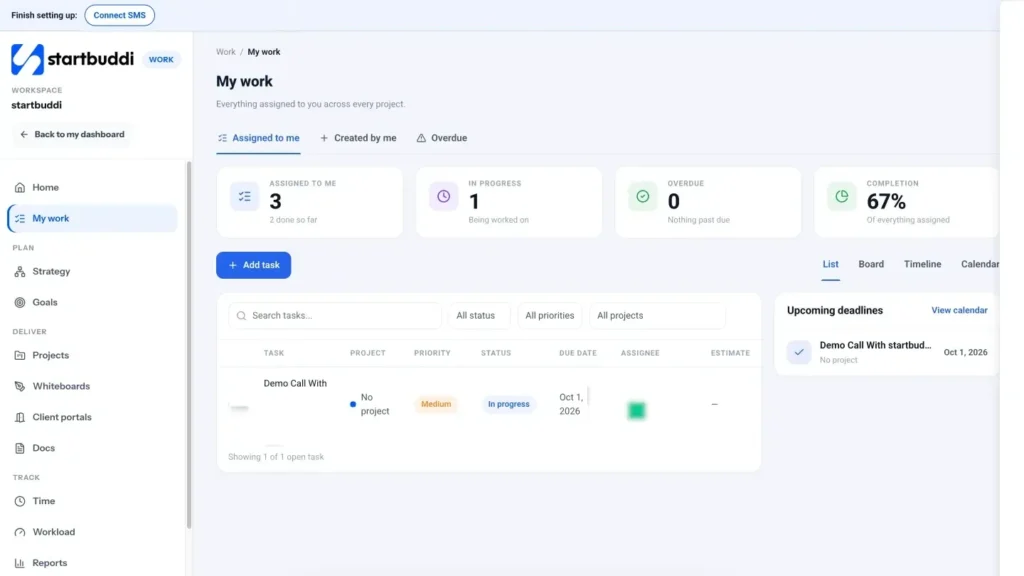
Work is where tasks and projects live. My work shows everything assigned to each person across every project, with tabs for Assigned to me, Created by me and Overdue, and views for List, Board, Timeline and Calendar. Stat cards at the top show what is assigned, in progress, overdue and the completion rate, so each remote teammate starts the day knowing exactly what is theirs.
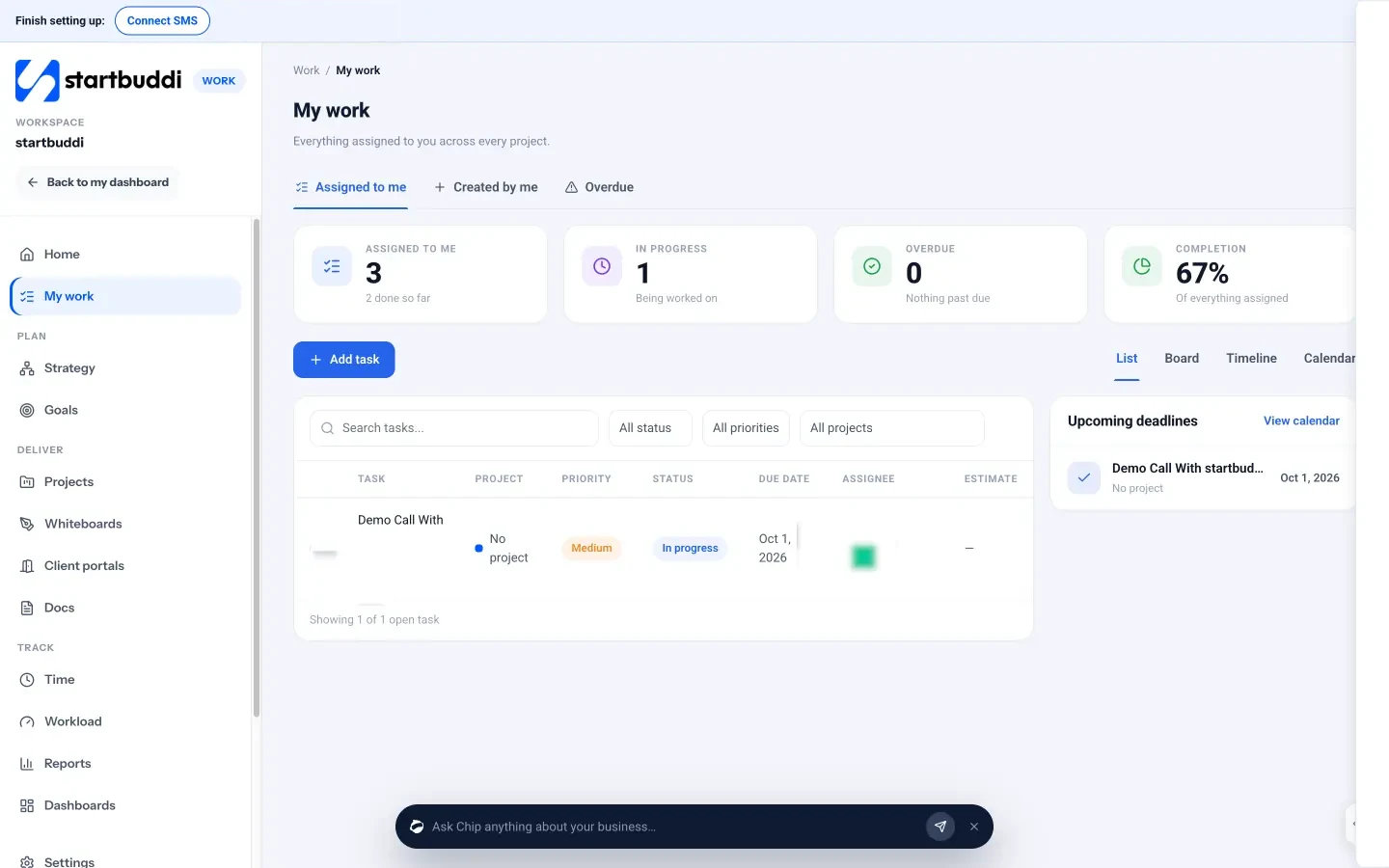
Click any task to open its drawer. There you can set the status, priority, assignee, due date and an estimate in hours, add subtasks, log time, mark dependencies and comment. Type @ in a comment to mention a teammate, or type @chip to ask Chip for help with that task. Projects add a timeline, milestones, a budget and a client portal tab, and 14 templates (such as Client delivery, Marketing campaign and Event planning) set up milestones and tasks you can change. Our help article on assigning tasks to team members walks through it step by step.
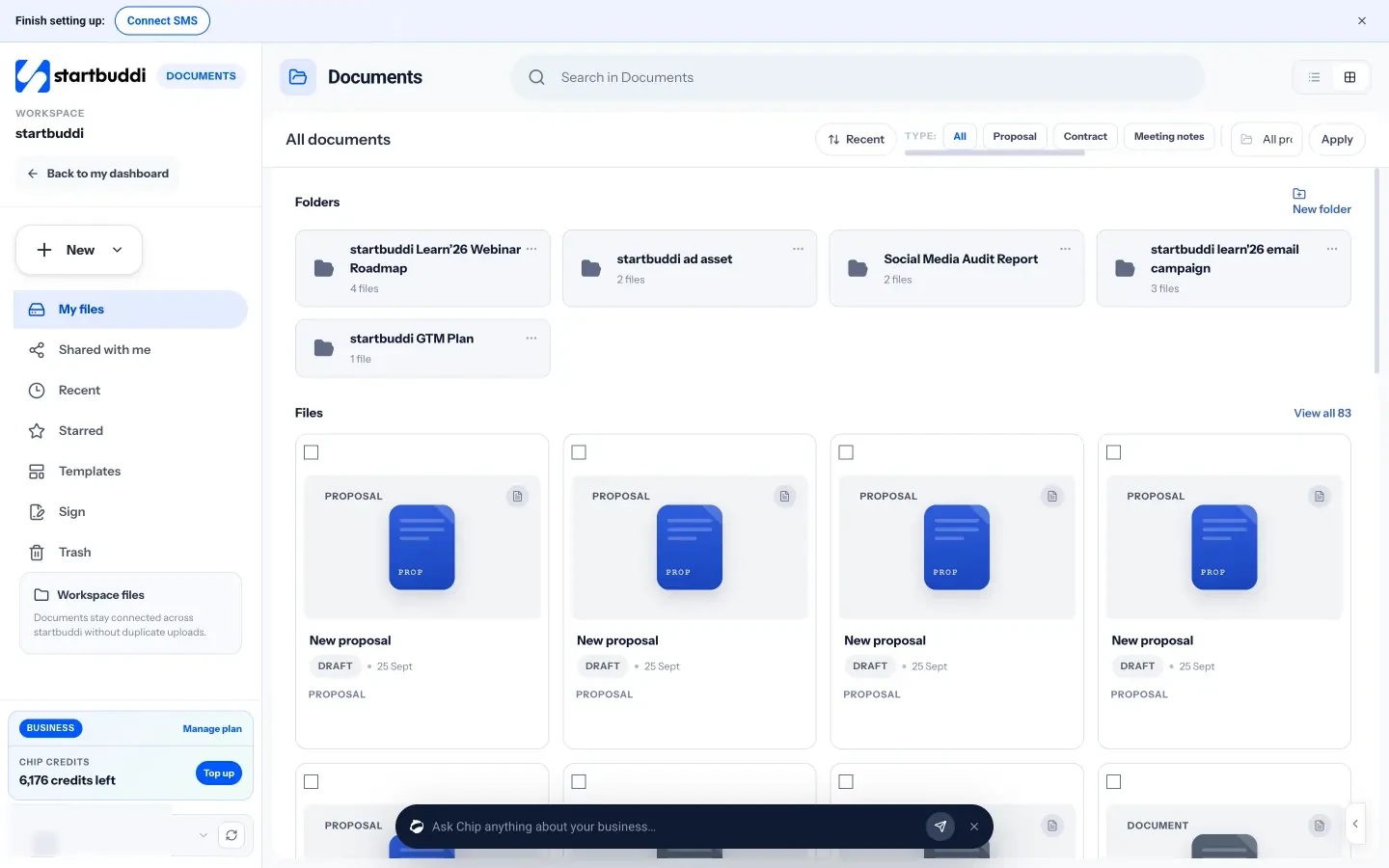
Documents holds the team's files: docs, sheets, decks, proposals and contracts, with folders, templates and e-signatures. Several people can edit a document at the same time and see each other's cursors, leave comments on selected text, and go back to any saved version. You can link a document to a project, contact, task or booking so it shows up where people need it. On the Free plan you can create 3 documents; paid plans have no document limit.
For planning sessions, Whiteboards give the team a shared canvas with sticky notes, shapes, mind maps and dot voting, with several people editing at once. Chip can brainstorm ideas, group notes by theme and summarise the board, and you can turn selected notes into tasks in a project. The Free plan includes 1 whiteboard and paid plans have unlimited boards. If you work with clients, client portals give each client a private page to follow progress, approve deliverables and message you, and clients sign in with an email link without taking a seat. Portals can be built and previewed on Free; inviting clients needs a paid plan (Starter includes 1 portal, Growth 10 and Scale 50).
Sources for this chapter
- Prices for startbuddi plans are from the startbuddi pricing page. Per-person prices for separate tools are illustrative round numbers.
Manage results, workload and wellbeing from a distance
- Manage results, not hours online
- The remote 1:1: your most important meeting
- Spot overload before it becomes burnout
- Loneliness and connection
- Recognition from a distance
- Handling a performance problem remotely
- Check in without micromanaging
- A monthly remote team health check
- When remote work is not working for someone
- Common mistakes managing remote performance
- Manage workload, time and wellbeing in startbuddi
The last part of managing a remote team is the part most managers worry about first: how do you know people are doing good work, and how do you keep them well, when you cannot see them? The answer is not surveillance software. It is clear goals, visible work, regular conversations and a manager who notices when someone is struggling.
This chapter covers managing by results rather than hours, the 1:1 meeting that holds a remote team together, spotting overload before it turns into burnout, loneliness and connection, recognition, and how to handle a performance problem from a distance. Then it shows the startbuddi features that support each one.
Manage results, not hours online
In an office, managers often judge effort by presence: who arrives early, who stays late. Remote work takes that signal away, and that is a good thing, because presence was never a reliable measure of output. Instead, agree what good results look like for each role.
| Role | Weak measure | Better measure |
|---|---|---|
| Customer support | Hours logged in | Tickets resolved, first reply time, customer rating |
| Sales | Calls made | Qualified conversations, proposals sent, deals won |
| Designer or developer | Green status dot | Work delivered on time to the agreed standard |
| Marketing | Posts published | Enquiries and sign-ups from those posts |
| Operations | Messages sent | Processes running on time, errors caught, costs saved |
Write two or three results for each person each quarter, and link them to the business's goals. Our goal setting for small business guide shows how to write goals and key results a small team can actually track.
The remote 1:1: your most important meeting
Gallup's research found that managers account for at least 70% of the variance in team engagement (Gallup). Remotely, the regular 1:1 is where most of that management happens. Hold it every week or every two weeks, for 30 minutes, and do not cancel it when things are busy. That is exactly when it matters.
A simple agenda, kept in a shared document so both of you can add to it during the week:
- How are you? Ask properly, and listen. Energy, workload, anything outside work they want to share.
- Their topics first. Questions, blockers, ideas.
- Progress on their goals. What is on track, what is at risk, what help they need.
- Feedback both ways. One thing that went well, one thing to try differently, and ask "what could I do better as your manager?"
- Growth. Once a month: what do they want to learn next?
- Actions. Write down who does what by when.
Formal reviews build on these conversations. When review time comes, you will have months of notes rather than a vague memory. Our guide to performance reviews covers the full process.
Spot overload before it becomes burnout
Remote workers often overwork rather than underwork. With the laptop on the kitchen table, it is easy to answer one more message at 22:00. As a manager you cannot see tired faces, so you need other signals:
- Messages sent late at night or at weekends, repeatedly.
- Due dates slipping for someone who is usually reliable.
- Shorter, flatter written updates, or no update at all.
- Cameras off when they used to be on, or withdrawal from social channels.
- Too many tasks with estimates adding up to more than their working week.
The last signal is the easiest to measure. If each task has a rough estimate in hours, you can add them up per person per week and compare with their contracted hours. Someone scheduled for 60 hours in a 40-hour week needs help now, not at their review.
Loneliness and connection
Loneliness is one of the most common remote struggles: 23% of respondents in Buffer's survey chose it (Buffer, State of Remote Work 2023). Small teams can do a lot with a little:
- A social channel for photos, pets, football and food. Managers should post too.
- Five minutes of non-work chat at the start of the weekly call.
- Pair work: two people on a call working on their own tasks, or reviewing each other's work.
- Celebrations: birthdays, work anniversaries and wins, named in public.
- Meeting in person when budget allows, even once a year. If some of the team live in the same city, a monthly lunch goes a long way.
- Anonymous pulse surveys: a two-minute check every few weeks asking how people are doing, with results the whole team can see.
Recognition from a distance
In an office, praise happens in passing. Remotely, it has to be deliberate. Be specific ("the way you handled the refund for Mrs Okafor kept a customer we could have lost"), be quick (the same day), and be public when the person is comfortable with that. A short weekly "wins" post in the team channel costs nothing and builds a record you can use at review time.
Handling a performance problem remotely
If someone's work slips, act early and privately, on a video call rather than in writing, because tone matters. Describe what you have seen (facts, dates, examples), ask what is going on, and listen. Many remote performance problems turn out to be unclear expectations, a home situation, a missing tool or overload. Agree a short plan with specific, measurable changes and a date to review. Write it down afterwards and share it with them. If the problem continues, follow a fair, documented process and check the rules where the person works; the UK's Acas guidance on problems with an employee's performance is a clear example of what a fair process looks like.
Check in without micromanaging
Many new remote managers swing between two extremes: silence for a week, then a flurry of "any update?" messages. Neither builds trust. The fix is to make progress visible by default, so you rarely need to ask. When tasks, due dates and weekly updates are all in one shared place, you can see how things are going without interrupting anyone.
When you do need to ask, the wording matters. Compare these:
| Sounds like micromanaging | Sounds like support |
|---|---|
| "Are you working on this?" | "I see the brief is due Thursday. Anything you need from me to hit that?" |
| "Why didn't you reply?" | "No rush, but can you let me know by tomorrow whether Tuesday works for the client call?" |
| "Send me an update." | "Could you add a line to the task on where it stands? I'm speaking to the client at 15:00." |
| "This is wrong." | "This section doesn't match what we agreed with the client. Can we look at it together for ten minutes?" |
The difference is context and a clear ask. People trust a manager who explains why they are asking and what they need, and they soon start sharing updates before anyone asks.
A monthly remote team health check
Once a month, spend 20 minutes on your own looking at the team as a whole. Ask yourself these questions and write down one action for anything that worries you.
- Did everyone have their 1:1s this month? Who missed out?
- Is anyone consistently over capacity, or working late at night?
- Are goals on track? Which ones need a decision rather than more effort?
- How did the last pulse survey look? Did anything change since the one before?
- Who did I praise this month, and who did I not mention at all?
- Is the working agreement still true, or has the team drifted into new habits?
- Does anyone need training, a better tool or a change of role?
This check takes little time but catches problems while they are still small. In a team of five, one unhappy person is 20% of your business.
Keep your answers in a private note from month to month. Patterns matter more than any single month: the same person over capacity three months running, a pulse score that drifts down slowly, or a goal that is "nearly there" every time you look. Those patterns are what you raise in 1:1s and act on before they turn into resignations or missed targets.
When remote work is not working for someone
Remote work suits many people, but not everyone, and not at every stage of life. Someone living in a noisy shared flat, a new graduate who learns best by watching others, or a person going through a hard time at home may struggle in ways that look like poor performance. Before you conclude someone is not up to the job, ask whether the set-up is the problem.
Options that small businesses can often afford include a co-working desk a few days a week (many cities have day passes), a better headset or a second screen, a regular pairing session with an experienced colleague, or moving some of their hours to overlap more with the rest of the team. Ask the person what would help. People are usually more honest about their set-up when the question comes with an offer rather than a warning.
Sometimes the honest answer is that a role needs to be done in person. A shop manager, a field supervisor or a trainee may need to be on site most of the time. It is better to say that clearly at hiring than to promise flexibility you cannot give.
Common mistakes managing remote performance
- Only talking when something is wrong. Then every call from the manager feels like bad news.
- Measuring online time. It rewards people who look busy, not people who deliver.
- Cancelling 1:1s. It tells the person they are the lowest priority.
- Ignoring quiet people. The most overloaded person is often the one who never complains.
Manage workload, time and wellbeing in startbuddi
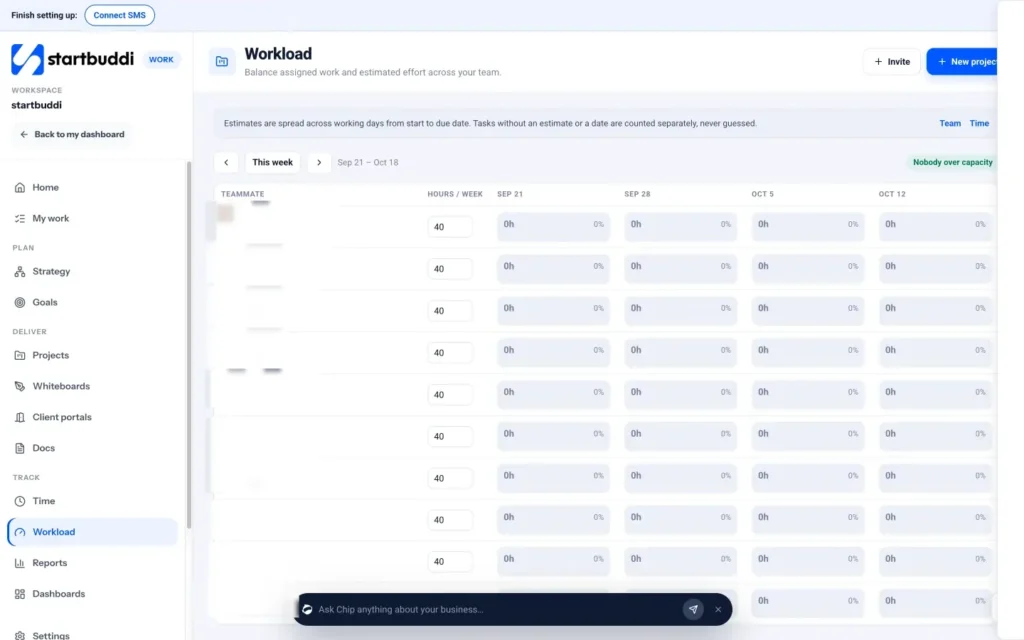
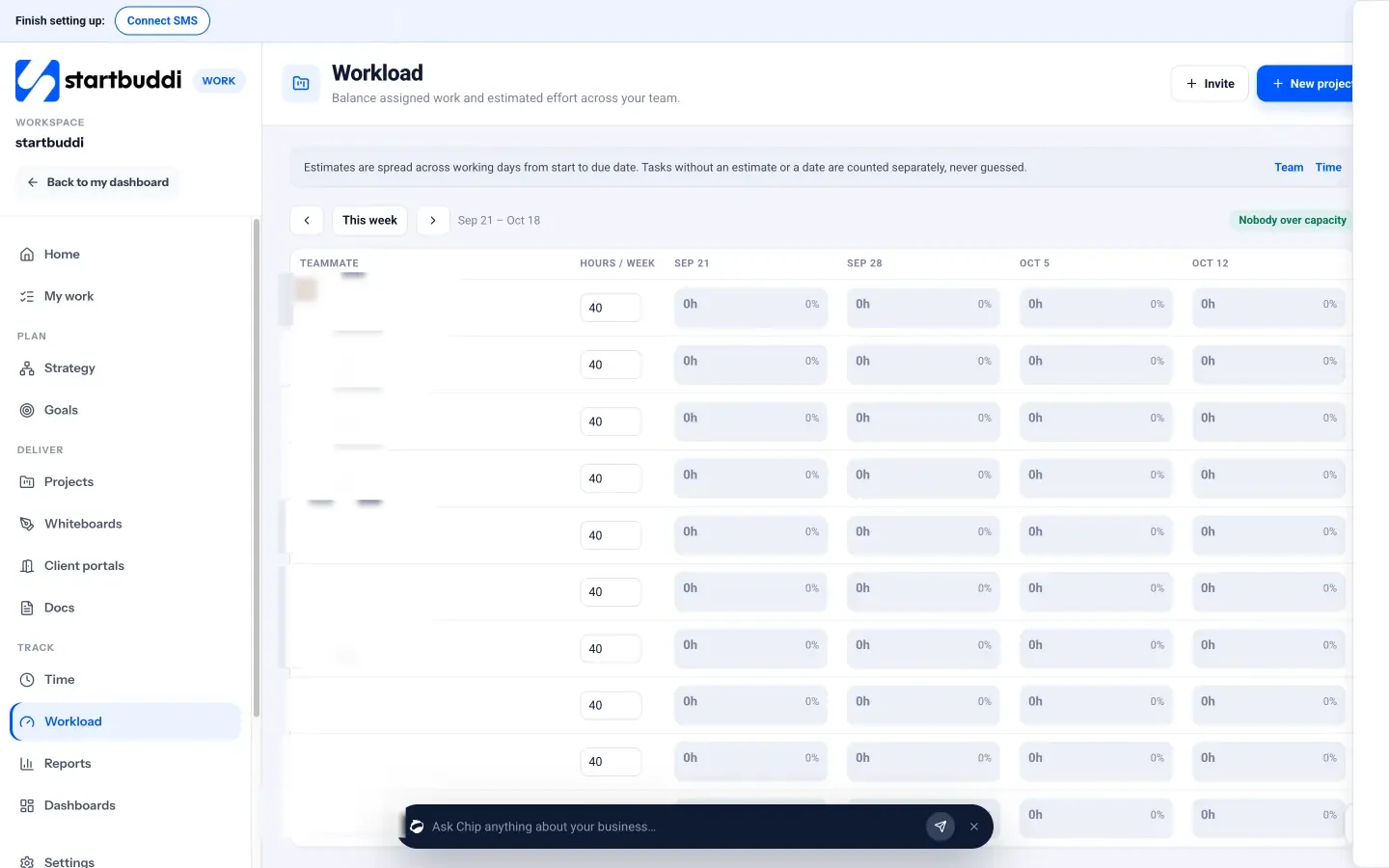
Workload in Work shows each teammate's hours per week against their capacity, week by week. Estimates are spread across working days from each task's start to its due date, and tasks without an estimate or a date are counted separately rather than guessed. When nobody is over capacity, a banner says so; when someone is, you can reassign a task from the grid. Workload is visible to managers, admins and owners.
Time lets each person start a timer on a task or log time by hand, mark it billable and see the week's totals. It is useful for billing clients and for checking estimates against reality. It is not a monitoring tool: nothing tracks screens or activity. In People, Time & Attendance can show who is working today, remote or on leave, and optional clock-in can be switched on or left off for the whole workspace. As the app itself puts it, presence is not treated as hours worked.
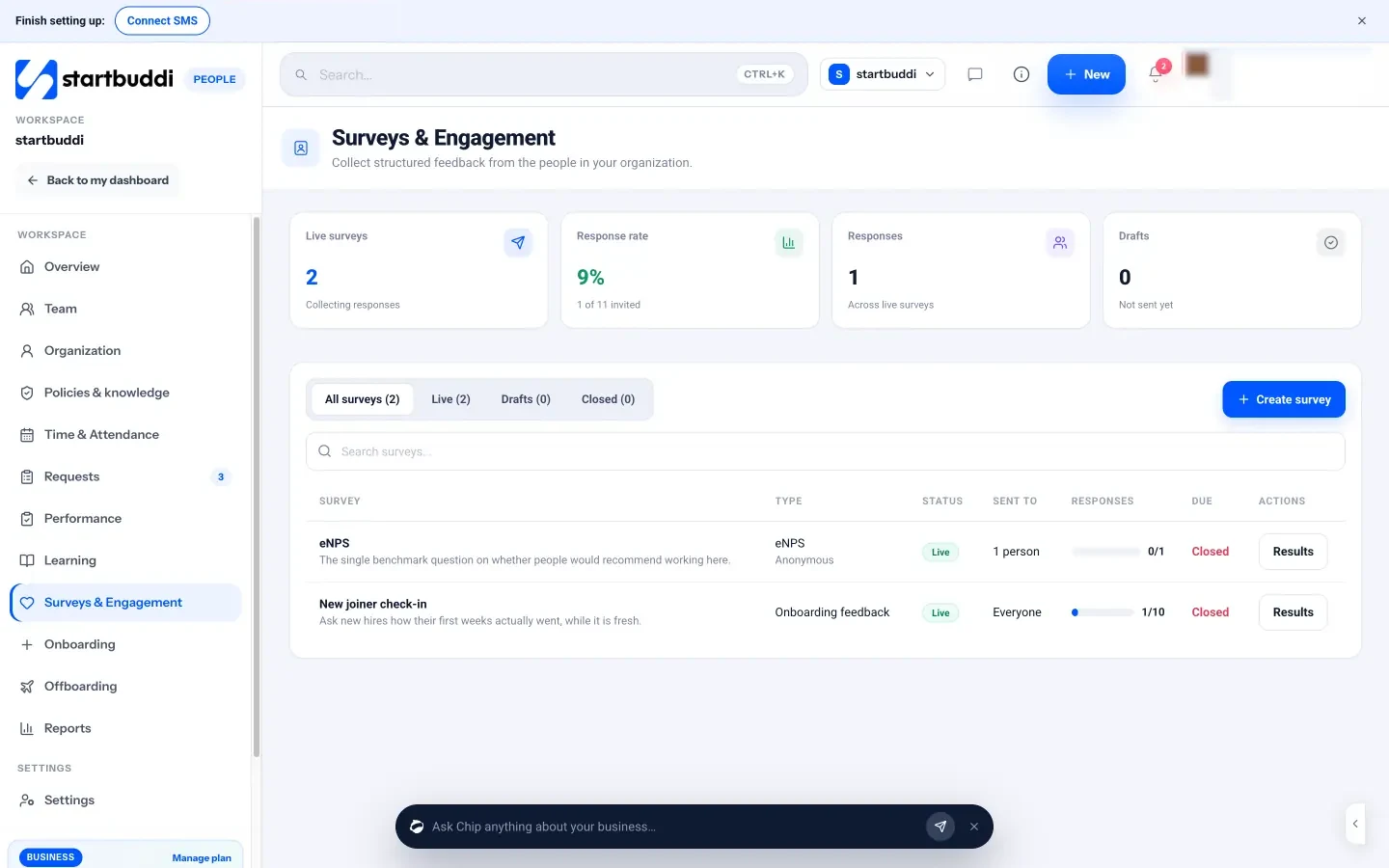
To check how people are really doing, use Surveys in People. Start from the Weekly pulse check or eNPS template, choose Anonymous (answers are never linked to a person, and results stay hidden until at least 3 people respond), pick the audience and send it to the team. People answer inside startbuddi, and results come back to the same place.
Goals and reviews tie it together. Set team goals in Goals with key results and weekly check-ins, and run reviews in Performance, where each person writes a self review and their manager adds theirs. Chip can draft a balanced review summary from real feedback and goals, and a person always decides the rating.
Your next step: write your one-page working agreement this week, share it with the team, and invite everyone into one shared space. If you want to try it in startbuddi, every paid plan has a 30-day trial; compare plans on the pricing page.
Sources for this chapter
- Gallup: Managers account for 70% of variance in employee engagement
- Buffer: State of Remote Work 2023
- Acas: Problems with an employee's performance
Tiwalade Joanna Okedara-Kalu is the founder, CEO and CTO of startbuddi, the business system that brings clients, bookings, invoices, projects, marketing and the Chip AI assistant into one place. Tiwalade builds software around how service businesses really work day to day, and writes about client management, getting paid on time and why small businesses outgrow the tools they start with.
Founded startbuddi and leads its product and engineering