
How to run a home service business: scheduling, jobs and getting paid
A practical guide for plumbers, electricians, HVAC and cleaning businesses: take bookings, run jobs from quote to completion, get paid on the spot and win repeat work.


This guide is for plumbers, electricians, HVAC technicians, cleaners, handypeople and other home service businesses that are tired of running the day from a phone full of missed calls and a notebook in the van. The short answer to “what do I need?” is a simple system with four parts: home service scheduling software or a booking page for taking jobs, a way to quote and track each job, invoices that customers can pay on the spot, and a customer list that brings people back.
Over four chapters you will set up a booking menu with travel time built in, write quotes that win, invoice before you leave the driveway, and turn one-off jobs into repeat work and referrals. Each chapter starts with the business thinking, with worked examples and templates you can copy, then shows how to do it in startbuddi. We are also clear about what startbuddi does not do, such as GPS dispatch and route planning, and how to fill that gap.
Bookings and scheduling: what home service scheduling software should do
- What a home service schedule has to handle
- Decide what customers can book themselves
- Arrival windows, travel time and zone days
- Leave room for emergencies
- Ask the right questions before you turn up
- HVAC appointment booking and seasonal peaks
- Confirmations, reminders and no-shows
- Scheduling a team of technicians
- Common scheduling mistakes
- Where startbuddi fits, and where you need a dispatch tool
- How to set up bookings in startbuddi
Every home service business runs on its diary. A plumber, an electrician, an HVAC technician or a cleaner sells time spent at someone else's property, so a messy schedule costs money twice: once in wasted driving and once in the jobs you never had room to take. This chapter shows how to decide what customers can book, how to build travel and emergencies into your week, what to ask before you turn up, and how to cut no-shows. Then it shows how to set it up in startbuddi Bookings, and where you will need another tool.
What a home service schedule has to handle
An office-based business books meetings. A trades business books several very different kinds of work, and each one needs different handling. Before you choose any home service scheduling software, sort your work into types. Most trades end up with four or five.
| Type of work | Example | How it gets booked | Length you can predict? |
|---|---|---|---|
| Quote or survey visit | Look at a leaking roof, measure a kitchen for rewiring | Customer books online or by phone | Yes, usually 30 to 60 minutes |
| Fixed-price service | Annual boiler service, AC tune-up, standard 2-bed clean | Customer books online and may pay up front | Yes |
| Quoted job | New bathroom suite, consumer unit replacement, move-out deep clean | You schedule it after the quote is accepted | Roughly, from your quote |
| Emergency call-out | Burst pipe, no heating in winter, power out | Phone call, same day | No |
| Recurring visit | Weekly office clean, quarterly filter change | Set up once, repeats | Yes |
The point of this table is simple: only some of your work belongs on a public booking page. Quote visits and fixed-price services are perfect for online booking because the length and price are known. Big quoted jobs and emergencies are better scheduled by you, because you need to judge time, materials and urgency first.
Decide what customers can book themselves
A good booking menu for a trades business is short. Three to five services is plenty. Each one needs a clear name, a length, a price or "free", and a line that says what is included. Here is an example for a small plumbing business in Manchester:
- Free quote visit (30 minutes). "We look at the job and send you a written quote within 24 hours."
- Boiler service (60 minutes, £85). "Annual service by a Gas Safe registered engineer, including a written record."
- Leak or blockage visit (60 minutes, £70 call-out, parts extra). "First hour of labour included. We quote any parts before fitting them."
A cleaning company in Nairobi might offer a "Standard home clean, 2 hours, KES 3,500" and a "Move-in clean, quote visit, free". An HVAC contractor in Texas might offer an "AC tune-up, 90 minutes, $129" in spring and a "Furnace check, 90 minutes, $129" in autumn. The prices here are examples, not benchmarks: work out your own with the hourly rate calculator.
Two rules keep the menu honest. First, never let people book a job you cannot price without seeing it. Offer a quote visit instead. Second, say plainly what is extra. "Parts extra" and "first hour included" stop arguments at the door.
Arrival windows, travel time and zone days
Customers want an exact time. Trades know that the job before theirs might overrun. The usual fix is an arrival window: "We will arrive between 8am and 10am." You book the slot at the start of the window and tell the customer the window in your confirmation. Two-hour windows are common for residential work; tighter windows are a selling point if you can keep them.
Travel is the hidden cost in every schedule. If two jobs are 40 minutes apart, that is 40 minutes of your day you cannot bill. Three simple habits help:
- Add a buffer after each visit. A 30 minute buffer after every job covers most drives inside a town and stops back-to-back bookings you cannot reach.
- Use zone days. An electrician in Johannesburg might take bookings in the northern suburbs on Mondays and Wednesdays and the south on Tuesdays and Thursdays. Tell customers which days you cover their area, and quote visits cluster naturally.
- Set a sensible booking window. Letting people book 60 days out is fine for services; for quote visits, two to three weeks keeps your quotes fresh.
Leave room for emergencies
Emergency work pays well and wins loyal customers, but it wrecks a fully booked day. Keep emergencies off your public booking page and handle them by phone. Then protect some capacity for them. Many trades block one slot a day, often late afternoon, that only opens to emergencies. If nobody calls, you use it for paperwork, quotes or a short job from the waiting list.
Price emergencies separately. An out-of-hours rate or a higher call-out fee is normal in most markets, and it should be written on your website and confirmed on the phone before you set off.
Ask the right questions before you turn up
A wasted visit usually starts with missing information: the wrong address, no parking, a locked gate, the wrong part in the van. A few booking questions fix most of it. Use this as a template and keep only what you need:
- Full address, including flat number and postcode or zip code.
- What is the problem, in a sentence? ("Kitchen tap drips when turned off.")
- What type of property is it? (House, flat, office, shop.)
- Is there parking, or anything we should know about access? (Stairs, lift, gate, pets.)
- For boilers, AC units or appliances: what make and model is it, and roughly how old?
- Will an adult be at home to let us in and sign off the work?
- Can you send a photo on WhatsApp or email after booking?
Do not ask for things you do not need, and never ask customers to type alarm codes or key safe numbers into a form. Collect those by phone on the day, and delete them from your notes afterwards.
HVAC appointment booking and seasonal peaks
HVAC businesses feel the calendar more than most. The US ENERGY STAR programme advises homeowners to schedule a cooling system check-up in the spring and a heating check-up in the autumn, because contractors get busy once summer and winter arrive. That is useful for you: open online booking for tune-ups early, promote it before the rush, and keep peak-season capacity for breakdowns. The same thinking works for boiler servicing before winter in the UK or aircon servicing before the hot season in Lagos or Sydney.
Confirmations, reminders and no-shows
In home services a "no-show" usually means "no access": you arrive and nobody answers the door. It costs you the visit and the drive. Most of it is prevented by communication:
- A confirmation straight after booking, with the date, arrival window, price and what to prepare.
- A reminder the day before, so they can reschedule rather than forget.
- A clear cancellation policy, for example "free to change up to 24 hours before; after that the call-out fee applies".
- A deposit or call-out fee paid at booking for services where no-access visits hurt. Add up what missed visits cost you each month before you decide.
Scheduling a team of technicians
Once you have two or more people on the road, scheduling becomes matching: the right person, with the right skills and licence, in the right area. Write down each person's working hours, their skills (gas, electrical, refrigeration, deep cleaning) and their usual area. Give simple jobs to whoever is free and keep specialist jobs for the person qualified to do them. A shared calendar where everyone can see the day is the minimum. A short call or message each morning to confirm the day's jobs is still worth doing.
Common scheduling mistakes
- Booking back to back. A schedule with no gaps looks efficient on Monday morning and falls apart by 11am. Always leave travel time.
- Keeping the diary in your head. If only you know where you are going tomorrow, nobody can help when you are ill or a customer calls the office.
- Letting everything be booked online. A three-day renovation squeezed into a one-hour slot causes more trouble than a phone call would.
- Never saying no. A realistic "our next free slot is Thursday" wins more trust than a promise you miss.
- Forgetting the admin time. Quotes, invoices and ordering parts need a slot in the week too, or they end up done at midnight.
Where startbuddi fits, and where you need a dispatch tool
Here is the honest part. Home service scheduling software comes in two broad kinds. The first is booking and scheduling: a booking page, services, working hours, reminders and a shared calendar. The second is full field service management, often called dispatch software, which adds a live map of your vans, GPS tracking, route optimisation and a technician mobile app. Tools such as Jobber, Housecall Pro and ServiceM8 describe dispatch, routing and map features on their own sites.
This is where startbuddi sits: the first kind, joined up with quotes, invoices, payments and a customer list. It does not have GPS tracking, route planning or dispatch maps, and there is no separate technician app. If you run one to three vans, you can fill the gap simply: group jobs by area with zone days, add a buffer for travel, and plan the day's order in a maps app. Google Maps lets you add several stops to one route on your phone. If you run a larger fleet and route-planning every morning is a real job, a dedicated dispatch tool is worth a look, and startbuddi can still hold your customers, quotes and invoices alongside it.
How to set up bookings in startbuddi
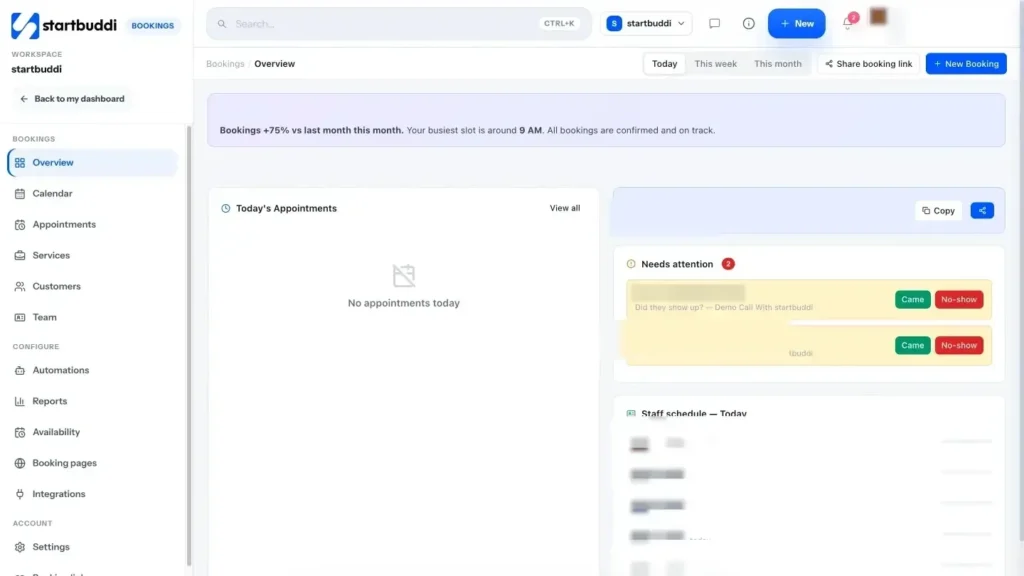
In startbuddi, Bookings gives you a booking page with your services, your hours and your reminders. Here is how to set it up for trades work.
1. Create your services. Open Bookings, then Services, and click Create Service. Give each one a name, a description, a duration (15, 30, 45, 60 or 90 minutes, or 2 hours in the full editor) and a colour. Then open the service to set a price and currency. If you want a call-out fee or deposit taken at booking, turn on "Require payment to book" and choose the full amount or a deposit. Payment runs through Paystack or Stripe, and the slot is held while the customer pays. Longer quoted jobs are better added by you from the calendar than sold as a two-hour slot.
2. Add booking questions. In each service, add the questions from the template above. Answers can be short or long text, single or multiple choice, and you can save an answer to the contact record, so the address and property type stay with the customer for next time. Chip can suggest questions for a service as a starting draft.
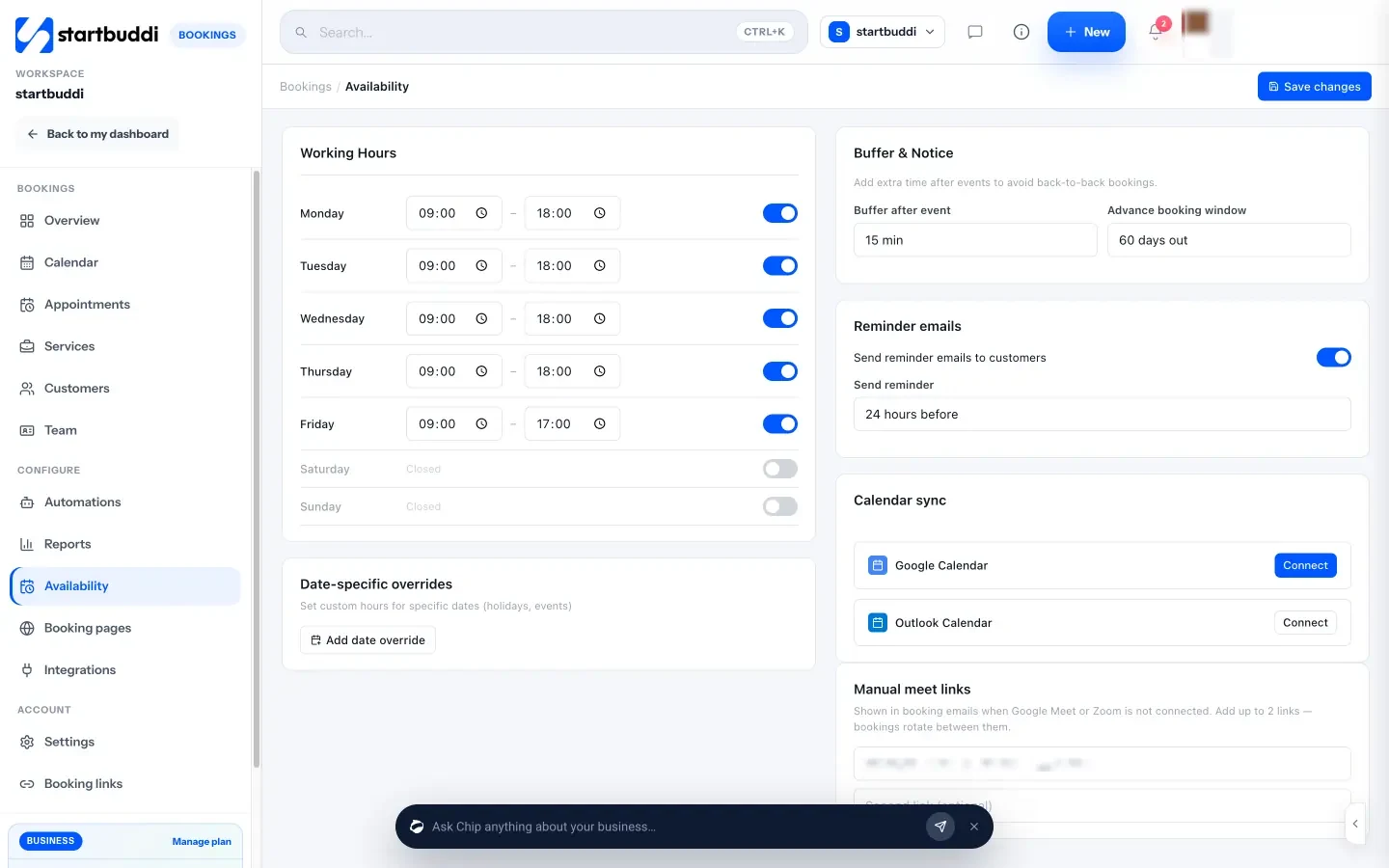
3. Set your hours, buffer and window. In Availability, set working hours for each weekday. For holidays, use Block time on the Calendar. Under Buffer and Notice, set a buffer after each event (up to 60 minutes) for travel, and an advance booking window. Turn on reminder emails and pick how long before the visit they go out, for example 24 hours.
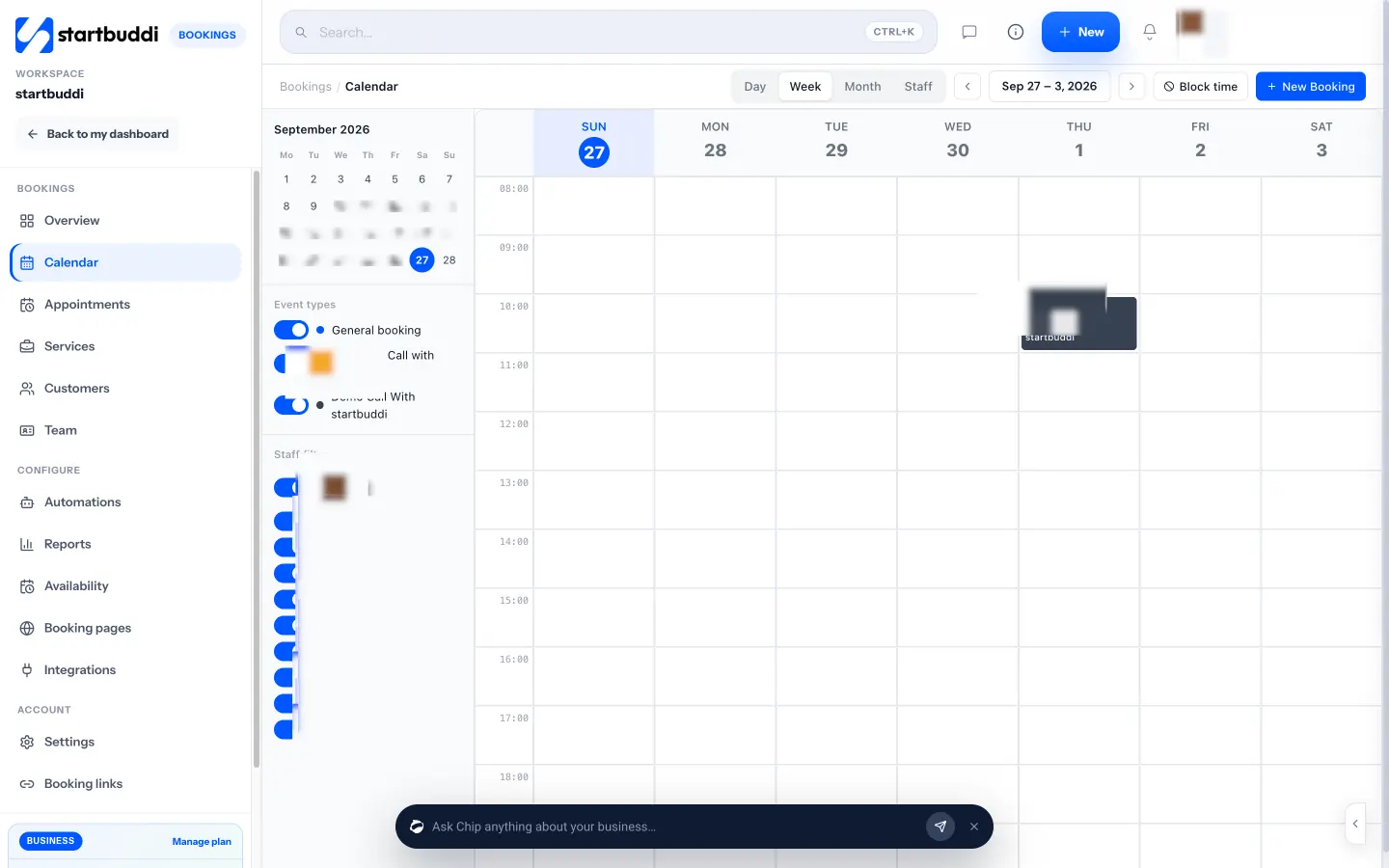
4. Run the day from the calendar. The Calendar shows day, week, month and staff views. Use New Booking for jobs that come in by phone, including emergencies, and Block time to protect your emergency slot, a lunch break or a day of training. Calendar sync pushes your bookings into Google Calendar (and Outlook where connected), but it does not read your other calendar events, so block personal time in startbuddi too.
5. Share bookings across a team. In Team, invite each technician and let them set their own hours. Members join the booking rotation, and a service can be assigned to specific people, so gas jobs only go to your gas engineer. The rotation shares bookings fairly by availability. It does not know where people are on a map, so keep using zone days if distance matters.
6. Share the link. From the Overview, click Share booking link to copy it, send it on WhatsApp or email, embed it on your website, or download a QR code for your van, invoices and flyers.
The Overview then becomes your morning check: today's bookings, anything needing attention, and quick Came or No-show buttons. Marking a no-show sends the follow-up message you wrote in Settings, which invites the customer to rebook.
On the Free plan you can run one live service; Starter allows ten (see pricing). Team members use plan seats. If you are a plumbing business, the booking software for plumbers page shows the same setup in more detail. With bookings in place, the next chapter follows a job from the first quote to the moment you pack up the van.
Run every job from quote to completion
- The stages of a job
- Quote or estimate: know which one you are giving
- How to write a quote that wins the job
- Pricing: hourly, flat rate or both
- Licences, registrations and consumer rules
- A job sheet you can use on every visit
- Handling changes without arguments
- Guarantees, aftercare and call-backs
- Common mistakes when running jobs
- Job management software for plumbers and other trades: what to look for
- How to run jobs in startbuddi
A booking gets you through the door. What happens next decides whether you make money on the job and whether the customer calls you again. This chapter walks through a job from enquiry to sign-off: how to quote, how to price, what the law may expect when you agree work in someone's home, how to handle changes, and how to finish properly. Then it shows how to run the same steps in startbuddi with estimates, projects and tasks.
The stages of a job
Whether it is a dripping tap or a full rewire, every job moves through the same stages. Writing them down means nothing gets skipped when you are busy.
| Stage | What happens | What you need to record |
|---|---|---|
| 1. Enquiry | Call, message or online booking | Name, contact details, address, the problem |
| 2. Visit or survey | You look at the job | Notes, measurements, photos, parts needed |
| 3. Quote | You send a written price | Scope, price, validity, deposit, terms |
| 4. Acceptance | Customer says yes, pays a deposit | Date accepted, deposit received |
| 5. Scheduling | Book the days, order materials | Start date, who is doing it, parts ordered |
| 6. Work | The job itself | Progress, changes, before and after photos |
| 7. Sign-off | Test, tidy, walk the customer through it | Customer's confirmation, certificates issued |
| 8. Invoice and follow-up | Bill, get paid, ask for a review | Invoice, payment, review request |
Small jobs can squash several stages into one visit: you diagnose, quote on the spot, fix it and invoice before you leave. Bigger jobs spread over weeks. Either way, the stages are the same, and so is the rule: if it is not written down, it did not happen.
Quote or estimate: know which one you are giving
In everyday speech people use the two words loosely, but customers may not. A quote is normally a fixed price for a defined piece of work. An estimate is your best guess, which may change once you open up the wall or lift the floor. If there is a real chance of hidden problems, say so in writing and explain how extra work will be priced. For example: "Price assumes existing pipework is sound. If we find corroded pipes, we will stop and quote the extra work before continuing."
Being clear about this protects both sides. It also keeps you on the right side of consumer rules in many countries, which generally expect prices to be stated clearly before work starts.
How to write a quote that wins the job
Homeowners often collect two or three quotes. The one that wins is not always the cheapest. It is the one that makes the customer feel they understand what they are buying. A good trades quote has the same sections every time:
- Your details and, where relevant, your licence or registration number.
- The customer and the site address.
- What you will do, in plain words, as a short list.
- What is not included. Plastering, painting, removing waste, making good.
- Materials and labour, as line items, or one fixed price if you prefer.
- Price, tax and total.
- How long the quote is valid, for example 30 days, because material prices move.
- Deposit and payment terms. "30% deposit to book, balance on completion."
- Timing. Earliest start date and how long the job will take.
- Guarantee. What you guarantee and for how long.
Here is a worked example for an electrician in Toronto quoting new kitchen circuits. The figures are illustrative.
| Line item | Qty | Price |
|---|---|---|
| Install two new 20A kitchen countertop circuits, including cable and breakers | 1 | $780 |
| Replace four countertop receptacles with GFCI protected outlets | 4 | $220 |
| Permit and inspection arrangement | 1 | $150 |
| Subtotal | $1,150 | |
Underneath: "Excludes drywall repair and painting. Valid for 30 days. 30% deposit to book, balance on completion. Work takes one day." That is a quote a customer can say yes to without calling you with ten questions. Our quote and estimate template gives you the same structure to fill in.
Pricing: hourly, flat rate or both
Most trades use a mix. Flat-rate pricing (one price for a boiler service, one for a tap replacement) is easier for customers to accept and rewards you for working quickly. Hourly pricing is fairer for jobs you cannot predict. Many businesses use a call-out fee that covers the first hour, then a set rate per additional hour, plus parts.
Whatever you choose, make sure the price covers more than your time on site. Travel, time spent quoting jobs you do not win, van costs, tools, insurance and admin all have to come from somewhere. Work out the true hourly cost of your business first, then check each job's margin against it. If materials are a big part of the job, decide on a standard markup and apply it every time.
Licences, registrations and consumer rules
Much trade work is regulated, and customers increasingly check. Rules differ by country, state and trade, so this is general information, not legal advice. A few examples show the pattern:
- In Great Britain, anyone doing gas work within the scope of the regulations must be on the Gas Safe Register (GOV.UK regulated professions register).
- In the US, technicians who work on equipment that could release refrigerant must hold EPA Section 608 certification, and many states license contractors, such as California through the Contractors State License Board.
- In New South Wales, Australia, a licence is needed for plumbing, gasfitting, electrical wiring and air conditioning work (NSW Government).
Put your registration or licence number on your quotes and invoices where it applies. It builds trust and it is often required.
There is a second rule to know if you agree jobs in the customer's home. Many countries give consumers extra time to change their mind about contracts made away from the trader's premises. In the UK, the Consumer Contracts Regulations generally give a 14-day cancellation period for off-premises contracts, and traders must tell customers about it. In the US, the FTC's Cooling-Off Rule gives three days to cancel certain sales made at the buyer's home. Both have details and exceptions, and other countries have their own versions, so check with your trade association or consumer protection body before you start work the same day on a quote agreed at the kitchen table.
A job sheet you can use on every visit
A job sheet is a checklist that travels with the job. It keeps quality the same whether you or a new hire does the work. Here is a template to adapt:
Before you go
- Confirm the time and access with the customer the day before.
- Check the booking notes and photos.
- Load the parts on the quote, plus common spares.
On site
- Take "before" photos.
- Protect floors and surfaces.
- Do the work in the quote, and nothing extra without agreement.
- Test everything: water pressure, circuits, airflow, the finish of a clean.
- Take "after" photos.
Before you leave
- Walk the customer through what you did and anything to watch.
- Issue any safety certificate or record the work requires.
- Tidy up and remove waste if it was in the quote.
- Send the invoice or take payment.
Photos matter more than most people think. They settle disputes, prove the condition before you started, and make good material for your website and social posts later (ask the customer first if anything identifies their home).
Handling changes without arguments
Changes happen on almost every bigger job. The customer asks for an extra socket, or you find rotten joists under the floor. The fix is a small written change note: what changed, what it costs, how it affects the finish date, and the customer's yes. A WhatsApp message saying "Extra socket in the hallway, $95, adds half an hour, OK to go ahead?" followed by "Yes please" is enough for small changes. For big ones, send a revised quote. Never do extra work first and hope to be paid for it later.
Guarantees, aftercare and call-backs
Every trade gets call-backs: a joint that weeps a week later, a breaker that trips again. How you handle them decides your reputation more than the original job. Write your guarantee on the quote and invoice ("12 months on workmanship; parts carry the manufacturer's warranty"), log every call-back against the original job, and go back quickly. If the same kind of call-back keeps happening, it is a training or materials problem worth fixing, and your job records will show it.
Common mistakes when running jobs
- Starting work on a verbal quote, then disagreeing about the price at the end.
- No deposit on a job with expensive materials.
- Doing "while you're here" extras without writing them down.
- No photos, so nobody can prove what the job looked like before you started.
- Leaving without testing, or without showing the customer what you did.
Job management software for plumbers and other trades: what to look for
If you are comparing job management software for plumbers, electricians or cleaners, check it against the stages above. At minimum it should let you:
- keep every customer's details and job history in one place;
- send a professional quote and turn it into an invoice without retyping;
- schedule jobs and see who is doing what;
- keep notes, checklists and photos with each job;
- take deposits and card payments;
- work on a phone, because nobody carries a laptop up a ladder.
Field service tools add dispatch maps, GPS and dedicated technician apps. All-in-one business tools add marketing, a website and team features. Decide which gaps hurt most today, and choose for that.
How to run jobs in startbuddi
In startbuddi, the quote, the job and the invoice stay connected, so you type each detail once.
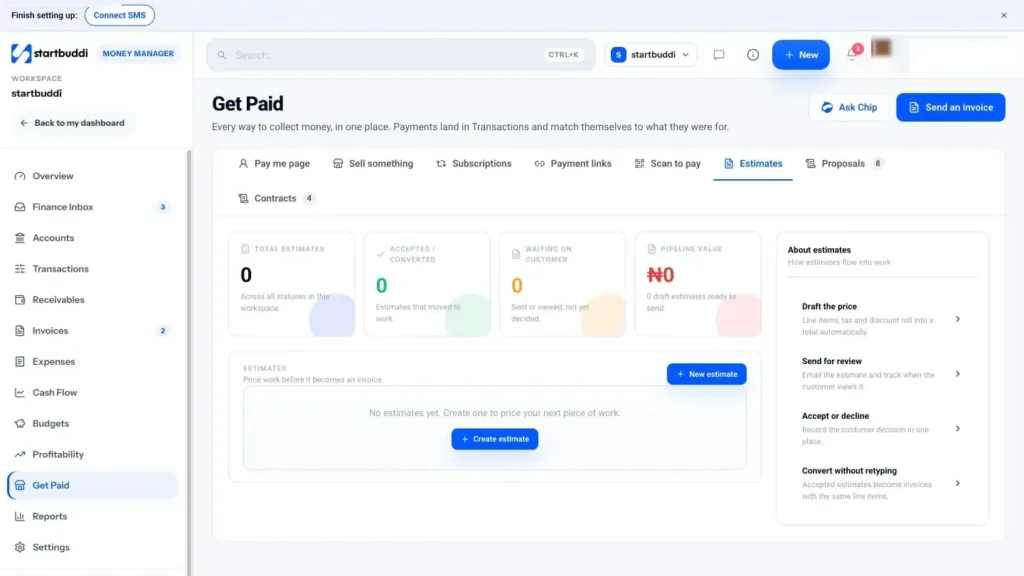
1. Send the estimate. In Money Manager, open Get Paid, then Estimates, and click New estimate. Choose an existing customer or a one-off recipient (you can also save them as a contact), set the currency and add line items, tax and any discount. The notes box is where your terms go, for example "Valid for 30 days. 30% deposit to begin." Save it, then Send estimate to email it. The customer replies to that email to accept, decline or ask for changes; there is no online accept button yet, so you click Mark accepted when they say yes. Then Convert to invoice turns the same line items into an invoice, with nothing retyped. See estimates, proposals and contracts for more.
For larger jobs you can also send a contract for e-signature from the Contracts tab: start from a template or a blank document, edit the wording, add the customer as a signer and click Send for signature. The templates are a starting point, not legal advice, so have your own terms checked.
2. Turn big jobs into projects. For work that runs over several days, such as a bathroom refit or a rewire, open Work, then Projects, and start a project with the customer attached. Add tasks for each stage, with dates and the person responsible, and milestones such as "First fix done" or "Inspection passed". The Budget tab shows a money and hours budget against time logged and expenses linked from Money, so you can see whether the job is still making a profit. Every project also gets its own room in Chat for the team. The guide to running client projects covers this in depth.
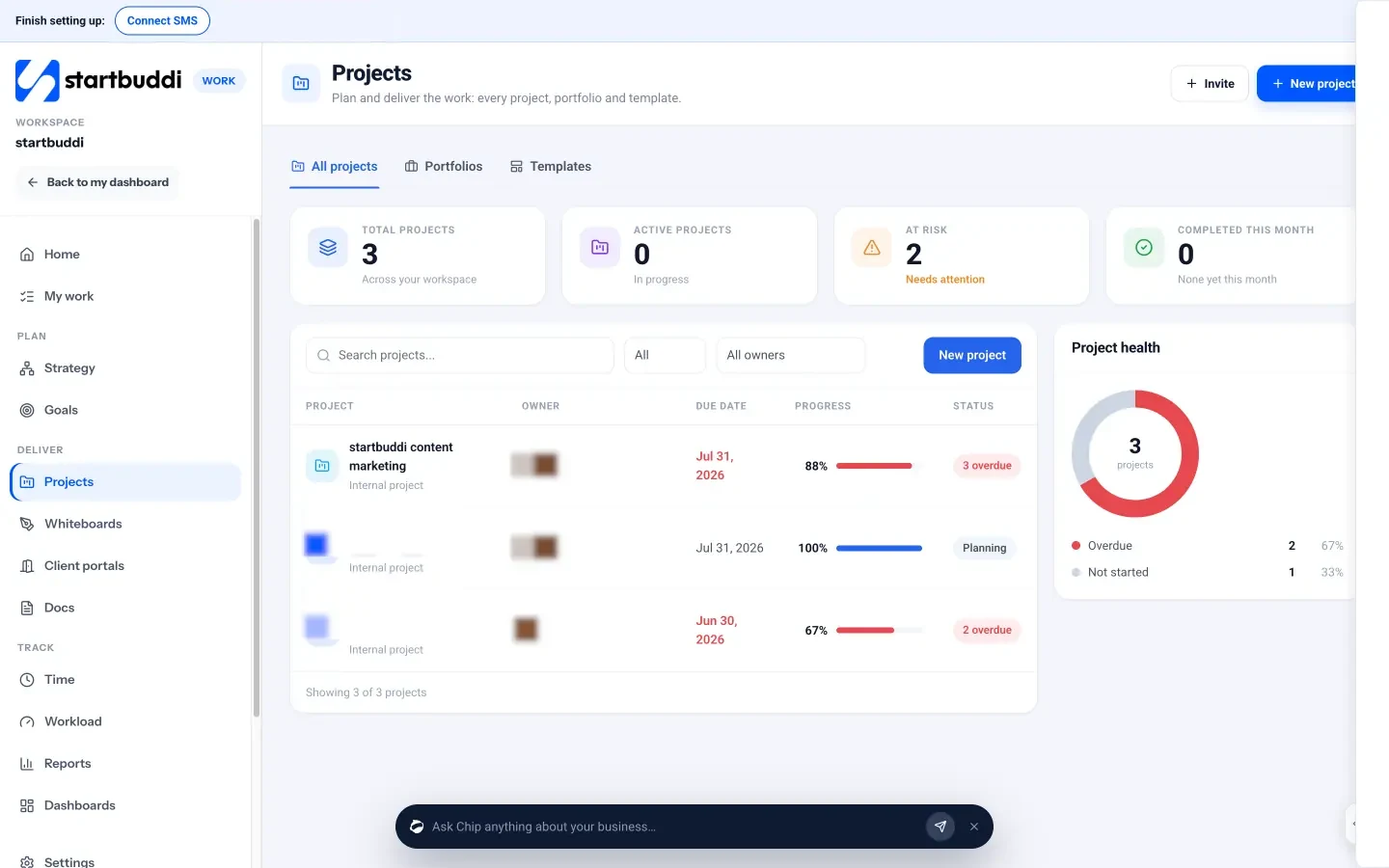
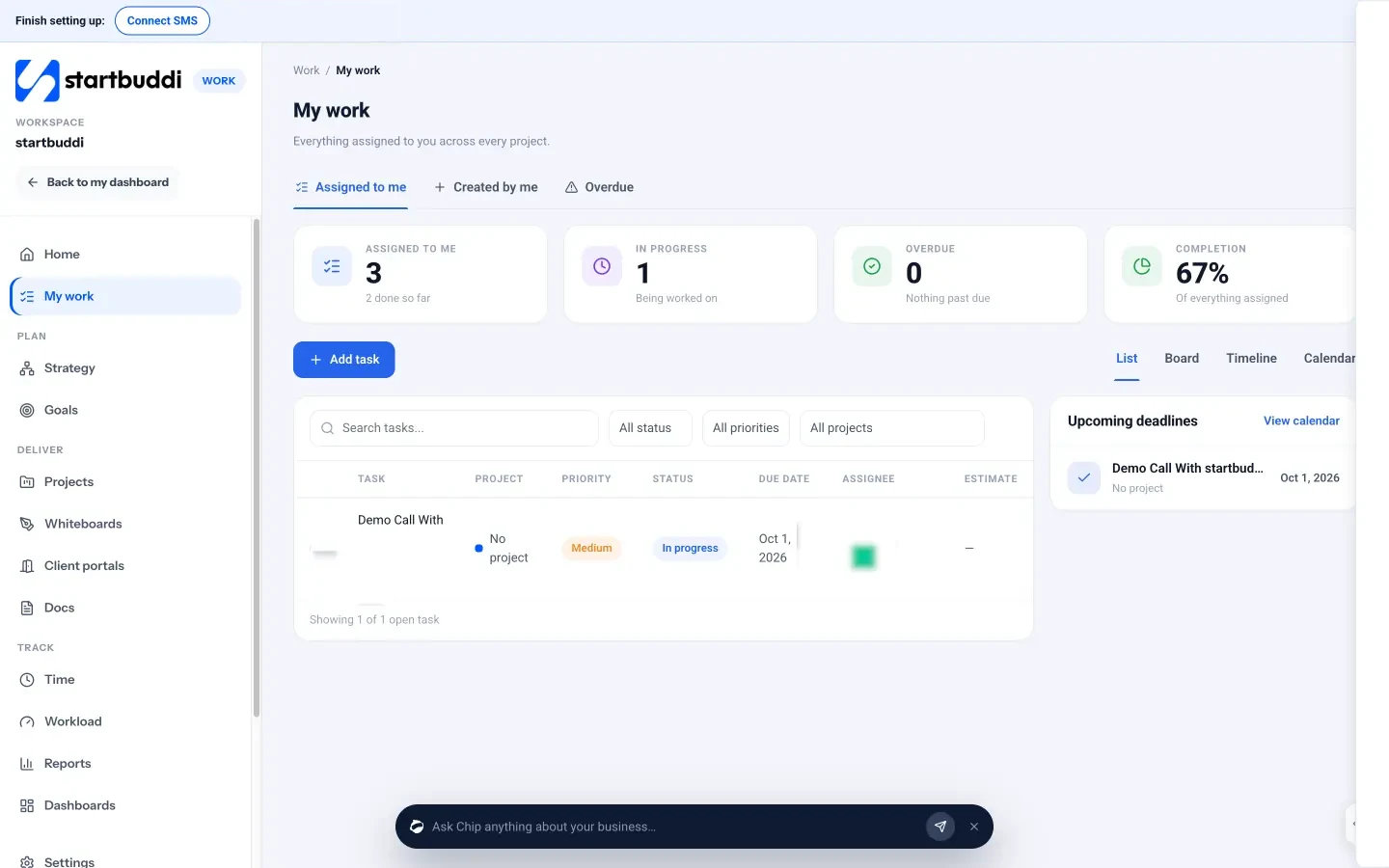
3. Use tasks as job sheets for smaller work. In My work, add a task for each job with a due date and assignee. Subtasks become your checklist (before, on site, before you leave), and you can attach files, which is where before and after photos go. Tasks can repeat daily, weekly or monthly, which suits recurring cleans and maintenance visits. Log time against the task if you price by the hour.
4. Record materials as you buy them. In Money Manager, Expenses, add each materials purchase with the receipt photo and link it to the project or customer. That keeps job costs visible when you invoice.
On a phone. startbuddi is a web app that works in your phone's browser; there is no separate technician app. On a phone, the Create button lets you add a task, a booking, an invoice, a payment link or a contact from the van. Some management screens, such as most Bookings tabs, are desktop only. If your team needs offline job sheets, GPS check-ins or turn-by-turn directions, that is where a dedicated field service app earns its place.
With the job done, the next chapter is about the part that matters most: getting paid.
Invoice on the spot and get paid faster
- Why trades get paid late
- Choose payment terms by customer type
- Deposits and stage payments
- What a trades invoice must include
- Invoice before you leave the driveway
- A reminder schedule that gets paid without awkwardness
- Job costing: did the job actually make money?
- When a customer disputes the bill
- Common invoicing mistakes
- Invoicing software for contractors: what to look for
- How to invoice and get paid in startbuddi
The work is finished, the customer is happy, and you are already thinking about the next job. This is exactly the moment money slips away. An invoice written on Sunday night, a customer who "will transfer it later", a landlord who pays in 60 days: each one stretches your cash and your patience. This chapter covers payment terms for different customers, deposits, what an invoice must include, how to get paid on the spot, and how to chase politely. Then it shows how to do it in startbuddi, and what startbuddi is not.
Why trades get paid late
Most late payments in home services are not about customers refusing to pay. They come from three habits on the business side:
- Invoicing late. If the bill arrives a week after the job, the customer's sense of urgency has gone.
- Unclear terms. "Pay when you can" is not a due date.
- Making it hard to pay. If the only option is a bank transfer with details the customer has to copy from a PDF, some of them will put it off.
Fix those three and most of the chasing disappears.
Choose payment terms by customer type
Different customers need different terms. Decide yours once and write them on every quote.
| Customer | Typical terms | Why |
|---|---|---|
| Homeowner, small job | Due on completion, paid before you leave | Small amounts, no reason to wait |
| Homeowner, big job | Deposit, stage payments, balance on completion | Protects your cash for materials |
| Landlord or letting agent | 7 to 14 days | They often pay in batches |
| Commercial client | 14 to 30 days, agreed in writing | Their accounts team has a payment run |
| Recurring customer | Monthly or quarterly invoice, or a standing plan | Less admin for both sides |
Whatever you choose, write a due date on the invoice, not "net 14". "Due 14 March" is clearer to everyone.
Deposits and stage payments
For jobs with expensive materials, a deposit is standard practice and customers expect it. It covers what you buy up front and shows the customer is committed. A common pattern for a larger job is a deposit to book, a stage payment at a clear milestone, and the balance on completion.
Worked example: a bathroom refit in Melbourne quoted at AUD 12,000. The plumber asks for 30% (AUD 3,600) to book and order the suite, 40% (AUD 4,800) when first fix is complete, and 30% (AUD 3,600) on completion. The customer knows exactly when each payment falls due, and the plumber is never more than a few days of work ahead of the money.
Tie each stage payment to something the customer can see ("tiles delivered", "first fix inspected"), not to a date, so nobody argues about whether the payment is due.
What a trades invoice must include
Every country sets its own rules, and this is general information, not tax advice. As an example, GOV.UK lists what an invoice must include in the UK: a unique invoice number, your business name, address and contact details, the customer's name and address, a clear description of what you are charging for, the supply date, the invoice date, the amounts charged, any VAT, and the total owed (GOV.UK). In the US, the IRS explains which business records to keep, including invoices. In Canada, the CRA sets out what GST/HST registrants must show on receipts and invoices. In Nigeria, check current guidance with the Nigeria Revenue Service. If you are registered for VAT, GST or sales tax, ask an accountant what your invoices need.
On top of the legal minimum, a good trades invoice also shows the job address, your licence or registration number where it applies, how to pay, and the due date in plain words.
Invoice before you leave the driveway
The single best habit in this chapter: send the invoice from the site, on your phone, the moment the job is signed off. The customer has just watched you fix the problem. That is when they are happiest to pay. A payment link or QR code turns "I'll transfer it later" into "done" in under a minute.
Offer the payment methods your customers actually use. In the UK and Europe that is usually card and bank transfer; in the US, card; in Nigeria, card, bank transfer and USSD; in Kenya and Ghana, mobile money alongside cards. If someone pays cash, record it straight away so your books match.
Always give a receipt once the money arrives, even for small cash jobs. Customers need it for warranty claims, landlords need it for their own records, and business customers may need it to reclaim tax. A receipt also closes the job cleanly, which makes the review request that follows feel natural rather than pushy.
A reminder schedule that gets paid without awkwardness
If an invoice goes unpaid, follow a fixed schedule so chasing feels routine rather than personal. Here is one that works for most customers:
- 3 days before the due date: a friendly heads-up with the payment link.
- On the due date: "Just a reminder that invoice 1042 is due today."
- 3 days overdue: a polite nudge, asking if anything is wrong with the invoice.
- 7 days overdue: a firmer note with the amount, the date and how to pay.
- 14 days overdue: a phone call, then a final written notice explaining your next step.
A template for the 7-day message: "Hi Sarah, invoice 1042 for the boiler repair at 14 Oak Street ($340) was due on 3 June and is still open. You can pay by card here: [link]. If there is a problem with the invoice, just reply and I will sort it out. Thanks, James." The late payment email writer drafts these for you in different tones.
For business customers, some countries give you a legal right to interest on late payments. In the UK, for example, a business can usually claim statutory interest of 8% plus the Bank of England base rate on late business-to-business payments (GOV.UK). This does not apply to consumers, and other countries have different rules, so check locally before you add interest to an invoice.
Job costing: did the job actually make money?
Getting paid is only half the story. The other half is knowing what the job cost you. It is easy to be busy all year and still find at year-end that some kinds of job barely paid. A simple check after each larger job fixes this. Worked example, a water heater replacement in Cape Town quoted at ZAR 18,000:
| Item | Amount |
|---|---|
| Price charged | ZAR 18,000 |
| Materials (unit, valves, fittings) | ZAR 9,800 |
| Labour: 2 people for 5 hours at your internal cost of ZAR 350 an hour | ZAR 3,500 |
| Travel, waste disposal and consumables | ZAR 900 |
| What is left to cover overheads and profit | ZAR 3,800 (about 21%) |
If that last line is lower than you expected, the fix is usually one of three things: a higher materials markup, a more realistic labour estimate, or a travel charge for distant jobs. Record materials and time against each job as you go, and this check takes two minutes rather than an afternoon.
When a customer disputes the bill
Now and then a customer questions an invoice. Stay calm and go back to the paperwork: the accepted quote, any written changes, and your photos. Most disputes come from a misunderstanding about what was included, which is why the "not included" list in chapter 2 matters. If part of the complaint is fair, fix the work or adjust that line, and ask for the rest to be paid on the agreed date. If it is not, explain politely with the quote in hand. Keep it in writing so there is a clear record either way.
Common invoicing mistakes
- Waiting until the weekend to write invoices.
- Vague descriptions such as "plumbing work", which invite questions and delay payment.
- Forgetting parts bought on the day, so they never get billed.
- No due date, or a due date that differs from what the quote said.
- Not recording cash, so your records never match your bank.
- Chasing only when you are short of money, instead of on a fixed schedule.
Invoicing software for contractors: what to look for
If you are choosing invoicing software for contractors, or comparing invoicing software for electrical contractors or plumbing businesses, these are the features that matter day to day:
- Turn an accepted quote into an invoice without retyping.
- Send from a phone, on site.
- Online payment by card and the local methods your customers use.
- Deposits, part payments and a clear balance due.
- Record cash and bank transfers taken outside the system.
- Automatic or one-click reminders.
- Recurring invoices for maintenance contracts.
- A clear view of who owes what.
Free invoice software for contractors exists, including free plans on larger tools, but check the limits: many cap the number of invoices or customers.
How to invoice and get paid in startbuddi
In startbuddi, invoicing sits in Money Manager, next to your estimates, payment links and expenses.
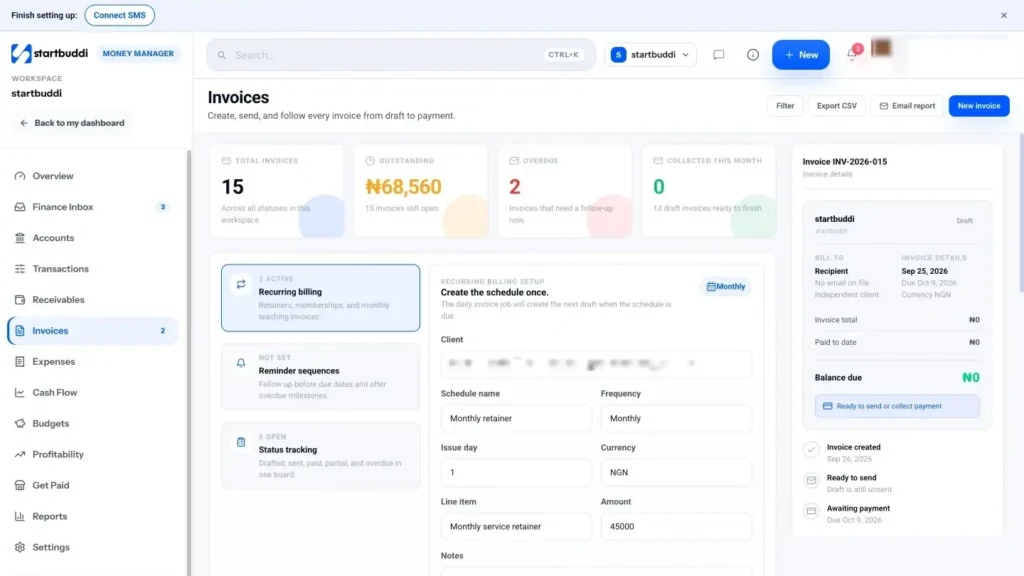
1. Create the invoice. Click New invoice, choose the customer, add line items, tax and discount, and set the currency and due date. Leave "Accept payment via Paystack" and/or "Accept payment via Stripe" switched on (connect them once in settings), and add bank transfer details in the notes. If the job started as an estimate, use Convert to invoice instead. If it started as a booking, the booking's Generate Invoice button creates one with the amount and due date.
2. Send it from site. Send invoice emails it to the customer, or copy the invoice link and send it on WhatsApp. The customer's invoice page has a Pay button for card checkout, plus your bank transfer details and PayPal if you added them. Paystack takes cards, bank transfer, USSD and mobile money in Nigeria, Ghana, Kenya and South Africa; Stripe takes cards in many countries. Online payments mark the invoice as paid on their own.
3. Record cash and transfers. For money that arrives outside startbuddi, open the invoice and click Record payment. Choose bank transfer, cash or card, enter the amount (part payments are fine), and the invoice shows Partially paid or Paid. Recording a payment also creates a receipt, so the customer has proof it was received.
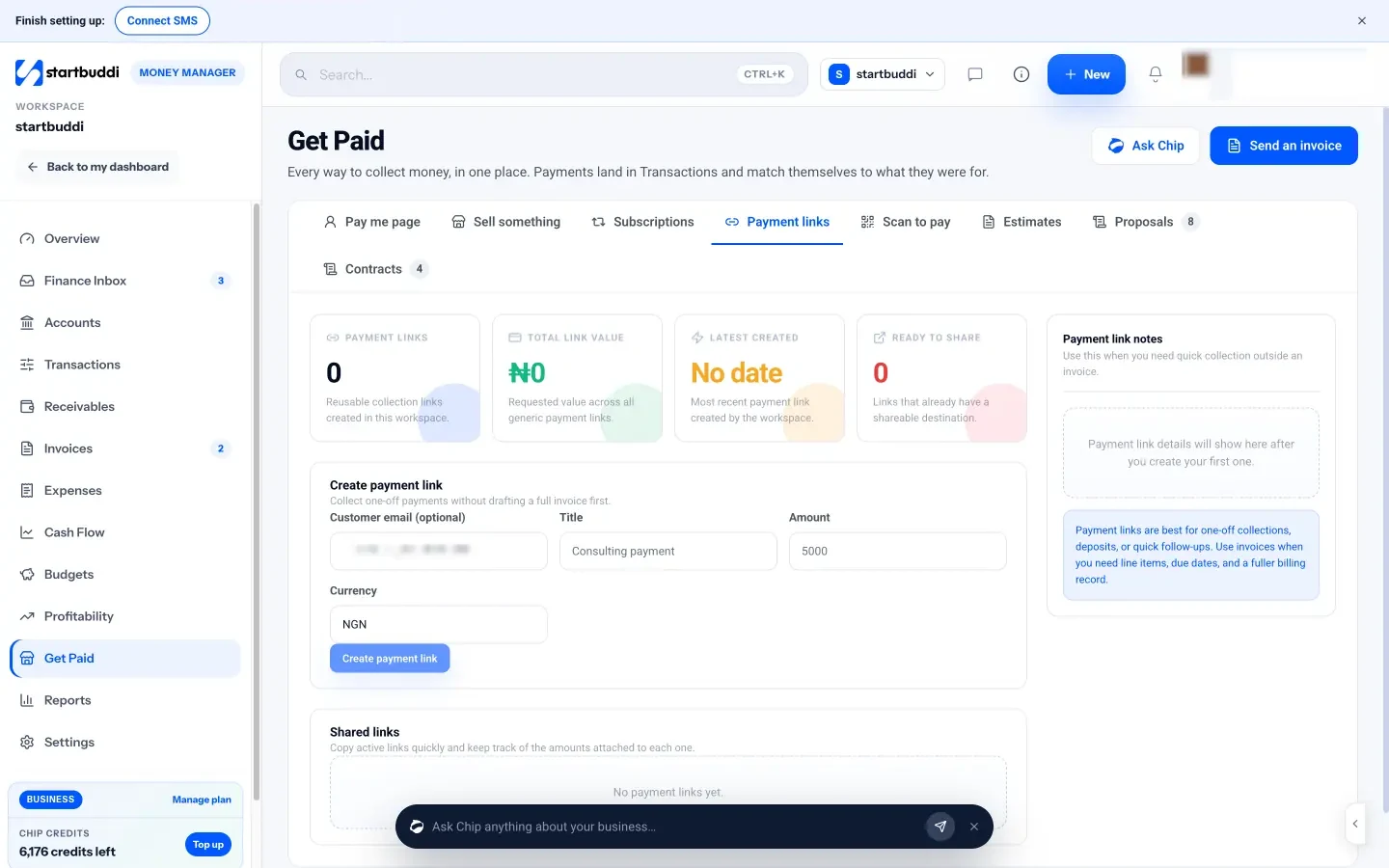
4. Take deposits with a payment link. In Get Paid, Payment links, enter a title such as "Deposit: bathroom refit, 14 Oak Street", the amount and currency, and click Create payment link. Copy it into WhatsApp or send it by email. Payment links are best for deposits and one-off collections; use invoices when you need line items and a full record. Scan to pay gives you a printable QR code for your pay me page or any active payment link, so a customer can pay from their own phone at the door.
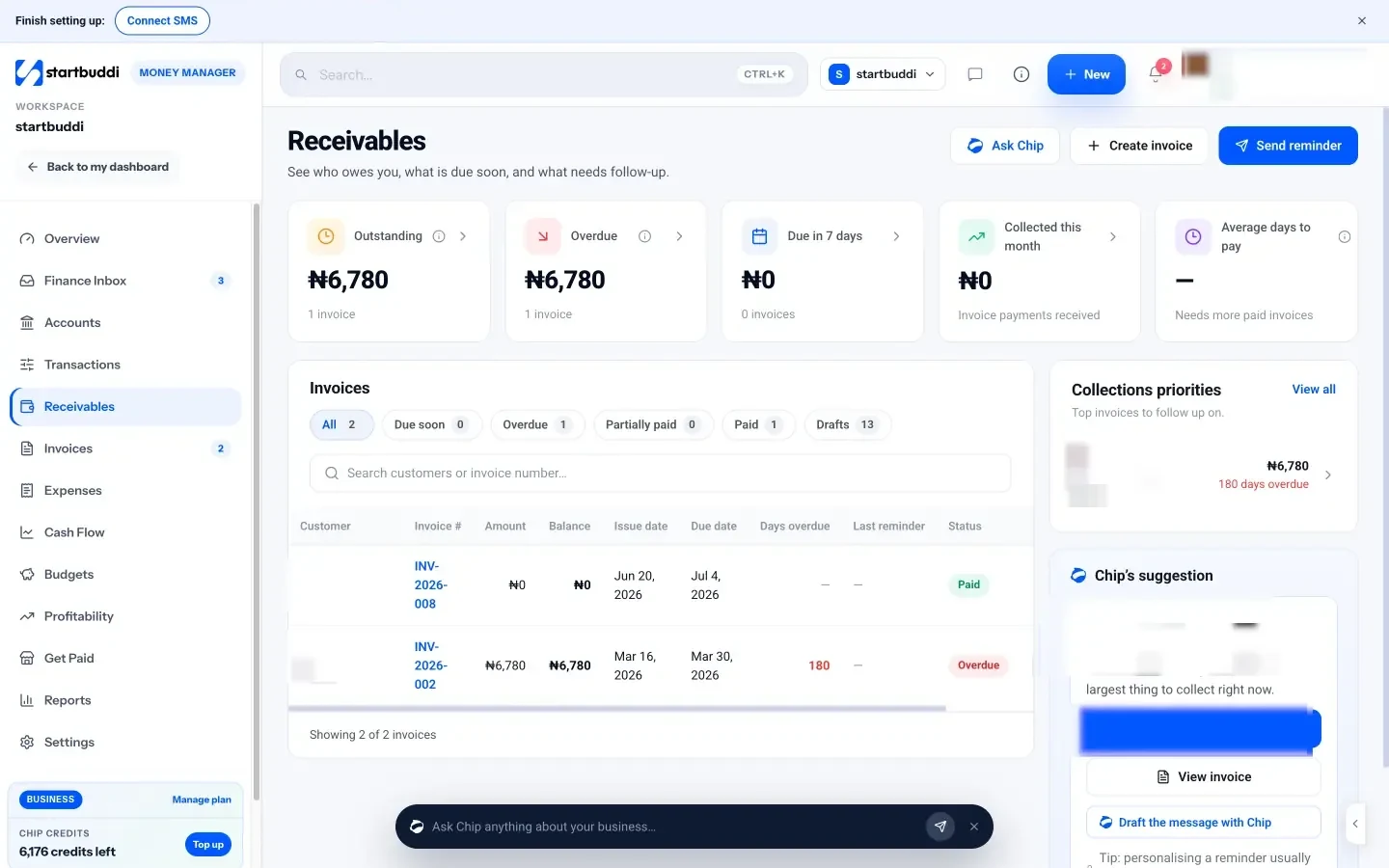
5. Chase from Receivables. Receivables shows what is outstanding, overdue, due in the next seven days, collected this month and your average days to pay. Each open invoice has a Remind button, and Chip can draft a friendly or firmer reminder for you to edit. On the Invoices page you can also save a reminder sequence: days before the due date, on the due date, and follow-ups such as 3, 7 and 14 days overdue.
6. Bill maintenance customers on a schedule. Recurring billing creates a draft invoice monthly or quarterly for a customer, which suits commercial cleaning contracts or planned maintenance agreements. If you would rather customers pay automatically, the Subscriptions tab lets you sell a monthly or annual plan through Paystack or Stripe.
The Free plan includes five invoices a month; Starter and above remove the limit. One honest note: startbuddi tracks invoices, payments and expenses, but it is not accounting software. It does not file tax returns, run payroll or connect to bank feeds, so keep an accountant or accounting tool for year-end. For a step-by-step walk-through of your first invoice, read how to send your first invoice. Once the money is in, the last chapter is about turning today's customer into next year's work.
Win repeat work, reviews and referrals
- Why repeat and referral work matters most
- Keep a customer list you can actually use
- Turn one-off jobs into maintenance reminders
- Offer a service plan
- Reviews: ask at the right moment, and the right way
- Get found by people nearby
- Ask for referrals without feeling pushy
- A simple repeat-work calendar
- Turn complaints into loyal customers
- Stay in touch without being annoying
- How to run repeat work in startbuddi
- Your next step
Most home service businesses spend money and time finding new customers, then forget about them once the invoice is paid. Yet a boiler needs servicing every year, an air conditioner needs a check before summer, a house needs cleaning every week, and every happy customer knows neighbours with the same problems. This chapter shows how to keep a customer list you can actually use, set up maintenance reminders and service plans, collect reviews the right way, and ask for referrals without feeling pushy. Then it shows how to run it in startbuddi.
Why repeat and referral work matters most
A customer who has already let you into their home is the easiest sale you will ever make. They know your work, they have your number, and they trust you. Referrals carry that trust to new people: in Nielsen's 2021 Trust in Advertising study, 88% of global respondents said they trust recommendations from people they know more than any other channel (Nielsen).
Repeat work also smooths out the seasons. A plumber with 300 boiler service customers has a predictable autumn. A cleaner with 20 weekly clients has a predictable month. That predictability is what lets you hire your first employee or buy a second van with confidence.
Keep a customer list you can actually use
A phone full of contacts called "John Boiler" and "Lady Blue Door" is not a customer list. For repeat work, you need a few more facts about each customer and their property. Record these for every job:
- Name, phone, email and the property address (some customers have several).
- What you did and when.
- The equipment on site: boiler or furnace make and model, AC unit, water heater, consumer unit, and roughly when it was installed.
- When the next service or check is due.
- How they found you (Google, a neighbour, a letting agent, a flyer).
- Whether they are happy to hear from you about servicing and offers.
That last point matters. Rules on marketing messages vary by country, but a safe habit everywhere is to ask customers whether they want service reminders and news, record their answer, and let them opt out easily.
Turn one-off jobs into maintenance reminders
Much of the equipment trades work on needs regular attention, and some of it is required by law. That gives you a natural reason to get in touch. Some examples:
- Heating and cooling. ENERGY STAR advises homeowners to hire a contractor for routine maintenance, with cooling checked in spring and heating in the autumn (ENERGY STAR).
- Landlords' gas safety. In Great Britain, landlords must have gas appliances they provide checked every 12 months by a Gas Safe registered engineer (HSE).
- Landlords' electrical safety. In England, private landlords must have the electrics in rented homes inspected and tested at least every five years (GOV.UK).
- Cleaning. The job itself repeats: weekly, fortnightly, or a deep clean each season.
The rules where you work may differ, but the principle holds everywhere: if you know when the next job is due, you can ask for it before a competitor does. A simple reminder four weeks before the due date works well: "Hi Ahmed, your boiler service is due in April. Want me to book you in? Reply with a day that suits, or pick a time here: [booking link]."
Offer a service plan
A service plan turns occasional customers into regular ones. The customer pays a monthly or annual fee and gets something clear in return. For example, an HVAC business might offer: "Comfort plan, $19 a month: spring AC tune-up, autumn furnace check, priority booking for breakdowns, 10% off repairs." A cleaning company might offer a discount for committing to fortnightly cleans. The figures are illustrative; price yours so the plan still makes a margin if the customer uses every benefit.
Service plans work best when they are simple: one or two levels, a short list of benefits, and easy cancellation. Write the terms down, including what happens if a visit is missed and how customers cancel.
Reviews: ask at the right moment, and the right way
For local trades, online reviews often decide who gets the call. BrightLocal's 2025 Local Consumer Review Survey found that only 4% of consumers say they never read online business reviews, that Google is the platform most used to find them, and that email was the request method people said they were most likely to respond to (BrightLocal). In short: people check reviews, and many will leave one if you ask.
Ask when the customer is happiest, usually right after a successful job or when they pay. Ask personally first ("Would you mind leaving us a quick review? It really helps a small business"), then send the link by email or message so it takes them one tap. A template:
Hi Maria, thanks again for having us round to fix the heating. If you were happy with the job, a short Google review would mean a lot to a small team like ours: [review link]. And if anything is not right, reply to this message and I will sort it. Thanks, Tunde.
Two rules keep you safe. First, do not pay for reviews. Google's policy prohibits offering incentives such as payment, discounts or free services in exchange for reviews (Google), and consumer protection bodies in many countries take fake or bought reviews seriously. Second, respond to every review, good and bad, calmly and briefly. A polite reply to a one-star review often does more for your reputation than the review itself does damage.
Get found by people nearby
Most home service searches are local, so your Google Business Profile matters. If you work from home and travel to customers, Google treats you as a service-area business: you can hide your home address and list the areas you cover instead (Google Business Profile Help). Add your services, photos of real work, your hours and your booking link, and keep them up to date.
Ask for referrals without feeling pushy
Happy customers are usually glad to recommend you. They just forget to. A few gentle habits make it easy:
- Ask at sign-off. "If you know anyone who needs an electrician, I would be grateful if you passed my number on."
- Leave something behind. A card or a sticker on the boiler or fuse board with your number and booking QR code.
- Say thank you. When someone sends you a customer, thank them properly. Some businesses offer a discount on the referrer's next service; if you do, keep it separate from any review request, and check local rules on incentives.
- Build trade partnerships. Letting agents, property managers, builders, kitchen fitters and estate agents all need reliable trades. One good relationship can bring dozens of jobs a year.
Record the source of every new job. After six months you will know whether your work comes from Google, neighbours or partners, and where to spend your effort.
Two more numbers are worth watching each quarter. The first is your repeat rate: how many of this quarter's jobs came from people you had worked for before. The second is how many reviews you asked for against how many you received. If the repeat rate is flat, your reminders are not going out or not landing. If few people leave reviews, ask sooner and make the link easier to tap. Neither needs special software, just a customer list where every job is recorded.
A simple repeat-work calendar
Plan your reminders once a year so they go out without you thinking about it. Here is an example for a heating and cooling business in the northern hemisphere; move the months if you work south of the equator.
| Month | Who to contact | Message |
|---|---|---|
| February to March | Customers with AC units | "Book your spring tune-up before the summer rush." |
| Every month | Landlords with checks due next month | "Your annual safety check is due. Pick a slot." |
| August to September | Customers with boilers or furnaces | "Get your heating checked before the first cold week." |
| Any time | Customers you have not seen in 18 months | "Just checking in. Anything we can help with this year?" |
Turn complaints into loyal customers
Something will go wrong eventually: a late arrival, a mark on the wall, a repair that fails. Customers judge you less on the problem than on what you do next. Reply the same day, say sorry without excuses, offer a clear fix and a time, and then do it. Afterwards, note what happened on the customer's record so the next visit starts with extra care. A customer whose problem you fixed well is often more loyal, and more likely to recommend you, than one who never had a problem at all.
Stay in touch without being annoying
Between jobs, a few useful messages a year keep you in mind: a pre-winter heating reminder, a pre-summer AC reminder, a note when you add a new service. Keep them short, useful and relevant to the customer's property. A "your service is due" message is welcome. A weekly sales email is not.
How to run repeat work in startbuddi
In startbuddi, your customers, their jobs, their invoices and their bookings sit on one record, which is what makes repeat work easy to spot.
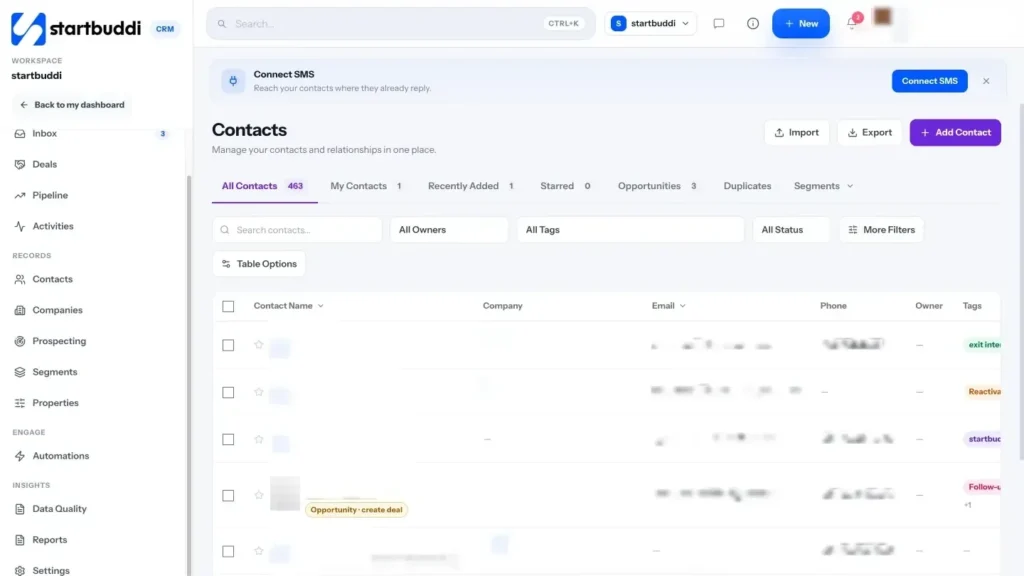
1. Build the customer list. In Customers, open Contacts and click Add Contact, or import your existing list from a CSV file. Bookings create or update contacts automatically, so online customers land here on their own. Use tags for the facts that drive repeat work, such as "boiler-service", "landlord" or "service-due-april", and add notes for equipment details. Booking answers you mapped to contact properties in chapter 1 (address, property type) are already on the record. See contacts and companies.
2. Work from the customer record. Each contact page has Email, Call and WhatsApp buttons, a money tile showing what they have been invoiced and paid, and a menu to book a call (video, phone or in person), add a task, add a note or create an invoice pre-addressed to them. Filter contacts by tag and save the view as a segment, such as "Boiler customers due in April", to come back to each month.
3. Schedule the follow-ups. For each service due, add a task in Work with a due date, or a follow-up in Customers, Activities. A monthly repeating task called "Send service reminders" makes sure the list gets worked. The Bookings Customers tab also tags people as Active, VIP or At risk based on their booking history, which is a quick way to spot who has gone quiet.
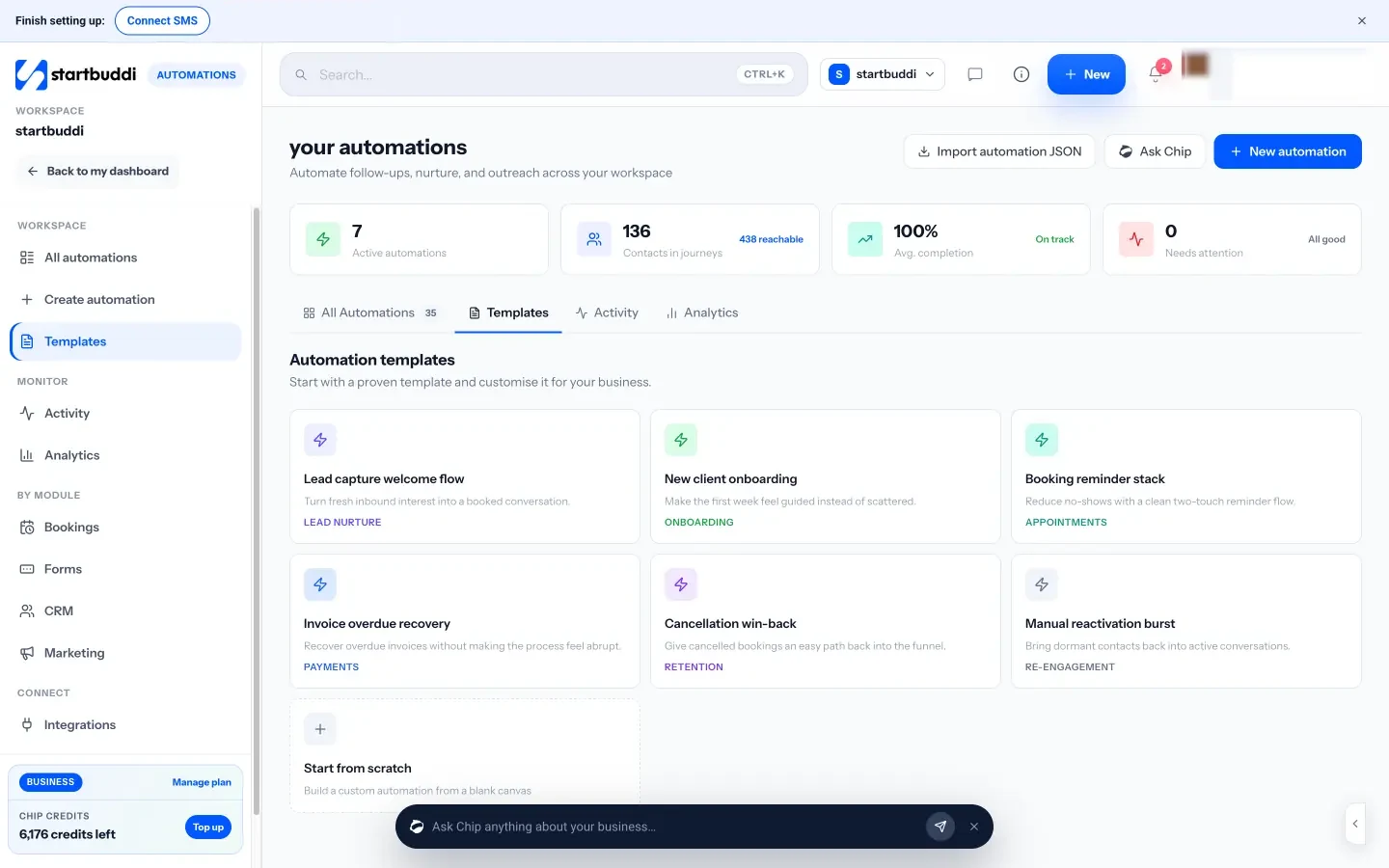
4. Ask for reviews automatically. In Bookings, Settings, edit the "After a completed booking" follow-up message to include your review link. When a booking is marked complete, Send follow-up on that booking lets you review the message and send it. On Starter and above, Automations can do more: start from "Booking completed" or "Invoice paid", wait a day or two, then send an email, SMS or WhatsApp message asking for a review. Ready-made templates such as "Cancellation win-back" and "Manual reactivation burst" help you bring back customers who have gone quiet.
5. Send seasonal reminders. On Starter and above, the Marketing module lets you send an email campaign to a segment, for example every heating customer in September. Marketing is not available on the Free plan.
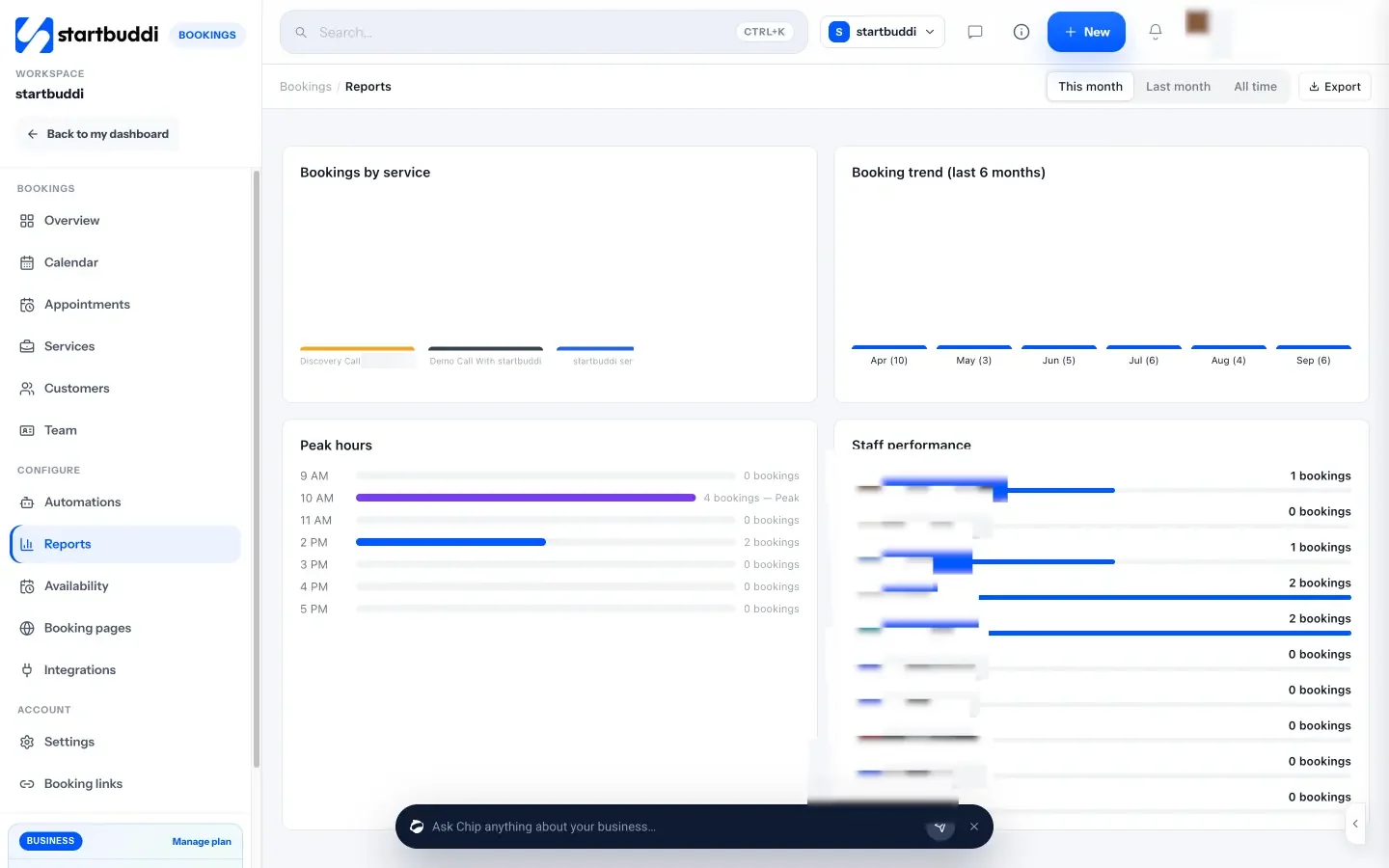
6. Watch the numbers. Bookings Reports shows total bookings, cancellation rate, repeat customers, bookings by service and peak hours, so you can see whether your reminders and plans are working.
Your next step
Pick one thing from each chapter and do it this week: publish a booking link with a quote visit, send your next quote with clear terms, invoice your next job before you leave the driveway, and ask your next happy customer for a review. You can set all of it up in startbuddi on the Free plan and move to Starter when you want unlimited invoices and automations; every paid plan starts with a 30-day trial. See plans and prices to choose.
Tiwalade Joanna Okedara-Kalu is the founder, CEO and CTO of startbuddi, the business system that brings clients, bookings, invoices, projects, marketing and the Chip AI assistant into one place. Tiwalade builds software around how service businesses really work day to day, and writes about client management, getting paid on time and why small businesses outgrow the tools they start with.
Founded startbuddi and leads its product and engineering

