Collaborative task management: how to stop losing tasks in Slack and email threads
Why requests vanish in chat and email, and a simple team habit, email routine and weekly review that turns every commitment into a task someone owns.


Chinonye wrote this while on the startbuddi team. The product has changed since, so the team updated it on .

- Tasks get lost because Slack and email are built for conversation, not commitments. Agree one rule: any request with an action, an owner and a time becomes a task in one shared list, linked back to the thread. Clean up the backlog once, then keep it working with a 15-minute weekly review.
Most teams don’t lose tasks because people are careless. They lose them because Slack and email are built for conversation, and a task is a commitment. When a request lives only in a chat message or an email thread, it has no owner anyone can see, no due date, and no place to be ticked off. Within a day it scrolls out of sight.
The fix is collaborative task management: a simple team habit, not a new app. Any message that asks someone to do something by a certain time becomes a task in one shared list, with one owner and one date, and the thread gets a short reply saying where the task now lives. This guide shows you how to spot those hidden tasks, agree the habit with your team, deal with email, clean up the backlog you already have, and keep it all working with a 15-minute weekly review.
Why tasks get lost in Slack and email threads
Communication now takes up most of the working week. Microsoft’s 2023 Work Trend Index found that people using Microsoft 365 spend 57% of their time communicating (meetings, chat and email) and 43% creating. The same report found that 62% of people struggle with too much time spent searching for information, and 68% say they don’t have enough uninterrupted focus time.
That is the background noise. Inside it, tasks slip through a few predictable gaps:
- The scroll. A request made at 9am is 200 messages up by lunchtime. Nobody goes back.
- The polite ask. “Could someone look at the Adeyemi proposal?” feels like a request, but no one is named, so everyone assumes someone else has it.
- The private save. Slack’s Later feature lets you save a message and set a reminder, which is useful. But saved items and reminders are private to you. Your manager and teammates can’t see that you’ve taken the job on.
- The email CC. Five people are copied, one person is expected to act, and the email doesn’t say who.
- The DM silo. A client request arrives in a direct message to one person, who then goes on leave.
- No “done” signal. Even when the work happens, nobody closes the loop in the thread, so the person who asked follows up again, and time is wasted twice.
None of this is fixed by asking people to “be more organised”. It’s fixed by giving commitments a home that everyone can see.
How to spot a task hiding in a message
Before anyone can move tasks out of chat, the team needs a shared idea of what counts as one. Use this four-part test. If a message has, or clearly implies, all four, it’s a task:
- An action. A verb: send, fix, call, review, draft, book.
- An owner. One named person, not “someone” or “the team”.
- A time. A date, a day, or a trigger like “before the client call”.
- A finish line. What “done” looks like: sent, approved, live, paid.
Here’s how some everyday messages translate:
| What was said in chat or email | The task it should become |
|---|---|
| “Can someone send Amara the revised quote?” | Send revised quote to Amara. Owner: Tunde. Due: Wednesday. |
| “We should really update the pricing page at some point.” | Draft new pricing page copy. Owner: Priya. Due: end of month. (Or: not a task yet, park it as an idea.) |
| “Client says the logo files won’t open on their PC.” | Re-export logo files as PNG and SVG and resend. Owner: Kofi. Due: today. |
| “Reminder: the VAT return is due soon.” | Prepare and file VAT return. Owner: Grace. Due: the actual filing date. |
| “Let’s discuss the launch plan on Monday.” | Prepare launch plan agenda. Owner: Sam. Due: Friday. |
Notice the second example. Not every “we should” is a task. If nobody can put a name and a date on it, it’s an idea. Keep a separate ideas list so good thoughts aren’t lost, but don’t let them clutter the list of things people have promised to do.
One rule: capture it, give it an owner, give it a date
The Getting Things Done method starts with two steps: capture what has your attention into a trusted collection tool, then clarify what it means and whether it’s actionable. For a team, the collection tool must be shared, or it isn’t trusted.
So the rule is short enough to pin in every channel:
If it has an action, an owner and a time, it goes into the task list within the hour. The owner replies in the thread with a link to the task. When it’s done, the task is ticked, and the person who asked is told.
A few details make the rule work in practice:
- The person who is asked creates the task, not the person asking. That way the owner has actually accepted it.
- If it takes less than two minutes, just do it and reply “done”. Creating a task for a 30-second job is overhead.
- Link both ways. The task should link to the original message or email, and the thread should link to the task, so context is never lost.
- Use a reaction as a receipt. Agree one emoji that means “task created” (a tick or a clipboard, for example). Anyone scanning the channel can see at a glance which requests are safely captured.
- Dates are real dates. “ASAP” isn’t a date. If it’s urgent, write today’s date and mark it high priority.
A team agreement you can copy
A written agreement saves arguments later. Keep it to one screen and post it where new starters will see it. Here’s a starting point for a small team:
- Chat is for talking. The task list is for doing. Decisions and requests made in chat get copied into tasks.
- Ask a person, not a room. Use @mentions for requests. “Can someone” is banned.
- Every request gets a reply within four working hours: “on it, task created”, “can’t until Thursday”, or “not me, try Jo”.
- Client requests are always tasks, whatever channel they arrive through.
- Long discussions end with a summary that lists decisions, tasks and owners.
- Nobody uses private saves or starred emails as their only to-do list for team work.
- Friday review: 15 minutes, everyone checks their open tasks and dates.
Agree it together in a short meeting rather than announcing it. People follow rules they helped write. Our free meeting agenda template works well for a 20-minute “how we handle requests” session.
Handling email: the inbox is not a to-do list
Email has its own traps. The inbox mixes newsletters, receipts, client requests and internal chatter, and it sorts by arrival time rather than importance. Using unread or starred emails as a to-do list works until the day you’re off sick and nobody else can see your stars.
A better routine:
- Process, don’t just read. Each time you check email, decide for every message: reply now, turn into a task, file for reference, or delete.
- Turn requests into tasks. Gmail lets you add an email to Google Tasks, and most email apps have something similar. That’s fine for personal work. For team or client work, the task needs to live where your team can see it, with a link or copy of the key details.
- Give shared addresses one owner at a time. If hello@ or support@ is read by several people, each conversation needs a named person responsible, or everyone assumes it’s handled.
- Write the ask in the subject line when you send requests: “Action by Thu: approve April social posts”. It makes the task obvious to the reader and easier to find later.
- Reply to close the loop. When the task is done, a one-line reply (“sent this morning, attached”) ends the thread and stops follow-up chasers.
Customer emails deserve special care, because a lost client request costs money and trust. If your team shares an inbox, make sure each conversation can be assigned and that follow-ups are recorded against the customer, not buried in one person’s sent folder. Our guide on managing freelance clients without chaos covers the client side of this in more detail.
Clean up the backlog you already have
If you’re reading this, there are probably dozens of half-remembered requests sitting in old threads. You don’t need to find all of them. Spend one hour on a focused sweep:
- Search your chat for request words from the last 30 days: “can you”, “could you”, “by Friday”, “please send”, “remind me”, “follow up”, “waiting on”.
- Check your saved and starred items. These are often forgotten commitments.
- Search your sent email for promises you made: “I’ll send”, “will get back to you”, “by next week”.
- For each result, decide: still relevant (create a task with owner and date), already done (reply to close the loop), or dead (tell the person it’s not happening).
- Send one message to the team with the tasks you’ve created, so they can do the same.
Telling someone “we’re not going to do this” feels awkward, but it’s kinder than silence. It frees them to find another way.
Keep it working with a 15-minute weekly review
Every capture system decays without a review. The reflect step in Getting Things Done exists for exactly this reason. For a small team, a Friday review can be short:
- Each person (5 minutes): scan your open tasks. Update dates that have slipped. Tick off what’s done. Hand back anything you can’t do, with a reason.
- Scan this week’s channels (5 minutes): look for requests that never got the “task created” reaction.
- Team lead (5 minutes): look at overdue tasks across the team and anyone who looks overloaded. Move work or dates before Monday, not after.
If you already run a weekly planning meeting, add these checks to the start of it. If you manage client projects, our guide to project management for agencies shows how task lists fit into the bigger picture of milestones and deadlines.
What to look for in a collaborative task management tool
You can run this system on almost any shared task management system. What matters most:
| Need | Why it matters |
|---|---|
| One list per person across every project | People need to see everything they owe, not hunt through five boards. |
| Owner, due date and status on every task | These are the three things chat messages lack. |
| Comments with @mentions on the task | Follow-up talk stays with the work instead of going back into chat. |
| An overdue view | Slipped dates are visible without anyone having to ask. |
| Links to files and to the customer or project | The context travels with the task. |
| Low effort to add a task | If capture takes more than 20 seconds, people won’t do it. |
Whatever you choose, pick one. Two task tools is the same problem as no task tool.
How startbuddi helps you stop losing tasks
startbuddi puts your task list, team chat and customer inbox in one workspace, so moving a request from a conversation into a task doesn’t mean switching apps. Here’s what’s there, and where the limits are.
One task list for everything you own
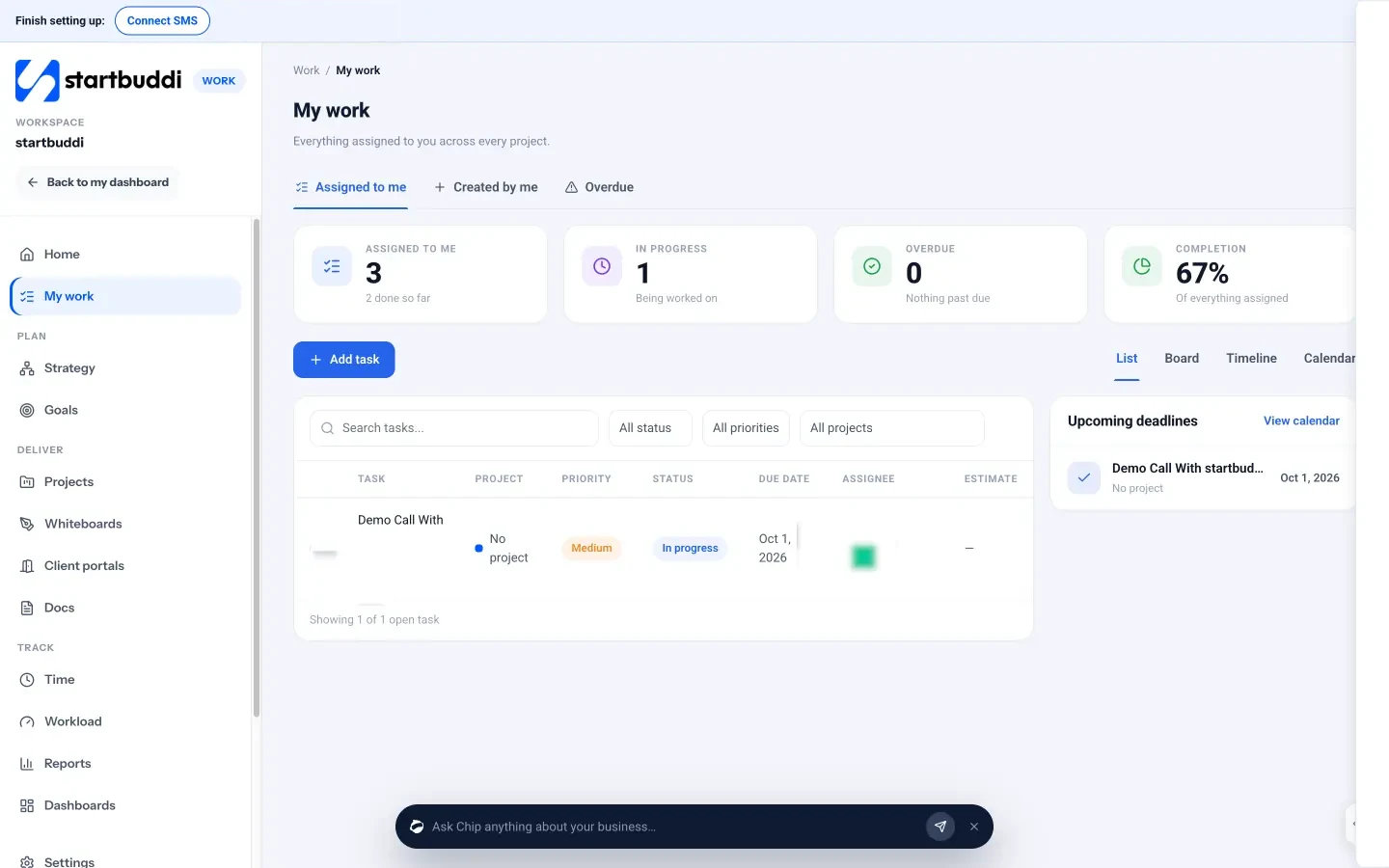
My work, inside Work, shows every task assigned to you across every project, with tabs for Assigned to me, Created by me and Overdue. You can switch between List, Board, Timeline and Calendar views. Adding a task takes a title, and you can set the project, assignee, priority, due date and whether it repeats. Each task opens into a drawer with subtasks, comments with @mentions, file attachments and linked documents, so follow-up discussion stays on the task.
Team chat next to the work
startbuddi Chat has channels, direct messages and a room for every project. Typing @ links a person or a record (a project, customer, document, campaign or booking), so a message can point straight at the work it’s about. On any conversation you can ask Chip, the built-in AI assistant, “What tasks and owners were mentioned?” or “What decisions were made?”. Chip answers from that conversation only. It doesn’t create the tasks for you, so you still add them to My work, but it makes the end-of-discussion summary much quicker. Chat also has follow-up reminders you can set on a conversation.
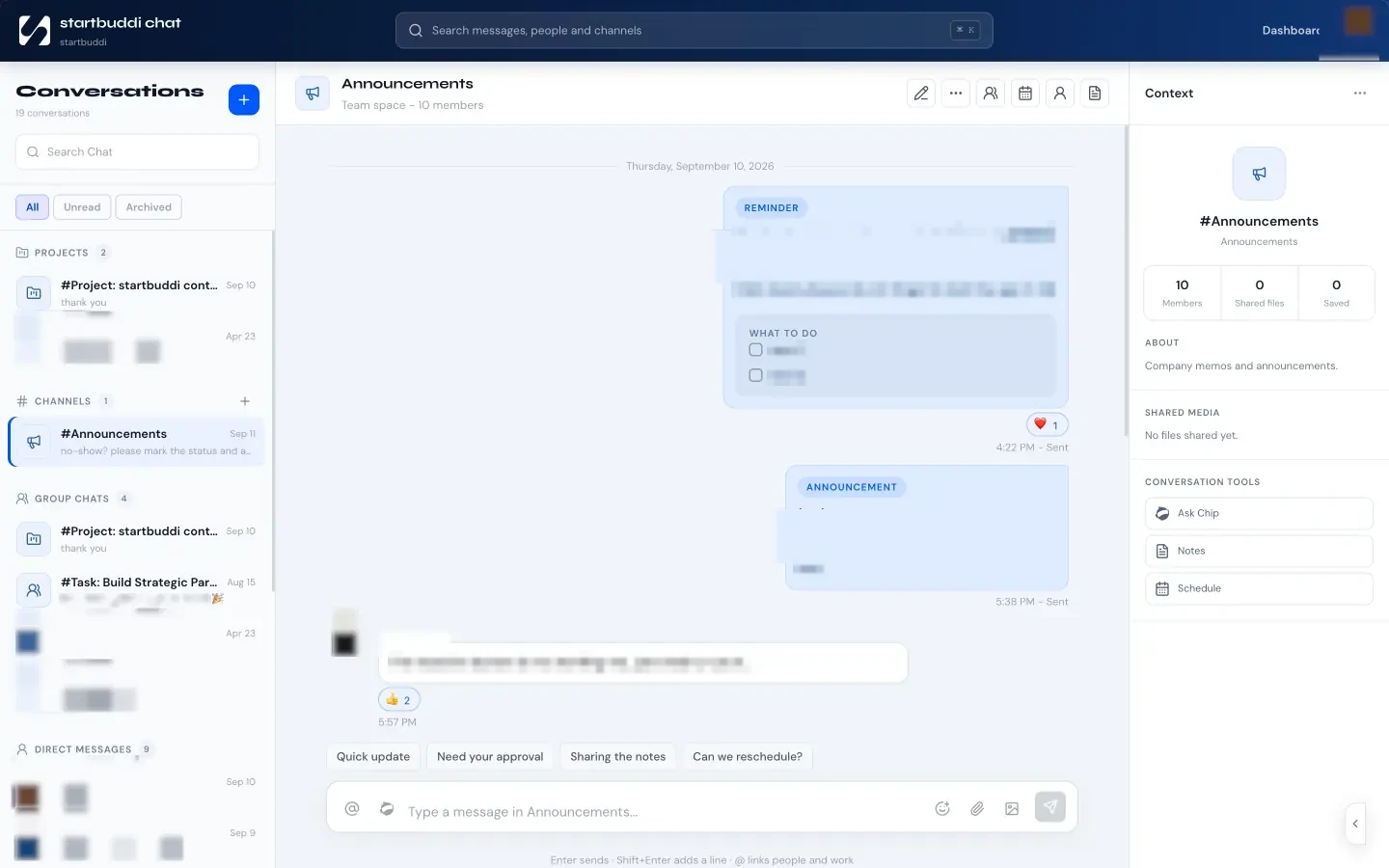
Be aware of the limits. Replies in Chat are quoted replies in the main conversation rather than separate side threads, and new messages are checked every few seconds rather than pushed instantly. It suits small teams well; if your company lives in Slack and wants to stay there, know that startbuddi doesn’t connect to Slack yet, so it can’t post updates into your Slack channels or turn Slack messages into startbuddi tasks.
Customer requests from every channel
The Inbox brings customer email, website chat, WhatsApp, SMS, Instagram and Facebook messages into one shared view. Each conversation can be assigned to a person or team, carry internal notes your customer never sees, and, from the contact panel, become a task or a project in one step. That’s the “client requests are always tasks” rule built into the screen. WhatsApp and SMS need the Starter plan or above.

One practical note on plans: the Free plan includes one seat, Starter two, Growth five and Scale 15, so a team that wants to share tasks needs a paid plan with enough seats. You can compare plans on the pricing page, and our help article on assigning tasks to team members walks through the setup.
Your next step
This week, pin the one-line rule in your busiest channel and run the one-hour backlog sweep. Next Friday, do the 15-minute review. If you’d like the task list, chat and customer inbox in one place while you do it, try startbuddi free and add your first five open requests to My work.
Sources
- Microsoft Work Trend Index 2023: Will AI fix work?
- Slack Help Center: Save messages and files for later
- Gmail Help: Create a task from an email
- Getting Things Done: What is GTD?
Frequently asked questions
Should every Slack message become a task?
No. Only messages with an action, a named owner and a time. Ideas without an owner go on a separate ideas list, and anything under two minutes should just be done.
Is Slack's Later feature enough to track tasks?
It works for personal reminders, but saved items and reminders are private to you. For team or client work, the task needs to be somewhere your colleagues can see it.
Who should create the task, the person asking or the person asked?
The person asked. Creating the task is how they accept it, and it avoids tasks being assigned to people who never saw them.
How do we handle requests that arrive by WhatsApp or DM?
The same way. Client requests are always tasks, whatever channel they arrive through. Copy the key details into the task and reply to confirm.
SEO Copywriter| Email growth Specialist| I help businesses increase revenue with strategic SEO content & high-converting email funnels.