
Client Onboarding Process: The First 48 Hours That Keep Clients
A client onboarding process for the first 48 hours after a client says yes: what to send and when, who owns it, two worked examples and messages to copy.

A good client onboarding process gets four things done within 48 hours of a client saying yes: a same-day thank-you with next steps, a signed agreement and deposit request, a welcome pack that asks for everything you need in one go, and a booked kick-off. One named person owns each step, so nothing waits on “I thought you sent it”.
Key takeaways
- The client decides how they feel about you in the first two days after they say yes. Speed and clarity matter more than polish.
- Send the agreement and the deposit request together, within 24 hours. Don’t start work until the deposit clears.
- Ask for everything you need from the client in one message, not ten.
- Give every client one owner and one channel for updates.
- Measure two numbers: hours from “yes” to deposit received, and days from “yes” to kick-off.
Why the first 48 hours matter
When a client agrees to work with you, they’ve just spent money or committed to it, and they’re slightly nervous. Whatever happens next either confirms they made a good choice or plants a doubt.
Most onboarding problems aren’t dramatic. Nobody is rude. The invoice just arrives four days later, the welcome email asks for things the client already sent on WhatsApp, and the kick-off date slides because nobody booked it. By the time work starts, the client has chased you twice, and you’ve started the relationship on the back foot.
A 48-hour window is short enough to keep momentum and long enough for real-world delays: a client who signs on Friday evening, a bank transfer that takes a day, a power cut in the afternoon. If your business can’t hit 48 hours, set your own window and stick to it. What matters is that the client always knows what happens next.
This chapter is the process: who does what, in what order, and what to say. If you just want a printable list to tick off, use our free client onboarding checklist. For what goes in a welcome email and welcome pack, our post on how to onboard a new client covers the contents in more detail.
The 48-hour client onboarding timeline
| When | What happens | Owner | Done when |
|---|---|---|---|
| Hour 0 to 2 | Thank them, confirm what they bought, say what happens next | The person who won the job | Client has a message with the next two steps and dates |
| Hour 2 to 24 | Send the agreement and deposit request together; create the client record and project | Owner or admin | Agreement sent, invoice sent, project exists |
| When the deposit lands | Confirm payment, send the welcome pack | Account owner | Client has the welcome pack and a list of what you need |
| Hour 24 to 48 | Collect information and access; book the kick-off | Account owner | Kick-off is in both calendars |
| Kick-off | Agree goals, first deadline and update rhythm | Account owner and delivery lead | Notes sent within a day |
The client onboarding process, step by step
Step 1: Thank them and set expectations (hour 0 to 2)
Reply on the channel they used to say yes, within two hours if you can. Three things go in this message: thanks, a one-sentence summary of what they’ve bought, and the next two steps with dates.
Thanks, Kofi. Confirming: brand identity package, logo plus colours and type, delivered in four weeks. Next: I’ll send the agreement and a 50% deposit invoice by 12pm tomorrow, and once that’s settled we’ll book a 45-minute kick-off this week.
Don’t send a wall of paperwork yet. The aim is reassurance: they chose well, and you’re on it.
Step 2: Send the agreement and the deposit request together (hour 2 to 24)
Send both in one message. Two separate messages a day apart doubles the chance one gets missed. The agreement should state the scope, what isn’t included, the price, the payment terms, the timeline and what happens if either side cancels. Our post on the client service agreement covers the clauses.
For the deposit, 30% to 50% of the total is common for project work. Our guide to how much deposit to charge clients explains how to set it. Make paying easy: an invoice with a pay-online link, plus bank details for clients who prefer a transfer.
While you wait, create the client record (with phone number in international format, email, company and who pays the bills, if that’s someone else) and set up the project with its first tasks. This is internal work the client never sees, but it means nothing is missing when they’re ready.
Step 3: Confirm payment and send the welcome pack (when the deposit lands)
The moment the deposit arrives, confirm it. A one-line “Received, thank you” stops the client wondering whether the transfer went through.
Then send the welcome pack in a single message or document. It should cover:
- who they’ll work with and how to reach them;
- the channel for updates and how often they’ll hear from you;
- the timeline with the first milestone date;
- everything you need from them, as a numbered list, with a date;
- how to book the kick-off.
The list of what you need is where most onboarding stalls. Ask for it all at once and say why you need each item. “Your logo files (so we can match the existing colours)” gets a faster reply than “assets”.
Step 4: Collect access and book the kick-off (hour 24 to 48)
Follow up on missing items within a day, and only once, with a short list of what’s still outstanding. If the client is slow, offer to collect it during the kick-off.
Book the kick-off for within a week of the deposit. Send a calendar invite with a video link or the address, the length and a three-line agenda. If they would rather do it by phone, fine; the point is a fixed time.
Step 5: Run the kick-off and send notes the same day
Keep it to 30 to 45 minutes. Cover their goals in their words, the first deadline, how decisions get made (who approves, how fast), and the update rhythm. Then send short notes within a day: what was agreed, the next deliverable and date, and any open questions. Those notes become the reference point if anything is disputed later.
The decisions that trip people up
Can work start before the deposit clears? Usually not. Starting early teaches the client that the deposit is optional, and you carry the risk if they change their mind. The exception is a long-standing client with a good payment history; write down that you’ve made an exception and why.
Who owns the client? One person, named in the welcome pack. In a small team the person who won the job often hands over to whoever delivers it. Do the handover inside the first 48 hours, with an introduction message, so the client hears it from you rather than discovering it.
Which channel? Agree one channel for updates and one for urgent issues. Many Nigerian and Ghanaian clients prefer WhatsApp; corporate clients in London may want email. Whatever you choose, keep the conversation where the whole team can see it. A shared inbox solves this for teams of two or more.
What if they go silent? If the agreement or deposit hasn’t come back after three working days, send one friendly reminder with the next available start date. If nothing comes after a week, ask directly whether they’d like to go ahead, and release the slot if not.
What about WhatsApp templates? If you message clients through the WhatsApp Business Platform rather than the phone app, Meta allows free-form messages only within a 24-hour customer service window after the client’s last message; outside it you need an approved template (checked on 1 October 2026). Plan onboarding messages so they go out while the client is still talking to you, or have templates approved in advance.
How the process changes by type of business
| Business | What changes | Extra item in the first 48 hours |
|---|---|---|
| Design or marketing agency | More access to collect | Brand files, social logins (shared securely), a list of approvers |
| Consultant or coach | Scope and stakeholders matter more | A short intake questionnaire before the kick-off; see our client intake form template |
| Cleaning or home services | Access to the property | Key or code arrangement, a walk-through visit, pets and alarm notes |
| Photographer or event business | Dates are fixed | Date held in writing, venue contacts, a shot or run-sheet list |
| Bookkeeper or accountant | Documents and permissions | Signed engagement letter, read-only access to bank statements |
Only collect what you’ll use. The UK’s data protection rules, summarised on GOV.UK, say personal data should be “adequate, relevant and limited to only what is necessary”, and Nigeria’s Data Protection Act 2023 sets similar duties (checked on 1 October 2026). Don’t ask for ID numbers, dates of birth or passwords you don’t need.
Worked example 1: a design studio in Accra
These figures are illustrative.
Efua runs a two-person brand design studio in Accra. A café owner agrees to a GH₵12,000 brand identity package on Monday at 3pm.
| Time | What happens |
|---|---|
| Monday 3:40pm | Efua replies on WhatsApp: thanks, scope in one line, agreement and invoice by noon Tuesday |
| Tuesday 10am | Agreement and a GH₵6,000 deposit invoice (50%) sent in one email, with a WhatsApp nudge |
| Tuesday 4pm | Client signs and pays by mobile money. Efua confirms receipt within the hour and sends the welcome pack: her assistant is the day-to-day contact, updates every Friday, and a list of four things she needs by Thursday (current logo, photos of the shop, three brands they admire, the name of whoever approves designs) |
| Wednesday 11am | Kick-off booked for Thursday 2pm, 45 minutes, video call |
| Thursday 2pm | Kick-off held; notes sent at 5pm with the first concept date |
From “yes” to kick-off: about 47 hours. The client has paid half, knows who to talk to and has a date for the first concepts. The remaining GH₵6,000 is due on final delivery, as the agreement states.
Worked example 2: a cleaning company in Manchester
These figures are illustrative.
Dan runs a cleaning company with six cleaners. A family signs up for a fortnightly clean at £70 a visit, with the first visit in a week.
- Hour 1. Dan’s office manager emails a thank-you and confirms the day, time and price.
- Hour 20. The service agreement and a card payment link for the first visit go out together. The agreement covers access, cancellations with less than 48 hours’ notice, and breakages.
- Hour 30. Card details saved. The welcome email names the two cleaners assigned, explains how they’ll arrive, and asks for the key arrangement, the alarm code process, pets, and any rooms or surfaces to avoid.
- Hour 46. A 15-minute walk-through is booked for the day before the first clean.
Over a year that’s 26 visits, or £1,820 from one household, so the hour spent on a tidy start pays back many times over.
Mistakes that slow onboarding down
- Asking for things you already have. If they sent their logo on WhatsApp during the sale, don’t ask for it again. Check the history first.
- Ten small messages. Batch your requests into one welcome pack with a numbered list.
- The disappearing seller. The person who won the job goes quiet the moment it’s signed. Make the handover visible.
- Paperwork before thanks. Lead with the thank-you and next steps; the agreement comes a few hours later.
- No date on anything. “We’ll be in touch soon” creates anxiety. Give dates for every next step.
- Onboarding by memory. If the steps live in someone’s head, they get skipped on busy weeks. Write them down once and reuse them.
How to measure your onboarding
Track three numbers for every new client for a quarter:
- Hours from “yes” to agreement and invoice sent. Target: under 24.
- Hours from “yes” to deposit received. This tells you whether paying is easy enough.
- Days from “yes” to kick-off. Target: under 7.
If clients often take more than three days to pay, look at the payment options you offer. If kick-offs keep slipping, book them during the first call instead of after the deposit.
How to do this in startbuddi
startbuddi keeps the client record, the agreement, the invoice and the project in one place, so the onboarding steps run from one screen.
- Mark the deal won. In Customers, drag the deal to Won or click Mark as won. When a deal is won, Chip offers to create a client portal and invite the client to it.
- Send the agreement and deposit invoice. Create the contract in Documents for e-signature, and the deposit invoice in Money Manager; open Create an invoice from the contact’s menu so it’s already addressed. Clients can pay by card through Stripe, or by card, bank transfer, USSD or mobile money through Paystack.
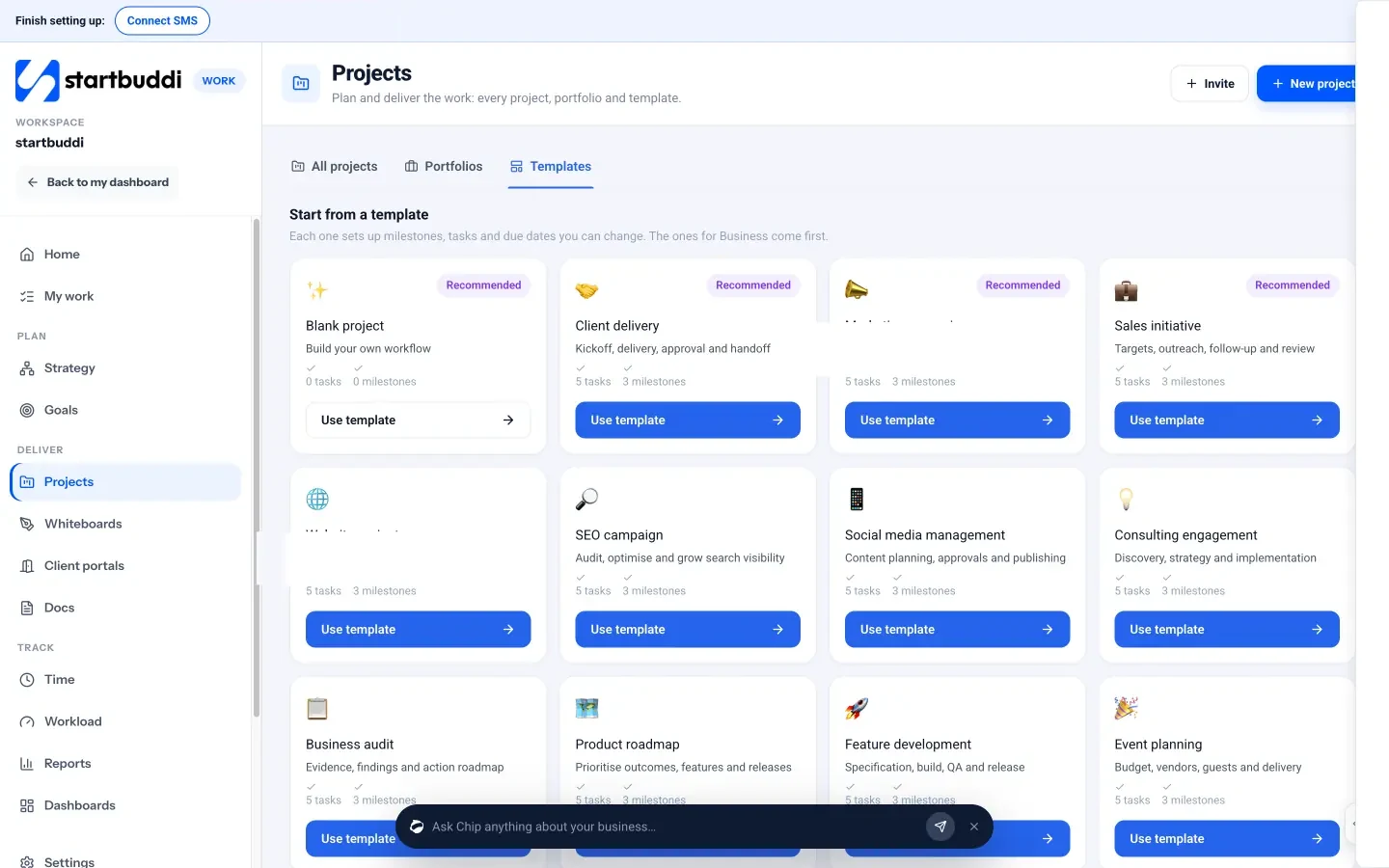
- Start the project from a template. In Work, open Projects → Templates and pick Client delivery (“Kickoff, delivery, approval and handoff”), then name it and link the client.
- Automate the welcome. In Automations, start a flow from the Deal won or Invoice paid trigger and add a Send email step with your welcome pack, so it goes out the moment the deposit lands. Automations are on the Starter plan and above.
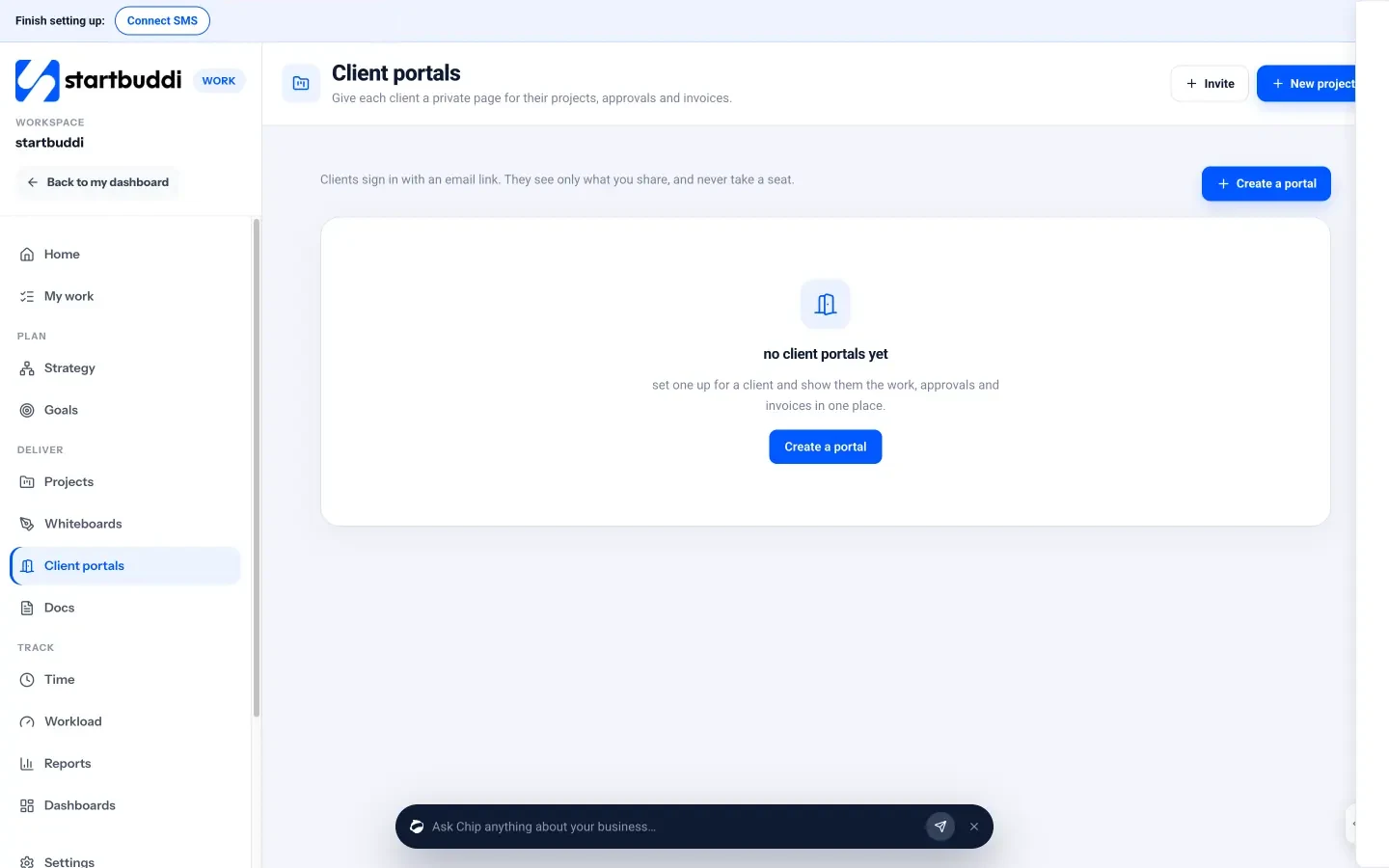
- Invite the client to their portal. In Work → Client portals, choose what the client sees and invite them. They sign in with an email link, no password or startbuddi account needed. Live portals start on the Starter plan; see pricing.
Previous and next
- Up: Client Management for Small Businesses: the complete guide
- Next chapter: Customer Service Checklist Template: Standards for Small Teams
Frequently asked questions
What is a client onboarding process?
A client onboarding process is the set of steps between a client agreeing to work with you and the work starting: confirming the scope, signing an agreement, taking a deposit, sharing a welcome pack, collecting what you need and holding a kick-off. Writing it down means every client gets the same good start.
How long should client onboarding take?
For most small service businesses, aim to complete the core steps within 48 hours of the client saying yes and to hold the kick-off within a week. Larger projects with several stakeholders can take longer, but the client should hear from you on the same day and know every next date.
What are the steps in onboarding a new client?
The usual steps are: thank the client and confirm the scope, send the agreement and deposit invoice, confirm payment, send a welcome pack listing what you need from them, collect access and information, and run a kick-off meeting with written notes afterwards.
Should I take a deposit before starting work?
Yes, for most project work. A deposit of 30% to 50% confirms the client’s commitment and covers your early costs. Start work once it has cleared, and state the deposit and when the balance is due in your agreement.
What should be in a client welcome pack?
A welcome pack should say who the client will work with and how to reach them, how and how often you’ll send updates, the timeline with the first milestone, a numbered list of everything you need from them with a date, and how to book the kick-off.
Can client onboarding be automated?
Parts of it can. Welcome emails, payment confirmations, reminders for missing information and project setup from a template can all run automatically once a deal is won or a deposit is paid. Keep the first thank-you and the kick-off personal.
Give every new client the same strong start
Write your 48-hour timeline down this week and use it for the next client who says yes. Start startbuddi free to keep the agreement, deposit invoice, project and client portal for each new client in one place.
Tiwalade Joanna Okedara-Kalu is the founder, CEO and CTO of startbuddi, the business system that brings clients, bookings, invoices, projects, marketing and the Chip AI assistant into one place. Tiwalade builds software around how service businesses really work day to day, and writes about client management, getting paid on time and why small businesses outgrow the tools they start with.
Founded startbuddi and leads its product and engineering