A 30-minute weekly planning meeting for small teams
A timed 30-minute agenda for your weekly planning meeting: review the numbers, agree priorities with one owner each, clear blockers and balance the workload.



- Hold a 30-minute weekly planning meeting at a fixed time: check a few key numbers, review last week, agree three to five priorities with one owner and a due date each, clear blockers and rebalance workload, then read back every decision. Ask people to update their tasks beforehand.
A good weekly planning meeting for a small team takes 30 minutes, happens at the same time every week, and ends with every important task having one owner and one due date. It is not a status report and it is not a brainstorm. It has one job: agree what matters this week, spot what is stuck, and make sure nobody is overloaded before the week starts.
This guide gives you a timed agenda you can copy, the roles to assign, what to prepare beforehand, and the mistakes that turn a 30-minute meeting into a draining hour. It works for a team of two to about ten people, whether you sit in the same office or work across cities.
Why small teams need a weekly planning meeting
In a small business, everyone does a bit of everything. The founder sells, the designer answers customer messages, the operations person also does the books. Without a moment each week to line up priorities, three things happen: urgent work pushes out important work, two people do the same job, and problems surface on Friday when it is too late.
Meetings have a bad reputation, and often deserve it. In Microsoft’s 2023 Work Trend Index, people ranked inefficient meetings as their number one productivity disruptor, and more than half said next steps were often unclear after a meeting. The answer is not no meetings. It is one short, well-run meeting that replaces a week of scattered check-ins, “quick calls” and unanswered messages.
A weekly planning meeting gives a small team:
- One shared list of priorities for the week.
- Clear owners, so nothing falls between two people.
- An early warning for blocked work and overloaded teammates.
- Fewer interruptions during the week, because questions have a place to go.
When to hold it and who should come
Pick a fixed slot
Monday morning is the classic choice because it shapes the week ahead. Some teams prefer Friday afternoon, planning next week while this week is fresh. Either works; what matters is that it is the same time every week, so nobody has to ask.
Keep the group small
Invite the people who do the work and make the decisions. For most small businesses, that is the whole team. Once you pass about eight people, consider splitting into smaller groups (for example sales and delivery) with the founder or a lead joining both.
Assign three roles
- Facilitator: keeps time and moves the agenda on. This does not have to be the boss; rotating it builds ownership.
- Note-taker: records decisions, owners and due dates, directly in your task list if possible.
- Timekeeper: often the facilitator in a small team. Their job is to say “two minutes left on this” out loud.
The 30-minute weekly planning meeting agenda
Here is an agenda you can use from next week. The timings add up to 30 minutes. Stick to them for the first month, then adjust.
| Time | Item | What happens |
|---|---|---|
| 0 to 3 min | Numbers check | The two or three numbers that matter most this month, such as sales, new enquiries or cash in the bank |
| 3 to 8 min | Last week in review | What got done, what did not, and why. Quick and blame-free |
| 8 to 18 min | This week’s priorities | Agree the top three to five priorities and who owns each |
| 18 to 25 min | Blockers and workload | Anything stuck, and anyone with too much or too little on |
| 25 to 30 min | Decisions and wrap-up | Read back decisions, owners and dates. Park anything else |
1. Numbers check (3 minutes)
Start with facts, not opinions. Show the same few numbers every week so the team learns what “good” looks like. Pick numbers tied to your goals for the quarter; our guide to setting 90-day business goals helps you choose them. Do not discuss the numbers in depth here. If one needs a conversation, add it to priorities.
2. Last week in review (5 minutes)
Go through last week’s priorities. For each: done, not done, or partly done. If something slipped, ask one question: “What got in the way?” The aim is to learn, not to blame. Unfinished work either moves into this week or is dropped on purpose.
3. This week’s priorities (10 minutes)
This is the heart of the meeting. Agree three to five priorities for the team, not thirty tasks. For each priority, confirm:
- One owner. Not “the team” and not two people. One name.
- A due date within the week, or a clear next step if the work is bigger.
- What “done” looks like, in one sentence.
A useful test: if the week goes badly, which of these must still happen? That is priority number one.
4. Blockers and workload (7 minutes)
Ask each person: “Is anything stuck, and do you have too much on?” Solve simple blockers on the spot (“I will send you the login after this”). For anything that needs more than two minutes, agree who will talk after the meeting. Then look at the balance of work. If one person owns four of the five priorities, move something before the week starts, not on Thursday.
5. Decisions and wrap-up (5 minutes)
The note-taker reads back every decision, owner and date. People correct anything they heard differently. Anything that came up but was not decided goes on a “parked” list for next week or a separate conversation. End on time, every time.
What to prepare before the meeting
Ten minutes of preparation saves twenty minutes of meeting. Ask everyone to do three things before they arrive:
- Update their tasks. Mark what is done, move dates that have changed, and add anything new.
- Note one blocker, if they have one.
- Suggest one priority for the coming week.
The facilitator prepares the numbers and a short agenda. A shared template keeps this consistent; our free meeting agenda template is a good starting point.
Remote and hybrid teams
If some people join by video, run the meeting as if everyone is remote: one screen, one shared task list, and the facilitator calling on remote people first. Keep cameras on if your team is comfortable with it, and put the meeting link in the recurring calendar invite so nobody hunts for it.
Common mistakes and how to fix them
| Mistake | What it looks like | The fix |
|---|---|---|
| Turning it into a status report | Everyone lists everything they did | Ask people to update tasks beforehand, and discuss only priorities and blockers |
| Solving problems in the meeting | A 20-minute debate between two people | Note the problem, name who will solve it, and take it offline |
| Too many priorities | Fifteen “top priorities” | Cap it at five for the whole team |
| No written record | Different memories of what was agreed | Write decisions straight into the task list during the meeting |
| Cancelling when busy | The meeting skipped in the weeks it matters most | Keep it, even at 15 minutes. Busy weeks need it most |
| The founder does all the talking | Others stop contributing | Rotate the facilitator and ask others to go first |
Long meetings are a problem well beyond small teams. A 2017 Harvard Business Review article, “Stop the Meeting Madness”, noted that executives spent nearly 23 hours a week in meetings, up from under 10 hours in the 1960s. A strict 30-minute limit protects the rest of your week.
Adapting the meeting to your kind of business
The agenda stays the same, but what you talk about in each slot changes with the business. Here is how three common small teams use it.
A small agency or freelance collective
Numbers: hours logged against each client budget, and invoices waiting to be paid. Priorities: the next deliverable for each active client, plus one internal task such as updating the portfolio. Blockers are usually on the client side: missing content, slow feedback or approvals. Agree who will chase each one and by when, so the project does not quietly stall.
A shop, salon or local service business
Numbers: last week’s sales or bookings, no-shows and stock running low. Priorities: staffing for the busy days, one promotion or social post plan, and one improvement such as a new service or a price change. Workload here means rotas: check who is covering which shifts before the week starts, not the morning someone is missing.
An early-stage startup
Numbers: sign-ups, active users, revenue and cash runway. Priorities: the one or two things that move the quarter’s main goal, which is often a product feature and a sales or marketing experiment. The biggest risk is doing too much, so be strict about the five-priority cap and say out loud what you are choosing not to do this week.
Make the meeting better over time
Once a month, spend the last two minutes asking one question: “What would make this meeting more useful?” Small tweaks, such as moving the numbers to a shared screen, starting five minutes later or rotating the facilitator, keep the meeting fresh. If the answer is “nothing, it works”, that is a good sign.
How it fits with other team rituals
The weekly planning meeting works best as part of a simple rhythm, not the only conversation you have.
- Daily: an optional 10 to 15-minute check-in, or a written update in your team chat. The Scrum Guide timeboxes its Daily Scrum at 15 minutes, a good ceiling for any daily meeting.
- Weekly: the 30-minute planning meeting in this guide.
- Monthly or quarterly: a longer review of goals and numbers, and a look at what to stop, start and continue.
If your team works in sprints, the weekly meeting can double as sprint planning for one-week sprints. Our guide to agile project management for small teams covers that in more detail. And if tasks keep disappearing into chat threads between meetings, read how to stop losing tasks in Slack and email threads.
A copy-and-paste weekly planning meeting template
Weekly planning, [date]
Facilitator: [name] · Notes: [name]Numbers: [number 1], [number 2], [number 3]
Last week: done: [ ], not done: [ ], carried over: [ ]
This week’s priorities:
1. [priority] · owner: [name] · due: [day] · done means: [ ]
2. [priority] · owner: [name] · due: [day] · done means: [ ]
3. [priority] · owner: [name] · due: [day] · done means: [ ]
Blockers: [blocker] · who will help: [name]
Workload changes: [task moved from / to]
Decisions: [ ]
Parked: [ ]
How startbuddi helps
The meeting is only as good as the list you plan from. In startbuddi, Work brings that list together. The Work home shows your open tasks and what is due today, active projects, projects needing attention because of overdue work or slipping health, upcoming schedule and your goals, which covers most of the numbers and review part of the agenda on one screen.
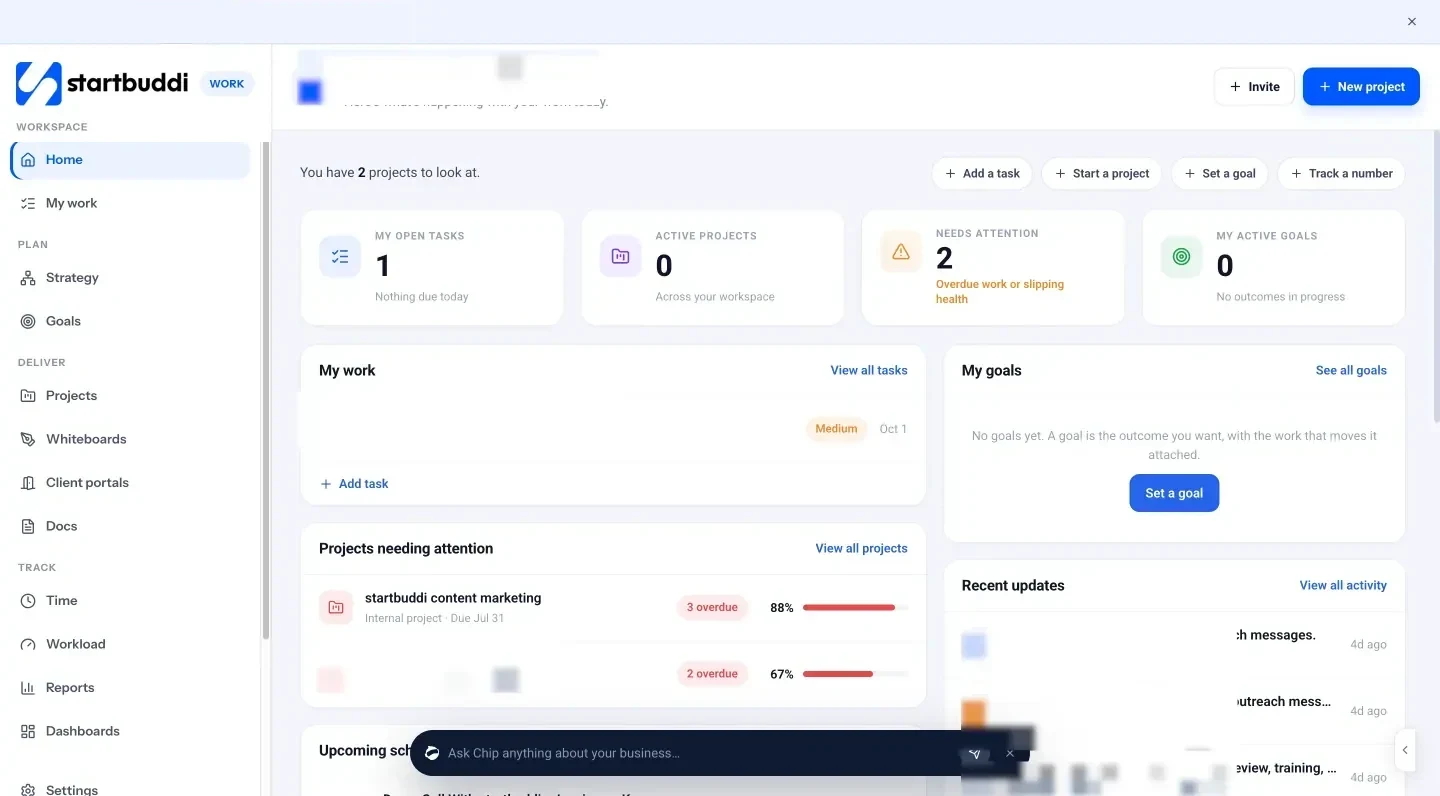
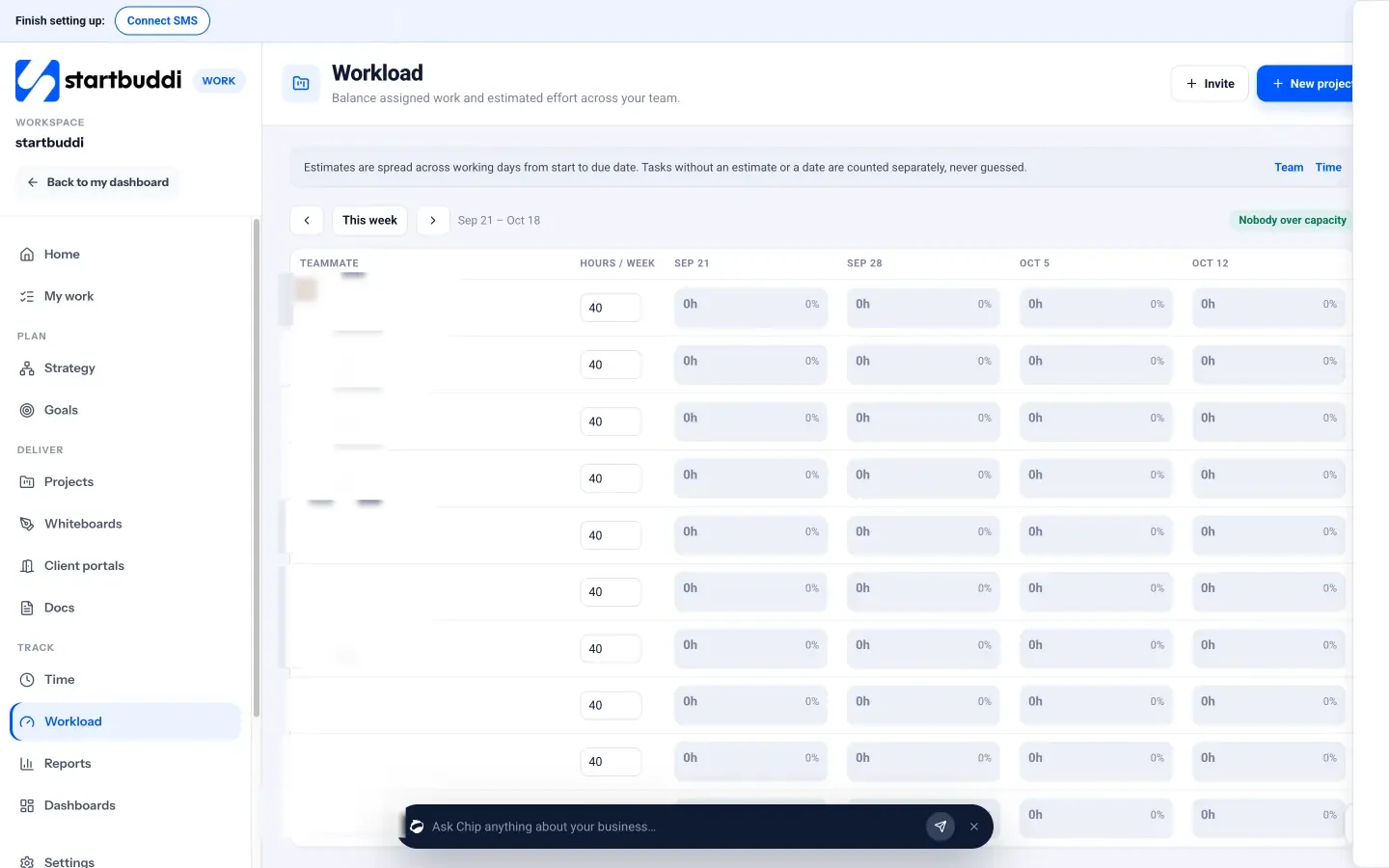
During the meeting, add or update priorities as tasks with an owner, a due date and a priority, and link them to a project. Each person then sees everything assigned to them in My work, across every project, as a list, board, timeline or calendar, with an Overdue tab for anything that slipped. Managers and admins can open Workload to see each teammate’s hours per week from task estimates and reassign a task from the grid, which makes the blockers and workload part of the agenda much faster.
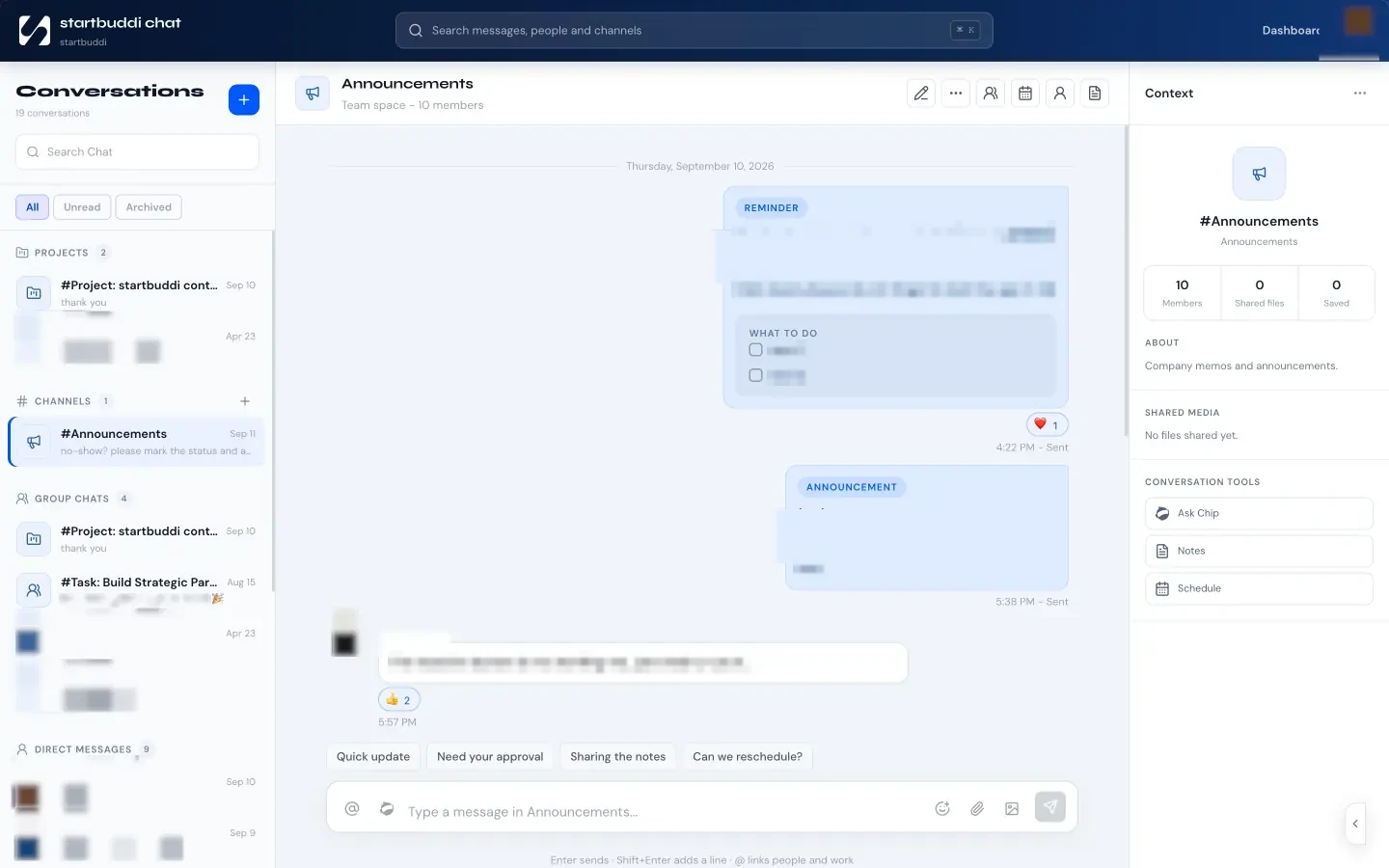
If your team sets quarterly goals, Goals lets you add key results, link projects and check in weekly with a health rating; Chip can draft the check-in from what changed since the last one. Between meetings, startbuddi Chat gives every project its own discussion room, and you can ask Chip to summarise a conversation or list the tasks and owners that were mentioned, which is a handy way to prepare the next week’s agenda.
Your next step
Put a 30-minute recurring meeting in the calendar for next Monday, paste the template above into the invite, and ask everyone to update their tasks beforehand. Run it the same way for four weeks before changing anything. If you want the tasks, workload and goals you discuss in one place, see startbuddi’s plans.
Sources
- Microsoft, 2023 Work Trend Index: Will AI fix work?
- Perlow, Hadley and Eun, “Stop the Meeting Madness”, Harvard Business Review (2017)
- Schwaber and Sutherland, The Scrum Guide (2020)
Frequently asked questions
Monday or Friday: when is the best day for a weekly planning meeting?
Either works. Monday shapes the week ahead; Friday lets you plan while the week is fresh. Choose one fixed slot and keep it.
What if my team is only two people?
Still do it, even in 15 minutes. Two people can easily assume the other is handling something, and a short weekly check stops that.
How do I stop the meeting running over?
Give each agenda item a time limit, name a timekeeper, and move any discussion that needs more than two minutes to a separate conversation with a named owner.
Should we still meet in a quiet week?
Yes, but keep it short. A quiet week is a good time to look ahead, tidy the task list and pick one improvement to work on.
Omolola Akiyode is the operations and project manager at startbuddi, leading cross-functional projects and the content that helps founders get set up. Omolola writes about projects, websites and getting found online, and turns complex ideas into clear, practical steps.
Runs operations and projects at startbuddi