What is a task management system?
Also called: Task manager, task tracker, to-do list app, task management software
A task management system is a method or app for capturing, assigning, prioritising and tracking the jobs you and your team need to do, so every task has an owner, a due date and a clear status.
A task management system is a way of capturing, organising and finishing the jobs you and your team need to do. At its simplest it is a list with owners and due dates. In software form, it adds reminders, priorities, boards, calendars and a shared view so nobody has to ask “who is doing that?”
Every business already has some kind of task system. For many it is a notebook, a WhatsApp chat with yourself or a stack of sticky notes. A proper system makes sure tasks are written down in one place, have a clear owner and a date, and do not quietly disappear.
Why a task management system matters for a small business
Small teams lose more work to forgetting than to laziness. A client asks for a change on a call, someone promises to send a quote, a supplier needs paying on Friday. If those promises live in people’s heads or in scattered chats, some of them will slip.
- Nothing falls through the cracks. Every promise becomes a task with a date.
- Less mental load. You stop trying to remember everything, which frees your head for the real work.
- Clear ownership. When a task has one named owner, it gets done. When it belongs to “the team”, it often does not.
- Easy handovers. If someone is off sick, the team can see exactly what was on their plate.
- A record of work. Finished tasks show what you delivered, which helps with client reports and billing.
How a task management system works
Most systems follow the same loop: capture, organise, do and review.
- Capture: write the task down the moment it appears. Speed matters here, so quick-add buttons and short titles help.
- Organise: give it an owner, a due date, a priority and, if it belongs to a bigger piece of work, a project.
- Do: work from a daily view of what is due today and what is overdue.
- Review: once a week, look at everything open, move dates that are no longer real and delete tasks that no longer matter.
Here is an example. Chidi runs a small cleaning company. After a site visit, he adds three tasks: “Send quote to Adebayo Estates” (owner: Chidi, due tomorrow, high priority), “Order extra floor polish” (owner: Grace, due Thursday) and “Book team for Saturday deep clean” (owner: Grace, due Friday). On Friday he opens the overdue list, sees the polish has not been ordered, and sorts it before Saturday.
Key parts of a task management system
| Part | What it does |
|---|---|
| Title and description | Says what “done” looks like, in a sentence. |
| Owner (assignee) | One person who is responsible. |
| Due date | When it needs to be finished, so it shows up at the right time. |
| Priority | Helps you choose between tasks when you cannot do everything today. |
| Status | To do, in progress, review or done, often shown as columns on a board. |
| Subtasks and dependencies | Break big jobs into steps, and show which task has to finish before another can start. |
| Views | A list, a kanban board, a calendar or a timeline, depending on how you like to see work. |
| Recurring tasks | Jobs that repeat daily, weekly or monthly, such as payroll or a weekly report. |
Best practices
- Start every task with a verb. “Call Amaka about the logo” is clearer than “Amaka logo”.
- Use real dates. A due date you already know you will miss teaches everyone to ignore dates.
- Keep priorities honest. If everything is urgent, nothing is. Save “urgent” for true emergencies.
- Get tasks out of chat. When a request arrives on WhatsApp or email, turn it into a task straight away. Our article on how to stop losing tasks in chat and email threads has practical tips.
- Do a weekly review. Fifteen minutes on Friday keeps the system trustworthy.
- Do not over-engineer it. A few fields you actually fill in beat twenty you ignore.
Task management vs project management
People often use the terms together, but they are not the same. Task management is about individual jobs: what needs doing, by whom and when. Project management software groups those tasks into projects with milestones, timelines and budgets. A freelancer with a handful of clients may only need a good task list. A team running several client projects at once usually needs both.
Other related terms: agile project management is a way of working in short cycles, often using a task board, and OKRs are the bigger goals your tasks should ultimately move.
Task management in startbuddi
Tasks in startbuddi live in Work, under My work. You see everything assigned to you across every project in one place, with tabs for tasks assigned to you, tasks you created and tasks that are overdue.
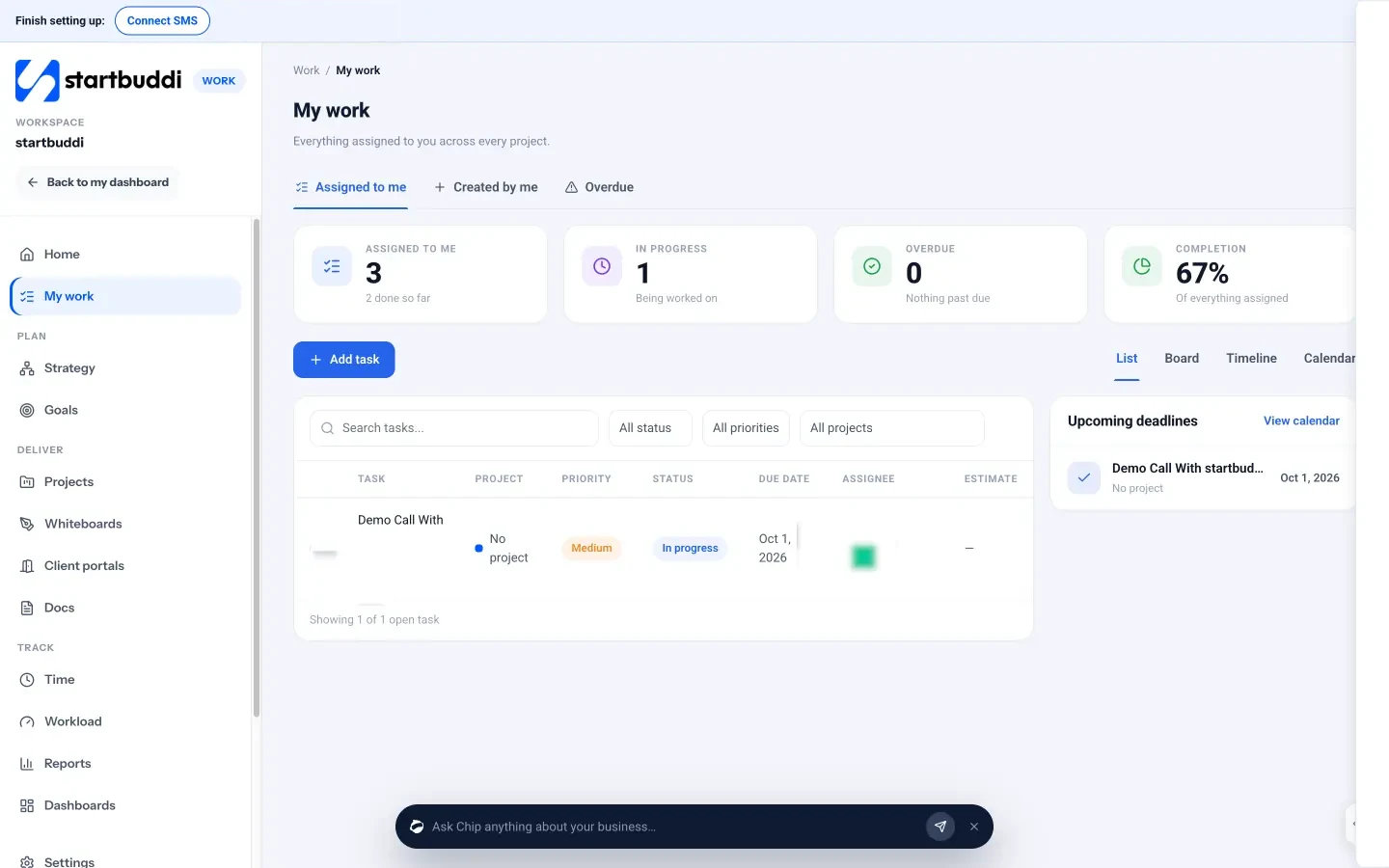
You can switch between a list, a board, a timeline and a calendar. Each task can have a project, an assignee, a status, a priority (urgent, high, medium or low), a due date and an estimate in hours. Inside a task you can add subtasks, set “blocked by” dependencies, log time, attach files, link a document and comment with @mentions. Tasks can also repeat daily, weekly or monthly.
Because tasks sit next to your projects, time tracking and customers, the work you promise a client does not live in a separate app. Your next step: pick the five things you must do this week, add them to My work with real dates, and see how it feels. You can start free on the pricing page.
Related terms
FAQ
Is a to-do list a task management system?
A to-do list is the simplest version. It becomes a system once tasks have owners, due dates and a regular review, and once everyone on the team works from the same list.
What is the best way to prioritise tasks?
Start with due dates, then ask which tasks bring in money or unblock someone else. Keep "urgent" for real emergencies so it still means something.
Do I need task management software if I work alone?
Not always, but it helps once you juggle several clients. A shared, searchable list with reminders is easier to trust than notes spread across your phone and inbox.
How often should I review my tasks?
Look at what is due each morning and do a fuller review once a week. Move unrealistic dates and delete tasks that no longer matter.
Tiwalade Joanna Okedara-Kalu is the founder, CEO and CTO of startbuddi, the business system that brings clients, bookings, invoices, projects, marketing and the Chip AI assistant into one place. Tiwalade builds software around how service businesses really work day to day, and writes about client management, getting paid on time and why small businesses outgrow the tools they start with.
Founded startbuddi and leads its product and engineering