Time management for business owners: find your hours and spend them well
A practical guide to time management for business owners: audit your week, set priorities, protect focus and choose the time tracking and task apps that fit.


This guide to time management for business owners is for founders, freelancers and small business owners who finish most days feeling busy but not sure what they achieved. You might be answering messages until midnight, doing the books on Sunday and never quite getting to the work that would grow the business. You are not lazy and you do not need to work harder. You need a clearer picture of where your time goes and a few simple rules for spending it.
The quick answer: find out where your hours actually go by tracking one normal week, decide which work only you should do, plan each week around a handful of priorities, protect blocks of focused time, and hand off, automate or drop the rest. The four chapters below turn each of those into practical steps, with worked numbers and templates.
By the end you will know what an hour of your time is worth, have a weekly planning routine, a way to protect focus from constant interruptions, and a shortlist of time management apps and time tracking tools that fit a small business. Each chapter finishes with how to do the same in startbuddi.
Time management for business owners starts with a time audit
- How to do it
- What to look for in your audit
- Your target hourly value
- The cost of the task
Most time management advice is written for employees: people with a manager, a job description and a fixed set of responsibilities. Business owners have none of those. You are the salesperson, the delivery team, the accountant, the customer service desk and the person who fixes the printer. Every one of those jobs can expand to fill your entire week, and nobody will tell you to stop.
That is why time management for business owners starts with facts, not tips. Before you change anything, you need to know where your hours go today. This chapter shows you how to run a simple time audit, how to sort what you find, and how to work out what an hour of your time is really worth.
Why time management is different for business owners
Three things make an owner's time harder to manage than an employee's.
- Nobody sets your priorities. An employee has a manager deciding what matters this week. You decide everything, which means urgent requests from customers tend to win by default.
- Your time is the business's main resource. In a small business, the owner's hours are often the biggest constraint on growth. An hour spent reformatting an invoice is an hour not spent winning a new client.
- Work never has a natural end. There is always another message, another improvement, another idea. Without limits you set yourself, the working day stretches to fill the evening.
That last point has a name. In 1955, the historian C. Northcote Parkinson wrote a satirical essay in The Economist that opened with the line "work expands so as to fill the time available for its completion" ("Parkinson's law", The Economist, 19 November 1955 (Internet Archive)). It was a joke about the civil service, but every business owner who has spent a whole afternoon on a task that needed an hour knows it is true.
Step 1: run a one-week time audit
A time audit is simply recording what you do, in blocks of 15 or 30 minutes, for one normal working week. It feels tedious for the first day and eye-opening by the third. Most owners are surprised by at least one number: how long they spend on email and messages, how many hours go on admin, or how little time is left for the work that brings in money.
How to do it
- Pick a normal week. Not a holiday week and not the week of a big launch.
- Record as you go. Use a notebook, a spreadsheet or a timer app. Write down the start time, what you did and when you switched. Do not rely on memory at the end of the day; you will underestimate the small interruptions.
- Be honest. Twenty minutes scrolling after a difficult call counts. So does the hour spent chasing an invoice.
- Tag each block with one of the categories in the next section.
Step 2: sort your time into five buckets
At the end of the week, group every block into one of five categories. The names do not matter; the split does.
| Bucket | What it includes | Examples |
|---|---|---|
| Earning | Work that directly creates revenue | Client delivery, sales calls, sending proposals |
| Growing | Work that brings future revenue | Marketing, building partnerships, improving your offer |
| Running | Necessary admin | Invoicing, bookkeeping, scheduling, hiring paperwork |
| Reacting | Unplanned interruptions | Unexpected calls, "quick questions", fixing problems |
| Leaking | Time that did not help anything | Aimless scrolling, looking for files, duplicated work |
A typical pattern for a busy owner might look something like this for a 55-hour week: 20 hours earning, 4 hours growing, 12 hours running, 13 hours reacting and 6 hours leaking. Your numbers will differ, but the lesson is usually the same. Growing gets the smallest share, because it is never urgent, while reacting and running quietly eat a third of the week.
What to look for in your audit
- How many hours were earning or growing? This is the time that moves the business forward.
- What were the three biggest running tasks? These are your first candidates for automating or handing off.
- When did interruptions happen? If most arrive between 10:00 and 12:00, that tells you when not to schedule deep work, or when to switch notifications off.
- How long was your longest uninterrupted block? Many owners find it is under 30 minutes.
Step 3: work out what an hour of your time is worth
Knowing the value of your hour turns vague decisions ("should I do my own bookkeeping?") into simple maths. There are two useful numbers.
Your target hourly value
Take the income you want the business to pay you in a year and divide it by the hours you realistically have for earning and growing work. Suppose you want to earn $90,000 a year. You work 46 weeks after holidays and sickness, and about 30 hours a week go on earning and growing work (the rest is running the business). That is 1,380 hours, so your time is worth about $65 an hour. In other currencies, the same logic might give £50 an hour in the UK, ₹2,500 an hour in India or ₦35,000 an hour in Nigeria. The exact number matters less than having one.
The cost of the task
Now compare. If bookkeeping takes you six hours a month and a bookkeeper would do it for $150, the task costs you $390 of your time (6 × $65) versus $150 to hand over. The maths says delegate. If a task takes you ten minutes and would take longer to explain, keep it.
This is not about valuing yourself above others. It is about using the scarce hours only you can give to the work that only you can do: talking to customers, making decisions, doing the craft your business is known for.
A simple time audit template
If you are using paper or a spreadsheet, set up five columns. The last two are optional but turn the audit from a record into a plan.
| Time | What I did | Bucket | Energy (high, medium, low) | Could someone else do this? |
|---|---|---|---|---|
| 08:30 to 09:15 | Replied to WhatsApp and email | Reacting | High | Partly, with saved replies |
| 09:15 to 11:00 | Wrote client proposal | Earning | High | No |
| 11:00 to 11:40 | Chased two unpaid invoices | Running | Medium | Yes, or automate |
| 14:00 to 14:30 | Looked for a contract file | Leaking | Low | Fix the filing instead |
The energy column shows when you do your best thinking, which matters in Chapter 3. The last column builds your list of tasks to hand over, which matters in Chapter 2.
Patterns most audits reveal
Every business is different, but a few patterns come up again and again when owners look at their week honestly.
- The owner as help desk. Customers and staff bring every question to you because you always answer. Each question takes two minutes, and there are forty of them.
- Admin creep. Invoicing, scheduling and chasing grow slowly as the business grows, until they take a day a week without anyone deciding they should.
- The "just five minutes" trap. Small tasks feel too quick to plan, so they interrupt everything else. Five minutes rarely takes five minutes once you count the time to get back into what you were doing.
- Searching. Time spent looking for files, messages and passwords is almost always bigger than people expect.
- Growth work in the gaps. Marketing, planning and improving the business get whatever time is left, which is usually none.
Spotting your pattern is useful, because each one has a different fix: saved replies and a written FAQ for the help desk, automation for admin creep, batching for small tasks, better filing for searching, and scheduled blocks for growth work.
If you have a team: audit the handoffs too
Owners with staff often find that a large share of their reacting time comes from the team, not customers. Questions like "where is the file?", "what price do we charge for this?" and "can you check this before I send it?" each take a minute, but they add up and they break your concentration. During your audit, mark every interruption from a teammate with a small "T". At the end of the week, group them by topic. The topics that come up most are the ones to write down as short procedures or to hand decision rights over, so people can act without asking. That one change often frees more time than any calendar trick.
You can also ask your team to run the same audit for a week. It is not about checking up on people. It shows where they get stuck waiting for you, which is usually the fastest way to free time for everyone.
Common time audit mistakes
- Auditing a strange week. A holiday week or a crisis week gives misleading numbers.
- Tracking only work you are proud of. The value is in the uncomfortable blocks.
- Stopping at the audit. Knowing where time goes only helps if you change something. Pick one change from the next chapter and make it this week.
- Judging yourself. Everyone leaks time. The audit is information, not a verdict.
What to do with your audit results
Once you have your numbers, write three sentences in your notebook. First: "My most valuable work is..." (for example, sales calls and client strategy). Second: "The biggest drain on my time is..." (for example, answering the same customer questions by WhatsApp). Third: "The one change I will make this month is..." (for example, a set of saved replies and a page that answers the common questions). Keep the list short. One change that sticks is worth more than ten that fade by Friday.
Do not expect everything to change at once. Most owners who act on an audit see the first hours come back within two or three weeks, usually from one or two big leaks such as repeated questions or manual reminders. Deeper changes, like handing off a whole area of work, take a few months. Keep the original audit so you can compare, because progress is easy to forget once the new habits feel normal.
Repeat the audit every three to six months. Businesses change, and so do the tasks that eat your week. What was a sensible use of your time at the start can become a drain once you have more customers or a team.
Tracking your time in startbuddi
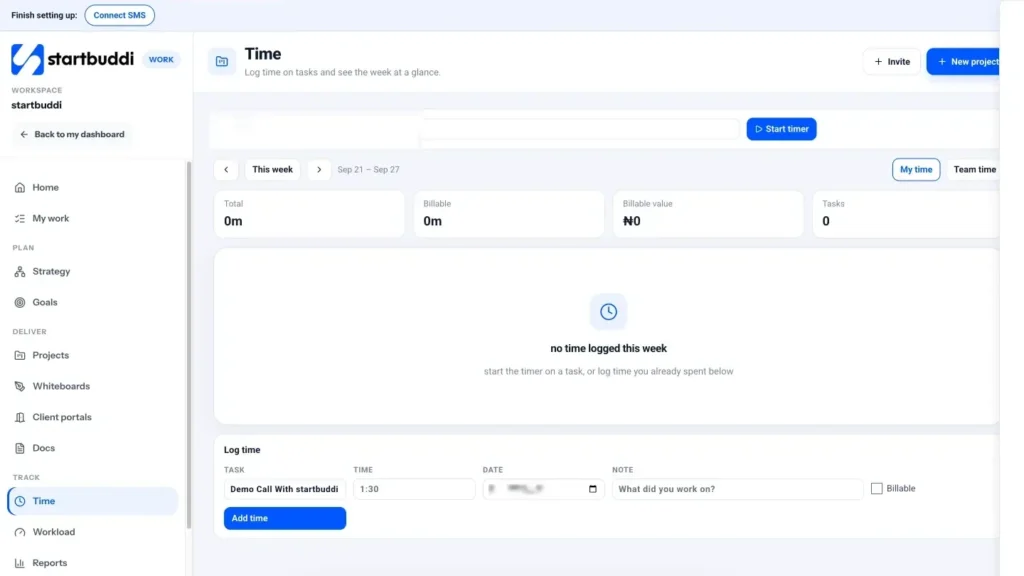
You can run a time audit on paper, but if you want the data without extra effort, startbuddi has time tracking built into Work. Open Work, then Time. Pick a task and press Start timer, then Stop when you switch. If you forgot to start the timer, use the Log time form below: choose the task, enter the time (for example 1:30), the date and a note about what you worked on, and tick Billable if a client pays for it.
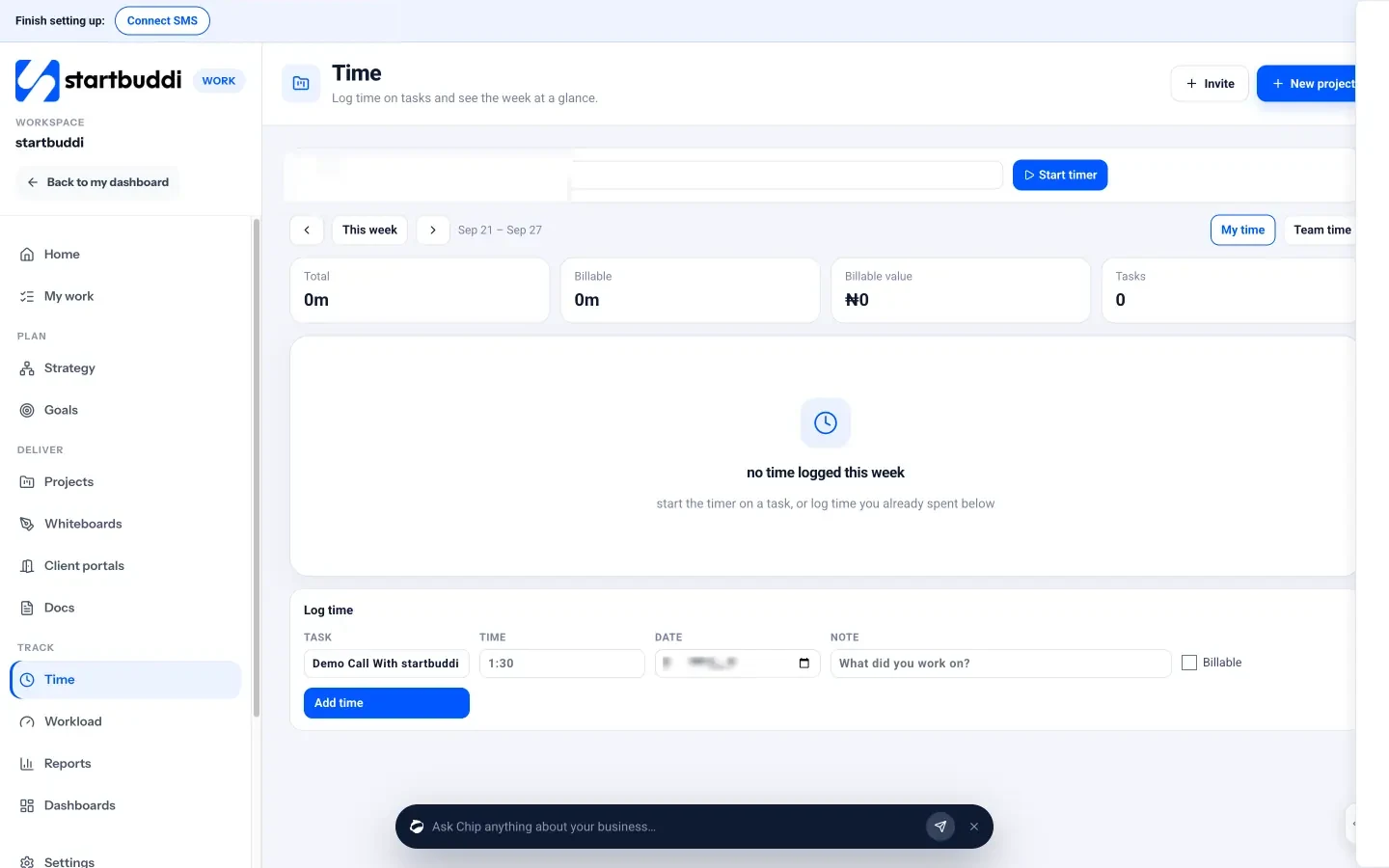
At the top, the week's cards show your total time, billable time, the value of that billable time where you have set rates, and the number of tasks you worked on. You can step back to previous weeks, which makes a before-and-after comparison easy once you start changing how you work. Because time is logged against tasks, and tasks belong to projects, you can also see how many hours each project took. For more background, read what billable hours are or our guide to tracking billable hours without a spreadsheet.
A tip for the audit: create a small internal project called "Running the business" with tasks such as "Email and messages", "Invoicing" and "Admin". Logging time against those tasks gives you the running and reacting numbers without a separate spreadsheet.
Your task for this chapter: track one normal week, sort it into the five buckets and write down your hourly value.
Decide what matters: priorities, the Eisenhower matrix and saying no
- The weekly three
- The daily one
- Worked example: freeing up six hours a week
- A filled-in example: sorting one owner's task list
Once you know where your time goes, the next step is deciding where it should go. This is the part of time management that most tips skip. Clever apps and morning routines do not help if you are efficiently doing the wrong things. This chapter gives you three tools for deciding what matters: a simple way to separate urgent from important, a method for choosing your few weekly priorities, and a four-way filter for everything else.
Urgent versus important: the Eisenhower matrix
In a 1954 speech, US President Dwight D. Eisenhower quoted a former college president who said: "I have two kinds of problems, the urgent and the important. The urgent are not important, and the important are never urgent" (The American Presidency Project, Eisenhower's address in Evanston, 1954). The idea was later turned into a simple four-box grid, now usually called the Eisenhower matrix.
| Urgent | Not urgent | |
|---|---|---|
| Important | Do now. A client's site is down; payroll is due tomorrow. | Schedule. Plan next quarter's marketing; improve your onboarding; write your standard procedures. |
| Not important | Delegate or batch. Most "quick questions", routine booking changes, many emails. | Drop. Reformatting documents nobody reads, most social scrolling. |
For a business owner, the top right box is where growth lives. It holds the work that is never urgent until it is too late: following up with past clients, raising prices, building a simple website, writing down how you do things so someone else can help. If your time audit showed only a few hours a week of "growing" work, this box is why.
Choose three priorities a week, and one a day
Long to-do lists create the feeling of progress without the substance. A better approach is to choose a small number of priorities that would make the week a success, and let everything else fit around them.
The weekly three
At the start of each week, ask: "If I only achieved three things this week, which three would make the biggest difference to the business?" Write them down. They should be specific and finishable, such as "Send proposals to the two leads from last week", "Publish the new price list", or "Interview two bookkeepers". Not "work on marketing".
The daily one
Each evening, or first thing in the morning, pick the one task that would make tomorrow a good day if it was the only thing you finished. Do it before you open email or messages if you possibly can. Many owners find their energy and concentration are highest early in the day, before the stream of requests begins.
The four-way filter: do, delegate, automate or drop
Everything that is not one of your priorities goes through a simple filter. It works well alongside the time audit from Chapter 1, because you already know which tasks eat the most hours.
- Drop it. Would anything bad happen if this task stopped? Many reports, meetings and habits exist only because they always have. Stop them and see if anyone notices.
- Automate it. Is it the same every time, triggered by a clear event? Booking confirmations, payment reminders, welcome emails and follow-up messages are good examples.
- Delegate it. Could someone else do it to a good enough standard with clear instructions? Use your hourly value to decide whether paying for help makes sense.
- Do it, but faster. If it has to be you, can you batch it, use a template or put a time limit on it?
Our guide on how to delegate tasks covers the delegation step in depth, and the guide to writing standard operating procedures explains how to write instructions that make delegation work.
Learning to say no (politely)
Every yes to one request is a no to something else, usually your own priorities. Business owners find no especially hard, because every request feels like an opportunity or a customer you might lose. A few phrases make it easier:
- "I can't take that on this week, but I could look at it on the 14th. Would that work?"
- "That is outside what we agreed. Happy to quote for it separately."
- "I'm not the best person for that. Have you tried..."
- "Let me check my priorities and come back to you by Friday."
The last one is the most useful. It stops you saying yes on the spot, gives you time to check the request against your weekly three, and lets you reply calmly.
Set limits so work cannot expand forever
Remember Parkinson's law from Chapter 1: work expands to fill the time available. The answer is to give tasks less time on purpose. Three simple limits help.
- Time boxes. Decide in advance how long a task deserves ("45 minutes for this proposal") and stop when the time is up. Good enough and sent beats perfect and late.
- Working hours. Set a finishing time for your working day and tell your customers when you are available. Clients adapt faster than you expect.
- Response times. Customers rarely need an answer in five minutes. Promising a reply within a few working hours, and meaning it, is kinder to you and still excellent service.
Worked example: freeing up six hours a week
Here is an illustration. Picture the owner of a small cleaning business in Johannesburg who runs the audit and the filter. Over a month, the changes might look like this:
| Task | Hours a week before | Change | Hours a week after |
|---|---|---|---|
| Confirming and reminding customers of bookings | 3 | Automated confirmations and reminders | 0.5 |
| Answering the same questions about prices and areas | 2 | Wrote a short FAQ and saved replies | 0.5 |
| Weekly supply shopping | 2 | Delegated to a team leader with a checklist | 0 |
| Chasing late payments | 1.5 | Invoices with payment links and a set reminder routine | 0.5 |
| Total | 8.5 | 1.5 |
Seven hours a week is almost a full working day, enough to visit commercial clients and still finish work before 6pm. None of the changes is complicated; they only happen once the audit makes the cost visible.
Connect weekly priorities to bigger goals
Weekly priorities work best when they add up to something. Once a quarter, set two or three goals for the business, such as "win five new retainer clients" or "cut the time spent on admin by half". Then, in each weekly plan, ask which task moves one of those goals forward. This stops the weekly three from becoming a list of whatever feels most pressing, and it gives you a way to say no: "Does this help one of our goals this quarter? If not, it waits."
If you want a simple framework for setting goals, read our explanation of OKRs. For a small business, even one written goal per quarter with a number attached makes weekly priorities much easier to choose.
Make fewer decisions
Owners make hundreds of small decisions a day: what to charge this customer, whether to accept this booking, which supplier to call, what to post today. Each decision takes time and a little energy, and by late afternoon the quality of those decisions often drops. The answer is to decide once and turn the decision into a rule.
- Standard prices and packages mean you do not negotiate every quote from scratch.
- Booking rules, such as minimum notice and a cancellation policy, mean you do not decide each request individually.
- Spending limits let a team member buy supplies up to a set amount without asking you.
- Default days, such as invoices every Friday and social posts every Monday, mean you never have to decide when.
- Written criteria for which enquiries you take on help you say no quickly to work that does not fit.
Each rule removes a small decision from your day forever. Write them down where your team can see them, and revisit them every few months.
A filled-in example: sorting one owner's task list
Here is how a bakery owner's Monday list might sort into the matrix:
| Task | Box | What happens |
|---|---|---|
| Oven repair visit today | Important and urgent | Do now |
| Plan the Christmas order menu | Important, not urgent | Block two hours on Wednesday |
| Reply to six enquiries about opening hours | Urgent, not important | Saved reply now; update the website this week |
| Confirm this week's cake collections | Urgent, not important | Automate confirmation messages |
| Redesign the loyalty card | Neither | Drop for this quarter |
Managing customers who expect instant answers
Many owners feel that fast replies are part of good service, and they are right up to a point. But answering every message within minutes means your whole day is shaped by other people's timing. Most customers care more about a reliable reply than an instant one. A few changes help without harming service:
- Set expectations up front. Put your reply times on your website, booking page and email signature, for example "We reply to messages within four working hours."
- Use away messages outside your hours, saying when you will reply and where to find answers to common questions.
- Offer self-service. A booking link, a price list and a short FAQ answer many questions before they are asked.
- Keep a genuine emergency route for the few situations that really cannot wait, and make clear what counts.
What to do with the tasks you drop
Dropping tasks is uncomfortable, especially ideas you were excited about. Keep a "someday" list for them: a single page or task list where good ideas go to wait. Review it once a quarter when you set your goals. Some ideas will still look good and earn a place; most will not, and you can delete them with a clear conscience. The list stops good ideas from being lost while keeping them out of this week.
Priority mistakes to avoid
- Making everything a priority. Three a week is the point. Ten is a to-do list.
- Choosing priorities you cannot finish. "Grow Instagram" is a goal, not a weekly priority. "Post four times and reply to every comment" is finishable.
- Letting other people's urgency set your day. A message marked urgent is not always important.
- Never reviewing. At the end of each week, check how many of your three you finished. If the answer is often zero, the priorities are too big or too much reacting work is getting in.
Setting priorities in startbuddi
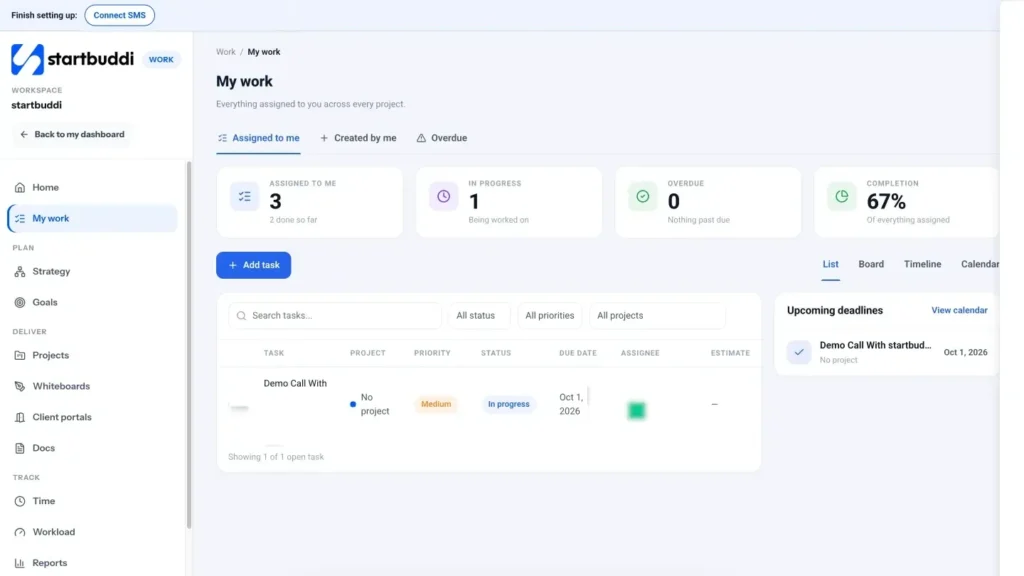
In startbuddi, Work, then My work, shows every task assigned to you across all projects. Each task has a priority (Urgent, High, Medium or Low), a status and a due date, and you can filter the list by status, priority or project. A good weekly routine is to open My work on Monday, set your three most important tasks to High, and make sure each has a due date this week.
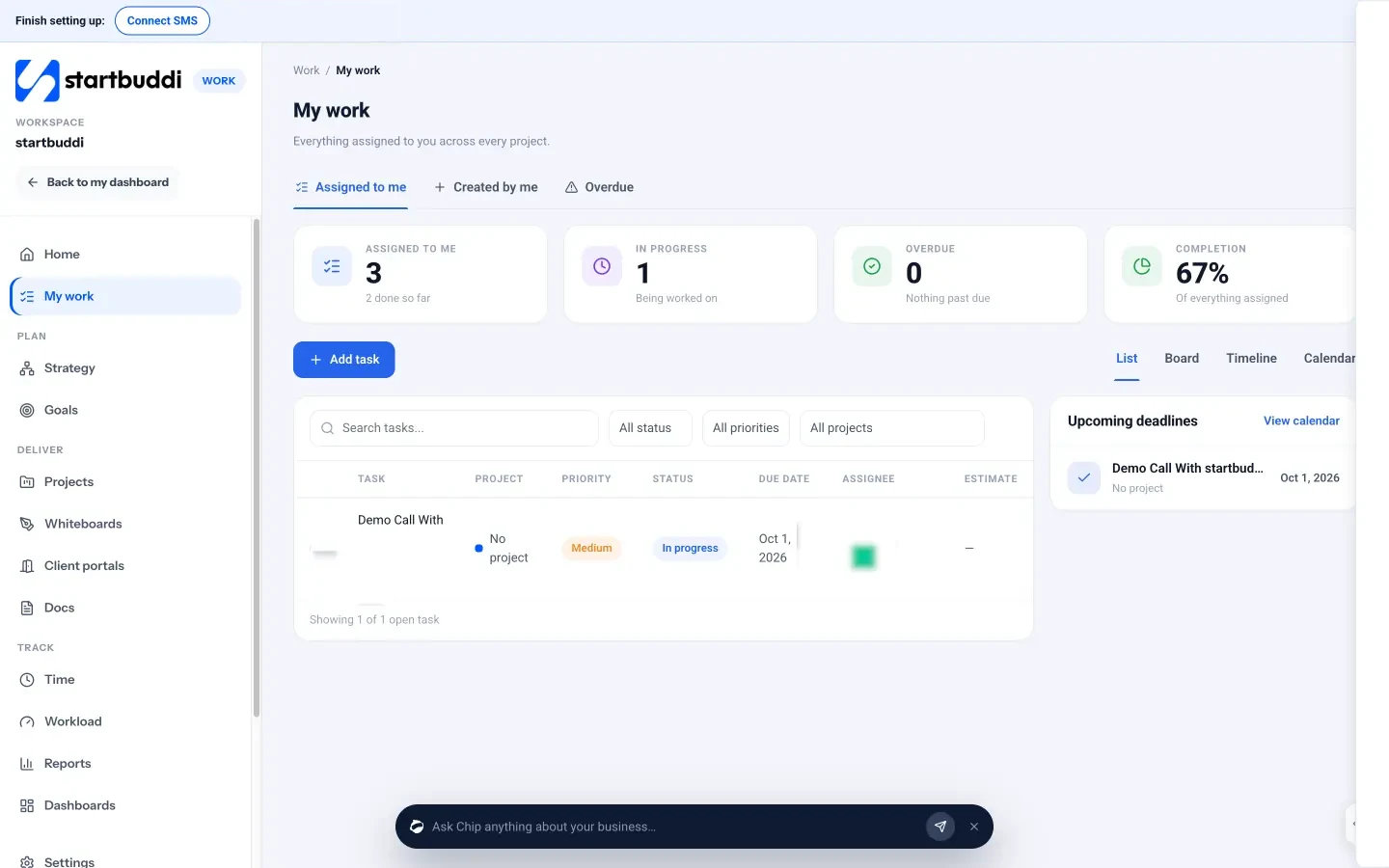
The Overdue tab lists tasks past their due date, which is a quick, honest check at the end of the week. The cards at the top show how many tasks are assigned to you, how many are in progress, how many are overdue and your completion rate. If the overdue number keeps climbing, it is a sign your weekly three are too big, or that too much reacting work is getting in.
For work you do again and again, set a task to repeat daily, weekly or monthly so it appears without you having to remember it. For work that should happen automatically, such as booking reminders or invoice follow-ups, see Chapter 4. You can read more about task features on the My work page.
Your task for this chapter: sort your open tasks into the four boxes, choose this week's three priorities, and pick one task to drop, one to automate and one to delegate.
Plan your week and protect your focus
- How to time block a week
- Theme days
Knowing your priorities is half the job. The other half is making sure they actually get time in your calendar, and that the time is not shredded by interruptions. This chapter covers weekly planning, time blocking, batching, focus techniques, managing meetings and messages, and the energy side of time management that most guides ignore.
The 30-minute weekly plan
Set aside 30 minutes at the same time every week, such as Friday afternoon or Monday morning, to plan the week ahead. Protect it like a client meeting. Use the same steps every time.
- Review last week (5 minutes). What did you finish? Which of your three priorities slipped, and why?
- Clear the inbox of tasks (5 minutes). Move notes, scribbled reminders and promises made on calls into your task list. Nothing should live only in your head.
- Choose this week's three priorities (5 minutes). As described in Chapter 2.
- Look at the calendar (10 minutes). Check fixed commitments, then block time for each priority (see the next section).
- Check deadlines (5 minutes). Look two weeks ahead for anything due, so it does not surprise you.
This half hour is the single most effective time management habit for most owners, because it turns good intentions into scheduled time.
Time blocking: give your priorities a place in the calendar
Time blocking means scheduling blocks of time for specific kinds of work, the same way you schedule meetings. Instead of a to-do list that you hope to get through, you have a plan that says "Tuesday 9:00 to 11:00: write the new service page".
How to time block a week
- Start with your priorities. Block time for your weekly three first, ideally in the part of the day when you think most clearly.
- Add focus blocks for client work. Two to three hours at a time for work that needs concentration.
- Batch the small stuff. Two or three short blocks a day for email, messages and admin, rather than dipping in all day.
- Leave room for the unexpected. Keep about a quarter of the day unplanned. Reacting work will come; plan for it rather than pretending it will not.
- Put a stop time on the day. A block called "finish" at 17:30 is surprisingly effective.
Theme days
If your week is chaotic, try giving each day a theme. For example: Monday for planning and admin, Tuesday and Wednesday for client work, Thursday for sales and marketing, Friday for learning, improving the business and catching up. Themes cut down on switching between very different kinds of work, and they make it easier to tell customers when you are available for calls.
Protect your focus from interruptions
For most business owners, the enemy is not a lack of hours. It is that the hours are chopped into fragments by messages, calls and notifications. Switching between tasks has a real cost. The American Psychological Association summarises research showing that switching makes tasks take longer and causes more errors, and that the brief mental blocks created by shifting between tasks can cost as much as 40 percent of someone's productive time (APA, multitasking: switching costs).
You cannot eliminate interruptions in a customer-facing business, but you can reduce and contain them.
- Turn off non-essential notifications. Keep calls from key people and alerts for genuine emergencies. Everything else can wait for your next batch.
- Check messages at set times. For example, at 10:30, 13:00 and 16:00. Tell customers when they can expect a reply.
- Use saved replies for questions you answer every week about prices, opening hours, delivery areas and booking.
- Close what you are not using. One browser tab and one app for the task in front of you.
- Signal focus time. A status in your team chat, a closed door or headphones tells others to save non-urgent questions for later.
Meetings: fewer, shorter, with a purpose
Meetings are the second biggest time sink for many owners, after messages. Before accepting or calling one, ask three questions. What decision or outcome is it for? Could a message or a shared document do the job? Who actually needs to be there? If a meeting passes the test, give it an agenda, a finish time and a named person to write down decisions and actions. Our free meeting agenda template covers the basics.
Default to shorter meetings, too. A 25-minute or 50-minute slot instead of 30 or 60 leaves time to write notes and move to the next thing. For sales calls and client consultations, let people book themselves into times you have chosen, instead of trading messages about when everyone is free. That alone can save hours a month.
Manage your energy, not just your hours
An hour at 9:00 after a good night's sleep is not the same as an hour at 22:00 after a twelve-hour day. Good time management puts your hardest work where your energy is highest.
- Notice your peaks. Most people have two or three hours a day of their best thinking. Use your audit to spot when yours are, then guard them.
- Put routine work in your low points. Admin, filing and simple replies suit the post-lunch dip.
- Take real breaks. Short breaks during the day and at least one full day off a week are not a luxury; they keep your judgement sharp for the decisions only you can make.
- Watch for burnout signs. Persistent tiredness, irritability and dreading work you used to enjoy are signals to change how you are working, not to push harder.
Batching: group similar work together
Batching means doing similar tasks in one go: all invoices on Friday morning, all social posts for the week on Monday afternoon, all supplier calls in one hour. Each switch between different kinds of work costs time and attention, so batching reduces the number of switches. It also makes delegation easier later, because a batch of similar work is easy to describe and hand over.
Good candidates for batching in a small business include invoicing and payment follow-ups, content and social media, ordering and supplier admin, bookkeeping and receipts, and returning non-urgent calls.
When the plan falls apart
Some days, a crisis wipes out every block you scheduled: a key staff member is ill, a big order goes wrong, a client needs urgent help. That is normal in a small business. The point of planning is not to prevent these days but to recover quickly from them. When a day collapses, do three things. First, deal with the crisis properly rather than half-working on your plan at the same time. Second, at the end of the day, move your blocks rather than deleting them, starting with the week's most important priority. Third, if the same kind of crisis happens often, treat it as a signal: it probably needs a procedure, a backup person or a change in how you take on work.
Boundaries when you work from home
Working from home saves travel time but makes it harder to stop. Work is always one room away, and family life is always one room away from work. A few boundaries help: a set start and finish time, a place that is only for work if you have the space, a separate phone number or a business messaging account that you can mute in the evening, and clear signals to the people you live with about when you are working. Treat your finish time as seriously as a client meeting.
Get email and messages under control
For many owners, messages are the single biggest source of reacting time. They arrive by email, WhatsApp, SMS, social media and phone, and each channel pulls at your attention separately. Four habits help.
- Process, do not just read. When you open a message, decide what happens to it straight away: reply now if it takes under two minutes, turn it into a task with a date, pass it to someone else, or archive it. Reading a message and leaving it for later means reading it twice.
- Bring channels together where you can. Checking five apps five times a day is 25 interruptions. A shared inbox that collects customer messages from several channels cuts the checking down.
- Write templates for common replies. Prices, availability, directions, payment details and booking instructions should never be typed from scratch.
- Move conversations to the right place. If a message thread turns into a project, create the task and continue the discussion next to it, not in an endless chat.
End each day with a five-minute shutdown
A short routine at the end of the working day makes it easier to stop, and easier to start tomorrow. Spend five minutes to write down anything still in your head, check tomorrow's calendar, choose tomorrow's one most important task, and close your apps. Some owners say a phrase out loud, such as "done for today", to mark the switch. It sounds odd, but it helps if you work from home, where the line between work and the rest of life is easily blurred.
A weekly plan template you can copy
Week of: 6 October
Last week's wins: Sent three proposals; new booking page live.
What slipped and why: Price list update (too many client calls on Thursday).
This week's three priorities: 1. Follow up the three proposals. 2. Publish the new price list. 3. Interview two bookkeepers.
Focus blocks: Tue 9:00 to 11:00, Wed 9:00 to 11:00, Thu 14:00 to 16:00.
Deadlines in the next two weeks: VAT return on the 20th; client launch on the 15th.
One thing to drop, automate or delegate: Booking confirmations (automate).
Plan travel and waiting time
Trades, cleaners, consultants and anyone who visits customers lose hours to travel and waiting. Group visits by area on the same day where you can, leave realistic travel time between appointments, and keep a short list of small tasks you can do from a phone while waiting: returning a call, approving an invoice, replying to a quote request. Those gaps add up to hours a week that can either leak or get small jobs done.
Planning mistakes to avoid
- Over-scheduling. A calendar with every minute filled breaks the moment something unexpected happens. Leave buffers.
- Treating the plan as fixed. Plans change. Move blocks when you need to, but move them, do not delete them.
- Planning in your head. If it is not in the calendar or the task list, it does not exist.
- Skipping the weekly plan when busy. Busy weeks are when you need it most.
Planning your week in startbuddi
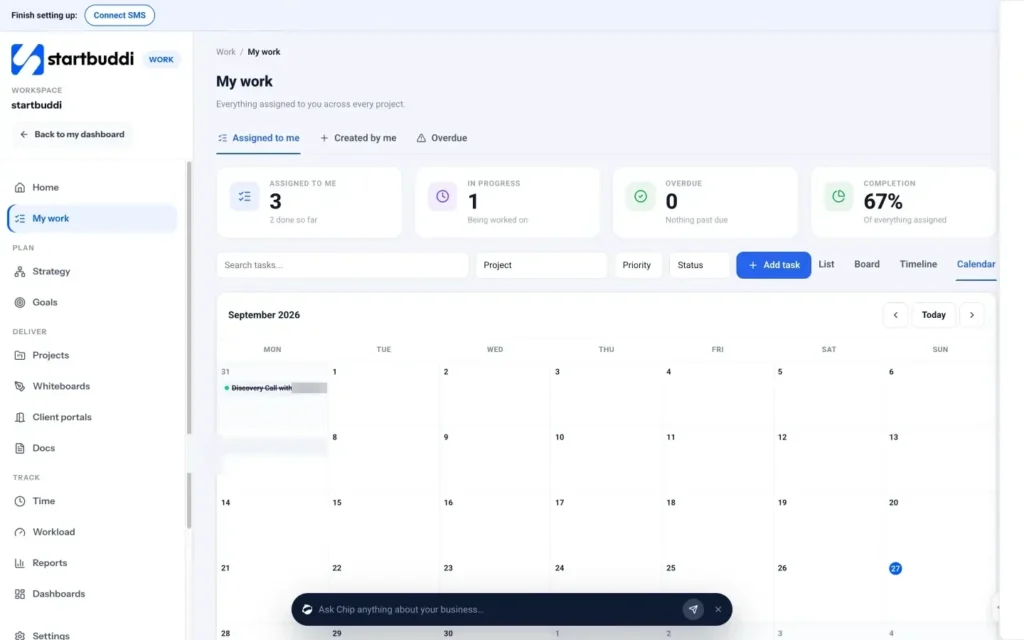
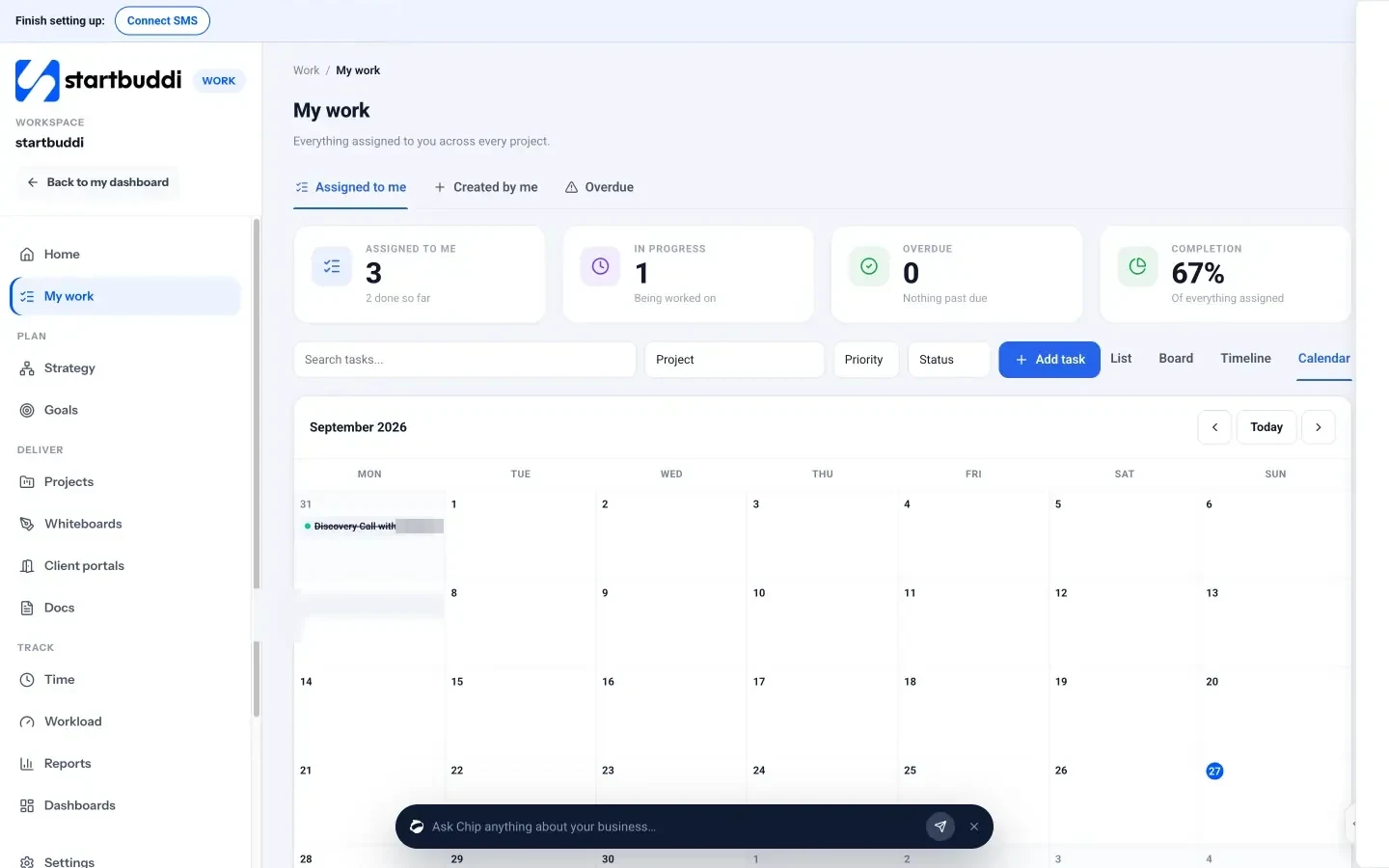
In startbuddi, Work, then My work, has a Calendar view that shows your tasks on a month grid by due date. It is a quick way to see whether one week is overloaded while the next is empty, so you can spread work out before it becomes a problem. Use Today to jump back to the current date and the arrows to move between months.
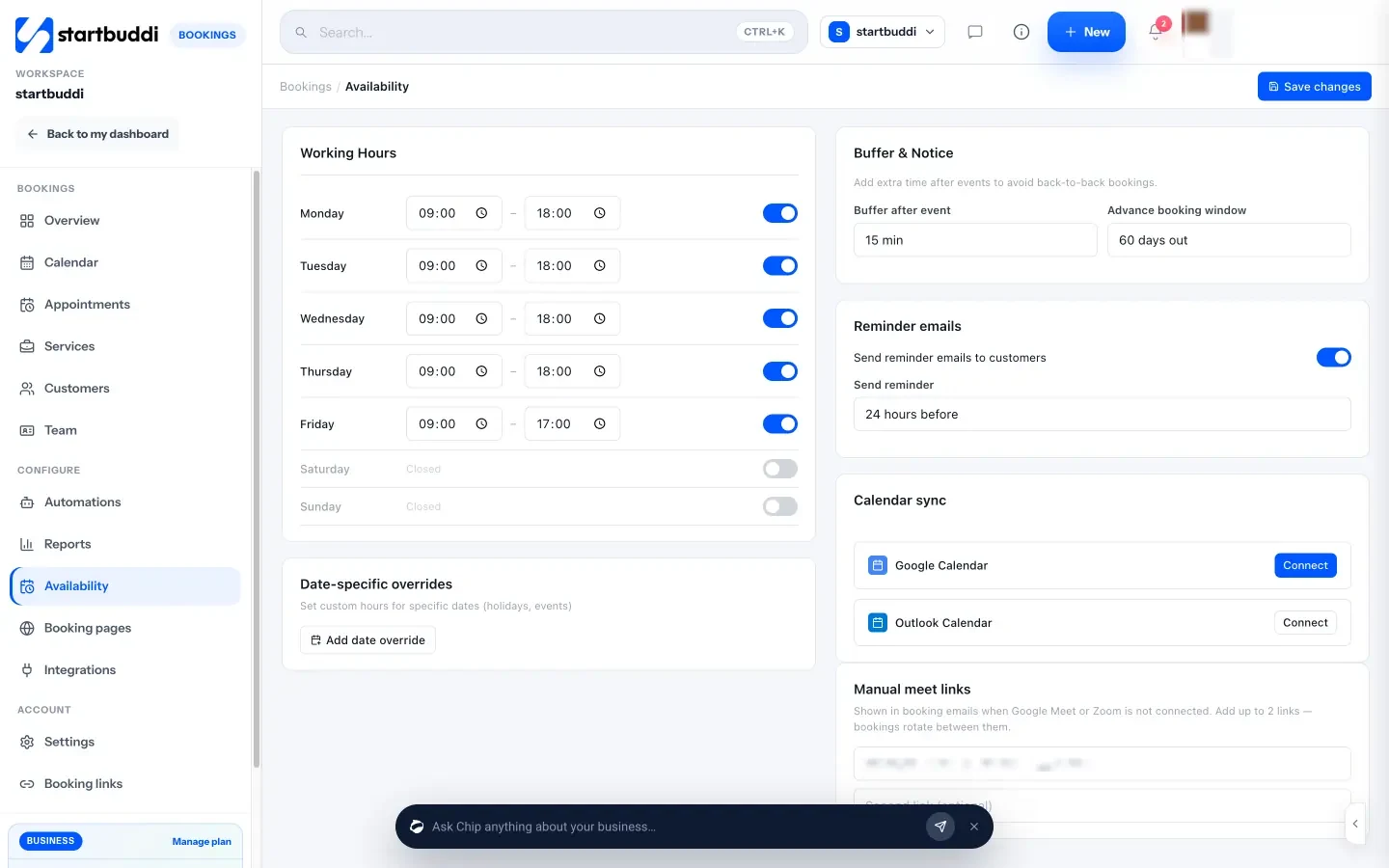
For customer meetings, Bookings lets people book themselves into times you choose instead of trading messages. Under Availability you set your working hours for each day, a buffer after each event (so calls are not back to back) and how far ahead people can book. Block time on the calendar takes holidays out of booking. Reminder emails can go out automatically before each booking. Protecting your focus blocks is then a matter of leaving those hours out of your availability.
For conversations with your team, startbuddi Chat keeps messages next to your projects, and each project has its own room. Agreeing that non-urgent questions go in the project room, rather than direct calls, makes it easier to batch your replies. Your task for this chapter: do your first 30-minute weekly plan, block time for your three priorities and set two fixed times a day for messages.
Time management apps for business owners and the best time tracking app for a small business
The last piece of time management is building systems so that you are not relying on willpower every day. The right tools help: a time tracking app that shows where the hours go, a task app that keeps promises from slipping, and automations that handle repeat work without you. The wrong tools make things worse, adding more logins, more notifications and more places to check. This chapter helps you choose time management apps for business owners, including the best time tracking app for your small business, and shows how to put a simple system in place and keep it working.
Time management apps for business owners: the four types
Most apps sold as "time management" fall into four groups. You probably need something from each, but not four separate products.
| Type | What it does | You need it if |
|---|---|---|
| Task and to-do apps | One list of everything you have promised to do, with dates and priorities | You forget things or keep tasks in your head, email and chat |
| Calendar and scheduling | Time blocks, meetings and customer bookings | You lose time arranging meetings or your days have no structure |
| Time tracking | Records how long work takes, often billable versus not | You bill by the hour, quote fixed prices or want to know where time goes |
| Automation | Handles repeat steps when something happens | You send the same confirmations, reminders or follow-ups again and again |
How to choose the best time tracking app for your small business
Time tracking is where many owners start, because it answers the question "where did my week go?" with data. Use these criteria to compare options.
- Easy to start and stop. If tracking takes more than a click or two, nobody will do it consistently. A one-click timer and a quick manual entry for time you forgot are essential.
- Linked to real work. Time logged against a task or project is far more useful than time logged against a vague label. It tells you which clients and projects are profitable.
- Billable and non-billable. Even if you do not bill hourly, marking which time a client pays for shows your effective hourly rate on fixed-price jobs.
- Weekly view. A simple week grid by task and day makes the weekly review from Chapter 3 quicker.
- Team view (if you have a team). Managers need to see hours across people without chasing spreadsheets.
- Connected to invoicing and budgets. If your hours feed into what you charge, check how the time gets from the tracker onto an invoice or a budget report.
- Fair pricing as you grow. Many tools charge per person. Work out the cost for your team size, not just for you.
For comparisons of specific products, see our researched list of the best timesheet software . If you only need a simple record for now, a free timesheet template is a fine place to start.
Automate the repeat work
Automation is where the biggest time savings usually hide. Anything that happens the same way every time, triggered by a clear event, is a candidate. Look back at the "running" and "reacting" buckets from your time audit and ask which tasks follow a pattern. Common examples in a small business:
- When someone books, send a confirmation and a reminder the day before.
- When a form is submitted, add the person to your contacts and send a welcome email.
- When an invoice is overdue, send a polite reminder.
- When a new client signs, create their onboarding tasks.
- When a booking is cancelled, send a message inviting them to rebook.
Start with one automation that saves the most time, check it works for a couple of weeks, then add the next. For more ideas, read business workflow automation examples or plan them with your team using the ideas in our guide to standard operating procedures.
Use templates to stop starting from scratch
A lot of owner time goes on recreating things that already exist: the same proposal, the same onboarding email, the same project plan. Templates turn those into a few minutes of editing. Build a small library of the documents and messages you send most often, and keep it where you will find it. Good first templates are a proposal, a welcome email for new clients, a project plan for your main service, a weekly status update and replies to your five most common customer questions.
Where AI assistants help, and where they do not
AI assistants can save real time on first drafts: a reply to a tricky email, a summary of a long thread, a list of tasks from meeting notes, an outline for a proposal. They are less useful for decisions that depend on judgement, relationships or facts they cannot see. A good rule is to use AI for the blank page and your own judgement for the final version. Always read before you send.
Fewer tools, less switching
Every extra app is another login, another set of notifications and another place information can hide. When tasks live in one tool, time in another, bookings in a third and client messages in a fourth, you spend time moving information between them and checking each one. Before adding a new tool, ask whether an existing one already does the job well enough. If you are running a stack of separate apps, it can be worth comparing the total cost and the time spent switching with an all-in-one option, as we explore in all-in-one workspace vs 5 separate tools.
Keep the system working: the monthly review
Systems drift. Once a month, spend 30 minutes checking yours.
- Look at your time data. How did the split between earning, growing, running, reacting and leaking change?
- Check your priorities. How many weekly priorities did you finish? What kept getting pushed?
- Review automations. Are they still sending the right messages at the right times?
- Prune tools and subscriptions. Cancel anything you have not opened this month.
- Pick one improvement for next month.
Worked example: the value of the system
Suppose your audit found 12 hours a week of running and reacting work you could cut or hand off, and after three months of changes you have reclaimed 6 of them. At a target value of $65 an hour, that is $390 a week, or roughly $17,900 over 46 working weeks. Even if you spend some of it resting rather than earning, the business is paying for your tools many times over. Whatever your currency, the calculation is the same: hours saved multiplied by the value of your hour.
Introducing time tracking to a team without micromanaging
Time tracking can feel like surveillance if it is introduced badly. Explain the purpose first: to price work properly, to spot overload and to see which clients are profitable, not to check whether people are working hard enough. Share the results with the team, including your own hours. Track against projects and tasks rather than minute-by-minute activity, and never use the data to punish someone for a slow week without talking to them first. When people see that tracking leads to fairer workloads and better-priced work, they are much more willing to do it.
Manage time on the move
Many owners spend part of the day away from a desk: on site, at a client, in a shop or travelling. Check that your task list, calendar and timer work well on a phone, so you can add a task the moment a customer mentions it, log the hour you just spent and see what is next. The best system is the one you can reach from wherever you are when the thought arrives.
Bringing your team along
If you work with others, your time management depends partly on theirs. The number of questions you get, the way meetings are run and how work is handed over all shape your week. A few team habits make a big difference:
- Agree where work lives. Tasks in one shared tool, conversations in project rooms, files linked to the work they belong to.
- Agree response times. Not every message needs an instant answer. Decide together what counts as urgent.
- Protect shared focus time. Some teams keep one or two mornings a week free of internal meetings.
- Write down how things are done. Every question answered in a written procedure is a question you will not be asked again.
- Review workload. If one person is always overloaded, the problem is planning, not effort.
Your time management checklist
To pull the whole guide together, here is a checklist you can come back to.
- I have tracked one normal week and know my split of earning, growing, running, reacting and leaking work.
- I know what an hour of my time is worth.
- I plan every week in 30 minutes and choose three priorities.
- My priorities have blocks in my calendar.
- I check messages at set times and use saved replies.
- Customers can book meetings into times I choose.
- My most common repeat tasks are automated or delegated.
- I review my time and my tools once a month.
Keep your data safe as you add tools
Every tool you add holds some of your business data: customer names, times, rates, messages. Before you sign up, check that you can export your data, that you can remove people's access when they leave, and that each person has their own login rather than a shared password. It takes a few minutes and saves real trouble later, especially once staff or freelancers are involved.
Tool mistakes to avoid
- Collecting apps. Productivity software is not productivity. Choose the fewest tools that cover your four jobs.
- Tracking without reviewing. Data you never look at is wasted effort.
- Automating before understanding. Get the process right by hand first.
- Letting tools set the rules. Decide your working hours, response times and priorities, then configure tools to match.
Time tracking, workload and automation in startbuddi
In startbuddi, the four jobs sit in one place. Tasks and projects live in Work. The Time page gives you a one-click timer on any task, manual time entries with a billable tick box, and weekly totals for total, billable time and billable value. Managers, admins and owners also get a Team time view. Each project's Budget tab turns logged time into time logged, spent so far and cost to complete. Read more on the time tracking page.
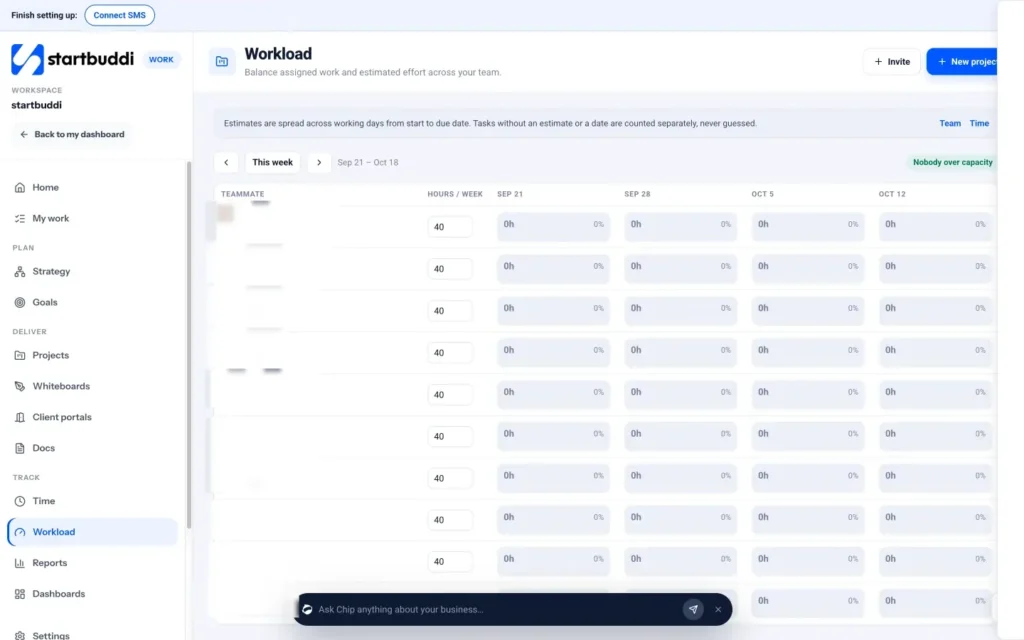
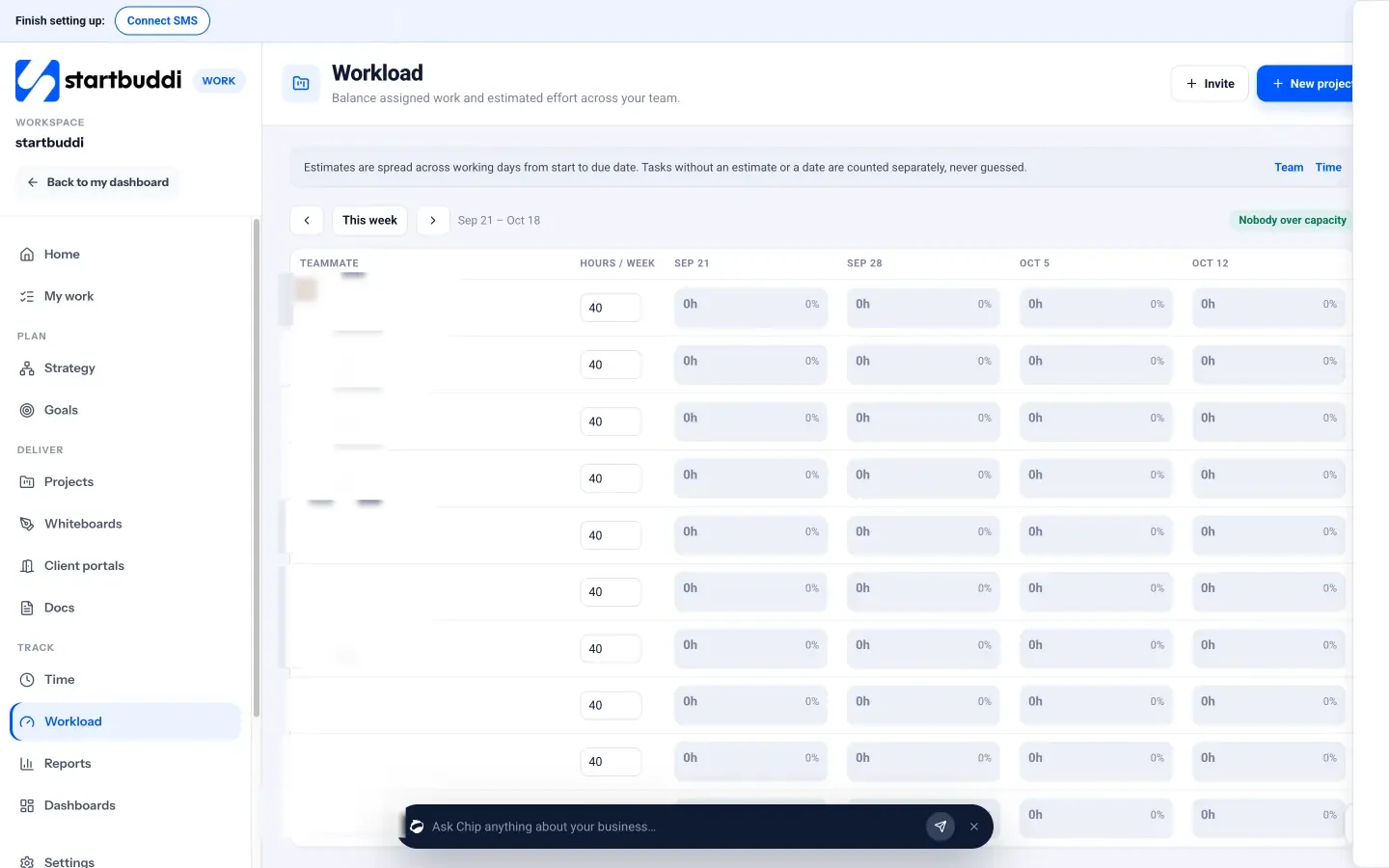
Once you have a team, Workload shows each teammate's hours per week, worked out from task estimates spread across the working days between start and due date, with a banner that says "Nobody over capacity" when all is well. If someone is overloaded, you can reassign a task from the grid.
Automations handle the repeat work: booking reminders, form follow-ups, invoice reminders and more run on one engine. You can start from a template (such as a booking reminder flow or an overdue invoice reminder), build from scratch by choosing what starts it and what happens next, or tell Chip, the built-in AI assistant, what you want in plain words and let it plan the steps and write the messages for you to review. Steps can send emails and messages and create tasks. Automations are included on the Starter plan and above.
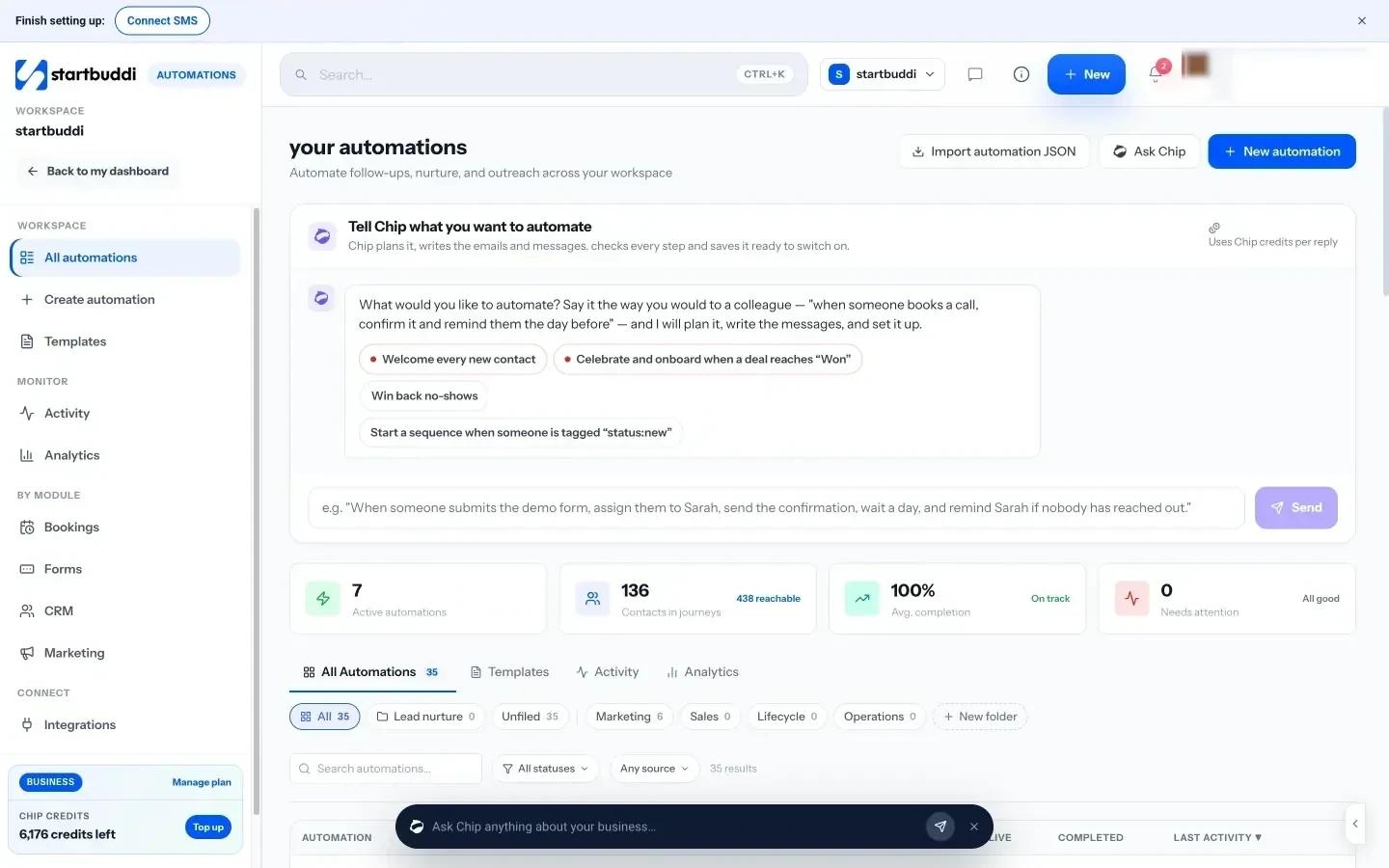
Chip is available from the panel on every screen, so you can ask for a draft or a summary without switching apps. Chip uses credits, and every plan includes a monthly allowance.
Your next step
Start with Chapter 1: track one normal week. You can do it with a notebook, or open startbuddi Work on the Free plan and use the timer. Once you know where your time goes, choose your three priorities for next week and one task to automate. Every paid plan has a 30-day trial, and plans and pricing shows what each includes.
Tiwalade Joanna Okedara-Kalu is the founder, CEO and CTO of startbuddi, the business system that brings clients, bookings, invoices, projects, marketing and the Chip AI assistant into one place. Tiwalade builds software around how service businesses really work day to day, and writes about client management, getting paid on time and why small businesses outgrow the tools they start with.
Founded startbuddi and leads its product and engineering