How startbuddi replaces your CRM, PM, email, invoicing and booking tools
A tool-by-tool look at how one all-in-one business system replaces a CRM, project app, email tool, invoicing and bookings, what it does not replace, and how to switch.


Photo: Patrick Tomasso / Unsplash
- startbuddi covers the jobs of a CRM, a project app, an email tool, invoicing and a booking tool on one customer record, so handoffs stop needing you. It is not accounting, payroll or a POS, so keep those if you need them, and switch one job a week.
startbuddi replaces five separate subscriptions (a CRM, a project management app, an email marketing tool, invoicing software and a booking tool) with one piece of all-in-one business software where the same customer record runs through every step. A form fill becomes a contact, the contact becomes a deal, the deal becomes a booking and a project, and the project ends in an invoice your client pays online.
That is the short answer. The honest answer has two more parts: what you gain by connecting those jobs, and what startbuddi does not replace, so you can decide whether it fits your business. This page goes tool by tool, then covers the handoffs, the gaps, and a four-week plan for switching without losing anything.
Why five separate tools cost more than their subscriptions
Most small businesses do not choose a tool stack. It grows. A booking link here, a free CRM there, an invoicing app the accountant recommended, an email tool from a course. Each one is fine on its own. The cost shows up in the gaps between them.
- Switching time. A Harvard Business Review study of 137 people at three large companies found they toggled between apps and websites nearly 1,200 times a day, losing just under four hours a week to getting reoriented.
- Work about work. Asana’s Anatomy of Work research reports that people spend 60% of their time on coordination, such as chasing updates and searching for information, and that the average employee uses 10 apps a day.
- Copying data by hand. The client’s email lives in the CRM, the booking tool and the invoicing app, spelled three different ways. When one changes, two go out of date.
- Nobody sees the whole customer. Your CRM does not know the invoice is overdue. Your invoicing app does not know the client booked another session yesterday.
Those studies looked at larger companies, but a founder or a three-person team feels the same thing more sharply, because there is nobody else to do the copying. For a cost comparison in money rather than time, see all-in-one workspace vs 5 separate tools.
Tool by tool: what startbuddi replaces
Here is each category, what a dedicated tool usually does, and what the startbuddi equivalent is. The names in bold are the names you will see in the app.
Your CRM becomes Customers
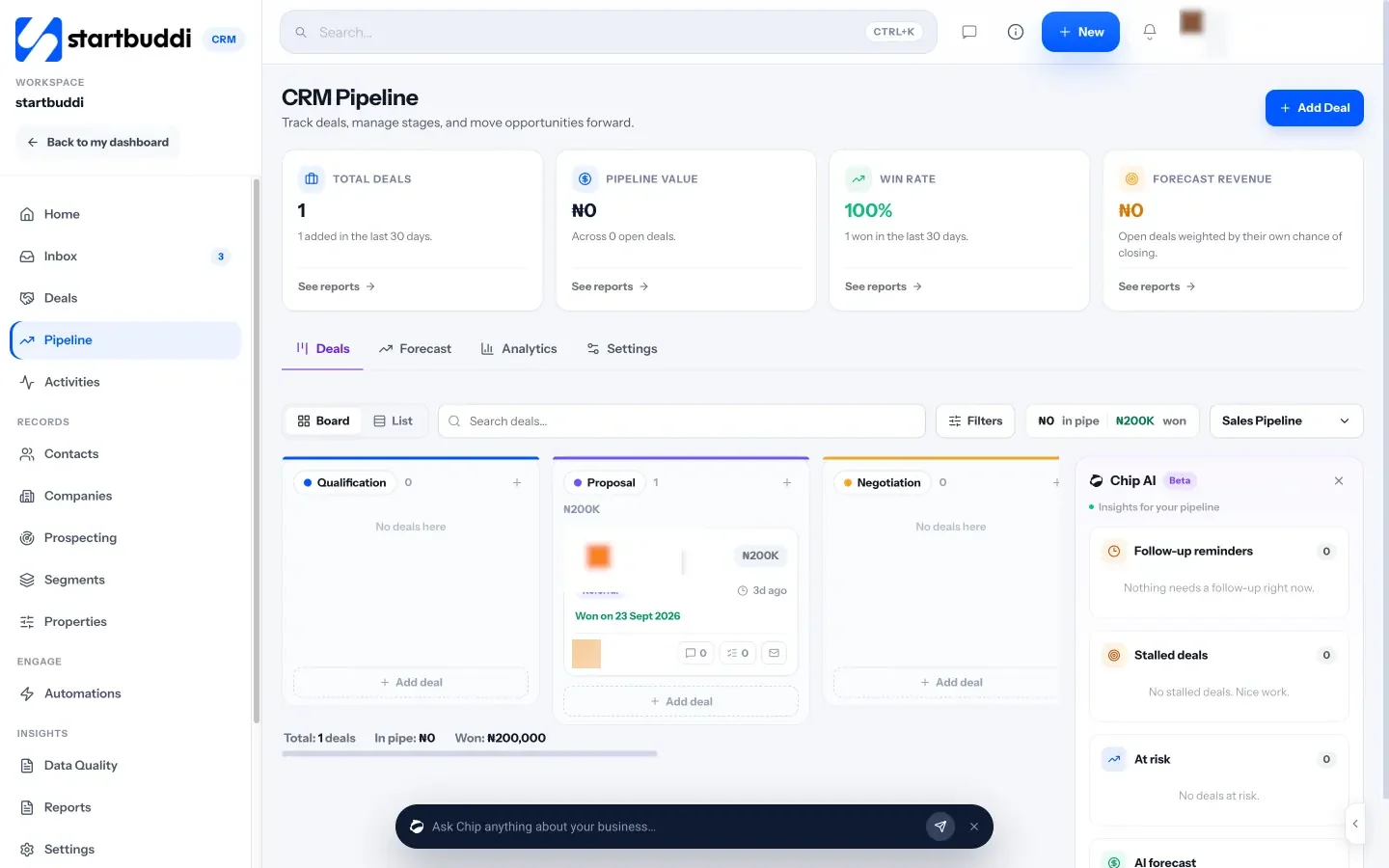
A CRM keeps your contacts, conversations and deals. In startbuddi that is Customers: contacts and companies, a sales pipeline with deals you drag between stages, activities, segments and a shared inbox for email, SMS and WhatsApp conversations. Contacts arrive from forms, bookings, website chat and imports, so the list builds itself as you work.
Your project management app becomes Work
A project tool holds projects, tasks and deadlines. Work covers projects, your own task list, goals, time tracking, workload and client portals. Because projects sit next to your contacts and money, you can see which client a project belongs to and what time on it is worth.
Your email tool becomes Email Marketing and Automations
An email marketing tool sends campaigns and sequences. In startbuddi, campaigns live in Email Marketing (pick an audience, write, review, send) and sequences live in Automations, which can start when someone fills in a form, books, pays or clicks. Your audience is your contact list, so there is no separate subscriber list to keep in sync.
Your invoicing software becomes Money Manager
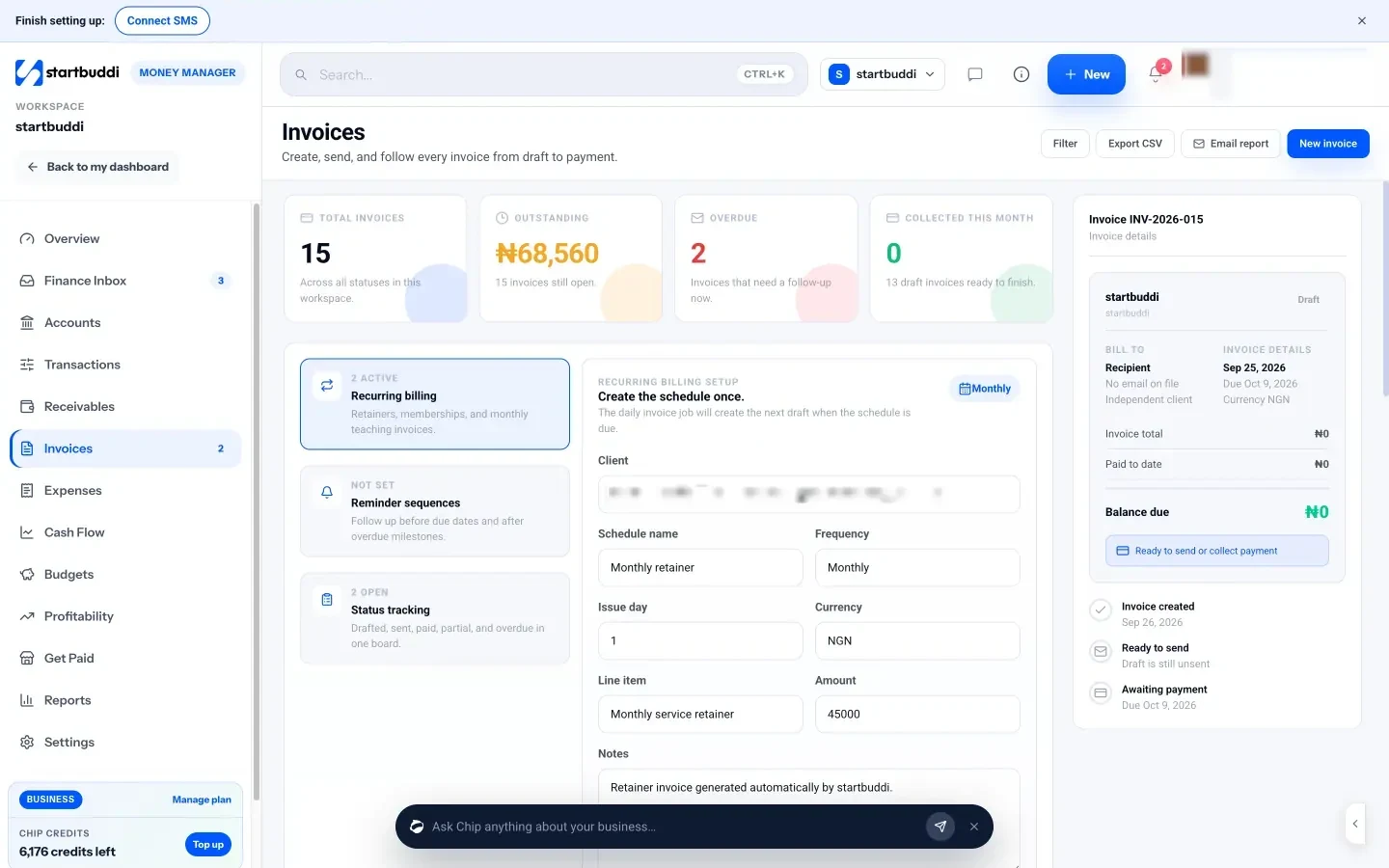
Invoicing software creates bills and records payments. Money Manager lets you create an invoice for a contact, let the client pay online by card or bank through Paystack or Stripe, record transfers that arrive outside the app, and see who owes you in Receivables. Expenses, estimates, payment links and cash flow sit in the same module.
Your booking tool becomes Bookings
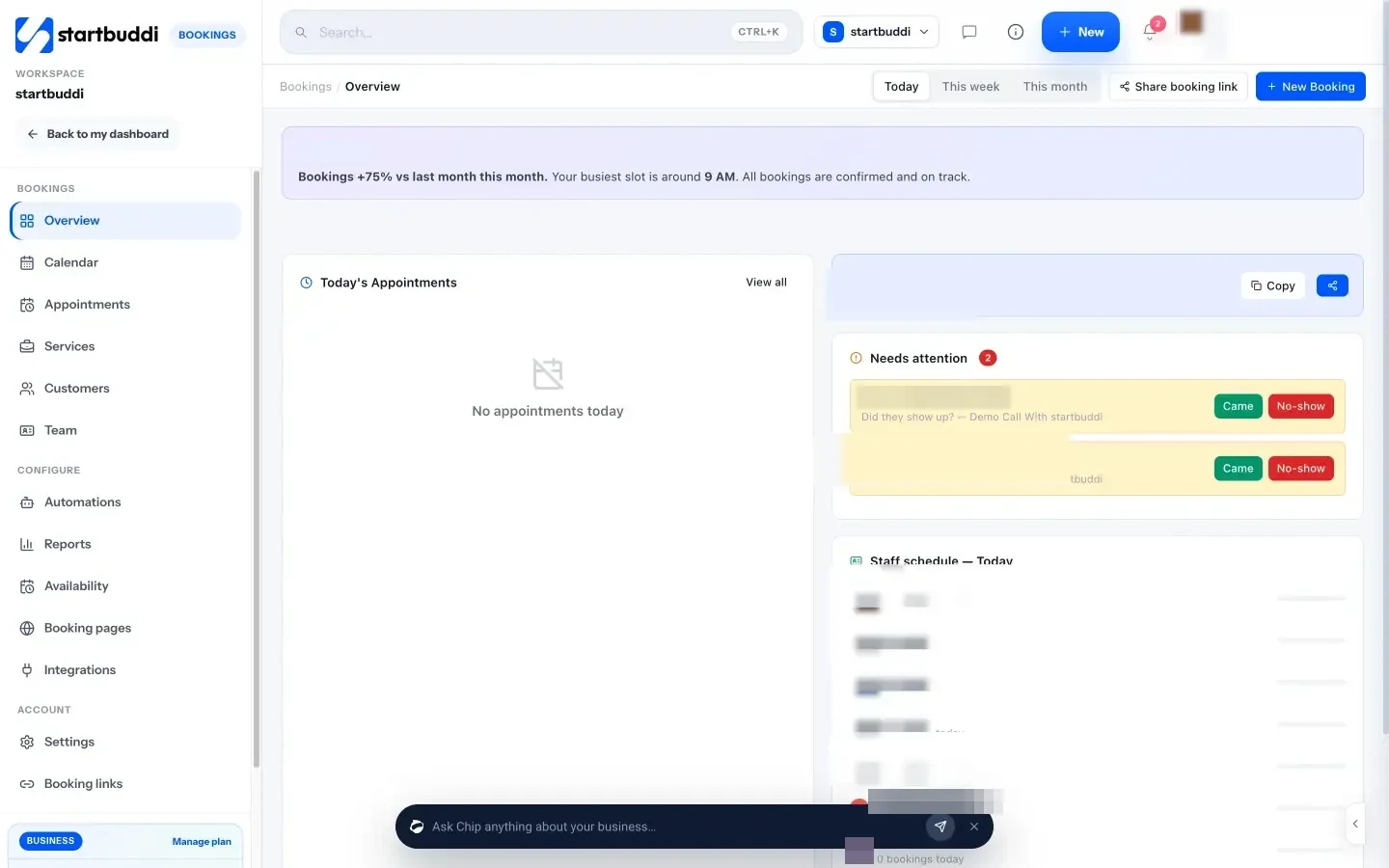
A booking tool gives clients a link to pick a time. Bookings gives you services, availability, a booking page, deposits or full payment at booking, reminder emails and no-show follow-ups. Every booking creates or updates the contact in Customers.
Things you may not have had at all
Consolidating often fills gaps you were living with. The same workspace includes Publish for landing pages, a link in bio page and a simple online store, Documents for proposals and notes, Chat for internal team messages, and People for team records, leave and onboarding. You do not have to use them, but they are there when the business needs them, already connected to the same contacts.
What changes when the tools are connected
Replacing five logins with one is nice. The real difference is that the handoffs between jobs stop needing you. Follow one client through a typical service business:
- They fill in the enquiry form on your landing page. They become a contact, with the page they came from saved.
- An automation sends a thank-you email and creates a task for you to call them.
- You add a deal to the pipeline and send them your booking link.
- They book a paid consultation and pay the deposit. The booking, the payment and the contact are linked.
- After the session you generate an invoice from the booking and start a project for the work.
- When the invoice is paid, the payment shows on the contact’s record, and Chip can tell you which clients are waiting on you.
In a five-tool setup, steps 1 to 6 involve at least four exports, copies or connectors. Here they happen on one record. Chip, the AI assistant built into every screen, can answer questions across all of it, such as “who have I not followed up with in 14 days?” or “which invoices should I chase first?”.
Chip runs on monthly credits: 50 on the Free plan, 500 on Starter, 2,500 on Growth and 8,000 on Scale. Simple questions use a few credits, while building something bigger, such as a landing page, uses more, and Chip shows the price before it spends anything. When Chip creates or changes something for you, it shows you a preview and waits for you to confirm.
What you can see in one place that you could not see before
Separate tools each hold part of the picture. When the data sits together, some useful questions become easy to answer:
- What is this client worth? Each invoice shows a customer snapshot: total invoiced, total paid, what is outstanding and how many days they usually take to pay.
- Which marketing brought in money? A marketing campaign can group its emails, pages and forms, and when a contact it reached pays an invoice, the revenue counts towards that campaign.
- Who is waiting on me? The Customers home page lists unread messages, stalled deals and money still owed, with a plain-language briefing from Chip.
- Where does the week go? Time logged against projects in Work shows which clients take the most hours, next to what they pay you.
None of this needs a spreadsheet that someone rebuilds every Friday. It is a side effect of doing the work in one place.
What startbuddi does not replace
Being clear about this saves you a bad switch. startbuddi is a business system for clients, marketing, bookings, invoices and work. It is not:
| Category | What startbuddi does instead | What to keep |
|---|---|---|
| Accounting and bookkeeping | Tracks invoices, payments, expenses and profit and loss views | Your accountant’s software for ledgers, reconciliation and tax filing |
| Payroll | Keeps team records, leave and time | A payroll provider |
| Point of sale | Sells online through payment links, a store and a simple sell screen | A POS system if you run a till or card terminal in a shop |
| Two-way calendar sync | Pushes bookings into Google Calendar (and Outlook where available) | Blocking time in startbuddi for personal events, because it does not read busy times from your calendar |
| Field service dispatch | Bookings, projects and tasks | A dispatch tool if you need GPS tracking or route planning |
There are also connectors if you keep a specialist tool: an automation can add each form response to Google Sheets, send it to Zapier or call a webhook, and bookings can send events to Zapier.
When you should keep your separate tools
An all-in-one system is not always the right call. Keep what you have if:
- A specialist tool is central to your service. An agency that sells advanced email programmes may want a dedicated email platform’s depth. That is a fair trade.
- Your team already lives in one tool and likes it. Moving everyone for small gains causes more disruption than it saves.
- You need something on the list above, such as payroll or a shop till, and would still need it anyway.
Many businesses end up in the middle: startbuddi for clients, bookings, invoices and marketing, plus an accounting package their accountant uses. That is still three or four fewer logins. If you want to compare specific tools first, our guide to all-in-one business software sets out the options and how to compare them.
Questions to ask before you consolidate
Before you switch anything, answer these honestly. They take ten minutes and tell you whether consolidating is worth it for you.
- How many tools touch one customer? Count them from first enquiry to paid invoice. If it is one or two, the gain is small. If it is four or five, it is large.
- Where do things fall through the cracks? Missed follow-ups, invoices sent late and double-booked slots usually happen at the handoffs between tools.
- Which tool would you miss? Name the one feature you use every day in each tool. Check that it exists in startbuddi before you plan to cancel.
- Who else uses these tools? An accountant, a virtual assistant or a contractor may need access. Plan their seat or their export.
- What must you keep for records? Old invoices and tax records may need to stay where they are, or be exported and stored, depending on the rules where you trade.
If the answers point to fewer tools, the plan below keeps the move low risk.
How to switch without breaking anything: a four-week plan
Do not move everything on a Monday. Move one job at a time, run the old tool alongside for a week, then cancel it.
| Week | Move | Check before cancelling the old tool |
|---|---|---|
| 1 | Contacts. Export from your CRM or spreadsheet and import the CSV into Customers. Set up your pipeline stages. | Counts match. Duplicates merged. Owners and tags look right. |
| 2 | Bookings. Recreate your services, hours and questions. Replace the old link on your website, email signature and social profiles. | A test booking arrives, the confirmation email sends and the event lands in your calendar. |
| 3 | Invoices. Connect Paystack or Stripe, set your invoice details, and send new invoices from startbuddi. Leave old unpaid invoices where they are until they are paid. | A test payment reaches your account and marks the invoice paid. |
| 4 | Email and projects. Verify your sending domain, rebuild your main follow-up automation and move live projects into Work. | A test email reaches an inbox, not spam. Your team can find their tasks. |
Before you cancel any tool, export your data from it and keep a copy. Our help guide to importing contacts covers week one in detail.
Plans: what the all-in-one business software costs
You can start free and keep the free plan as long as you like. Prices below are from our pricing page (September 2026).
| Plan | Good for |
|---|---|
| Free | Trying it out: 1 seat, 250 contacts, 1 form, 5 invoices a month, one live booking service and projects. Marketing is not included. |
| Starter | A solo business or a pair: 2 seats, 2,500 contacts, unlimited invoices, email, SMS and WhatsApp marketing, and 10 active automations. |
| Growth | A small team: 5 seats, 15,000 contacts, and Chip auto-replies in your inbox, WhatsApp and live chat. |
| Scale | A growing team: 15 seats and 75,000 contacts. |
Every paid plan has a 30-day trial, and paying yearly costs ten times the monthly price. Enterprise pricing is custom.
Your next step
Write down the tools you pay for today and what each one actually does for you. Then open a free account and try the first week of the plan above with your contacts. If it saves you time, keep going. If a tool you rely on has no equal here, keep it and connect it. Compare the plans when you are ready.
Sources
- Harvard Business Review: How much time and energy do we waste toggling between applications?
- Asana: How work about work gets in the way of real work
Frequently asked questions
Can I move my contacts from another CRM?
Yes. Export them as a CSV from your current CRM or spreadsheet and import the file into Customers, then check for duplicates before you cancel the old tool.
Does startbuddi replace my accounting software?
No. It handles invoices, payments, expenses and money reports, but not ledgers, bank reconciliation, payroll or tax filing. Keep your accountant's software for those.
Can I keep one tool I like and use startbuddi for the rest?
Yes. Many businesses keep a specialist tool and connect it, for example sending form responses to Google Sheets, Zapier or a webhook, or booking events to Zapier.
Is there a free plan?
Yes. The free plan includes 1 seat, 250 contacts, 1 form, 5 invoices a month, one live booking service and projects. Marketing features need Starter or above, and every paid plan has a 30-day trial.
Olabimpe Salami is the email and outreach specialist at startbuddi. Olabimpe writes about the messages that bring customers in and back: email, WhatsApp and SMS campaigns, follow-ups, and turning enquiries into paying clients.
Runs email and outreach at startbuddi