What is workflow automation?
Also called: Business process automation, workflow automation software, no-code automation, automated workflows
Workflow automation is using software to run the repeatable steps of a business process for you. A trigger starts it, such as a form being submitted, and the software carries out the next steps, like sending an email or creating a task, without anyone doing them by hand.
Workflow automation is using software to carry out the repeatable steps in a business process, so you don’t have to do them by hand. Something happens (a customer fills in a form, books a call or pays an invoice) and the software does what comes next: sends a reply, adds a tag, creates a task or tells the team.
IBM describes it as replacing manual tasks with software that runs all or part of a process. For a small business, the simplest way to think about it is a list of “when this happens, do that” rules that work while you sleep.
Why workflow automation matters for a small business
When you run a business on your own or with a small team, time is the thing you have least of. Most of the jobs that eat it are small and repetitive: replying to every new enquiry, reminding clients about appointments, chasing a payment, copying details from one app to another.
None of these jobs is hard. The problem is that they are easy to forget. A lead who waits two days for a reply often goes to someone else. Workflow automation makes sure the same good response happens every time, not just on the days you remember.
- Speed: new leads get an answer in seconds, not hours.
- Consistency: every client gets the same welcome, the same reminders and the same follow-up.
- Fewer mistakes: details are copied by software, not retyped.
- Headroom: you can take on more customers without adding hours to your week.
How workflow automation works
Every automated workflow has the same basic shape. It starts with a trigger, may check a condition, then runs one or more actions, sometimes with a wait in between.
Here is an example for a cleaning company that takes quote requests through a website form:
- Trigger: someone submits the “Get a quote” form.
- Action: save them as a contact and tag them “quote request”.
- Action: send a thank-you email that says when to expect the quote.
- Action: create a task for the owner: “Send quote to Ada”.
- Wait: three days.
- Condition: has Ada booked a clean yet? If not, send a friendly check-in message.
Written down, that is six steps. Done by hand for every enquiry, it is a lot of small interruptions. Automated, it happens on its own and the owner only steps in to write the quote.
The key parts of an automated workflow
| Part | What it does | Example |
|---|---|---|
| Trigger | The event that starts the workflow | New booking, form submitted, invoice paid |
| Condition | A check that decides which path to take | Is the contact tagged “VIP”? |
| Action | The work the software does | Send email, add tag, create task |
| Delay | A pause before the next step | Wait two days |
| Exit | A rule that ends the workflow early | Stop if the customer replies |
Common types of workflow automation
- Sales follow-up: reply to new leads and nudge them towards a call.
- Customer onboarding: send welcome messages and set up tasks for a new client.
- Appointment reminders: confirm bookings and remind people before they are due.
- Marketing journeys: a series of emails or messages over days or weeks, often called marketing automation.
- Internal handoffs: notify a teammate or create a project when a deal is won.
Best practices and common mistakes
Start with one process you repeat every week. The best first workflow is usually the reply to a new enquiry. It is simple, it runs often and it has a clear payoff.
Write it on paper first. If you can’t describe the steps in plain words, the software can’t follow them either.
Test with your own details. Send yourself through the workflow before real customers see it. Check the wording, the timing and the links.
Don’t automate the personal moments. A reminder can be automatic. An apology for a mistake should come from a person.
Respect consent. Only send marketing messages to people who agreed to hear from you, and make it easy to opt out.
A common mistake is building a huge workflow on day one. Start small, watch how it performs, then add steps.
Related terms
An automation workflow is a single set of automated steps, while workflow automation is the wider practice. CRM automation applies it to your customer records and deals. Email automation focuses on messages sent in response to what people do.
Workflow automation in startbuddi
In startbuddi, Automations is one engine that works across the whole business. Booking reminders, form follow-ups, CRM sequences and marketing journeys all live in the same hub, so you don’t manage four separate tools.
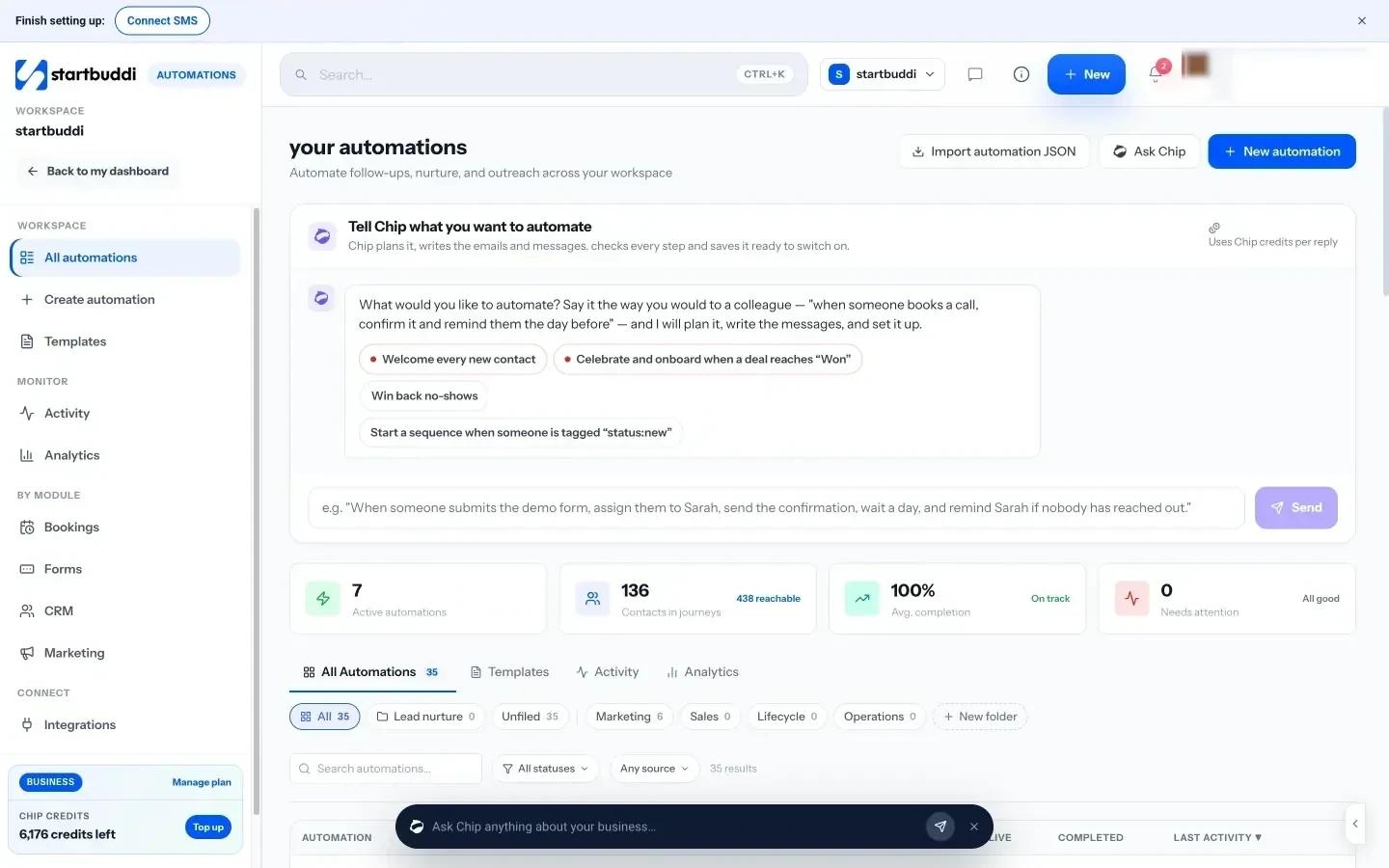
You can start an automation three ways: pick a template (such as a booking reminder or a lead welcome), start from scratch by choosing what starts it, or tell Chip what you want in plain words. Chip plans the steps and writes the messages, then saves the automation as a draft so you review it before switching it on.
Triggers include forms, new contacts, tags, deal and pipeline changes, bookings, payments and email activity. Steps include email, SMS and WhatsApp messages, waits, conditions, tags, tasks and team notifications. Before you activate, a review shows how many contacts can be reached and how many are held back, with the reasons (such as missing consent).
Automations is available on the Starter plan and above. Each plan includes a monthly number of automation runs, and every paid plan starts with a 30-day trial. For a practical walkthrough, read how to set up CRM automation workflows.
Your next step: write down the one task you repeat most often, then see how startbuddi Automations could run it for you.
Related terms
FAQ
Is workflow automation only for big companies?
No. Small businesses often benefit most, because one person is usually doing sales, service and admin at once. Even one automated reply to new enquiries can save hours a month.
Do I need to know how to code?
No. Most tools, including startbuddi, let you build workflows by picking a trigger and adding steps. In startbuddi you can also describe the workflow to Chip in plain words.
What is the difference between workflow automation and AI?
Workflow automation follows rules you set: when this happens, do that. AI can help write the messages or plan the steps, but the workflow itself still runs on clear rules you can check.
What should I automate first?
Start with the reply to a new enquiry or a booking reminder. Both happen often, are easy to describe and have a clear result you can measure.
Tiwalade Joanna Okedara-Kalu is the founder, CEO and CTO of startbuddi, the business system that brings clients, bookings, invoices, projects, marketing and the Chip AI assistant into one place. Tiwalade builds software around how service businesses really work day to day, and writes about client management, getting paid on time and why small businesses outgrow the tools they start with.
Founded startbuddi and leads its product and engineering