What is AI sequencing?
Also called: AI-powered sequences, AI follow-up sequences, AI sales sequences, AI email sequencing
AI sequencing is using AI to plan, write and set up a series of follow-up messages and actions (emails, texts, WhatsApp) that run after a trigger, such as a new lead. You review the draft and switch it on.
AI sequencing means using artificial intelligence to plan, write and set up a sequence: a series of follow-up messages and actions that go out over days or weeks after something happens. A new lead fills in your form, and instead of you writing five emails and deciding when each one goes, an AI drafts the whole sequence, suggests the timing and builds the steps. You check it, edit it and switch it on.
A plain sequence is a fixed list you write by hand. AI sequencing speeds up the slow part, the thinking and writing, while you stay in charge of what actually gets sent.
Why AI sequencing matters for small businesses
Most small businesses know they should follow up. They just don’t. A lead asks for a quote, you reply once, life gets busy, and the lead goes cold. Writing a proper follow-up series takes an evening you don’t have, so it never happens.
AI sequencing removes that blank-page problem. You describe what you want in one sentence (“welcome new leads and get them to book a call”), and you get a first draft of every message and step in minutes. That turns follow-up from a project into a quick review, which is often the difference between having a sequence and not having one.
How AI sequencing works
The details vary by tool, but the flow is usually the same:
- You set the goal. For example: turn form sign-ups into booked consultations.
- You pick or describe the trigger. What starts the sequence: a form submission, a new contact, a booking, a missed payment.
- The AI plans the steps. It proposes messages, waits between them and simple checks, such as “if they already booked, stop”.
- The AI writes the messages. Emails, texts or WhatsApp messages in your tone, using details about your business.
- You review and switch it on. A good tool shows you everything before anything is sent.
Example: a fitness coach in Nairobi types “When someone downloads my free meal plan, send a welcome, share a client story two days later, then invite them to a free call.” The AI builds a three-step email sequence with waits, writes each email, and adds a check that stops the sequence once the person books. The coach tweaks two lines and activates it.
AI sequencing vs a traditional sequence
| Traditional sequence | AI sequencing | |
|---|---|---|
| Planning | You map every step | AI proposes the steps from your goal |
| Writing | You write every message | AI drafts, you edit |
| Time to launch | Hours or days | Often minutes, plus review |
| Control | Full | Full, if the tool makes you approve before sending |
Some tools also claim the AI changes timing or content per person as it goes. Treat that claim carefully and check what the tool actually does. For most small businesses, the big win is the drafting and set-up, not self-adjusting magic.
Key parts of an AI-built sequence
- Trigger: the event that enrols someone.
- Messages: email, SMS or WhatsApp steps.
- Waits: the gaps between messages.
- Conditions: branches like “if they replied” or “if they clicked”.
- Exit rules: when to stop, such as after a booking or a purchase.
Common mistakes and best practices
- Sending AI drafts unread. AI can get a price, a date or a promise wrong. Read every message before you activate.
- No exit rule. Nothing annoys a new customer more than “still thinking about it?” after they paid. Always stop the sequence when the goal is reached.
- Too many messages. Three to five well-spaced touches usually beat ten.
- Vague prompts. Tell the AI who the audience is, what the offer is and what tone to use. Better input gives better drafts.
- Ignoring consent. Marketing messages need permission. Only enrol people who agreed to hear from you.
Related terms
An email drip sequence is a sequence that runs on email only. An automation workflow is the wider structure of trigger, steps and conditions that a sequence runs on. Lead nurturing is the goal many sequences serve: keeping interested people warm until they are ready to buy.
AI sequencing in startbuddi
In startbuddi, sequences live in Automations, one engine shared by Customers, Bookings, Forms and Marketing. When you create an automation you can choose Tell Chip what you want. You describe it in plain words, for example “When someone books a meeting, send them a confirmation and remind the owner”, and Chip plans it, writes the emails and messages, checks every step and saves it ready to switch on.
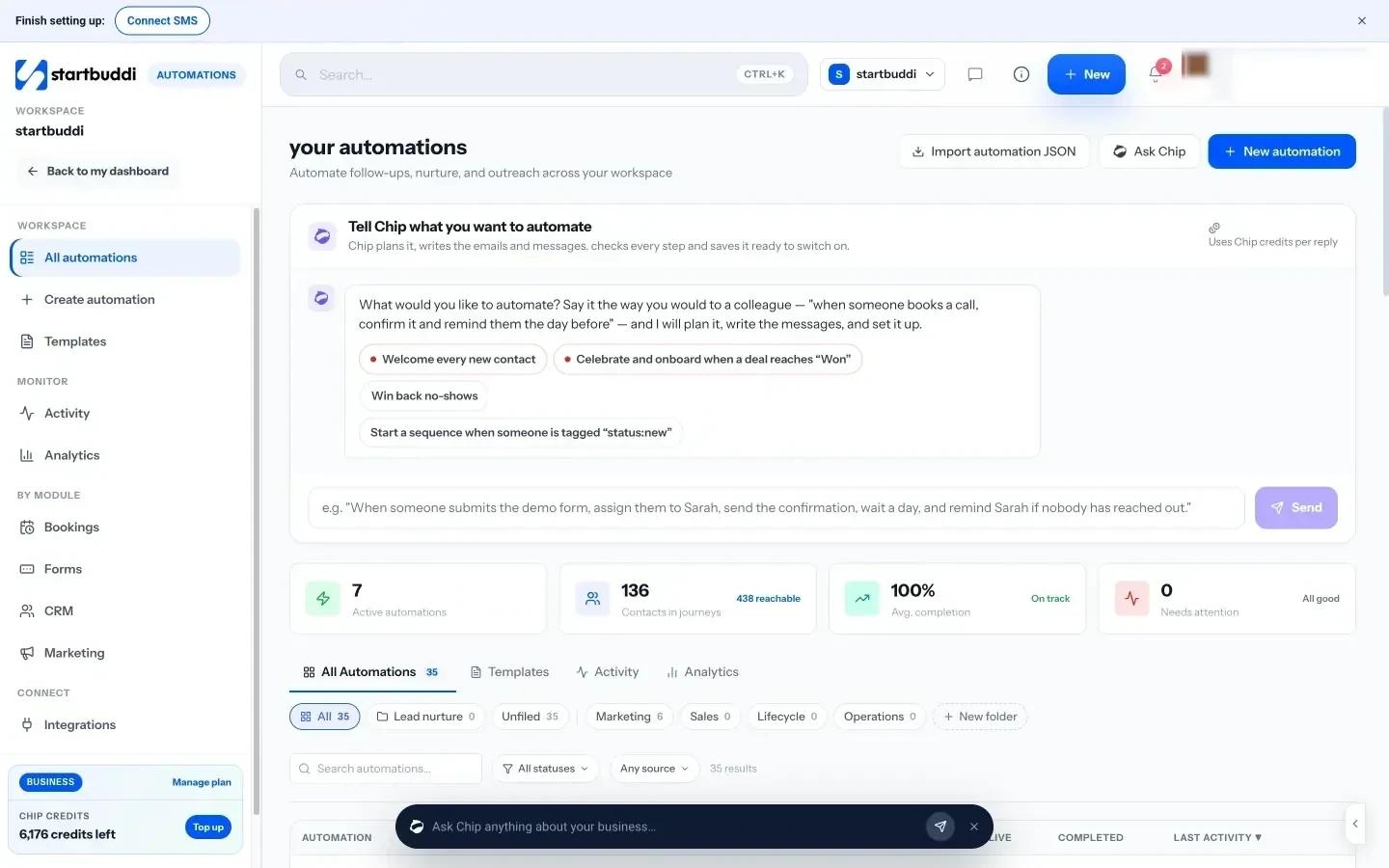
Chip always saves what it builds as an inactive draft, so nothing sends until you turn it on. Before activation, a review shows how many contacts are reachable and how many are suppressed. You can also test with a contact first. For individual leads, Nurture with Chip on a contact drafts a follow-up sequence you can save and reuse. Chip’s building work uses Chip credits, and Automations is available on the Starter plan and above. Read more on the Automations page and in our post on how AI sequencing works for businesses.
Next step
Pick one moment where leads go quiet, such as after a quote or a form, and write one sentence describing the follow-up you wish you sent. That sentence is your first AI sequence. When you are ready to build it, see what each plan includes on the pricing page.
Related terms
FAQ
Is AI sequencing the same as marketing automation?
It is one part of it. Marketing automation is the wider practice of sending messages automatically. AI sequencing is using AI to plan and write those sequences for you.
Will the AI send messages without asking me?
It depends on the tool. In startbuddi, Chip saves every automation it builds as an inactive draft, and you choose when to switch it on.
How many messages should an AI sequence have?
For most small businesses, three to five messages over one to three weeks is enough. Add an exit rule so it stops when the person buys or books.
Can AI sequences use WhatsApp and SMS as well as email?
Yes, if your tool supports those channels. In startbuddi, automations can include email, SMS and WhatsApp steps, with WhatsApp and SMS available from the Starter plan.
Tiwalade Joanna Okedara-Kalu is the founder, CEO and CTO of startbuddi, the business system that brings clients, bookings, invoices, projects, marketing and the Chip AI assistant into one place. Tiwalade builds software around how service businesses really work day to day, and writes about client management, getting paid on time and why small businesses outgrow the tools they start with.
Founded startbuddi and leads its product and engineering